Leaderboard




Popular Content
Showing content with the highest reputation on 01/01/25 in all areas
-
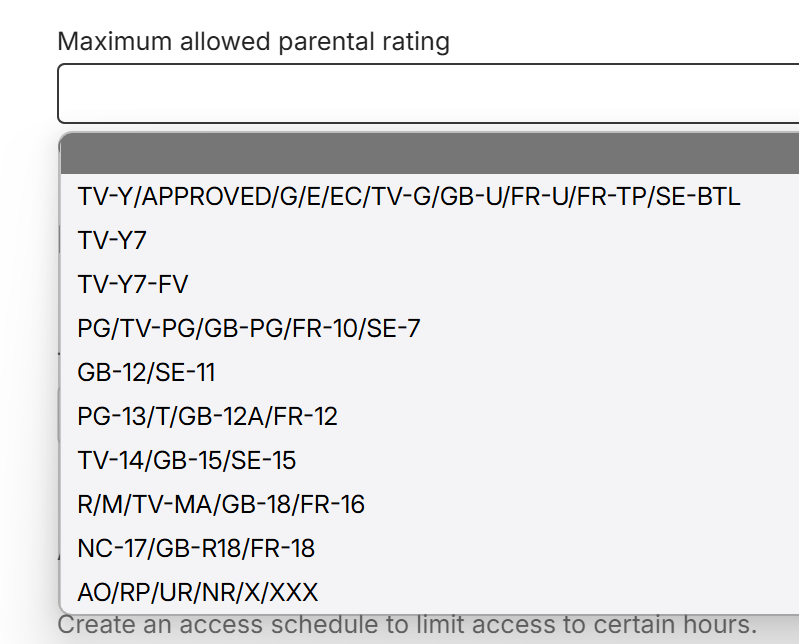
@guill69f FYI in 4.9.0.34 Emby Server beta, the libraries certifications are consolidated now in the drop-down. This is example of a server with US, UK, Sweden and French certifications configured for libraries
 2 points
 -
I've found that, while you can upload an image from a URL (as shown above), you don't get the "upload from a file" option if you already have an image for that item. To upload a file, you must first delete the existing image, and then the Delete option will become the "Upload New file" option (the icon is a plus symbol in a circle).2 points
-
Alles, Fine. Then propose an itemized estimate for hours and expense on coding, setting up and running a legal server at a host. If you can come up with a lower cost, that would be helpful.2 points
-
Hi, I would like to have an option to choose H265 instead of H264 in the Transcode option. It will be smaller for all bad bandwidth (2~5Mbit ADSL), but will have a great quality. Mobile phone can benefit of it greatly too with the 4G and the limitation of download.1 point
-
Hi, The current implementation of Emby search is very basic. Based on what I can tell, it only matches exact strings in the same exact order. Example: "Mission: Impossible" In this example the following queries will return a positive match Possible Impossible Mission Mission: Impossible And the following queries will not return anything at all (The worst offenders are highlighted) Mission Impossible Missoin: Imposible Imposible Impossible Mission Mission : Impossible Mission Impossible Another example would be "Mr. Robot" where if the dot is missing, nothing is returned or in general terms any variation of any string that is not an exact match will not return anything at all. Let's not even attempt to try a title like "Agents of S.H.I.E.L.D.". This makes the search difficult to use and at times even frustrating. As the examples above show, the major theme is special characters and punctuation and they can probably be bypassed by just ignoring them, which might or might not cause other problems in the process. This problem also affects titles that have letters with diacritical marks or glyphs such as "Amélie" and "Æon Flux", if you can't type them exactly, you can't find them. In my opinion a better attempt would be to use a difference string matching algorithm such as Levenshtein distance, you can then define an acceptable threshold and return the closest matches. I found a couple of C# projects that implement this and might be useful as a starting point. FuzzyWuzzy, a port of Python project in C#. https://github.com/BoomTownRoi/BoomTown.FuzzySharp FuzzyString. Has some additional string comparison algorithms too. https://github.com/kdjones/fuzzystring Thanks.1 point
-
Right so I got this app coco player and it says I can sign in. Or something and idk what to do?1 point
-
I would like to see a plug-in developed which allows for transcoding to be offset. My thoughts are for a transcoding server (high powered pc), running cut-down/transcoding only version of Emby. Then on my main Emby server a plug-in which offsets transcoding to the high powered pc (if available) Originally I had thought of this as being a high availability server https://emby.media/community/index.php?/topic/41443-emby-server-high-availability But thinking about this more, my requirement isn't for high availability but simply to offset the transcoding elsewhere.1 point
-
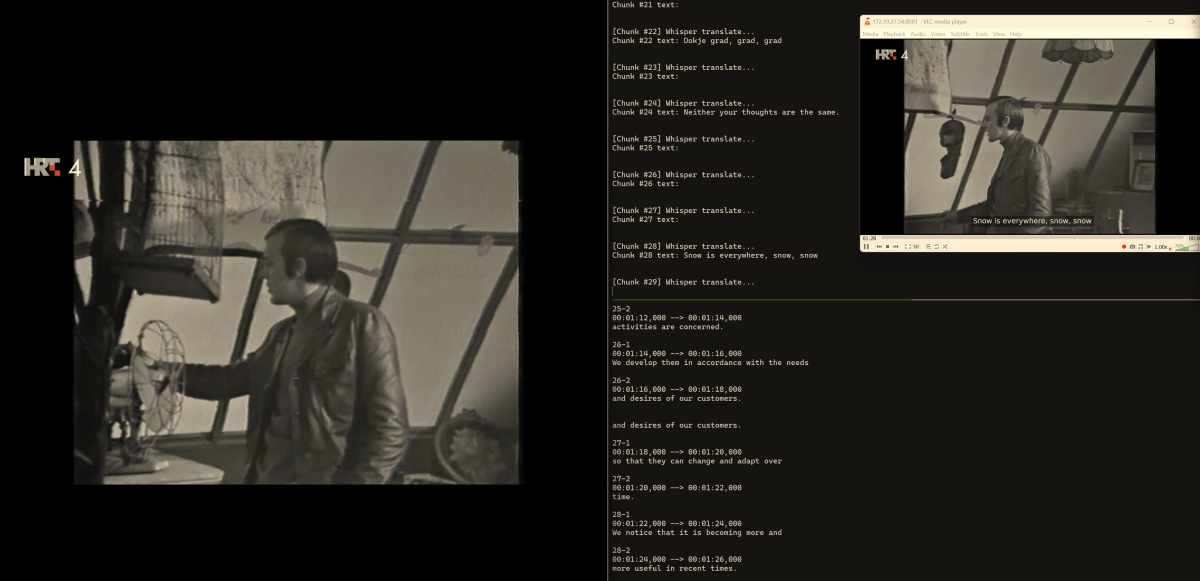
So I've spent a lot of the weekend using OpenAI's open source Whisper. This is a live transcription/translation tool. I was also watching some foreign language live TV and my friend couldn't understand, and I thought to myself, well why shouldn't there be live subtiltles/closed captioning. I whipped together a proof of concept python script that: 1) Grabs the video feed from Emby for restreaming and generates a URL like this 'http://ip/emby/Videos/video/stream?Static=True&StartTimeTicks=12279100000&api_key=api 2) feed that url into ffmpeg, which takes 5 second chunks of audio 3) Feeds them into whisper which spits out raw text for that 5 second chunk (translation usually taking .5-.8 seconds) 4) Feed that back into ffmpeg to overlay the translation as subtitles, achieving live transcription/translation of whatever is playing. I am using the "draw" feature to draw the subtitles on, as ffmpeg does not take a dynamically generated file as input for subtitles. I'm still working on the timing of how long to display the subtitles, but it works well! The proof of concept is I have to consume the feed from VLC. So, the LLM and performance are easily attainable. One could adjust the preceicsion of the translation using a smaller and faster LLM, however on my 3090 even the Large model is performant enough to get live transcription and translation. Haven't tested this on my 1070 yet. There's no reason this couldn't be used for just generating your own subtitles as you need on the fly. Now I've started brainstorming an actual plugin that achieves this. Before I delve into it I'm trying to forsee some of the issues. To keep the plugin self contained we'd need: 1) Whisper and a CUDA capable GPU available to Emby 2) The plugin would have to basically remux on the fly, which isn't that big of an issue for live TV, but quality may suffier on HDR / large files, haven't test it there yet. I'm not sure I have the knowledge to implement a full plugin. Any other considerations anyone can think of ?
 1 point
 -
Long Promised — Long Awaited — Finally Here! We are excited to announce the first release of our all-new range of Emby apps, starting today with Windows and Xbox. With a fully redeveloped native foundation, this update delivers improvements across the board: from remote control and gamepad support to background downloading (Windows), as well as refresh and HDR mode switching, and most importantly, enhanced video playback. The new app also comes with a name change from Emby Theater to simply Emby. The name is the only simplification though: On Windows it supersedes and replaces both current apps, "Emby Theater Desktop" and "Emby Theater" from the Windows store, combining the best of both in a single app. It provides enhanced video playback driven by MPV player under the hood, like and even better than "Emby Theater Desktop", and the Download features which were previously available in the Windows store app only. A primary design goal has been to ensure that users of either previous app encounter no drawbacks when moving to the new version. Video Playback (Windows) Video options in the previous ET Desktop app were not always straightforward. The new Emby app adopts a fundamentally different approach to video playback configuration, which accommodates to a range from least to most knowledgeable users by boiling quality options down to three simple and easy understandable presets alongside a custom mode which allows to control all the underlying options in detail. The main presets are: High Quality A no-compromise choice for the best possible quality, regardless of resource usage. Recommended for powerful PCs with high-end GPUs. Video decoding and filtering occur in software for optimal quality, and output scaling uses custom GPU shaders. Balanced The default and recommended choice for most users. Similar to ET Desktop and a standalone MPV player with default settings. Efficiency Mode MPV player is generally focused on quality rather than power saving, and even with the Balanced preset, you can get short of energy rather quickly when running on batteries. This mode is not built-in or available in the regular MPV player. All video operations are fully performed in hardware while scaling at the video output (no shaders/gpu kernels) gets disabled. Too simplistic for you? Enter the Customize mode where you can control all options in detail to find your perfect setup. Video Playback (Xbox) In the new Xbox app, we have a new playback implementation which is based on ffmpeg and takes place of the HTML video playbaback which which had limited codec and format support. By combining ffmpeg decoding with elements from Windows Media capabilities, it combines the best of both worlds: The rich format and codec support from ffmpeg and the built-in hardware acceleration of the Xbox for playing 4k and HDR videos in the best possible way Automatic Refresh and HDR Mode Switching (Windows & Xbox) Refresh rate switching is now as simple as enabling or disabling a single option. The new app can track its window position across multiple monitors and adapt the refresh rate accordingly. On both Windows and Xbox, it can also automatically toggle HDR mode based on the video content and the capabilities of your monitor and graphics hardware. Download Feature (Windows) With the download feature, you can transfer media from your Emby Server to your client device in a suitable format and size, so you can enjoy your media when you're on the road or without an online connection and even automatically synchronize items based on the watched status. The new Windows app implements this with a completely different approach. Instead of periodically polling and running in the background, it uses Windows Push Notifications for server-side activation and the Windows BITS (Background Intelligent Transfer) service for downloads. As a result, the app runs only briefly whenever the server notifies it about newly available items or when BITS reports a completed download. If you don't use this feature, nothing runs in the background at all. Enhanced Support for Remote Control and Gamepad Input (Windows & Xbox) Remote Control support has been extended to cover almost all functions defined in the Windows Media Center remote button schema. For game controllers, mapping has also been expanded to assign functions to all available controls. New options pages provide a reference for button assignments and allow you to test inputs to ensure everything works as intended. Windows Theme (Windows) As a visual highlight, the Windows app features a new and exclusive Windows theme with Mica material background (Win 11) and seamless integration with your Windows desktop appearance, matching theme colors and dark/light switching accordingly. High Contrast Themes (Windows) As part of the Windows theme, the new Emby app also supports the Windows High Contrast settings. Fonts adjust in size and weight for better visibility, and fewer — but thicker—lines are drawn to enhance readability for those who need it.1 point
-
Please note the upcoming name change to1 point
-
p.s. I had forgotten about all those paths that can be defined under various places and thus data moved under Server > "Library > Advanced" / Transcoding / Settings. I found btw a few reasons the cache path to be useful to keep around. So will be doing a move instead of a purge and re-creation. But don't think I have need to persist the current transcoding cache content. Eh, I may anyway. Time to do some more specific benchmarking between two M.2 NVMe drives to determine which is more suitable for the workloads. I was convinced I wanted to move the whole Emby-Server dir but thinking now what you suggest should be sufficient. Emby-Server dir of under 600 megs or even if a Gig or two is quite acceptable.1 point
-
@sweetmslilyyou should definitely play the lottery! Xbox app > settings > 'play the lottery' > enter your Xbox live email address.1 point
-
Thanks for the reply, it was the information that I was seeking. In terms of the comparison between the two tv's in question, I think that the Samsung will have a better picture for the room that it will be used in that has a lot of ambient light from windows. However, the current old LG (1st generation LED from '07) has served me well over the years. As for the Emby server, I just did a complete hardware/software upgrade from Windows 7 in which I was running Windows Media Center. Now it's an i9 12900K with 32Gb memory and nVidia 3060 12Gb. Performance is very good as I presently stream from Emby to Apple TV and Roku which are connected to the old LG tv. There doesn't appear to be any transcoding issues as all my live tv recordings are done thru SiliconDust HDHomeRun Prime with a cable card, are 720p and .MKV (I pass them through MCEBuddy to strip commercials). The balance of my media which is 1080i in .mp4 plays equally well without issue. Any 4K stuff I will watch would be thru a different source not Emby. So, it sounds like the Samsung might suit my needs better since my concern over Emby support won't be an issue for either.1 point
-
Hi, this is resolved in the next update to Emby for iOS. Thanks.1 point
-
You should configure a different location for your transcoding-temp folder, that's your biggest problem, and you probably need to clean up some old folders from it too - don't worry it's all temporary, you can delete anything under it that's older than a day safely. You can move the metadata folder and tell it the new location and run the task to scan the metadata folder just in case. You can also move the cache folder and tell it where it is, I don't think anything in this folder is critical since it's just a cache. Your library itself doesn't seem that big since your data directory is only 500 mb, not much bigger than mine.1 point
-
App versions for both models should be available in the store and get updated several times a year. There is no real difference in the app features as they are based on the same code base. The app is fairly stable, hence the update frequency. For Samsung, there is a monthly Beta version that can be installed via USB and it needs to be updated manually every month, but as the app is now quite stable on both platforms there is little need for it. From a playback perspective, LG supports DolbyVision, but Samsung does not. The Samsung app uses the Samsung Native Player which tends to have better support for DirectPlay. It will depend somewhat on your server performance and how well it will cope with any transcoding requirements. You should choose the TV with the best required picture quality, with the technology that suits your viewing area (dim or bright light) and the OS that you find most appealing, then if you need better playback support, most people would suggest buying an Nvidia Shield Pro which supports nearly every format. I would start with the native app and use that as a fallback.1 point
-
From.S01E01.strm1 point
-
I could add another one for local over strm/kodi-plugin content. This would be awesome if it is possible1 point
-
Je n'avais inclus que le dossier de sauvegarde le plus récent dans le Linux. Après avoir effectué une copie complète du dossier, tout est maintenant opérationnel. Un grand merci pour ton assistance. Philippe1 point
-
One pointing to a strm file and one for local content, right? correct And you want to prioritize local content as the default multiselection version? correct Same as I did for e.g. resolutions? Higher resolution content is always default... This acually doesnt work corretly in my case, the strm file is resolving and starts playback for one second, after this it switches automated to local file. The media selection is to late, it need to select before strm resolving.
 1 point
 -
Sorry I wasn't clear. I meant it would be nice to have allow/deny list functionality for usernames that upload subtitles. Each site, for example opensubtitles.com, has subtitles that are uploaded by individual users. Each user has a unique username. Some users upload higher quality subtitles than others. Some users create subtitles that I avoid (like a <font> tag for every line). An allow/deny list could ensure that downloaded subtitles come from a desired source/user, and not from an undesired source/user. Both of these features would save opensubtitles.com bandwidth and save the user from frustration. Every time I add a show, I have to loop through and delete all the SDH subtitles. After that, I have a few scripts to loop through files and check for "trollness" (such as a <font> tag for every line). I edit these manually or sometimes download a different file. I hope that is clearer.1 point
-
Correct - there is a fine balance between the 'patterns' on the chromeprint (audio fingerprint). Too loose, and it will match anything related, too tight, and it will reject the slightest difference. I think emby have this set just ok - I have very few misidentified Intro's vs the original Plugin. I just wish they had added editing, credits and TV series selection etc - but the core Intro detection part works just fine.1 point
-
No issues asking questions - that's how we all learn. For VM's - you need threads and memory - so while both these only have '4' threads - unless the vm's are very busy, hitting 100% cpu etc, then they can all share what resources are available. I would still use the N100. If it doesn't work out - then simply drop the nvme/ssd into a better machine with more threads. The 4790K is 'on par' with the N100 CPU wise (8 threads vs 4 but the 4 will be more efficient) but the GPU in the N100 is significantly better (12 Gen vs 7th Gen iGPU).1 point
-
New BETA version available 11.1.16: Delta changelog 11.1.15 -> 11.1.16 fix music nodes fix playlist nodes (again) Comment: node reset is required when using playlists or music1 point
-
Have you compared what the web client queries on itemdetails or parentid/library level. As I believe you have to include specific fields as everything is not given by default. So your example you would need to add &Fields=genre but as for the full object others will have to comment.1 point
-
The admins should consider locking old threads after 6 months of inactivity. Reviving years' old threads without providing new information and logs is a waste of time.1 point
-
I should like to have TV Shows show and play MP3 and M4A files. I've tried Music and Audiobooks and neither is satisfactory. TV Show would be ideal if only it would play mp3 and m4a files. Thank you.1 point
-
Sorry to hear that the dual tagging didn't work out. If you make a new playlist within Emby it should (hopefully) be easy to keep adding to it. If you have imported an m3u playlist this could be problematic? There's a recent topic here that may be relevant: If this doesn't help, then perhaps searching the forum for "add" AND "playlist" and you may find something to help? Good luck!1 point
-
Not at this time AFAIK, item 56. in below mega-thread: In the meantime, you can set Profile PINs for both accounts, in which case it won't you login automatically as last user, at least, but present Enter PIN screen from which you can go to Change users. Or untick "Remember me" on Login screen, in which case you'd have to re-enter password every time. Neither is as elegant as Startup option in the AndroidTV app mentioned/requested above.1 point
-
Hereditary... that's why. 90% rotten score (which are critics and don't matter). 7.3 from iMDb... closer but still inaccurate On a 1-5 scale, I'd give it a 1. It was a terrible movie that I hated BUT one of my kids loved it has watched it a few times with friends. Therefore, it won't be deleted. Do I care that she likes this movie? No. Do I care if others might like it? No. And, I'm certainly not going to ask them for their opinion on it. I only care about MY opinion about the movie. That's why I want to be able to rate my movies and only see my ratings.1 point
-
The ember for emby app is a 3rd party app that as far as I'm aware hasn't received any updates in a very long time. It is likely incompatible with recent emby server versions. You're going to want to stick with the official emby app on Xbox. We're also going to need more details to help you out, like what the emby app is doing when you try to launch it and connect to your server, app version, server version, etc. I'm not sure what you mean by "change provider" Emby is a self-hosted personal media server that provides no content. You install the server software on a NAS or computer and point it to a local media library. Either you have your own server with your own media collection, or you have are granted access to a friend or family member's server. If there is some third party service you are using that provides content via an emby server they have no affiliation with emby whatsoever.1 point
-
I fixed it by uninstalling emby for android and installing it again.1 point
-
wow 10 years and there is still no way to personally rate movies - right now i use collections but its painful - would love a simplier way to rate my movies1 point
-
For what you are trying to do, it's not. It's like buying $100,000 of mechanics tools and tool-chests just to check your oil level and top it off. It's WAY overkill, which is why it's probably not the right solution for you. If you were a person who made your living as a mechanic, that $100,000 investment would likely make all the difference whether you were profitable or lost money as a mechanic, because those tools would allow you to do jobs far faster and with much less chance of doing accidental damage, because you'd have the right tools for the job almost every time. That's why mechanics spend so much on their tools. Emby is designed for people who need to share LARGE collections of media to many devices. It assumes that you've probably already spent many hundreds or thousands of dollars on hardware to do this job, and the $119 for a lifetime license is the smallest expense you'll have. And for this kind of person, Emby is an absolute bargain - but that doesn't sound like it's you. That's okay. It just means you probably need to keep looking for a FREE solution, even if it isn't as elegant as Emby can be, because COST is your biggest concern. For most Emby users, the cost of Emby is a very small concern. Not because we're rich or anything, but because we make our media servers a high priority, and are willing to invest some real money to make it powerful and user-friendly. It's okay if you don't want to do that - there are other solutions you can use to get the job done, they're just not going to be as slick and pretty.1 point
-
I noticed how you switched your line of reasoning away from the running yearly costs (that we were talking about) to one-time costs of setting this thing up... I don't think you're arguing in good faith here, so I'd suggest we're leaving it at that...1 point
-
Next time, move all your MP3 (or whatever music) files out of that folder to some folder Emby can't see. Then manually Rescan the database (Settings, Manage Server, Scheduled Tasks, Scan Media Library). Once the scan is finished, move the files back. You should be good at that point. The KEY is to make sure your music files are correctly and thoroughly tagged BEFORE putting them into Emby, because Emby will pull in the metadata when it first finds them and usually won't recognize metadata changes that happen later - at least, not without removing them, doing a scan, and adding them back. If you'd started with the Album Artist field filled in, you'd never have had this issue. I'm not trying to give you a hard time or anything - I know this because I've screwed up my own files from time to time, and had to learn how to fix it. None of us are perfect, but the more you get into a habit of having clean and complete ID3 tags before you add the files to Emby, the better Emby's database will work. Last, and this is only my personal suggestion, but IMO using a semi-colon is going to be better than using \\ as a separator. Semi-colons are nearly universally recognized by all kinds of different apps, and the \\ is not. Of course, that's up to you.1 point
-
I fix these errors manually all the time by editing the data inside the NFOs of the media with Notepad or some other text editor. For example, there are two UK rock bands that feature a drummer named Roger Taylor: Queen and Duran Duran. Obviously, those are two very different Roger Taylors. But I can correct the TMDB and IMDB (and even TVDB) numbers in the NFO file for the media and get the correct person. Queen: <actor> <name>Roger Taylor</name> <type>Actor</type> <tmdbid>84530</tmdbid> <imdbid>nm0003547</imdbid> </actor> Duran Duran: <actor> <name>Roger Taylor</name> <type>Actor</type> <tmdbid>929258</tmdbid> <imdbid>nm0853100</imdbid> </actor> Is it a little clunky? Sure - Emby has to recognize that the data in the file has changed, and sometimes I have to rename the media file (by changing the EXTENTION to something not recognized as a video file) so that Emby thinks the main media file has been deleted, wait for that entry to disappear from Emby (a minute or two, usually), and then rename it back. That will cause Emby to read in the edited NFO file for that media and spits out the corrected actor in Emby. My Roger Taylors are now the right ones. Occasionally, I'll edit some media inside Emby and when I save the changes, it will change the IDs from a person to someone else with the same name (such as putting Queen's Roger Taylor into the cast of the Duran Duran video I'm editing), which is frustrating, but I can go back in to the NFO manually and fix it again, and everything is okay. What really messes things up is if the wrong ID number gets into the wrong NFO file - then you get two different actors linked together, and THAT causes endless hell - but I've literally spent years cleaning up TMDB, IMDB, and TVDB databases to help avoid those problems (TVDB was an absolute disaster before, because the way you entered actors was WAY too free-form, but they fixed that a couple of years ago and it's gotten much better, but the database is still full of old garbage that is slowly getting cleaned up). What's even more fun is when you host videos of family and friends, or local events, and you have different non-celebrity people with the same name. I have several dupes - two guys named Matt Williams and one named Matthew Williams - and because they will never have a TMDB, IMDB, or TVDB ID number, I have to enter them as "Matt Williams (I)" and "Matt Williams (II)". Again, clunky, but it works. This is NOT necessary for anyone with an ID from one of those databases, though - that's the whole point of those numbers.1 point
-
I'm alone this new years also, what i had to drink is from just visiting the old neighbors and saying happy new years. Give the dog some treats and pets from me. Happy to hear what i have written helped. I don't think Intel is even aware of the problem since it has been a problem for so long. Linux has fixed the problem in newer kernels and the other Media Servers like Plex and Jellyfin seems to have fixed it bandaid style by just disabling quick sync when intel arc is detected (not 100% sure on that but what info i can find says). So i suggest people with the problem write to Intel about it and keep at it (in a friendly manner!!) until Intel fixes it.1 point
-
Agreed, this is something that needs to be better documented and monitored. Currently all of the information is scattered across multiple forum threads. I ran into the issue a while back on my windows server with a 12600k with the uhd 770 IGPU after updating drivers. In my case I was able to roll back to 31.0.101.5382 (driver date 3-27-24) and hardware tone mapping was working again. I'm not sure if there is a more recent driver that works as I was just trying to fix the problem ASAP. It would be nice to have a list of known working drivers for igpu's as well as Arc GPU's until the issue is resolved with the latest ones (whether the fix comes from Intel or emby.)1 point
-
A.) Since in your initial calculation also factored in the cost of acquireing and curating those trailers - yes it makes a difference. B.) You keep ignoring my way more important point. We do not know how many potential users this service would need to serve, since we don't have any numbers how many paid subscribers there are for emby. Calculating a traffic/server requirement like this is shady at best. C.) If you seriously think that 20.000-60.000$ a year is a valid cost estimate for "you need a server running" you're massively out of touch.1 point
-
Wish I could also drink, but I'm sitting in my home office with my dog next to me and brown noise as "music" since 2 hours, because he's panicking from fireworks. But thanks to your suggestion from the other thread I took the risk to upgrade to the latest 32.0.101.6332 with no success. After that I downgraded to 31.0.101.5122/5085 et voila, HW-Tonemapping works as it should with around 100fps. Since the server is just for Emby, I do not care for less 3D performance. Conclusion: Latest Intel driver 6332 -> still crap. 23:57:20.066 Stream #0:0 (hevc_qsv) -> vpp_qsv:default (graph 0) 23:57:20.066 vpp_qsv:default (graph 0) -> Stream #0:0 (h264_qsv) 23:57:20.066 Stream #0:1 -> #0:1 (truehd (native) -> mp3 (libmp3lame)) 23:57:20.066 Press [q] to stop, [?] for help 23:57:21.061 Output #0, segment, to 'C:\Users\blingbling\AppData\Roaming\Emby-Server\transcoding-temp\E04847\E04847_%d.ts': 23:57:21.062 Metadata: 23:57:21.062 encoder : Lavf59.27.100 23:57:21.062 Stream #0:0: Video: h264, qsv(progressive), 1920x1080 [SAR 1:1 DAR 16:9], q=2-31, 4616 kb/s, 23.98 fps, 90k tbn 23:57:21.062 Metadata: 23:57:21.062 encoder : Lavc59.37.100 h264_qsv 23:57:21.062 Side data: 23:57:21.062 cpb: bitrate max/min/avg: 4616001/0/4616001 buffer size: 9232002 vbv_delay: N/A 23:57:21.062 DOVI configuration record: version: 1.0, profile: 7, level: 6, rpu flag: 1, el flag: 1, bl flag: 1, compatibility id: 6 23:57:21.062 Stream #0:1(ger): Audio: mp3, 48000 Hz, stereo, s32p, 192 kb/s (default) 23:57:21.062 Metadata: 23:57:21.062 encoder : Lavc59.37.100 libmp3lame 23:57:21.062 elapsed=00:00:00.36 frame= 1 fps=0.0 q=0.0 size=N/A time=00:00:00.00 bitrate=N/A throttle=off speed= 0x 23:57:21.062 elapsed=00:00:00.99 frame= 1 fps=0.0 q=0.0 size=N/A time=00:00:00.00 bitrate=N/A throttle=off speed= 0x 23:57:21.568 elapsed=00:00:01.50 frame= 64 fps= 43 q=18.0 size=N/A time=00:00:02.64 bitrate=N/A throttle=off speed=1.76x 23:57:21.703 [segment @ 00000185b6cd3c80] Opening 'C:\Users\blingbling\AppData\Roaming\Emby-Server\transcoding-temp\E04847\E04847.m3u8.tmp' for writing . . . 23:57:32.122 elapsed=00:00:12.05 frame= 1277 fps=106 q=24.0 size=N/A time=00:00:53.23 bitrate=N/A throttle=off speed=4.42x Thanks again @yockerfor your suggestions (also in the other thread) and a Happy New Year to all! @Luke@ebrWouldn't it be useful to put the info about the buggy Intel driver and the last working 5122/5085 version into the knowledge base in case more people have the problem until the problem is fixed by Intel or a workaround is present by you guys (honestly I would bet more on you than on Intel )?1 point
-
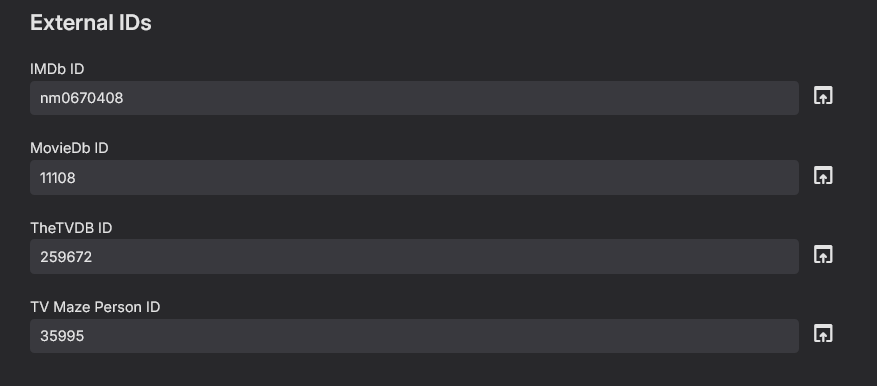
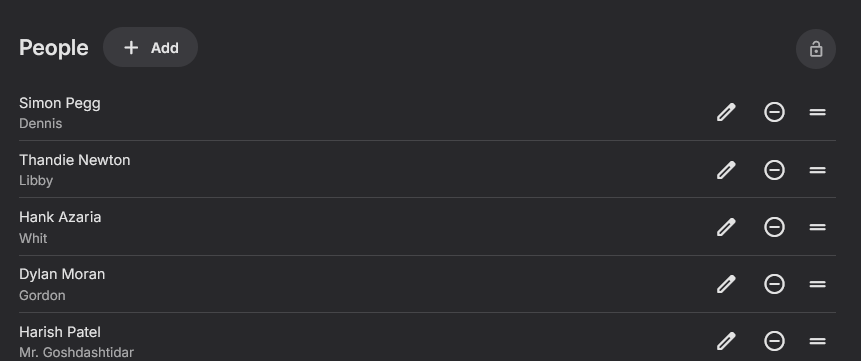
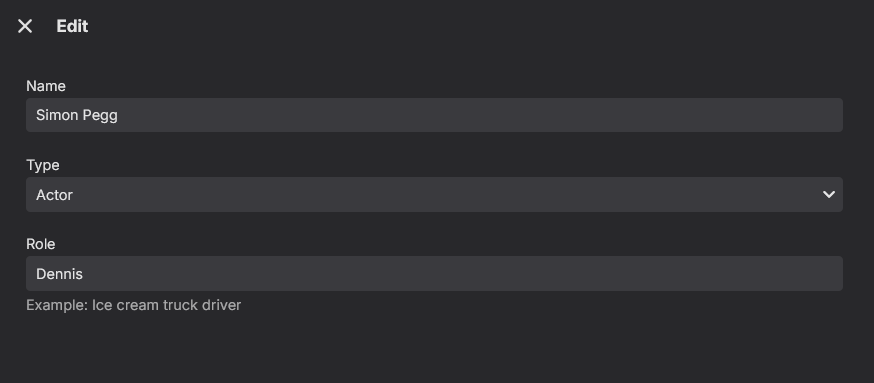
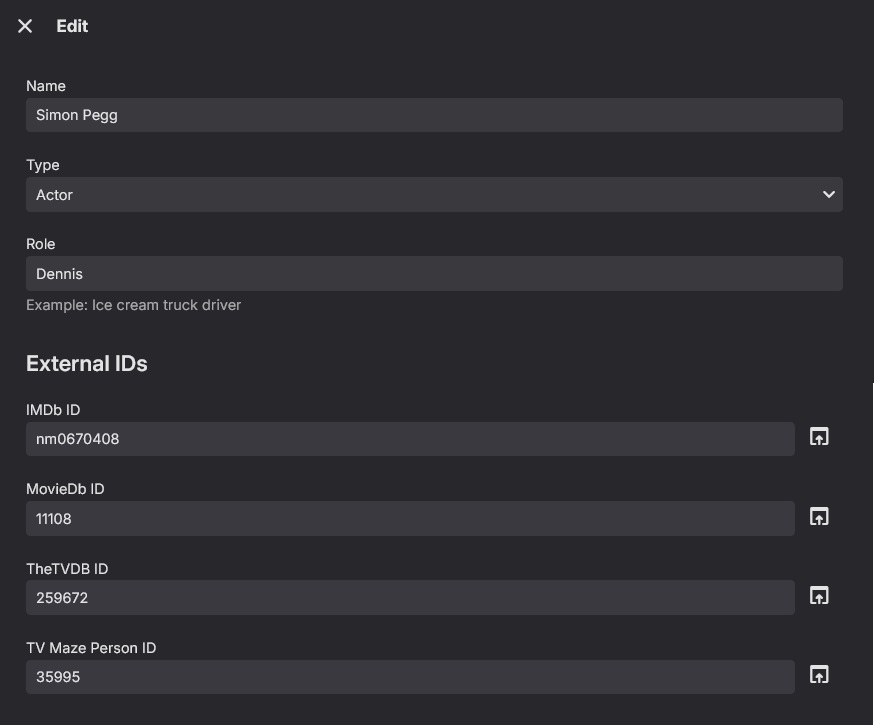
The problem still persists that its is extremely difficult to correct an error because you still cannot add provider ids manually when editing a movie or tv show cast, so you cannot easily split/fix an errornous entry. The External ids still needs tagging on to the back of the editor so they can be added maually when there is a problem. So it has this when editing or adding from the movie or tvshow level Over the years I have explained this so many times and its been ignored, now its becoming more and more of an issue (as predicted) and its still getting fobbed off as a metadata providers issue. Thats just lame in my opinion.. Thats only partly the case emby is not allowing it to be easily corrected either, so although its continually rebuffed its also an emby issue! I am conculding either its too hard to fix or you just are not interested in doing it, but either way we are not getting a good explaination and are basically and politely being told to go away ....
 1 point
 -
Well, it hasn't gone well, so I took a leaf from CMJR23 book and reinitialised (totally wiped) my M4. So far it's looking good. I'm still rebuilding my library, but live tv seems to be running smoothly again. 'Message to self' - When upgrading, always start with a clean, shiny new os. Thanks again to CMJR23 (sorry, I don't know how to link him in) Cheers1 point
-
Great. Im now on .30 and its still there occationally, or maybe like it was....1 point
-
Hi, this is resolved for the next update to Emby for iOS. Thanks.1 point
-
https://emby.media/community/index.php?/topic/134536-emby-keep-pauseplay-video-when-i-touch-video-section/1 point
-
The Emby team hopes you and yours are enjoying a Happy Holiday Season. We would like to announce a couple of changes that will hopefully increase the value of Emby in all of your households. First, to aid in the transition from our old TV-only Android TV app to the new Standard Android app on that platform, we will be eliminating the need for the app unlock by allowing free playback for up to five TV devices per Emby Server. Devices beyond that limit will require Emby Premiere. Previously purchased unlocks will still be honored. This should allow most households to move to the new app more easily. Second, recognizing that today's households have more and more devices, we are increasing our standard Emby Premiere License device limit from 25 to 30. We will then also increase the extended premiere plans from 45 to 50 and 75 to 80. Existing extended subscriptions will remain the same but new ones will be at these new levels. All standard licenses will be automatically updated to the new 30 device limit immediately. You should see all of these changes rolling out over the next week or so. Happy Holidays from the Emby Team! View the full article1 point
-
Hehe, #1 was the first one I had created and how I thought it should be. The second one was done to make it somewhat less aggressive. The 3rd one resulted from the request to create something more like Netflix. The intention for #1 was in fact to be somewhat similar to the well-known THX trailer. I also wanted to produce a 5.1 version where the ding--ding-ding--ding--ding is rotating (FR-RR-RL-FL-ALL) around in the room. We'll see, maybe it can be optionally added in a future update.1 point
-
Thank you for the response. Initially, I was trying to use comskip from windows, but when that didn't work, I installed comskip in ubuntu. That's where I am now. Here are the instructions I followed to set it up in Ubuntu: Detecting & skipping commercials on Ubuntu v0.1.pdf I tested this from the CLI (ubuntu) and it processed.1 point
-
I want to create multiple backup libraries. but still don't want to show with all the members It will only open when the main library has a problem. What do I have to do in order to turn on/off once for all members? I would like the next version to be developed to be able to hide/show libraries for all members. Because I don't want to go into one member at a time because my list has many members. https://emby.media/community/index.php?/topic/99001-how-to-hide-and-show-some-libraries-for-all-members/&tab=comments#comment-10332751 point