Leaderboard




Popular Content
Showing content with the highest reputation on 12/29/24 in all areas
-
The Emby team hopes you and yours are enjoying a Happy Holiday Season. We would like to announce a couple of changes that will hopefully increase the value of Emby in all of your households. First, to aid in the transition from our old TV-only Android TV app to the new Standard Android app on that platform, we will be eliminating the need for the app unlock by allowing free playback for up to five TV devices per Emby Server. Devices beyond that limit will require Emby Premiere. Previously purchased unlocks will still be honored. This should allow most households to move to the new app more easily. Second, recognizing that today's households have more and more devices, we are increasing our standard Emby Premiere License device limit from 25 to 30. We will then also increase the extended premiere plans from 45 to 50 and 75 to 80. Existing extended subscriptions will remain the same but new ones will be at these new levels. All standard licenses will be automatically updated to the new 30 device limit immediately. You should see all of these changes rolling out over the next week or so. Happy Holidays from the Emby Team! View the full article4 points
-
I use Radarr for movies to organize my movies. If you dont setup download clients or site indexers, its a great movie management program. And can be used without copyright infringements It can index and rename your movies and folders so they align with Emby. And Sonarr for my TV shows.3 points
-
Well thats a lot of bullshit, since the standard is more or less going towards releases containing both frame to frame hdr formats. Well of course it probably are releases with the one or other hdr standard also, but thats pretty irrelevant if the player could do the simple task of choosing the format the screen supports or to fallback to HDR10 since BOTH formats include it.3 points
-
Hi, The current implementation of Emby search is very basic. Based on what I can tell, it only matches exact strings in the same exact order. Example: "Mission: Impossible" In this example the following queries will return a positive match Possible Impossible Mission Mission: Impossible And the following queries will not return anything at all (The worst offenders are highlighted) Mission Impossible Missoin: Imposible Imposible Impossible Mission Mission : Impossible Mission Impossible Another example would be "Mr. Robot" where if the dot is missing, nothing is returned or in general terms any variation of any string that is not an exact match will not return anything at all. Let's not even attempt to try a title like "Agents of S.H.I.E.L.D.". This makes the search difficult to use and at times even frustrating. As the examples above show, the major theme is special characters and punctuation and they can probably be bypassed by just ignoring them, which might or might not cause other problems in the process. This problem also affects titles that have letters with diacritical marks or glyphs such as "Amélie" and "Æon Flux", if you can't type them exactly, you can't find them. In my opinion a better attempt would be to use a difference string matching algorithm such as Levenshtein distance, you can then define an acceptable threshold and return the closest matches. I found a couple of C# projects that implement this and might be useful as a starting point. FuzzyWuzzy, a port of Python project in C#. https://github.com/BoomTownRoi/BoomTown.FuzzySharp FuzzyString. Has some additional string comparison algorithms too. https://github.com/kdjones/fuzzystring Thanks.2 points
-
@Gilgamesh_48It may be that my videos are very poor. As I have said before, I am voice challenged, and what you hear is the best I can do. It took me considerable time to create these videos and I do it because I am trying to help others. That's why I give away the source code. I would appreciate it if you could chip in and make a better set of videos that everyone could enjoy. I will give you credit. I would like your help and extend my hand of friendship. Vic2 points
-
Yeah, I don't find it a solution to keep double editions of all my media just to stay with Emby when I can have one file on my server with another software. My Samsung TVs need HDR10+ and my LG a Dolby Vision for optimal viewing. The LG TV doesnt natively support Dolby Vision MKV even, so maybe I should keep a mp4 of my media too for all my LGTVs that doesnt have a external media player. The HDR10 metadata is there as a base, other software can play it, it cant be a question of hundreds of employees.2 points
-
Interesting you’re automatically assuming pirating and downloading... probably because that’s your kind of game. Sorry!! Nothing like that here. I rip my own BRs for the convenience of watching in every room of the house and backing up the delicate physical media. To my humble opinion, regardless of employee number, Emby needs to fix this to keep up with the competition. I prefer Emby over Plex but will keep using Plex until this is fixed by either Amazon or Emby… and it doesn’t look like Amazon cares much.2 points
-
Thanks, but you have been, looking into it, for 8 Months... you must have seen it by now. can we have a timeline please?2 points
-
Guys, The ebook side of Emby/MediaBrowser has been long stalled or rather stagnated. I would like to offer up a couple of suggestions. Many people use calibre as an ebook/comic book tool for scraping data and general management of their collection already. This program is absolutely astonishing in its ability to pull metadata from post calibre scans, as well as draw in metadata from the file source and/or directory structure. http://vaemendis.net/ubooquity/ Its a self contained .jar server/reader combination. And honestly I am very impressed by it's small footprint and wide range of abilities. The other option is COPS , which was written specifically with calibre in mind. It is open source, so making it work with emby I would think would be fairly easy. https://blog.slucas.fr/projects/calibre-opds-php-server/ Ever since the original release of MediaBrowser's bookshelf I have always wanted something that would allow me to 'read' my collection, rather than being basically nothing more than a place-set for images of books I own. I am sure that those who mainly have audiobooks are thrilled with bookshelf , but it's nothing more than an extension of the music library IMHO, not new features. We can have both right? Here I give you two suggestions free of charge.. Just because I love you, and Emby Personally I plan on running the Ubooquity Server along side of Emby from now on, just because of it's massive functionality and tiny footprint. But I sure hope that someone decides -- "yeah, ebook support should be in here too" and do something about it - rather than allow this now very very ancient issue to continue to remain an issue. And so I don't have to have 20 different ports open, some with SSL support - some not, because Emby isn't delivering the 'complete package'. (Please take some of this with humor, I know you have your hands full with improvements/bugs/suggestions/requests)1 point
-
As I'm transitioning from Volumio and Plex to Emby to centralize my usage to one app, the one thing I'm missing the most is gapless playback. This is particulary annoying when listening to albums like "Dark Side of the Moon" by Pink Floyd. I'm experiencing a buffer of about 1 second in between songs, which really ruins the immersion. Would be awesome if this would be implemented in both the Chromecast, and web player.1 point
-
I am looking to see if a SAML2/OAuth plugin is something others would use. I myself would love this feature to share Emby publicly with family members and friend and worry a little less about insecure passwords that some may use. I personally am a big advocate for security as I work in IT and see how a lack of good security can cause havoc. I love Okta and what it offers. Anyone can sign up and use it for free under 1000 users if you sign up as a Developer. That is just plain awesome. Let's see who else is interested. I am excited to find out! Thanks1 point
-
It is really cool that Emby has the ability to support multiple versions of the same movie. It would be nice to have a setting on the client side to allow the user to set which version should be selected by default. This could be as simple a user-entered string, or it could be a list of detected strings to choose from. It could allow multiple entries and it would choose them in the order entered. On the Kodi side, it would also be nice to get the "Choose the Best Version for Me" option that the Emby app has.1 point
-
I'll try to keep this feature request short and simple. When the Emby server needs to transcode audio to make it compatible for the Emby client, it will use a hardcoded value for the bitrate that cannot be changed. For example, if the audio gets transcoded to Dolby Digital AC-3, it will always use a bitrate of 384 kb/s. This value cannot be changed, even though Dolby Digital AC-3 allows a maximum bitrate of 640 kb/s. Although 384 kb/s is a decent compromise between quality and data, it is very compressed and the quality is far from being transparent. The same thing applies to every other audio codec the Emby server may transcode to, such as AAC. So the request is simple, allow users to specify the bitrate that should be used for transcoding audio. Thanks, Charlie1 point
-
Hello, I make often upgrade to my music playlists and i would like to have the possibiliy to sort by 'last changed' like for the tv series 'last episode added' Thanks1 point
-
Hi, you need to make "Album Artist" the same for all songs in an album. E.g. "Various Artists" or "Soundtrack". This is covered in Emby's basic documentation here: https://emby.media/support/articles/Music-Naming.html1 point
-
No sir it is working fine I was just curious to know since I do the updates for fam and friends and sometimes a database rebuild is required which requires me on site so I am aware. Usually meaning the plugin needs to be reconnected to server database and tv and movies rebuilt which is very fast thank you for having made it so much faster in the current version1 point
-
To add to that check this out, if and when you setup Bazarr lingarr-translate/lingarr: Lingarr is an application that supports both local and SaaS translation services to translate subtitle files into a user-specified target language. With automated translation options, Lingarr simplifies the subtitle translation process. For your subs if you have English subs, but need Spanish subs. Like I said it's a rabbit hole1 point
-
Can only agree! Fileflows/Unmanic/Tadarr for re-encoding/transcoding movies to ensure compatibility for your library. Bazarr to find and sync subtitles so they are perfect. Takes a day or seven to set up juuuust right but it's well worth it.1 point
-
I think the only limiting factor to what an Android system can handle when speaking of video/audio is if the processor it uses is fast enough. Never experienced anything to show me otherwise.1 point
-
@RLanger7228If you decide to go down this rapid hole, read this TRaSH Guides1 point
-
In the next days. Probably before new year.1 point
-
Yeah. I'd seen those but no info from Intel itself which leads me to believe that no stable software or drivers are available yet either.1 point
-
@Q-Droidfound some leaked info Intel Processor N-series CPU specifications leaked — Intel dishes up paltry clock speed improvements | Tom's Hardware Intel Processor N150 Benchmark, Test and specs I would guess, linux drivers are NOT ready at this time, or tomorrow. It might be in 1 year or 2.1 point
-
Why not? A Shield would fit the bill.1 point
-
Hi. This is easy for them because they control your server experience and watch everything you do. We are not designed like that as your server is actually YOUR server and your users are too - unlike Plex.1 point
-
I don't believe that I have any separate NFO files. I just edited the "native" Emby Metadata files & changed/added images. I wanted to be certain that changing the folder structure/file path externally (with File Station) would not change the "Identity" of the file within Emby, and the Emby Metadata/images would remain intact if the file path changes. I would not be changing the file names at this stage. I will experiment with a couple of movies at first to see what happens before I take on a wholesale change, which would be a massive undertaking with over 2000 movies at present. I will start with the ones that have a Making of... video associated with them to see if I like how they are presented. I currently have a separate, "custom" TV show with all these Making of... videos collected together. Having them in the same folder with the Movie/Show itself would seem an improvement. Another related question: I realized movies are also assigned to Playlists & Collections by file names/file paths. I have spent hundreds of hours sorting my collection into Playlists & Collections over time. I would not want to risk losing all that work. Will those change (disappear) if the sub-folder structure is changed externally via File Station? If so, is there a way to add sub-folders within Emby so the changes are tracked & the Emby references are appropriately adjusted? If not, can I submit that as a feature request? I have no experience with NFO files. I did a quick Google search & found that they are text files with information, often associated with "pirated" media files (ouch). The AI summary said that not all media managers support them. Since you seem to be recommending them, I assume that Emby does. It also said they are created by specific software: Do you have any recommendations about which one to download. I am leery of download sites, as many are sketchy & can introduce viruses or trojan horses. As I add new content, I have been editing the Emby metadata & images, then adding to Playlists/Collections. This accomplishes much of what I am intending to do. Do NFO files add anything significant to this process? I mostly create new content by converting used DVDs to MP4 files, so I would have to create & edit the NFO files myself. Would there be an advantage to the extra effort? Also, how are NFO files used by Emby? Do they assist with initial identification? Is the data "imported" into the Emby Metadata file? Renaming existing files may not be necessary. It seems a better strategy to just insure that new additions follow the naming conventions, so they will be properly Identified when adding. I have already Identified & edited the metadata/images of the content I have now. There seems no value to changing existing file names when I risk losing edited data. Thank you. I will experiment with a few at first to see If I like the presentation.1 point
-
These are for Mortal Kombat.




 1 point
 -
1 point
-
Except for not giving two $#*^'s you make zero sense on a few levels.1 point
-
@NeminemI was actually still using my old creative X-FI Fatal1ty titanium pro up until about a year ago or so. I started having issues with the drivers after updating to the latest build of windows 10 and the situation was no better under windows 11. It sucked having to remove it. Considering the card came out in 2008 I wasn't surprised though. My biggest issue with creative's lineup since the x-fi has been lack of discreet 7.1 analog outputs. The most they support is 5.1. The X-FI was also the last card to support hardware accelerated EAX and OpenAL for older games that used it. As far as the whole HDMI sound card thing, here's an old review I found for the auzentech one. This and the one Asus made are to my knowledge the only discreet HDMI capable sound cards ever made. I always thought it was a cool concept to be able to bitstream lossless digital audio over HDMI and still have all of the control and features of the software. https://aphnetworks.com/reviews/auzentech_x_fi_hometheater_hd1 point
-
I hope that the combination of strm files and subtitles will behave similarly to the combination with mp4 in the future. Thanks.1 point
-
It's a shame the HDHRs don't allow a static IP to be set. It's unfortunate that Starlink doesn't allow picking/setting the IP range to use (in case of conflict) as well as allowing for DHCP reservations for the LAN side. It's a shame that Starlink doesn't support local name to IP mapping, so devices and equipment can be accessed by name vs IP. This is trivial to do when you can integrate dhcp & dns together. Many home routers do this as a default. Many of the home 5G plans are the same or worse when it comes to DHCP but even worse as your behind a CG-NAT for IP4 but have fully routable IP6 addresses handed out by DHCP but have no firewall, port mapping or port forwarding control. T-Mobile for example allows setting the SSID and password for 2.4 and 5 WIFI bands and that's the adjustable settings under your control. The newer Sage router/switch/AP/modem adds the ability to scan/set the channel each WIFI band uses as well. T-Mobile does IP4 over IP6 encapsulation which lowers the MTU to 1400ish and has 0 CG-NAT on IP6 but double NAT on IP4 With Starlink, you can get a public IP4 address in your dashboard, (but it's not static) which removes the CG-NT. You can also switch out the Starlink router replacing it with your own adding a lot of additional functionality such as QOS, VPN, Tailscale, traffic shaping, traffic filtering, firewall, port forwarding, DNS & DHCP, optionally WIFI & Mesh as well. You can do this for $35-$100 depending on WIFI & Mesh with higher quality equipment than home routers using Mikrotik routers or router/switches or router/switch/APs. You can't do this with T-Mobile or some other 5G home plans. The closest you can get on T-Mobile is plugging in a router that supports IP6 passthrough but will add a 3rd NAT to IP4. It could also get you other functionality as mentioned above. Without replacing or adding additional routers you can still fix or work-around IP issues on HDHR which don't allow setting an IP directly. For device similar to an HDHR you could plug the device directly into your Emby server if you have an open Ethernet port or could add a cheap NIC. You could then enable a DHCP server directly on the Emby server running Windows, Linux, Docker, etc bound to only the NIC supporting the device. The NIC would use a static IP on it's own LAN segment and assign a reserved IP to the device. If you have a smart switch supporting VLAN use a 2nd NIC wouldn't be needed as the DHCP server would be assigned to the VLAN created for the device. If the only device giving you an issue switching IPs once in a while, then it's even easier. Don't use an IP when setting up the HDHR in Emby. Instead use the device ID. You can install hdhomerun_config on Windows, Linux, Mac, BSD & Solaris OSes. Once installed you can use hdhomerun_config discover To find all HDHRs are the network getting their IIP as well as ID. From that point on you can use IP or device ID to talk to the device. hdhomerun_config <device id> get help hdhomerun_config <ip address> get help This works for any of the web/http endpoints as well as from the command line using hdhomerun_config to access the web/http end points. Read more about using the device ID instead of IP here: https://info.hdhomerun.com/info/hdhomerun_config1 point
-
I try also some different movies Thank Hispa Download.zip1 point
-
v2.2.33 has been available for a week now, but unfortunately it is still crashing on startup for IOS 12.5.7.1 point
-
true didnt check that, then yes to ur question before, but also with some similarity stuff u can search for like ‘str wars’ or ‘star wrz’ etc… and the similarity would be higher than 50% and stuff like that1 point
-
HI, please email billingsupport@emby.media Thanks !1 point
-
This would still be a big help for some of the bluray rips I have... Right now I have to either include multiple audio tracks so I can manually select the native 640kbps AC3 backup audio on anything that doesn't support TrueHD/Atmos, or have a still capable 5.1 setup get killed by terrible audio quality over a wired lan where I really don't need to conserve bitrate. Like, I'd get it if it was something Emby did when set to one of the more bitrate-limited transcoding modes, but both the server and the TV and on 2.5gig lan. Let me have more than 384kbps audio whenever it has to transcode...1 point
-
Remove the subtitles from the media that has the buffering issue and see if that helps. Full ffmpeg command line or 3rd party tools like MKVtools can remove embedded subtitles. see: https://www.wikihow.com/Extract-Subtitles-from-MKV I would guess that there may be 25 subtitles embedded in the media and each one is possibly examed during the transcoding. Any delay from doing this could cause the buffering and probably shutting down playback alltogether. This number of subtitles works fine on Blu-ray disc playback, but is not at all optimal for streaming. If you want a decent streaming experience remove the subtitles and copy them out to separate files. Add these files, as needed, with the correct file name listed in the Emby guide. Users can then pick subtitles they want, you can even force one to start with the .default.srt in the file name. Often editing software can be set to eliminate subtitles while encoding. Emby tries to be able to grab the subtitles, as well. It probably runs into issues when users just leave the media untouched with 25 subtitles. It's really one of things you should check for incoming media. Hope that helps.1 point
-
Don't use your phone as a server. While it may work it is not how it is designed. Use a dedicated computer for a server and make everything else a client. That is how Emby is designed and the way you are doing it just makes it harder.1 point
-
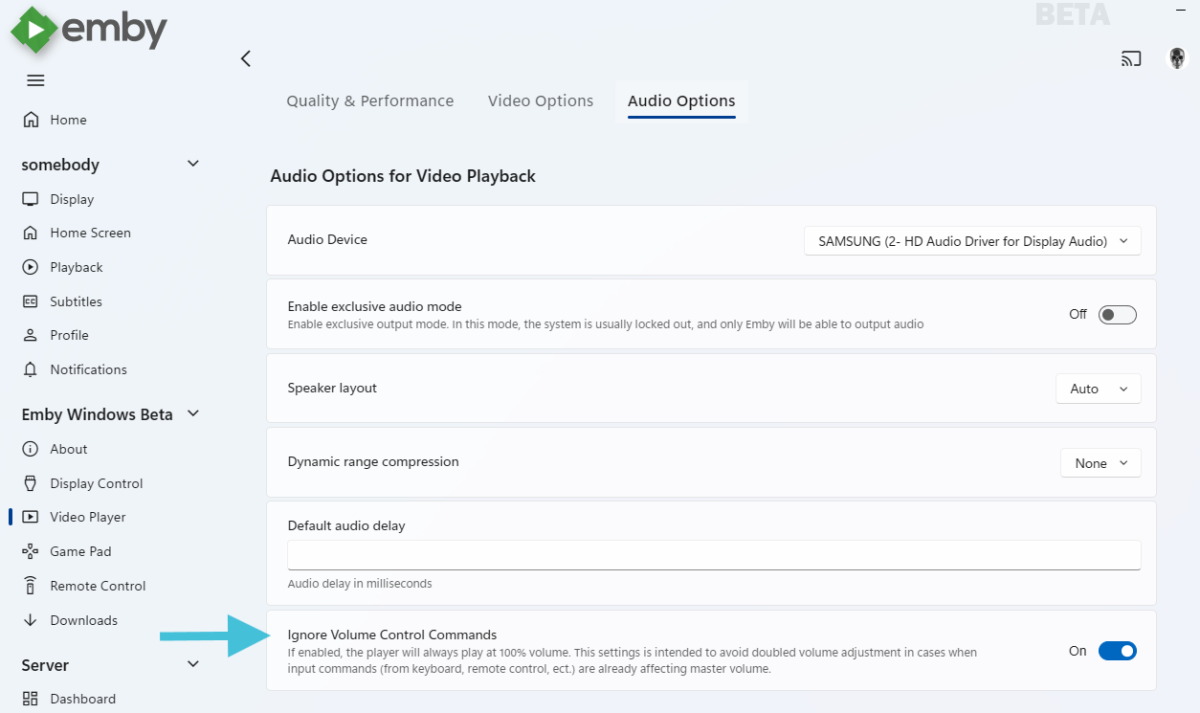
The next update has an option that allows to ignore volume changing input commands:
 1 point
 -
Glad you got it working, but like rbjtech said, this utility creates new subtitles from the videos audio, it does not extract anything existing. That is why CCExtractor is faster, it simply extracts what is there. To make it do multiple files would need the bat file to do the looping and call SubtitleCreator for each file in the loop. Something like this @echo off setlocal set executablePath=C:\SubtitleCreator\SubtitleCreator.exe set videoDir=C:\Recordings set ffmpegDir=C:\ffmpeg\bin REM Loop through each .mp4 file in the directory for %%f in ("%videoDir%\*.mp4") do ( echo Processing %%f "%executablePath%" -ffmpegpath="%ffmpegDir%" -infile="%%f" -model=medium ) endlocal @rbjtech There could still be a reason to generate a new srt file, Emby has problems with some CC.1 point
-
Other apps (Plex, Kodi..) have no problem on the AFS. This has been going on for years and no fix from Emby… nada.. crickets This is by far Emby’s #1 problem and as much as I don’t like Plex, I am already invested in the AFS on several TVs (like so many others). I understand this is an Amazon/Google hardware problem but it has already been proven to be resolvable and shouldn’t be used as an excuse at this point. With the market going DV hybrid on many new titles Emby will be left behind by not implementing a simple workaround for the issue. Go to work Emby!!1 point
-
OK, I figured this one out. The timeout command apparently has some idiosyncracies that prevent is from running correctly in a child process. The solution is to use waitfor or the start-sleep powers he'll command instead. All good now.1 point
-
Read here:1 point
-
For those who haven't seen the TOPIC I'm writing it here too Same black screen issue with DV HDR10+ Fire TV Stick 4K Max 1st gen, works by removing HDR10+ metadata (as rbjtech wrote, thanks ) I used Dolby_Vision_Tool (drag file to DDVT_REMOVER, press S) very fast, 30 seconds. Is it possible to add a setting to disable HDR10+ to emby??1 point
-
Dear Emby Team, First and foremost, thank you for building and continuously enhancing this platform. We are naturally drawn to the incredible features and stability it provides compared to other applications. Back in 2019, there was mention of a potential book-reading feature being considered for Emby in the not-too-distant future. Many in the community have been eagerly anticipating this addition. We humbly request the team to revisit this feature, as it would greatly complement the platform's capabilities. We understand that development takes time and resources, but this is just a gentle reminder that we, as a community, are still waiting for this to happen. Thank you!1 point
-
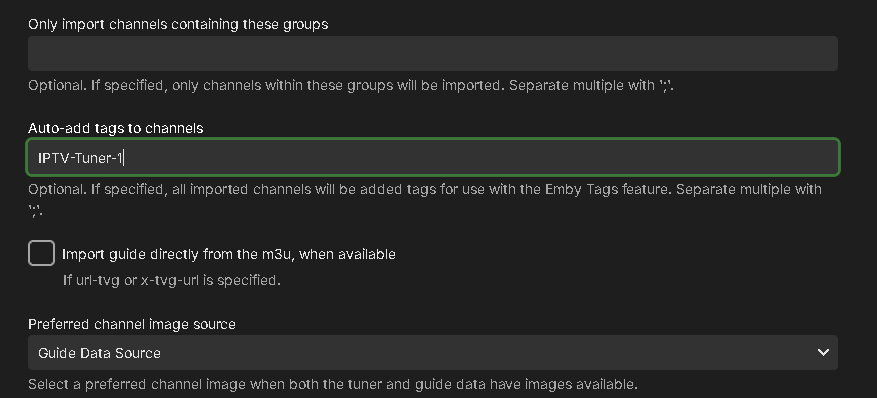
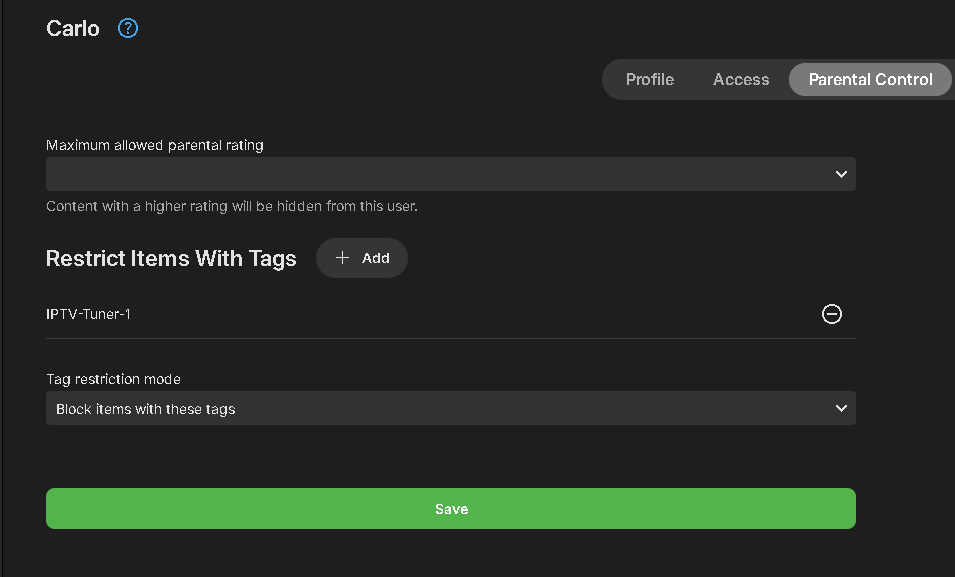
This just became much easier to implement thanks to a new feature added to LiveTV. We have pushed out a change to M3U functionality that can be very helpful and used by admins in a few different ways. When setting up or editing an M3U tuner, you will see a new option to use. "Auto-add tags to channels" shown above. This will do exactly what it sounds like. Every channel loaded from the M3U source will be tagged with the entry you set in the config. Each M3U source can have a different tag associated with the channels from that source. USEFUL USES Many IPTV providers limit the number of simultaneous streams in their service. If you need additional streams, you could purchase another plan adding a 2nd m3u tuner to your system, you end up with an unmanaged set of channels, having duplicate channel entries of every channel. Not only does it make using LiveTV harder to maneuver with double the data, it looks far less clean and becomes confusing to users. With the new auto-tagging functionality, you can set a tag like IPTV1 and IPTV2 to each tuner. Every channel will now be tagged according to what tuner it's associated with. With the help of Emby's Parental Controls you can add a tag assigned to a tuner's channels in parental control in the section that blocks items with these tags. Setting Up Tags for TV Users Split Users: Set up half your TV users with one tag and the other half with another tag. Each group shares one tuner and only sees one set of channels. Multiple Subscriptions: Use 3, 4, or more IPTV subscriptions to spread the number of tuners/streams across your users. Tagging for Different Uses Split Subscriptions: Have one IPTV subscription split among your users while keeping a second subscription for your use. This way, you can provide LiveTV and recording abilities to users, while reserving a subscription for your own private use. Curate Channels: If your m3u file doesn’t use grouping, move multiple channels at once to category-based m3u files (e.g., sports.m3u, news.m3u, kids.m3u, premium.m3u, network.m3u, local.m3u). Set these up in Emby LiveTV with each file having a tag to match the content. Multiple m3u Files: If you have multiple IPTV m3u files from different sources, tagging helps you know what source a channel is from by looking at the channel's tag. These are just a few of the creative ways this new functionality could be used. If you don't see the new tag option when adding or editing an M3U tuner, it may not have updated on your system yet. You can manually upgrade this easily by upgrading the M3UTUNER plugin to 1.0.32 or later in the Plugin Catalog.
 1 point
 -
Just test Just tested 4.8.0.41 beta and still not seeing any sign of an option to adjust bitrate and/or codec for transcoded audio. Can we get any sort of confirmation as to whether or not you guys plan to implement this feature? In the meantime I also tested the docker build from MakiXx and it is working great. Hard to understand why this feature keeps getting passed over by the devs.1 point
-
Still not changeable in 4.7.13. This is just ridiculous...1 point
-
Well done.1 point