Leaderboard




Popular Content
Showing content with the highest reputation on 12/24/24 in all areas
-
UPDATE Hello everybody! The release of our new Window & Xbox apps in December 2024 was overshadowed by the unexpected rejection of the HEVC Playback capability by the MS Store for Xbox (only - the Windows app was unaffected). As a temporary remedy for Xbox users, we had established the Emby Xbox Holiday Bonanza. which allowed to register for a private version of the app with HEVC playback enabled: The "Emby Plus" app. Today (March 25, 2025) we are glad to announce the following changes: The Emby Xbox Holiday Bonanza program is closed The Emby Plus app is discontinued Starting from version 2.222.0, HEVC playback is included and enabled in the regular app releases What does this mean for current users of the Emby Plus app? There is no action required Emby Plus users will automatically be updated to 2.222.0 (or later) There is no drawback in any direction Version from 2.222.0 on provide the exact same capabilities like the Emby Plus app had offered before already We apologize for all the inconvenience, questions, support interactions and uncertainties this has caused for our users. The Emby Team This topic is locked now. Please create new topics in case of any questions. --------------------------------------------------------------------- Original Message Xbox Users! Santa Softworkz has worked relentlessly to bring you a happy holiday with Emby and the Xbox. There are rules, though: Don't talk about it Don't speculate Don't ask questions about it If you don't follow, then there's no happy ending for you. Watch out for the "Santa Softworkz Holiday Lottery"2 points
-
Hi and welcome! I can assure you that our development team has zero crossover or ties with that other product. There are few users still here that have been around since around 2009-10 that can corroborate that. Please post any issues you run into and we'll do our best to help you. Happy Holidays.2 points
-
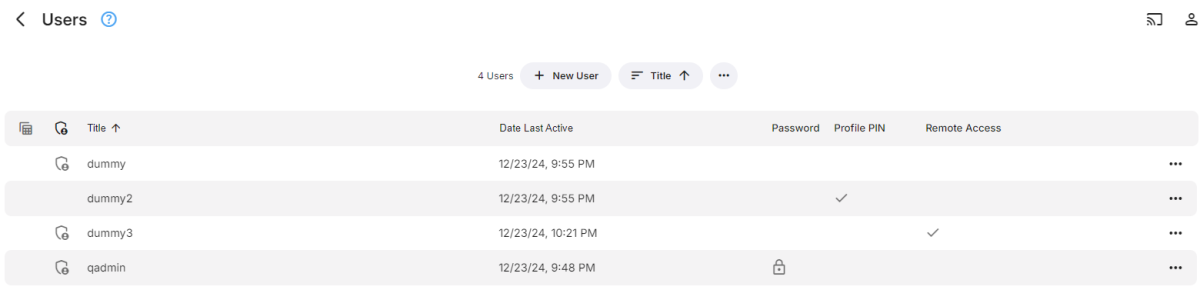
Change the Users view to table format and select the columns you want to display.
 2 points
 -
2 points
-
Emby Windows & Emby Xbox A new stable version 2.207.0.0 is available now. Please go to the Microsoft Store and check for updates. Changes 2.207.0 [Xbox] Fix AV1 playback [Xbox] Fix Xbox One detection [Win] Fix restoring maximized window state 2.204.0 [Xbox] Holiday Lottery [Xbox] Add video options [Xbox] Change default video decoder mode on Xbox One * models [Win] Fix error on startup when a 3rd party firewall is installed 2.203.0 [Xbox] Emby Plus1 point
-
It is clear that you do NOT know much about what actually happened but Emby closed their code and then Jellyfin effectively stole the last public domain code they had available and then went on to produce a much less stable media manager that was clearly inferior and remains so to this day. I do wonder why anyone would prefer Jellyfin over Emby except for the fact that it is, I think still public domain. I use a number of public domain programs but I do not think Public domain makes them better, just different. Also Emby does NOT force any monthly charges as the free version works quite well and for those that need more functionality there is a lifetime license available. Also you can limit the need for expanded device limits by running two, three or more servers with a separate premier license for the servers that need additional device slots. But again Emby did NOT fork from Jellyfin but Jellyfin was the one that took the code and ran with it. They are just a bunch of unscrupulous hackers that are too lazy to develop from scratch.1 point
-
I dont think the emby team are driving exotic sports cars and living in multi million dollars houses from any profits lol not from a $99 lifetime sub. you’ll need to donate to Jellyfin for continued improvement anyway, why not support emby?1 point
-
They don't just add or remove channels unless it's an issue they caused (very rare). What they normally have to do is contact the station/broadcaster to get an authorized lineup change. Then depending on the channels and contracts they have in place, will need to get source programming from the station or can use a network feed if appropriate. When we've reported issues like this in the past, we've seen anywhere from it being fixed the next day to taking a couple (or more) months. They don't really elaborate on specific processes for a particular station or feed other than give a general overview that applies to everyone. But I've got the feeling that many smaller stations owned by larger stations or entities keep control over programming and channel selection. With all the station buyouts and mergers that are always taking place I wouldn't doubt the stations never update contact info properly which then causes our provider to play phone and email tag with the stations to get that worked out before they can even address the reported issue. As I said, I don't know if that's the case here or not but it's certainly not uncommon. I added a note on my calendar to follow up on this on the 27th to see if I can get an update. I noted the trouble ticket and contact info above so it will be an easy follow up on our part. PS, I did some web searches to find guides from other online sites both using and not using the same guide provider we use, and it doesn't seem like any of them have the correct data. I might try and reach out to the station as well to see if I can get any info from them as well.1 point
-
Emby is VERY cheap for what it is, I wouldn't be complaining too much. For what we pay its more of a donation really, there is nothing that comes close in my opinion and the new windows player takes it to a new level. I would have happily paid for it. I do like getting things for free, who doesn't? There is a cost, time or otherwise to maintain and further develop a product such as Emby or Jellyfin. Its obvious that Jellyfin does not have the same resources as Emby. I can understand hitting a user limit is frustrating, but 25 users? and $12/month? I spend more at the coffee shop a week! Enjoy Xmas and don't be too hard on the Emby team.1 point
-
You been living under a rock? This hasn't changed in almost 10 years...1 point
-
Hehe, #1 was the first one I had created and how I thought it should be. The second one was done to make it somewhat less aggressive. The 3rd one resulted from the request to create something more like Netflix. The intention for #1 was in fact to be somewhat similar to the well-known THX trailer. I also wanted to produce a 5.1 version where the ding--ding-ding--ding--ding is rotating (FR-RR-RL-FL-ALL) around in the room. We'll see, maybe it can be optionally added in a future update.1 point
-
Which highlights why universal assumptions about Emby servers shouldn't be made. They're fine as defaults, but should be configurable as not all world is the same. And Emby is just shifting the "support" to admins with this approach. With 1mbps hardcoded, my users will either: 1. Start complaining to me that "something's wrong with the app" and I have to explain to them to disable "auto" (which some of them may not want to do). 2. Don't understand why their quality is suddenly crap and either live with it or assume that Emby doesn't provide them quality content. Status quo and new change is shifting the workload onto the server admins who have their hands tied. Most of the admins probably won't ever complain because they won't care or understand why it's happening, and ones that do understand, sit here not quite understanding why we can't control what happens to our servers and have to live by assumptions made in the world where cellular doesn't work well1 point
-
If I read this right, this is only for the "fallback" value, which only covers a smaller subset of "auto" users where client doesn't support `navigator.downlink` API (I guess Fire TV and all other weird devices). The larger subset - i.e. clients with downlink API access, will still be tied to whatever nearly always wrong value that API returns, which is then further hit by that * 0.7. Judging by the code snippet, WAN users with weird devices without downlink API will almost always have better results as it will be that hardcoded 12mbps. And WAN + downlink API users will never get 12mbps, as it's capped to 10mbps - so it stands true even if downlink somehow figures out the proper value (which from my tests, never happened). Also I only just noticed that cellular users will be hardcoded to 1mbps now? That's... horrifying. Nearly all of my clients have 100+mbps cellular, so now I should expect way more needless transcoding. To be honest, this change makes things even worse than they were before by making invalid assumptions and I still think Emby should just leave this all up to the server admins / community. We all can probably figure out a better solutions catering to different needs than Emby team trying to come up with some kind of universal value that will work for everyone.1 point
-
Hi Feel free to mark as duplicate if you think this is too closely related to the other threads on pooling channels. My suggestion for doing has different ultimate goals to the other ones I've found: - Suggestion to pool duplicate iPTV or DVB, DVC, DVT sources so they only show up as a single channel - Each "single" channel could have multiple sources siting in behind - Channel service/sources can be set in preference/priority - When you tune/play the channel you want if it hangs or buffers then tuner automatically failbacks to the next source/service until it finds a stable one to play Most iPTV providers are providing multiple back ups in case a channel goes down or buffers. This suggestion allows us to use the back ups without having to manually edit the XML File. TV Headend has this type of feature built in already so it can be done1 point
-
There's no way to do that unfortunately, apart from building your own patched versions of emby apps. This is what Emby Android does for example: define(["exports"], function(_exports) { function supportsConnectionTypeDetection() { if ("undefined" != typeof navigator) { var connection = navigator.connection; if (connection) { var connectionType = connection.type; if (connectionType || void 0 !== connectionType) return !0; connectionType = connection.effectiveType; if ("slow-2g" === connectionType || "2g" === connectionType || "3g" === connectionType) return !0 } } return !1 } Object.defineProperty(_exports, "__esModule", { value: !0 }), _exports.default = void 0; _exports.default = { supportsConnectionTypeDetection: supportsConnectionTypeDetection, getDefaultQuality: function(networkType) { switch (networkType) { case "wan": return function() { if ("undefined" != typeof navigator) { var connection = navigator.connection; if (connection) { var downlink = connection.downlink; if (downlink && 0 < downlink && downlink < Number.POSITIVE_INFINITY) return downlink = downlink * 1e6 * .7, downlink = parseInt(downlink); if ((downlink = connection.downlinkMax) && 0 < downlink && downlink < Number.POSITIVE_INFINITY) return downlink = downlink * 1e6 * .7, downlink = parseInt(downlink) } } return null }() || (supportsConnectionTypeDetection() ? 12e6 : 4000002); case "cellular": return 1000001; default: return 2e8 } } } }); It uses the same `navigator.connection` attribute, which as defined in the first post - is awful for detecting actual downlink conditions by itself, and it also does the same fallback to 4mbps. I wish emby provided a better way to hook into this system until a better "auto" is developed. The way I can see the stupid simple intermediary solution is either of these two options: A. Have all emby apps call the "/bitratetest" endpoint to measure speed. Server admins can optimize this endpoint to provide more realistic speeds. E.g. use cloudflare, caching etc. B. Provide server admins with an option like "Auto quality multiplier" or "Min auto bitrate" and use it as floor for whatever tests the clients end up with. Or even both, but I'd take anything at all that gives me, the server admin an ounce of control over this.1 point
-
Think it has been mentioned before but the other guys have a db. ChapterGrabber Software Looks to be a static copy of what use to exist here.1 point
-
Hi, there's already an open request for this or something functionally equivalent. Please join in and contribute to the existing discussion at:1 point
-
For the web client yes you can use some custom css but will only apply to that client. Have a look through this topic can be tricky now that navdrawer can be docked also. But css code may have slightly changed over time and need adjusting on new html code.1 point
-
Yes - /path/to/tvshows:/mnt/usb/TV Green = Host path Blue = path inside docker. : is a delimiter / seperator In short <source>:<target> Docker Mount Volume – How To Mount a Local Directory1 point
-
I hate when I do changes and forget to push that "save" button I happens for me sometimes.1 point
-
I am assuming this is for local users... Under the user profile settings make sure you do not have the the following options checked... - Hide this user from login screens on the local network. - Hide this user from login screens on devices they've never signed into. PIN is to used if you are switching to the user and want it secure. So like switching from your wife's account to the admin.1 point
-
1) It look like your user it a admin. Try with a user that's not an admin. 2) I don't know, but I guess not.1 point
-
Tried numerous h264 videos after app updated on numerous xbox versions. No stutters at all! Fantastic work guys!1 point
-
I cannot agree with you there, though; the issues I see are occasional irritations, but no worse than that. I have no problems using this client constantly. Paul1 point
-
You rock!1 point
-
Welcome, anyway I'll try to find the core issue. Both should work.1 point
-
Ummm... apparently not. I did so, followed the quoted directions in your previous post and now it's working great! Thank you again for your help & your quick responses - I guess your username is appropriate!1 point
-
The stutter is totally fixed! Everything looks great. Your attention to this is much appreciated.1 point
-
Works perfectly now, thanks!1 point
-
But, if i remember correctly, those were only on systems that allowed remote access or were tied to "Emby connect." I do not use Emby connect and I do not ever have remote access enabled. I would like to have no password at all but I am required to have one. I have everything configured so Emby almost never asks anymore for a password. But i do not see any reason for me to need a password for Emby or any other program I use. I do not want to use passwords for any system I use locally and there is no way, unless I do something extremely stupid, I am in absolutely no danger from the internet bad actors except if i click on something and allow them in. My network is locked down pretty tightly and I do not see any danger to me. I do not understand why I am being punished by having to have local passwords when the only person that can access my system and Emby server is me. My dog does not have the mental and physical tools to use my computer and the various insects that sometimes get in are not weighty enough to move the mouse or press keys. I just use everything locally but i am forced to have a password by Emby and Windows and a few other programs. I am a bit paranoid but not near paranoid enough to need to protect my systems from myself and my dog by using passwords. Anything like a password requirement is just excessively anal and not needed by those of us that never allow anybody else to even access my computers. But, as I have said before it is Emby's program and just use it so they can be as foolishly anal as they want and i just have to deal with it. If I choose to use Emby I must put up with all the useless protections they, in all their anal fixations, put in place. But i do not have to like it. I know i expose myself a bit by using the internet at all but I also protect about that and the Emby password requirement is there no matter if i want it or not. [/rant] But i still love Emby. I just hate being forced to use passwords locally. BTW: All my local passwords are set to "a" but I use MUCH stronger passwords for my router and just about any site I use on the internet.1 point
-
I'm a bit fuzzy as to what the Windows Store updated to be honest. At around 1pm, it updated Emby LLC. I didn't actually see the version number. All I know is when I tried to start the app after that update, it still would not start. When I got home later tonight, the app had been updated again. After that update, the app started. I just assumed it was 2.204.0 earlier today, and then 2.207.0 after that based on the version history listed in the Microsoft Store. Important part, as you say, is that it is working now. And first impressions are extremely positive! edited to add: Okay, I think I get what happened. The earlier install actually failed with the following error.
 1 point
 -
The 2.204 version has never completed certification, and I doubt that you really had it, because it has the fix included. Anyway, I'm glad to hear that it's fixed. Thanks for confirming!1 point
-
SOUND 1 Emby Intro Animation-Sound.mp4 SOUND 2 Emby Intro Animation-Sound-Soft.mp4 SOUND 3 Emby Intro Animation-Sound-KerPlug.mp41 point
-
Hi, this is resolved for the next update to Emby for iOS. Thanks.1 point
-
well done, it work , in the configurations you can set the options for Film, Episodes Covers. If you like this information you can set it on the top or down . And you can change the Position on the Side if you like it ..... you can find many options ther Thanks for the Christmasgift you gife me1 point
-
That really shouldn't be allowed.1 point
-
I will have to try again. Atmos worked fine but not DTS X. Thanks1 point
-
Please enter the Lottery and wait. Thanks1 point
-
Ok, I'll doublecheck everything.1 point
-
Confirmed. Yes, that needs to be fixed.1 point
-
Just want to say thank you for this very useful. Very helpful. I wish the team would add this as part of the EMBY whole package system configuration. Thanks to you. I can just make a script do this when I update my guide @BillOatman1 point
-
It should be fixed in the next update. Thanks1 point
-
This is not an application feature, more a Windows feature. Just drag the icon from the start menu into this folder: C:\ProgramData\Microsoft\Windows\Start Menu\Programs\Startup I think you need to go to the app via "All Apps", the ones on the first page are not draggable.1 point
-
I am using a dedicated htpc just for emby. Could you please add run at start up please. Agree on the back button situation, prefer for when l look at info etc, i end up out the player. Apart from these two issues am liking the new app..... thanks1 point
-
It works well on my HTPC. Nice work! What I hate is, that App can be closed with the back key. This means I have to find the mouse to restart the App. This should be deactivated in TV mode at least. I usually never close the app on the TV (HTPC). Even on other computers I do not like this "double function" of the key. When I like to close the app I want to click "close"... So please: Give us the option to deactiavte "closing the app with back key".1 point
-
This is a needed feature. Jellyfin already does it correctly... Need it for batman TAS.1 point
-
Hi, I don't have an ETA but it is on our to do list for Emby for Apple TV. Thanks .1 point
-
WELCOME TO THE HISTORY OF EMBY! A lot of our users are new to Emby and we thought it would be a good idea to share some of the backstory of how Emby came to be, where we started and where we are headed. We have grown significantly since our inception. Once a humble open-source project, Emby has evolved into a sophisticated platform that allows users to organize, stream, and enjoy their media libraries with ease. In this post, we'll take a look back at the history of Emby, explore its development journey, and highlight the key milestones that have made it what it is today. The Early Days: An Open-Source Beginning Emby started its life as Media Browser, an open-source project focused on creating a simple, user-friendly interface for accessing digital media collections. Originally, Media Browser was a plugin for Windows Media Center, and its primary goal was to offer users a better way to manage and play their media files. Back then, it was a community-driven project, with developers and enthusiasts contributing code, features, and plugins to expand its capabilities. Media Browser gained a loyal following among tech-savvy users who appreciated its customizable nature and flexibility. The Shift to Emby and the Rise of the Media Server In 2014, Media Browser underwent a major rebranding and evolved into what we now know as Emby. This change wasn’t just about a new name—it marked a shift in focus from a media center add-on to a full-fledged media server solution. Emby’s developers wanted to create a standalone server capable of managing large media libraries, transcoding content, and streaming to multiple devices. The introduction of the Emby Server brought a range of new features: Library Management: Users could organize and manage their media files with a sleek web interface. Metadata Scraping: Automatic fetching of metadata like cover art, descriptions, and ratings. Transcoding: On-the-fly transcoding for seamless streaming to any device, regardless of format. Multi-Device Support: Streaming became possible on a variety of devices, including smartphones, smart TVs, web browsers, and gaming consoles. This new direction attracted more users who were looking for a flexible media server that could handle diverse formats and provide a unified experience across different platforms. Open Source to Closed Source: In 2018, Emby made a significant decision: it moved from being an open-source project to a proprietary, closed-source model. The change allowed the development team to maintain greater control over the codebase, improve security, and introduce features more rapidly. Key Milestones in Emby’s Development As Emby transitioned to a proprietary model, the development team pushed forward with a series of updates and improvements: Emby Premier: The introduction of a paid subscription model called Emby Premier brought exclusive features like DVR support, cloud sync, offline media, and hardware-accelerated transcoding. Emby Premier gave the development team a sustainable revenue stream to fund further development. Improved Mobile and TV Apps: Over time, Emby released a series of polished apps for mobile platforms (Android, iOS) and TV devices (Roku, Apple TV, Amazon Fire). These apps received regular updates to improve stability, user experience, and customization options. Live TV and DVR Integration: Emby expanded its offerings to include Live TV and DVR functionality, allowing users to integrate live broadcast channels, schedule recordings, and manage live content alongside their media libraries. Enhanced Transcoding and Streaming: Emby has continuously improved its transcoding capabilities to support modern formats like 4K, HDR, and Dolby Atmos. These improvements allow for a high-quality viewing experience regardless of the device being used. Security and User Management: Emby introduced advanced user management features, including user profiles, parental controls, and access restrictions. This makes it easier for families to share media without compromising on privacy or security. Emby Today: A Comprehensive Media Experience Today, Emby is a mature and feature-rich media server solution that caters to a wide range of users—from casual media consumers to serious home theater enthusiasts. It supports a broad spectrum of devices, offers robust customization options, and remains focused on providing a powerful yet easy-to-use interface. Some of Emby’s standout features today include: Unified User Interface: A sleek, modern interface that makes browsing and streaming media a joy. Customizable Libraries: Tailor your media collections with custom artwork, genres, and metadata. Cross-Platform Syncing: Keep your media in sync across multiple devices and platforms. Comprehensive Live TV Support: Access live TV, manage recordings, and watch DVR content effortlessly. Community Engagement: Emby continues to value its user base, with an active community forum, feature requests, and beta testing for new updates. The Impact of the Community and the Road Ahead Despite its shift to a closed-source model, the Emby community remains strong. Many long-time users contribute by creating plugins, themes, and offering technical support. The Emby team regularly interacts with the community, implementing feedback and adjusting features based on user needs. Looking forward, Emby is set to continue expanding its feature set while focusing on performance enhancements and cross-platform support. Emby’s development is driven by innovation and user feedback, ensuring that it remains a competitive choice in the world of media servers. Conclusion Emby’s journey from a simple open-source plugin to a leading media server solution is a testament to its adaptability and the passion of its developers. While the shift from open-source to closed-source was a turning point, Emby has continued to evolve, delivering a reliable and customizable media experience for millions of users worldwide. The history of Emby is one of growth, change, and a dedication to providing users with a comprehensive and enjoyable way to manage their digital media. View the full article1 point
-
There is 2 things that are frustrating about the blog announcements. 1. They rarely happen. 2. You guys repeatedly reply as if you will get right on it and don't. I've brought it up numerous times over the years and get the exact same response above. The last blog for the app was Feb 2023. I love Emby but the lack of the release notes is annoying. Especially when there is precedent for removing features. I'm at the point now where I have to keep ignoring the spam to update the app on the TV because I don't know what it's going to do. I usually wait a week to make sure no obvious issues are brought up on the forums. The worst part is I come across as the prick complaining about it when it's something that should just happen by default. I know I'm wasting my time but I felt like a rant. And I understand the admin replying on here may have no control over it and are just placating the masses but if there is some higher up cracking the whip so hard you don't have time to post an update blog, let them know I hope they step on some lego.1 point
-
Hello! I'm new here and today I learnt "Emby" why did this happen? it's very simple - I'm PlexPass life-time user and I'm tired of buggy Plex and helpless Plex's team. I have several open issues with STR and ton's of log files without any feedback. now I'm looking for something other. I found this thread while searching support forums for open cases and common problems of Emby. I have to say, that they are very-very similar with Plex - no public roadmap, no public backlog, unexpected feature's lifecycle and so on. Even UI is more than similar (Ebmy's is less accurate and polish), paywall options are the same and even problems (transcoder, offline mode, mobile clients) are the same. interesting. I even readout all Q&A answers (parts I and 2) guessed to find the date (or reason) of separation and outcome one of the team from Plex or something like that - but no, I was wrong. and now I see "a shiny leader" - full of sh*t and "a dark horse" - full of what? I see the TC @Gilgamesh_48is very unfriendly to PMS and fills all topics with strong words about it. but I can't believe that similar UI, similar paywall, similar movie recognition (identification) problems and localized naming (Russian) has no generic roots.0 points