Leaderboard




Popular Content
Showing content with the highest reputation on 12/23/24 in all areas
-
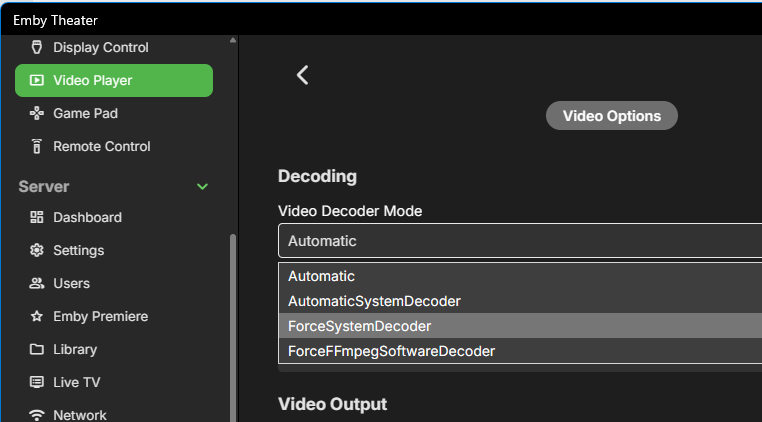
Good news for all Xbox users: The big issues are fixed in the next update, which is in store certification already. Unfortunately it can still be rejected or take multiple days - fingers crossed that it will arrive just in time to make holidays really happy for all Xbox users. Stuttering/Shaking Playback on Xbox One Models This has been fixed and confirmed in a beta version and the fix is included in the new stable version currently waiting for store review. The new version has a Video Options section now: For all Xbox One models, the setting needs to be "Force System Decoder" For all newer models, it should be "Automatic" These values are automatically set as defaults, depending on the model. HEVC Playback Please see here: https://emby.media/community/index.php?/topic/134691-the-santa-softworkz-xbox-christmas-miracle/
 3 points
 -
New version is out:3 points
-
Thank you for your input. I found out on the Qnap NAS you need to install the app for it, "HybridMount." Once I installed that, figuring out how to point it to my WD NAS was not difficult and it works! The jury is still out, however, if the Automatic monitoring works. So far I had to do a manual refresh for it to see movies I add into the NAS. It may not work since it is not 'directly' attached to the Emby Server running on my QNAP. It would have to talk through the LAN connection and not sure if it will do that. I've thrown a few more movies into the share and will see if Emby evidentially figures they are there.2 points
-
Immich (https://immich.app) is slowly becoming the best self-hosted photos / home videos solution out there and Emby is light years behind it. Emby, outside of Movies / TV Shows and partially Music, delivers subpar and pretty stale experience for everything else. You can clearly see that some of the library types are there just an afterthought or "ported" from other library types (see audiobooks with library settings clearly ported from the music library type) So, why struggling the efforts on a gazillions subpar features rather than focus on just the "pillars" and made them EXCEPTIONALLY well. We need to understand that different media types require a TOTALLY different UI/UX and user experience, with a complete different features based on each media type. No, Photos / Videos / Music / Audiobooks / Books / Recipes ... or the kitchen sink, they don't go together in the same interface, within the same app. So, I fully agree 1000% with the OP. Let's start the "Make Emby Leaner" movement . In my opinion, Emby should focus on Video (movies / tv shows) and Music and that's it, and provide a TOP NOTCH experience with amazing features for both (dedicated apps included). 1. Let Immich do Photos and Home Videos 2. Let Audiobookshelf do Audibooks and Books 3. Let Mealie do the Recipes (just sayin) 4. .... and so on2 points
-
When you are unable to open a port for your torrent client, you are ONLY able to connect to other torrent users that have opened their own ports for you to connect to. Even then, you discover clients/users via third party trackers that tell you how to connect to each of the other seeds. A standard web server has no such discovery/tracking service. Relating to Emby: either the client, or the server must have a port open for the other to connect to. It's not reasonable or even possible in most cases for the client to have a port open (a phone on mobile data as an example) nor would it be reasonable to have the server keep track of where/how to reach each client; so instead, the server must be the one to keep a port open and listening for clients to connect to it. In cases where neither the client or the server can open a port; a third party must get involved, being the one to open a port listening for both client and server connections. Cloudflare tunnels, tailscale, a VPS with a vpn tunnel to the servers lan, etc. Both the server and the client must reach out to this third party together to get in contact with each other. Plex, as an example, provides the middle-man service by having both the clients and the servers connect to their public infrastructure which has its own ports open, proxying connections through their own servers. While this makes things easy to use/setup; it provides Plex (the company) with complete access and control over every single plex installation. Emby has no such control/restrictions over YOUR server; at the cost of more setup work for you. TLDR; ports are ALWAYS used. If you didn't open a port, and neither did the other end of the connection; there's a third party in between that did.2 points
-
You have no idea... There are also some composed sounds to accompany, but we feared that users might object or find it too aggressive, so it wasn't included. There were concerns that users might complain about the startup animation, assuming it would be the cause for the somewhat slow startup. In order for being able to provide proof that it's the other way round (the animation is rather meant to cover up the slow startup), we added the "Hide" button (Windows) which allows you to see what's going on behind, so it was kept to show something instead of just a black screen. The most common case where this happens is when the client cannot connect to the last used server and it has to do network discovery. There's a plan to run our network discovery right at the launch of the application , so that the result is already there when the app needs it. , but 0This didn't make it into tthid release. For everything else, please see this: Thanks2 points
-
It's very quiet around these parts! I could have sworn it was so much busier this morning!2 points
-
If you continue having trouble getting Connect set up again, is there any reason you can't just give him your server details and let him log in directly? Paul2 points
-
I mentioned it in another thread, but thought I'd put it here since this looks like a new section--just for posterity. Would like to have a bulk meta data editor function. For example, if I have 750 videos whose producing studio is the same, I want to select those videos and apply the name of the studio to those videos. Similarly, if there is a custom tag I want to apply to a subset of those movies, I want to be able to select them in bulk and apply the tag to those videos (instead of selecting them one by one).1 point
-
Can we get the option to change the up next and continue watching to show the tv show poster not the card (whatever it’s called)?1 point
-
I am looking to see if a SAML2/OAuth plugin is something others would use. I myself would love this feature to share Emby publicly with family members and friend and worry a little less about insecure passwords that some may use. I personally am a big advocate for security as I work in IT and see how a lack of good security can cause havoc. I love Okta and what it offers. Anyone can sign up and use it for free under 1000 users if you sign up as a Developer. That is just plain awesome. Let's see who else is interested. I am excited to find out! Thanks1 point
-
Long Promised — Long Awaited — Finally Here! We are excited to announce the first release of our all-new range of Emby apps, starting today with Windows and Xbox. With a fully redeveloped native foundation, this update delivers improvements across the board: from remote control and gamepad support to background downloading (Windows), as well as refresh and HDR mode switching, and most importantly, enhanced video playback. The new app also comes with a name change from Emby Theater to simply Emby. The name is the only simplification though: On Windows it supersedes and replaces both current apps, "Emby Theater Desktop" and "Emby Theater" from the Windows store, combining the best of both in a single app. It provides enhanced video playback driven by MPV player under the hood, like and even better than "Emby Theater Desktop", and the Download features which were previously available in the Windows store app only. A primary design goal has been to ensure that users of either previous app encounter no drawbacks when moving to the new version. Video Playback (Windows) Video options in the previous ET Desktop app were not always straightforward. The new Emby app adopts a fundamentally different approach to video playback configuration, which accommodates to a range from least to most knowledgeable users by boiling quality options down to three simple and easy understandable presets alongside a custom mode which allows to control all the underlying options in detail. The main presets are: High Quality A no-compromise choice for the best possible quality, regardless of resource usage. Recommended for powerful PCs with high-end GPUs. Video decoding and filtering occur in software for optimal quality, and output scaling uses custom GPU shaders. Balanced The default and recommended choice for most users. Similar to ET Desktop and a standalone MPV player with default settings. Efficiency Mode MPV player is generally focused on quality rather than power saving, and even with the Balanced preset, you can get short of energy rather quickly when running on batteries. This mode is not built-in or available in the regular MPV player. All video operations are fully performed in hardware while scaling at the video output (no shaders/gpu kernels) gets disabled. Too simplistic for you? Enter the Customize mode where you can control all options in detail to find your perfect setup. Video Playback (Xbox) In the new Xbox app, we have a new playback implementation which is based on ffmpeg and takes place of the HTML video playbaback which which had limited codec and format support. By combining ffmpeg decoding with elements from Windows Media capabilities, it combines the best of both worlds: The rich format and codec support from ffmpeg and the built-in hardware acceleration of the Xbox for playing 4k and HDR videos in the best possible way Automatic Refresh and HDR Mode Switching (Windows & Xbox) Refresh rate switching is now as simple as enabling or disabling a single option. The new app can track its window position across multiple monitors and adapt the refresh rate accordingly. On both Windows and Xbox, it can also automatically toggle HDR mode based on the video content and the capabilities of your monitor and graphics hardware. Download Feature (Windows) With the download feature, you can transfer media from your Emby Server to your client device in a suitable format and size, so you can enjoy your media when you're on the road or without an online connection and even automatically synchronize items based on the watched status. The new Windows app implements this with a completely different approach. Instead of periodically polling and running in the background, it uses Windows Push Notifications for server-side activation and the Windows BITS (Background Intelligent Transfer) service for downloads. As a result, the app runs only briefly whenever the server notifies it about newly available items or when BITS reports a completed download. If you don't use this feature, nothing runs in the background at all. Enhanced Support for Remote Control and Gamepad Input (Windows & Xbox) Remote Control support has been extended to cover almost all functions defined in the Windows Media Center remote button schema. For game controllers, mapping has also been expanded to assign functions to all available controls. New options pages provide a reference for button assignments and allow you to test inputs to ensure everything works as intended. Windows Theme (Windows) As a visual highlight, the Windows app features a new and exclusive Windows theme with Mica material background (Win 11) and seamless integration with your Windows desktop appearance, matching theme colors and dark/light switching accordingly. High Contrast Themes (Windows) As part of the Windows theme, the new Emby app also supports the Windows High Contrast settings. Fonts adjust in size and weight for better visibility, and fewer — but thicker—lines are drawn to enhance readability for those who need it.1 point
-
I know this might be controversial and maybe even odd to have a request to remove features but clearly the Photos functionality is not a priority and honestly there are other apps that do a much better job at it. The main reason why I think this feature should be removed is so the team can focus on more important things. There are so many feature request from many years ago that would be a lot more useful but it seems like the team is spread thin with supporting so many things. There are other things I think that should get removed but I know a lot of people use them so I guess is worth keeping but sometimes it helps to trim the fat. Quality over quantity.1 point
-
Okay, that confirms H.264 is working because HEVC is still transcoded. For the latter one, please see:1 point
-
And I'm posting back. Earlier today, the app updated to 2.204.0. Even though the update notes identified the an error was fixed when trying to start the app when a 3rd party firewall is installed, the Emby app would not start. A few minutes ago, the Microsoft Store updated the app to 2.207.0. After doing so, the app starts. Thanks @softworkz!1 point
-
My issue resolved in new 2.207.2.0 release.
 1 point
 -
Fixed my loading issue.1 point
-
Try adding providerId to folder name, i.e. Open Season (2006) [tmdbid=7484]1 point
-
This is the only part that the Windows app is in charge of. All other issues are matters of the common app code base. @Luke would need to comments on this. Only the outer part (native side code), is used for the WMC UI, i.e. the part which you confirmed working, the inner part largely remains the same as is. Thanks1 point
-
Looks after some digging around I found the solution.1 point
-
After launching the app try signing out, then sign back in with the same account and uncheck the "remember me" box. It should launch to the user select screen the next time.1 point
-
Oh right ok..that was also done. Shall now be quiet! Thanks again!1 point
-
Please enter the Lottery and wait. Thanks1 point
-
This is why we can't have nice things...
 1 point
 -
GREAT work !, giving the Windows+xBox Emby client a new and future-proof foundation: GREAT. (although I have found some bugs which I'll report in the apropriate forum) Thnx & best regards, Peter1 point
-
Thank you @Luke. Today it is working for me again. I understand that downtime can happen, it was just longer than I expected, so was not sure if something is wrong on my end. All good now.1 point
-
Flat structure is supported but not recommended as it can run into more issue/quirks than each movie in their own folder.1 point
-
OK thats your issue, all movies are not a folder of there own. Your are confusing Emby, with the way you are doing it. Movie Naming I have it like this. Movies --- 10 Cloverfield Lane (2016) {TmdbId-333371} -------- 10 Cloverfield Lane (2016) {TmdbId-333371}.mkv -------- 10 Cloverfield Lane (2016) {TmdbId-333371}.en.srt -- another movie (2000) {TmdbId-xxxxxx} -------- another movie (2000) {TmdbId-xxxxxx}.mkv etc etc1 point
-
Ok, clear. Thank you for the quick answers as always. Hopefully this gets implemented by Emby in the future.1 point
-
Hi @sameh1925, Emby Community is not the appropriate forum to discuss this topic. There are plenty of places elsewhere online to get help with this, thanks.1 point
-
It is fixed. Apparently it was obviously my mistake. I have forgotten an include statement in my nginx configuration file, regarding php-fpm and some redirects and cache mechanisms, which were completely irrelevant with the current emby server setup. Thank you for your support and sorry for any inconvenience.1 point
-
I'm really appreciating your work on this. At this point, when I get my Nextpvr feed through the updated Emby, and it is not stuttering, the picture is the best I have seen yet. Way better than the Kodi one with the Nextpvr add-on.1 point
-
One thing. I have never heard of anyone coming from Plex and finding Emby too complicated. There have been more than a few that di not like Emby and so returned to Plex but I do not remember even one saying that Plex was easier to use than Emby. I do not use remote access at all but I have tested it and I had no problem making it work but I see no value for me in using it so I disabled all remote access. Yep the obvious solution is to completely wipe out your server and then reinstall and that is a drastic but reasonable solution. I have done that a couple of time over the years but it was never an actual Emby problem but rather something stupid I did. When I used Plex, years ago, I had to do that kind of thing almost bi-yearly and Plex almost always was at fault for whatever problem forced me to reinstall. I do not have any problem whatsoever with Emby (except for little implementation issues) and, although there are some parts i find somewhat confusing, it is one of the simplest "big" programs I have ever dealt with.1 point
-
Are you able to reach your server, using only the remote address listed in the server dashboard, from outside your network? If that is not working; emby connect is a lost cause. Emby connect is just a means of passing that address to your users. Plex's easy-of-use comes at the cost of giving them unrestricted access to your server and it's contents.1 point
-
But don’t you want you use a personal media server and not one that puts all of your information into the cloud?1 point
-
Personally I don't see any value in the devs spending time and resources on this kind of feature. They would at minimum have to host servers to handle connection negotiation and the networking code of both the server and clients would have to be completely rewritten. The traditional client/server model that emby uses is more desirable for it's intended audience and much more ideal than further complicating the networking code to handle p2p negotiations with NAT hole punching. On the flip side, Plex handles this problem by relaying the entire stream through their servers if a direct port forward isn't available. One of the big selling points of emby is that they aim to know as little about your server, your media, and your users as possible. The devs themselves have expressed no desire to implement these kinds of relay servers that pass full content streams through them. Simply put, this isn't the kind of thing the dev team should be focusing on, nor is it something that I think the larger emby community would want the devs to focus on. If you can't directly port forward, there are already workable solutions. You can use an overlay VPN like tailscale that supports NAT hole punching to connect back to your home network without having to forward any ports. Alternatively you can get a public VPS and establish a connection between it and your home network so that you can have emby exposed via a publicly accessible port. Cloudflare tunnels is also a potential third option, however I'm not 100% clear whether streaming media through it is against their TOS or not.1 point
-
I'm seeing this from my computer but I don't recall seeing these squares from the fridge. When I go downstairs I'll check. Or I can look at the photos I've uploaded in this thread EDIT: Scratch that. Just looked at the photos here and yes the green squares are there. Never noticed them before.1 point
-
Hi, yes.1 point
-
New BETA version available 11.1.13: Delta changelog 11.1.10 -> 11.1.13 minor http improvements fix server reconnect when using proxies fix dynamic content issue fix Kodi shutdown issue fix sync timing issue faster http communication fix http chunked transfer encoding fix song selection via dynamic nodes when same song is assigned to multiple Emby libraries improve playlists fix subcontent realtime updates improve sync locks fix egde case sync and logging issues improve http request locks fix async commands ping improve progress updates when playback ended or seek workaround for Kodi bug when seekposition is higher than runtime -> Kodi stalls for couple of seconds unless stop is pressed increase subtitle download timeout to 30 seconds fix edge case sync issue, when init sync is in progress, incoming updates might not be processed and results in a sync loop1 point
-
Yes complete structure and naming will be required to see the big picture here as I will guess the nested folder structure with those names could be an issue. But ultimately it may be as easy as adding (YEAR) to their naming scheme.1 point
-
Xbox One Users: Please wait for the next update. Thanks. (1-2 days from our side plus unpredictable duration for store certification)1 point
-
There's a new single but modular cross-platform, cross-framework codebase which has been developed from scratch. It covers UWP (Windows, Xbox), WinUI3 (Windows), Electron (Windows, Linux, Mac) and MAUI (Windows, MacCatalyst, iOS, Android and Tizen/Samsung). Internally we have indeed 4 apps that run on Windows, the decision in favor of WunUI3 was made just half-way during development. The UWP(Xbox) app runs fine on Windows but has a number of drawbacks compared to the WinUI3 version. MAUI uses WinUI3 under the hood on Windows, but with increased complexity in code, so this path hasn't been followed. The Electron flavors are all running, but on Windows, it cannot compete with a WinUI3 app, especially with regards to window management and visual styles. The next official app from this code base is Emby Linux, the beta is starting right now. Please understand that further plans cannot be disclosed at this time. Thanks.1 point
-
Read here:1 point
-
Is this only a successor to the Windows Store app? What does it mean for Emby Theater Desktop? Why can't you just leave Emby Theater Desktop as is and let me continue using it? How can I launch the Emby app from the command line? (Windows) How can I make the Emby app start automatically on Windows startup? (Windows) I'm experiencing stuttering video playback, what can I do? (Windows) On the video quality settings page there are multiple presets. How can I know which settings are applied by each preset? (Windows) I have installed the app, but it doesn't look like it does in some of the screenshots. (Windows) To which folder do the downloaded files go when using the Download/Sync feature? (Windows) I am changing the subtitle style settings, but it doesn't seem that they have any effect. (Windows & Xbox) Will the Windows theme be made available in other Emby apps? Is there some other way to download and install the Windows App? Why can't you provide an MSIX for download and manual installation? Why are you forcing me to have a Microsoft account for downloading the app from the Microsoft Store? I have selected the High Quality preset in the video quality options, why doesn't it use hardware acceleration? (Windows) The start animation is nice, but it takes a long time and the previous Windows & Xbox apps were starting up faster, can the animation be disabled? (tbc)1 point
-
Highly disagree. EMBY is easily the best photo manager if you need a client beyond web/mobile and is the #1 reason I use EMBY over Plex. The entire concept of scrapping it would be absurd, and you can just look at Plex as a key example to the response of them scrapping photo support over the years. I could make the same argument with music and Live TV, as I would argue many more people use photo functionality vs those 2 functions.1 point
-
I'd like to respectfully disagree. I rely on this for my elderly parents. An all in one place for them to go to, where we can share photos or personal videos with them. Keeping everything all in one place simplifies their experience and makes it less complicated for them. Teaching them new methods or devices is difficult at best. Please don't assume everyone has the same capabilities or preferences that you may have.1 point
-
For those who haven't seen the TOPIC I'm writing it here too Same black screen issue with DV HDR10+ Fire TV Stick 4K Max 1st gen, works by removing HDR10+ metadata (as rbjtech wrote, thanks ) I used Dolby_Vision_Tool (drag file to DDVT_REMOVER, press S) very fast, 30 seconds. Is it possible to add a setting to disable HDR10+ to emby??1 point
-
Yes, I think it must be possible to do something with this issue. Since the base HDR metadata is in there with the Dolby Vision. And also HDR10+ for the DV/HDR10+ files. It should be able to select and play one that does not output black screen without user interface. Since I (and my users) have a wide set of screens with different HDR support, It should be enough to have one file with different HDR standards. The solution cant be to have one DV and one HDR10+. Is there not maybe possible to create option preset which metadata you want to use?1 point
-
Correction suggested by @andy22 in Skin Embuary 2K adopted skin.embuary2k.teddyknuddel.zip skin.embuary4k.teddyknuddel.zip1 point
-
Not now, but a future update will make channel switching almost instant for IPTV and comparable to a hardware TV for native tuner reception.1 point