Leaderboard




Popular Content
Showing content with the highest reputation on 12/18/24 in all areas
-
I tried to change the Content Type of an existing library on Emby server installed on Synology. I followed the guide here: https://emby.media/community/index.php?/topic/99927-how-to-change-the-content-type-for-a-library/, but Synology stores libraries in an SQL database, so the process is not as straightforward. Therefore, I’m sharing the procedure that worked for me. I hope that it hepls someone. - Turn off the Emby server - Connect to NAS by SSH - Navigate to the directory: cd /var/packages/EmbyServer/var/data - Set correct permissions: sudo chmod 664 library.db sudo chmod 775 /var/packages/EmbyServer/var/data/ - Create a backup of the database: cp library.db library.db.bak - Open the database tool: sudo sqlite3 library.db - List the tables: .tables - Libraries are stored in the table `MediaItems`. - Get the column names for the library table: PRAGMA table_info(MediaItems); - Select data based on the name of the desired library (focus on entries with an existing `Path`): SELECT Id, Name, Path FROM MediaItems WHERE Name = 'LIBRARY_NAME'; - From the selected record, take the ID. - Select additional settings for the library based on the ID: SELECT * FROM ItemExtradata WHERE ItemId = ID; - It will show that one column contains JSON data with settings, including the `ContentType` value. - Valid `ContentType` values: - Audio books: `"ContentType":"audiobooks"` - Camera Uploads: `"ContentType":"homevideos"` - Collections: `"ContentType":"boxsets"` - Home videos & photos: `"ContentType":"homevideos"` - Movies: `"ContentType":"movies"` - Music: `"ContentType":"music"` - Music Videos: `"ContentType":"musicvideos"` - Playlists: `"ContentType":"playlists"` - TV shows: `"ContentType":"tvshows"` - Mixed content: `EMPTY` (no `ContentType` key) - Update the `ContentType` to Mixed content (original value is `ORIGINAL_CONTENT_TYPE`): UPDATE ItemExtradata SET Value = REPLACE(Value, '"ContentType":"ORIGINAL_CONTENT_TYPE",', '') WHERE ItemId = ID; - Alternatively, update `ContentType` to a new value (`NEW_CONTENT_TYPE`) (original value is `ORIGINAL_CONTENT_TYPE`): UPDATE ItemExtradata SET Value = REPLACE(Value, '"ContentType":"ORIGINAL_CONTENT_TYPE"', '"ContentType":"NEW_CONTENT_TYPE"') WHERE ItemId = ID; - Exit the database tool: .exit - Delete the database backup: sudo rm library.db.bak - Start the Emby server - Run the "Scan media library" task2 points
-
I've created a bash script libstrm.sh just in case someone needs it in bash-based systems. Notes: 1. It follows @rbjtech original libstrm.bat. And it needs a library.txt with path pairs of source/;target/ in each line. 2. It tried to identify all the video file extensions like .mp4, .mov., etc. If any of your video types are missing, you can simply add them as how I did in the code. 3. If you use a library.txt file created in Windows/DOS environment, it may have incompatible line-ending symbols that sometimes show as "^M" or "\r" or can be completely invisible. That will cause problem. You can use an editor that can product Unix text file like notepad++, or convert the file to Unix way with utility "dos2unix". (I will probably fix that issue in the script directly in future.) Cheers! libstrm.sh2 points
-
Hi,Luke: It's working normally now, thanks2 points
-
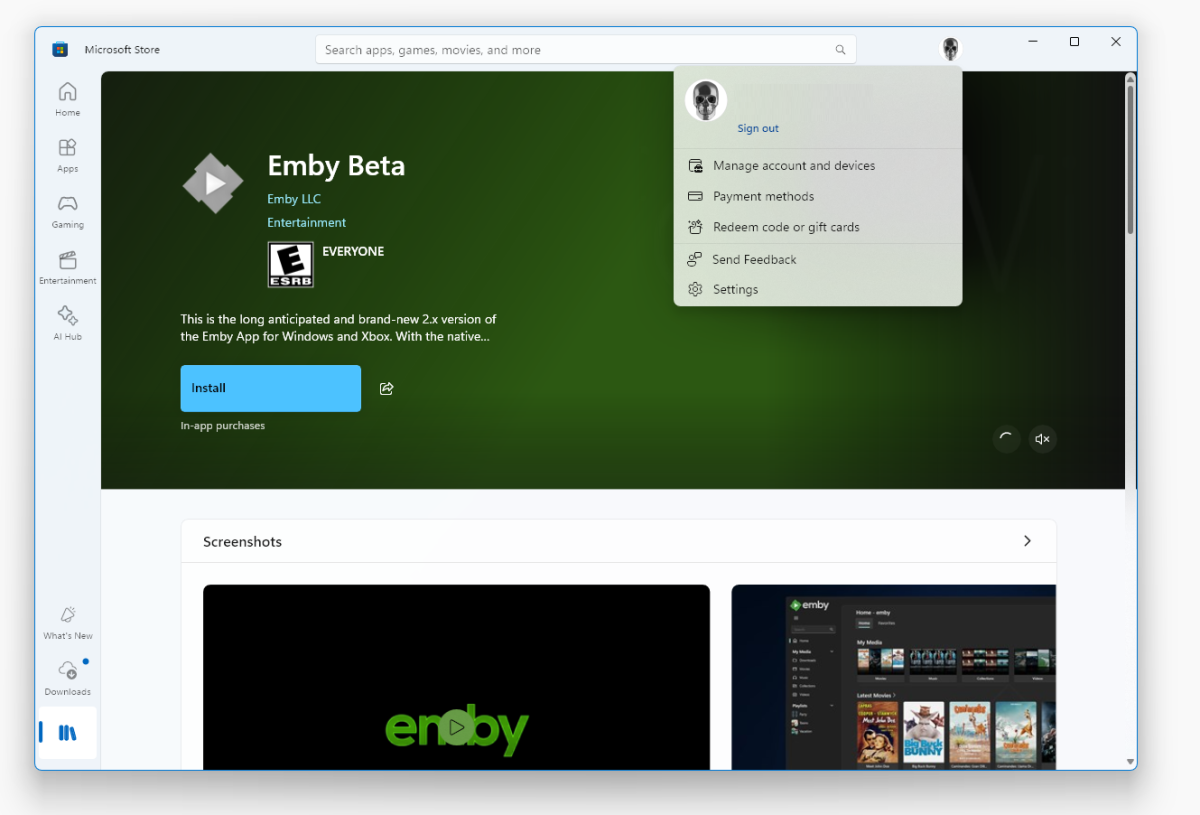
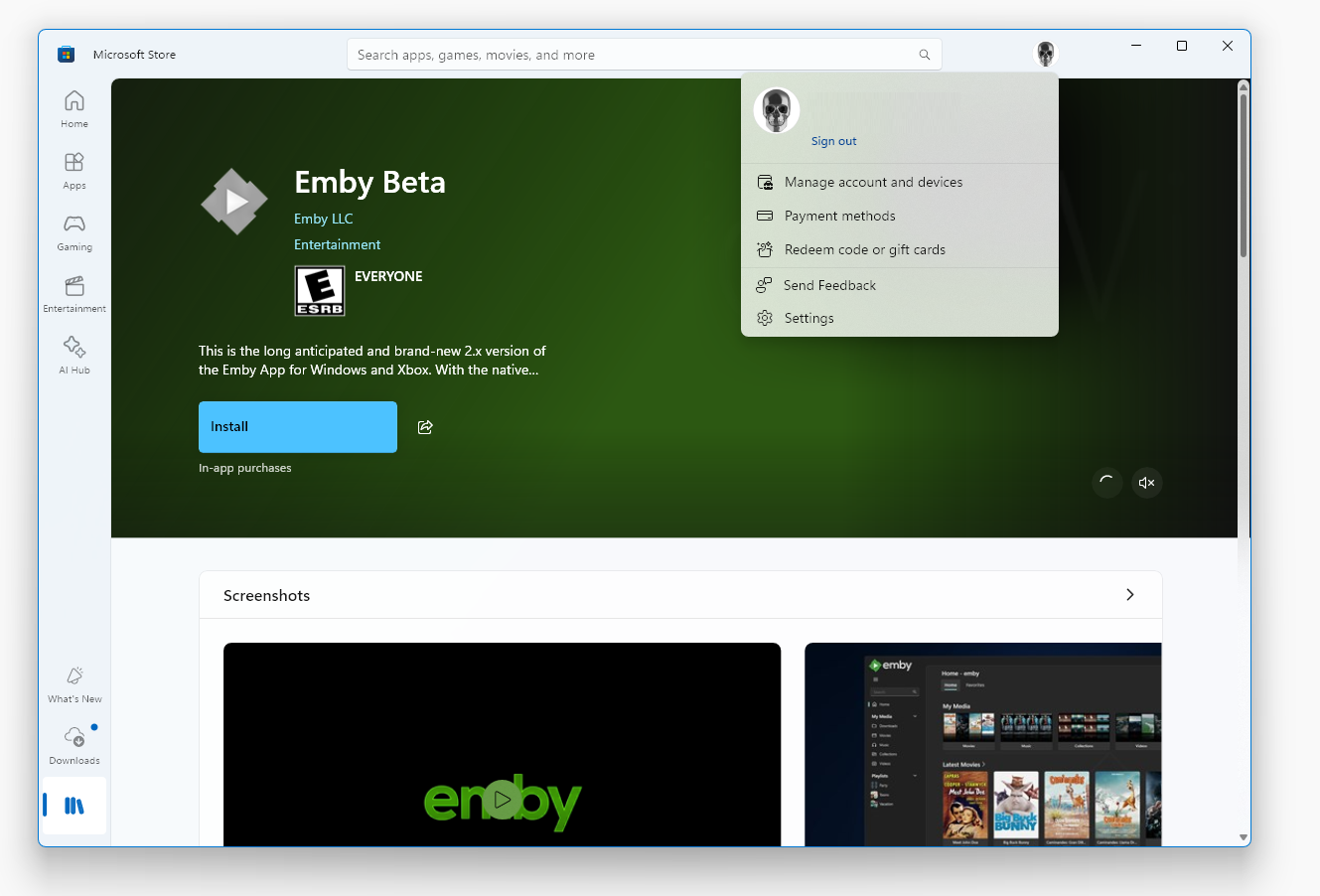
Let's clear this up! You don't need a Microsoft Account for using the Windows Store. I don't know the situation when you have set up Windows (or added a user) with a Microsoft account, because I've never done that. But if you do so, then the store should really be your least concern... But when you set up Windows with a local account (or Domain with Windows Server), then you are using the store without any login by default. You can't buy anything of course, but you can install anything you like of what's free of charge and at the side of applications, that's by far the majority. While people are happily buying apps on their Apple and Android phones, this has never got much traction on Windows. If there's payment involved, then it's most of the time about payment inside the apps which often doesn't even go through the store as MS doesn't restrict that in the way like all the other stores do. In the Windows Store app, you can log in and out by clicking on the person circle in the title bar: There's one case where login is required: Store Login is required for Beta Users (only!) The reasons for this are We want to keep close contact to the beta users instead of just throwing it out by publishing a link, where we might get little to no feedback and users (many are not reading any text) think we have a bad app Applications for a private audience are much easier to get into the store than public applications The way it works is really simple: We add the user's e-mail to a list in the store portal and when the user is logged in to the store with that e-mail they will be able to see the app and install it. You can even log out of the store immediately after installation without loosing the app. But then you don't get updates autiomatically until you log in again. ---------------- But once again, to make it very clear for partial-readers: You don't need to log in to the Store for getting the stable Versions
 2 points
 -
I frequently use the filter of Unwatched for movies and TV shows. And with music, you get recommendations based upon "similar" artist or songs. I would like a flag option to mark media as "Not Interested" or whatever verbiage would be better for the masses. This would have to be at the user level and not stored in a NFO file since I would like to filter out things my family likes, but only on my profile. As my libraries grow, I am having more content for my family. Since I am the only male in the house, my users have tastes that are distinctly different from mine. Whether it be real surgery shows, true murder, sappy romances, or telenovelas; these are things that I will never - and I do mean never - watch. The same thing goes for the music collection. I don't mind classic musical soundtracks, but my daughters collection of Broadway musicals is vast. And annoying. Now I could make them as Watched, but then that would go into the algorithm "Since you watched this, you might like this...", I would like to avoid doing that. I've poked around quite a bit, but I don't see anything like this currently nor did I see anything like this requested. If it has been requested but called something else, I would love to know about it so I can like that post. Thanks in advance.1 point
-
I love music visualizations. I was thinking that a unique way to integrate visualizations in Emby would be to encode the audio with the video output of a visualizer like Milkdrop or ProjectM. The mux can then be streamed to clients as video (if the client has enabled music visualizations). Wouldn't that be cool? Sure, you sacrifice a little quality in the transcode but it would still be acceptable and by offloading the visualization to the server, even underpowered clients could potentially support visualizations that would be impossible given their hardware.1 point
-
Moving the issue from this thread, here is a formal request to add to all Emby apps the ability to adjust / sync the audio playback / delay, in the same way it apparently is currently possible to do in Emby Theater.1 point
-
Passkey support will not just make loging in more secure but it will make signing in on TVs a lot easier.1 point
-
ability to be able to add a collection into another collection. ie: Spiderman Collection into a SuperHero Collection. like i could with mediabrowser with shortcuts. TIA1 point
-
As I mention in a related post, I love the additional subfolders for Movie Extras (eg, Shorts, Scenes, Interviews, etc.)! It would be awesome to extend this functionality to TV Series as well. Specifically to add support for many/all of the same folders supported for Movie Extras, eg, extras specials shorts scenes featurettes behind the scenes deleted scenes interviews trailers As well as any additional folders that get added in the future (eg, hopefully Galleries). Support Placement of "Extras" Folders Within Each Season Folder, Plus A Naming Scheme to Link A Particular Extras Folder with a Specific Episode (eg, "\Season 1\E1 - Deleted Scenes\" for episode 1 deleted scenes): I want to clarify that it would be great if these various "extras" folder types could reside within each Season folder. So for example, within a Season 1 folder we could then have an "Extras" folder, a "Deleted Scenes" folder, a "Featurettes" folder, etc. And furthermore, that we could designate a particular folder to refer to a specific episode (eg, "\Season 1\E1 - Deleted Scenes\" for episode 1 deleted scenes). See more below, particularly why I think this would be so useful: https://emby.media/community/index.php?/topic/55915-emby-server-theater-additional-extrasspecial-folder-types-for-tv-series-similar-to-movies/&do=findComment&comment=587195 Thanks for your consideration! PS - If this is something you might like to see implemented, be sure to "Like" this top/first post (as well as any subsequent posts in this thread that highlight particular aspects of what you are interested in) -- "Liking" the top/first post helps the Devs to know how much interest there is in a given Feature Request.1 point
-
Hi Eric @ebr Would it be possible to add 'Collections' as an option in the Home Screen for AndroidTV/FireTV please ? I'm aware it exists in the Android app... Thanks !1 point
-
I have a problem while watching my show i watch in my ipad (M2) the problem is every time I click anywhere in the screen the episode stop and I click anywhere again it plays the episode and i put the screen locked and it doesn't help, I click anywhere in the screen (while putting the screen locked) it stops the episode thx1 point
-
I created a Holiday collection with Christmas movies, it took some time to go through all my collection and add the Christmas ones to the Holiday collection. After Christmas is over, I would have liked to restrict access to my Holiday collection, or simply hide the collection from showing up in the collections menu, however there does not seem to be a way to do this. Seems like I will have to delete the collection, and then go through the pain of re-adding all the movies again next year I realize I could have created a Holiday library, but I don't want to split up my movies into different libraries. Can you please allow access control to collections the same way as libraries? Or at the very least be able to hide specific collections from showing up in the collection list?1 point
-
Hello all Yesterday, while adding a library in Emby, I noticed there is no option to create a library based on a clone of an existing one. As a result, all advanced settings had to be added manually. Typically, this wouldn't be an issue, but for users like me who are hard to please, it can be a lot of manual labor and work. Here’s an example: When i added my personal data i had to create over 20 library as example: Business class AI Class Art History Biology Youtube podcasting Now for TV show TV Shows Hindi TV Shows Children TV Shows Adult TV Shows Movies Adult movies International Movies Hindi Movies Anime Movies You see the problem here. since most library will have same setting that mean if user create a TV show and then clone rest tv show with same setting and only thing they need to manually do will be add the location for TV or movie or educational video that cant be automated or cloned i understand but a clone library option will be extremely helpful so a user does not set and add all small setting from selection langue , country's , subtitled langue and metadata ect Please advise Thanks1 point
-
Voicing feedback to MS over X, Facebook, etc is highly encouraged.1 point
-
That will need to be in the Announcement/Blog.1 point
-
@Q-Droidthank you! This fixed all of my problems, even with an external enclosure that supposedly does not support Linux. Everything working great now. Thanks again.1 point
-
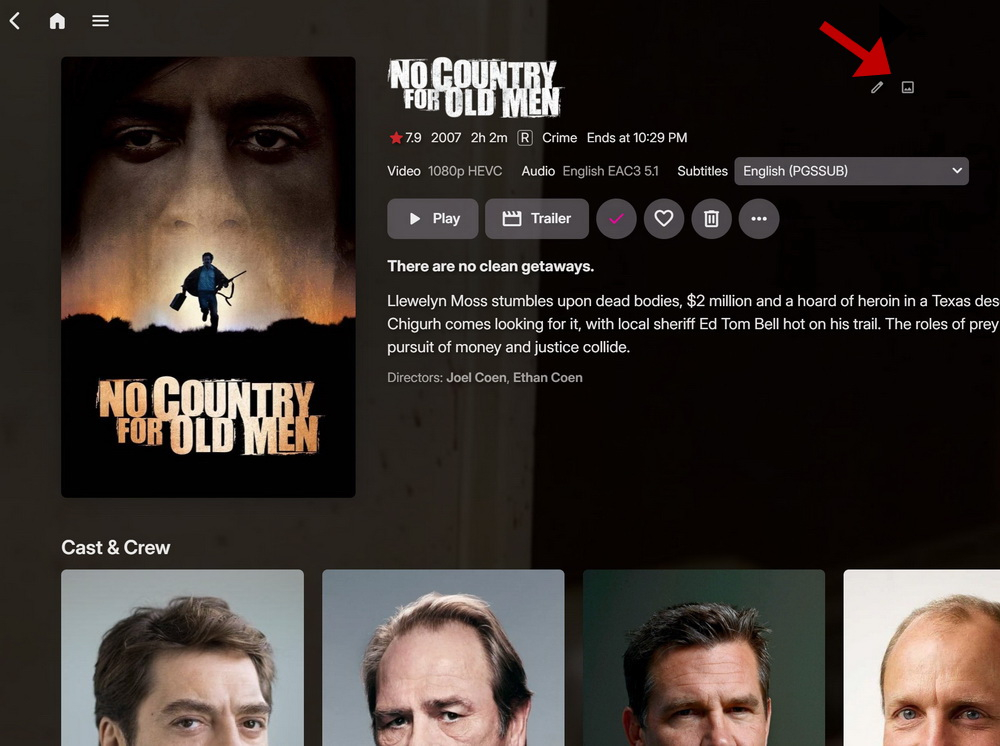
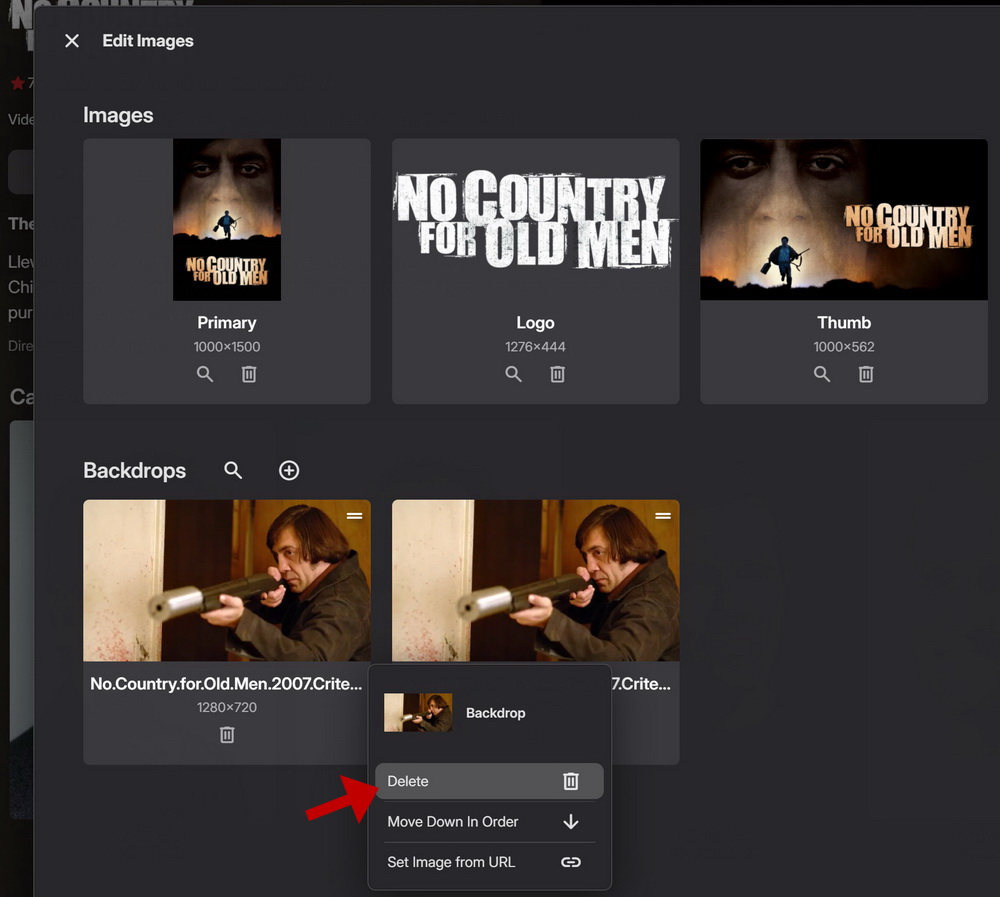
My suggestion: Maybe on this screen we can have option to "view image" or even better just click on image to enlarge.
 1 point
 -
Hi, Yes, that is how it should work. Casting is a one-to-one relationship between devices. There is no one-to-many casting.1 point
-
ahhhh shit, thats it thanks for your help1 point
-
Any social platform to their support channel.1 point
-
How did you configure the external player?1 point
-
Hi guys, At the last minute when promoting our new windows app from beta to public, hevc support was denied by Microsoft. Here is their explanation: Therefore the best way to get hevc supported as quickly as possible is to voice your feedback to Microsoft about this publicly. Thanks everyone.1 point
-
From the client machine. What arguments does MPC require to do what you want? Have you looked into that?1 point
-
So I'm also looking for a way to just simply hide content I'm not interested in from my Latest TV/Movies. I also want the option to maybe go look at stuff I have marked not interested in/hidden later if say I change my mind, run out of my favorites and really want to watch something else. Been searching and seems to be several threads/requests for a feature like this but no easy solution. Simply let the user click something to hide/ignore media and also restore that later if need be at some point. I don't want to go creating tags, manual filters, different libraries etc. and have another item to administer or teach/show a user how to do. A few threads I've scanned Please please add something simple for all of us. Thanks1 point
-
Hey Luke, No, I haven't figured out why I had to do what I had to do to make it work, but it works. I have this all written down for the next time. Thanks, Chris1 point
-
Don't run Emby with data, config and cache on network/external storage.1 point
-
To your point, it's indeed very convenient. As a plugin developer, I’d like to avoid spending too much time and effort on managing logistics. Initially, I thought SimpleFileStore could take an additional parameter for the option type, allowing multiple UI classes to be serialized into an array within a single JSON file. Thank you very much for the information and guidance.1 point
-
I appreciate the response. Any updates would be welcome.1 point
-
Actually it looks like these are in the UI but just never got implemented. We'll take a look at it. Thanks.1 point
-
HI, we are working on improving this. Thanks for the feedback.1 point
-
@lightsoutI feel your pain. You can create a python environment that uses the higher Python version. AI is good with helping with this, specify your problem and that you would like to use python environments but regardless it's not exactly straight forward to be honest. Plugin version is a few weeks away and this type of stuff will not be needed. @rbjtechYou are a wealth of information! The script is taking a backseat to plugin work at the moment but I have been meaning to add description support. I could add something like {month} {day} {time} as variables in the description. For the plugin I was thinking that it would report back the missing media and be able to show those on the plugin web page at least. But maybe there are better ideas like using the trailer along with a custom "Coming soon" overlay on the poster. I have not looked into STRM files at all, can these be Youtube urls perhaps? MDBList includes trailer information so it would be somewhat straight forward.1 point
-
To not take up too much time, I had several problems with the server because I did a recovery using the recovery plugin. 1. The actors' photos were not displayed. See here my posts: https://emby.media/community/index.php?/topic/115715-actors-photos-no-longer-showing-up/#comment-1407941 The problem has been solved and I know now what to do next time, but there are the following two that were solved only with a fresh installation of Emby. 2. I was no longer able to delete my users. See here: https://emby.media/community/index.php?/topic/134582-can-not-delete-an-existing-user/#comment-1408215 3. I was no longer able to add the connect email for new users (actual post). Note that all these three problems no longer appeared as soon as I reinstalled the server (new server) without using the restoration plugin. I would like to thank the moderators as well as the Emby support contacted by email, however, based on my experience, I do not recommend restoring the server using the plugin.1 point
-
Hi, Luke. Well, I did a new instalation of server. I had a lot of issues with the backup plugin. Thank you anyway, it's good to know for the next time.1 point
-
worked like a charm. thanks for all your help1 point
-
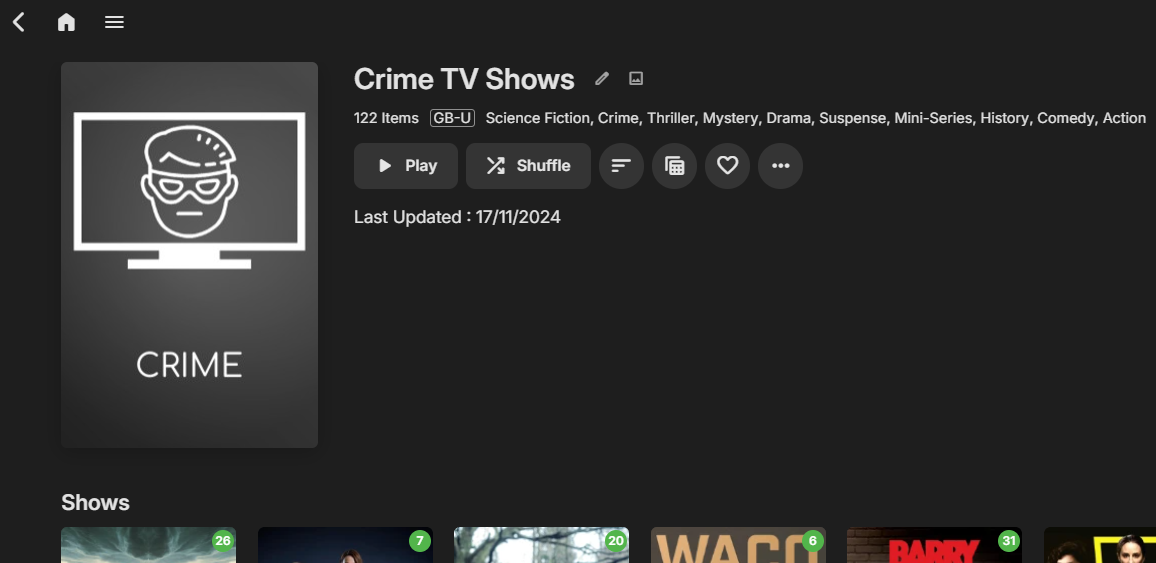
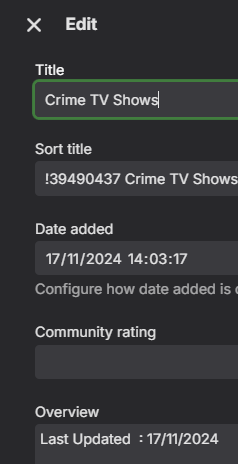
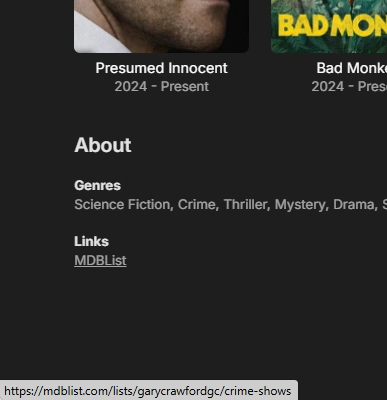
@Amything Not sure if you are taking Feature Requests but it would be great to add the date the collection was updated to the 'Overview' section. Then I know it's not a stale collection. Sadly while Emby has this as metadata, there is no way to show it .. An example below - this was manually added by me to the metadata overview field (empty on mdb created collections). Adding other info into this section might also be useful - such as the more complex refresh options ? Adding ProviderId's would also be the icing on the cake - as I'm needing to manually add these for them to appear as 'Links' to the mdb source...
 1 point
 -
Previously outlined here... https://emby.media/community/index.php?/topic/103009-audio-screensaver-presentation/&do=findComment&comment=10836371 point
-
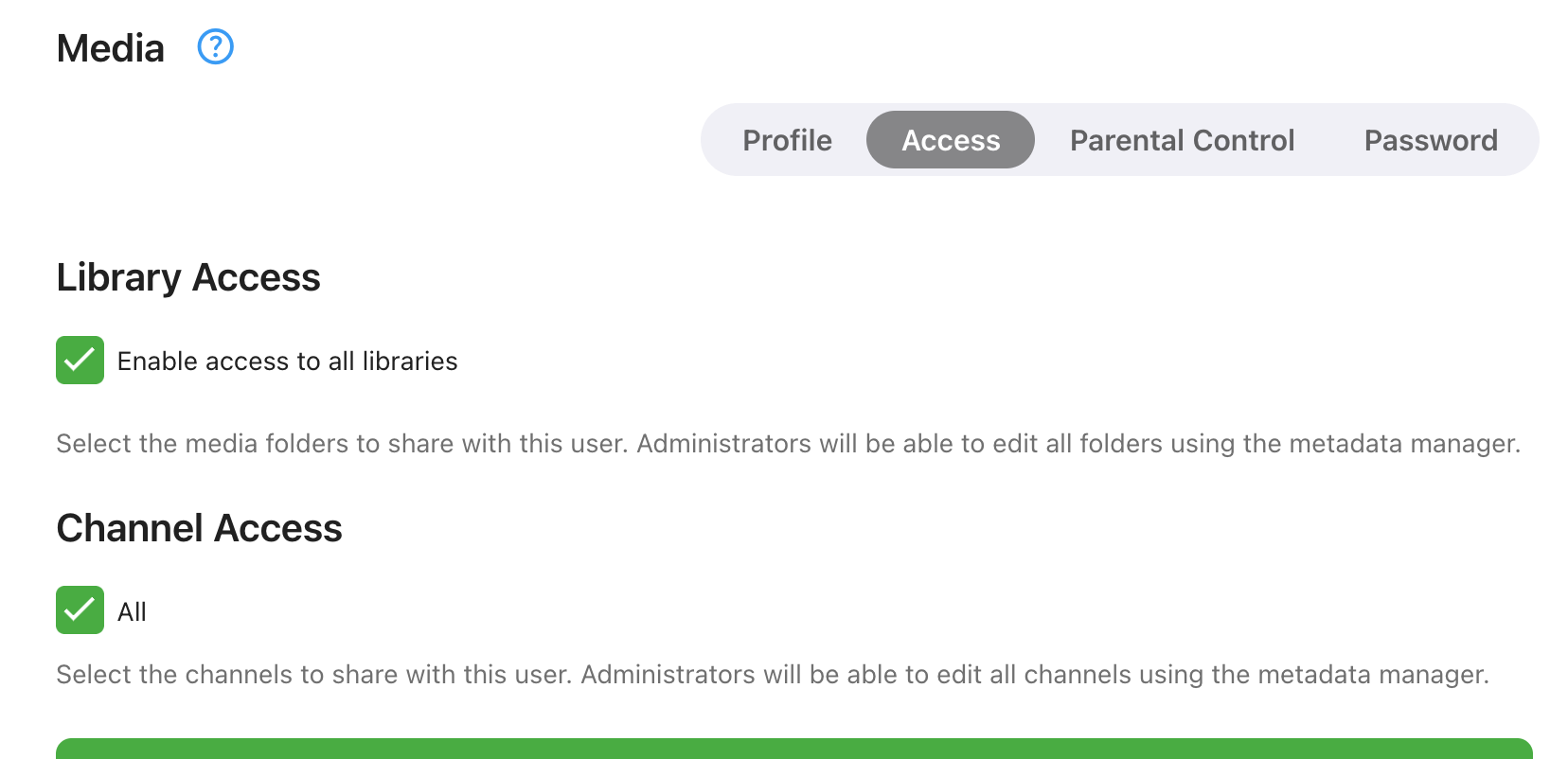
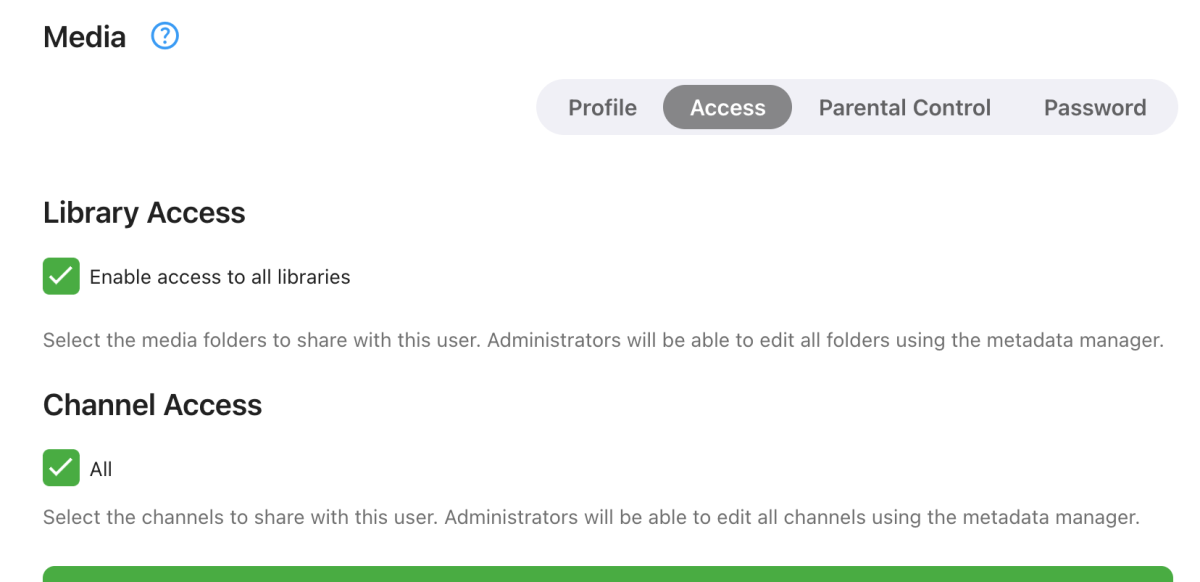
That worked... who'd a thunk it... it was created under that user, an admin user to boot; reasonable to expect that user would have access by default. Hopefully I fixed for future by selecting "... all libraries". Tks seanbuff...
 1 point
 -
OMG...that was easy1 point
-
Can you give it another try?1 point
-
Hi, what makes you think this?1 point
-
@djerniehoule ebr, was just reminding us not to talk about 3r party services like this here in the forums. Problem is that it's far too hard these days to know what services are legit and which aren't in different countries, never mind the fact we don't promote any 3rd party services. We do not want to be associated or seen as promoting any service that might not be fully legal in countries that use Emby. Hope that makes sense, Carlo PS Feel free to PM any questions you might have.1 point
-
Bonjour, C'est ce qui me semblait. Ce serait intéressant d'avoir possibilité de créer un "modèle" utilisable ou non. Merci et bonne journée. --------------------------------------------------------------------------------------------------------------------------------------------------------------------------------------------- Hello, That's what I thought. It would be interesting to be able to create a “template” that could be used or not. Thank you and have a nice day.1 point
-
There is some delay due to Synology's long review process. So for example, if we release a 4.8.6 release but we know we'll probably be doing a 4.8.7, then we'll probably just wait for 4.8.7.1 point
-
WELCOME TO THE HISTORY OF EMBY! A lot of our users are new to Emby and we thought it would be a good idea to share some of the backstory of how Emby came to be, where we started and where we are headed. We have grown significantly since our inception. Once a humble open-source project, Emby has evolved into a sophisticated platform that allows users to organize, stream, and enjoy their media libraries with ease. In this post, we'll take a look back at the history of Emby, explore its development journey, and highlight the key milestones that have made it what it is today. The Early Days: An Open-Source Beginning Emby started its life as Media Browser, an open-source project focused on creating a simple, user-friendly interface for accessing digital media collections. Originally, Media Browser was a plugin for Windows Media Center, and its primary goal was to offer users a better way to manage and play their media files. Back then, it was a community-driven project, with developers and enthusiasts contributing code, features, and plugins to expand its capabilities. Media Browser gained a loyal following among tech-savvy users who appreciated its customizable nature and flexibility. The Shift to Emby and the Rise of the Media Server In 2014, Media Browser underwent a major rebranding and evolved into what we now know as Emby. This change wasn’t just about a new name—it marked a shift in focus from a media center add-on to a full-fledged media server solution. Emby’s developers wanted to create a standalone server capable of managing large media libraries, transcoding content, and streaming to multiple devices. The introduction of the Emby Server brought a range of new features: Library Management: Users could organize and manage their media files with a sleek web interface. Metadata Scraping: Automatic fetching of metadata like cover art, descriptions, and ratings. Transcoding: On-the-fly transcoding for seamless streaming to any device, regardless of format. Multi-Device Support: Streaming became possible on a variety of devices, including smartphones, smart TVs, web browsers, and gaming consoles. This new direction attracted more users who were looking for a flexible media server that could handle diverse formats and provide a unified experience across different platforms. Open Source to Closed Source: In 2018, Emby made a significant decision: it moved from being an open-source project to a proprietary, closed-source model. The change allowed the development team to maintain greater control over the codebase, improve security, and introduce features more rapidly. Key Milestones in Emby’s Development As Emby transitioned to a proprietary model, the development team pushed forward with a series of updates and improvements: Emby Premier: The introduction of a paid subscription model called Emby Premier brought exclusive features like DVR support, cloud sync, offline media, and hardware-accelerated transcoding. Emby Premier gave the development team a sustainable revenue stream to fund further development. Improved Mobile and TV Apps: Over time, Emby released a series of polished apps for mobile platforms (Android, iOS) and TV devices (Roku, Apple TV, Amazon Fire). These apps received regular updates to improve stability, user experience, and customization options. Live TV and DVR Integration: Emby expanded its offerings to include Live TV and DVR functionality, allowing users to integrate live broadcast channels, schedule recordings, and manage live content alongside their media libraries. Enhanced Transcoding and Streaming: Emby has continuously improved its transcoding capabilities to support modern formats like 4K, HDR, and Dolby Atmos. These improvements allow for a high-quality viewing experience regardless of the device being used. Security and User Management: Emby introduced advanced user management features, including user profiles, parental controls, and access restrictions. This makes it easier for families to share media without compromising on privacy or security. Emby Today: A Comprehensive Media Experience Today, Emby is a mature and feature-rich media server solution that caters to a wide range of users—from casual media consumers to serious home theater enthusiasts. It supports a broad spectrum of devices, offers robust customization options, and remains focused on providing a powerful yet easy-to-use interface. Some of Emby’s standout features today include: Unified User Interface: A sleek, modern interface that makes browsing and streaming media a joy. Customizable Libraries: Tailor your media collections with custom artwork, genres, and metadata. Cross-Platform Syncing: Keep your media in sync across multiple devices and platforms. Comprehensive Live TV Support: Access live TV, manage recordings, and watch DVR content effortlessly. Community Engagement: Emby continues to value its user base, with an active community forum, feature requests, and beta testing for new updates. The Impact of the Community and the Road Ahead Despite its shift to a closed-source model, the Emby community remains strong. Many long-time users contribute by creating plugins, themes, and offering technical support. The Emby team regularly interacts with the community, implementing feedback and adjusting features based on user needs. Looking forward, Emby is set to continue expanding its feature set while focusing on performance enhancements and cross-platform support. Emby’s development is driven by innovation and user feedback, ensuring that it remains a competitive choice in the world of media servers. Conclusion Emby’s journey from a simple open-source plugin to a leading media server solution is a testament to its adaptability and the passion of its developers. While the shift from open-source to closed-source was a turning point, Emby has continued to evolve, delivering a reliable and customizable media experience for millions of users worldwide. The history of Emby is one of growth, change, and a dedication to providing users with a comprehensive and enjoyable way to manage their digital media.1 point
-
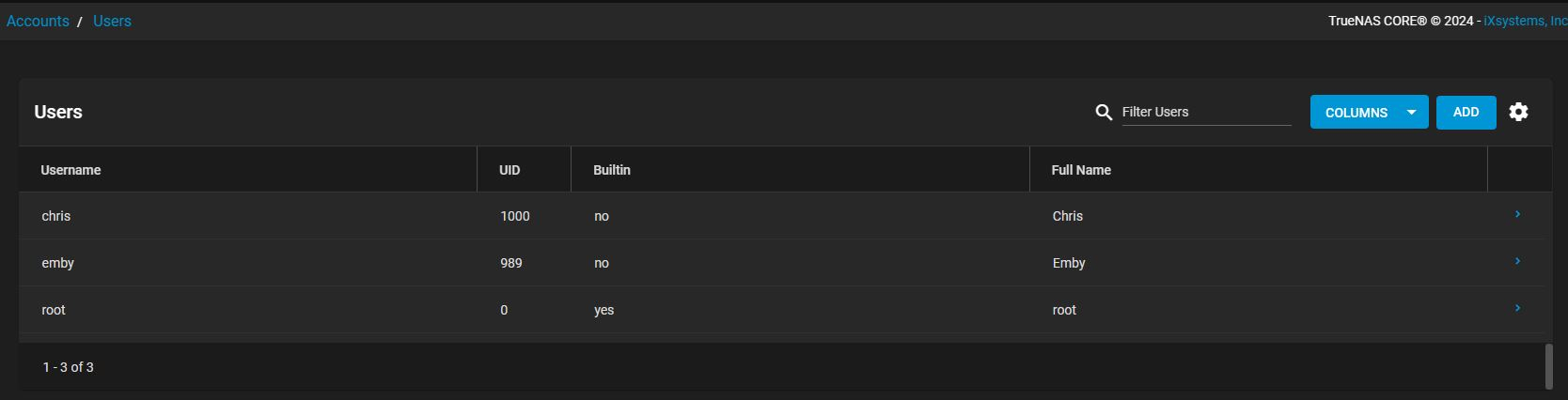
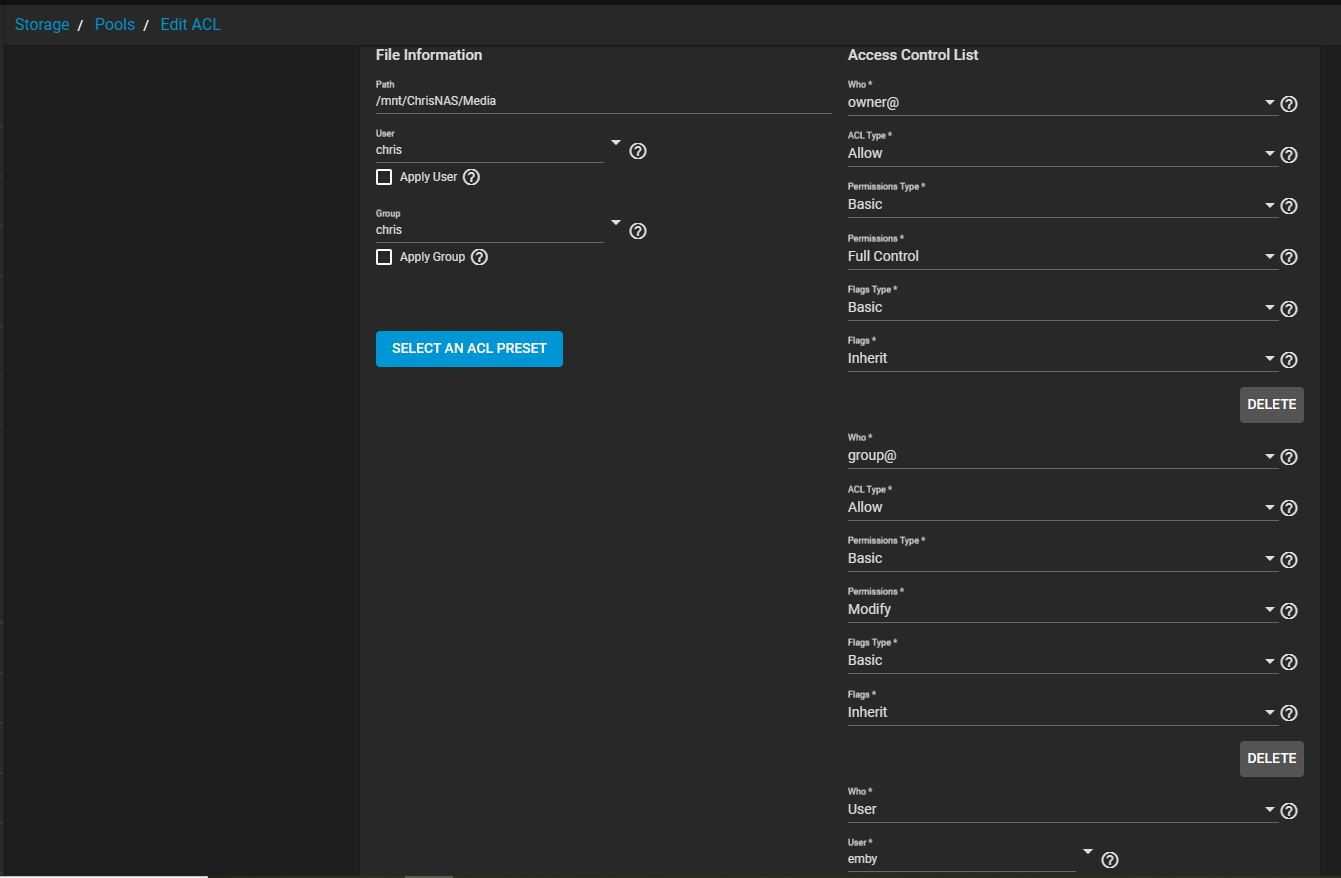
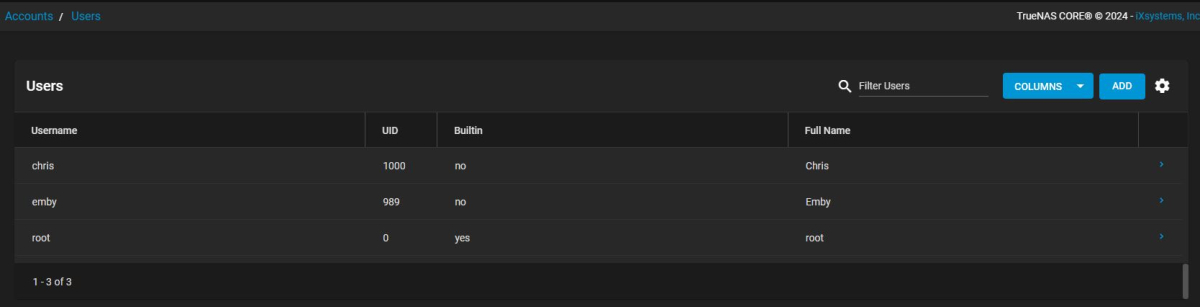
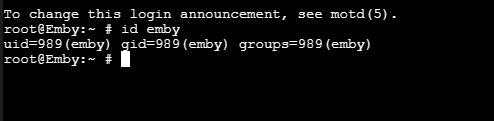
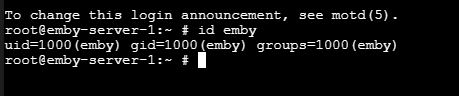
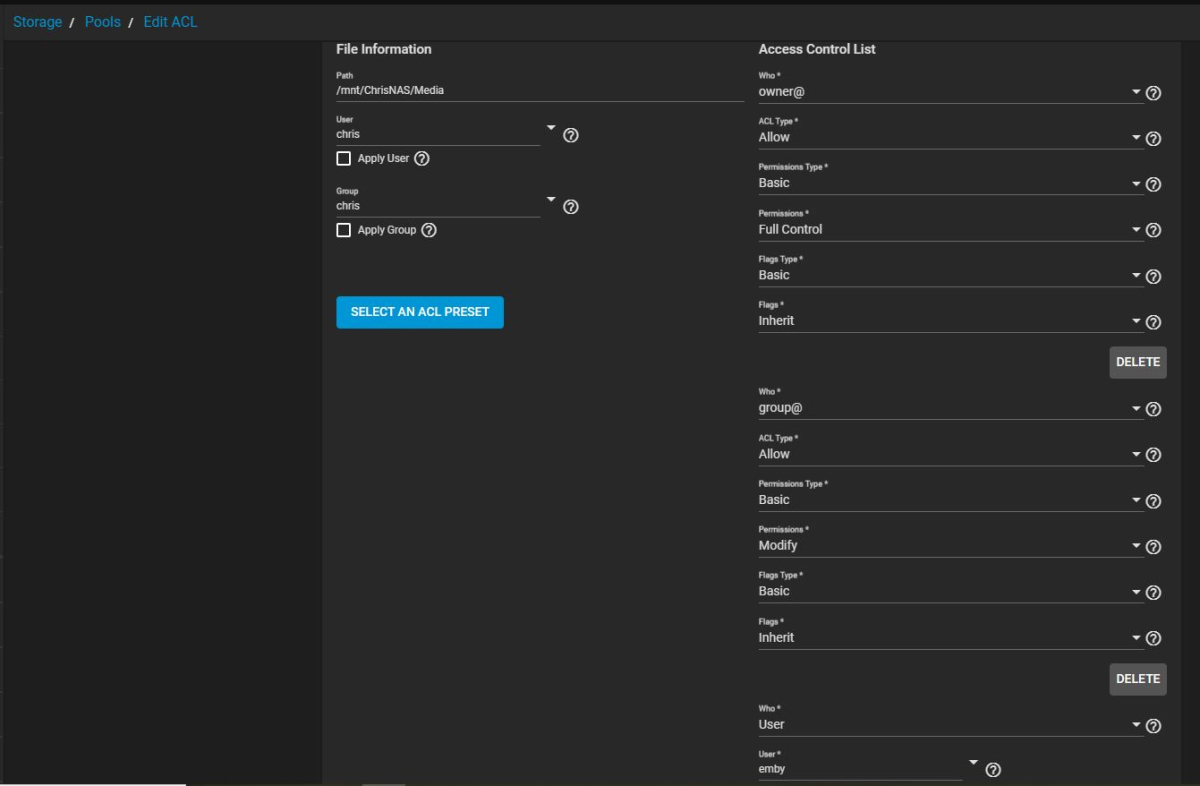
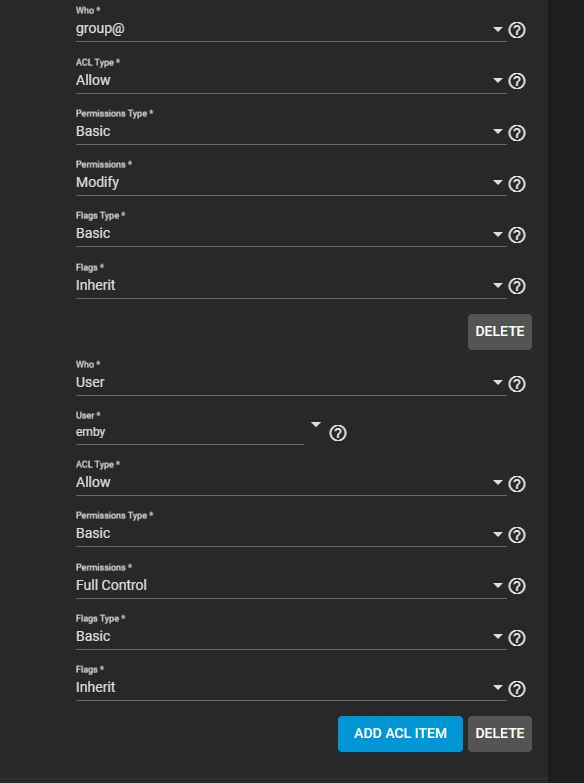
The backup I created was from a working Emby server on Emby 4.8.10.0. The user assigned to it was emby and the UID, GID and groups were all 989. I restored that backup on a new Emby Jail and everything played except for some of the movies. I checked the UID, GID and groups of that new server and it too was emby and 989. I didn't understand why some movies wouldn't play. I have a user named chris and the UID for that user is 1000. So I set the the user emby, in that Jail, to have a UID, GID and group of 1000. This resolved the issue. I still find it odd that one server works fine with emby set as 989. Attached are the permissions. As you can see in one picture (see attachment Exiting server), I ran the command Id emby and it shows 989 associated to emby. That server works without issue and that's the server I backed up and used that backup to restore. I do have my original Emby server from when I first started using Emby and I have that one's emby associated to 1000. I figured, let me try associating the new server to 1000 and that worked (see attachment New Server). Below is a screen shot of my ACL. This is the same ACL associated to all three of my Emby servers (I will be decommissioning the one based on 4.8.1.0 shortly, leaving me just 2 servers) and the ACL is associated to the mount point of each server that points to the same location. So for one server 989 works, but for the other, 1000 works. I'm still a little shaky on permissions, but at least I got it working. Just can't understand why I had to make that change, especially when you can clearly see emby as a user in the ACL. If you can offer an explanation, I'm all ears. Thanks, Chris
 1 point
 -
im pretty sure @RanmaCanada kills kittens in RL1 point
-
As far as I can tell you are neither an employee of Emby nor a moderator on this forum, therefore I don't get why you go out of your way to berate newcomers seeking help and constructive input. I'm not sure what happened in your life that you feel the need to be rude to strangers on the internet, whatever it is I feel truly sorry for you. But to use the only rethorical device you seem to recognize: whatever problem in life made you turn out this way it's a YOU problem.1 point
-
Have you taken a look at this?1 point
-
Hi, Looks like single bay my cloud devices can't install apps: https://community.wd.com/t/adding-new-app/223054For gen 2 there's a hack that will let you install apps, but this doesn't seem feasible on gen 1.1 point

















.thumb.png.f4cb0545e98b51fd9b00e427622ab761.png)