Leaderboard




Popular Content
Showing content with the highest reputation on 12/16/24 in all areas
-
I think I have "partially" solved it. I was accessing the music folders from a network drive. I moved them locally on the server and this worked. We can call this solved for now, but worth noting for anybody else doing this.2 points
-
This is unfounded. It's perfectly reasonable for someone with a huge collection to expect their friends and family might need some help navigating it.2 points
-
After I got the files selected it took me a while to figure it out. Once the files are selected, if you want to remove a single tag, open the extended tag dialog via [Alt+T], delete the fields and press OK to save the changes. Thanks for the help! I had about 10k tracks that this was an issue for, so it saved me a lot of time. Thanks! -HS2 points
-
Am a little confused for this request as it is as simple as not adding a photo library, correct?2 points
-
Thanks for the reply. From what I have read the 6600k was OK however, I don't think I will be transcoding much. The pc has 16gig of ram and running at the moment of a usb drive. Will be getting a few new 8 gig harddrives soon. Main tv is 4k and running emby client on nvidia shield. We have android and iPhone etc. I think the only tv that is 1080p and emby client is on a chrome cast which is 1080p. Might upgrade that to the new 4k version soon. I will leave the gpu out and continue testing. No issues in the last few hours with one stream with a few 1080p tv shows. The test I did on my main pc was amazing though, had 4 internal stream and 3 outside streams going with no issue.2 points
-
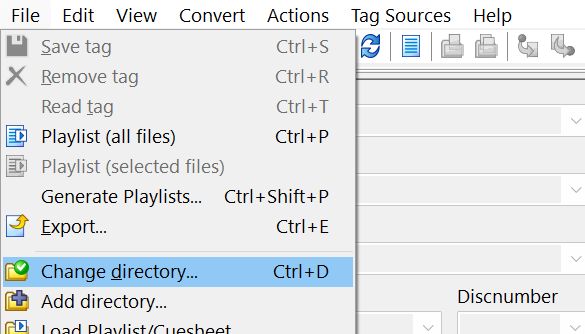
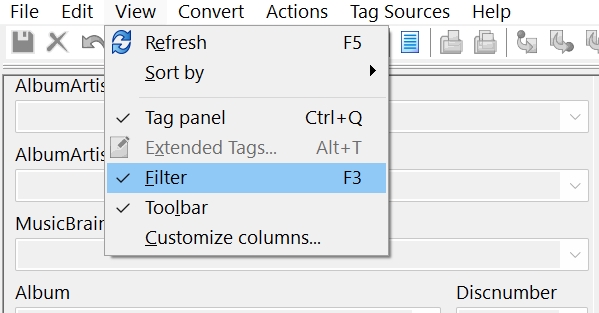
Hi, Mp3tag can possibly do what you want. Perhaps something like this: Load in a parent folder of music (large or small) File>Change Directory (Mp3tag will load in all underlying sub-folder music files) Filter by "Album Artist" tag View>Filter>%album artist% PRESENT or Filter by "AlbumArtist" tag View>Filter>%albumartist% PRESENT The Filter section is shown at the bottom of the window: Beyond this, Mp3tag can be customised as you wish and bulk changes can made. (Manually select all filtered files and then delete the ""Album Artist" tag and Save). Or create an "Action" and run it on all files as required (once you learn a bit about the "Actions" capabilities). Cheers!

 2 points
 -
If Emby's functionality for Live OTA TV and DVR was not present, I would have far less interest in it; it works for me right now, but I would be pleased to have some of the improvements reported as present in TVnext. As for smart playlists, and the subject of this thread in particular, I find it ironic that Emby put in so much effort for features which, it seems to me, are of most use to people using Emby in ways not intended by the T&Cs... My Emby server contains my content, and my family and I already know what's there when choosing what to watch. Paul2 points
-
Thanks @Carloand everyone else for the troubleshooting help. I discovered that opening port 443 on my router allows the connection to go through successfully, with port forwarding rule 443 -> 8920. I now suspect that our firewall is blocking specifically https over non-443 ports on certain subnets, breaking the connection. It would explain why otherwise, public connections are fine, but certain subnets cause trouble. It would also explain why I'm able to netcat those ports and see them as open normally, but not be able to connect over https in the web browser. I think the reverse proxy approach is best, since I assume the network team where I work is not keen on making new rules for personal servers. Thanks again, this should be resolved now, at least as far as Emby goes.2 points
-
Unless I'm being a bit blind (highly possible!), I'd love a way to hide a couple of the top green navigation items without hacking it in myself. For example, in Movies I don't want the 'Trailers' item to appear for any profile and for TV I don't need the 'Upcoming' nav link. Obviously not a major issue but thought it would be a nice thing to have, perhaps allowing them to be re-ordered like the home page items but again just a nice extra,1 point
-
I'm a big fan of services such as Rifftrax, and I hate having to manually mux files every time I purchase another release. Much in the same way that external subtitle file support was added, it would be nice to have external audio track support for TV and movies added as well. I wouldn't expect Emby to handle the offset calculations needed to sync the audio. It's not too difficult for me to modify that now.1 point
-
Hmmm - sounds very much like someone else I know... (me)... ️️!!! ... Keep listening though...1 point
-
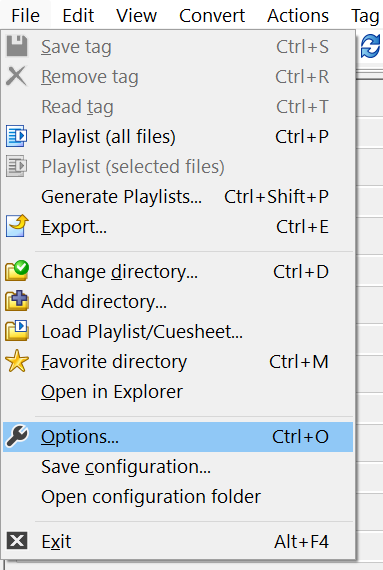
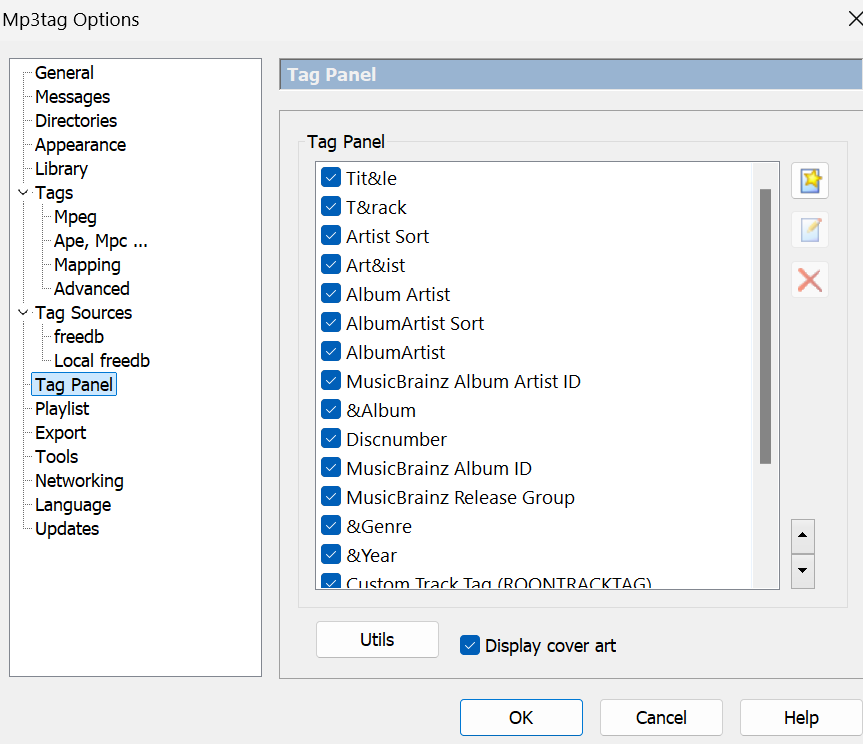
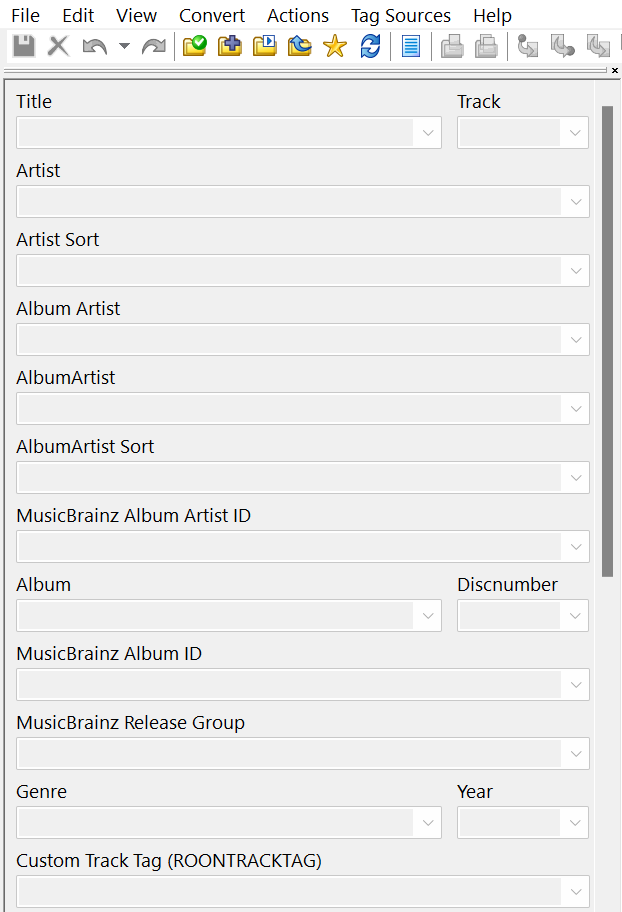
Hey, great to hear that it worked and you're getting it sorted out. Yeah, there can be quite a few different ways to navigate Mp3tag... If you go to File>Options>Tag Panel it's possible to customise the LHS tag panel to show any of the extended tags you might like to always see. E.g. you could put both "Album Artist" and "AlbumArtist" here if you wanted, but it may not be necessary for you now? This is the top section of what I have now (different from the default panel), though I keep making changes from time-to-time, to suit whatever my current focus/project is: Good luck with getting everything organised how you want it be!
 1 point
 -
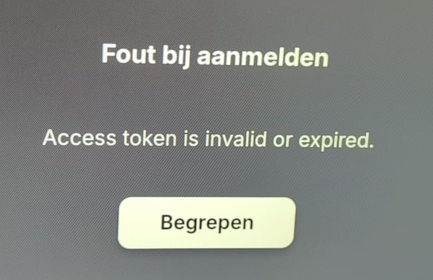
Never had this problem. Untill i have someone whos in another country and tried to login. There was no way..... untill i saw this post. After 100000s of tries, i tought i give this a go... and IT WORKS. Thank you very much !! And i dont even use 443 thats the weird part.
 1 point
 -
If a truly unneeded feature is available then it is in the code and thereby bloating the app. Clearly Emby can do as they wish because they own the app but people begging for features that do nothing for most but bloat the code are not desirable.1 point
-
I'm not thinking that is the issue. I thought they wanted it removed so the devs can concentrate on other things and because there are other apps that do photos "much better" and to reduce the size of Emby or "fat'.1 point
-
HI, we are working on adding this to Emby for Apple TV. Thanks for the feedback.1 point
-
I think we'll know once we have the solution, but probably something that will sort itself out. Thanks.1 point
-
That was it! I have a plugin that removes non-English/Spanish subs. I would have though that since it was a plug in (vs a separate tool) it would detect the change. At least I know how to fix them now! Thank you!1 point
-
Hi, what exactly do you mean? It's hard to answer such an open question.1 point
-
No it's not new, but probably the first time ever for you that a program entry from your real live tv also exists in your libraries and the library item has broken metadata. I can try to ignore that exception with an update next week. For the time being i would just disable that special export setting.1 point
-
Do you remove subtitles? As it suggest Emby known media info says one thing but files when played say another. 10:05:40.445 Stream map '0:3' matches no streams. Had another topic on this where user was using a program to strip subs but Emby never way the update and could not play the files with similar error. So if you Refresh metadata on file does it play? Or maybe library scan? If that is the case you will need to "touch" every file that gets edited to ensure has new modification date so Emby can reprobe media info to update the database.1 point
-
It's the export setting "Try to match program entries to library items...". Some of your tv shows must have bad meta data with either no production year (release date) or where the production year is higher than the ending year.1 point
-
If you are one of the people who does use it, of course it is important to you. Its important to us too, it just can't be more important than some other things. We have to pay for guide data and can make some extrapolations from that. BTW I'm also one of the people in that minority.1 point
-
Please try with the new app once it's released, ET Desktop isn't actively supported anymore. Thanks1 point
-
Looks like you will get better results from the 6600K/Skylake as it has better HEVC decoding capabilities. Intel Quick Sync Video - Wikipedia Video Encode and Decode GPU Support Matrix | NVIDIA Developer1 point
-
It's wasn't H2P's idea - it was mine - he just linked to my post But yes, the concept is simple - and while it could be adopted easily into a plugin - adding the ability for multiple metadata languages/regions would be much better but as with most Feature Requests in emby, if it's only used by a small percantage of users - it highly unlikely to be implemented.1 point
-
Maybe you could fix this as a christmas gift? Sincerly Your paying customers1 point
-
Thanks to all of you for your help. It is not the same price in Europe. To get something close to Onn 4K UHD, it’s at least 99€. Enough powerful to get a good user experience without lags but need to be subscribed on certain application to get all TV channels in France for example. I decided to get back Video Station on my Synology with a script given by someone on GitHub and it is working great. Movies and music play well. No need to pause/unpause. It is also very surprising that Synology has not decided to leave it available but without maintaining it. btw, I tried Emby Premium to have Emby in my vehicle and listen my music from my server, but when I play a music, it plays 5 secondes then stop, maybe to download the next few seconds, then play 10 seconds and stop, to download the next few seconds, etcetera. I have not this problem with DS audio. The music starts after few seconds but it is enough downloaded to play the music clearly and not stop to download the rest. Maybe I will go back to try Emby when I will get another device , but for now, my experience is not complete. Even if Emby seems much better than other solutions. One again, thank you for your help.1 point
-
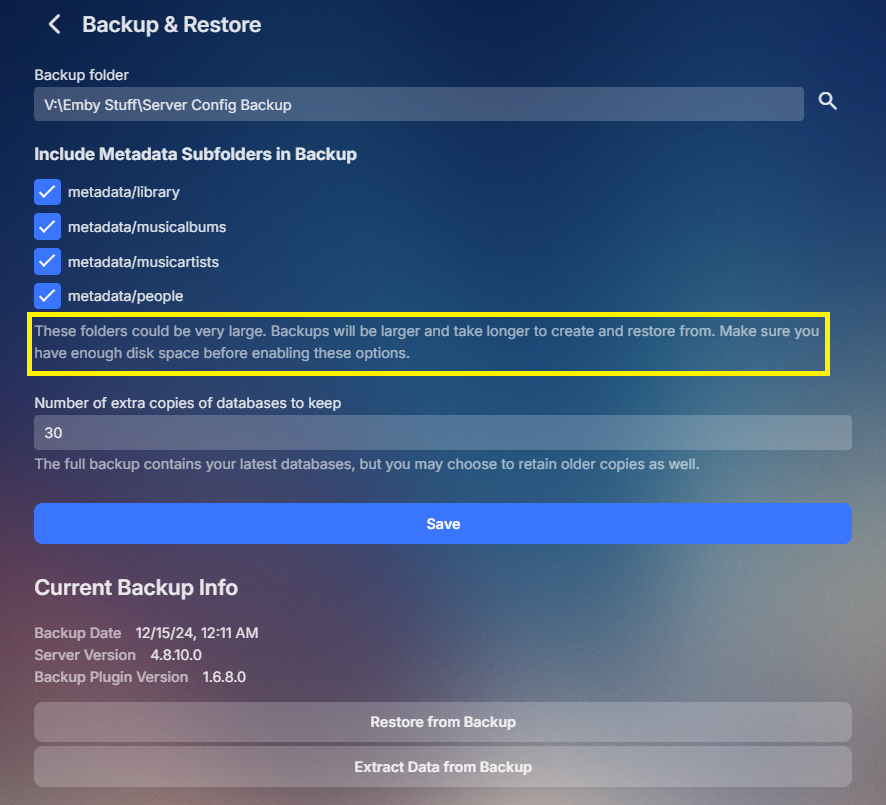
If you have not enabled the option in the plugin yes as it is required. Otherwise you will be required to Refresh metadata on all libraries as the backup would not contain all info. by default they are not enabled do to potential size of backup and time to backup all. In the end everyone should have their own backup plan for the entire Emby Programdata folder.
 1 point
 -
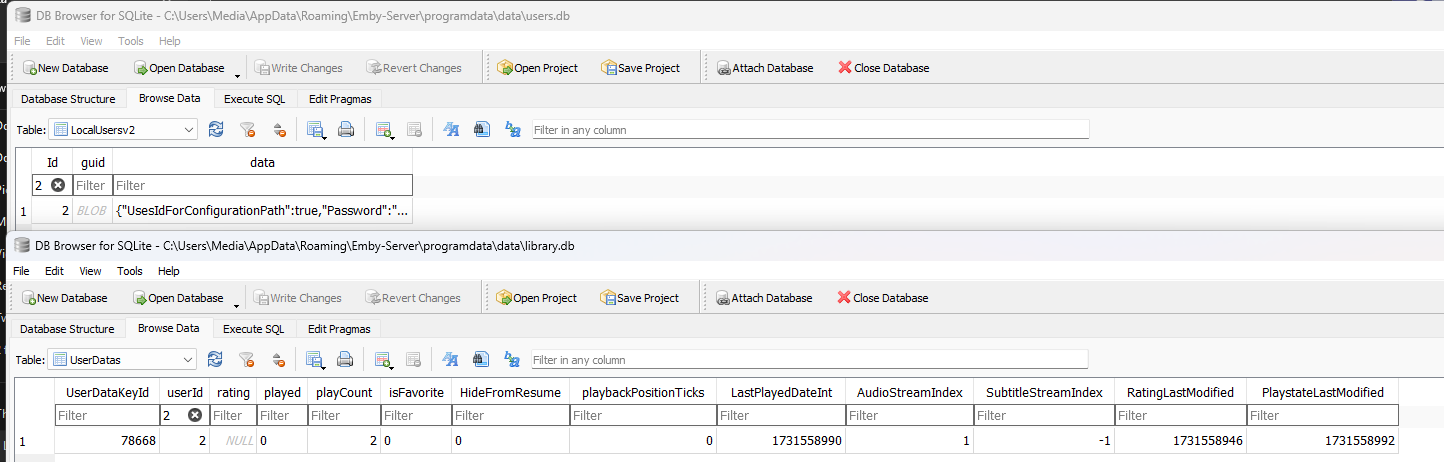
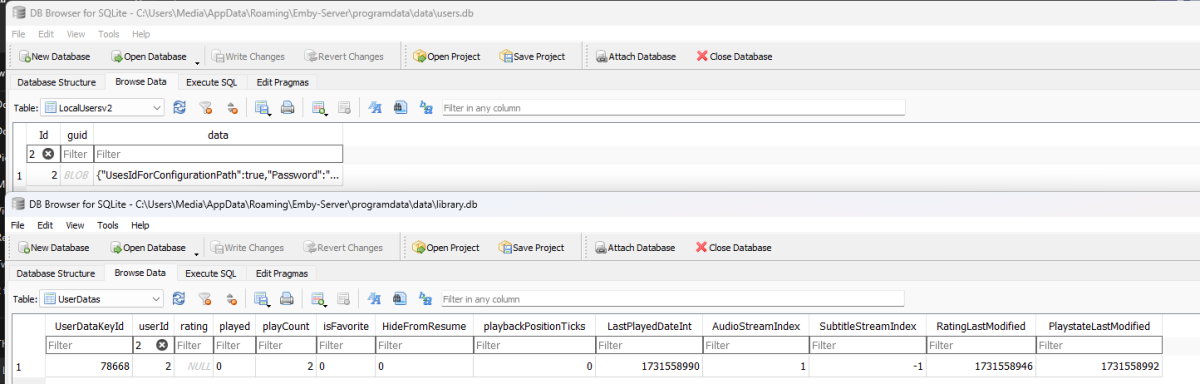
It is in the library.db in the userdatas table per usersid from the users.db. And yes you can query all that userid info and remove it. example showing user 2 in users.db and data in library db.
 1 point
 -
If you haven't done so already try checking your spam folder for the delivered key or any responses from support. My experience has always been that keys are delivered fairly quickly and response from support never took more than a couple of days maximum.1 point
-
Thanks @TZTZoroFantastic. That's all I need. I appreciate the help. I continue to learn from your CSS. Vic1 point
-
I don't use live TV so I'm not certain; but isn't tv guide data something Emby provides as a service? At the very least, they'd have stats on how often that data is requested, what IPs/server IDs/Premiere IDs are used to retrieve it, and probably some similarly related metadata.1 point
-
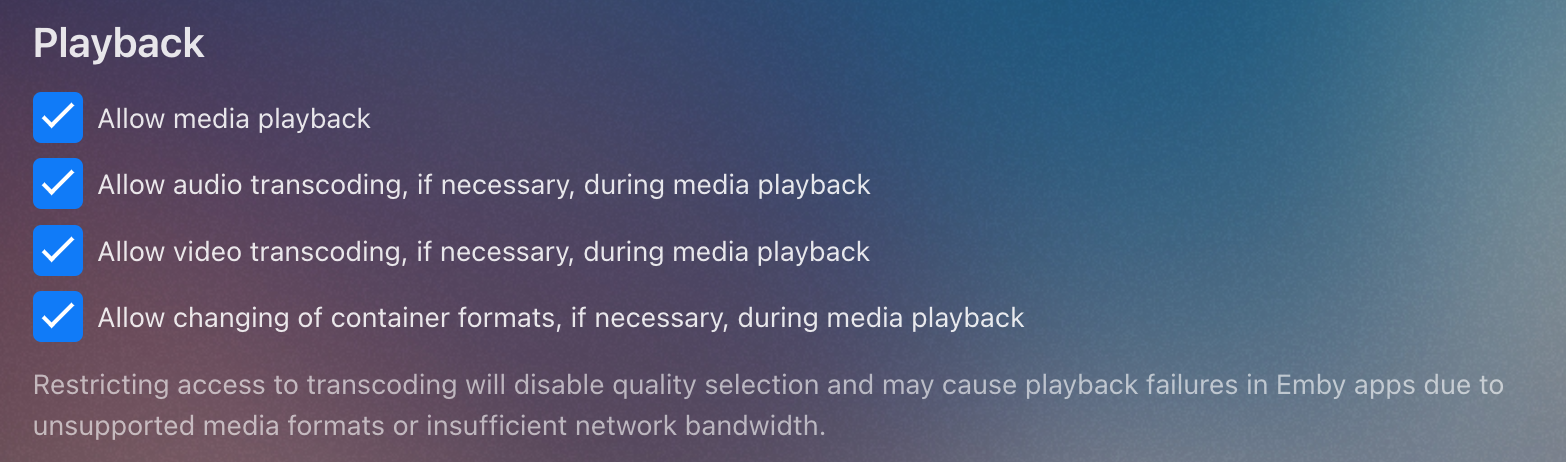
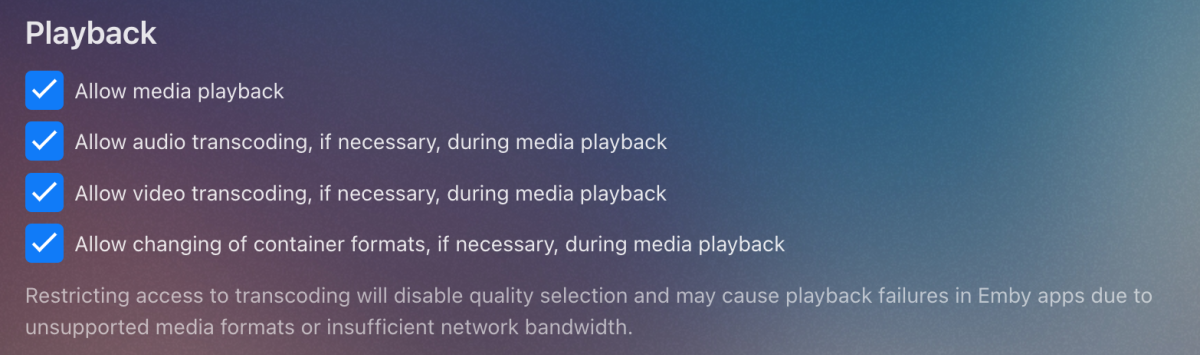
DV on LG only works in MP4. Can you make sure that you have all these user options enabled, and that this setting is enabled in Transcoding settings on the server
 1 point
 -
Disregard again. I installed the official docker instead of the Binhex one, and it's working now.1 point
-
Hi, no, but it is in process of being increased.1 point
-
It was indeed permissions related. Thanks! Problem solved. I have created a bash script that deletes old .TS files from streams that are longer then 1 hour active /not modified. This seems to solve the Live-TV issue that is causing large folders... Is it not possible to set a limit on the .m3u8 size? For example, setting a limit on the number of TS files a .m3u8 can have? If it exceeds this limit, Emby would discard the first segments.1 point
-
In latest version (4.8.10.0) I noticed using my media wheel does not change the volume control in web media player. Thanks a lot! So much better handling now1 point
-
No, I hadn't. I tried just about everything else. Clicking/Selecting the password field DID bring up a "keyboard" matrix. It also showed a QR code that would allow a user to use the keyboard on a smartphone, because "It is easier to type on your phone" --> THANK YOU EMBY DEVELOPERS for being so thoughtful!! I also noticed some options below the USERS line, including connect via EMBY CONNECT. Selecting this option displays a QR code and a PIN number on my TV. Pointing my smartphone camera at the screen gives the option to go to the CONNECT website & enter my Emby Connect credentials on my phone. I just had to also enter the PIN # from the TV screen, then click the NEXT button on the TV (after my smartphone said PIN CONFIRMED), and my Emby Collection came right up. THANK YOU!!! NOTE: I marked my answer as the solution because I added additional details, but the true credit goes to EBR. FEATURE(s) REQUEST: 1) The QR code to use your smartphone keyboard also appears in the search field when looking for titles. However, the search field specifically states "Click to see keyboard". The password field should offer that suggestion also. 2) It would be nice for the QR code keyboard option to also be available in the Apple TV version (and other streaming devices, if it is not already there), though Siri allows dictation, which would make it superfluous I guess.1 point
-
Ly, You are aware of the connection challenges encapsulating TCP inside of Starlink download packets? A quick summary of the issues are listed here in an August 2024 proposed method to fix the problem: https://dl.acm.org/doi/10.1145/3663408.3665803 If the 15 second interval is still correct, you could easily be experiencing many out of order packets and any ACK responses might get lost, resulting in the host server resending perviously sent TCP packets. This would result in more buffering. The 12Mbps upload is only part of the specs that affect video streaming. I believe the TCP processing in the Mac OS will not adjust RWIN sizes quickly, if at all, to compensate for out of order TCP packet reception due to Satelite broadcast. It may well be that your Mac OS handling of TCP packet traffic is part of the problem and apparently can not be changed. It might be nice to force a larger RWIN size to help. Does your host setup mention any TCP/IP customized RWIN settings either in any software they provide or adjusting the Mac OS directly, if that is even possible? You can tweak up the RWIN size on Window and Linux, but it's not that easy. Mac RWIN is apparently set to an algorithm and cannot be changed. It is probably set to work best for direct Ethernet and Wifi only. As far as I see, there is no automatic RWIN change for satellite or similar issues with very distance connections. I think with Mac OS, you may be stuck and it just doesn't work perfectly well yet with Starlink when it comes to video streaming. More RWIN and TCP settings info: https://community.plus.net/t5/Library/Guide-To-RWIN-amp-MTU/ba-p/1322233 https://duckduckgo.com/?q=rwin+tcp+settings+mac+os+algorithm&ia=web A nice description of how RWIN settings can affect TCP packet flow in the first response. https://stackoverflow.com/questions/10289604/tcp-receive-window1 point
-
Thx @Carlo I am giving it a try. As of now, they were off. I deleted the plugin and did not reboot. I'll have to wait a few hours, even till tomorrow to see if things have changed. Will keep you posted1 point
-
4 months since the last message, so figured it's due another check. We are getting close to a year of 4.9 being available as a beta release now (4.9.0.0 was made available on Feb. 3) with no signs of this feature. Any further update on this or a potential timeline?1 point
-
Hello Everyone, I’d like to share a project I’ve been working on a Docker container that automates the management of Emby’s "Top Picks" feature. Here’s the GitHub repository: https://github.com/Fahmula/top-picks Initially, I created this container for personal use, but I’ve done a lot of refactoring to make it accessible to others. I hope it can be useful to the community. How It Works 1. Fetching Trending Media: The container fetches two pages of trending movies and shows (20 each) from Trakt’s public lists, keeping the same order. It then retrieves the TMDb IDs for these items. 2. Matching with Local Media: Using the TMDb IDs, it queries your Emby server to check if the media is available locally and retrieves the internal Emby IDs required by the "Top Picks" plugin. 3. Updating Top Picks: The container updates the "Top Picks" plugin configuration with the retrieved Emby IDs and manually triggers the "Update Top Picks" scheduled task. 4. Fixing NFO Issues: To address the common issue of .nfo files being stored in the root folder of shows instead of the correct season folder, the container runs a loop for 1 minute after the task is triggered. During this time, it organizes the .nfo files into their proper season directories. Note: To avoid conflicts, disable .nfo generation for the "Top Picks" library, as it isn’t necessary and can exacerbate the issue. Things to Keep in Mind This container might not suit everyone’s needs, but feel free to customize it to fit your setup. It’s designed to be flexible and configurable. Let me know what you think! Feedback, suggestions, and contributions are welcome1 point
-
Would your OCD accept C:\Movies\Public and C:\Movies\Private? Then you'd add the two subdirectories, but not the enclosing directory. Of course, you'd be rescanning the whole lot because of the change in directory of the existing non-private movies. Paul1 point
-
Sorry for the absence. Yes, this problem is solved in version 4.8.10. Thank you very much1 point
-
@Happy2Play That did exactly what I wanted! Thanks!1 point
-
I did...instead of reverting to the original library, I deleted it and kept the mirror library (with the network address instead of mapped drive), and made mirrors of the other libraries using the same format. I haven't done any further testing, as the Radarr/Sonarr connections have been working perfectly.1 point
-
+1 on this. I can use css easily on the browser, but I use emby in browser 1% of the time, mobile apps 9% of the time and TV android app 90% of the time, so the css tweak is useless really. If hiding is not possible, is it instead possible to re-order the tabs? I just don't want to have to click through suggestions, trailers etc in order to reach favourites, genres and folders.1 point
-
Bump I'd like to be able to remove some unused tabs to. For me I'd remove Artists, Composers, Tags and Folders from the music top navigate bar. I find that Album Artists provides a better list for me considering I download albums of artists that I like and don't care too much about those that feature on the tracks. They'd be a few tabs I'd remove from TV and Movies to. I hope this is a feature at some point. I guess you'd add this as checkboxes in the Library settings. Thank you.1 point
-
Update: Issue is resolved if port 443 is specified (instead of left empty)1 point
.thumb.jpg.8d54a78411d15728ced2e460df60257b.jpg)