Leaderboard




Popular Content
Showing content with the highest reputation on 12/14/24 in all areas
-
Hi One thing that takes a while in Emby is actually trying goto the media folder of the currently playing media in Emby. I am not talking about using file explorer/manager type thing. This is within Emby. I propose that there should be a way to go to the folder of the currently playing media. For instance, I start playing a video from Latest Video. Now, I want to go to the media folder of that playing video. That is a bit cumbersome, like looking in the info for the path, go back to the home and start recursing into the subfolders. This can be a single click instead like an option like "browse folder" in one of those media's options places. thanks2 points
-
Hi all! Jon from Eshtek here, creators of HexOS! Saw this post and just wanted to comment. I definitely see us supporting Emby as a curated app on our platform. In the meantime, savvy users can drop to the TrueNAS UI to manually configure Emby through docker. It is true that TrueNAS dropped k8s as of the electric eel release in favor of docker. FYI we opened the beta to all customers on 12/11, so you should be in now!2 points
-
When on main media screens, users are given the option to choose what fields appear (title, file name, IMDb rating, etc). However, when you are inside of a collection, this option is not given. Users should have the option to choose specific fields inside of collections just like they have the option elsewhere.2 points
-
Disclaimer: If you decide using the delete option, IT'S YOUR OWN RISK! If you are using fileops on Kodi, LOOK and VERIFY what Kodi is about to delete or modify. The affected folder is clearly shown in a Kodi popup message. Kodi 20 no longer supported! Kodi 21 or higher is required. Factory reset is mandatory and will automatically trigger when upgrade from 10.X versions! Info: The core module is of emby for kodi next gen is the service plugin. Video, picture and audio modules are helpers and optional and needed when using dynamic nodes. STABLE VERSION 11.1.27: Emby server 4.8 and higher supported Download Links: https://kodi.emby.tv/Public testing/emby-for-kodi-next-gen-11X/plugin.service.emby-next-gen-11.1.27.zip https://kodi.emby.tv/Public testing/emby-for-kodi-next-gen-11X/helpers/plugin.video.emby-next-gen-10.1.2.zip https://kodi.emby.tv/Public testing/emby-for-kodi-next-gen-11X/helpers/plugin.audio.emby-next-gen-10.1.2.zip https://kodi.emby.tv/Public testing/emby-for-kodi-next-gen-11X/helpers/plugin.image.emby-next-gen-10.1.2.zip Release Notes: fix sync issue for multiversion content when width info is not available fix dynamic node for musicvideo artists fix https EOF issues fix forced resyncs on Emby server updates fix hibernate mode fix subtitle issue fix minor http communication issue increase http timeouts to 20 minutes -> Emby MusicAlbum queries are very slow fix playback cancel on multiselection for episodes and musicvideo not respected add option to cancel artwork cache update Chinese language file fix http communication issue, when server connection was dropped fix sort order for mixed content playlists fix shuffle playback session info fix lastplayed date updates when playcount was not modified update Chinese language file fix sync when a content item has no name (invalid item reported by Emby server) fix edge case http communication issue when Emby server connection was interrupted add warning message when Kodi companion addon is not installed on Emby server fix sync folder removal issue in native mode fix multiversion update issue Fix movie update issue fix reset cache for playlists on updates add option to prefer local content over "plugin" links (default is on) fix minor multiversion sync issues fix special features for multiversion content assigned to multiple libraries support Kodi's player default version setting for episodes, musicvideos and videos fix edge case endless sync loop fix music nodes fix playlist nodes disable path substitution for audio content (not necessary for audio content and improves playback performance and stability) improve node caching skip Emby userdata updates for MusicAlbum when sending = receiving device fix root nodes when using multiple Emby servers fix EPG refresh on events fix minor shutdown issue fix minor progress update issue fix remote playback position accuracy spare unnecessary skin refreshes on progress updates -> Less Kodi load when using same Emby account on multiple devices fix embedded nodes in homescreen (some special nodes had issues) fix dynamic nodes order (e.g for playlists) improve hybrid nodes for playlists fix synced playlists nodes (avoid using Kodi's native m3u playlists due to lag of metadata, use the synced playlist node) fix playlist sorting fix audioplayback issue on some devices minor http improvements fix server reconnect when using proxies fix dynamic content issue fix Kodi shutdown issue fix sync timing issue faster http communication fix http chunked transfer encoding fix song selection via dynamic nodes when same song is assigned to multiple Emby libraries improve playlists fix subcontent realtime updates improve sync locks fix egde case sync and logging issues improve http request locks fix async commands ping improve progress updates when playback ended or seek workaround for Kodi bug when seekposition is higher than runtime -> Kodi stalls for couple of seconds unless stop is pressed increase subtitle download timeout to 30 seconds fix edge case sync issue, when init sync is in progress, incoming updates might not be processed and results in a sync loop fix photo nodes fix delete homevideos via dyanmic nodes fix download homevideos fix progress updates for homevideo in native mode fix log issue fix to many threads running (edge case for slow devices on heavy load) fix minor queue issues fix deleting files by dynamic nodes fix to many threads started (edge case when massive and long running updates are pushed via realtime sync) improve websocket reconnects on Emby server hard reboot/power cycle fix cyclic import fix remove client on remote playback fix remote playback pause command from clients after init fix watch together for multiple participants and one of them stopped the playback -< disabled watch together for all clients add musicvideo album node inject --NO INFO-- when musicvideo album is empty improve websocket reconnect fix issue when using invalid dynamic nodes improve episode debug messages improve Kodi shutdown fix minor sync pause issue fix emby connect fix music sync when AlbumArtist info is missing fix chapter sync issue when using older 4.8.X Emby server versions lower ping interval to 3 seconds, as proxy servers (apache) keepalive timeout is by default 5 seconds minor https connection improvements fix websocket close-connection issue improve offline-mode notifications increase http timeouts from 1 to 3 seconds add music content synced-nodes for singles add translations fix websocket-reconnect issue (edge case) fix minor webservice issue when Kodi queries jpeg pictures improve strm files playback with embedded http streams fix progress updates when using dynamic nodes in native mode add follow-http option for remote content e.g. strm and livetv default off -> do not pipe external http links through Emby server. This fixes some edge case playback issues fix cinnema mode in native mode fix remote playback progress updates when dynamic content remotely played in native mode some minor playback performance improvements change datetime datetime.utcnow api call, as it's deprecated minor logging changes add SeriesPrimary artwork as fallback for episode thumb artwork hold upcoming episode cache for 1 day fix server remove change playerbusy threading increase aysnc conmmands timeouts to 3 seconds set highest resolution for multiversions by Kodi (as an option, default is on) autoselect best quality multiversion for episodes etc. (classic multiversions selection) (as an option, default is off) improve tvshows deduplication notifyall on content add/content updated/content remove/content userdata changed/library add/library remove (option) fix delete season/tvshow support multiversion content delete fix server remove when server is offline improve http error messages fix edge case http communication issues fix sync stalled when plugin content update in progress and Emby server restarted improve TVShow deduplication fix minor http request queue issue fix special charecter & issue in nodes keep plugin settings on forced database resets keep Kodi native favorites favorites toggle option syncs fix dynamic node issue when "dynamic libraries" configuration options set to off fix player crash when item was removed from Kodi playlist Rename GusetStart to Guest Star fix guest stars fix audio playback fix database vaccum function fix episode remove bug fix delete after watched fix folder startup sync issue fix removeal of abandoned MusicAlbums and MusicArtists fix library remove issue fix playsession fix minor subtitle issue fix when no pathsubstitution used fix invalid music album disc numbers add fallback for chapters using Emby server 4.8.X fix runtime for multiversion content fix content ungrouping (mutiversion) sync issue fix http connection issues fix subtitle issue add movie-tvshowlink support option to disable startup sync chapters assigned to mediasources (accurate chapter markers for multiversion content) support skip credits in native mode add Creditstart into database change logging modes add support Kodi 21 multiversion add support Kodi 21 specials improve livetv sync menu improve themes sync menu use original filenames in addon mode (improves Kodi subtitle download) support native mode for dynamic nodes fix non youtube trailers support skipintro for dynamic nodes support multiversion selection for dynamic nodes filter MusicAlbum update on song play (realtime updates) -> skip double updates (performance) rename helper addons improve threading priorities (performance) fix xml encoding in addon.xml improve http connection -> use less tcp sessions (performance) support specials in continue last played node (modification by user seashell, thanks) improve sync performance for multiversion content improve boxset sync (performance) improve folder sync (performance) improve database priorities (reliability) remove Kodi workarounds for bookmarks (Kodi 21.1 seems fixed the issues) remove settings migration from 9.X reconnect when emby server is down on Kodi start fix repeat mode status updates and support repeat remove command add support shuffle mode remote commands add support remote audio stream selection improve player events increase default curl timeouts1 point
-
Unless I'm being a bit blind (highly possible!), I'd love a way to hide a couple of the top green navigation items without hacking it in myself. For example, in Movies I don't want the 'Trailers' item to appear for any profile and for TV I don't need the 'Upcoming' nav link. Obviously not a major issue but thought it would be a nice thing to have, perhaps allowing them to be re-ordered like the home page items but again just a nice extra,1 point
-
More items in the Latest row(s) would be nice. I just added a bunch of new TV shows / series and 16 isn't enough. If I click on Latest TV, it goes to Suggestions, which is useless, I would like more Latest TV not Continue Watching or Latest Episodes. I can sort TV by date added but that doesn't show new series added to existing ones (series 5 of The Expanse) for example. Similar for Movies please.1 point
-
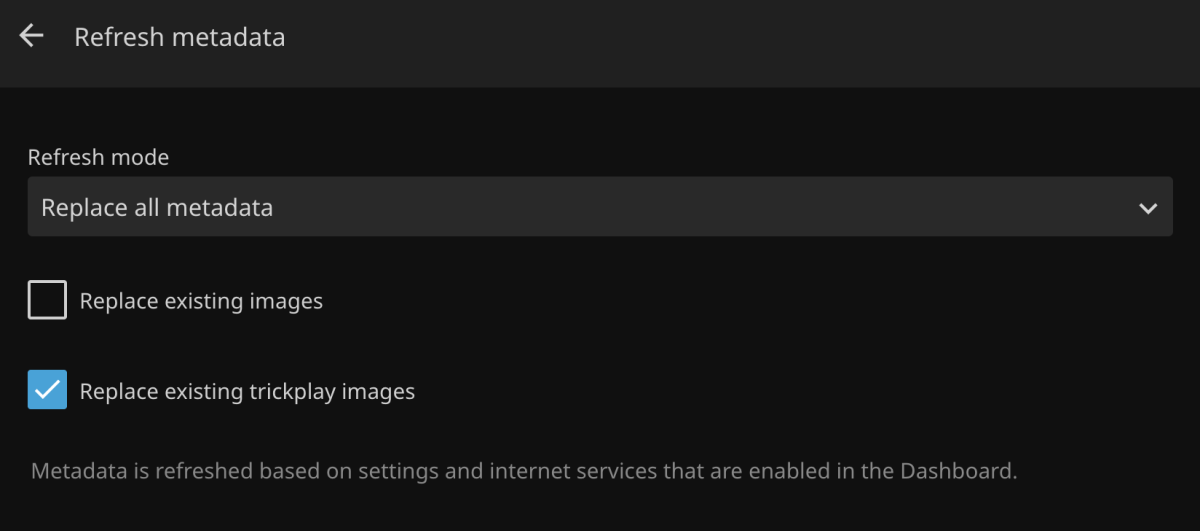
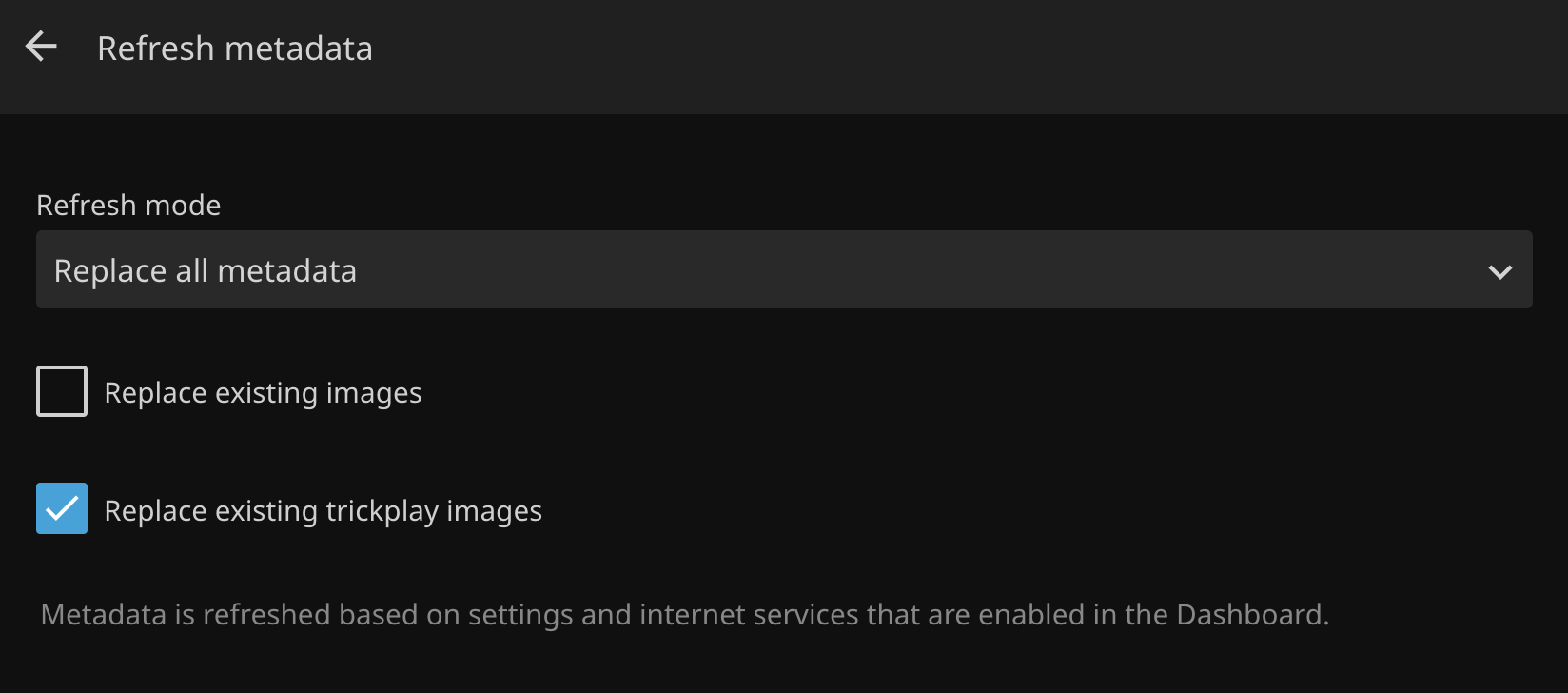
Refreshing metadata should include the option to regenerate seek/index images. Currently you have to find and delete the bif files manually. With Jellyfin, all you have to do is check a box in the UI: https://i.ibb.co/Tq5LznF/jellyfin-refresh-md.png
 1 point
 -
This is a PSA for any Emby users that have also subscribed to Trakt VIP. In September Trakt increased the subscription from $30/year to $60/year. In the Trakt forum a user asked about the price increase for existing users, and one of the moderators responded with: "If you’re existing VIP member, nothing changes and you keep your existing pricing. This means a Trakt OG on the $15/yr plan keeps their pricing. And it means Trakt VIPs paying $30/yr keep that pricing. As long as you remain an active VIP, you’re grandfathered in at your price point. If you have issue or a failed renewal, just contact support and we will honor the price." Unfortunately, this has turned out not to be true. if you currently are an active VIP that previously paid $15 or $30 for your annual subscription and for some reason the auto-renewal expired (or was cancelled) you will lose the ability to renew at the previous price point - even if you contact support. The only option is to renew at $60/year. Support responded to one user who reached out to ask for the original price point to be honored prior to their subscription expiring with: "Thanks for reaching out. Unfortunately, since your automatic renewal was canceled, it would be considered a new vip subscription and isn't eligible for the original pricing." The thread in the Trakt forums is Price of VIP? - Trakt / Questions & Help - Trakt Forums. I'm one of the users caught off-guard by this with a subscription ending early next year. I would renew at $30/year that I paid for the last two years. But since I turned of auto-renewal 30minutes after paying for the year in 2024 I'm not being given that option. I don't know about others, but I personally cannot justify renewing at $60/year for the handful of VIP features that are actually of use to me. So I'm going to have to let my subscription expire and move on.1 point
-
News and talk shows often have a single original air date when they are not episodic, I don't think this is a Gracenote issue. Martin1 point
-
We can support gpus for Plex so I would assume we could do the same for Emby. I'll reach out here again when we are ready to curate and we can talk more details. Any guidance you guys could provide when we get to that point would be awesome. Thanks guys!!1 point
-
Danke für eure Hilfe aber ich habe das Problem gelöst ich habe bei synology ds224 nas in volume 1 den Emby Ordner gelöscht und jetzt geht alles wieder1 point
-
Same black screen issue with DV HDR10+ Fire TV Stick 4K Max 1st gen, works by removing HDR10+ metadata (as rbjtech wrote, thanks ) I used Dolby_Vision_Tool (drag file to DDVT_REMOVER, press S) very fast, 30 seconds. Is it possible to add a setting to disable HDR10+ to emby??1 point
-
Awesome to hear Jon. I have at least 5 sites I will move from other OS/Storage setups to HexOS in the near future. @hexos_jon will HexOS support GPU's for Emby as well? I am not familiar with trueNAS/Emby integration.1 point
-
OS is 6.12.14 and driver is 565.57.011 point
-
I tried to post it https://httpbin.org/post which just returns the response and I can see the header. So this is on my end somewhere.1 point
-
Hi Jon, welcome !1 point
-
4 months since the last message, so figured it's due another check. We are getting close to a year of 4.9 being available as a beta release now (4.9.0.0 was made available on Feb. 3) with no signs of this feature. Any further update on this or a potential timeline?1 point
-
Thanks, I can see the problem. The subtitle size is quite big and the download times out after 6 seconds. I'll increase the timeout for subtitle download in next version, but frankly not sure if it's a great idea to use pgs subtitles.1 point
-
Thanks, here is a sample subtitle. pgs_subtitle_sample.sup1 point
-
none whatsover1 point
-
Disregard, I added a PIN to my account and it started working. Even once I deleted the PIN, it continued to work. I have absolutely no idea what the correlation/causation is there, or if there is one, or if it was totally unrelated, but at least for now it seems to be working again.1 point
-
That fixed it. Thank you very much for the precise instructions. Much shorter thread than SSL Made Easy.1 point
-
This change was implimented to make library scans quicker, which it does.. No need to scrape future bullcrap that you don't have and may never have! I think it was the way to go. What I think could be done is add a "missing episodes" to the shedule so we can run it overnight and don't get the spinning wheel when we enter that menu..1 point
-
What do you mean with autoload? If you are talking about dvdsub, it's a Emby server issue. @LukeThat's also a known Emby server bug.1 point
-
All good This is a very common complaint about the Samsung app and there are numerous posts on the subject. It's notoriously bad when converting HD audio and PGS subs and the higher the bitrate of the video the worse the problem. Preselecting a compatible audio and subtitle track (if there are any) will always give you a better experience (better bitrate, etc) I'm hardwired with everything 2ft away from each other and I can't convert audio and PGS subs on the fly without it constantly buffering. Any other client I have no issues.1 point
-
Great - if it was the issue, then post here as it may help others1 point
-
I have managed to reproduce the errors in a test setup recording on Emby Server on linux into a recording library of mixed content setup with an smb path to a network shared folder on windows. My first recording was ok but subsequent recording failed - in a similar way to those 2 fails in your logs for the 16th and 20th: 2024-10-16 15:50:05.693 Error LiveTV: Error recording to smb://10.0.0.95/TV_Record/Tele-Noticias/Tele-Noticias 2024_10_16_16_00_00.ts 2024-10-20 05:50:06.447 Error LiveTV: Error recording to smb://10.0.0.95/TV_Record/Misa Dominical/Misa Dominical 2024_10_20_06_00_00.ts The issue may be smb specific as I did not get these errors in all my earlier tests recording into a local folder I will refer the diagnostics I captured to the development team. Meanwhile, as suggested originally, could you setup a recording library on a local drive or give a local path - such as /mnt/xxx/xxx path and see if that resolves the matter1 point
-
There is some delay due to Synology's long review process. So for example, if we release a 4.8.6 release but we know we'll probably be doing a 4.8.7, then we'll probably just wait for 4.8.7.1 point
-
HI, we are working on it. Thanks.1 point
-
It would appear so, form your testes. 1) Yes 2) Yes 3) Yes I do not use embedded subtitle, I always extract them from media, and only use .srt subs. I have had to many issues over the years with embedded subtitle and graphic subtitle even if they where not embedded. And this is with plex, jellyfin and emby. I have learned to avoid embedded and graphic subtitle.1 point
-
Going to test Jellyfin over christmas, It now supports hardware encoding, Dolby Vision, Atmos, AND Dolby Vision to SDR Tone mapping, (which Emby still cant do) The Two main issues are apparently the Clients aren't as good, and remote access can be a trickier. But Jellyfin does has far more useful plugins. I am frustrated that Smart Playlists for Emby has taken 10 YEARS, and it's still not ready, and this feature breaking bug has taken 9 Months, which should be fixed in days. I would be more lenient, even happy, if this was free software, but i am not getting any value from my subscription. If Jellyfin ticks all the boxes over the next month, i'm out, and glad i didn't pay for lifetime... Lifetime is how long you have to wait for something to be fixed.1 point
-
Yeah it looks like that was it, everything has been stable with no missed recordings even the one mentioned.1 point
-
Carlo - I appreciate your response. These are all home movies. I have been able to resolve the problem. When setting up the Library, I probably indicated that they were 'Movies' as opposed to "home movies'. I deleted the originally Library and re-installed them as "home movies" and things appear to be correct. Again, thank you for your response.1 point
-
There are pros and cons to using home videos as well as to using TV. I think you have to decide what's best. Just know that TV libraries do have some file naming requirements.1 point
-
I said at the time that I thought it was an awful change and still feel the same. Awful changes unfortunately happens far to often with this product.1 point
-
WELCOME TO THE HISTORY OF EMBY! A lot of our users are new to Emby and we thought it would be a good idea to share some of the backstory of how Emby came to be, where we started and where we are headed. We have grown significantly since our inception. Once a humble open-source project, Emby has evolved into a sophisticated platform that allows users to organize, stream, and enjoy their media libraries with ease. In this post, we'll take a look back at the history of Emby, explore its development journey, and highlight the key milestones that have made it what it is today. The Early Days: An Open-Source Beginning Emby started its life as Media Browser, an open-source project focused on creating a simple, user-friendly interface for accessing digital media collections. Originally, Media Browser was a plugin for Windows Media Center, and its primary goal was to offer users a better way to manage and play their media files. Back then, it was a community-driven project, with developers and enthusiasts contributing code, features, and plugins to expand its capabilities. Media Browser gained a loyal following among tech-savvy users who appreciated its customizable nature and flexibility. The Shift to Emby and the Rise of the Media Server In 2014, Media Browser underwent a major rebranding and evolved into what we now know as Emby. This change wasn’t just about a new name—it marked a shift in focus from a media center add-on to a full-fledged media server solution. Emby’s developers wanted to create a standalone server capable of managing large media libraries, transcoding content, and streaming to multiple devices. The introduction of the Emby Server brought a range of new features: Library Management: Users could organize and manage their media files with a sleek web interface. Metadata Scraping: Automatic fetching of metadata like cover art, descriptions, and ratings. Transcoding: On-the-fly transcoding for seamless streaming to any device, regardless of format. Multi-Device Support: Streaming became possible on a variety of devices, including smartphones, smart TVs, web browsers, and gaming consoles. This new direction attracted more users who were looking for a flexible media server that could handle diverse formats and provide a unified experience across different platforms. Open Source to Closed Source: In 2018, Emby made a significant decision: it moved from being an open-source project to a proprietary, closed-source model. The change allowed the development team to maintain greater control over the codebase, improve security, and introduce features more rapidly. Key Milestones in Emby’s Development As Emby transitioned to a proprietary model, the development team pushed forward with a series of updates and improvements: Emby Premier: The introduction of a paid subscription model called Emby Premier brought exclusive features like DVR support, cloud sync, offline media, and hardware-accelerated transcoding. Emby Premier gave the development team a sustainable revenue stream to fund further development. Improved Mobile and TV Apps: Over time, Emby released a series of polished apps for mobile platforms (Android, iOS) and TV devices (Roku, Apple TV, Amazon Fire). These apps received regular updates to improve stability, user experience, and customization options. Live TV and DVR Integration: Emby expanded its offerings to include Live TV and DVR functionality, allowing users to integrate live broadcast channels, schedule recordings, and manage live content alongside their media libraries. Enhanced Transcoding and Streaming: Emby has continuously improved its transcoding capabilities to support modern formats like 4K, HDR, and Dolby Atmos. These improvements allow for a high-quality viewing experience regardless of the device being used. Security and User Management: Emby introduced advanced user management features, including user profiles, parental controls, and access restrictions. This makes it easier for families to share media without compromising on privacy or security. Emby Today: A Comprehensive Media Experience Today, Emby is a mature and feature-rich media server solution that caters to a wide range of users—from casual media consumers to serious home theater enthusiasts. It supports a broad spectrum of devices, offers robust customization options, and remains focused on providing a powerful yet easy-to-use interface. Some of Emby’s standout features today include: Unified User Interface: A sleek, modern interface that makes browsing and streaming media a joy. Customizable Libraries: Tailor your media collections with custom artwork, genres, and metadata. Cross-Platform Syncing: Keep your media in sync across multiple devices and platforms. Comprehensive Live TV Support: Access live TV, manage recordings, and watch DVR content effortlessly. Community Engagement: Emby continues to value its user base, with an active community forum, feature requests, and beta testing for new updates. The Impact of the Community and the Road Ahead Despite its shift to a closed-source model, the Emby community remains strong. Many long-time users contribute by creating plugins, themes, and offering technical support. The Emby team regularly interacts with the community, implementing feedback and adjusting features based on user needs. Looking forward, Emby is set to continue expanding its feature set while focusing on performance enhancements and cross-platform support. Emby’s development is driven by innovation and user feedback, ensuring that it remains a competitive choice in the world of media servers. Conclusion Emby’s journey from a simple open-source plugin to a leading media server solution is a testament to its adaptability and the passion of its developers. While the shift from open-source to closed-source was a turning point, Emby has continued to evolve, delivering a reliable and customizable media experience for millions of users worldwide. The history of Emby is one of growth, change, and a dedication to providing users with a comprehensive and enjoyable way to manage their digital media. View the full article1 point
-
As you know, Emby is a powerful media server that lets you stream and manage your personal content across a wide range of devices. With Emby, you can access your favorite movies, shows, music, and photos from nearly anywhere. Here’s a rundown of the devices that support Emby and how you can enjoy a seamless media experience on each. 1. Smart TVs Emby has dedicated apps for several major smart TV brands, including Samsung, LG, and Android TVs. This means you can stream directly on your TV without needing extra hardware: Download the Emby app from the TV's app store. Log in to your Emby server, and you’ll have full access to your media library on the big screen! 2. Streaming Devices (Roku, Apple TV, Fire TV, Chromecast) If you don’t have a smart TV, streaming devices are a great option for using Emby: Roku: Available as a free app in the Roku Channel Store. Apple TV: Download Emby from the App Store, and enjoy a smooth Apple TV interface. Amazon Fire TV: The Emby app is in the Amazon Appstore, letting you easily access content. Android TV: Download either the Android TV or regular Android apps from the Google Play Store to access your Emby server. Chromecast: Use the Emby mobile app to cast content directly to any Chromecast-enabled device. 3. Mobile Devices (iOS and Android) Stay connected to your media library on the go with Emby’s iOS and Android apps: Download the Emby app from the App Store (iOS) or Google Play Store (Android). You can stream media, manage your library, and even download files for offline viewing. 4. Computers (Windows, macOS, Linux) Emby can be accessed on desktop computers and laptops as well: Simply open your preferred web browser and log in to your Emby server at http://yourserverip:8096. Emby also offers desktop apps for Windows and macOS for a native experience. 5. Gaming Consoles (Xbox and PlayStation) Gaming consoles like Xbox One, Xbox Series X/S, and PlayStation 4 offer access to Emby through a web browser as well as through their dedicated stores: On Playstation, open the console’s browser, enter the server address, and log in to access your media. For Xbox, visit the Xbox Store and download the Emby Theater app for a seamless Emby experience. Wrapping Up With support for such a wide variety of devices, Emby provides flexibility to access your media wherever you are, at home or on the go. Whether it’s a smart TV, a mobile device, or even a gaming console, you’re just a few clicks away from streaming your media collection seamlessly. Happy viewing! View the full article1 point
-
This is maintenance release, primarily targeting Linux users. Here are the changes: Fix hardware transcoding regression on some Linux platforms View the full article1 point
-
That's what I was expecting, since everything else is under the "3 dots". It's the only button I can think of that's kind of down there living life alone and on its own (when active), but maybe it can live in two places and still dynamically? Another "idea" is to make it visible all the time, so it's more noticeable, but have it grayed out when there isn't an active split. Thanks for the replies btw.1 point
-
It should probably also be in the context menu.1 point
-
HI, yes we'll look at improving it. Thanks for the feedback.1 point
-
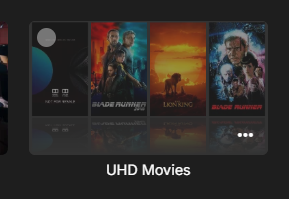
I interpreted it as he wants to be able to click on the different parts of this image and go to that movie/item. Of course, we don't have that info at this time because it is just a combined image but that is what I thought was being requested...
 1 point
 -
I can now confirm that this worked for me to. If anybody else is looking for an easy way to accomplish this: The DDVT tool features this as an option.1 point
-
I've been part of the threads on github reporting these issues. The key issue is HDR10PLUS and DV - simply does not work unless you strip the HDR10PLUS metadata, leaving just HDR10. HDR10 and DV (to make DV8) DOES work just fine however, but the 4K Max seems to be very strict on the format. I've found remuxing/correcting with the dovi scripts from RESET_999 does the trick, and I have 100% success rate here. This is with the standard AndroidTV/FireTV Emby client - it works just fine.1 point
-
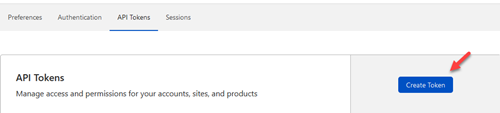
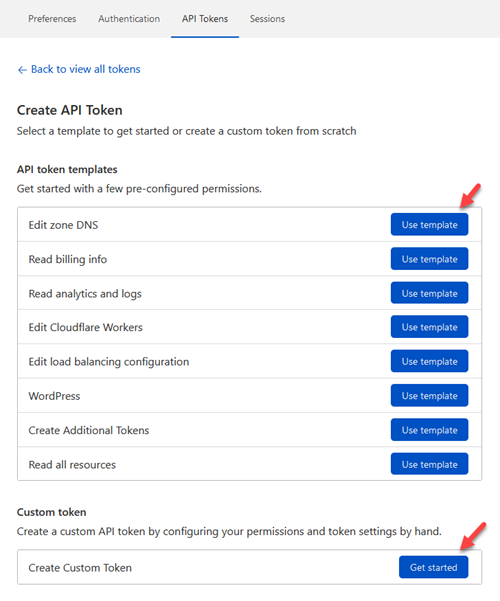
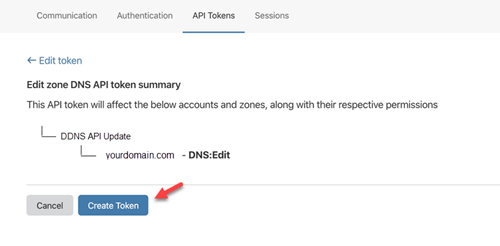
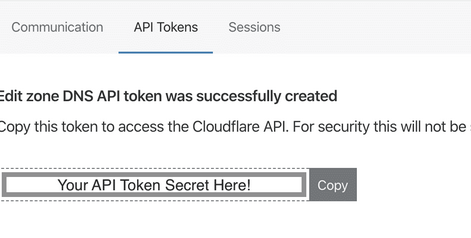
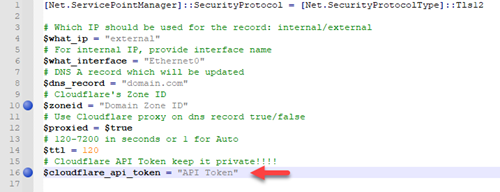
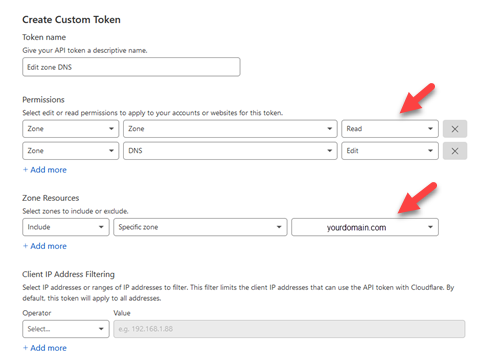
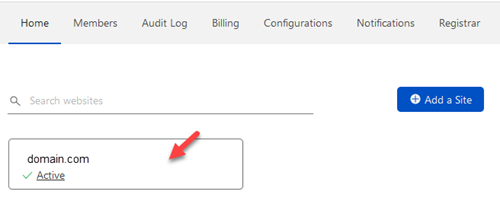
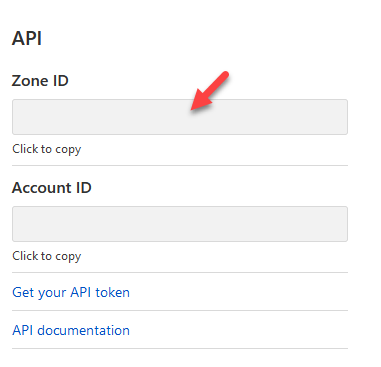
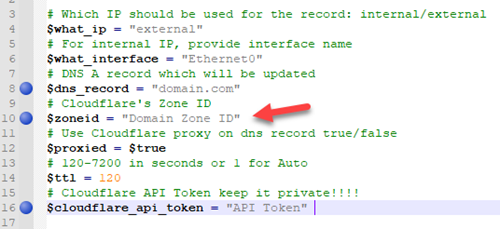
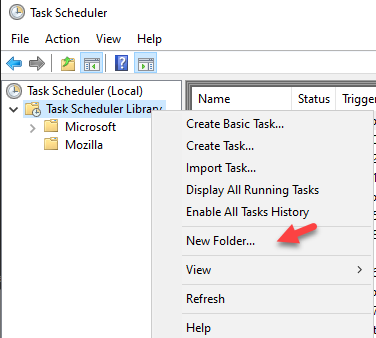
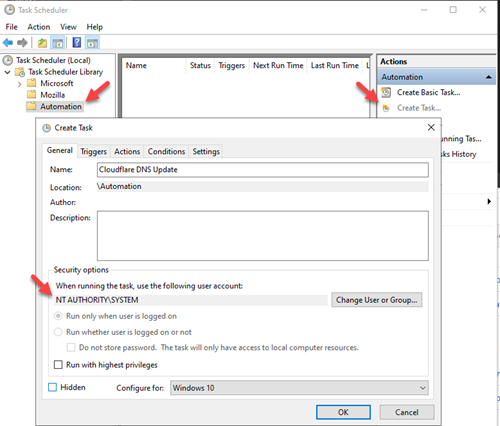
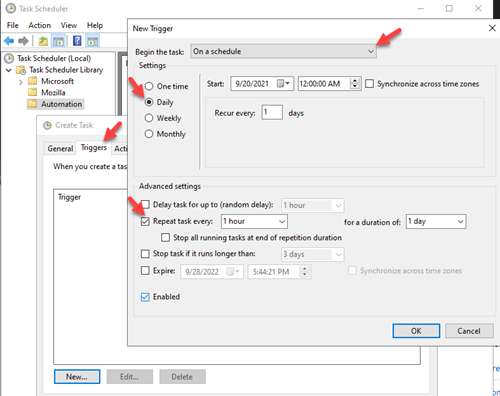
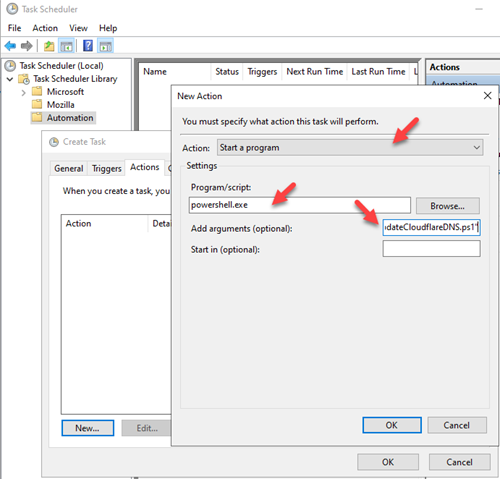
I wanted to share a PowerShell script with everyone. This can be ran as a scheduled task on a Windows box, and will update your DNS entry in Cloudflare via API. This is much better then paying for a DDNS service, and you can use your own domain. Make sure you have already purchased a domain and have your domain's DNS setup in Cloudflare. Step 1: Create a path on your hard drive for this script. For this example I'm going to use C:\Scripts. Copy the script to this path and open it with your favorite editor. I use Notepad++. Step 2: Create you Cloudflare API token https://developers.cloudflare.com/api/tokens/create To create an API for your script login to your Cloudflare account at https://dash.cloudflare.com/login. Then go to User Profile/API Tokens https://dash.cloudflare.com/profile/api-tokens. From the API Token dashboard select 'Create Token' You will want to use the 'Edit zone DNS' template or select 'Create Custom Token' Here you will want to allow Zone Read access and Zone DNS Edit rights. It will then take you to a summary page, select 'Create Token' You will now have the generated API Secret. Copy API Token into the script Copy your Zone ID Go back to the main home page of your Cloudflare dashboard and select your domain Scroll down and towards the bottom right you will find the API section. You want to copy the Zone ID Add which record you want to change. I typically update my main domain I have for emby and then all my other records are CNAME that point back to the same IP. Note: Make sure you are proxying your traffic to mask your actual IP. Step 3: Create a task in task scheduler Open task scheduler on windows. I typically create an Automation folder to keep my tasks separate from Windows and Applications. Once you have your Automation folder, select that folder and 'Create Task'. Name the task anything you like. I chose to name mine 'Cloudflare DNS Update'. Also change the user to run as 'System'. Go to the next tab and create a new 'Trigger'. I choose to run mine hourly. You now want to create an 'Action'. You want to 'Start a program'. The program is 'powershell.exe'. For the argument you want '-File "C:\Scripts\updateCloudflareDNS.ps1" That is it, the task will now execute the script to check your external IP and update your DNS record for you. Issues and updates will be logged wherever this script is. So for this example it would be in C:\Scripts\updateCloudflareDNS.log. updateCloudflareDNS.ps1
 1 point
 -
I am trying to go the "folder" where the media in question resides so I can see the rest of the files/media in that folder. Here is an example. - You are on the home page - You click (not play) on one of the latest videos (it is part of multiple medias in the same folder) to open the details page or the one where there is "play", "resume" "delete" etc and some details about the media. - You want to go the Empy page/folder where the rest of the medias that are in the same folder as the media you just clicked on If you click on "info" on thaht page (in the 3 dots menu) or check the "path" in that page, you can see where the file is but it can take a bit of steps to get there and you need to click many times to get there if the media is in many sub folders. This gets distractive especially on a mobile device. All those steps can be avoided if we had a menu item for "open media's folder'. One click and you are in the Emby page/folder of that media to see the rest of the medias in there.1 point
-
Awful changes unfortunately happens far to often with this product. A bunch of monkeys banging on a keyboard could do better than this group. The stupid crap changes is beyond belief.0 points










.thumb.png.f4cb0545e98b51fd9b00e427622ab761.png)