
Leaderboard



Popular Content
Showing content with the highest reputation on 12/12/24 in all areas
-
Going to test Jellyfin over christmas, It now supports hardware encoding, Dolby Vision, Atmos, AND Dolby Vision to SDR Tone mapping, (which Emby still cant do) The Two main issues are apparently the Clients aren't as good, and remote access can be a trickier. But Jellyfin does has far more useful plugins. I am frustrated that Smart Playlists for Emby has taken 10 YEARS, and it's still not ready, and this feature breaking bug has taken 9 Months, which should be fixed in days. I would be more lenient, even happy, if this was free software, but i am not getting any value from my subscription. If Jellyfin ticks all the boxes over the next month, i'm out, and glad i didn't pay for lifetime... Lifetime is how long you have to wait for something to be fixed.3 points
-
Hi, so I must have checked that by mistake not realizing what it's doing. Ugh... I'm sorry to bother you then. I didn't mean to waste your time. Thank you!2 points
-
Hi Anyone ever had the idea of making an emby app for virtual reality? Only a simple app with a virtual screen (maybe cinema environment). There isnt a good solution for enjoing media in VR yet, so that might bring many new users to emby. Plex tried sth similar about a year ago, because many people requested it but the app was in a very bad shape at release and failed. Btw have someone already tried sth in that direction?1 point
-
Hi all, Not sure if this is the right area. Emby server 4.8.10.0 running on Unraid Media is stored on a QNAP and mounted via samba. Android 15 with Emby for Android 3.4.20 I've been using Emby for years for all media. I constantly cast my music to my chromecast speaker group and the functionality suddenly changed about a week ago. I can still cast from my mobile (and Fire tablet) to the speaker group, but I can no longer control the playback. The android media control behaves differently. Sometimes I can see the media and pause/resume. Sometimes I can't see what's playing. I've just realised that this behaviour is dependent on if Emby on my mobile is attached to the session. Although I'm pretty sure that this used to work if I started the session from the Fire tablet. If I ask google assistant to pause the music, it says it "can't find anything playing right now". This is even if the android media control works. Sometimes the Emby session on the mobile loses connection and I can no longer control or reconnect to the session. I've tried to use the Emby API and pause via the SessionService. This works fine if playing from my android phone, but when I've cast the audio to the Chromecast speaker group, it sees the session (Client: Emby for Chromecast), and the POST command returns a 204, but nothing happens. I can see the API calls in the log and there are no errors reported. There's no issues playing videos on my Nvidia shield. I'm at a loss. Any assistance would be amazing. thanks, Cam embyserver.txt1 point
-
okay i just made an additional copy of the playlist files, and it is now letting me remove them manually through emby thank you!1 point
-
Surprised to hear this, thanks so much!1 point
-
Yes I'm asking you to try that so that we can try and learn what that is.1 point
-
I've never set anything up, so that won't help me, but thanks for the tip...
 1 point
 -
My pleasure. Anything else, glad to help. (Btw previous screenshot was not full screen, but it's the exact same when in full screen, too)1 point
-
A filter for older content? Yea that might help some.1 point
-
I installed the beta version of the emby for android tv and it fixed the issue. So some change made between the beta and the one in the store fixes this issue.1 point
-
Hi. Can you try searching for our standard android app (Just "Emby" on Amazon and "Emby for Android on Google) on the same device's app store and see how that compares? Thanks.1 point
-
When you filter on library, yes that will catch both videos and photos. If you're talking about if and when something gets added to the playback reporting plugin, that's all up to TeamB and how many filters he wants to add.1 point
-
Thanks found it, I was looking at each library configuration clicking the Advanced button and couldn't find it at first until I realized that it's the overall Advanced "tab"!1 point
-
The issue is when a movie has initially been aired as two or more parts but later or in other countries only as one movie. In this case the entries on TMDB or IMDB only show the option as mini series and emby will not even recognize the movie, because it is ignored when it is in the wrong category (movies instead of series). How can we get emby to identify it as a movie? I tried to use the "identify" option in emby and type in the TMDB or IMDB ID, but it won't even show the mini series. One of many examples: https://www.themoviedb.org/tv/40360-ben-hur A movie produced together by CBC, Antenna 3, ProSieben but has been cut into two parts by CBC for the US market to fit into their broadcast schedule. We need an option to force the database entries from the mini series into the movie fields. Right now it is a pain to copy paste all information from the internet and manually add the poster and background pictures.1 point
-
Yes, I think it must be possible to do something with this issue. Since the base HDR metadata is in there with the Dolby Vision. And also HDR10+ for the DV/HDR10+ files. It should be able to select and play one that does not output black screen without user interface. Since I (and my users) have a wide set of screens with different HDR support, It should be enough to have one file with different HDR standards. The solution cant be to have one DV and one HDR10+. Is there not maybe possible to create option preset which metadata you want to use?1 point
-
never had the isue again somehow Thanks all1 point
-
By deleting all the files and putting them back on, it works again.1 point
-
FYI. It hit me again on December Patchday. No connection to emby server whatsoever after the KB on Tuesday. Switching OFF Win firewall without effect. I had to delete the whole emby entry in the firewall settings and to enter the rule completely new to make it work again. Fresh Win11 without any other security software, HIPS or FW. It's getting weirder with every patchday.... Merry Christmas and Happy Holidays!1 point
-
This is beyond a joke, This was first reported in March, 9 Months ago. This is a Paid feature. What am i paying for? it's certainly not support or working features1 point
-
For developing a Metadata provider, I would strongly advise doing so, to understand how the server calls in to your provider. With the Data Explorer plugin for Emby Server, you can not only see the information returned by all providers and how they're prioritized - you can also use it to trigger calls into your provider (repeatedly for the same item), which is also very useful.1 point
-
It was saying there was an error loading but everything good now apparently when I reset my PC network in setting it said network will reset and restart in 5 mins and after the PC restarted Emby was somehow blocked and it took a while then some of the movies started to show up and when I came back from work everything was back to normal.1 point
-
Thank you so much, truly appreciate it1 point
-
Hello Everyone, I’d like to share a project I’ve been working on a Docker container that automates the management of Emby’s "Top Picks" feature. Here’s the GitHub repository: https://github.com/Fahmula/top-picks Initially, I created this container for personal use, but I’ve done a lot of refactoring to make it accessible to others. I hope it can be useful to the community. How It Works 1. Fetching Trending Media: The container fetches two pages of trending movies and shows (20 each) from Trakt’s public lists, keeping the same order. It then retrieves the TMDb IDs for these items. 2. Matching with Local Media: Using the TMDb IDs, it queries your Emby server to check if the media is available locally and retrieves the internal Emby IDs required by the "Top Picks" plugin. 3. Updating Top Picks: The container updates the "Top Picks" plugin configuration with the retrieved Emby IDs and manually triggers the "Update Top Picks" scheduled task. 4. Fixing NFO Issues: To address the common issue of .nfo files being stored in the root folder of shows instead of the correct season folder, the container runs a loop for 1 minute after the task is triggered. During this time, it organizes the .nfo files into their proper season directories. Note: To avoid conflicts, disable .nfo generation for the "Top Picks" library, as it isn’t necessary and can exacerbate the issue. Things to Keep in Mind This container might not suit everyone’s needs, but feel free to customize it to fit your setup. It’s designed to be flexible and configurable. Let me know what you think! Feedback, suggestions, and contributions are welcome1 point
-
Thanks Skippa. (kinda) glad it's not just me. I took all the other components out of the equation to work out which piece was the problem. Home Assistant, zigbee buttons with zigbee2mqtt. But using these and just replacing the music source (YTM or jellyfin instead of Emby), every other music source cast to the same speaker group was controllable. Just Emby.1 point
-
The issue is that the library scanned contained folders full of hundreds of files. Which would suggest that the output means that the files were already scanned and detected at that point, and yet when attempting to browse the library in question from multiple Emby clients, the libraries appeared to be empty. The server in question is a low-power PC so perhaps there was some kind of performance related delay between those library items being successfully scanned, and becoming available to play on an external client. It was a niche situation as I was loading a new server with a ton of preexisting media files from scratch. In any case, I proceeded to do a full scan of all libraries, after which the affected library along with two other libraries did populate with the rest of the media, and further tests of the single library scan have worked as expected.1 point
-
Update, it's working now. I have no clue what I did to fix it, but it's working soooo I'll take it. I just added the domain back to my username1 point
-
cant quite remember, but i think it was IPTV source had so many channels that emby wasn't sanely useable. threadfin allows regex/search criteria to filter on.1 point
-
Attached below is the latest code. I cleaned up the code a bit and finished the image editor. I will post a video about the image editor later today. You can now edit any of the images in Emby. Just click on the image in the metadata editor (within the tools). Vic PseudoTV.zip PseudoTV.dll1 point
-
I used powershell to touch my test system files and drove RTM crazy. Opened powershell and cd to media library and ran this. Touch all existing nfo files so Emby thinks something has changed and reprocess the item. # Touch files in specified path powershell gci -recu -inc "*.nfo" | % { $_.LastWriteTime = Get-Date } or change to touch your files (mkv or mp4) but will guess a coding guru can comment more.1 point
-
OK please try refreshing the metadata on one of these and then attach the emby server log. Thanks.1 point
-
Hi, what format subtitles are these?1 point
-
Sorry, difficult to do now, I decided to reset everything, delete all downloads etc, gone back to a fresh system and it is now working ok, if it comes up again I will share it. Appreciate you coming back to me1 point
-
Hi, we are looking into this. Thanks.1 point
-
this i happening for me as well, but for 2 streams im playing at once on my pc. they should be showing both by themselves. https://drive.google.com/file/d/1N1Dpb1eCRNnmwjN1tr3YATgwC652pxVH/view?usp=sharing 20241208-1802-52.3263547.mp41 point
-
Hi, date created = date added, so look for that menu option.1 point
-
HI, we suggest using Emby going forward.1 point
-
WELCOME TO THE HISTORY OF EMBY! A lot of our users are new to Emby and we thought it would be a good idea to share some of the backstory of how Emby came to be, where we started and where we are headed. We have grown significantly since our inception. Once a humble open-source project, Emby has evolved into a sophisticated platform that allows users to organize, stream, and enjoy their media libraries with ease. In this post, we'll take a look back at the history of Emby, explore its development journey, and highlight the key milestones that have made it what it is today. The Early Days: An Open-Source Beginning Emby started its life as Media Browser, an open-source project focused on creating a simple, user-friendly interface for accessing digital media collections. Originally, Media Browser was a plugin for Windows Media Center, and its primary goal was to offer users a better way to manage and play their media files. Back then, it was a community-driven project, with developers and enthusiasts contributing code, features, and plugins to expand its capabilities. Media Browser gained a loyal following among tech-savvy users who appreciated its customizable nature and flexibility. The Shift to Emby and the Rise of the Media Server In 2014, Media Browser underwent a major rebranding and evolved into what we now know as Emby. This change wasn’t just about a new name—it marked a shift in focus from a media center add-on to a full-fledged media server solution. Emby’s developers wanted to create a standalone server capable of managing large media libraries, transcoding content, and streaming to multiple devices. The introduction of the Emby Server brought a range of new features: Library Management: Users could organize and manage their media files with a sleek web interface. Metadata Scraping: Automatic fetching of metadata like cover art, descriptions, and ratings. Transcoding: On-the-fly transcoding for seamless streaming to any device, regardless of format. Multi-Device Support: Streaming became possible on a variety of devices, including smartphones, smart TVs, web browsers, and gaming consoles. This new direction attracted more users who were looking for a flexible media server that could handle diverse formats and provide a unified experience across different platforms. Open Source to Closed Source: In 2018, Emby made a significant decision: it moved from being an open-source project to a proprietary, closed-source model. The change allowed the development team to maintain greater control over the codebase, improve security, and introduce features more rapidly. Key Milestones in Emby’s Development As Emby transitioned to a proprietary model, the development team pushed forward with a series of updates and improvements: Emby Premier: The introduction of a paid subscription model called Emby Premier brought exclusive features like DVR support, cloud sync, offline media, and hardware-accelerated transcoding. Emby Premier gave the development team a sustainable revenue stream to fund further development. Improved Mobile and TV Apps: Over time, Emby released a series of polished apps for mobile platforms (Android, iOS) and TV devices (Roku, Apple TV, Amazon Fire). These apps received regular updates to improve stability, user experience, and customization options. Live TV and DVR Integration: Emby expanded its offerings to include Live TV and DVR functionality, allowing users to integrate live broadcast channels, schedule recordings, and manage live content alongside their media libraries. Enhanced Transcoding and Streaming: Emby has continuously improved its transcoding capabilities to support modern formats like 4K, HDR, and Dolby Atmos. These improvements allow for a high-quality viewing experience regardless of the device being used. Security and User Management: Emby introduced advanced user management features, including user profiles, parental controls, and access restrictions. This makes it easier for families to share media without compromising on privacy or security. Emby Today: A Comprehensive Media Experience Today, Emby is a mature and feature-rich media server solution that caters to a wide range of users—from casual media consumers to serious home theater enthusiasts. It supports a broad spectrum of devices, offers robust customization options, and remains focused on providing a powerful yet easy-to-use interface. Some of Emby’s standout features today include: Unified User Interface: A sleek, modern interface that makes browsing and streaming media a joy. Customizable Libraries: Tailor your media collections with custom artwork, genres, and metadata. Cross-Platform Syncing: Keep your media in sync across multiple devices and platforms. Comprehensive Live TV Support: Access live TV, manage recordings, and watch DVR content effortlessly. Community Engagement: Emby continues to value its user base, with an active community forum, feature requests, and beta testing for new updates. The Impact of the Community and the Road Ahead Despite its shift to a closed-source model, the Emby community remains strong. Many long-time users contribute by creating plugins, themes, and offering technical support. The Emby team regularly interacts with the community, implementing feedback and adjusting features based on user needs. Looking forward, Emby is set to continue expanding its feature set while focusing on performance enhancements and cross-platform support. Emby’s development is driven by innovation and user feedback, ensuring that it remains a competitive choice in the world of media servers. Conclusion Emby’s journey from a simple open-source plugin to a leading media server solution is a testament to its adaptability and the passion of its developers. While the shift from open-source to closed-source was a turning point, Emby has continued to evolve, delivering a reliable and customizable media experience for millions of users worldwide. The history of Emby is one of growth, change, and a dedication to providing users with a comprehensive and enjoyable way to manage their digital media.1 point
-
2024-10-06 21-51-43.mp4 Alguien me puede ayudar cuando emby no tiene ningún CSS la serie "bleach" me detecta correctamente la S17 pero al colocar la configuración CSS la S17 desaparece y no es visible (solo se visualiza hasta la S16) Version 4.8.10.0 css emby.txt1 point
-
plus one here, would be great to have catch-up1 point
-
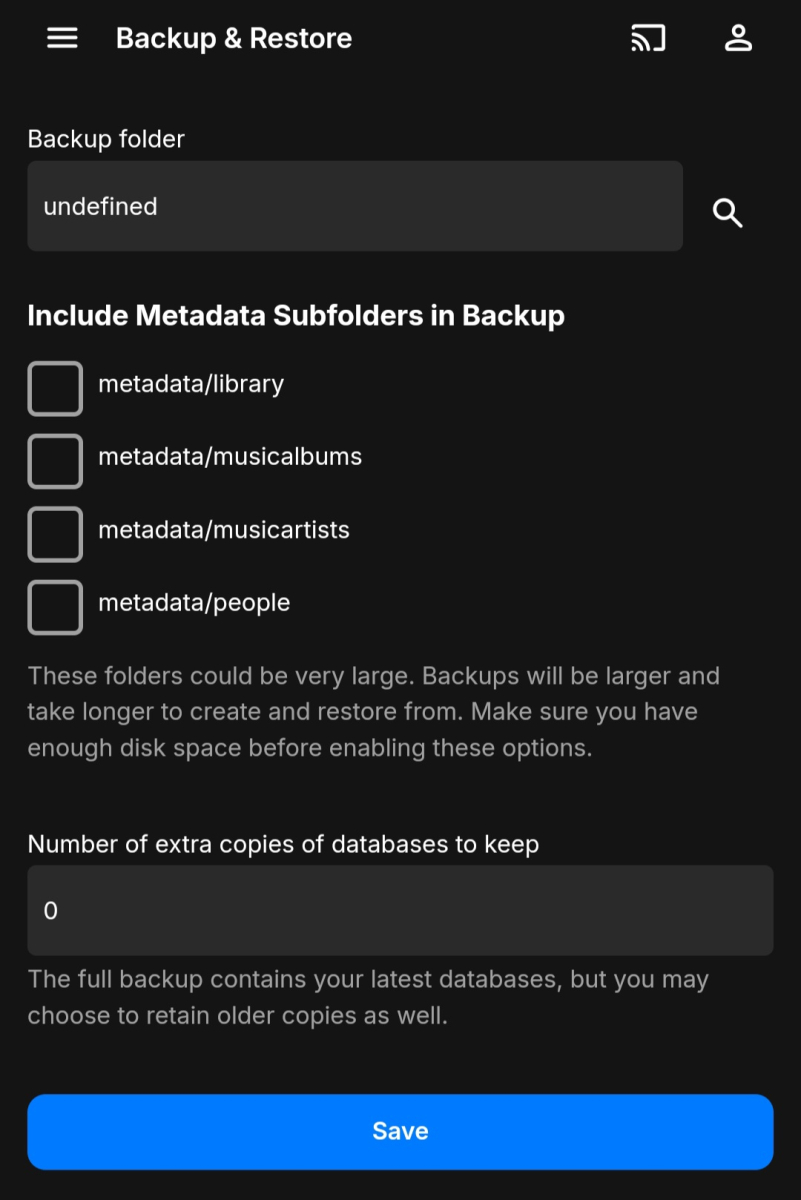
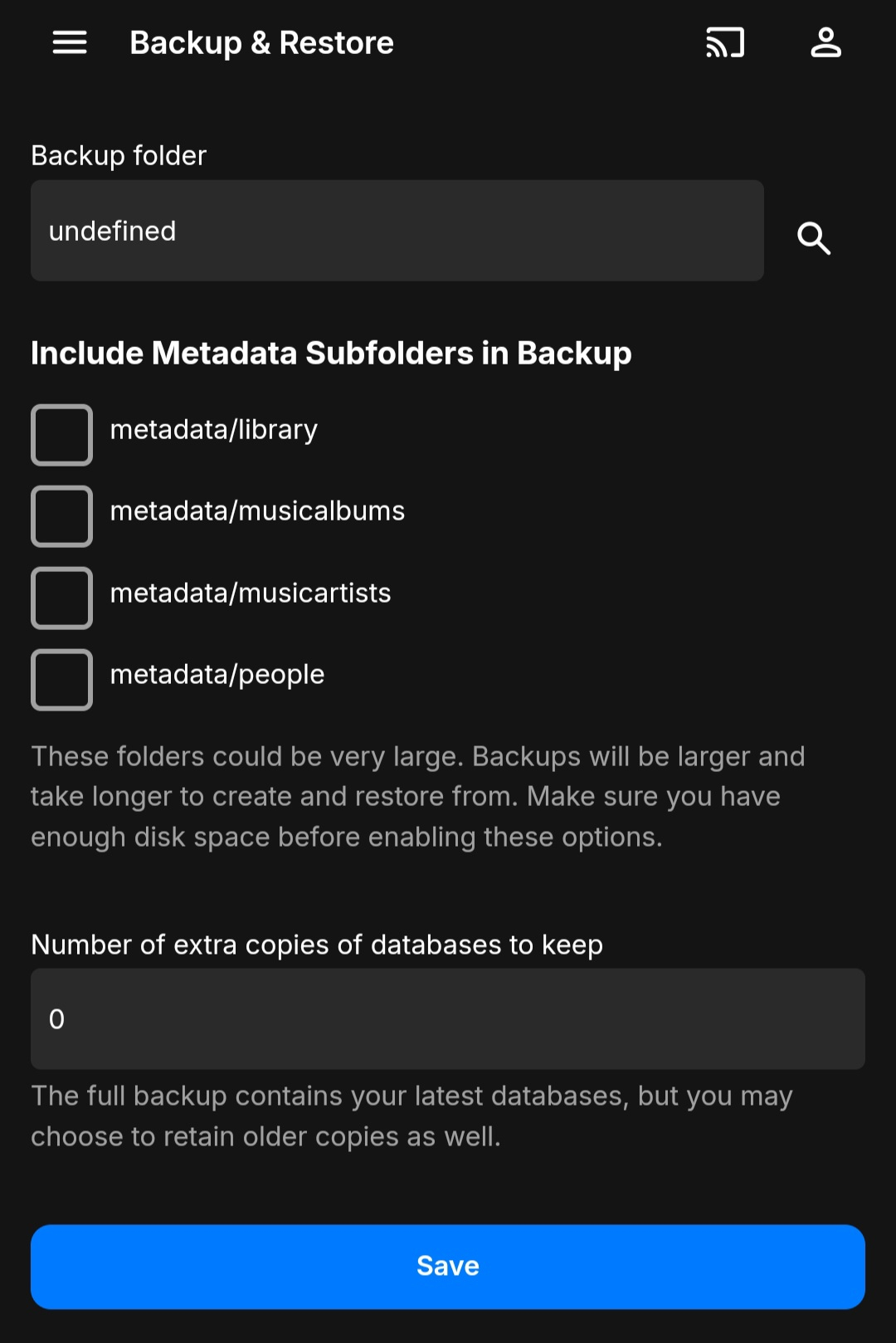
On the new server add the location of the backups to the plugin (same as you did when you set it up to backup). It should then show you a list of available backups. Click on one and you can restore from it. There should be options as to what data you want to restore in case you don't want everything.1 point




.thumb.jpg.7d793de0dff08bf27c2d089379dfdfb1.jpg)










