Leaderboard




Popular Content
Showing content with the highest reputation on 12/11/24 in all areas
-
Update, it's working now. I have no clue what I did to fix it, but it's working soooo I'll take it. I just added the domain back to my username2 points
-
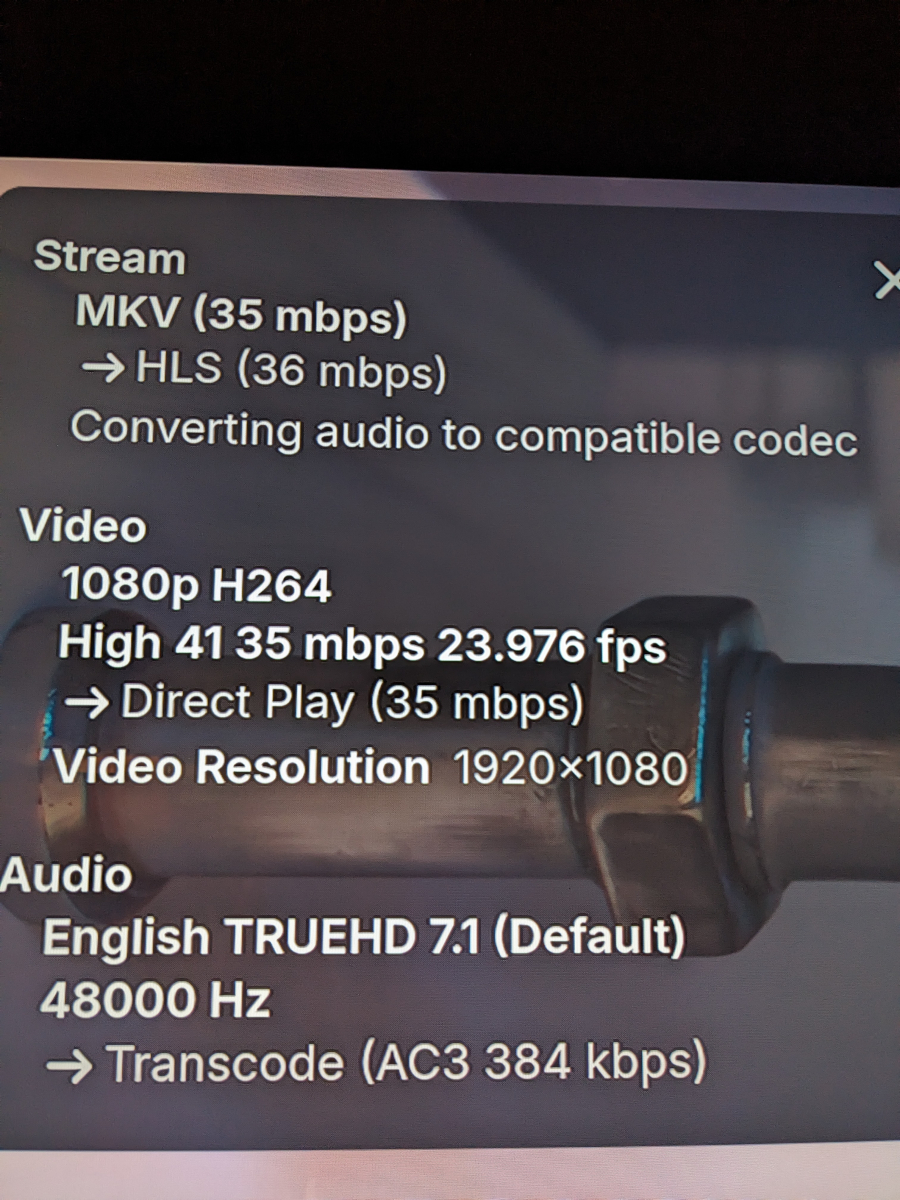
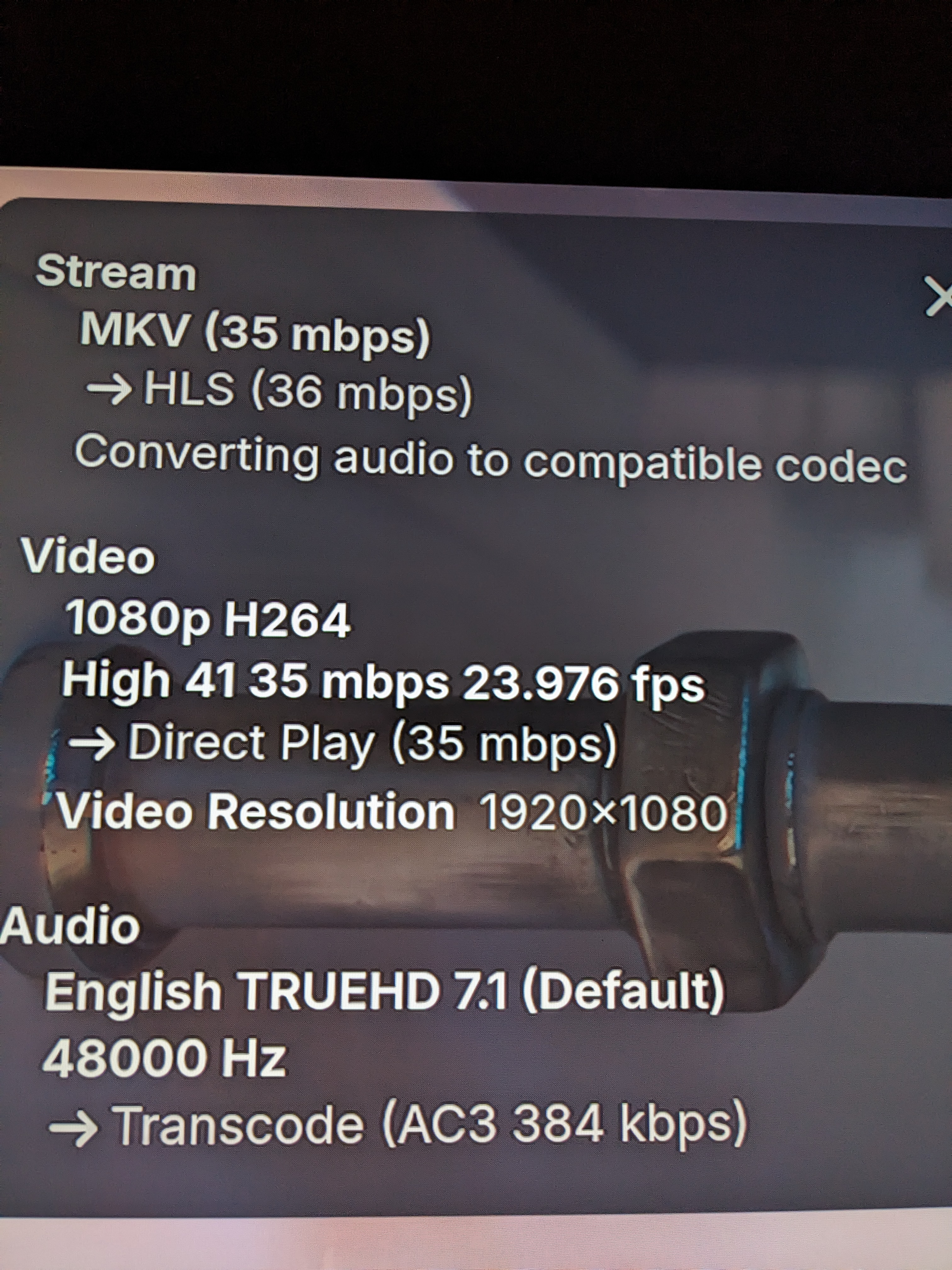
Hey Luke, I reran the movie and pulled up Stats for Nerds, the video is direct playing and the audio is transcoding. The system appears to be functioning as intended, I think my issue was entirely self-inflicted... I attached a screenshot of the stats for nerds, if you would still like a copy of ffmpeg and remux logs I can pull them when I get home but I don't want to waste anymore of your time on what appears to be user error lol. Thanks again!
 2 points
 -
Any progress on this? this is probably the most fundamental feature for a media server. Netflix, disney, primevideo etc… all have this for a good reason and i mean all apps that serve media. I think it’s worth investing into honestly. The way this works right now on Emby is not great at all. Makes it feel like the app is meant for technical users only. I like Emby and purchased it for its robust and clean UI. I think if this feature is nailed it would put it above plex.2 points
-
Thanks @Happy2Play I have figured out both issues. I was not copying the right backup file per your suggestion above. Additionally, since I was trying to run Emby as a secondary user on my box that didn't have admin privileges, instead of installing and running Emby under the account I was logged in as, it installed and ran under the context of the admin user I authenticated as. This was what was breaking the SMB auth. I added admin privileges to the Emby user. Reran installation under that context. Removed admin privs. Restored the backup. Created a runas bat file to run upon startup and a Caddy service to automatically start and everything is good. Also, the migration happened in minutes which is crazy compared to prior experiences.2 points
-
Kindly understand that this is your opinion, but the PIN is a separate idea. I am puzzled as to why we are discussing it within this request, which is specifically for a profile feature. The profile feature is primarily intended for family use, which is why many members have been requesting it. This is also why services like Netflix and Disney utilize it. Others, including myself, have previously explained the scenario for why we need it.2 points
-
Guys, The ebook side of Emby/MediaBrowser has been long stalled or rather stagnated. I would like to offer up a couple of suggestions. Many people use calibre as an ebook/comic book tool for scraping data and general management of their collection already. This program is absolutely astonishing in its ability to pull metadata from post calibre scans, as well as draw in metadata from the file source and/or directory structure. http://vaemendis.net/ubooquity/ Its a self contained .jar server/reader combination. And honestly I am very impressed by it's small footprint and wide range of abilities. The other option is COPS , which was written specifically with calibre in mind. It is open source, so making it work with emby I would think would be fairly easy. https://blog.slucas.fr/projects/calibre-opds-php-server/ Ever since the original release of MediaBrowser's bookshelf I have always wanted something that would allow me to 'read' my collection, rather than being basically nothing more than a place-set for images of books I own. I am sure that those who mainly have audiobooks are thrilled with bookshelf , but it's nothing more than an extension of the music library IMHO, not new features. We can have both right? Here I give you two suggestions free of charge.. Just because I love you, and Emby Personally I plan on running the Ubooquity Server along side of Emby from now on, just because of it's massive functionality and tiny footprint. But I sure hope that someone decides -- "yeah, ebook support should be in here too" and do something about it - rather than allow this now very very ancient issue to continue to remain an issue. And so I don't have to have 20 different ports open, some with SSL support - some not, because Emby isn't delivering the 'complete package'. (Please take some of this with humor, I know you have your hands full with improvements/bugs/suggestions/requests)1 point
-
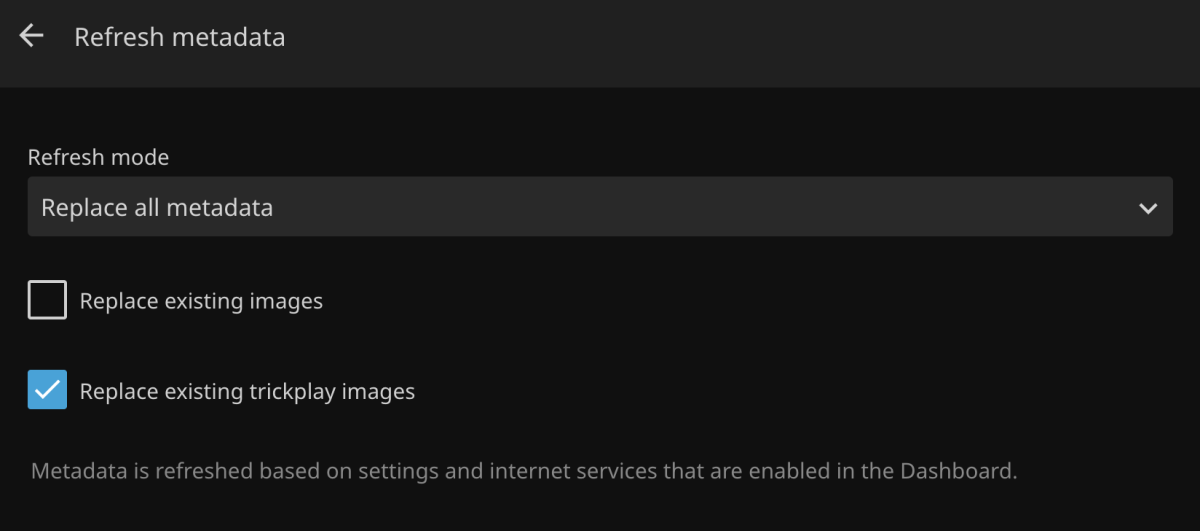
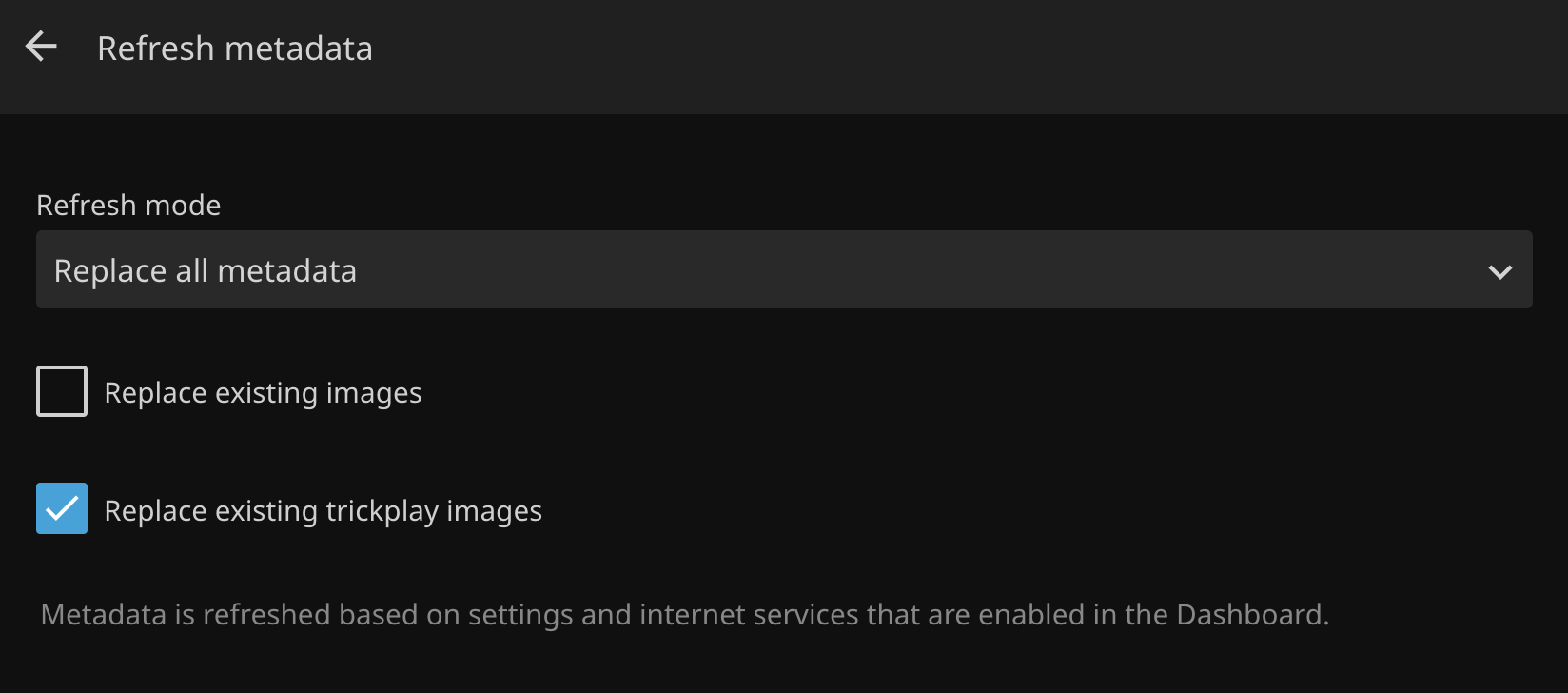
Refreshing metadata should include the option to regenerate seek/index images. Currently you have to find and delete the bif files manually. With Jellyfin, all you have to do is check a box in the UI: https://i.ibb.co/Tq5LznF/jellyfin-refresh-md.png
 1 point
 -
Hi when will the new app be available in the ms store?1 point
-
OK. I think i got it...Will try it and see what will happen. Thanks!1 point
-
Let's look at the search from TvMazeSeriesProvider: public async Task<IEnumerable<RemoteSearchResult>> GetSearchResults(SeriesInfo searchInfo, CancellationToken cancellationToken) { if (IsValidSeries(searchInfo.ProviderIds)) { var metadata = await this.GetMetadata(searchInfo, cancellationToken).ConfigureAwait(false); if (metadata.HasMetadata) { return new List<RemoteSearchResult> { metadata.ToRemoteSearchResult(TvMazePlugin.ProviderName), }; } } return await this.DataHub.FindSeries(searchInfo.Name, searchInfo.Year, searchInfo.MetadataLanguage, cancellationToken).ConfigureAwait(false); } internal static bool IsValidSeries(Dictionary<string, string> seriesProviderIds) { return seriesProviderIds.HasProviderId(MetadataProviders.TvMaze) || seriesProviderIds.HasProviderId(MetadataProviders.Tvdb) || seriesProviderIds.HasProviderId(MetadataProviders.Imdb); } TvMaze supports TvDB and Imdb IDs besides its own IDs, this means that when any of those IDs is present, the identity is already clear and no search needs to be performed. Otherwise it tries to search by name and year (FindSeries). Now, the GetSearchResults() method is only called when the user performs a search manually. In most cases though, the server calls just GetMetadata() on the providers and here the metadata may need to perform a search as well. The difference between the two cases is this: In case of GetSearchResults(), the provider can perform a more "loose" search and return more items, since the results are reviewed by a user who will then make a choice. In case of GetMetadata(), it's an unattended process - there's no user involved and the metadata provider should only use the result of a search if it is really sure that it's the right item Here's the GetMetadata() implementation from the TvMazeSeriesProvider: public async Task<MetadataResult<Series>> GetMetadata(SeriesInfo seriesInfo, CancellationToken cancellationToken) { var result = new MetadataResult<Series>(); if (!IsValidSeries(seriesInfo.ProviderIds)) { if (!seriesInfo.ProviderIds.HasProviderId(MetadataProviders.TvMaze)) { var srch = await this.DataHub.FindSeries(seriesInfo.Name, seriesInfo.Year, seriesInfo.MetadataLanguage, CancellationToken.None) .ConfigureAwait(false); var entry = srch.FirstOrDefault(); if (entry != null) { var id = entry.GetProviderId(MetadataProviders.TvMaze.ToString()); seriesInfo.SetProviderId(MetadataProviders.TvMaze.ToString(), id); } } } cancellationToken.ThrowIfCancellationRequested(); if (IsValidSeries(seriesInfo.ProviderIds)) { var mazeSeries = await this.DataHub.GetMazeSeries(seriesInfo.ProviderIds, seriesInfo.MetadataLanguage, cancellationToken).ConfigureAwait(false); if (mazeSeries != null) { result = this.CreateResult(mazeSeries); result.HasMetadata = true; } } return result; } Note: "DataHub" is a combination of remote apiclient and app-level cache.1 point
-
Comfirmed the Beta version works1 point
-
ebr has a new fixed Roku Emby beta build that I tested. My issue seems to be resolved from the new build. I assume it may be released soon, but I'm sure we'll be informed when that happens.1 point
-
Jellystat. I set it up for Jellyfin when I was testing different things, and because it's on the same port, jellystat just kept trying it. I feel like an idiot now. As soon as I stopped jellystat, the errors went away. Thank you for your help!1 point
-
HI, before you reinstalled, did you configure any external applications to be able to connect to your emby server? Something is constantly pinging the server, coming from 172.17.0.34, and I can tell it's not an Emby app. Basically it looks like you configured something, and that something is still trying to connect based on credentials from the old server installation.1 point
-
item.GetProviderId(xxx)1 point
-
Ahh, yeah the account I was using didn't have a password, kmartinka is on to something. I tried putting a password on it but it still closes out. I'll test later (reinstalling Emby app on Roku or creating a new user account with a password)1 point
-
okay Luke thank you I'll let you know, so far I haven't heard from my clients and we haven't been watching much live TV ourselves but I'll definitely send an email out to them. if it rears its head again I'll get in touch with you. thanks again.1 point
-
Looks to all be fixed now, thank you so much!1 point
-
Have a read here and see if it helps, but you will need to supply more information if not, such as your email provider etc.1 point
-
Dear Emby Team, First and foremost, thank you for building and continuously enhancing this platform. We are naturally drawn to the incredible features and stability it provides compared to other applications. Back in 2019, there was mention of a potential book-reading feature being considered for Emby in the not-too-distant future. Many in the community have been eagerly anticipating this addition. We humbly request the team to revisit this feature, as it would greatly complement the platform's capabilities. We understand that development takes time and resources, but this is just a gentle reminder that we, as a community, are still waiting for this to happen. Thank you!1 point
-
If it will work at the end I'll pay for it. I promise.1 point
-
seems solved with the update on 30th Oct. no further unexpected issues.1 point
-
Thanks this fixed it. I already had emby-for kodi-next-gen set to auto update. I set the repo to auto update and once it did it also updated emby-for kodi-next-gen. After a database reset everything is working. I didn't know I needed both the addon and the repo to auto update. Thanks again.1 point
-
Okay, now I understand. I will modify my code to get the current user policy before then make changes and resend. Thanks for your answer1 point
-
Appears resolved in my limited testing with only this Show with plugin update 1.5.7/8.1 point
-
@Lukeit would be nice to get some official feedback on this, with Christmas coming I (and I'm sure many others) will have music playing around the house regularly, it's going to be a real pita having to use phones / tablets to control playback manually.1 point
-
That would be great if possible. I have a show we turn on at night and fall asleep to. Using Home Assistant I am able to set a sleep timer on my tv, slowly dim the lights, but the last step for automation is to open this show, and start a shuffle haha.1 point
-
I guess we'd have to add a shuffle variation on that.1 point
-
This has been the solution, I don't know how it has changed... It will be my children when they take the mobile phone and touch everything, they are 4 years old1 point
-
i too would love to be able to edit a simple text file to update all server paths ... i have 100 libraries to update the paths for since i moved it off my synology and it would be so easy to search and replce but instead Im lookling at hours and hours of repeating the same task to change the same path in each library. And the above instructions make absolutely no sense, sorry.1 point
-
No, there is no browser on it and no way to install the Android app or something on it. Not very helpful, I know.1 point
-
Sounds good. Thanks!1 point
-
It wasn't in my fields list. I was sure it was there but is isn't. It works now. I want to apologize profusely for wasting your time.1 point
-
@777111000are you able to get a more detailed error message from the Infuse developers?1 point
-
What fields did you request as part of your query?1 point
-
I think the answer is that we need to add an option to our apps, that when you click into a folder, if that folder only contains one item then it will automatically drill into it.1 point
-
Generally, Artist is considered as top billing (credited most prominently). If you've seen any audiobook cover art, the author is the most prominent credit. Much music might indeed have someone as lead singer who is not part of the band releasing the song, but it is listed as "[Band] (ft. [singer])" where the band is still in the Artist credit. Classical music is an outlier, assuming you want the composer and not the musician(s) listed more prominently---which, as I think about it, is still not usually the case. If you had a movie score by Hans Zimmer performed by the London Symphony Orchestra, the London Symphony Orchestra would still be featured most prominently. But again, we're still having this conversation despite a direct competitor (ABS), at least one major storefront (Audible), and a metadata provider (Audnexus) already deciding this.1 point
-
Not trying to be a jerk @Luke, but you are saying this now for half a year or so. You even called it "imminent" a few months ago.1 point
-
Yes, this is the only channel that can't be watched sometimes, and it got better after a while after I posted it. I can't watch it again today. 是的,只有这一个频道有时候无法观看,在我发帖之后过了段时间它自己好了。今天又无法观看了。1 point
-
You are fine having it on as many servers as you like as device limit applies to key not server. Using Multiple Servers | Emby Documentation1 point
-
"""""""""""""""""""""""""" """"""""""""""""""""""""""""" After a week of testing, these settings "temporarily" fix the bug. The impact on RAM is not significant with multiple transcodes. I choose values from 100,000 to 150,0001 point
-
I changed a few Settings and it seems to work except Firefox but i can Live with that on my xbox it is working fine now. Thanks all of you for the fast support on my Topic1 point
-
First, sorry for the delayed responses, I'm now living in Madrid so there's a big time difference. I thought I had explained it clearly, I guess not. One day last week, I checked "save artwork to media folders." Then I realised that this might be too much data for the external 5tb hard drive where the media was stored. So I unchecked it. I deleted the artwork from the external hard drive. Yesterday morning I added 3 movies and removed 3 movies from that hard drive, (I found higher res copies so I was swapping them out-- done this many many times) So I reattached the hard drive to the nvidia shield and scanned the library. Upon scanning library, 90% of the artwork was now missing. Emby was using either a thumbnail or an icon as seen above. I edited the images of about 30 films and scanned the library. Primary images I had chosen were again replaced by the icon or a thumbnail. I looked and saw that "save a cached copy of images on the servers meta data folder was NOT checked. Neither of the save options was checked. So I checked "save cached copy to server" and repeated the steps, with abouit . Progress! Images I'd chosen are now sticking. So I have about 2470 left to edit. Fair enough. I just didn't understand why emby wasn't looking for primary images, but used an icon or thumbnail as seen above. If you look at the second screencap, why wouldn't emby search for a primary image of Hannah and Her Sisters for instance and use a thumbnail instead-- or in the case of The Heiress, an icon? (I wouldn't know what log to send to show this.) I thought showing those images after a scan was a specific example of the issue. I thought emby would look for primary images when I scanned the library, as it has done in the past when creating a new library, but it wasn't. However, it IS NOW searching/saving primary images when I refresh meta data and check "replace existing images" or edit them manually. I'm too worried that the images being saved now (500?) will go away, if I refresh metadata for the whole libabry., Re-editing the images has raised another question for me. Is there a general setting that tells Emby WHICH images to search for and save? I don't mean for which films, but for all films. For instance, Is there any way to tell the server to search for and save ONLY Primary Images, thumbnails and backdrops. Why take up space with logo, banner, disc and art,, none of which I really want anyway? (Just personal preference.) I know I can go in and delete them for each film, but I was wondering if there was a setting to not use those images which might cause emby not to search for them and then save them in the first place. As I said images that i edit are now being saved-- since I've checked "save to server." And only 2000 more to do! Woohoo! Thanks you thank you thank you1 point
-
Both Taiwan and Hong Kong use Traditional Chinese, but with slighty different; therefore, we need different ISO codes for better usage. Anyway, zh-TW, zh-HK, zh-Hant-TW, zh-Hant-HK, z-Hant, all should be Chinese Traditional. The "t" in zh-Han"t" means for "Traditional", and zh-Han"s" is the one for "Simplified".1 point
-
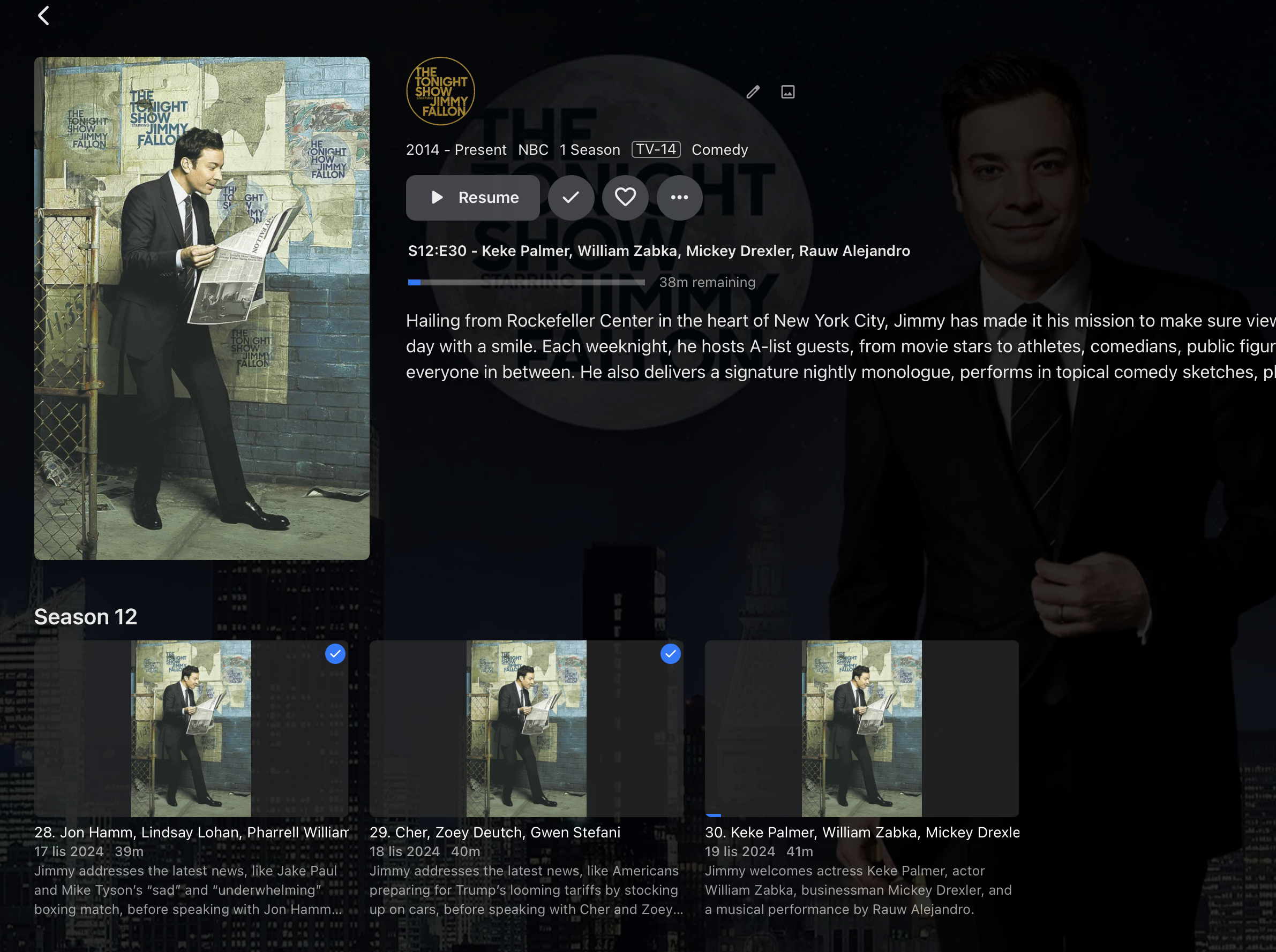
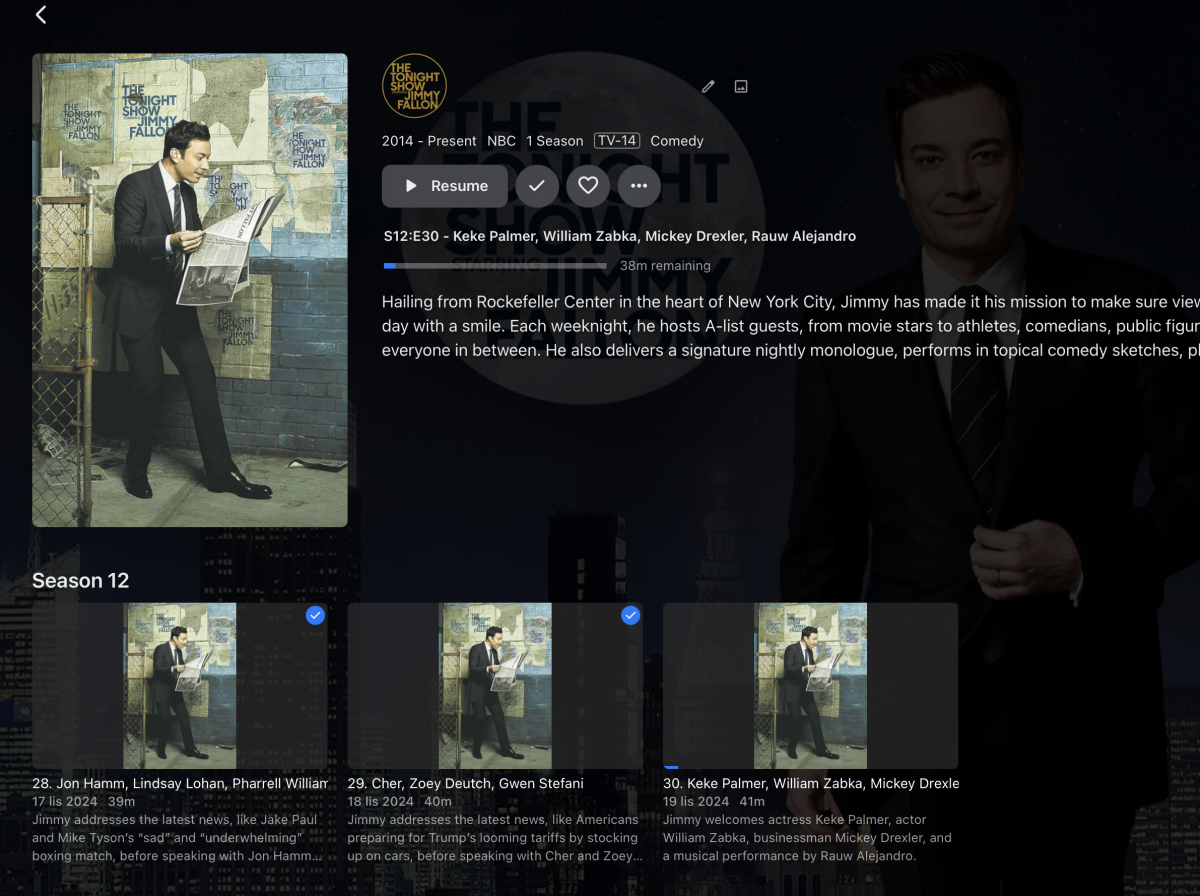
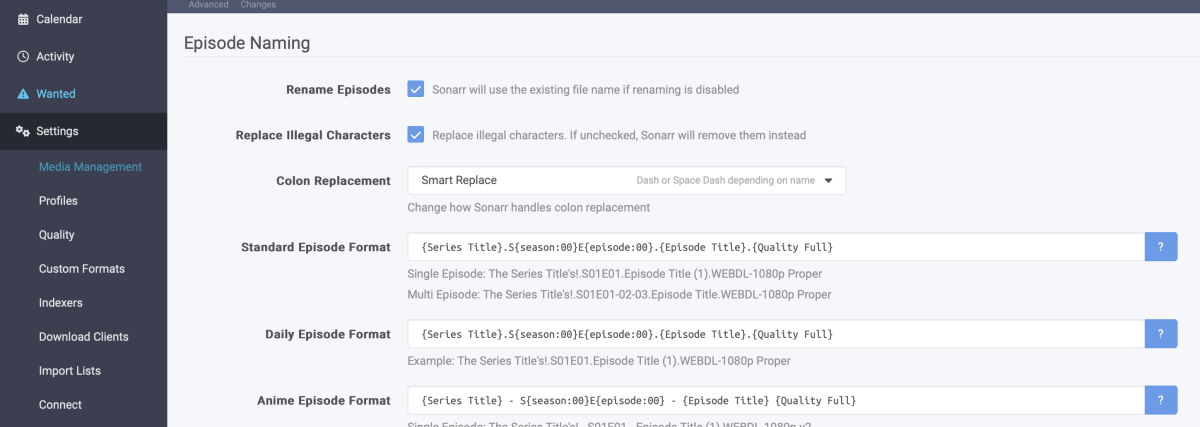
Seems to be working fine: I had E30 downloaded today, deleted ep 28 and 29, redownloaded them and they appeared correctly, the file name format I have right now seems to be working: As you can see, the file creation dates are the Local US time of AIRING and also I stripped the filenames from the date and time itself and put the Season number and episode number, all automatically done in Sonarr:

 1 point
 -
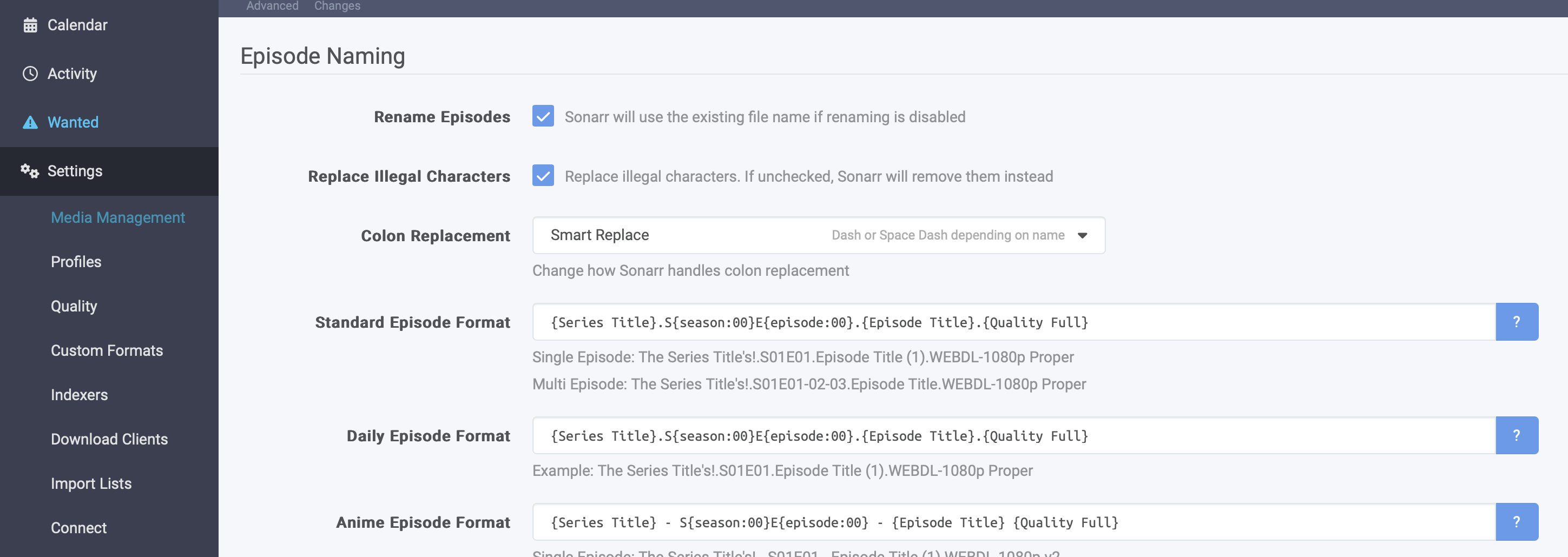
I have a solution, at least tested on this weeks episodes of Jimmy Fallon, the problem isn't TVDB, it's solely emby and the timezone you're in. Strip the video file of the date and substitue it with the S00E00 formar, you can do this in sonarr if you're using it, I rename the daily video files with this formula in Media Management: {Series Title}.S{season:00}E{episode:00}.{Episode Title}.{Quality Full} also you can try to change the file creation date in the same settings section of sonar: Change File Date to Local Air time (but this didn't help much), the title change helped a lot, this should work, because the Daily episodes are in S00E00 format on TVDB and it matches correctly I'm trying to redownload the rest of this weeks episodes to see if it works, hopefully, I'll have this problem solved once and for all1 point
-
I use Emby on an Xbox One and I really want to make it easier for my children to select their own user accounts. They know to switch their user accounts on Netflix, but Emby is a few steps too hard for them.1 point
-
Hi, yes hopefully we'll be able to do this in the not too distant future. Thanks1 point













.thumb.jpg.7d793de0dff08bf27c2d089379dfdfb1.jpg)









_svg.thumb.png.85e4ee6291ddd76347269c05175b5dda.png)