
Leaderboard




Popular Content
Showing content with the highest reputation on 12/10/24 in all areas
-
To the Amazing Emby Dev Team, I just wanted to take a moment to express my gratitude for creating such an outstanding media streaming platform. Emby doesn’t just work straight out of the box—it truly exceeds expectations in every way. Your attention to detail and user needs shines through, making Emby a platform that stands head and shoulders above the competition. A Refreshing Design That Just Works One of the standout features of Emby is its beautiful, intuitive design. From movies to TV shows and beyond, every type of media is presented in a way that feels clean, modern, and user-friendly. Unlike Plex, which has become cluttered with unnecessary features and overwhelming elements, Emby’s interface strikes the perfect balance between aesthetics and functionality. It’s clear, easy to navigate, and genuinely enjoyable to use. The customization options are also a big win. Being able to tailor the interface to my preferences makes a huge difference. It feels like the platform was designed with the user in mind, and the attention to detail is truly appreciated. Unmatched Media Playback Performance When it comes to playback quality and performance, Emby is a clear winner. My movies and shows load instantly, and playback is flawless—even with large 4K files. The fact that Emby supports 4K content natively and without a hitch is a testament to your commitment to delivering a premium experience. Unlike Plex, which often struggles with high-quality files or requires unnecessary transcoding, Emby handles everything with ease, making it the obvious choice for serious media enthusiasts. I also appreciate how Emby doesn’t bog down the experience with unnecessary server-side complications. Whether I’m watching locally or remotely, the platform performs smoothly, which is crucial for someone like me with a large library of diverse media formats. Upgrading to Premium: Worth Every Penny After trying Emby, I was so impressed that I decided to purchase the 1-year Emby Premiere subscription—and it has been worth every cent. The additional features unlocked with Premiere truly elevate the experience: Hardware Acceleration: Emby makes the most of my system’s capabilities, ensuring that even the most demanding content plays smoothly. Mobile Sync: The ability to download and watch my favorite shows and movies offline is a game-changer, especially for travel. Cinema Mode: This feature adds a touch of theater magic to my movie nights by playing trailers before the main event—it’s such a fun addition! Cloud Sync: Backing up and syncing my media to the cloud has been incredibly convenient, ensuring I can access it anywhere without hassle. Cover Art Customization: The enhanced artwork options give my library a polished, professional look that makes scrolling through my collection a visual treat. The subscription has not only added amazing functionality but also solidified my trust in Emby as a platform that continues to evolve and improve. Feature-Rich and User-Focused Emby isn’t just about great playback—it’s packed with features that elevate the experience: Parental Controls: The ability to set user profiles with specific permissions is fantastic for families. It’s easy to customize what content is accessible for different users. Server Management: Managing my library has never been easier. The tools for organizing, tagging, and fetching metadata are straightforward and reliable, ensuring everything looks polished and professional. Streaming Flexibility: Whether I’m on my home network or accessing my media remotely, Emby consistently delivers a smooth, buffer-free experience. The ability to sync content for offline playback is just the cherry on top. Wide Codec and Format Support: It’s incredible how many formats Emby supports natively. I no longer have to worry about converting files or running into compatibility issues—it just works. Reliable Updates and Active Community Another thing I love about Emby is how regularly updated it is. You’re constantly improving the software, squashing bugs, and adding useful features. It’s also clear that you listen to your user base; the forums and community engagement show how much you value feedback, which is rare in today’s software world. Why Emby Reigns Supreme To sum it all up, Emby is everything a media streaming platform should be. From the stunning design and rock-solid performance to the thoughtful features and seamless playback, it’s clear that you’ve built this platform with passion and care. Compared to alternatives like Plex and Jellyfin, Emby stands out as the perfect blend of power, simplicity, and user-centric design. Thank you for creating a platform that has revolutionized how I enjoy my media. I’m genuinely excited to see how Emby evolves in the future—keep up the amazing work! A Big Thank You to the Entire Emby Dev Team! Fanlim5 points
-
Hi, They just gave me a new URL and it works perfectly fine now. Thanks for helping me out with this.2 points
-
Looks like is some cases this might be a good per show option instead of global. Will guess naming scheme or misidentification but need to see the full structure and naming. But as Luke mentioned Emby looks for Seasons within all TV Shows/Series.2 points
-
Dear fellow Developers, the PluginUI Demo Example in the Emby SDK is demonstrating the wide range of featuires from the Emby PluginUI, but a number of essential things were missing, like how to use buttons and perform actions on button click events, as well as how to create and use dialogs and wizard UI. I'm glad to tell that these gaps have been filled. The demo plugin content is split into two tabbed views with two menu items in the navigation bar, and two new tab pages have been added for buttons, links, progress and status indication, updating the UI view from the server side and the other page is demonstrating multiple kinds of dialogs and a three-page wizard. Here's a short video (no audio): 20241204-1209-59.8630269.mp4 The sample plugin code will be included in the next beta SDK, which means everything after 4.9.0.32.1 point
-
Thanks, @Luke.1 point
-
Carlo - I appreciate your response. These are all home movies. I have been able to resolve the problem. When setting up the Library, I probably indicated that they were 'Movies' as opposed to "home movies'. I deleted the originally Library and re-installed them as "home movies" and things appear to be correct. Again, thank you for your response.1 point
-
The only thing I have to say that could be improved is the subtitle customization. It would be really cool if users could adjust the font and color of subtitles to better match their preferences. However, I did see an older post about this feature, so I didn’t want to create a new one.1 point
-
Just exact steps to show the issue. But there are still a few Parental Controls completely broken in 4.8 the have been improved in 4.9 but looks like this one still needs some work if I replicated it properly.1 point
-
Got it, I’ll wait then thank you1 point
-
Hi, looks like it has built-in support for plex webhooks. Ideally, they would add support for Emby webhooks.1 point
-
Thank you. I've had to temporarily make double folders to get the view that I'm looking for. So: D:\Library\Clips\Clips D:\Library\Demos\Demos Now shows me two folders when my Library has both of these individually set. I agree the best path forward would be to have an option to display folders within libraries.1 point
-
For me when an app on the TV it self and playing any 7.1 audio source it gets downmixed to 2 channel on the TV before being handed on to the surround receiver. . Only way i can do anything about that is to have Emby transcode it to 5.1 first, then it gets passed on as 5.1 by the TV. Any in app on TV 7.1 audio just won't work, only when i use an external device like a Nvidia Shield or a PC can i get 7.1 with EARC to work without transcode. If the audio track is in 5.1 to begin with it just gets direct played no problem. Googling the issue shows two things that might be wrong. In app on TVs just not allowed by license to allow 7.1 and uncompressed audio tracks to pass through. Just Exoplayer not being able to do it and not transcoding when it should. At least, thats the reason for me thinking that 7.1 and in TV app might be the reason. Not trying to hijack the thread but if i'm wrong then please explain me what's happening so i can save my money and not use money on a shield for my self.1 point
-
You're welcome Luke It even works perfectly on my Mum's Chromecast with Google TV! Out of curiosity, how far away is support for hardware transcoding on Apple Silicon? I may be tempted to become a lifetime Emby Premiere member once hardware transcoding is fully supported on Apple Silicon1 point
-
Thanks. Will map the paths using the DB till it's added.1 point
-
it's the detailed view for User Sessions in the Advanced section1 point
-
"is" isn't included in the article list of words removed. You could add it here if you wanted. We should probably support more than just 3 languages for this as well. Current: <SortRemoveWords> <string>the</string> <string>a</string> <string>an</string> <string>das</string> <string>der</string> <string>el</string> <string>la</string> </SortRemoveWords> @Lukeif you wanted to add the entries below that would cover the top 20 countries that stream media and also make sense to ignore/remove starting articles. Asian languages not included <SortRemoveWords> <string>the</string> <string>a</string> <string>an</string> <string>ek</string> <string>yek</string> <string>o</string> <string>os</string> <string>as</string> <string>um</string> <string>uma</string> <string>uns</string> <string>umas</string> <string>le</string> <string>la</string> <string>les</string> <string>un</string> <string>une</string> <string>des</string> <string>der</string> <string>die</string> <string>das</string> <string>ein</string> <string>eine</string> <string>el</string> <string>los</string> <string>las</string> <string>unos</string> <string>unas</string> <string>il</string> <string>lo</string> <string>l'</string> <string>i</string> <string>gli</string> <string>le</string> <string>uno</string> <string>una</string> <string>un'</string> <string>de</string> <string>het</string> <string>een</string> <string>ang</string> <string>ng</string> <string>sa</string> </SortRemoveWords> That should cover: United States India Brazil United Kingdom Canada Germany France Mexico South Korea Australia Argentina Italy Spain Netherlands Turkey Indonesia Philippines1 point
-
I doubt that nginx is your problem here, a 71 Mbps stream is difficult to maintain (edit: over the internet)... …because what is your upload speed for your ISP? what is the receivers ISP download speed? many ISP's throttle streams at times! how many 'hops' are between the sender and receiver? You may want to try reducing Internet streaming bitrate limit (Mbps), to something that works without buffering and doesn't make the video look like crap!1 point
-
I'll check and give that a go. I'll keep an eye on it when I add more content again and get back to you. Thanks1 point
-
The blank guide was the only odd behavior I observed.1 point
-
2 minutes of video on pause and the screensaver started. No dimming, screensaver not disabled. It certainly doesn't screen-save during playback but the TV knows when it isn't playing... I hit the remote and the screen came back, hit it again and playback resumed. So, if you care enough to do something about it you might try the bouncy media info screen saver or just write it off as wontfix for the moment. Thanks for looking.1 point
-
Actually testing in 4.9 see the same @Luke Tagged Album Restricted user to tag log in with user item shows in Latest Albums Does not show in Albums Tag shows but empty Tracks show in Songs And could not get to work at all in 4.8. Tag show empty Just realize OP is using rating not tags but will say I get the same results. 4.8 shows nothing 4.9 shows in Latest Album, not in Album, Artist show with only songs Removing Parental controls all media visible.1 point
-
Oh, that's easy to test. If you turn off the screensaver during video playback then I can test dimming by putting an Emby video on pause for a few minutes. Stand by...1 point
-
Don't believe reading music nfo data has been enabled again yet. Pretty sure only in beta alpha testing here as plugin testing added in this topic. This issue sort of sounds familiar as an issue in 4.8 but corrected in 4.9 but will have to look. As there are a few Parental controls issues that are only corrected in 4.9.1 point
-
Editing a locked field in an nfo file should probably update the value in Emby as well. I think the fact that it's not is more or less a result of the same code being used for any kind of provider. By the same token, embedded metadata also falls into the same boat. But that one's a little trickier because sometimes users edit and lock in Emby because they either can't or don't want to deal with updating the embedded metadata within a media file. @sa20001 point
-
Other files are working so appears to be just this specific series . Maybe how it was encoded1 point
-
This probably makes the most sense.1 point
-
yes, it solved the problem. Thank you very much! :)1 point
-
Hi. There are a number of topics on this out here but the bottom line is that the device limits protect our business and help ensure Emby will continue to exist for you, the user. More information: Is there a limit to Emby Premiere?1 point
-
Have not heard further from you. Have you fixed the issue by renaming the adhoc channel/time manual recordings schedule? I now have more than 1 week of daily recordings in the library Daily at 12.55 2024_11_27_12_53_00.ts Daily at 12.55 2024_11_28_12_53_00.ts Daily at 12.55 2024_11_29_12_55_00.ts Daily at 12.55 2024_11_30_12_55_00.ts Daily at 12.55 2024_12_01_12_55_00.ts Daily at 12.55 2024_12_02_12_55_00.ts Daily at 12.55 2024_12_03_12_55_00.ts Daily at 12.55 2024_12_04_12_55_00.ts Daily at 12.55 2024_12_05_12_55_00.ts Daily at 12.55 2024_12_06_12_55_00.ts Daily at 12.55 2024_12_07_12_55_00.ts Daily at 12.55 2024_12_08_12_55_00.ts Daily at 12.55 2024_12_09_12_55_00.ts
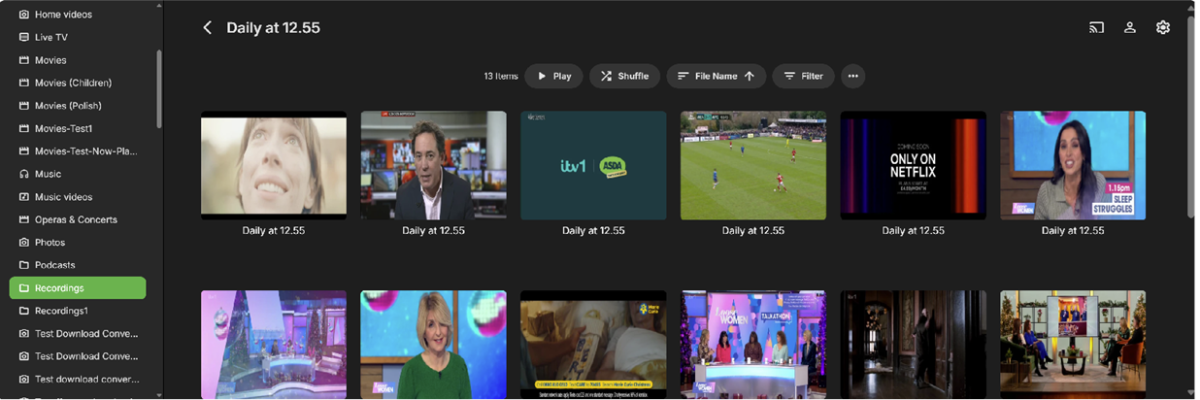 1 point
 -
well, mounting it in the system was like "workaround" in 2017 year post with consideration to implement it on the emby level. And the change done, it is now recommendation And the problem with mounting it in any external way still exists: - If the remote is offline, container wouldn't start or the folder would be unmounted (there no external samba mount managers, to make it sustain reboots or remote target reboots). Mounting it on fstab level brings another set of problems as well. - mounting via composer, exposes remote smb permissions, well, in a same way as to do it via fstab. - on emby side such mounts require watchdog to be disabled with manual rescan required, so the index would not be removed if remote would be disconnected.1 point
-
Hi, this is currently expected behavior but more options to control this will be coming in future updates. Thanks.1 point
-
Here is the latest updates. I've added a checkbox for real time updates or not. I've added language updates that pulls the language from the users audio settings first and then if that is set to auto it will pull the server language setting. @fillidillPlease feel free to try this version and let me know if you problem persists. If so I will start working on your issue next. Emby.WatchedSuggestions.dll1 point
-
Yes - surprisingly. Paul1 point
-
Hi Carlo Thanks for the detailed response, very helpful.1 point
-
Hello pals, I'm using short term Emby server to serve my Movie and Music collection and I'm fully satisfied. After installed XMLTV server plugin I can watch and my TVHeadend IPTV received TV programs. Now I've though (just an idea because don't look at server plugins in depth) - if the XMLTV plugin uses ffmpeg or avconv to cast TV channels is it possible to make choose second channel and produce resultant stream from both channels with Picture in Picture. I know with FFMpeg is relatively easily like ffmpeg -i pipInput1.flv -i pipInput2.flv -filter_complex "[1]scale=iw/5:ih/5 [pip]; [0][pip] overlay=main_w-overlay_w-10:main_h-overlay_h-10" -profile:v main -level 3.1 -b:v 440k -ar 44100 -ab 128k -s 720x400 -vcodec h264 -acodec libfaac PIP_output1.mp4 or more simple ffmpeg -i master_video.mp4 -vf "movie=second_video.mp4, scale=800:-1 [inner]; [in][inner] overlay=70:70 [out]" completed.mp4 ffmpeg -i rtsp://serer/mp4:1.mov -i http://serer2/sample-video2.mp4 -filter_complex “[1]scale=iw/4:ih/4 [pip]; [0][pip] overlay=main_w-overlay_w-10:main_h-overlay_h-10″ -ar 44100 -f flv rtmp://localhost:1935/Stream etc more variants. Could be possible to be created such PiP IPTV plugin server side ? Thanks to anyone in advance.1 point
-
I’m fine with displaying collections on the series page. However, the current issue is that when a season is added to a collection, the collection information doesn’t appear on either the series or season page. This means users have no way of knowing that it’s been added to a collection.1 point
-
@Luke I've saved a server log (with debug enabled), but when I tried to send an Android log via the "SHARE" button on the log page, it just gave me an error when pressing the button. I'm not sure how to save that log file in order to send it. I've attached my embyserver.txtserver log for now, though.1 point
-
Very exciting to hear! It sounds like you have been listening to what users have been asking for. Looking forward to testing this out when it becomes available.1 point
-
Thanks Eric - The fact you are referring to it as Smart Views is really positive - so thanks for the update. If you want Alpha/Beta testers - then please let us know.1 point
-
No, it is under active design right now.1 point
-
I don't want to promise a "silver bullet" but so much of all of this should be addressed by Smart Playlists - or, actually, what should be Smart Views. I'm sure it will take multiple iterations and it won't all be there at first but let's see how this shakes out once we get that feature started. Thanks.1 point
-
Yeah, it would be great if there was another column in the Guide explaining what the channels were, it would be a bit less trial and error, but I am getting there, slowly. I just hope the backup saves all these mappings, cos I don't fancy doing this again!1 point
-
I found some websites that lists all the channels for the different network providers (Comcast, DirecTV, ATT). You find the channel on the list and it makes it easier to find the channel in the guide. There are some odd-ball or streaming-only channels that I have not found on the Emby Guide but you can map most of them. It would be nice if you could do a word search in the Emby guide but its only a one-time pain until its set. https://www.tvchannellists.com/w/List_of_U-verse_TV_channels https://hd-report.com/guide/comcast-xfinity-tv-channel-lineup/1 point
-
Even just adding the individual Genres as rows on the front page would be useful. Especially if the contents of the rows are randomized1 point
-
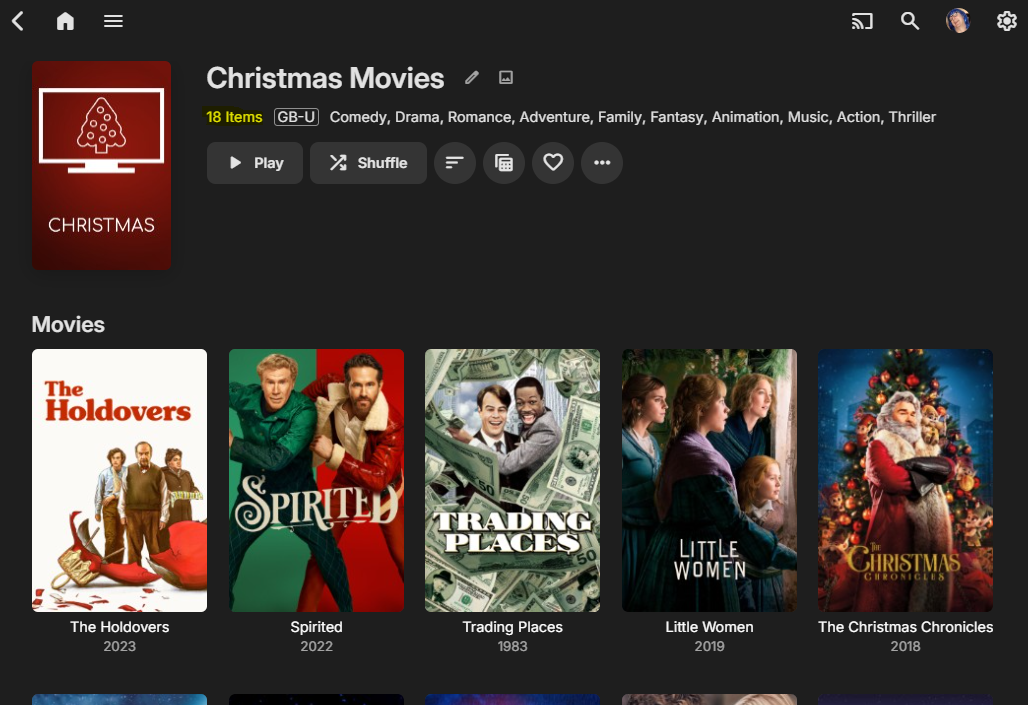
Is this not what I said above ? Emby knows what's on your server - so I'm not understanding why you cannot simply compare what's on an external 'Trending list' to what you have available on your server. This is EXACTLY what MDB script does and exactly what the Trakt plugin has done for years. The issue is we just can't present this information in a Home Page view - you have to go digging for it. Having 'collections' as a front row certainly brings it closer - but I want the ability to present the collection itself on the home page. So as an example - The MDB list 'Chrstmas Movies' has 876 movies on it (!) - link I now compare that list to what I have on my own Emby Server - I have 18 of them - thus I now create a new collection with the 18 that I have - I don't care about the others, as I cannot play them... The real issue is this collection is buried in 'collections' - which may take several clicks to get to. During the holiday peroid - it would be great to simply show this as a home screen 'row' entitled 'Christmas Movies' ..
 1 point
 -
Hi Luke, found the root cause: download not firing up when client user is also server admin. See my most recent post here:1 point
-
Agreed! Different people will have different needs. The people interacting on these forums and administrating servers will have the know how and interest to set something up whereas the average user might not. My family only use Emby on their TV apps and have never once logged in on a web browser or mobile device, they have never interacted with the home screen customizations that are already in place, they have never changed any in app settings (quality being the biggest one), and they don't use favorites. If the option to include smart playlists is added it must have some server side control or at the very least NOT be app specific and be global to the user account. I would be content with logging into their accounts remotely and setting up their home screens for them. If I have no control over this as an admin, or remote access with their credentials, this feature will go unused by all but the power users.1 point
-
Sure. Maybe you misunderstand how the external lists are used. They are not presented verbatim - they only show what you have available in your 'personal' media collection. So if the MDB list is 'classic films from the 80's' and you have lets say 5 of them available - then that is all it will show. Today - the equivalent in Emby will be a lesson in frustration - adding a filter, then individually adding the years from 1980 to 1989. And then when done - remembering to remove all the filters ... Seriously - do Emby not see this as a huge functional gap to not even being able to 'Save' this filter for re-use ? maybe you miss the point - this is the USER deciding what they want to see. The 'Admin' is not trying to force anything. Once they have a tailored 'smart playlist' where you can actually combine useful attributes (removed Genres, AND/OR items etc) then this will REPLACE the entire previous rows.1 point
-
@LukeAdd Brazil in the next country update on the official Samsung store1 point
-
That's ok! I found out what the issue was. Turns out, I just needed more computing power to transcode the .mkv files. I was initially running Emby on the 512 MB Ram/1 CPU server on DigitalOcean. I upgraded to the 2 GB Ram/2 CPU size and everything runs smoothly now.1 point












.thumb.png.95cc3d1db8647ae8b43445662d190f9d.png)









