Leaderboard




Popular Content
Showing content with the highest reputation on 12/09/24 in all areas
-
Hi all, sorry I have been away on extended holiday from Thanksgiving with family. I am just getting back into the daily norm now. @SamESSorry I do not have a particular file-type as I do use both MP4 and MKV files with different resolutions and I have tried this with several different file-types with same results between them all. @LukeThat would be AWESOME! And yes it was a hard one to get reproduced it seems . I will look forward to testing that out once the next update rolls out! Thanks everyone!2 points
-
@Luke You should set up AudioBookShelf and have a play. That project has handled a lot of the requirements of Audio Books very well. Audiobooks are becoming more and more popular, over the last few years I have seen a big uptick in people using and recommending audiobooks. Emby has an implementation for audiobooks, but it feels like it is just a renamed "Song/Album" library and internally nothing has really changed. It even still references chapter files and audiobooks as songs in a number of places. Simple things like not being able to set a series are a big drawback. /Author/Series/01 - BookName/files here.mp3 Book series are kind of a must-have when organising your Book library. I agree, metadata for audiobooks is sparse and hard to automate, one of the ways to overcome that is leaning more on the naming as an override, there should be an option in the lib setup to use the path more for import data, the above example /Author/Series/01 - BookName/files here.mp3 The author, the series, the book name and series number are all in the path. You should be able to set the library to force using this data. Some of the path options from AudioBookShelf https://www.audiobookshelf.org/docs/#book-directory-structure I feel over the next few years, audiobooks are only going to become more popular.2 points
-
And yet there are still a lot of people with the opposite opinion.2 points
-
It would be great to have Emby as a music provider for Music Assistant: https://music-assistant.io/ I'm forced to use Jellyfin as a provider for now: https://github.com/orgs/music-assistant/discussions/583 It probably wouldn't take too much effort to adapt the existing Jellyfin provider to the Emby API: https://github.com/music-assistant/server/tree/dev/music_assistant/server/providers/jellyfin1 point
-
Thanks Luke. That's it.1 point
-
Well, it does leave a new timestamp and a reduced file size since I removed 40 subtitles track. I'll see on next time this happen if just a simple scan file fixed it.1 point
-
There is no UI option for these SortRemoveWords they are only found in your system.xml You have to go to since Synology something like Data path: /var/packages/EmbyServer/var/config/system.xml and edit it. <SortRemoveWords> <string>the</string> <string>a</string> <string>an</string> </SortRemoveWords> Or going to Emby API and querying the config and reposting it. Something else that should be exposed in the UI. @Luke Also note changing these value will require your to do a complete REFRESH of all metadata to rewrite the sorttitle field in the database.1 point
-
Hi, any day now our new windows app should be in the store. Stay tuned to the blog for the release announcement !1 point
-
Found it - https://docs.google.com/spreadsheets/d/e/2PACX-1vTtWQwRLBTPp5TNh8KmtSH3Rvz9Zm6ovUL__YL9Ax1ikzGLCzdfhryjMJ6-g5N1rJIf5LrDGjE5jqds/pubhtml?gid=1930489182&single=true1 point
-
It completely (at some point) completely replaces existing Emby TV features. You can set up tuners from scratch with it, including satellite eg pick your satellite, choose LNB, have a tuner on a remote PC, works on Linux. There's a feature matrix for new vs old which I can never find - hopefully somebody else can.1 point
-
Ok I see now, yet another one fooled by an worthless AI.1 point
-
HI, they may just end up being recreated. There is no way to only convert newly added content while ignoring all existing content. No automatic way at least. You'd have to just do manual conversions as you add new videos.1 point
-
Gary, Try using the exact title with the year in parenthesis, used in imdb.com. I have found that always works.1 point
-
thanks rbjtech!! yes trsck titles remain. no external tool here. that was basically my thought. didn't know that metadata refresh is overwriting it did this sometimes even manually but now I remember after using the addon I have to scan the kjbrary not refreshing metadata also have to check if there's a schedule for it. I'm an idiot! thanks!1 point
-
FWIW, the download is working on bazarr again.1 point
-
Unfortunately Copilot doesn't know as much as it thinks it does!1 point
-
At least now you are understanding more about what is happening. I just asked Microsoft Co-pilot AI which words does Emby automatically remove - this was the answer: I guess there are other words for other languages as well? Emby could say this is by design and not an error that needs fixing - but that is for them to reply to you rather than me!!!1 point
-
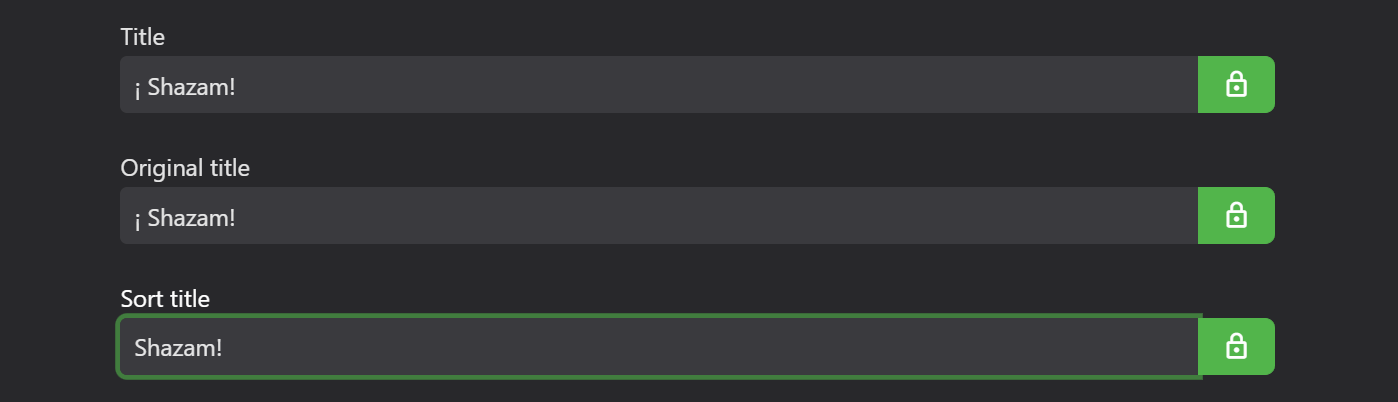
For your problem movies what does Emby show for Title and Sort Title? Emby automatically removes "The" from Sort Title for English language. Possibly the same automatic removal may be happening for "Los" for Spanish language??? What happens if you manually change your Sort Titles? Also, you need to lock any of the titles if you don't want Emby to change or update them.1 point
-
The problem is solved. It was, as you said, a database conflict. I wiped everything again. Then I installed emby_TOS5_APP_4.9.0.29_x86_64.tpk beta directly. As I mentioned above, I couldn't access the Emby UI for configuration. It then worked via Emby Connect and I was able to set everything up. Everything works now as before! I am so grateful to you! Thank you so much for your help!1 point
-
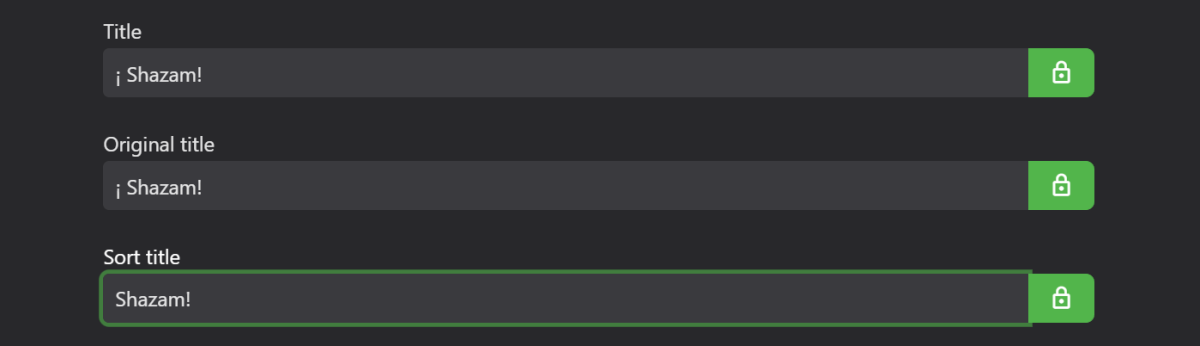
In your example there is an inverted exclamation mark "¡" before the capital "S". If you remove this from your Sort Title, then the symbol will be retained in your visible Title but Emby will sort the Movie under "S".
 1 point
 -
Just an FYI, this issue still exists on emby for android tv. The home screen does not update automatically with the only solutions being exiting out and relaunching or going to favorites and back to the home page.1 point
-
Yea, sorry for that, this is admittedly everything but obvious. It has always been a kind of plothole and many plugins had resorted to exposing their own instance as a static property, which is really an awful pattern. Also the Dependency Injection via class constructors can be quite confusing when you aren't fully clear about which classes are being created by DI and which are created and tracked manually or as children of a DI-created instance. In the latter cases you would often need to transfer lots of instances through your constructors, because they can only come from the DI-created parent instance. We have a pattern that helps with these things and adds a lot of convenience and allows to write code that is much cleaner: There's a base class Emby SDK Reference: CommonBaseCore that you can use You create your own derivate (once) in your plugin, like CommonBase Then you derive all most of your classes from CommonBase (of course not those which have other bases) The constructor needs an Emby SDK Reference: IServiceRoot implementation for which you can use the provided Emby SDK Reference: ServiceRoot class (this one is stateless, you can create new instances or reuse existing ones - it doesn't matter) That ServiceRoot is just a wrapper around Emby SDK Reference: IApplicationHost in this case ApplicationHost is carrying the "root" of everything: The DI container. With it's Emby SDK Reference: IApplicationHost.Resolve<T>() method, you can get and create instances for all DI types without constrructor injection. The CommonBaseCore class wraps that and when you use that as base class, you can call this.GetService<>() from everywhere in your code to get any instances from DI Now for how to get at the options? You expose them on the plugin class and you can get an instance of the plugin, again from Emby SDK Reference: IApplicationHost.Plugins You can do that in your CommonBase class and that allows you to access the options easily from everywhere in your code: public abstract class CommonBase : CommonBaseCore { private MyPlugin myPlugin; protected CommonBase(IServiceRoot serviceRoot, string logName = null) : base(serviceRoot, logName) { } protected MyPluginOptions Options => this.Plugin.Options; protected MyPlugin Plugin { get { if (this.myPlugin == null) { this.myPlugin = this.GetService<IApplicationHost>().Plugins.OfType<MyPlugin>().FirstOrDefault(); if (this.myPlugin == null) { throw this.GetEx(@"The {0} plugin is not loaded", MyPlugin.PluginName); } } return this.myPlugin; } } } I have extended the SDK sample with all the things I mentioned above. It will be in the next beta SDK, but here's a copy up-front: EmbyPluginSimpleUi.zip1 point
-
Sorry, I shouldn't have even mentioned that route, as so I have accidentally created the impression that the problem would be the embedding. I was a bit too lazy and stopped prematurely. The right answer regarding embedding of dependencies is: don't do it, it's a doomed path and even when it all looks good initially, it may take up until you're all done that you realize that you need to re-do substantial parts of your plugin. So, some of the real problems are these: What happens when your plugin X embeds libA and there's also another plugin Y which embeds libA? In a single process (more precisely AppDomain), it is not possible to have two or more implementations of the same type. So when one of the plugins gets loaded, it also loads libA, but when the other one gets loaded and tries to load libA, it fails and loader exceptions cannot be caught and remedied Since embedded libs are loaded from a byte stream, the usual loader mechanism do not work (i.e. "assembly with path p is loaded already"). There are several things that work differently and overall, you just can't handle it properly Also you don't know what other plugin developers might have implemented this, there are no rules or negotation for it. And anyway it's unlikely that two plugins would have embedded the exact same version of a lib, and in the end this makes countless points of potential breakage and it will breake more often than it works You could do assembly prefixing, but this doesn't work when you have two or more dependency libs where one depends on the other. Ultimately you could create a separate AppDomain and load your dependencies there, but then you'll have to deal so much with bridging in and out, that it would draw off all the fun from developing a plugin (plus otrher drawbacks). Before you look up assembly prefixing and AppDomains - please don't. These aren't meant to be suggestion and we're also not even done yet, as there's more: By using the built-in functionality, you are using implementations which are the result of work and experience of more than a decade. When you use "some lib" with "some json serializer", then you'll have to go through it the hard way and solve all the things yourself which we have solved long time ago: For example, we have special and different implementations of Emby SDK Reference: IHttpClient for platforms, e.g for Android and IIRC also when running on Mono We use ServiceStack serializaton everywhere, but with some adjustments that are important when deailing with information about movies and tv in metadata providers [enough for now] Bottom line is: use Emby implementations rather than external ones, this will allow you to create solid and reliable plugins without bad surprises and without needing to solve problems that we have solved long before. For the use of Emby SDK Reference: IHttpClient, just take a look at those plugins (and other public ones on our GitHub site): https://github.com/MediaBrowser/Emby.Plugins.AniSearch https://github.com/MediaBrowser/Emby.Plugins.MyAnimeList https://github.com/MediaBrowser/Emby.Plugins.Proxer https://github.com/MediaBrowser/Emby.Plugins.Anime Caching et al. can be configured with the Emby SDK Reference: HttpRequestOptions class.1 point
-
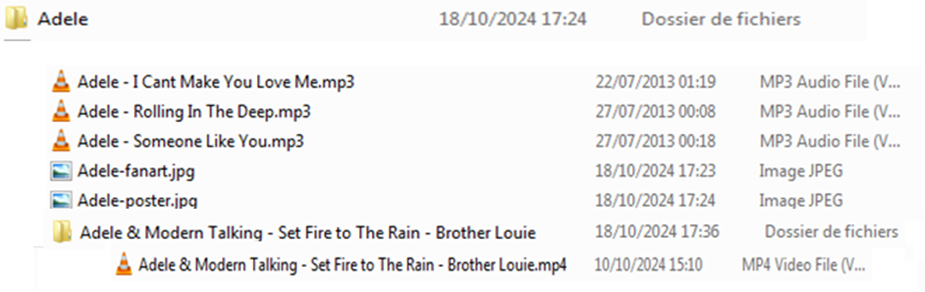
Hey Luke I've found a solution. Perhaps, it's well known for emby team 1) - Remember : I have "artists directories". Under those folder, the songs named : "ArtistName - SongName.mp3 or .mp4" When one of the music tracks is in MP4, sometimes, often, emby tends not to present the folder containing the songs in the folder. It presents only the MP4 music track that I can only launch: No access to the other tracks. 2) - Workaround : Each ".mp4" file must be isolated in a subdirectory of the same name but without extension and everything becomes correct For your information : Emby Server has been installed on a Debian Server Bullseye Thank you Luke
 1 point
 -
I must apologize. As I was adding new titles to various playlists that I (thought I) had already defined with a sort order, I saw the new titles at the end of a list, when they should have been sorted higher in the list. It seems as though Emby would "default" back to the order they were added. When I specifically tried to re-create this problem in a controlled fashion, adding to a playlist I know is sorted by title, the newly added film DID come up sorted properly. I made this post because I was certain that the sort criteria I assigned had changed. I will now set the sort order of ALL my playlists to my desired criteria. When I add new titles, I will look to see if any of the playlist sort criteria are changed. If I see any changes, I will re-post here & upload a log file, so you can see if there is anything "funny" that Emby is doing. Thank you.1 point
-
It shows what time the video will end if you began playing right now. So; say it's currently 9:35am and you have a 25min long video. That time will display '10:00am'1 point
-
You can follow this section of the forum. Announcements - Emby Community1 point
-
Removing the Trailers button is a feature I'd hoped would eventually come along at some point since I first started using Emby. I love Emby and my primary use case is a UI and media library used only for children where I put all kid-friendly content for them to watch along with other of various ages that come visit. However in my media library are also a few edited down movies I've created that I know kids would enjoy such as Avatar and Shaolin Soccer which is a basic edit to only show the fun or visually amazing scenes which the kids love. So I'd like to be able to disable the Trailer button (and any ability to load/watch trailers) so that a kid can't press the Trailer button and get a VERY different version of the Avatar movie (or the same for other films I've created a small kid-friendly version of). This might only be a narrow use case, but you can see why having control over removing Trailers option will ensure the kids can enjoy these older themed content in a safe way without being horrified at the actual movie trailer Thanks.1 point
-
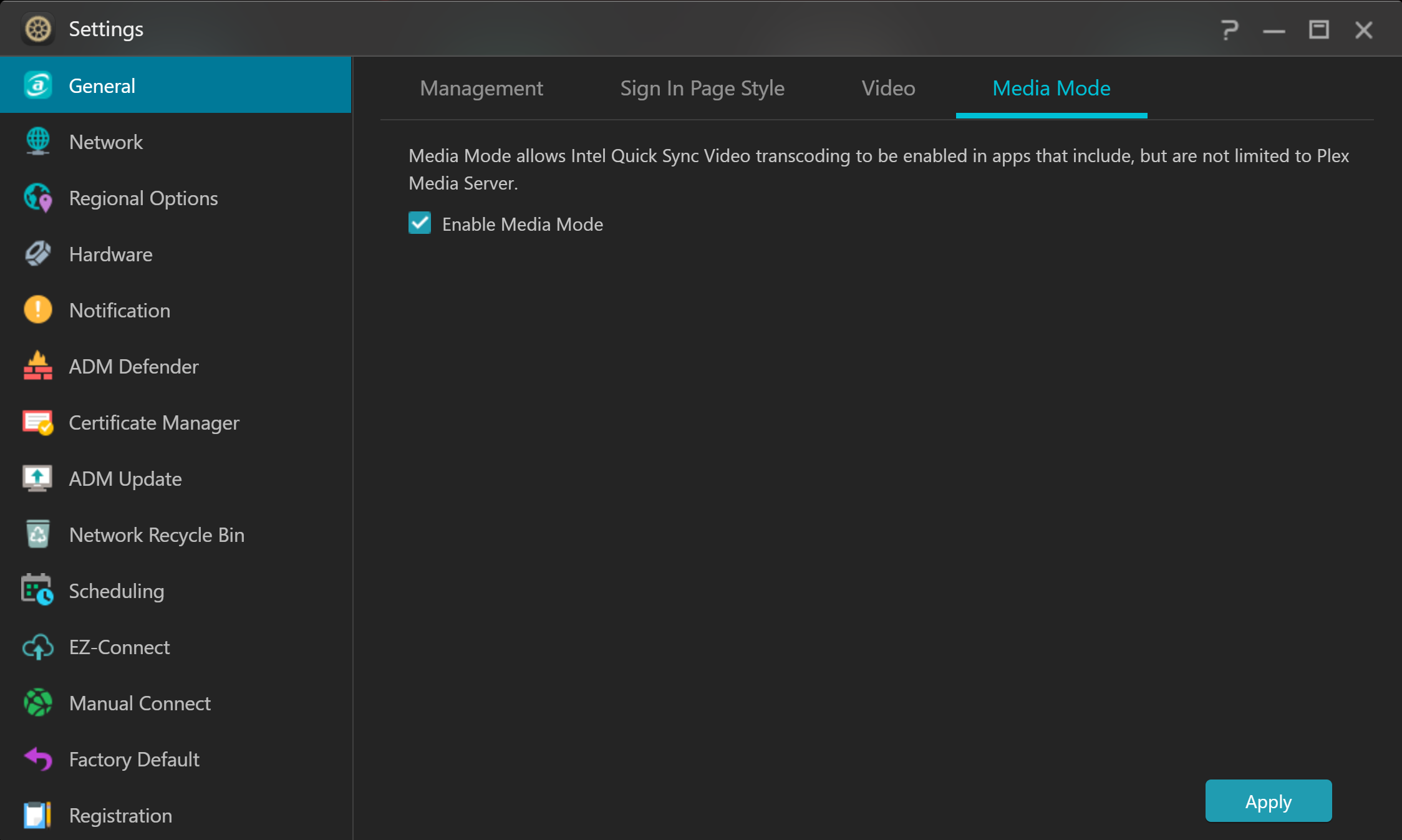
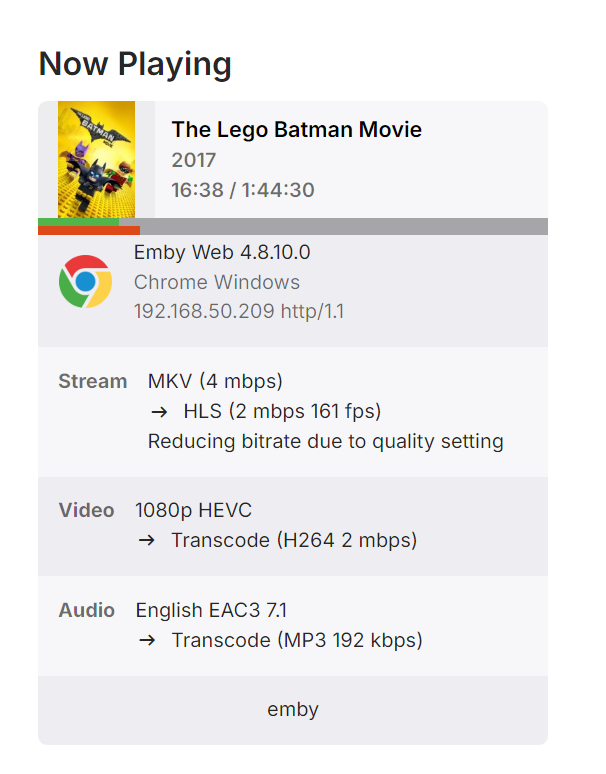
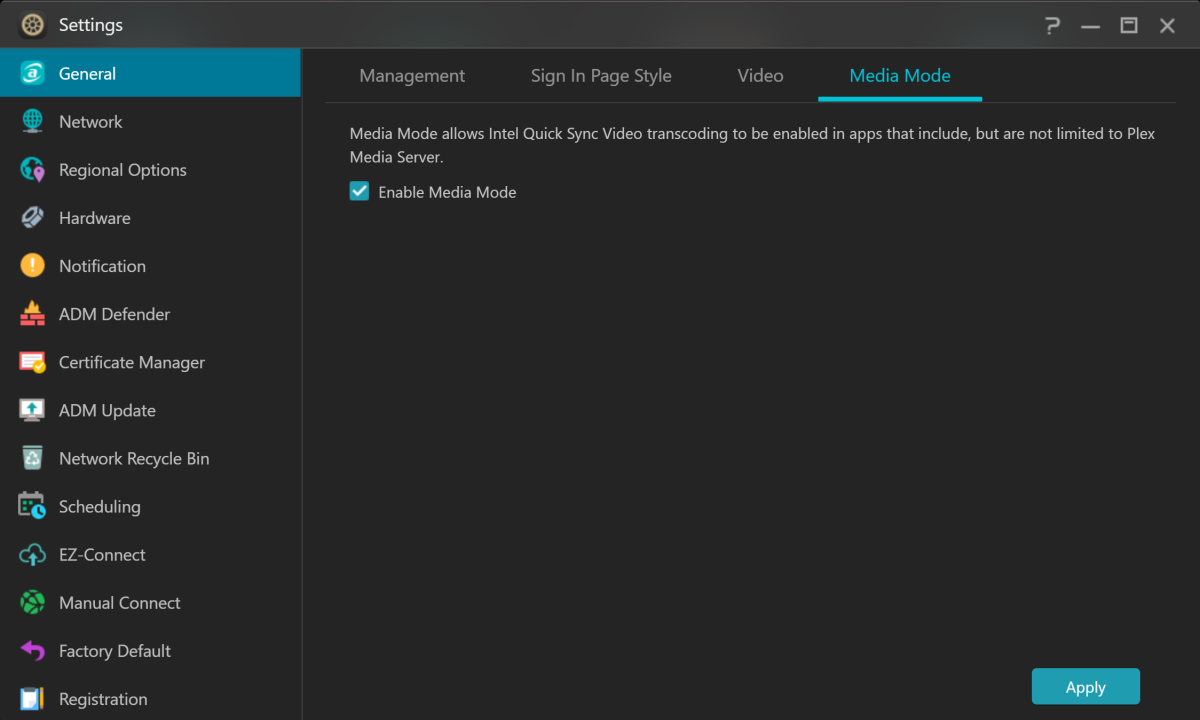
Hi @Clackdorand @Luke, Switching on the "Media Mode" option in the Asustor GUI solved my problem. Thanks for your help! Emby transcoding works perfectly now.
 1 point
 -
OK reproducing this has been difficult, but we think we have this solved for the next update to the Emby Apple TV app. Thanks.1 point
-
Hi, no, that's not it. But it should be any day now. Thanks.1 point
-
Could you possibly post a tutorial on how to do all that? I cant find inotify in my syno store and still can't figure out how to do it all with the dockers1 point
-
@Luke I just completed rebuidling my M4 Pro Mac Mini from scratch and....EVERYTHING WORKS!!!! I can access content locally and remotely so far on my LG TV, Android phone, iPhone and iPad. My next test will be my Mum's Chromecast with Google TV - fingers crossed! You may be correct about how Emby server was installed although I could've sworn I expanded it first in the downloads folder, then dragging it to the Applications folder before launching it for the first time, although, I will admit that due to muscle memory, I may have inadvertently launched the Emby Server app whilst it was still in the Downloads folder without realising in my excitement to get it running on my M4 Pro Mac Mini. This time around, I made VERY sure to extract it from the ZIP file and then drag it to Applications before launching it. Now eagerly awaiting when Emby server will support hardware transcoding on Apple Silicon fully - thanks for all you help Luke.1 point
-
Hi Luke, I downloaded and expanded the Emby Server zip in the Downloads folder before dragging the Emby Sever app to the Applications folder. Should I have expanded it in the Applications folder? I have decided to proceed with completely wiping my M4 Pro Mac Mini and re-installing everything. I will this time expand the Emby Server zip file in the Applications folder. Will test and update once done. Thanks for all your help Luke1 point
-
@Zander3768what format is your media normally in? Is it all mp4, mkv or a mixture (or something else)? Can you give some example media info that you know causes this issue? I can't determine if the already playing video or the video you are attempting to 'play on' is the issue, so media info for both would be useful. I can't reproduce this, so we need to try and understand more about your files and playback to try and reproduce it. Do you know if either file is transcoding or are they both direct playing? Any subtitles, or are they off?1 point
-
WELCOME TO THE HISTORY OF EMBY! A lot of our users are new to Emby and we thought it would be a good idea to share some of the backstory of how Emby came to be, where we started and where we are headed. We have grown significantly since our inception. Once a humble open-source project, Emby has evolved into a sophisticated platform that allows users to organize, stream, and enjoy their media libraries with ease. In this post, we'll take a look back at the history of Emby, explore its development journey, and highlight the key milestones that have made it what it is today. The Early Days: An Open-Source Beginning Emby started its life as Media Browser, an open-source project focused on creating a simple, user-friendly interface for accessing digital media collections. Originally, Media Browser was a plugin for Windows Media Center, and its primary goal was to offer users a better way to manage and play their media files. Back then, it was a community-driven project, with developers and enthusiasts contributing code, features, and plugins to expand its capabilities. Media Browser gained a loyal following among tech-savvy users who appreciated its customizable nature and flexibility. The Shift to Emby and the Rise of the Media Server In 2014, Media Browser underwent a major rebranding and evolved into what we now know as Emby. This change wasn’t just about a new name—it marked a shift in focus from a media center add-on to a full-fledged media server solution. Emby’s developers wanted to create a standalone server capable of managing large media libraries, transcoding content, and streaming to multiple devices. The introduction of the Emby Server brought a range of new features: Library Management: Users could organize and manage their media files with a sleek web interface. Metadata Scraping: Automatic fetching of metadata like cover art, descriptions, and ratings. Transcoding: On-the-fly transcoding for seamless streaming to any device, regardless of format. Multi-Device Support: Streaming became possible on a variety of devices, including smartphones, smart TVs, web browsers, and gaming consoles. This new direction attracted more users who were looking for a flexible media server that could handle diverse formats and provide a unified experience across different platforms. Open Source to Closed Source: In 2018, Emby made a significant decision: it moved from being an open-source project to a proprietary, closed-source model. The change allowed the development team to maintain greater control over the codebase, improve security, and introduce features more rapidly. Key Milestones in Emby’s Development As Emby transitioned to a proprietary model, the development team pushed forward with a series of updates and improvements: Emby Premier: The introduction of a paid subscription model called Emby Premier brought exclusive features like DVR support, cloud sync, offline media, and hardware-accelerated transcoding. Emby Premier gave the development team a sustainable revenue stream to fund further development. Improved Mobile and TV Apps: Over time, Emby released a series of polished apps for mobile platforms (Android, iOS) and TV devices (Roku, Apple TV, Amazon Fire). These apps received regular updates to improve stability, user experience, and customization options. Live TV and DVR Integration: Emby expanded its offerings to include Live TV and DVR functionality, allowing users to integrate live broadcast channels, schedule recordings, and manage live content alongside their media libraries. Enhanced Transcoding and Streaming: Emby has continuously improved its transcoding capabilities to support modern formats like 4K, HDR, and Dolby Atmos. These improvements allow for a high-quality viewing experience regardless of the device being used. Security and User Management: Emby introduced advanced user management features, including user profiles, parental controls, and access restrictions. This makes it easier for families to share media without compromising on privacy or security. Emby Today: A Comprehensive Media Experience Today, Emby is a mature and feature-rich media server solution that caters to a wide range of users—from casual media consumers to serious home theater enthusiasts. It supports a broad spectrum of devices, offers robust customization options, and remains focused on providing a powerful yet easy-to-use interface. Some of Emby’s standout features today include: Unified User Interface: A sleek, modern interface that makes browsing and streaming media a joy. Customizable Libraries: Tailor your media collections with custom artwork, genres, and metadata. Cross-Platform Syncing: Keep your media in sync across multiple devices and platforms. Comprehensive Live TV Support: Access live TV, manage recordings, and watch DVR content effortlessly. Community Engagement: Emby continues to value its user base, with an active community forum, feature requests, and beta testing for new updates. The Impact of the Community and the Road Ahead Despite its shift to a closed-source model, the Emby community remains strong. Many long-time users contribute by creating plugins, themes, and offering technical support. The Emby team regularly interacts with the community, implementing feedback and adjusting features based on user needs. Looking forward, Emby is set to continue expanding its feature set while focusing on performance enhancements and cross-platform support. Emby’s development is driven by innovation and user feedback, ensuring that it remains a competitive choice in the world of media servers. Conclusion Emby’s journey from a simple open-source plugin to a leading media server solution is a testament to its adaptability and the passion of its developers. While the shift from open-source to closed-source was a turning point, Emby has continued to evolve, delivering a reliable and customizable media experience for millions of users worldwide. The history of Emby is one of growth, change, and a dedication to providing users with a comprehensive and enjoyable way to manage their digital media. View the full article1 point
-
Same problem on my old Ipad Pro 1st gen. last IOS. App starts without problems, after a few seconds up to 1 minute the app crashes, after restarting the app it works.1 point
-
Hi there, Took me a while but I wanted to give some follow-up on this story. So 2 things "solved" my issue there: I replaced the movie with an higher quality version, the problem didn't came back I purchased a NVIDIA Shield (oh my god, the quality is so much better compared to Chromecast!) So, there is no miracle there and I could not really pinpoint the issue... The quality of the movie was not optimal, the quality of CC 4K Ultra is not optimal either and there is for sure different methods between Emby and Plex. At the end, my multimedia server is the only server in the house I don't want to troubleshoot, I just want to enjoy it Thanks to anybody that helped me in this topic!1 point
-
Switching the container doesnt make a difference @pünktchen.1 point
-
Hi @Luke Sure, replied to your DM.1 point
-
After various trials and errors, I gave up on displaying on Emby, changed all the album art for one artist using mp3tag, and when I executed "Scan Library Files" and "Replace existing images," the album art tags were applied to all albums. Why was it that changing only one album didn't work? Well, since the correct album art is now displayed correctly on Emby, I'll consider it a success. Thank you, everyone.1 point
-
It's actually ok. I figured out what the problem was. It was how I was naming the files I was using. I used to name my files like this: Series [Season # - Episode #] - Episode Title. For example, the first episode in the first season of the Transformers G1 cartoon would look like this: "Transformers [1-01] - More Than Meets the Eye - Part 1.avi". For whatever reason, Emby wouldn't recognize that this file would be considered to be part of season 1 if I tried to download the files. I would go to download the first season of a show, and nothing would be recognized as being part of the first season, so nothing would get downloaded. Since then, I renamed my files so that they would look like this: "Transformers - S01E01 - More Than Meets the Eye - Part 1.avi", and now Emby recognizes the files properly and downloads them when I ask it to. I hope I didn't botch that explanation so much that it couldn't be understood!1 point
-
Yeah I see how that makes some sense, ideally, it would always take either the M3U logo or EPG (user selectable or course) and then Emby would always use it unless the user changes. Otherwise, for users like me that use channel numbers for sorting, it would have to be tied to the Guide Name from the lineup.json I suppose.1 point
-
And the solution for those that can't use the standard app because of its shortcomings?1 point
-
You make a call to do what? It's only going to be there after while it is actively playing, not before, not after.1 point
-
Thank you very much It worked! I finally made an extra call to PlaybackInfo, and I got the PlaySessionId back and propagated it through the calls as you said! Great! Well, if you don't mind, I'll ask you one last question, in case you could help me in a similar way, since I have another part of the code that also stopped working as before (although it's not as critical). We have a websocket connected to emby server, waiting for the message ‘UserDataChanged’, when we receive it we make a call to: /emby/Sessions?ControllableByUserId=xxxxx&DeviceID=xxxxx. This call returns (when the user tries to play an item) the parameter: ‘NowPlayingItem’. The problem is that it does NOT always return it, when before it did. This happens for ISO movies (for MKV movies it always returns it). I know Emby doesn't play ISO, but it tries, and that attempt is reflected in the Emby server dashboard now. And as I said, in the old days it always did it in the NowPlayingItem parameter of the UserDataChanged message. Do you have any idea why? Out of 20 attempts I get it in 1 (to tell you), I always got it before. Anyway, I don't want to entertain you too much with this, if you have any idea, fine, if not, no problem. Or if you can think of any other way to get that ISO reproduction attempt, welcome. thanks1 point
-
+1 for this, since the movie and tv library is stable enough, it would be great to go to this section as well (basic e-reader is fine too, as long you can read without problem) currently i'm using this https://github.com/janeczku/calibre-web (and can be used via opds as well for other apps to grab the book) but the problem is, this one kinda dont have progress tracking, it would be great addition for emby if you can manage to achieve this, and also it would be big plus, since AFAIK currently for cross multi platform e-reader (epub) is only pocketreader atm, and only that alone that has progress sync, across ios and android (CMIIW), and it has quite issue as well in ipad1 point
-
I've also been using Ubooquity to KOreader on my Kindle. So it's really only running as OPDS library. It would be really cool if Emby could host OPDS and also have some sort of sync function. If this gets implemented, I could also move away from running multiple servers.1 point
-
Had added my vote cause I really think ebooks should get some love as well Surprised me it gets so few upvotes though1 point
-
@@Luke is this planned for v4? This is really the last thing I'm waiting on for premiere because I recall lifetime only supports current and next full version number and didn't want it to happen to land in v6. That would be a spot of bad luck.1 point
.thumb.png.1ddf135ad99a72646a26d671a28ffe35.png)