Leaderboard




Popular Content
Showing content with the highest reputation on 12/06/24 in all areas
-
CommercialCleaner is a command line utility to remove commercials from a video file at EDL file cutpoints. The EDL file is commonly created by the application ComSkip. It has executables that will run under Windows x64, OSX x64, Linux x64 and Linux ARM. The application transitions very smoothly in to and out from where the commercials were. It can also optionally: Remove an amount of time in seconds at the start of the video (in case the recording starts before the show begins) Remove an amount of time in seconds at the end of the video (in case the recording runs after the show ends) Allow you to set the video codec you desire for the output file Allow you to set the audio codec you desire for the output file List available audio and video codecs (for the 2 commands above) Latest Release3 points
-
Without more detail about your current server setup I would say it's much easier to clone Linux-to-Linux by copying the Emby server data to the new machine. AS LONG AS: - The emby user and associated groups are created/exist on the destination server. UIDs/GIDs don't have to match but it's easier if they do. - The library paths are the same on the destination server. This is important because if they don't or can't match then IT WILL HAVE TO SCAN. There's no reliable way around this.2 points
-
Found the cause. I hope we will be able to include a new ffmpeg build in the next beta. Thanks for reporting!2 points
-
hallo guys, I have iPhone 16 with the latest iOS version. When I use the Emby app to play movies . I exit the app then the movie plays Picture in Picture mode . But the problem is when I go back to the Emby app the screen turns black and the movie still playing. Anyone have a fix for this issue1 point
-
VideoRefactor is a Windows winform application that allows you to easily make common changes to video files such as changing video and audio codecs, the resolution (1080p to 720p for example), remove the Default tag on audio and subtitle tracks, and whether to keep any existing subtitle tracks or not. In addition, it allows you to specify how many seconds to take off the start and end of the video (for example, if you have your system configured to start recording a few minutes early and run a few minutes after the desired show to ensure getting the entire program). Latest release.1 point
-
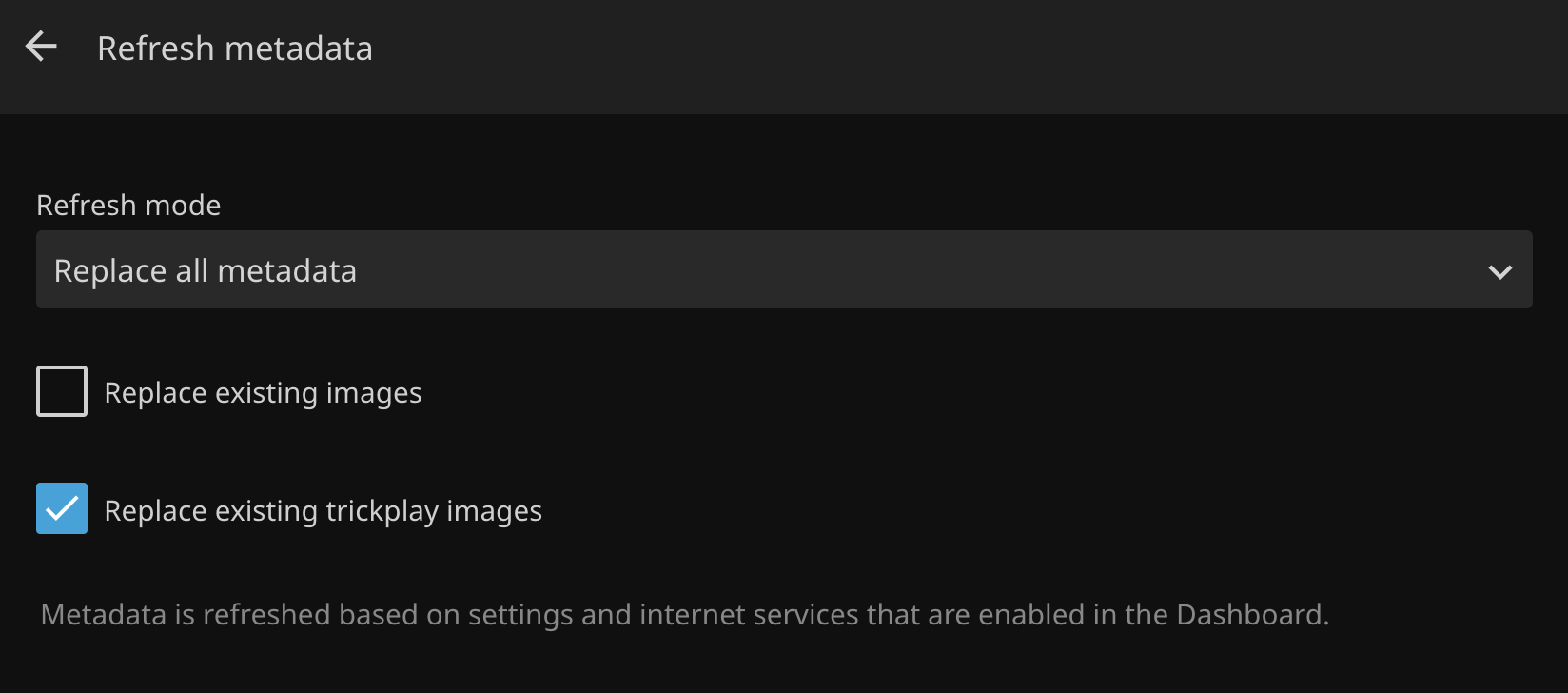
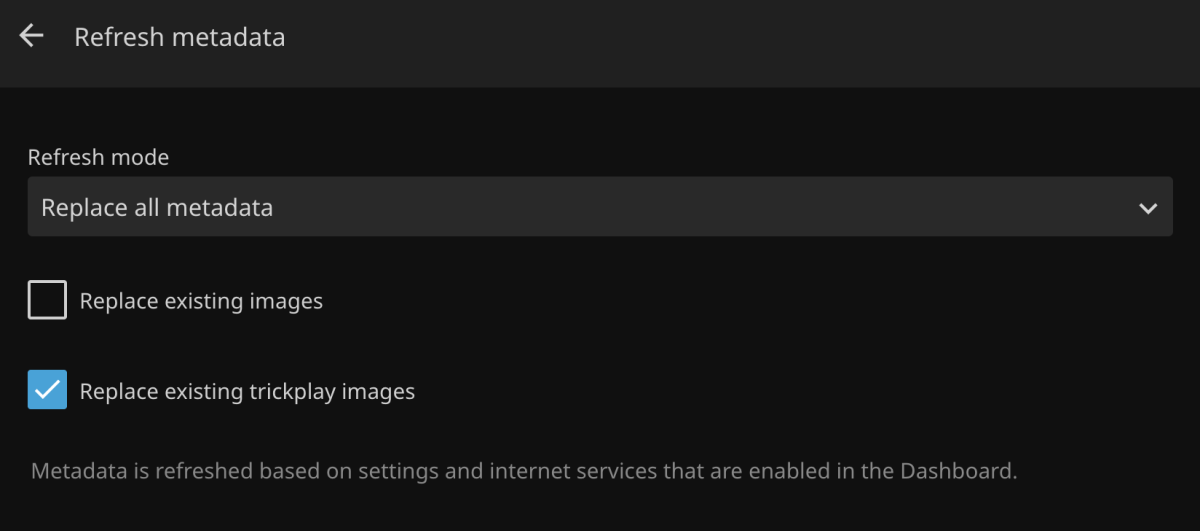
Refreshing metadata should include the option to regenerate seek/index images. Currently you have to find and delete the bif files manually. With Jellyfin, all you have to do is check a box in the UI: https://i.ibb.co/Tq5LznF/jellyfin-refresh-md.png
 1 point
 -
I've had Emby running nicely on TrueNas for past few years, using Android phones / tablets to cast it from the official app to a Google Nest Audio, 2 x Nest Minis and a Google Next Hub. All this time, once Emby has been cast to a device, I've been able to use basic voice controls through that device (volume, pause, skip etc.) and touch controls (volume, start/stop). All of a sudden sometime over the past month I would say, this has stopped working properly on all devices. I can cast fine as usual, but can only control volume on the devices, I can't start/stop or skip tracks with voice or touch. The Android app hasn't updated since August and I haven't done anything to my Google Home setup. Anyone aware of something that might have caused this?1 point
-
I thought you guys fixed this one a long while ago, but has bit me twice lately. You're likely keeping me from watching bad football (the Chicago Bears lately!), however still a serious issue for me. Issue: An in-progress recording is stopping prematurely due to the stream being watched (and likely exited) by another user at the same time. Recording in question: NFL Football 2024_11_10_12_00_00 - New England Patriots at Chicago Bears 2024-11-10 14:03:44.445 Info SharedHttpPipelineSource: SharedHttpPipelineSource is done streaming. 2024-11-10 14:03:44.445 Info Server: http/1.1 Response 200 to 127.0.0.1. Time: 7873278ms. GET http://127.0.0.1:8096/LiveTv/LiveStreamFiles/1b97d0b293e344e7b1591c628b912680/stream.ts 2024-11-10 14:03:44.445 Info Server: http/1.1 Response 200 to 127.0.0.1. Time: 6905377ms. GET http://127.0.0.1:8096/LiveTv/LiveStreamFiles/1b97d0b293e344e7b1591c628b912680/stream.ts 2024-11-10 14:03:44.447 Info LiveTV: Recording stopped: /mnt/user/Recorded_TV/NFL Football (2023)/NFL Football 2024_11_10_12_00_00 - New England Patriots at Chicago Bears.ts 2024-11-10 14:03:44.448 Info App: AppendExtraLogData - Read graph file: /config/logs/ffmpeg-directstream-ff6da435-e788-4a90-9e6b-015c1168fe62_1graph.txt 2024-11-10 14:03:44.448 Info App: AppendExtraLogData - Deserialized GraphData fileStream: 27.000 bytes Graph Count: 0 2024-11-10 14:03:44.448 Info App: AppendExtraLogData - File Deleted 2024-11-10 14:03:44.448 Info App: ProcessRun 'StreamTranscode ff6da4' Process exited with code 0 - Succeeded Full log attached. Please review/fix this ASAP. I have 8 tuners, and the user did not tell it to stop recording. I can tell in the activity that the time aligns with the user exiting the stream. I don't think they did so intentionally either, just bad connection or whatever is likely the reason for them stopping. Full log attached. Happened two weeks ago as well, but believe that log has been deleted by now (if not I can retrieve it). Thank you! embyserver-63866876399.txt1 point
-
I don't use Emby with Google Home but I suspect that it has to do with the migration to Google Home Developer Console that is currently underway. I got an email about it because I use it with Home Assistant.1 point
-
This is how they all looked for me: #EXTM3U #PLAYLIST:Remakes And that was the all the content they had, just header, containing playlist name. Everything else was blank.1 point
-
Subrip files are larger image based subtitles that need to be burned into the video with transcoding. I don't think there another way to show these files. However, you can convert them to .srt files. Pick an online convertor of your choice. https://duckduckgo.com/?q=subrip+to+srt+convert&ia=web I've used the first in the list successfully. https://subtitletools.com/convert-to-srt-online Also, if you have multiple audio or video options in one media page, you can clean up and shorten the names that appear in your pull down choice, by adding a dash, the resolution and then a word or two of the type of media. filmName - 1080P Director's cut.mkv filmName - 1080P.mkv Subtitles can be: filmName - 1080P Director's cut.en.default.srt That subtitle would only appear when you chose the Director's cut. Hope that helps.1 point
-
Okay thanks for the advice. I try to make my media more compatible or try adding more Hardware Transcoding1 point
-
You are using Firefox and hevc codex and pgs subtitles. You will get in trouble. 79 Mbit/s and 75 Mbit/s might be to high for you network, and client. User policy for user x Enable Playback Remuxing: True Enable Video Playback Transcoding: False Enable Audio Playback Transcoding: False elapsed=00:00:00.40 frame= 238 fps=0.0 q=-1.0 Lsize=N/A time=00:00:00.20 bitrate=N/A throttle=off speed=0.497x Your server can't handle those files, see marked in red, it should be over 1. Try enabling hardware transcoding if you have Premier. Otherwise you could try with EDGE browser seen it work ok with hevc. But then again not with PGS subs.1 point
-
Already did, only trick was that you had to click "refresh metadata" on all of playlists, to get content re-appear in Emby. But not everyone has BTRFS snapshots enabled (performance hit, space constraints, etc.) or are familiar with Linux commandline to copy files around from shell.1 point
-
Make sure you copy at least on out so daily backups don't delete them all. Not positive but since you can query the id in the api you should be able to manually extract the info from a old db but will probably need dev assistance here Also note there is only one full backup and all other backups only contain previous db. So it may be beneficial to have your own system backup plan on Emby Programdata folder. Data path: /var/packages/EmbyServer/var As full backups can be slow and problematic also as in my case the Emby Programdata folder is about 60Gb one reason Emby only maintains ONE full backup. So if someone does not save with media this folder will balloon a lot larger.1 point
-
Hi, yes once we have a smart views/playlists feature then you'll be able to do this sort of thing.1 point
-
Enjoy... christmas.zip1 point
-
Hi SamES, Thank you very much for the help. I didn't know about this excellent document regarding LG's webOS. Now that I've purchased the LG C4, I'm trying everything to avoid using my Zidoo BOX connected to the TV again. One more passenger on the waywould... not good. But, i see that at least for sound, we lost HD Audio. Image: I was already prepared, for example, for the limitation that Dolby Atmos files should be mp4 and not mkv, but I wasn't counting on other limitations. For example, with emby, files that are 60 fps (there are very few films with this feature) freeze a bit. Thanks1 point
-
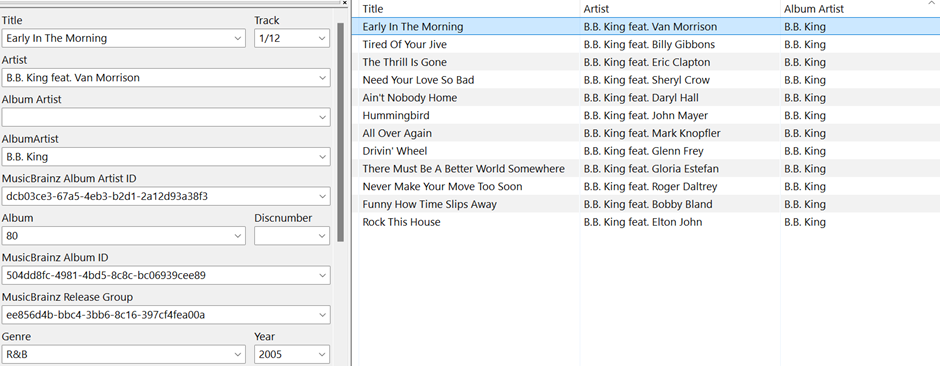
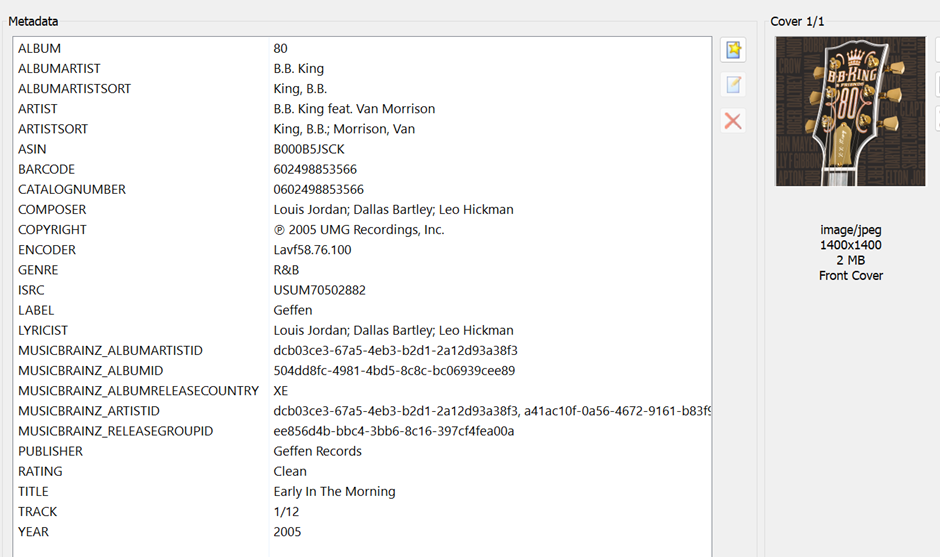
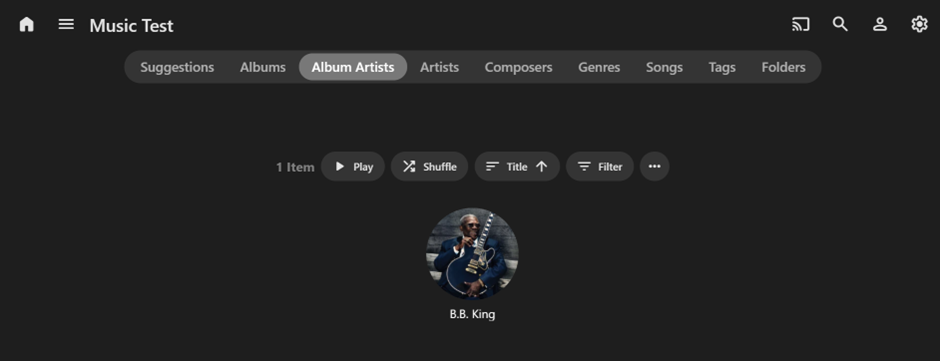
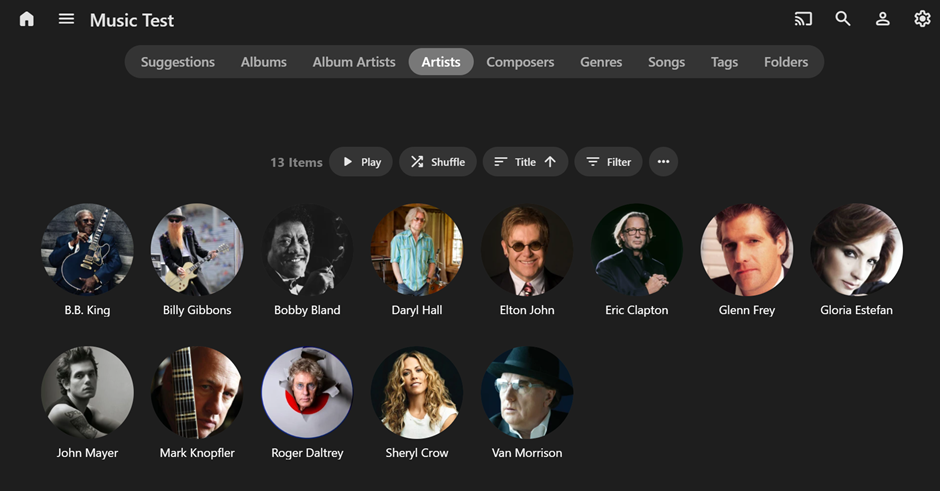
Hi, from what you have described, perhaps you may be putting your info into Mp3tag in a non-standard way? Normally the Song Author and any other participants are shown in the “Artist” section of the relevant individual song only. The Album Author is the only one typically shown in the “Album Artist" section. If you follow this convention then Emby will only show Album Artists under the Album Artists menu tab and Album Artists plus Artists under the Artists menu tab. I loaded the B.B. King 80 Album into Mp3tag and then used MusicBrainz as a Tag source to update the info. Here are the results: IMPORTANT: Also, remember to check all extended tags in Mp3tag as per below: Then, upon importing into Emby (using Scan Library Files) you should see 1 Artist under “Album Artists” (B.B King) and 13 Artists under “Artists” (B.B King plus the supporting Artists). Once you have the correct info in the correct fields in Mp3tag, then use the Album Artists menu tab in Emby for the primary Album Artists only and the Artists menu tab for all underlying Artists on the Album and Songs. Hopefully this makes sense? Cheers!!!
 1 point
 -
Most likely the /metadata folder but you could check the Transcode-Temp folder also. With only having that amount of limited space I will guess you will have to set custom /metadata and /transcode temp location via Library-Advanced tab and Transcoding pages.1 point
-
There's surely a log which tells the exact reason, then you can uninstall that driver or service. Or: Download an ISO image for installation from a USB stick on bootup, yet I don't remember whether this will retain your data, so don't go without backup into this.1 point
-
@LukeThank you for your help. I did a lot of searching and ending up migrating to truenas scale. I have now installed the app through the official means and it is now working fine.1 point
-
The first one1 point
-
Glad it's not me going mad!! I can only think it's a Google Home update that's caused this, and Emby devs need to tweak something on the app? I've tinkered with everything and can't find anything causing it.1 point
-
Is there any update. ETA to fix please? these workarounds are not ideal and without them Emby is pretty much unusable. Hardware Accelerated Transcoding is the main reason I am paying for Premiere, and it's not working...1 point
-
Hello Carlo, Yeah this works, perfect.... Sometimes it's so easy, just thinking to complicated.... Thank you for your Support Rainer1 point
-
I went and added the NFS share to the Emby server and it is now working. I guess you are correct, themes have issues over SMB. Thanks.1 point
-
Hi, You shouldn't need to do that. What I would try is remove the Emby Server via Package Manager. Do not delete or change any files on disk. All your config, users, library, etc is still there. Install Emby Server again. By uninstalling and reinstalling, your problem may be fixed. Emby Server should start by itself when the NAS is restarted. Carlo1 point
-
The 13500 is a great choice. To save $$ I personally would go with a ddr4 board, but that's just me being cheap ha.1 point
-
I had this issue, Firefox seemed to work better for me, also try and reset the zoom level1 point
-
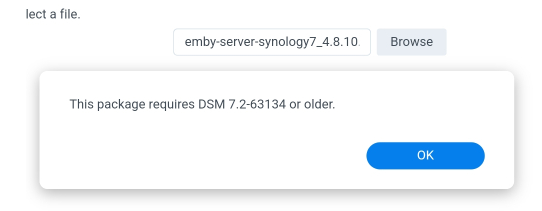
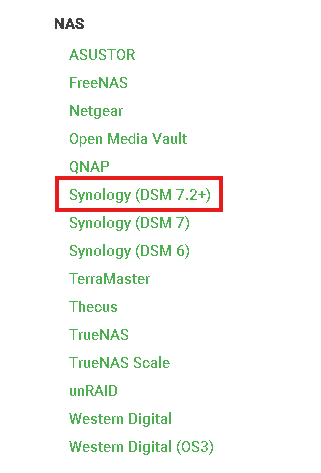
@MosswayHi, It looks like you choose the wrong version to install. You want to download from the Synology 7.2+ Give that a try and let us know if that solves your issue. Carlo
 1 point
 -
Latest Release - Updated to latest Whisper - Progress showed in the console window You will need to update the runtime for this release.1 point
-
Ya im having the exact same problem, i can use the emby app on my phone and cast to my chrome cast fine but can no longer ask google home to pause or stop, nothing happens and when using the google home app i cant pause or stop with the buttons either now, everything else i cast to the tv works fine with the home app and voice control, and like you it all worked great for years and only in the last 2 weeks its started doing this1 point
-
I will have to dig my old linux system out of the closet and get that up and running to test this out. I'll see if I can get it working correctly on both systems. It may take a bit to get it all updated again because it is mostly manual. It's on something similar to a raspberry pi. Just out of curiosity is there anything in the folders at all?1 point
-
Great, it works now. Thank you very much for your help and patience. Have a nice day.1 point
-
Have never seen Emby use anything but a poster on itemdetails page unless there was no poster image available. And there are no options to change the display image type on the item page as Primary is used.1 point
-
Hi, we’ll take a look at this. Thanks for reporting.1 point
-
I have tested the EPG build software and the TV Platform for over a week with no problems identified. I have left the population of the EPG running for over three weeks and everything went OK. I even tested building large EPGs that cover 6 to 8 weeks, without incident. The latest code is posted above and on page 1. I also added the ability to edit images and to fetch images from external Internet DBs. On page one there are additional videos that explain PseudoTV. Keep in mind that I am voice challenged. Soon, I will try and make better videos. Vic1 point
-
Please disregard. Turns out it was my secondary VPN conflicting with the connection. Turning this off allowed me to access as normal.1 point
-
It isn't: https://emby.media/premiere.html That was my point above. We no longer list it as one of the Premiere features you get on the page where you purchase Premiere. We haven't since we lost the high-quality source. We stopped listing it as one of the features you get on the page where you purchase. Therefore, I would not expect someone to purchase Premiere just for that or even heavily for that feature. As for the price - we haven't raised our price in over five years. Can you name just about anything else that hasn't about doubled in cost in that same period? I know our costs have but we have kept the price the same thus far. The issue here has been explained and the difficulties in rectifying it have as well. That is why we are no longer advertising this as one of the Premiere features. It is still listed in the feature matrix because it still exists to some extent but anyone looking at the page where you purchase Premiere would not have any idea that trailers are included.1 point
-
Hi Luke, hi Happy2Play, the problem has been solved. Many thanks for your exceptional support. I had a problem with the user settings. The checkbox for “Allow access to all libraries” was unchecked for both users. After I checked the box again, the libraries appeared in the view. When setting up the users, I had ticked the box for both users. I cannot explain why it was deactivated. However, thanks to your help, I have learned a lot more about my Synology and its user rights. I have implemented the measures suggested by Luke accordingly. Thanks again to both of you. Best regards from Bavaria GHA1 point
-
Yes sorry I did need to change it to the recommended setting.1 point
-
Thanks for the reply! I updated to the 4.9 beta and it fixed the problem. Thank you so much!!1 point
-
Why are you using container for emby and not install the native package from the App center?1 point
-
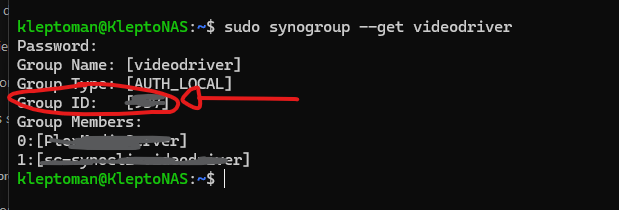
Hi Koolee, I faced the same issue with my Synology DS224+, but I managed to resolve it with a few adjustments. Here's what worked for me: Connect to your NAS via SSH and run the following command: sudo synogroup --get videodriver This will display the GID for the videodriver group. Note down the GID. Open the YAML configuration file for your Emby Server Docker container and update the GIDLIST value to include the videodriver GID you just retrieved. Credits → https://joshmccarty.com/emby-with-hardware-transcoding-in-docker-on-synology-dsm-7-2/ I hope this helps!
 1 point
 -
Be content ? Seriously ? You just can't go round saying things like that. Where would the world be if everyone was just content. Imagine if V. Putin was just content with Russia's existing borders, imagine if J. Bezos was just content with being just a millionaire and actually used the rest to pay all those employees a bit more...Anarchy I tell you, anarchy.1 point
-
I believe the correct phrase is ' Resistance is futile'. See Doctor Who, the Borg...1 point
-
Yeah sounds like it all complicated as all hell. Just still somehow can't get out of my mind how something that's basically ads can't just be freely distributed to a wider audience, they are meant to "hit" as many people as possible anyway. Good post, thank you.1 point
-
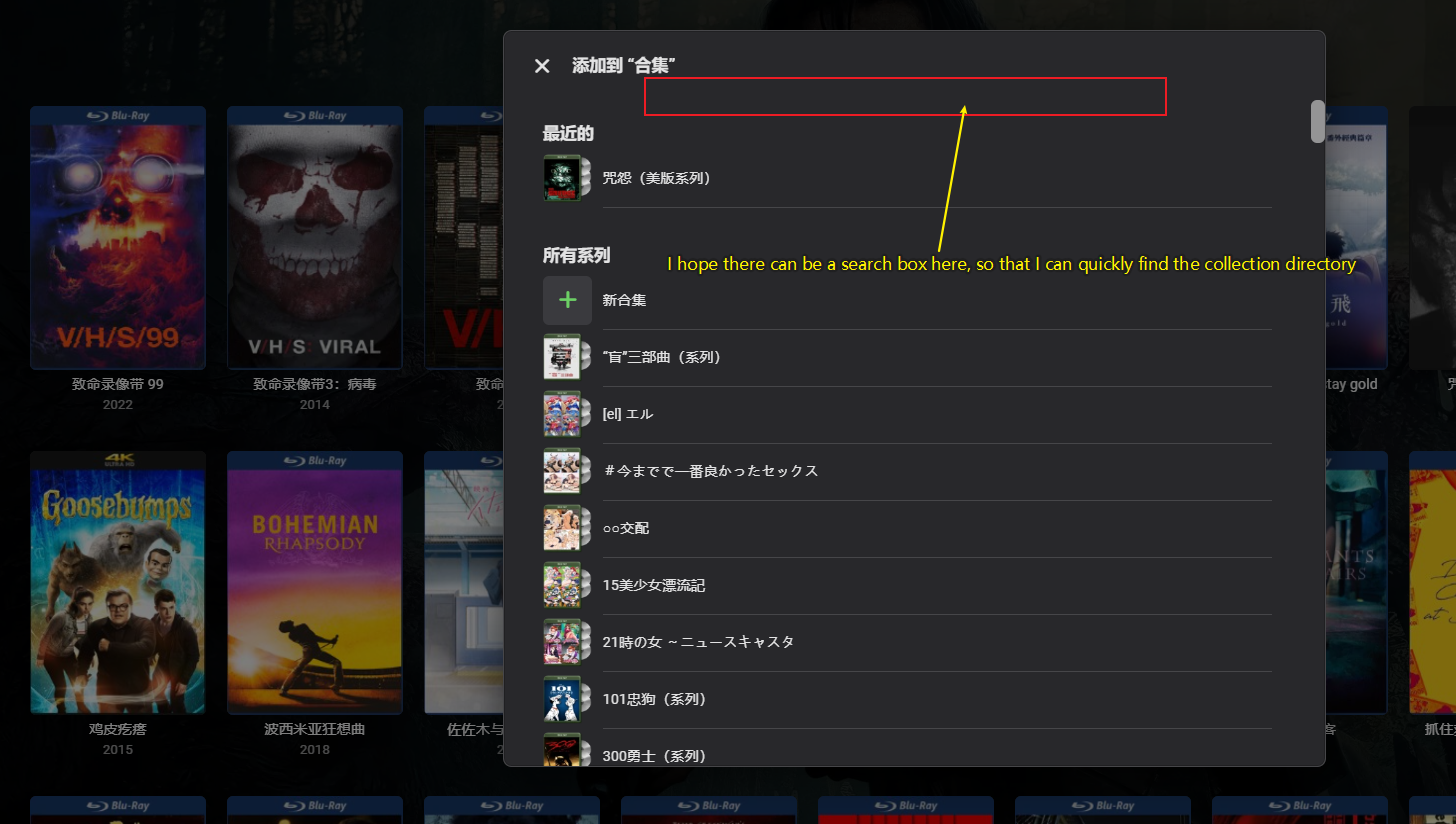
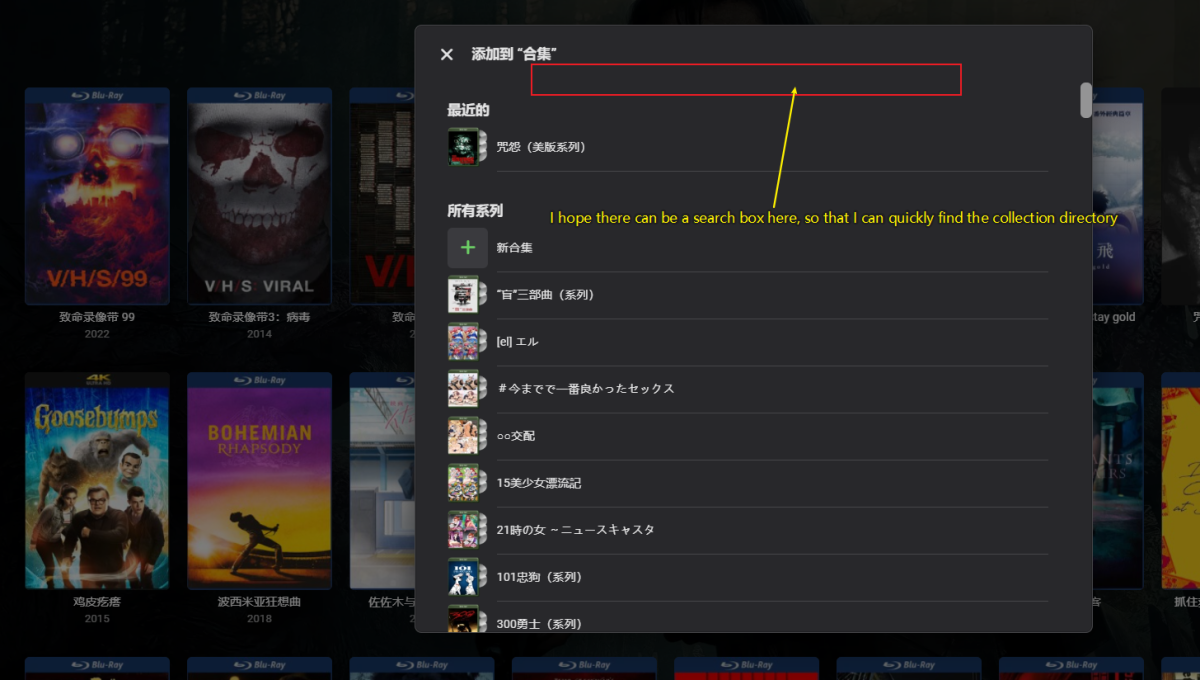
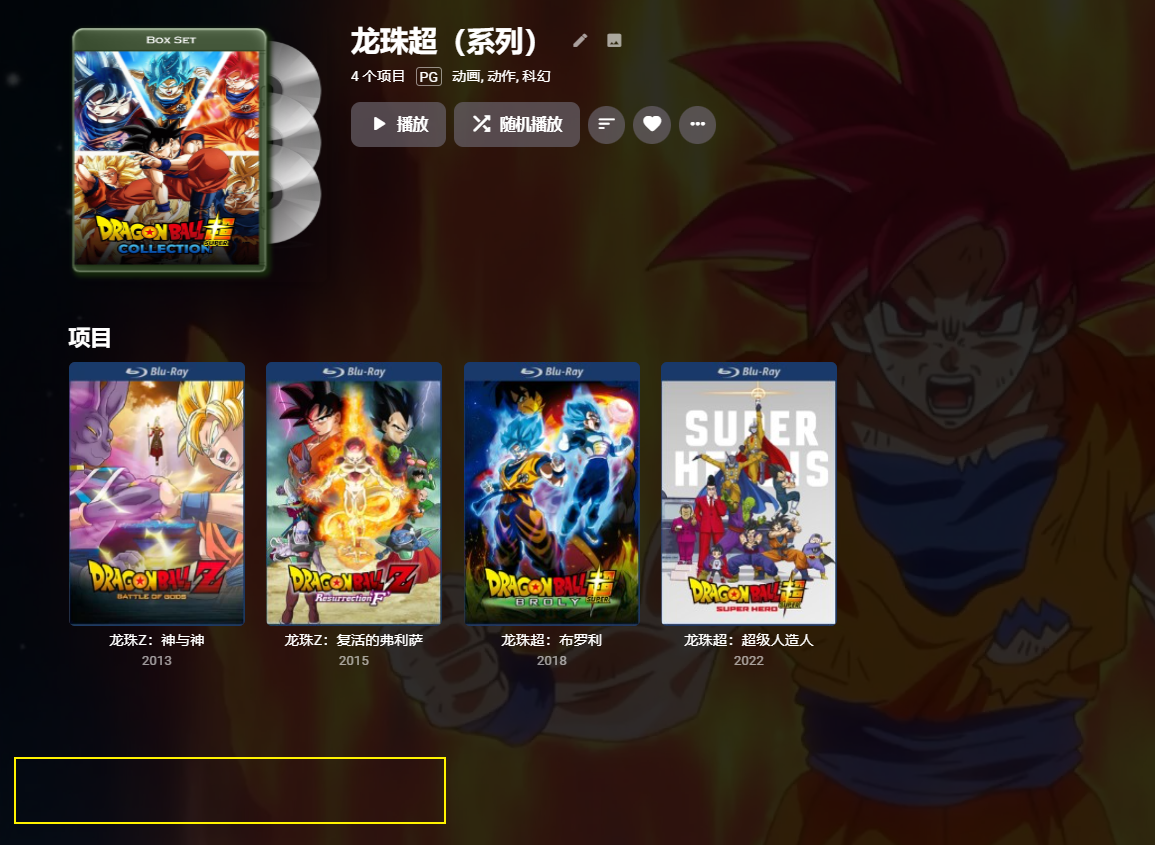
1.I hope that when adding a movie collection, there can be a search box for the collection directory. This way, for people with a large number of collection directories, manually organizing will be much more convenient. Otherwise, I have to use my eyes to search one by one every time 2.I hope to also add metadata link labels for the collection at the bottom
 1 point
 -
For my own user, under Playback, I have set 1080p - 60mbps. Since I've set it that way, I don't have the issue anymore. But still, before setting it, the quality was lowered at times, and at times not. I don't really understand why this happens... Is there any way to set settings server-side so that emby only transcodes when necessarily needed? Most of my media is 8-10 mbps, and 3 mbps just seems unnecessarily low.1 point