Leaderboard




Popular Content
Showing content with the highest reputation on 12/03/24 in all areas
-
We have a winner! Not only did it fix it, it also remembered if the item was played.1 point
-
ok, might need to wait a few days. i just restarted emby service last night. i just tried and RTM did pick up the file. let me see if it will fail over the next few days.1 point
-
Thank you to everyone who has offered help and suggestions but despite my best efforts I'm still unable to make any real progress, and that's ok. Getting this to work was always more of a curiosity than a priority and I have spent as much time as I'm able and willing to give it right now. I can always revisit it if/when time allows. Hopefully your suggestions will be of help to others. Thanks again.1 point
-
If nothing comes of 4.9 - then I may convert the Python to c# and create a plugin - Assuming @Amythingis ok with that of course.1 point
-
Thanks Luke, I watch nothing else but emby 100% of the time. If you need any support from your existing subscribers, please do not hesitate to reach out. Closing this thread as I ended up keeping the Nvidia Shield pro and bought a new FireTV. Will reach out again in time... Happy Holidays!1 point
-
HI all, Apologies for the long delay in providing any update. FFS! yes......... am I mad at myself. Metadata was locked. Sometime ago I meant to put in a feature request asking to move the metadata lock option from the bottom of the list of options to the top and change the the colour of the menu option like the image below. To stop olde gits like me falling into this trap Whilst I haven't checked ever single movie, it is working better so will mark as resolved. Look forward to my request being considered.
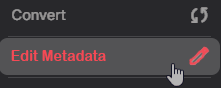 1 point
 -
that is what i figured..thank you1 point
-
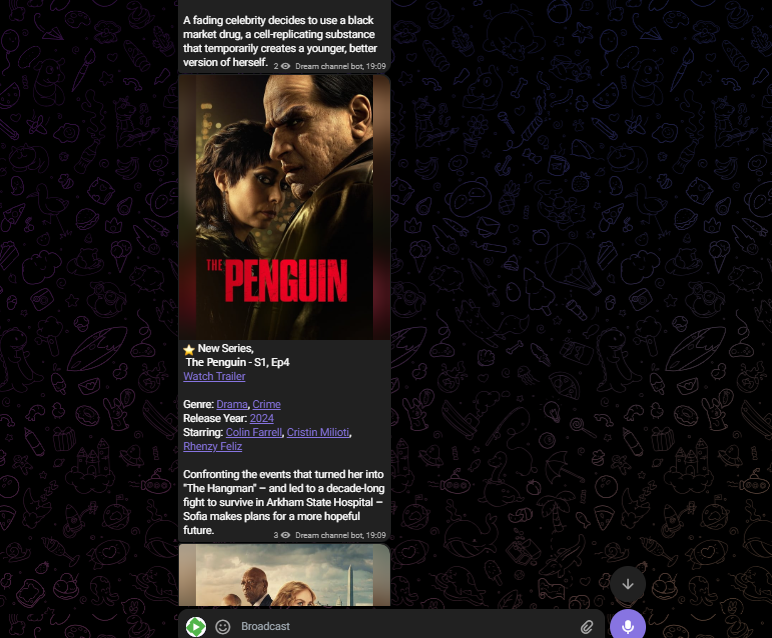
So The telegram plugin is so useful but up until now it doesn't post pictures which makes the channel a bit dull and unattractive so I made my own bot which modifies the posted message into this. I used a python code. and you need telegram bot from Bot father and a TMDB API which is free if you tell them its not for commercial purpose replace BOT Token with your own bot token and TMDB API with your API. Finally in the code line 141 you have to replace "Dream Server 1" to your emby server name (the one displayed at your dashboard it is Case sensitive) and make the bot ADMIN in the telegram channel and if u have any difficulties contact me. The other issue is the Bot token and the TMDB API is hard coded so u can modify it using environment variable. def extract_title_and_description(message): tv_pattern = r"^New (.+) - S(\d+), Ep(\d+) - (.+) on Dream Server 1(?:\n\n(.*))?$" match = re.search(tv_pattern, message, re.DOTALL) if match: main.py
 1 point
 -
Even just adding the individual Genres as rows on the front page would be useful. Especially if the contents of the rows are randomized1 point
-
I think this is the most important issue. There is too much choice. But, there are already options in Emby to limit this. Make more libraries and only give users perhaps 4 to 6 libraries each, targeted to their interests. Doing this automatically would be nice, but it's a marketing type choice to tailor selections that work for users. If there are only a dozen users, then this is pretty easy to do. 'Latest' lists and 'More like this' would also be targeted from the library selected. Users would stay within their interests. Perhaps have a contact way for users to request or switch out to other libraries. When the user logs in they know they will be seeing things they like. Overload goes away and users will hopefully login more. Branded by studio or type Collections, listed on the top home page row could help. You can put branded collections first by just adjusting the sort name of each to _brand 01, _brand 02... Actual collections of a films would come after all the brand targeted collections. Here is a study covering a lot of what everyone here is discussing: User's Dilemma: A Qualitative Study on the Influence of Netflix Recommender Systems on Choice Overload Research in Progress - Open access - Published: 24 September 2024 Recommendations: see page 365 https://link.springer.com/content/pdf/10.1007/s12646-024-00807-0.pdf1 point
-
Have you explored this option for your libraries?
 1 point
 -
As long as it’s one-way communication with MDB, Trakt or whomever, this would be great!1 point
-
Not trying to hijack this thread, but I made a post yesterday that seems like it may be relevant to your comment here regarding issues I'm having with the Android app vs AndroidTV app on my tv's built-in OS. With the fact that the general Android app seems to be where Emby on all Android devices is headed for the future, I would've expected that to be the "go-to" app for any android device, but maybe the fact I'm using it on my TV's built in hardware is what's causing the issues I'm having. If you wouldn't mind giving your opinion here or chiming in on my post from yesterday I'd be grateful, thanks!1 point
-
Still does on the AndroidTV/FireTV clients - it appeared for Halloween a few weeks ago - and as you say, dynamically added a row of all the Halloween related moves that I have. (as well as changing the colours and having a wolf howl whenever you opened the home screen .. ) So we know it CAN be done - but why it's hidden from general use is frankly a bit of a mystery ... I think it will transform the way my family will use emby - for the better.1 point
-
IIRC a couple of years ago there was a seasonal theme that would display suggestions on the home page on Halloween and maybe on Christmas I only saw it one year1 point
-
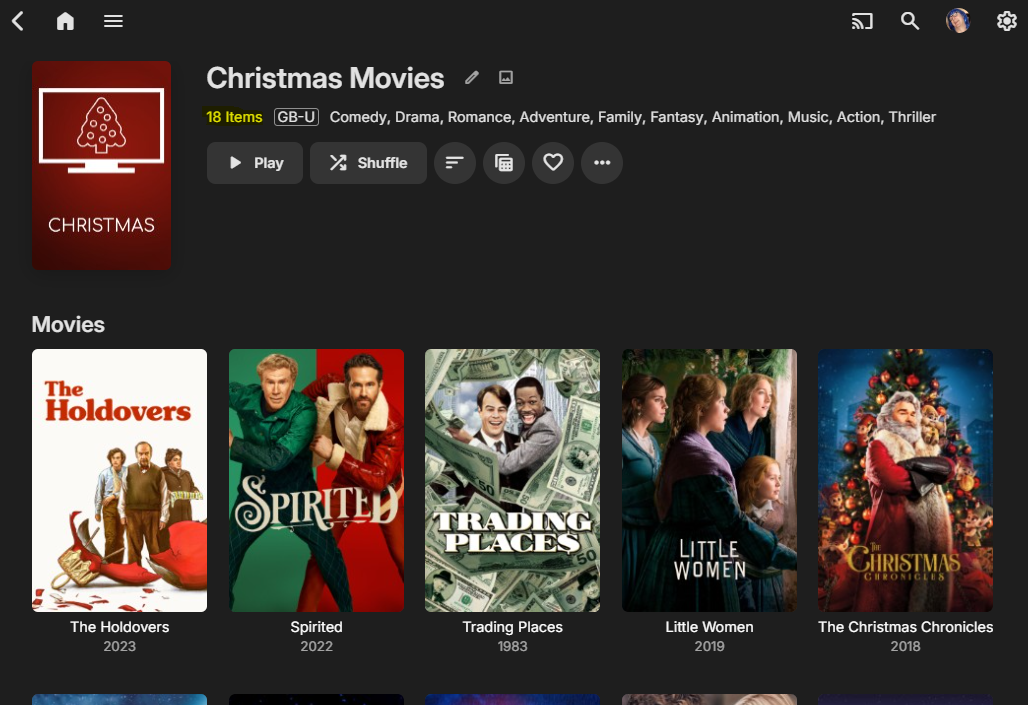
Is this not what I said above ? Emby knows what's on your server - so I'm not understanding why you cannot simply compare what's on an external 'Trending list' to what you have available on your server. This is EXACTLY what MDB script does and exactly what the Trakt plugin has done for years. The issue is we just can't present this information in a Home Page view - you have to go digging for it. Having 'collections' as a front row certainly brings it closer - but I want the ability to present the collection itself on the home page. So as an example - The MDB list 'Chrstmas Movies' has 876 movies on it (!) - link I now compare that list to what I have on my own Emby Server - I have 18 of them - thus I now create a new collection with the 18 that I have - I don't care about the others, as I cannot play them... The real issue is this collection is buried in 'collections' - which may take several clicks to get to. During the holiday peroid - it would be great to simply show this as a home screen 'row' entitled 'Christmas Movies' ..
 1 point
 -
Isn't TrueNAS moving away from K8S and over to Docker? Not sure what the status of TrueNAS, HexOS and Emby are now, but support for HexOS would be great! I've bought three licenses as there are some cool features I'm looking forward to try (for instance two way remote backup with encryption). I am also considering UnRAID, but need to test a bit more. I like the feature to just add disks, but I had a problem last time I tried that you need at least two GPUs to run VMs. Unsure if that still is an issue as I only have (newer) iGPUs, but this might have been a problem on TrueNAS as well, so probably a problem in HexOS too. Still waiting to get access to try HexOS.1 point
-
You would think that a 'theme' would be the way to solve this - but alas no - themes basically do very little other than change the colours. A 'cinema' theme would be perfect, where it simply tones down the intensity ...1 point
-
yes, it is home video & photos content - thank you for your efforts.1 point
-
sorry for long delay in replying. (thought to post it here to avoid any confusion) that issue was persisted for sometime and was later fixed. No issues these days. Thanks @Lukefor your attention to this, much appreciated.1 point
-
Thanks for the feedback - yeah I realize you can't just run a whole web interface over UDP, but I was wondering if the internal emby parts that do the actual media streaming from server to client could be set to use UDP instead of TCP and doesn't sound like it, for which I'm sure there are good reasons. I thought the VPN idea was pointless initially so I hadn't tried it until it was suggested here. But thinking about it, a well-placed VPN would split the long segment between server and client into two segments, in theory approximately halving the RTT on each segment, which would reduce the TCP Window issue. A good VPN provider may also have better routes than I am getting from my ISP, so fewer hops etc. So I tried Proton VPN with the server placed in Singapore, and the results speak for themselves: [ ID] Interval Transfer Bitrate Retr Cwnd [ 5] 0.00-1.00 sec 806 KBytes 6.60 Mbits/sec 0 137 KBytes [ 5] 1.00-2.00 sec 2.22 MBytes 18.6 Mbits/sec 0 245 KBytes [ 5] 2.00-3.00 sec 4.57 MBytes 38.3 Mbits/sec 0 436 KBytes [ 5] 3.00-4.00 sec 6.97 MBytes 58.5 Mbits/sec 1 602 KBytes [ 5] 4.00-5.00 sec 7.22 MBytes 60.6 Mbits/sec 0 611 KBytes [ 5] 5.00-6.00 sec 6.54 MBytes 54.9 Mbits/sec 0 619 KBytes [ 5] 6.00-7.00 sec 5.92 MBytes 49.7 Mbits/sec 0 625 KBytes [ 5] 7.00-8.00 sec 6.05 MBytes 50.7 Mbits/sec 0 645 KBytes [ 5] 8.00-9.00 sec 8.58 MBytes 72.0 Mbits/sec 0 685 KBytes [ 5] 9.00-10.00 sec 9.19 MBytes 77.1 Mbits/sec 0 742 KBytes [ 5] 10.00-11.00 sec 9.01 MBytes 75.6 Mbits/sec 0 815 KBytes [ 5] 11.00-12.00 sec 8.15 MBytes 68.3 Mbits/sec 0 914 KBytes [ 5] 12.00-13.00 sec 12.4 MBytes 104 Mbits/sec 0 1.02 MBytes [ 5] 13.00-14.00 sec 12.3 MBytes 103 Mbits/sec 0 1.17 MBytes [ 5] 14.00-15.00 sec 15.0 MBytes 126 Mbits/sec 0 1.35 MBytes [ 5] 15.00-16.00 sec 11.2 MBytes 94.4 Mbits/sec 0 1.57 MBytes [ 5] 16.00-17.00 sec 13.8 MBytes 115 Mbits/sec 0 1.83 MBytes [ 5] 17.00-18.00 sec 17.5 MBytes 147 Mbits/sec 0 2.14 MBytes [ 5] 18.00-19.00 sec 22.5 MBytes 189 Mbits/sec 0 2.48 MBytes [ 5] 19.00-20.00 sec 12.5 MBytes 105 Mbits/sec 3 1.89 MBytes [ 5] 20.00-21.00 sec 10.0 MBytes 83.9 Mbits/sec 9 1.41 MBytes Tada! I can certainly live with that. With regard to routes, I also note that the total RTT of the two segments is now only 145ms (from server to VPN server) + 85 (client to VPN server) = 230ms, so I've lost 100ms in RTT by using the VPN. Looking at the routes, this is because my ISP favors sending traffic between Asia and Europe via the US, which is a far longer way around than going via Middle East - probably because it is cheaper from a peering perspective. Thanks for the help here!1 point
-
Ok,... I testet more and more, and you can close this. It is not solved but it seems to be something strange behaviour between emby and gmrender-resurrect, only if using api. I would say it is so special case we can ignore it. I tested with an old sonos-device over dlna and it worked perfectly. I'll buy hardware. But thank you for your time and your tips. To see the debugmode in the browser helps me a lot. (I'm not a professional programmer, only hobby)1 point
-
No it does not. The context menu just closes.1 point
-
I tried deleting a single video file via Context menu, by selecting "EMBY: Delete Item" - normally a popup appears asking me to confirm, but instead the context menu just closes. (Deleting files works on 10.0.47 with this same setup)1 point
-
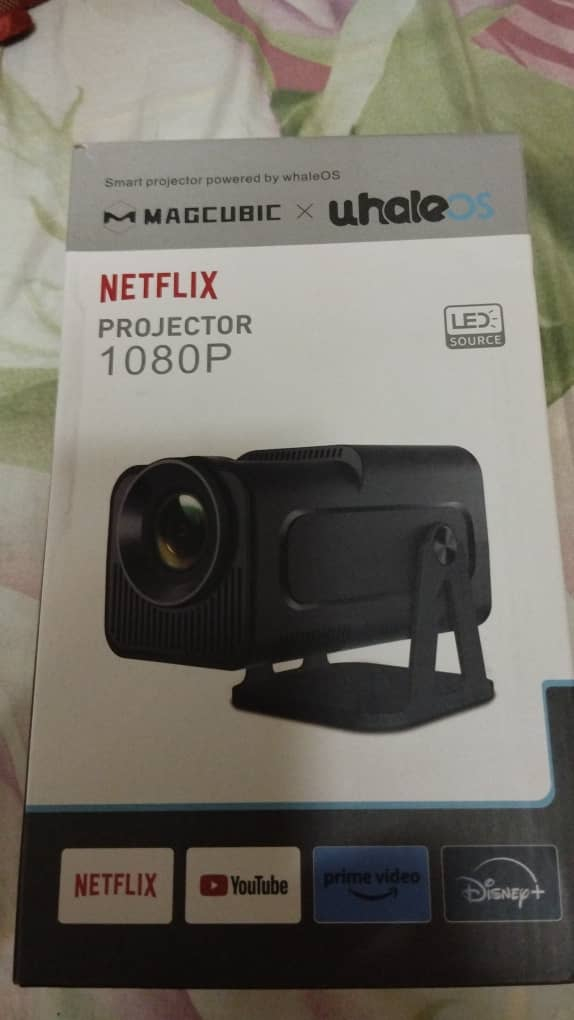
Hello, in Smart projectors, and several smartTVs that will be released in 2025. I have this device, attached here a photo. I think the applications are based on webapp, I think it will not be a difficult task since emby has a webapp, it would only be necessary to adapt it and upload it for this new operating system. The Kodi and Plex applications are now available. Our dear Emby should not be left behind. https://www.zeasn.com/about?id=9 https://partner.zeasn.com/partnerportal/Designhowto/index.jhtml https://partner.zeasn.com/partnerportal/Technicalhowto/index.jhtml https://www.whaletv.com/
 1 point
 -
Changed now to Chromium. It works normal again.1 point
-
@fillidillI am very interested in your jitter problem. I will work on it in the morning. Vic1 point
-
You are correct. The code section below shows which views were present. https://github.com/speechles/BN-ONE/blob/6ae2f6305432f7779489e0ed8ab6f3111d3959c2/source/HomeScreen.brs#L2296-L2358 Then you could see singular views of all media types using these as sort types. You indeed remember correctly. These views were shown as tiles on the homescreen. When clicking those tiles it would take you to a single page with all media sorted as per the tile and displayed as rows for each type. The "I Feel Lucky" was basically just everything sorted by random allowing you to see new things. I know the grid can be sorted by these types but it requires you first enter a library. The way Blue Neon Night worked had these globally for all libraries and types. So as you enter the views it displayed everything matching. Perhaps this type of functionality should be brought back into all the Emby apps?1 point
-
HI, this should be much improved in the 4.9 beta channel. We are working on backporting the fixes to 4.8. Thanks.1 point
-
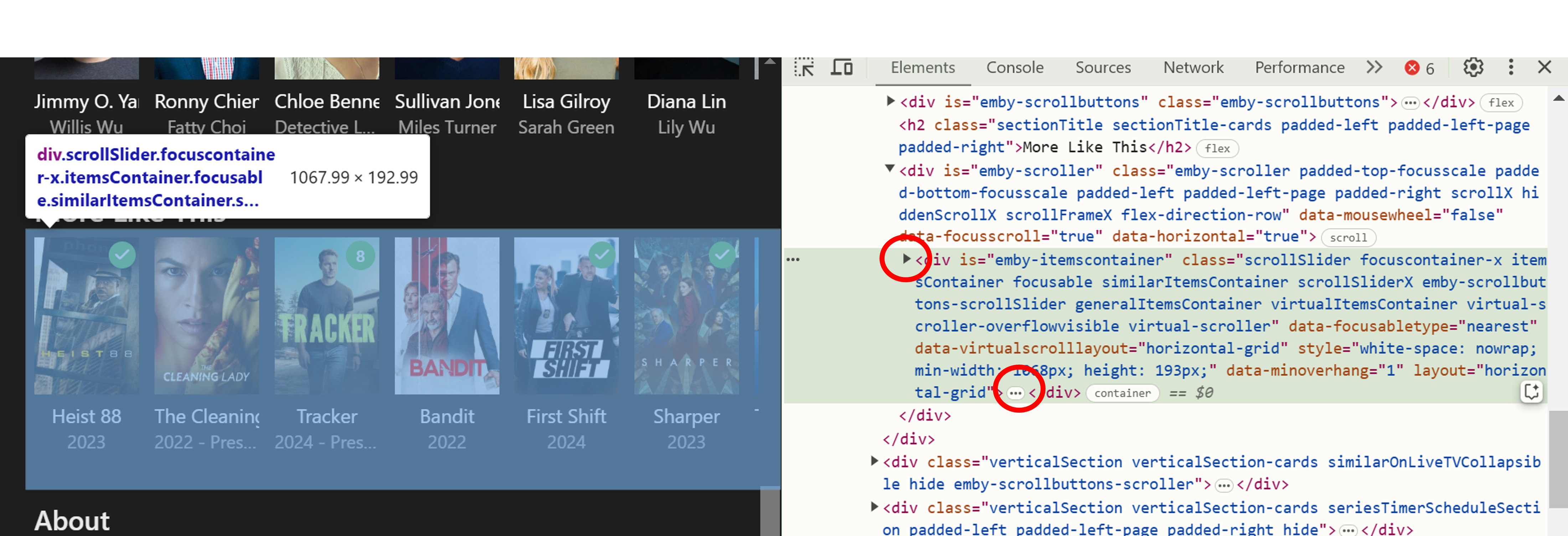
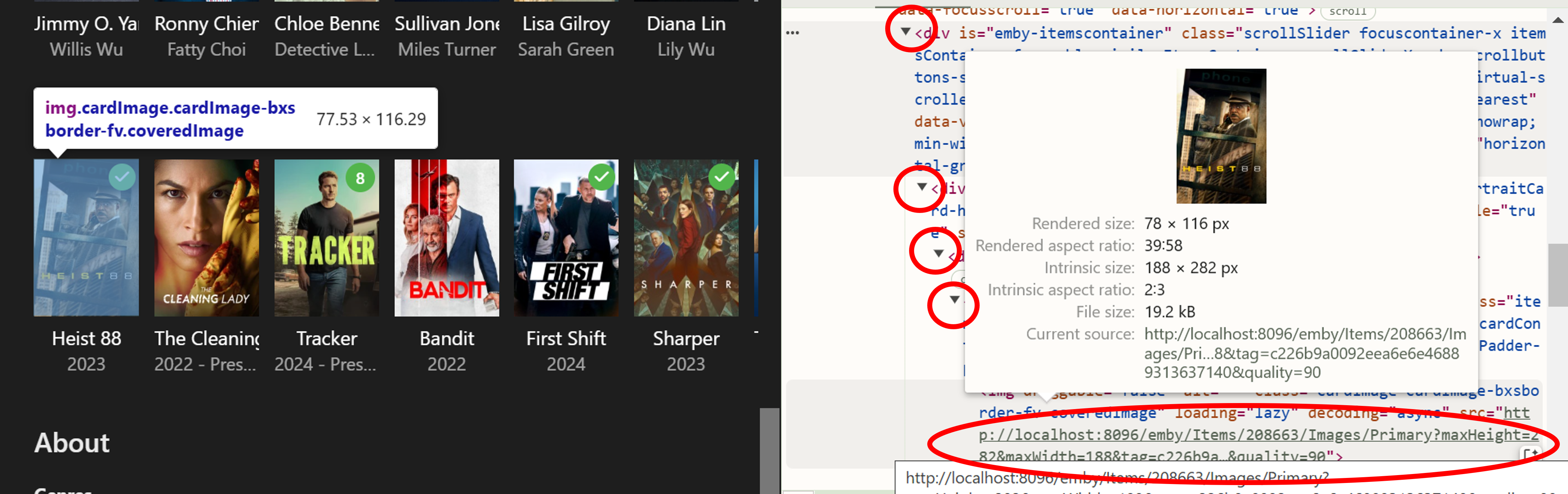
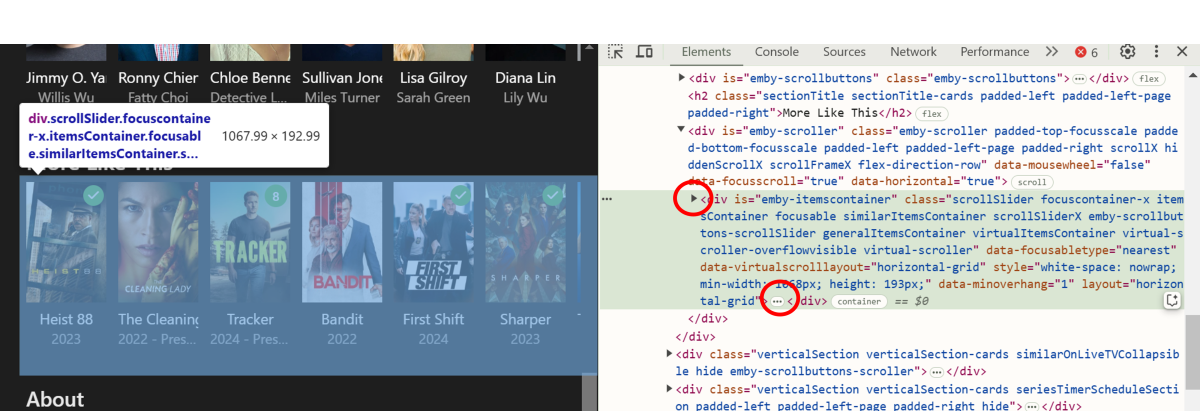
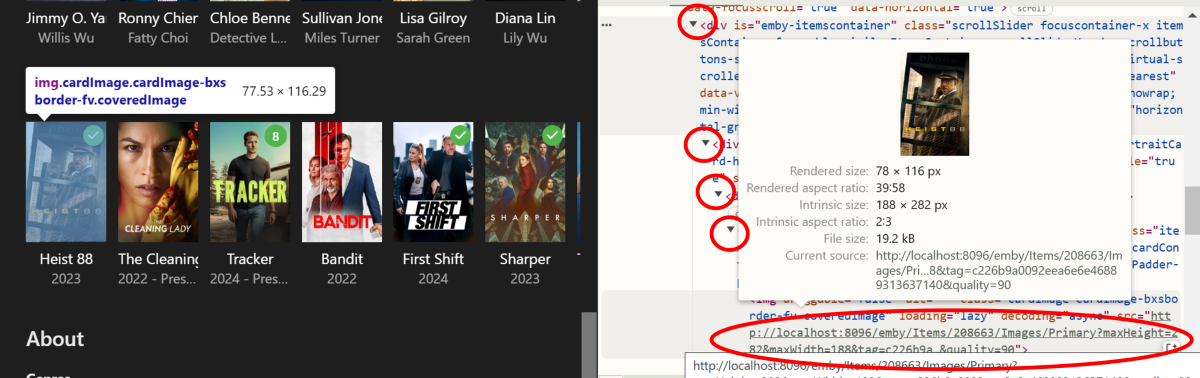
No bother at all. I'm not much of an expert on HTML/CSS either!. I have managed to figure out a few simple things though, from inspecting the relevant page, figuring out what the element is and even asking an AI program for help!!! As you know, there's also some very useful info and tips on the Emby forums. There are probably many ways to get to the relevant element and info you are after - e.g. - you can click on the "arrow" or the "three dots" to get to the lower level info. Here's a couple more pictures that perhaps show it better? When I'm adding custom images to Emby, I'm always trying to get the correct aspect ratio first, otherwise it's possible to end up with an unwanted resized or cropped image as the end result. Good luck with figuring it all out...
 1 point
 -
To me Plex should never be installed on a Smart TV or anywhere else for that matter. Plex is not, for me, a choice if I want to watch or listen to media. Emby is much better. Having said that my belief is that smart TVs are not truly "smart" and a second rate choice for any TV watching. But I do own a smart TV which I bought because it was a LOT cheaper for the features I wanted. I tried, briefly, to use the TV's operating system and its so called smarts but I quickly abandoned that for the better option of stand alone boxes simply connected by an HDMI cable. With virtually all "smart" TVs you do not have to use the "smarts" as those are quite often inferior to other options and so called "smart" TVs almost always have HDMI inputs that work well for external inputs and you can then avoid using the "stupid" TVs actual operating system. The main reason, for me, to buy a "smart" TV was because of its other features but, again for me, a smart TV's "smarts" is quite dumb. BTW: I would never use Plex as it is a system designed to throw media at users for profit rather than Emby which makes it easy to keep your media at the forefront and generally avoids most advertisements. (except those that appear on broadcast TV) Plex is a platform for exposing users to intrusions and Emby is a system for accessing your own media. BTW 2: Try going to the Plex forums and making a post that mentions Emby as much as Plex has been mentioned here. It will get you banned quite quickly. Plex is very anal and paranoid and closed to the idea that some people might just not prefer them.1 point
-
Yes the 4790 is more than up to the task - BUT ... personally, save your $75 for something much more modern (the 4790 is 10 years old ..). 10th Gen is probably the lowest I would go - a 10100 for example. You don't need memory for emby - so if you need to compromise on funds - go with something that you can later upgrade if you wish.1 point
-
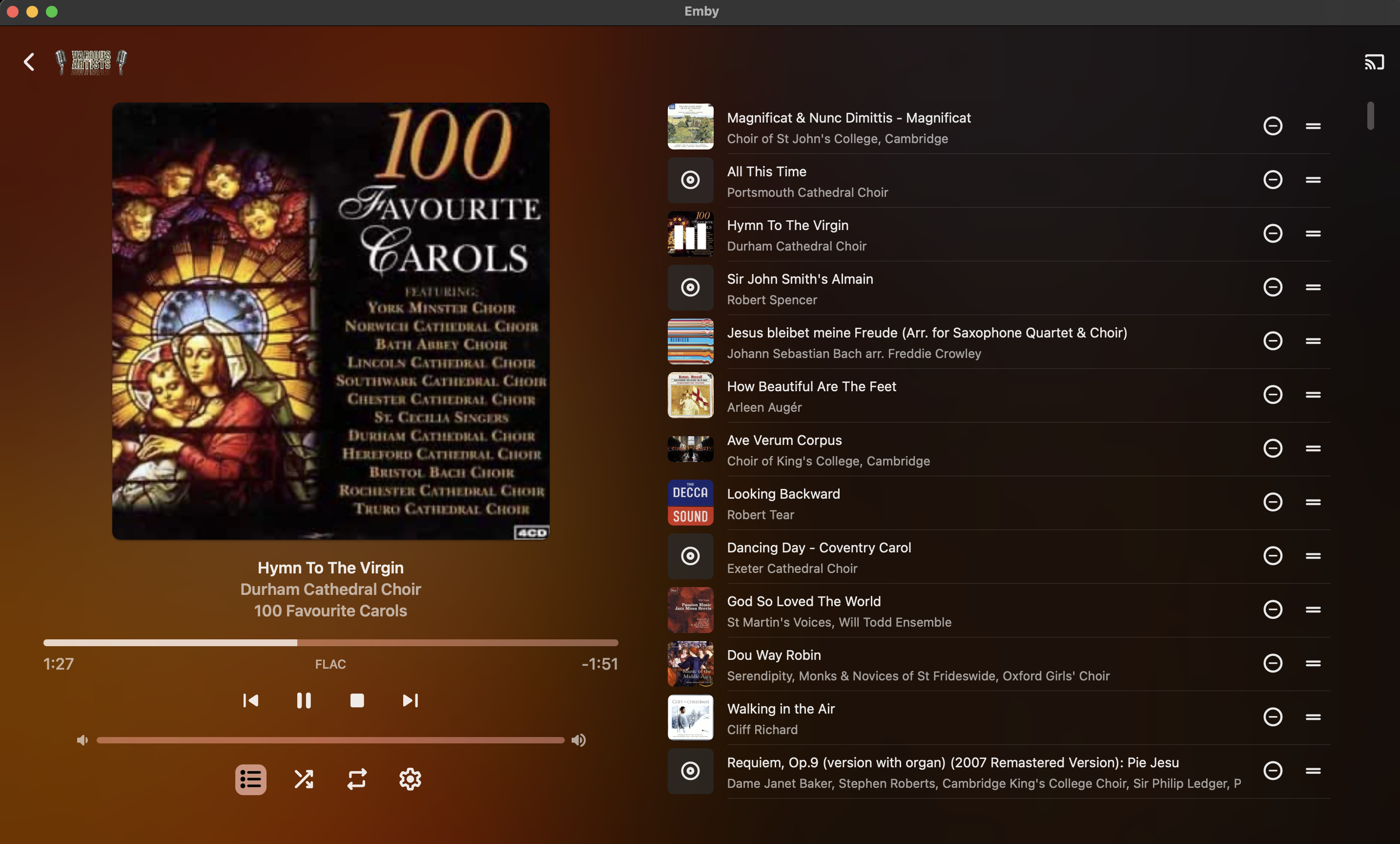
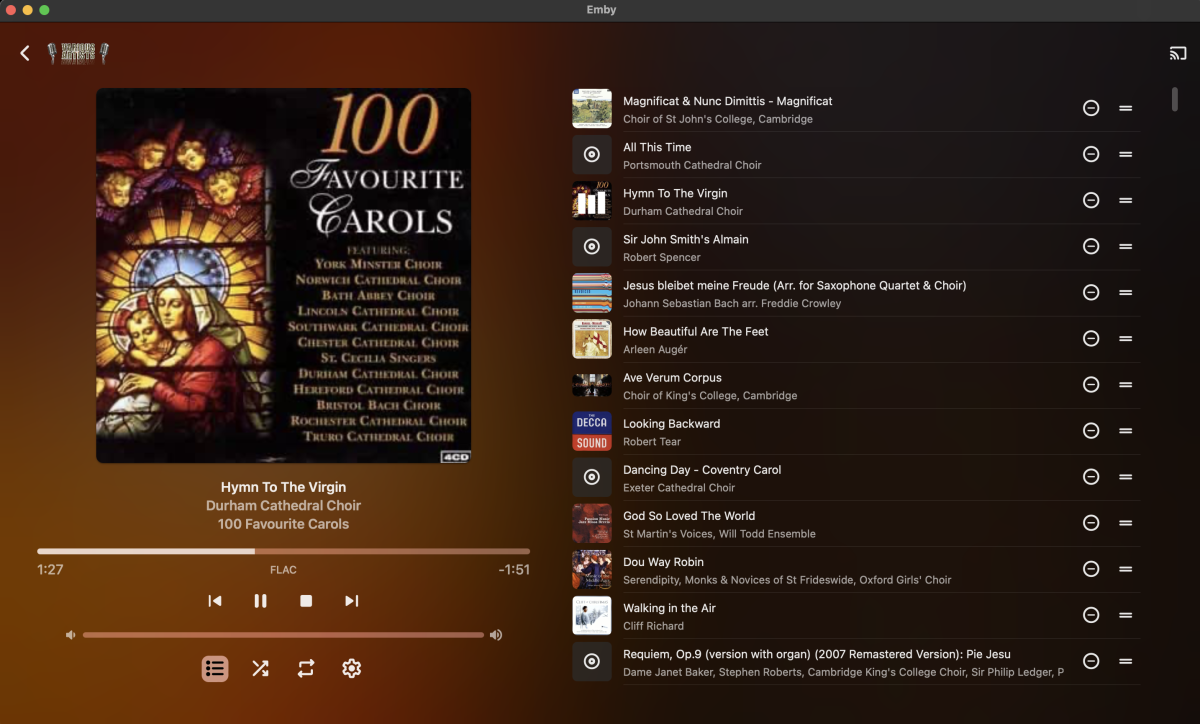
I have a fairly large music collection, mostly but not entirely classical or religious in nature, and pretty well tagged using ID3 since I also use MediaMonkey to access the collection on other computers. The left-hand side of play-queue screen shows album art, track title, artist, and album title metadata, ultimately sourced from the tags on the audio files (see attached screenshot). It would be helpful to be able to configure which metadata are displayed below the album art when in a play-queue view (for example, when using 'shuffle' to play random tracks from my collection). While track title / artist / album are very useful for genres where singer/songwriters are the norm, in a lot of situations when playing older music the Composer tag is more important to me (and less likely to be visible in the album art already.) Would it be possible to add a user-level setting to specify which metadata are listed, perhaps accessible from the 'cogwheel' settings menu on that page in Emby Theater as well as from the server side?
 1 point
 -
Thanks for the reply! I updated to the 4.9 beta and it fixed the problem. Thank you so much!!1 point
-
Coming back to this topic because it seems many people share the same concerns. Would it not be possible to have a manual 'for disaster/emergency uses' key issued for temporary use on the server/already-authenticated devices (like a smartphone), because it's a lot easier to authenticate from a phone with a mobile antenna than having to try and get the server and/or individual end-devices without said antenna connect to the internet and authenticate (which is also not something you can trigger on-demand so you just have to wait until it decides to do so?) The key can only be issued once every quarter or 6 months with maybe 3-4 weeks of "functionality" before the server/client rejects the key and all subsequent "manual" keys until it connects to the internet. I think that would make people affected by natural disasters have some reprieve with this model while maintaining the integrity of keeping the premium features secure. I still think people should be able to stream their media using the features they paid for locally, especially after a hurricane obliterates all network infrastructure that won't be online for weeks. Obviously this solution won't work if people have no internet at all, but just hopping over to a relief area with even a little public wifi to get the key would allow people to use their local libraries through emby.1 point
-
I wouldn't have thought I need to create a M3U file. I used sample in your article and it started to work. Thank you.1 point
-
I would love to give up logs from the time period where this occurred, however log retention is not a user controllable setting and the backup plugin does not backup logs. even though txt files are highly compressable.1 point
-
Attached below is the latest code. I still have to do: 1) finish documenting the settings, explaining what each setting does, 2) add additional Emby streaming settings and 3) finish the bulk save options of the metadata editor. Before you can use the "Settings Button" you must first delete the PseudoTV Source and install it again. Let me know if everything is working OK. Vic PseudoTV.dll PseudoTV.zip
 1 point
 -
Hi, I know it is possible to put different Versions of a movie into same folder and give them behind the "-" different names for identification. I use this feature very often, also if a movie is in 3D, HD and 4K available. Sometimes also special Extended Versions, etc. I also use this Feature for Multi-Movie Boxes, like Tarantinos Grindhouse. (Grindhouse (2007) - Death Proof, Grindhouse (2007) - Planet Terror) which work great. But I noticed, that the Chapter List in the Grid View don't refresh, for the newly chosen file. Is it possible to implement this, that you see the chapter list of the selected version?7 It's not a big deal and not a nobrainer, but it would be more elegant if this could work. Especially if different Movie Versions have different Chapters.1 point
-
Hi, this is planned for future updates. Thanks.1 point
-
Any update on this request.1 point
-
@McMoviesI would give it another try and see how things compare now. Thanks.1 point
-
You have to clear Kodi's live tv data in the pvr settings if the imported channel names or numbers have changed. Also i suggest you to not cache the live tv data in Kodi. Changing channel numbers in Kodi doesn't work reliable, it's better to do this in the backend. I use two pvr addons at the same time in Kodi. In one of those addons there's a already channel number #14, so i've created a virtual channel in my plugin with the number #14.1. This way i get nice custom sorting. If you do not want to export emby's guide data to a local place, you can also directly import it in Kodi's IPTV Simple pvr addon via http links. m3u channel playlist: http://{ip of your Emby server}:{port}/emby/VirtualTV/Channels?User={some unique identifier} xmltv guide file: http://{ip of your Emby server}:{port}/emby/VirtualTV/Guide Of course replace the {...} with your own input.1 point
-
That would be nice, but it doesn't work properly so I still have to have a cable box which I have been paying for the privilege to keep for the last 4 years waiting for emby to actually work correctly for live TV. Emby continues to eat up my hard drive until the OS crashes because of live TV, it truncates my recordings at random times, things that were scheduled to be recorded somehow just become unscheduled by themselves and I miss key recordings....too much to list.0 points