Leaderboard




Popular Content
Showing content with the highest reputation on 11/23/24 in Posts
-
Lets wait what is actually delivered. History suggests that 'core' functional replacements while usually better integrated, lack the full functionality that the plugin originally provided... (Introskip erherrrmm..) I hope it matches what Smart Playlists 2.0 can do - but what I'm really waiting for (and have been for years..) is the ability to create virtual libraries from these playlists and display as 'rows' on the main screen. imo Only then do they start to become really useful to present dynamic content as the users themselves can customise what they see. ie the concept of Spotlight/Recommendations/Top Picks etc becomes a reality.3 points
-
That was quick my man!! Great support, first thing I will do monday morning! Keep ya posted! Thanks so much!2 points
-
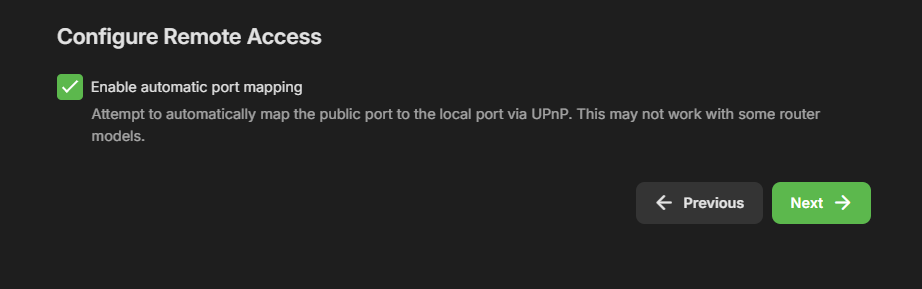
Jep people should by now, know to disable UPnP in there routers. Its a huge security risk, when enabled. Rough software can enable access to your home / lan network. And without that enabled Emby can't open access to your home / lan network. Further more Emby askes to open ports for you during installation, as an option, as you pointed out. But stupid people, just click next on everything, not reading the text. You clearly read the text. But if your router has this turned off, emby can't. I will say NOT a emby problem... Router owner problem, secure you network.2 points
-
WELCOME TO THE HISTORY OF EMBY! A lot of our users are new to Emby and we thought it would be a good idea to share some of the backstory of how Emby came to be, where we started and where we are headed. We have grown significantly since our inception. Once a humble open-source project, Emby has evolved into a sophisticated platform that allows users to organize, stream, and enjoy their media libraries with ease. In this post, we'll take a look back at the history of Emby, explore its development journey, and highlight the key milestones that have made it what it is today. The Early Days: An Open-Source Beginning Emby started its life as Media Browser, an open-source project focused on creating a simple, user-friendly interface for accessing digital media collections. Originally, Media Browser was a plugin for Windows Media Center, and its primary goal was to offer users a better way to manage and play their media files. Back then, it was a community-driven project, with developers and enthusiasts contributing code, features, and plugins to expand its capabilities. Media Browser gained a loyal following among tech-savvy users who appreciated its customizable nature and flexibility. The Shift to Emby and the Rise of the Media Server In 2014, Media Browser underwent a major rebranding and evolved into what we now know as Emby. This change wasn’t just about a new name—it marked a shift in focus from a media center add-on to a full-fledged media server solution. Emby’s developers wanted to create a standalone server capable of managing large media libraries, transcoding content, and streaming to multiple devices. The introduction of the Emby Server brought a range of new features: Library Management: Users could organize and manage their media files with a sleek web interface. Metadata Scraping: Automatic fetching of metadata like cover art, descriptions, and ratings. Transcoding: On-the-fly transcoding for seamless streaming to any device, regardless of format. Multi-Device Support: Streaming became possible on a variety of devices, including smartphones, smart TVs, web browsers, and gaming consoles. This new direction attracted more users who were looking for a flexible media server that could handle diverse formats and provide a unified experience across different platforms. Open Source to Closed Source: In 2018, Emby made a significant decision: it moved from being an open-source project to a proprietary, closed-source model. The change allowed the development team to maintain greater control over the codebase, improve security, and introduce features more rapidly. Key Milestones in Emby’s Development As Emby transitioned to a proprietary model, the development team pushed forward with a series of updates and improvements: Emby Premier: The introduction of a paid subscription model called Emby Premier brought exclusive features like DVR support, cloud sync, offline media, and hardware-accelerated transcoding. Emby Premier gave the development team a sustainable revenue stream to fund further development. Improved Mobile and TV Apps: Over time, Emby released a series of polished apps for mobile platforms (Android, iOS) and TV devices (Roku, Apple TV, Amazon Fire). These apps received regular updates to improve stability, user experience, and customization options. Live TV and DVR Integration: Emby expanded its offerings to include Live TV and DVR functionality, allowing users to integrate live broadcast channels, schedule recordings, and manage live content alongside their media libraries. Enhanced Transcoding and Streaming: Emby has continuously improved its transcoding capabilities to support modern formats like 4K, HDR, and Dolby Atmos. These improvements allow for a high-quality viewing experience regardless of the device being used. Security and User Management: Emby introduced advanced user management features, including user profiles, parental controls, and access restrictions. This makes it easier for families to share media without compromising on privacy or security. Emby Today: A Comprehensive Media Experience Today, Emby is a mature and feature-rich media server solution that caters to a wide range of users—from casual media consumers to serious home theater enthusiasts. It supports a broad spectrum of devices, offers robust customization options, and remains focused on providing a powerful yet easy-to-use interface. Some of Emby’s standout features today include: Unified User Interface: A sleek, modern interface that makes browsing and streaming media a joy. Customizable Libraries: Tailor your media collections with custom artwork, genres, and metadata. Cross-Platform Syncing: Keep your media in sync across multiple devices and platforms. Comprehensive Live TV Support: Access live TV, manage recordings, and watch DVR content effortlessly. Community Engagement: Emby continues to value its user base, with an active community forum, feature requests, and beta testing for new updates. The Impact of the Community and the Road Ahead Despite its shift to a closed-source model, the Emby community remains strong. Many long-time users contribute by creating plugins, themes, and offering technical support. The Emby team regularly interacts with the community, implementing feedback and adjusting features based on user needs. Looking forward, Emby is set to continue expanding its feature set while focusing on performance enhancements and cross-platform support. Emby’s development is driven by innovation and user feedback, ensuring that it remains a competitive choice in the world of media servers. Conclusion Emby’s journey from a simple open-source plugin to a leading media server solution is a testament to its adaptability and the passion of its developers. While the shift from open-source to closed-source was a turning point, Emby has continued to evolve, delivering a reliable and customizable media experience for millions of users worldwide. The history of Emby is one of growth, change, and a dedication to providing users with a comprehensive and enjoyable way to manage their digital media. View the full article2 points
-
It would be great to have Emby as a music provider for Music Assistant: https://music-assistant.io/ I'm forced to use Jellyfin as a provider for now: https://github.com/orgs/music-assistant/discussions/583 It probably wouldn't take too much effort to adapt the existing Jellyfin provider to the Emby API: https://github.com/music-assistant/server/tree/dev/music_assistant/server/providers/jellyfin1 point
-
Hello, everyone, I recently discovered TitanOS, a new Linux-based operating system (as described in their documentation) that already supports applications like Plex. I wanted to ask if there are future plans to develop a standalone Emby application for TitanOS? It seems like it would be a great addition for multimedia users. I currently have to use DLNA, but this is not very convenient as a standalone app. Thank you in advance https://docs.titanos.tv/introduction1 point
-
Hi Luke, I could access the UNC path via Windows Explorer but still couldn't map it in Emby until I cleared the previous credentials in Windows Credential Manager and then re-added them in again - weird. It's all working fine now. Thanks @Neminem@rbjtech @Luke1 point
-
Hi, we'll take a look at this. Thanks for reporting.1 point
-
I had exactly the same message on my two DS218+ However I downloaded "emby-server-synology72_4.9.0.32_x86_64" and it installed and works ok.1 point
-
Sorry for the absence. Yes, this problem is solved in version 4.8.10. Thank you very much1 point
-
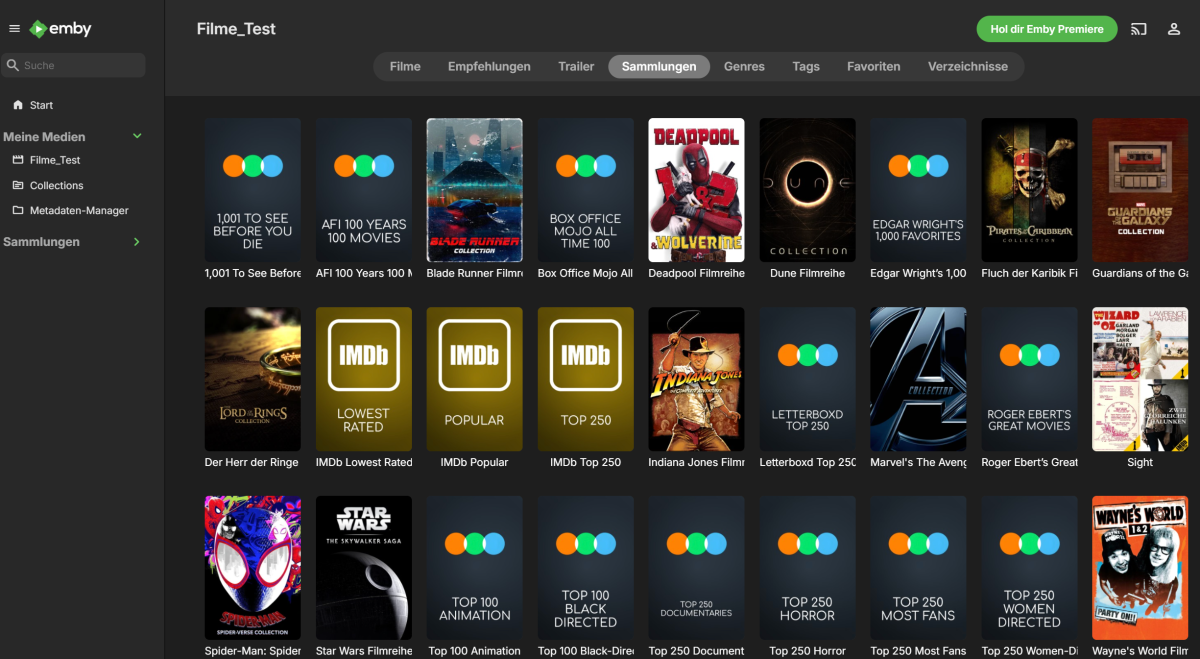
With some time taken, I've managed to butcher the code of Kometa and got it initially working with Emby. I thought of the ways possible to make it work without affecting too much of the rest. I've mostly butchered plex.py with some changes done to other parts which relied to heavily on Plex. I've tried recreating the Plex objects, as it would be otherwise too much work for me. Working (tested): Sync movie libraries Sync Imdb lists Sync letterboxd Poster upload Not Working: Overlays Lists by actors (maybe?) Sort name + summary for boxset Boxset sort order setting Plex labels become a local json file Untested: TV shows Music Multiple libraries etc. Mentions: I used a Plex server for piggyback hacking, thus I guesst the prerequisite is still a Plex library. Config was not updated, enter your Emby credentials in modules/emby.py It's a proof of concept, with no consideration taken towards compatibility to the source project. Removed "docs" folder for sharing Kept my current config as reference No idea how much work I'll put in it, I want the boxset sorting title fixed, summaries and boxsets by actors fixed. I know that we're not there yet, but it's a beginning. Any help welcome! Result with the current version, brand new test server, ca. 400 movies: Kometa.7z
 1 point
 -
Oddly, another reboot of the server has seemingly fixed this. My only guess is one of the plugins I have installed somehow interfered with this, but has been bugfixed recently.1 point
-
Update to clarify my prior post to avoid confusing matters... All of the points I raised are true, however I pulled the trigger a little early as I was testing everything using Emby native player, not the Zidoo external player. If you want Zidoo player, vs10 engine, custom edid support etc, many of the things you'd buy the Zidoo for you need to use the external player and if you do you then start to see some of the issues others have raised. Poor transport integration (time being lost), subtitles not working, sound popping etc. The native Emby player works really well but you don't get all the Zidoo features, and after comprehensive testing there are quite a few movies which for whatever reason don't match frame rate or resolution correctly, leading to extremely choppy playback; issues which don't occur using the Zidoo player, or emby on NVIDIA shield etc. Anyway it's still a very good app on the Zidoo, but further work is required with the possibility that there will be issues depending on your library and what you expect from the Zidoo and or Emby.1 point
-
Would be nice to have Emby on Titan OS https://docs.titanos.tv/devviewinstall1 point
-
If you need to - use credential manager on windows. Then Windows Credentials. It's in the control panel or search for 'cred' and you'll find it. Access that you have previously done in windows is all held here - and you can manage it (add/edit/remove etc)1 point
-
That's it. It's okay now. Thank you very much for your support. Have a nice day.
 1 point
 -
Hi, I would vote for a feature like that. I have some members of my family interested in series that I don't care about and I would like to not show up in my watchlist. It would be great if there was an option to hide the latest download and tag my favorite shows so I only see the latest unread episodes of my favorite shows. It would be faster to "do not follow" a show. If you can add a follow/don't follow, with every show being default to follow and when you see a new show appear in your watchlist because it was newly added by me or someone else, I would decide whether to continue following it if I still enjoy the show. Regards, FrAllard1 point
-
I feel like an idiot for not even thinking this! Have a whole cluster running and forgot about mounting it on the host first. Literally just looked at the container resources and there it is, the mount point option that utilizes host mounts and storage. Its Friday, feels like a Monday. Thank you both.1 point
-
Did you setup port forwarding to 8920?1 point
-
Thanks! That worked.1 point
-
Come on guys (Emby) this has been over a year and at this point I feel you're just giving us the run a rounds, there's no update unless we ask and we get the same response each time. Address the issue and get it fix please. As mentioned before, some are paying customers.1 point
-
True but still believe Remote access should be an option on the installer and not just enabled by default on installation. As you have Port Mapper but not Remote access option installation.
 1 point
 -
Remote access isn't specifically built into Emby. What's built in is general network access, and it's the same functions whether the client is on the LAN or WAN. It's really your router's port forwarding feature that is really doing the networking part of it.1 point
-
We should be able to support this easily.1 point
-
I guess depends on the usecase.. in my case (i just recounted them) I have 1162 physical blurays (2k and 4k) plus several for series (that I do not catalogue, so no idea how many i have).. they occupy LOT of space, so I cannot have them in my room.. i can't even have them at home so they are off site. ISO backups are my main media source. On the other side, it's also not correct to say that you don't miss anything with ripping.. you miss features that's a fact, like menus, extras, seamless branching and DoVi FEL in MKV is far from being optimally ripped (or at least it wasn't in the past)... in the end I also paid for all that crap for god's sake Yes, I agree that a good library wall might give a good experience.. but honestly I prefer the menues in the Game of Thrones BluRay (to say an example) than using Emby / Kodi or whatever.. In the end I use both.. i use the Emby as cataloguer and remote control in my iPhone and use a physical external hardware Bluray player.. best of both worlds. Two things I miss for full experience. 1- Audio/Video Metadata parsing for ISOs (i know, challenging) 2- Being able to play the "main movie" of the disc directly in emby (for the times when I'm lazy to go through the menues or when I want to use the internal player in whatever emby client) With those two features emby would be the perfect solution..1 point
-
HI, that's helpful. We'll take a look at that. Thanks.1 point
-
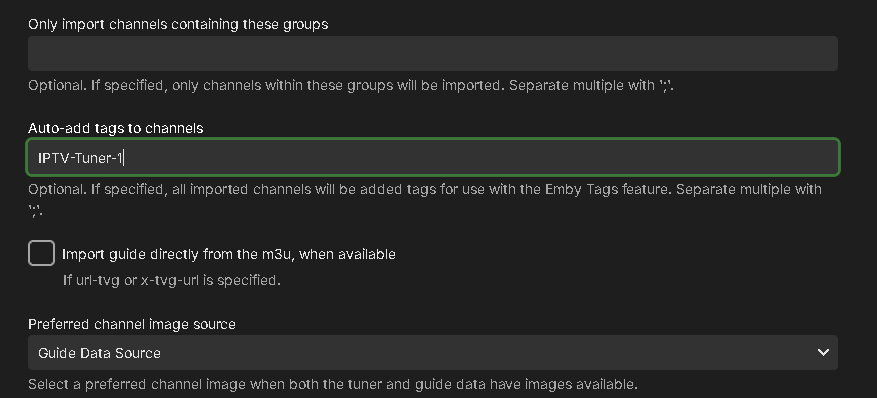
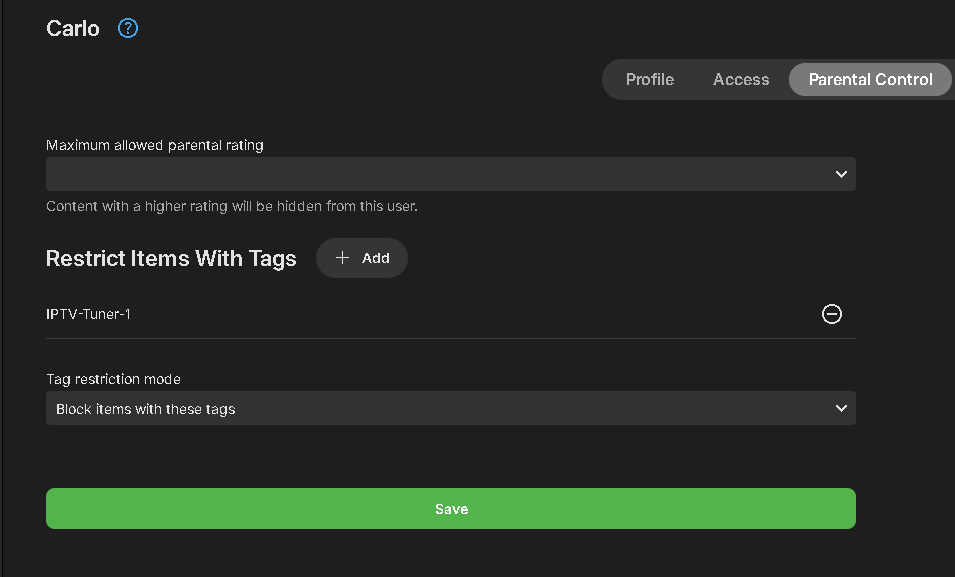
@EmYajcheck this out and see if it helps you. We have pushed out a change to M3U functionality that can be very helpful and used by admins in a few different ways. When setting up or editing an M3U tuner, you will see a new option to use. "Auto-add tags to channels" shown above. This will do exactly what it sounds like. Every channel loaded from the M3U source will be tagged with the entry you set in the config. Each M3U source can have a different tag associated with the channels from that source. USEFUL USES Many IPTV providers limit the number of simultaneous streams in their service. If you need additional streams, you could purchase another plan adding a 2nd m3u tuner to your system, you end up with an unmanaged set of channels, having duplicate channel entries of every channel. Not only does it make using LiveTV harder to maneuver with double the data, it looks far less clean and becomes confusing to users. With the new auto-tagging functionality, you can set a tag like IPTV1 and IPTV2 to each tuner. Every channel will now be tagged according to what tuner it's associated with. With the help of Emby's Parental Controls you can add a tag assigned to a tuner's channels in parental control in the section that blocks items with these tags. Setting Up Tags for TV Users Split Users: Set up half your TV users with one tag and the other half with another tag. Each group shares one tuner and only sees one set of channels. Multiple Subscriptions: Use 3, 4, or more IPTV subscriptions to spread the number of tuners/streams across your users. Tagging for Different Uses Split Subscriptions: Have one IPTV subscription split among your users while keeping a second subscription for your use. This way, you can provide LiveTV and recording abilities to users, while reserving a subscription for your own private use. Curate Channels: If your m3u file doesn’t use grouping, move multiple channels at once to category-based m3u files (e.g., sports.m3u, news.m3u, kids.m3u, premium.m3u, network.m3u, local.m3u). Set these up in Emby LiveTV with each file having a tag to match the content. Multiple m3u Files: If you have multiple IPTV m3u files from different sources, tagging helps you know what source a channel is from by looking at the channel's tag. These are just a few of the creative ways this new functionality could be used. If you don't see the new tag option when adding or editing an M3U tuner, it may not have updated on your system yet. You can manually upgrade this easily by upgrading the M3UTUNER plugin to 1.0.32 or later in the Plugin Catalog.
 1 point
 -
Moi je note le pays manuellement dans les Tags de chaque film. Par la suite avec la recherche d'un pays en choisissant tags comme choix, j'obtiens la liste de tous les films pour le pays choisit.1 point
-
Hi, not yet, but stay tuned.1 point
-
Each time when we say yes to something and nothing happens for several years, it causes disappointment for those who are waiting for it, and when those disappointments aggregate, it makes things much worse for all sides, thus it's often better IMO to set expectations straight right away. The DataExplorer plugin is great for those who need it, but that's a fraction of Emby users. And handling multi-version items in DE is again of interest only for a fraction of DE users. This makes a fraction of a fraction of audience and doesn't weigh against all the big things which are coming up. If it was a straightforward change which could be done blindly and doesn't likely need cycles to get it right, then it's a different story, but it's not a change of that kind, unfortunately. PS: Still I didn't say "never", just don't expect it1 point
-
+1 for this1 point
-
Hiya. when we make a collection we are given two sort options - Title A-Z or release date old to young I would very much like a release date young to old so same thing, just the newer ones first.1 point
-
This is a very old post (I am aware.), but there wasn't any answer to the original issue, so I thought I could chime in.. OPPO (either chipset or the firmware) does not support ISO reproduction through DLNA. You can do MKV reproduction through DLNA or you can do ISO reproduction through a mounted NFS/SMB share (or USB). But ISO->DLNA->OPPO is a no-go. What you can do (if you want to use a media server like Emby) is to use a "proxy" DLNA server that mounts the share in NFS/SMB and trigger the reproduction on the OPPO, like for example Xnoppo --> https://github.com/siberian-git/Xnoppo or you can ditch Emby and use a media server that supports this SMB/NFS "bypass" like "DVR-Provider" Best would be if Emby would support this natively, since Xnoppo is a bit tricky tool and requires you to create a docker to host the Xnoppo server. But.. this would require some friendly Emby developer to support it...I feel that they are more interested in MKV (ugh..) and more into mainstream clients like Shield, TVs, AppleTV, Google... (ugh x2..), but who knows.. maybe we get lucky some day1 point
-
The processor in question has a passmark score of 24781. The usual train of thought is that you need 2000 passmark per each 1080p transcode. You'll be fine, just keep an eye on thermals. Very roughly speaking, for a single full-transcode of a video, the following PassMark score requirements are a good guideline for the following average source file: 4K HDR (50Mbps, 10-bit HEVC) file: 17000 PassMark score (being transcoded to 10Mbps 1080p) 4K SDR (40Mbps, 8-bit HEVC) file: 12000 PassMark score (being transcoded to 10Mbps 1080p) 1080p (10Mbps, H.264) file: 2000 PassMark score 720p (4Mbps, H.264) file: 1500 PassMark score1 point
-
I read through this thread and I must admit that the idea of restricting a user (or users) from certain movies/TV shows/music files or even home videos while allowing access to others without mucking with the ratings directly is something I explored in the past. The best solution that anyone came up with was tags but tagging a lot of movies is a tedious propitiation at best. The final solution that was mostly agreed would be best is using collections and tagging collections and using the tags to grant/deny access to certain groups of media. This seemed ideal and not too hard to implement BUT Emby, at least at that time, did not support/respect tags on collections. I do not know if Emby plans to support (or already has support for) tags on collections or any such group tagging scenario in the future but my need for it has diminished quite a bit. I still think that the ability to filter collections by tags is a good idea but there are potentially serious issues like: What happens if a collection is tagged to not display for a particular user and that user uses a view that does not display collections? There are a LOT of other issues but I still believe that tags+collections+user restrictions is the way that this problem can be solved.1 point
-
Look in your livetv folder and copy seriestimers.json and timers.json. On a windows server it's located in the windows user AppData\Roaming\Emby-Server\programdata\data\livetv folder.1 point
-
Yeah, i see that to. (With other Errors after restoring a Backup)0 points
-
That's exactly my point; there's no such thing as 'defaulting remote access to off'. Emby is a server application accessed over a network. There is NO distinction between 'remote' and 'local', it's all just network access. How you configure the network emby server is attached to determines whether you have 'remote' access or not; not anything emby does or does not provide. If anything emby would have to build in additional functionality to reject connections that don't originate from the local network; which could then still be bypassed fairly easily. You're asking embys developers to engage in a wild goose chase, and significantly increase their work load while they're at it.0 points
-
I don't think you even know what you're asking for... The only difference between 'remote' access and 'local' access is whether or not you've forwarded a port on your router, if the system is even behind NAT (which it will be unless you've rented a VPS). There's nothing explicitly enabling/disabling remote access besides maybe UPNP which should be off by default for any service. There's nothing for Emby to change here. At most, Emby could remove a few options displayed for you in the settings pages, but really this would just create confusion over which release users should use and how to switch between them. In term of storage space, we're talking about a handful of megabytes at most. Hardly worth time/energy for anyone. In short; what specifically are you actually wanting changed (don't generalize with terms like 'bloat'), and why should Emby devote time+effort into making (and maintaining) an entirely separate branch of releases to make it happen, knowing how much they already have to do?0 points
-
Agree... The windows version (7z) is only ~128 MB...compared to how many TB of media do you have? If your worried about bloat on your system then get rid of the biggest one WINDOWS install a headless version of Linux (or one with a lightweight desktop).0 points