Leaderboard




Popular Content
Showing content with the highest reputation on 11/21/24 in all areas
-
I could get carried away talking about new features and changes in the new LiveTV. I'm going to answer by saying we have so many new features and improvements already that it might already feel overwhelming to some people wanting to quickly set up a tuner and feed. It's not hard and quite logical, but with many new options there will be a small learning curve for some people. For others it will be like Christmas morning unwrapping gifts to see what's new and how much more control there is, with little thought given to differences in setup and use. Power users will love it and have little to no issues finding or using new functionality paced in it. Typical users might find it a bit overwhelming at first glance, which is something we are already concerned about and want to simplify possible using a basic wizard like setup with the ability to turn on/off advanced features. I'm sure configuration and initial use observations will be the main focus at release to get feedback and make improvements based on it. We probably already pushed the envelope a bit too far, that will require getting used to. Any additional new functionality should probably not go into the first release but allow people to get comfortable with what's already there. Then follow up with releases having additional functionality, so it won't be even more overwhelming at first glance or use. I will tell you we already anticipated the functionality you wish to have and took this into consideration during the design phase to make it as easy as possible to add in a subsequent release. It already has the functionality to stack channels such as having 4 OTA devices combined as one set of channels using all 4 devices. We also have the ability to stack channels from the same lineup. If you had a channel with both 1024 and 728 they could be combined and used as fallback if the primary or preceding entry isn't available. This could also be used to stack cable and OTA channels as well, with only one entry appearing on your system. What is not currently supported is stacking multiple subscriptions using different credentials together. The framework supports this, as well as a large part of the code needed is already present, leaving only a couple things left to implement. To be honest, I think it might be a good idea to hide a few advanced options during the initial release, so there won't be support requests for a few of the really advanced features. This way support can focus on helping anyone in need of assistance while adjusting to the new system. We could then enable additional advanced features and be able to support this as well without having help requests for advanced features competing with those who need help on the initial setup or configuration. We just recently had a major release and started a new beta cycle for the next release. Current plans are once this beta becomes the general release the next version will focus on the new LiveTV. If you have a big interest in this, it would be a good time to join the beta program setting up the beta as a separate instance. You can run multiple instances of Emby from different locations on hard disk using different ports. Carlo3 points
-
I think he was just trying to add his experience corroborating yours. As you know and mentioned earlier in this thread, there are multiple tens of millions of reasons "why" they get more exposure but that's also exactly why they are moving the direction that they are - they have to provide a return on that investment. IMO we don't really need to step up our game in marketing. Instead, I think we need to step it up in development - and we're working on that.3 points
-
https://github.com/SimCity/emby-mediainfo-plugin-prereq?tab=readme-ov-file maybe this will help it saved mee some months ago. but now i still have the mod but no functuionality2 points
-
Problem solved - by son; he is in Nicaragua but clearly has more nous than me! What he has done ( even remotely!) I don't know but it's given me access2 points
-
run it again and then check your emby logs. search for 'MediaInfo' There will be an entry from MediaInfo explaining what happened. Most likely it will say something about not being able to access the location or something along those lines, i.e. the app was not found at the location that it was configured to search for it or it didn't have permission to access it. For example, if the config setting for media info is left unset, it will try and run this blank file location... and this would in turn generate an access error. Same thing if the location is set but the app is not in that location. Cant access something that doesn't exist, so again access error recorded. 90% of the time that I have seen 0 second runs, its cause I forgot to reconfigure the location after an update or something caused a reset (I modified my script to do this form me now...). If you have an different error than those 2, then your going to need to supply the logs so someone here can diagnose it.2 points
-
Thanks to everyone that gave useful advise, I guessed it only need my patient to fully synch. came back to it this morning and all is set! amazing, see screenshots attached. Thanks once again
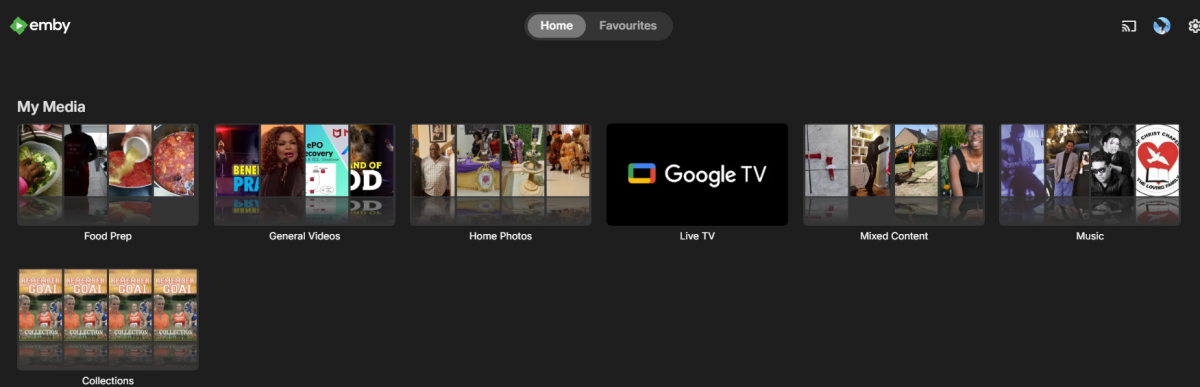 2 points
 -
I love the additional subfolders for Movie Extras (eg, Shorts, Scenes, Interviews, etc.)! I would like to propose an additional folder: "Galleries". Within the Galleries folder the user would place subfolders (only one level of nesting) and each subfolder could contain any images the user chooses. Then, Emby would display the subfolder name as an Extra (in Emby Theater) and opening that extra would launch an image gallery of the containing images. For example: Movies\Disney\The Sword In The Stone (1963)\Galleries\Scrapbook Movies\Disney\The Sword In The Stone (1963)\Galleries\Film Facts "Scrapbook" is what would be listed among other Extras in Emby Theater, and the Scrapbook folder contains various images to be displayed in a slideshow that the user can navigate with their left/right arrows. This feature request is motivated by the following related post: https://emby.media/community/index.php?/topic/55912-video-ts-folder-no-longer-recognized-in-movie-extras-folder/ Basically, sometimes there are extras such as image galleries and text content which are only available via the DVD menu. I have found that I can use FFMPEG to extract all the frames from a video file, and so use that on the appropriate VOB file from the original DVD. Then I can use VisiPics to delete all the duplicates, resulting in content I can then sort into folders (eg, Concept Art, Storyboards, etc.). All I need is for there to be the above support for a Galleries extras folder, which could contain multiple subfolders (only one level deep), each containing images to be displayed as image galleries in Emby Theater, etc. Thanks for your consideration! PS - If this is something you might like to see implemented, be sure to "Like" this top/first post (as well as any subsequent posts in this thread that highlight particular aspects of what you are interested in) -- "Liking" the top/first post helps the Devs to know how much interest there is in a given Feature Request.1 point
-
As I mention in a related post, I love the additional subfolders for Movie Extras (eg, Shorts, Scenes, Interviews, etc.)! It would be awesome to extend this functionality to TV Series as well. Specifically to add support for many/all of the same folders supported for Movie Extras, eg, extras specials shorts scenes featurettes behind the scenes deleted scenes interviews trailers As well as any additional folders that get added in the future (eg, hopefully Galleries). Support Placement of "Extras" Folders Within Each Season Folder, Plus A Naming Scheme to Link A Particular Extras Folder with a Specific Episode (eg, "\Season 1\E1 - Deleted Scenes\" for episode 1 deleted scenes): I want to clarify that it would be great if these various "extras" folder types could reside within each Season folder. So for example, within a Season 1 folder we could then have an "Extras" folder, a "Deleted Scenes" folder, a "Featurettes" folder, etc. And furthermore, that we could designate a particular folder to refer to a specific episode (eg, "\Season 1\E1 - Deleted Scenes\" for episode 1 deleted scenes). See more below, particularly why I think this would be so useful: https://emby.media/community/index.php?/topic/55915-emby-server-theater-additional-extrasspecial-folder-types-for-tv-series-similar-to-movies/&do=findComment&comment=587195 Thanks for your consideration! PS - If this is something you might like to see implemented, be sure to "Like" this top/first post (as well as any subsequent posts in this thread that highlight particular aspects of what you are interested in) -- "Liking" the top/first post helps the Devs to know how much interest there is in a given Feature Request.1 point
-
I would like to request a sleep timer function for the Emby app. For example, when a song is playing, it should be possible to quickly and easily set a sleep timer to shut off the song after a desired interval. Options could include 5, 10, 15, 20, 30, 45, 60, 120 minutes. If it had this, I would be happy to purchase Premiere.1 point
-
Hi there I have albums with some song I never want to listen but I don't want to split the songs in different directories and add the .ignore file. Is there a way to mark a song as "unloved" and never listen? I have seen the "Remove from Play Queue" but every time I reopen the Emby page I need to restart a new queue. I would not to make a playlist with all the songs I have in it. Thank you!1 point
-
It should add support for extgrp. Can you try it again?1 point
-
We should be able to support this easily.1 point
-
From your server dashboard -> view server info. That will show you some locations of things.1 point
-
@Gibberwhat do you see in the Live TV section under Series? Are you able to cancel the series recording there?1 point
-
I'll throw it on my docker server and see if I can make it work there. Right now I have it on dedicated hardware, and kind of old school that way. But if I can make it work in my docker, at least I can get a working version to help as a blueprint.1 point
-
Why not just get a Fire stick or a Shield Tv or a Roku or any number of other client boxes that attach to an HDMI port on your TV. That way you do not have to to deal with the issues/problems of the TV's clunky operating system. It is, for many of the clients, a very cheap solution and you will have a truly flexible client. I, just recently, had to replace my TV and the best price to performance TV I found was also a "smart" TV. I tested the TV's smarts and found them quite dumb and very slow so i hooked up my Roku, my Fire TV and my Shield TV and now I have a TV that actually performs very well and Is a lot smarter than the TV was before my upgrades.1 point
-
I'm using Emby most of the time on different TVs with a remote control, as does the rest of my family. There is no simple "move mousepointer there and click this".1 point
-
From the FAQ:1 point
-
I don't know if the files are existing they are not in the docker container. I cannot remember at all how I did it there was a homepage from someone with a description linked here in one of the 10k sites searching the site alone would drive me crazy. I will go on without the Plugin1 point
-
you pretty much nailed it on your first post does /bin/mkvpropedit exist ? /run/s6-rc:s6-rc-init:ofIEHG/servicedirs/svc-emby does this exist ? I would set it up again as you did the first time - I have two links in my post above that may help. I don't run emby on docker nor synology I'm afraid - so I'm not in a position to help with regards to the OS install. 2024-11-21 16:17:19.019 Warn Media Info: Please check your Folder Path and FileName: Filename must be Correct 2024-11-21 16:17:19.019 Warn Media Info: MEDIAINFO CANNOT CONTINUE 2024-11-21 16:17:19.021 Error Media Info: An error occurred trying to start process '/bin/mkvpropedit' with working directory '/run/s6-rc:s6-rc-init:ofIEHG/servicedirs/svc-emby'. No such file or directory1 point
-
if the paths are not in the config XML, then it's not saving the paths (for some reason) Maybe try clicking a 'save' option for something else (empty) - it should pop up and say 'saved' - then check the XML ?1 point
-
Even if it originates on a disc, people rip it to a streaming-friendly format because all modern devices are designed for playing content in that format because they are targeted at online streaming services. I cannot really think of an advantage to storing an exact copy of a disc format. You already have a physical backup. The only thing I can think of is for people who want the disc menu experience and, in that case, you are probably better off with a physical disc player. Our system provides most (and more) of that menu experience.1 point
-
The log is simply stating that it cannot start the mkvpropedit executable - likely permissions caused by your last update. Remember it's the two executables you specify in the plugin that do all the updating to the FILES - so emby only needs execute access to those files, but those executables need write access to the actual media files (to make the changes to the MKV track titles). If you turn on debug logging in emby, the mediainfo plugin is very verbose in what it is doing which may give further clues, but it looks like permissions to me in the log. This may help - https://github.com/Cheesegeezer/MediaInfoWiki/wiki/Various-OS-Installation-Help#5-docker https://github.com/Cheesegeezer/MediaInfoWiki/wiki/Various-OS-Installation-Help#2-synology-nas1 point
-
Thats all very exciting to hear! Thank you for the detailed answer.1 point
-
1 point
-
Oh ok, I'll try for now to use 1 SSD for app storage and later 1 SSD to cache then and see how it will be; im curious about this nas power in transcoding Chooo1 point
-
That would be AWESOME!!! I was wrecking my brain, about this one. adb dumpsys, checking everything, Great to hear, that would make the programming SO much simpler. Thank you very much, awaiting with eagerness for that update!1 point
-
Hi, this has been added on the 4.9 beta channel. Thanks.1 point
-
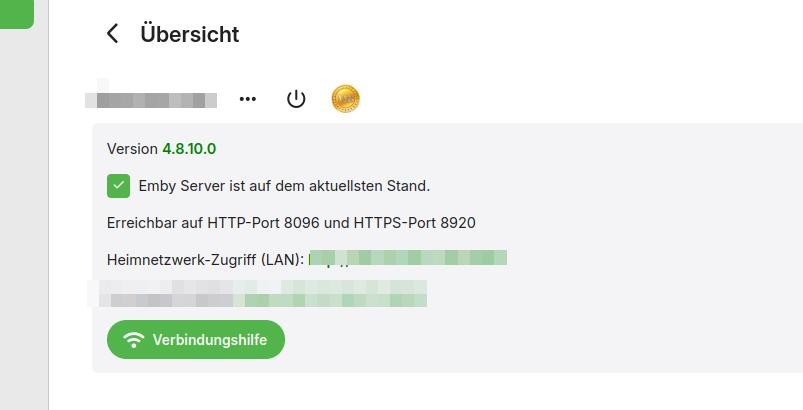
Leider auch in neuen Version fehlt die Funktion Musik fortsetzen
 1 point
 -
Thanks Carlo! I will definitely mess with this to see if i can act as a bandaid to my issue. Can you confirm if there are still plans in the future to handle the original issue? To re-iterate, If I have two IPTV subscriptions from the same provider (as in they share the same exact EPG and channel list) with 2 max connections on each Tuner and I have for 10 total Emby users all with access to Live TV. It would be very very helpful if Emby could "roll over" from one M3U Tuner to the next once the maximum # of connections is reached on the first one. The concern I have is that even though the tagging method will certainly help, it means I would have to have some knowledge of each individual users TV habits and try to manually "load balance" the users where as if Emby would automatically choose the tuner with available connections the load-balancing would be handled automatically.1 point
-
I did...instead of reverting to the original library, I deleted it and kept the mirror library (with the network address instead of mapped drive), and made mirrors of the other libraries using the same format. I haven't done any further testing, as the Radarr/Sonarr connections have been working perfectly.1 point
-
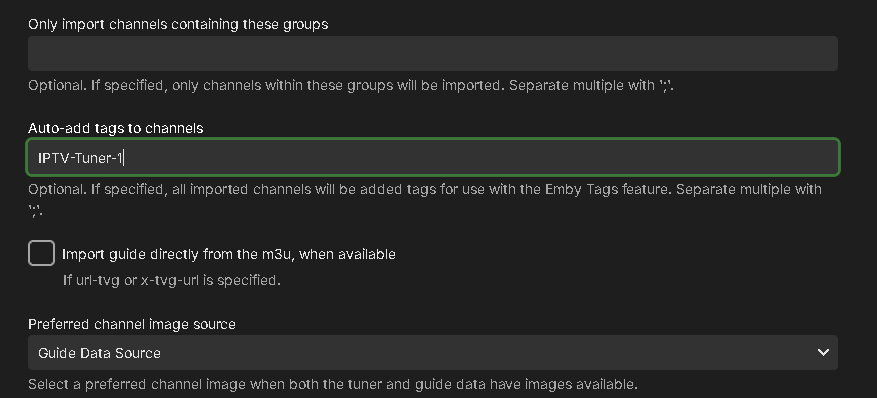
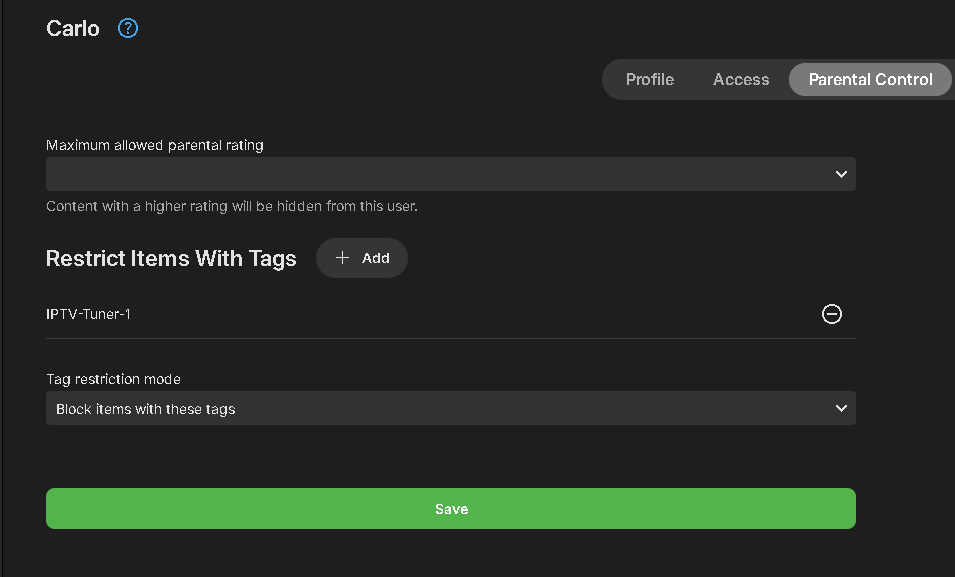
We have pushed out a change to M3U functionality that can be very helpful and used by admins in a few different ways. When setting up or editing an M3U tuner, you will see a new option to use. "Auto-add tags to channels" shown above. This will do exactly what it sounds like. Every channel loaded from the M3U source will be tagged with the entry you set in the config. Each M3U source can have a different tag associated with the channels from that source. USEFUL USES Many IPTV providers limit the number of simultaneous streams in their service. If you need additional streams, you could purchase another plan adding a 2nd m3u tuner to your system, you end up with an unmanaged set of channels, having duplicate channel entries of every channel. Not only does it make using LiveTV harder to maneuver with double the data, it looks far less clean and becomes confusing to users. With the new auto-tagging functionality, you can set a tag like IPTV1 and IPTV2 to each tuner. Every channel will now be tagged according to what tuner it's associated with. With the help of Emby's Parental Controls you can add a tag assigned to a tuner's channels in parental control in the section that blocks items with these tags. Setting Up Tags for TV Users Split Users: Set up half your TV users with one tag and the other half with another tag. Each group shares one tuner and only sees one set of channels. Multiple Subscriptions: Use 3, 4, or more IPTV subscriptions to spread the number of tuners/streams across your users. Tagging for Different Uses Split Subscriptions: Have one IPTV subscription split among your users while keeping a second subscription for your use. This way, you can provide LiveTV and recording abilities to users, while reserving a subscription for your own private use. Curate Channels: If your m3u file doesn’t use grouping, move multiple channels at once to category-based m3u files (e.g., sports.m3u, news.m3u, kids.m3u, premium.m3u, network.m3u, local.m3u). Set these up in Emby LiveTV with each file having a tag to match the content. Multiple m3u Files: If you have multiple IPTV m3u files from different sources, tagging helps you know what source a channel is from by looking at the channel's tag. These are just a few of the creative ways this new functionality could be used. If you don't see the new tag option when adding or editing an M3U tuner, it may not have updated on your system yet. You can manually upgrade this easily by upgrading the M3UTUNER plugin to 1.0.32 or later in the Plugin Catalog.
 1 point
 -
Just saw that version 1.9.2 is the latest of the Emby AppleTV client. I will update from 1.8.8 and try again, hopefully this issue is addressed in that version.1 point
-
Moi je note le pays manuellement dans les Tags de chaque film. Par la suite avec la recherche d'un pays en choisissant tags comme choix, j'obtiens la liste de tous les films pour le pays choisit.1 point
-
I use the sort title of movies to get the grouping I want. I find that perfectly adequate and easy to do.1 point
-
I really do not understand the problem. In the web interface it is very easy to navigate to a show and then click on the three dot menu and the go to the bottom and click on "Show missing episodes" and all the missing episodes show in a nice easy to use list. I guess there are people that manage their content from various clients, and I have absolutely no idea why or how anyone would do that, but that seems to me to be an unproductive way to manage content. I disagreed with Emby when they made the change but, now that I have used it for a while, I find it easier and faster that the other, much more cumbersome, method used before. I find Emby's decisions on user interface design poor on first inspection but, after using it for a short time, it really does seem better most of the time.1 point
-
I finally found the .dll needed, all I was originally finding in the github is the Source Code.1 point
-
If you look in the ffmpeg file you will see: >>>>>> Processing Plan Name CanDoInHW WillDoInHW Reason QuickSync Intel Arc A380 Graphics - H... >> True True Hardware Codec VideoInput >> True True Same adapter Id (0), same hardware context (D3D11) ColorConversion >> True True VideoOutput >> True True Hardware encoder QuickSync Intel Arc A380 Graphics - H... >> True True Hardware Codec or >>>>>> Processing Plan Name CanDoInHW WillDoInHW Reason Copy video stream >> False False Software Codec VideoInput >> False False Not a hardware decoder VideoOutput >> False False Not a hardware encoder Copy video stream >> False False Software Codec That's the execution plan. Can it Do in Hardware,, Will Do In Hardware are the two middle columns.1 point
-
Yes Like fire stick Amazon. And they work.1 point
-
Thanks guys. I've tried out a you suggestions and some work, others don't. It is most likely that my directory structure and file name formats seems to be all over the place which could be contributing to the issues. So, I'm sure we a proper cleanup of my directory/files I should have better results. I wish this could just be done with the metadata built into the file (like EXIF for images, but I don't think video files have such a system). Anyway, that's all for your help!1 point
-
Ok, so turning NFOs off in radarr/sonarr solves my issues with emby. I'll just manually have to assign tags, unless there is a better way of assigning tags. Thanks everyone.1 point
-
Sorry for the late response but I didn't have the time to run down the issue and since I was going to move the db to a newer PC I just did that instead. Checked the install and no issues so far. I know it probably wasn't the right choice because finding the answer to the error would have been better. But I was time pressed so all is good for now. Sorry.1 point
-
Hi, not yet, but stay tuned.1 point
-
New PUBLIC TESTING version available 11.1.3: Delta changelog 11.1.2 -> 11.1.3 fix websocket close-connection issue improve offline-mode notifications increase http timeouts from 1 to 3 seconds add music content synced-nodes for singles add translations fix websocket-reconnect issue (edge case) fix minor webservice issue when Kodi queries jpeg pictures improve strm files playback with embedded http streams fix progress updates when using dynamic nodes in native mode add follow-http option for remote content e.g. strm and livetv default off -> do not pipe external http links through Emby server. This fixes some edge case playback issues fix cinnema mode in native mode fix remote playback progress updates when dynamic content remotely played in native mode some minor playback performance improvements change datetime datetime.utcnow api call, as it's deprecated Comment: This version might become the next beta if no showstoppers are reported1 point
-
+1 for this1 point
-
Wouldn't it be GREAT to have Picture-in-Picture capabilities in Emby clients (all versions), especially in Live-TV, Films, TV-series, etc. Especially in Emby WMC (but also other clients ofcourse!), it would be great! Is it (technically seen) a feasible option ? Thanks & best regards, Peter (Ticket copied from )1 point
-
nah man stick around, you are helping effect change, read Lukes message, it is discussions like this that helps everyone. I will be the first to agree that the community on this forum is tight and if you upset them they all band together and attack, you had some valid points and in the end we got to a place where we can talk about the core issue.1 point
-
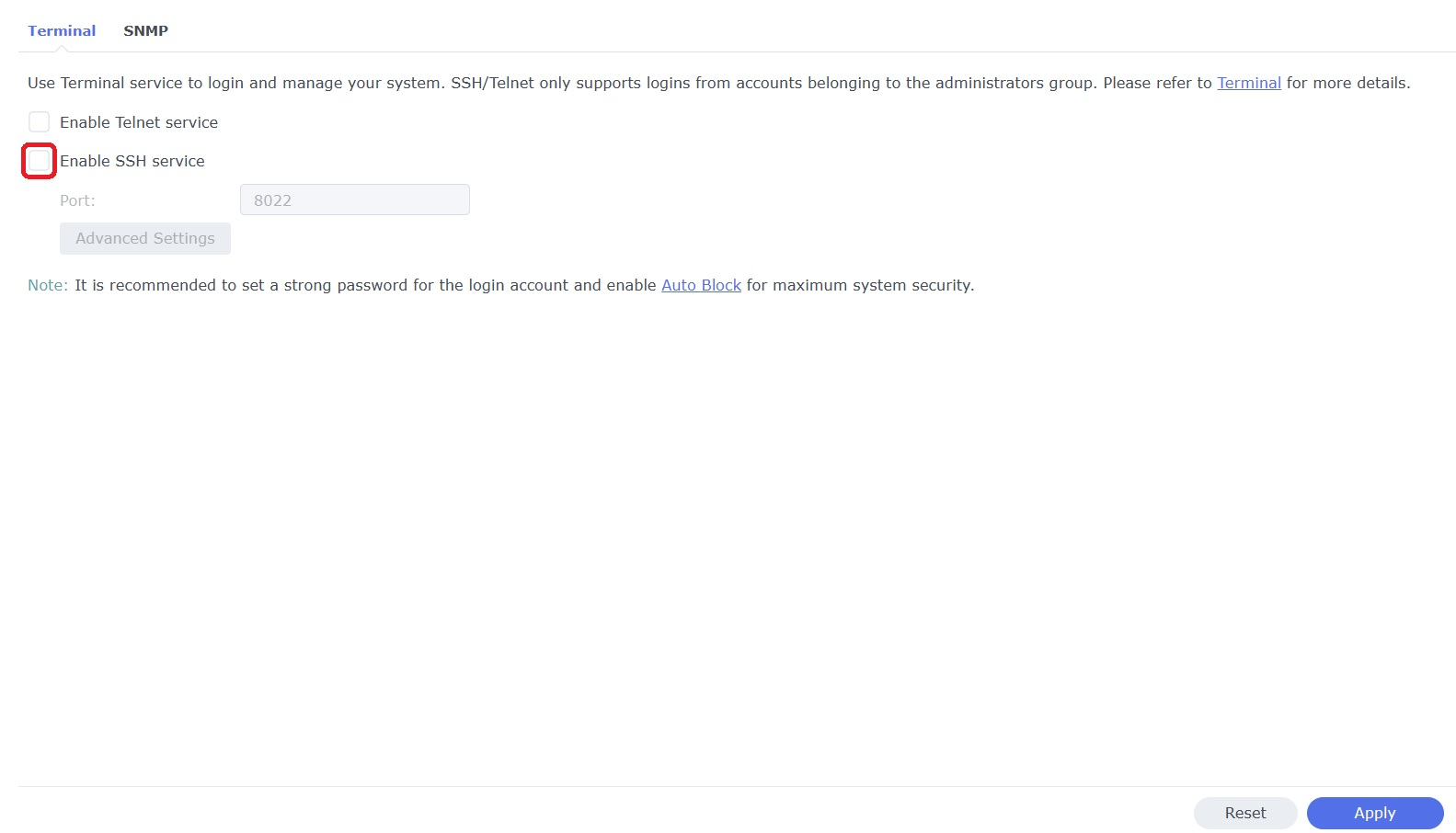
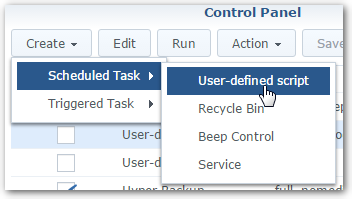
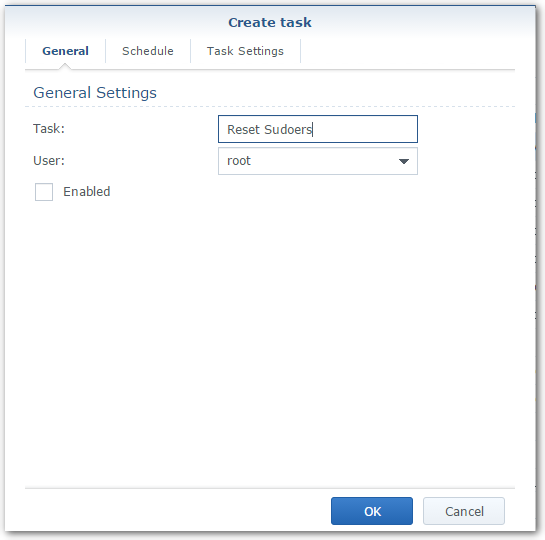
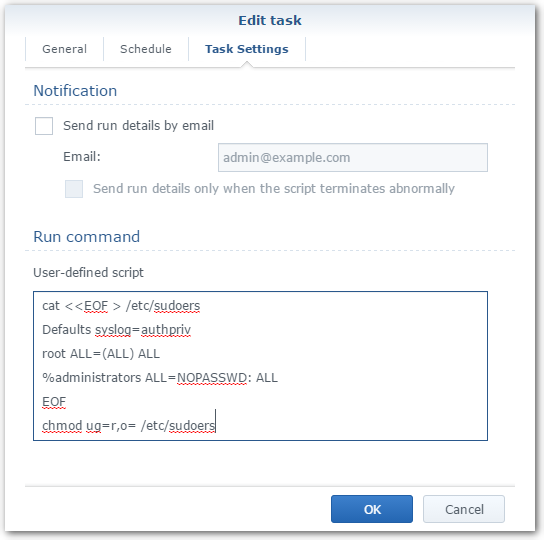
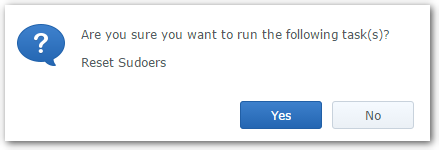
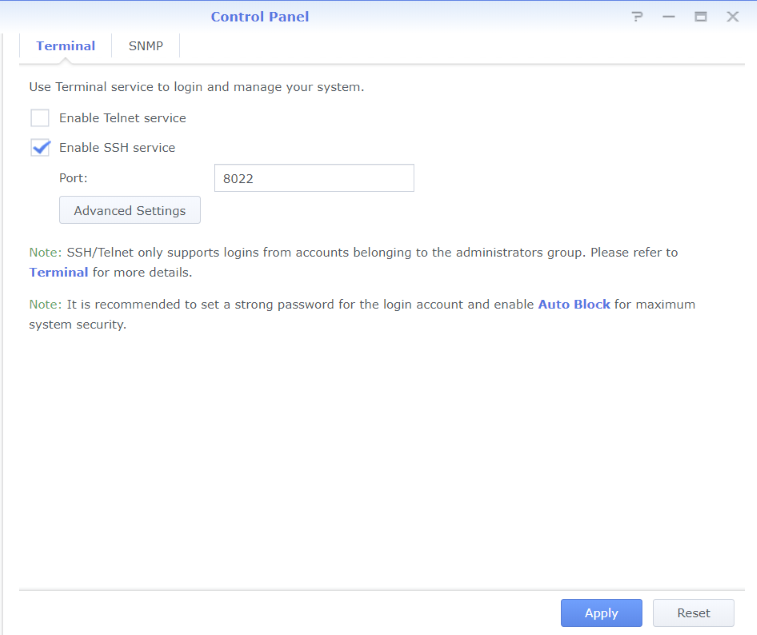
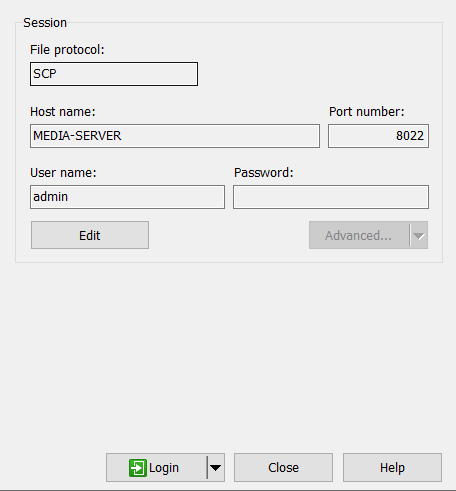
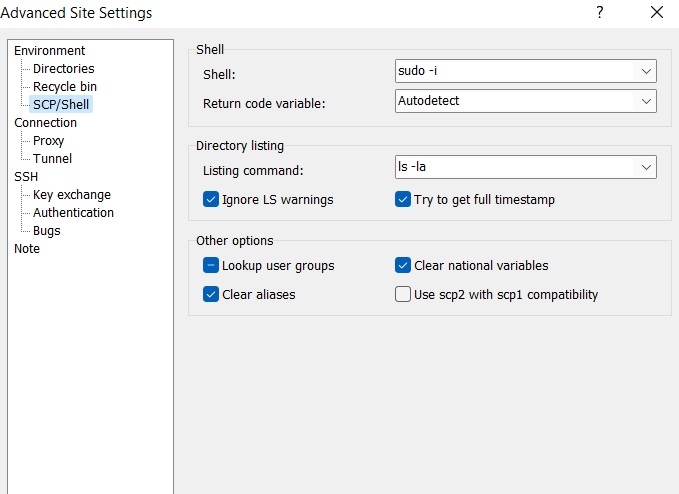
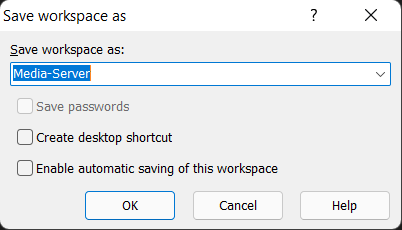
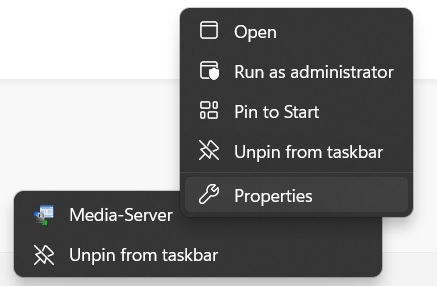
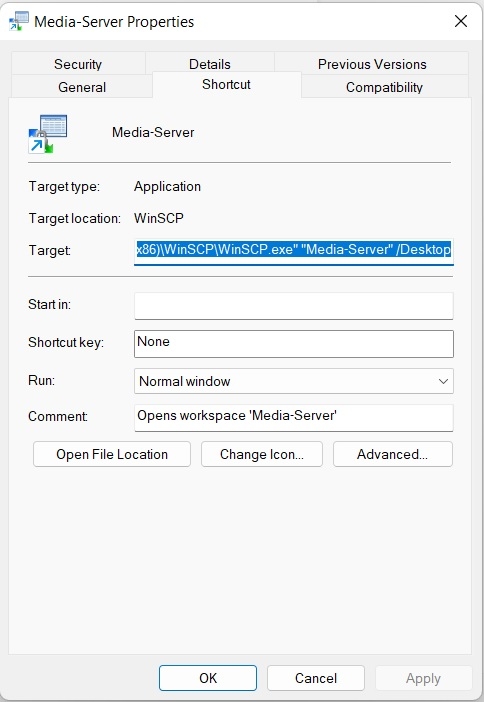
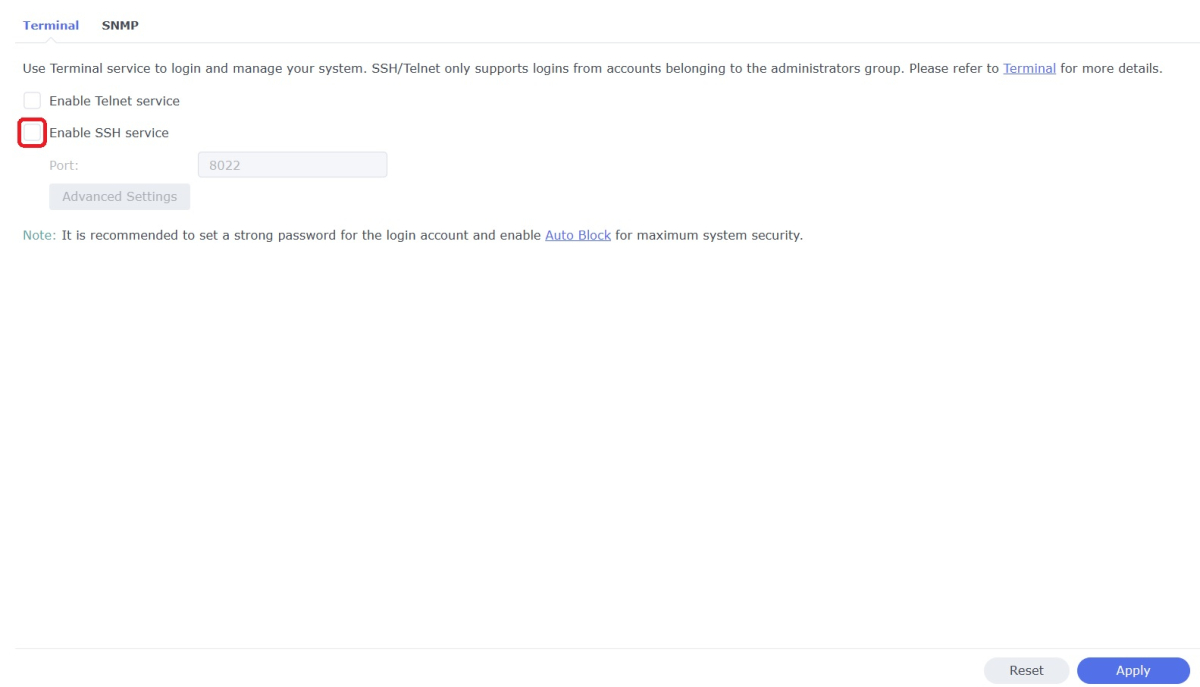
WinSCP is a popular SFTP client and FTP client for Microsoft Windows which can be used as a GUI alternative to Putty or Terminal. The procedures below will allow you to perform tasks as Superuser just like you can with Putty or Terminal. Superuser privileges may be needed for the following: full read/write/ execute privileges creating or installing files or software modifying files and settings deleting users and data If you do not need superuser access with WinSCP and just want to access your NAS using Admin then skip the steps (2, 3, and 6) in blue. 1. Enable SSH on Synology NAS Open DSM Control Panel Click Terminal & SNMP Click Terminal tab Check "Enable SSH service" Click "Apply" 2. Create script to modify sudoers config file on Synology NAS This script modifies the sudoers file which is needed to prevent DSM from prompting administrators only for the Admin password again when switching to superuser during the login process as WinSCP can't handle this prompt. This script is saved to rerun again later because DSM updates tend to overwrite any changes to the sudoers file. Open DSM Control Panel Click Task Scheduler Create a Scheduled Task - User-defined script Click General Tab Set task name "Reset Sudoers" Set user as "root" Uncheck "Enabled" box Click Task Setting tab Copy/paste the following into the Run command box cat <<EOF > /etc/sudoers Defaults syslog=authpriv root ALL=(ALL) ALL %administrators ALL=NOPASSWD: ALL EOF chmod ug=r,o= /etc/sudoers Click OK 3. Run the "Reset Sudoers" script on Synology NAS This step will need to be rerun whenever a DSM update puts your sudoers file back to default Highlight the new script you just created Click Run Click Yes 4. Install WinSCP Download and install WinSCP on Windows machine https://winscp.net/eng/download.php Allow WinSCP to start when done 5. Configure WinSCP to auto logon Create a new session/site: Change Login window using the following File protocol: SCP Host name: enter the NAS host name or IP address Port number: enter the port number you used from step 3 Enter User name: "admin" and password 6. Add switching to super user Click the Advanced... button In the the Advanced Site Settings window do the following: Select SCP/Shell under Environment Shell box: "sudo -i" Click OK to return to the Login window Click Save Click "Login" 7. Create a saved workspace for WinSCP (this step is optional) This will create a Windows shortcut to start WinSCP and automatically login to your session without any prompts Log into your new session you created in Step 5 Click Sessions Click Save Workspace... type a name for your new workspace Click OK 8. Create a shortcut for WinSCP on taskbar (this step is optional) While WinSCP is running Right Click the icon on the taskbar and choose "Pin to taskbar" Right Click on the WinSCP icon on the taskbar again Now Right Click on the WinSCP workspace you used in Step 7 and choose properties Your shortcut should look something like the one below with the exception of the workspace you used above Example Windows shortcut used on target line above "C:\Program Files (x86)\WinSCP\WinSCP.exe" "Media-Server" /Desktop Click OK Click WinSCP icon on taskbar start WinSCP and be logged into your NAS as Superuser without any prompts 9. Disable SSH in DSM (this step is optional) After you're all done using WinSCP it may be a good idea to close this port for security reasons. Additionally, you can also disable your Admin account now if you enabled it to do this. When you need to use WinSCP again just reenable SSH and you're ready. Open DSM Control Panel Click Terminal & SNMP Click Terminal tab Uncheck "Enable SSH service" Click "Apply"
 1 point
 -
I know this thread is ancient, but i used rar2fs a long time ago, my idea was that instead of scanning the rar2fs fuse mount, i cloned the fusemount on my local filesystem and had Plex scan the cloned folder instead. The folders were locally created folders, and the files were symlinks into the rar2fs mount. That way, you can both realtime monitor it, and have a regular scan do its thing very fast.1 point
-
Similar to films, whereas the extras are shown below the listing. Could be on episode info page. This could be handy for shows like The Flash, who's DVD releases have episode specific extras, such as deleted scenes or interviews, while there are season-based special features as well. How likely is this to be added to Emby? Opinions?1 point