Leaderboard




Popular Content
Showing content with the highest reputation on 11/15/24 in all areas
-
This sounds a lot like a problem I had a couple versions back on Synology. I couldn't reproduce on Linux or Windows. I had 8GB memory in the NAS but it started using all the memory. I upgraded to 20GB and it would just take longer but do the same thing. I couldn't get any decent profile or debugging tools installed on Synology due to conflicting dependencies. I traced the problem to occur during library scanning. It was exception related. It seemed that memory used during exceptions didn't free up locally (code wise) and would build up. Once the code performed the inner loops and worked itself back out the memory could free up. Something related to the exception didn't clean up properly and would hold the memory until it got back to a parent calling block which could then dispose it and garbage collection to free up the memory. I noticed having debug logging turned on aggravated the memory increase. Having the server log open in a different tab would consume a lot of memory as well as the log grew. I tried testing on other platforms by changing file permissions o Emby would throw an exception when checking files during scans. This caused memory to rise quickly on Synology. BTW, problem disappeared, one day not it just stopped doing it. Whatever the cause, it only affected two other Synology users that I'm aware of. Had to be something unique to our systems or maybe combination of settings, maybe even legacy settings not exposed anymire.2 points
-
Version 11.4.0 Notes: Please do not forget to leave an up to date textual review on Play Store. Your feedback plays a crucial role in building the app’s ranking, ensuring a future for Symfonium. Added: Added new settings for playback Fade In and Fade Out. (Settings/Playback/Transitions, enabled by default) Added new option to create resuming playlist shortcuts. Added optional multi selection to “Add to playlist” dialog to add song(s) to multiple playlists at once. Added font weight configuration to inactive lines in lyrics view to increase emphasis of the active line. Added search function to the now playing queue. Added new option to Symfonium tag parser to use the raw artist tag as display artist value. Added sort by album to song smart playlists. Added support for custom STYLE tag to Symfonium custom tag parser (For albums). Added support for custom TAGS tag to Symfonium custom tag parser (For albums). Added support for custom ARTISTS_TAGS, ALBUM_ARTISTS_TAGS, COMPOSER_TAGS tags to Symfonium custom tag parser (For artists). Added support for SYLT tag for lyrics. Added Romanian translation. (Thanks Traidor) Album types are now clickable in album details view and you can add an album type navigation shortcut in library view. Changed: Due to Google new rules, Symfonium can no longer automatically search for external images for local device when using the Android Media Store. Please remember that in all cases, you should be using the default folder mode for local device for improved results. Back to targeting Android 14, due to Android 15 bug with AudioFocus. Hopefully they’ll fix to avoid loosing features when we are forced to target Android 15. To support clickable album types, the values are now normalized before storing them in the database. You may need to update your smart filters! You can now set the item limit to 0 for home overview rows to just create header links. Updated the backup and restore screens for future changes. Plex per songs genres are now synced. Symfonium no more add an artist with no name for tags without values or due to wrong tag separators. Symfonium custom tag parser now also store per song mood and smart filters now also support per song mood. Added a dismissible card in settings about Android battery optimizations and the cases where it can be necessary to disable it. Renamed the ‘Skip silence’ option to ‘Skip all silences,’ with a clearer subtitle indicating that this feature is intended for audiobooks and not suitable for music. Improve streaming retries on bad networks to support more special cases. If it’s worse for you please contact me. Custom LRC parser now support multiline without a timestamp on the next lines. Sort the field in the about pages alphabetically. Try more combinations to search what to play from Android Auto voice commands, to workaround Google sending data more precise than what you may ask preventing the search to work. Fixed: Fix API to start Internet radios by name. Fix possible race when trying to start playback when then app was killed in background and queue is still restoring. Fix possible race when multiple errors in a row can lead to infinite very fast auto skip to next. Fix extra small size row settings for some home overview rows. Fix resuming playlists not always taking the actual media resume point. Fix some settings not present in the backups, please make new backups to ensure all is present. Fix sort by album in playlists. Fix custom headers for Emby/Jellyfin not used for token refresh. Improvements to dynamic button colors with some settings and images combinations. Fix (and improve) retries handling during syncs. Fix Subsonic added artist images not always properly synced. Add security for servers returning invalid data that could lead to infinite loop. Fix possible wrong artist merging due to punctuation or only having special characters. Fix some cases where library filtering with multiple active provider could lead to wrong queries. Fix Symfonium sometimes pushing playlists to server in display order and not in the actual playlist order. Fix some cases when fully playing a media would not remove the resume point. Properly indicate when Symfonium is unable to reconnect to last renderer when the option is enabled. https://support.symfonium.app/t/version-11-4-0-released/58032 points
-
TheTVDB now supports more alternative orders than just Aired/Absolute/DVD. Can Emby query these additional orders and add them as options? Two examples of shows I've seen this used are Re:Zero which has a "Director's Cut" display order and Money Heist which has a "Netflix" order. https://thetvdb.com/series/re-zero-starting-life-in-another-world https://thetvdb.com/series/la-casa-de-papel1 point
-
Can we get the option to change the up next and continue watching to show the tv show poster not the card (whatever it’s called)?1 point
-
@Carlothanks again for your help and guidance. I understand that we shouldn't use this forum to discuss Cloudflare settings. I just wanted to share the option I went with in hopes that it might help someone else who is providing remote access to their Emby servers and wish to automatically update their WAN IP. To set up dynamic DNS updating for your Cloudflare-hosted domain using DNS-O-Matic and your ASUS router, you'll need to follow these steps: Configure DNS-O-Matic: Log in to DNS-O-Matic (www.dnsomatic.com) Add a new service and select "Cloudflare" Enter your Cloudflare account email as the username Use your Cloudflare Global API Key as the API Token/password Set the hostname to your full domain (e.g. yourdomain.com) Set the domain to your root domain Set up Cloudflare DNS: Log in to your Cloudflare account Go to the DNS settings for your domain Create an A record with the name "@" (or your subdomain) pointing to your current WAN IP Ensure the proxy status is set to "DNS only" (gray cloud icon) Configure your ASUS GT-AXE 16000 Router: Access your router's admin interface Navigate to the WAN or DDNS settings Look for a DDNS or Dynamic DNS option Select "Custom" or "DNS-O-Matic" as the DDNS provider Enter the following details: Server: updates.dnsomatic.com Hostname: all.dnsomatic.com (or your specific hostname if you prefer) Username: Your DNS-O-Matic username Password: Your DNS-O-Matic password Save and apply the settings on your router With this setup, your ASUS router will automatically notify DNS-O-Matic when your WAN IP changes. DNS-O-Matic will then update the A record in your Cloudflare DNS settings with the new IP address. Note: Make sure to use the Cloudflare Global API Key, not an API Token, as DNS-O-Matic doesn't support the newer token-based authentication The "dynamic" hostname mentioned in some instructions is not necessary for your setup. Use your actual domain or subdomain instead If you're updating multiple subdomains, you may need to create separate service entries in DNS-O-Matic for each one1 point
-
Yep. Makes sense now. Those two services have the "wrong" season listings as compared to the "official" American Dad wiki. Might be easier for me to just rename my video files. Thank you for your time and great explanations!1 point
-
I have referred the problem to the development team with all the relevant diagnostics. Thank you for bringing it to our attention1 point
-
Yes, for Dolby Vision to work on LG the container needs to be MP4, been trying to get it to work for ages with a friend who has an LG. An external player or DLNA might be the answer instead of using money on external hardware, anyone know?1 point
-
Hey guys, you are awesome, thank you very much for the quick help! Will give it a try tomorrow1 point
-
We've seen this before and I believe it came down to database corruption. Yeah, sorry, you're right. I was thinking that was exposed in metadata manager. I think it may be possible for them to exist in an NFO and you can't see them but this issue is starting to look like something other than I posited.1 point
-
Thanks seanbuff. Log file is attached with several instances of "creating recording timer for...". embyserver-63867139200(1).txt1 point
-
So one thing I'm grateful for among many is that I was not sure how installing emby on the upgraded Ubuntu worked, so I opened a terminal and started the update|upgrade and then went to do an install of emby server. The terminal stated it was already installed. So I was like hmm...let me check the status of the emby server by typing sudo systemctl status my-server. I came back...nothing found, error. So my next guess was to check and see if it was started, because when I went to the browser, I pressed my premade EMBY button, and it took me to create a new account. I was like OMG, I have to do all that work again. So quickly a thought came to me, and it was check to see if it is started, I ran the command sudo systemctl start emby-server. I went to the browser did a refresh and all the work that I did from Ubuntu 20.4.5, showed up, I am now going to check my fstab to see if that carried over and I wont have to do that again either. I am grateful. Ive learn a lot, I feel like an expert. I could not have done this without the help of this community...I was tripping really hard thinking I was going to loose all of his hard work. I think he would be proud of me. Thanks again everyone! You all rock! Maddy1 point
-
Yes, these have helped greatly. I have to redo this all over again because my Ubuntu updated to the latest version, In windows I know how to turn off updates, In Ubuntu, I'm still searching. But will find it. I am currently reading over what was placed here to duplicate it in the newest update from Ubuntu, which wiped everything out. I still have my drive, which is all that matters. But this was very helpful and I can keep our memories and movies. It's such a great community. Thank you all, Maddy1 point
-
Put only the first episode of a series in the playlist. You have to go to the actual episode page to do this. If you have play next episode in series turned on, the user should be given that option automatically.1 point
-
emby log with IP addresses removed. i had just tried playing something from the menu. the results were a loop of 5 of the same songs no matter what song on the list i clicked. embyserver.txt1 point
-
Typical lmao. I'm new here to Emby and every idea I've tried to research and see if it's been brought up yet and every one of them were brought up like 6 years ago and still not implemented. Seems like a reoccurring theme shame because I actually considered spending money on lifetime premium.1 point
-
I don't want this to become a discussion here in the Emby forums, as it's not up to you, me, other customers or Emby. Any question concerning use of Cloudflare services, should be addressed to Cloudflare itself, if you have questions about their services. As with many things in life, sometimes things are more grey than black or white. https://community.cloudflare.com/t/streaming-over-a-cloudflare-tunnel/517388/4 Question: Answer Above we have a pretty clear cut question with an answer, not black or white on first read. I think it's clear they state the restriction only applies to the use of their CDN and not the tunnels themselves. Cloudflare has many offerings and services that can be part of different plans from free to paid services. Some features are optionally used with some combination of plans and upgrades on others plans.Some services are paid for based on use or consumption Each of these services or offerings may have specific use clauses based on the type of plan you have or the way you are using the service or offering. Some free services they offer, give them a marketing and technical advantage over other competitors be it connectivity to other cloud services or direct connections to homes or businesses. For example, when CF controls traffic using a tunnel on their services they can dynamically route traffic beyond what's normally possible using convention DNS and typical routing of packets. In a sense they have a layered network running on top of the Internet under their control. Even when some of this traffic is "free", it becomes part of a strategic advantage to other services they offer which are very profitable. If Cloudflare has direct control of one side of a connection that's an advantage a competitor doesn't have. If both sides of a connection are under their control, they have a much greater advantage over competitors as they can direct/redirect traffic at will to make point A to B faster. They can also manipulate traffic in ways that might make A to B actually slightly slower but open up resources on C or D that traffic might have passed through allowing overall faster service as a whole. It might sound counter intuitive, but adjusting packet routing on the fly to a slower pathway can make overall use faster. But if you think about it, if you were to start playing a video or download from a service and your packets are using the fastest route possible you benefit from it. Once a video starts playing or the download starts, if packets take a detour using a slower path with more latency, it won't be matter to the user nor matter because the client has enough data on hand in a buffer to satisfy it's needs. Meanwhile that freed up bandwidth on the "main" pipe where lowest latency is key. The more control they have of end-points the more control they have over spreading loads in a smart manner to provide the most beneficial performance for all traffic under their control. So lets just say that Cloudflare can benefit from carrying traffic over it's network, even when free. On the other hand, a service such as CDN can use resources that other wise wouldn't have been used but can be highly beneficial to the owner of the origin data. If all the graphic content of a site is replicated throughout the network, it's going to be much closer to the "edge" of the network in many local/regional areas making access faster for the last mile. A startup or growing company may find having their data replicated to the edge a strategic advantage and willing to pay for this benefit. Getting back to our use. If a thousand Emby servers were using a free plan you would see lots of patterns of data like our graphics. If all thousand Emby servers had top gun there would almost certainly be a high overlap of the graphics between the systems. By way of de-duplication algorithms these 1000 images will likely be reduced to a dozen images. It is likely beneficial to push these graphics out to edge servers as it will save overall bandwidth. As a whole a lot of content like common graphics will benefit this way. In affect the difference between 500 and 5000 servers offering similar content is not 10x difference but much smaller. The more servers with overlapping graphics the more the overall saving from pushing the content to the edge, done smartly. If the traffic might pass through the Cloudflare network it can make sense to have control over the origin even if free as it can save them overall bandwidth and allow legit statistics showing they "control" X amount of traffic flowing over the Internet and accelerate it Y amount. What does not work for the above is when a large portion of that traffic is video, especially when it's being transcoded as every stream is unique It's one thing to carry this data from point A to point B in a local area where a cluster of users will reside like local customers, friends and family vs replicating this unique data throughout the network. Knowing this is key to setting up a home media server on Cloudfront on a free plan as you can set rules to direct Cloudflare not to cache or replicate specific data. Using the 5 rules available on the free plan can allow you to strategically tell Cloudflare not to cache video or audio. This is a friendly way of not taking advantage of the CDN features. Cloudflare can still cache and replicate this data by it's own decision if it makes sense for them to do this. It might be only replicated to 1 or 2 other edge servers or two a regional server or two but it's done by them based on their own algorithms in a way to benefit their service which benefits all parties involved. Think about the use of your server and the perception Cloudflare will have of your server from a resource usage standpoint. If you have 10 friends and family that are geographically close to you the content will likely all be handled by the same edge server using little to no backbone resources. With 50 local users it's still mostly the same with occasional use outside the local edge server area requiring more data to traverse their network. If your in Phila with friends/family in LA, Miami, Chicago & Dallas the use of Cloudflare resources is quite a bit different looking now as your server has a different footprint that will likely start caching some data in different locations. Text and graphics are one thing being cached vs video caching. With video caching turned off your not trying to abuse their network but they are still transporting each video stream to different regions. If these 10 friends/family watch a movie or two each week your use is going to look different then if the same friends/family watch 3 hours of video each evening. Same with 25 users viewing a movie or two each week vs 25 users watching 3 hours a night. 25 heavy local users might look like a blip in usage from a backbone standpoint, but the same 25 heavy use destinations spread out to many multiple regions is going to look much different from a resource usage standpoint. One use case is clearly using more CDN functionality and possible replication then the other case all things being equal. Keep in mind how your content will affect their resource usage. Saying 1 or 2 hours a week per user or 3 hours a day isn't as qualified as it might sound until you consider the actual media. If you have well encoded UHD HEVC content using 5 or 6Mb/s bitrate vs torrent acquired 12 to 15Mb/s or "high quality" 25 to 40Mb/s rips your foot print is going to look a lot different. The makeup/bitrate of your media, number of friends/family as well as geographic dispersion of users will have a wildly different footprint on their network. You could be nothing but a blip on their radar, to a user on a free plan that shows up or stands out on a statics report using resources well beyond the norm that gets you an email notice for violation of their TOS. Having a better understanding of their services and how it works combined with how you setup, configuration, number or users, geographic dispersion of users as well as your consideration of their bandwidth using quality compressed media should help makes their answer much clearer. Understanding your use of their services combined with good common sense will take you a long way! If your use case isn't clear how it fits into what you can do and what you shouldn't do, reach out directly to them and ask.1 point
-
4.8.10.0 Debian server using web app and android app. Android app also alwas plays incorrect song, but pics an incorrect song and sticks with it at every click. I will post a log when i am back at my pc.1 point
-
After a little bit of fiddling around I found that you can keep all episodes in the SeasonXX folder and put seasonXX-poster.jpg in the root and it works to organize season posters.1 point
-
I agree the download option is basically useless as downloads just get stuck and never ever transfer.1 point
-
I tried the emby app on my 5-year-old LG B8. To my utter astonishment, it's a far superior experience to the Chromecast app. Thanks for the advice.1 point
-
Within your Movie library, hit the "..." menu
 1 point
 -
I'm using standard Windows version 4.8.10.0. (I'm not the OP though.)1 point
-
I would absolutely love for TMDB keywords to be scraped into Emby and be searchable. Likewise, it would be cool to see applicable keywords displayed in the movie info screen and be able to navigate to and click on a keyword and see all my movies that share the keyword. The same way you can click on a cast member and see all the movies you have with them in it.1 point
-
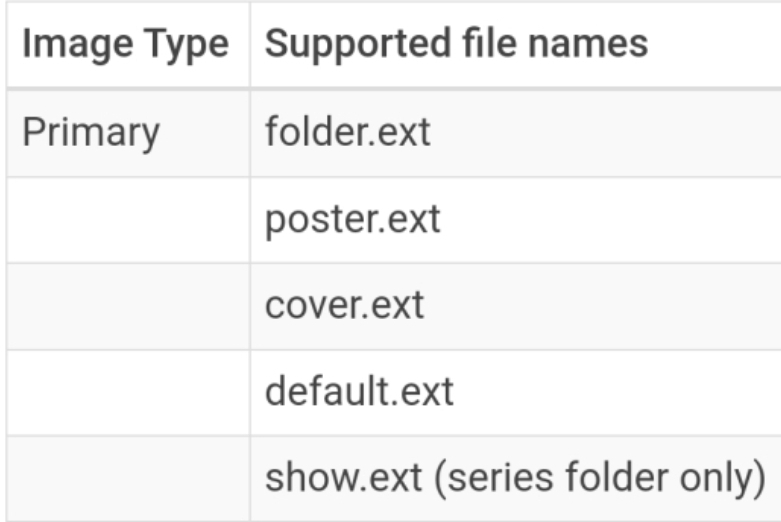
Any of these names will do: So, 'poster.jpg' or 'folder.mpeg' for example. 'seasonXX.ext' will not work. If you move all your episode files out of season folders, so all episodes of a single series are in a single folder; you could use something like 'seasonXX-poster.jpg', but I would not recommend this layout. Either option, you will have to rename your image files.
 1 point
 -
No. But there are numerous ways to protect a library. You probably should ask in the main Windows server section as this is an Emby question and this forum is for non-Emby general discussion.1 point
-
I apologize for my lack of expertise with Kodi. It really slows down my testing. I was not seeing the same thing as you and it took me a while to figure out why. I'm assuming you were running NextGen in Add-on (default) mode whereas I was previously running in Native (direct paths). That seems to be why I was seeing different results. My testing is now on completely clean portable installs using only NextGen 11.1.2 on Omega 21.1, plus the three v10.1.12 helper plug-ins for audio, images, and video. The only library I have installed is my Internet Streams library. Running under Native mode, I get very different results. I could not get my internet streams library to sync. I could only access it via dynamic nodes even though it was selected for sync. Everything else NextGen related seemed to be working. Running under Direct mode, I saw pretty much what you described. Although I would mention they showed up under --NO INFO-- under Composers which I don't think are songs. So from what I am seeing, you appear to have nailed the problem which is it seems to be identifying the stations as single entities rather that albums. The more I think about it, that kind of makes sense they should show as single entities. You obviously know this stuff better than me though. For the end result of keeping these stations separate from the rest of my music, I am hoping to to be able to access these via dynamic libraries rather than synced libraries. That's what I was doing in my previous testing under the Aeon MQ 9 - Omega MOD skin. And there, just like under the default skin, the only place I was seeing the stations with the music type was under in places where single entities would appear. But the results were much more inconsistent running in Native mode. The stations tended to always show under A-Z but would only appear under Random sometimes (i.e. randomly). And when they did show up they showed correctly as music, i.e. played with visualizations and showed CD cover art. I've always used Native as my preferred mode because I have been told it provides the best compatibility with other Kodi add-ons. Is that still true or do you have a different recommendation on which is better for use with Emby? And again, I am sorry for being so slow. I genuinely appreciate all your work on this. It's really impressive. Please let me know if there's anything I can do to help.1 point
-
Just want to bring this back to attention and for now offer a work around for others until this is added. Again, this was for Futurama. 2 ways can work: 1 - Import the media into Jellyfin (free) with the NFO save option turned on. Let it process the metadata with the alternative season order from TVDB set. Once complete, copy it back over to Emby and use the NFO reader to import. 2 - A bit more technical, but worked. Access the json cache inside Jellyfin's cache data (programdata\cache\tvdb\<id>) and bring this over to the respective folder in Emby and overwrite. You will need to rename the json file to episodes-dvd.json and episodes-dvd-<lang>.json from their existing json names. This does work as emby thinks it has the files already cached. This is a bit more troublesome but you can get it to work, sort of. I also sniffed the data using a mitm tool for the api calls and I think I can create a mitm script on an local http proxy (mitmproxy - an interactive HTTPS proxy for example) to intercept and send the http request to a different endpoint to again trick Emby to think it's receiving the DVD order bit it is actually getting the alternative order - but it doesn't seem worth it as this doesn't come up often for me. To the Emby team - implementing this would be helpful avoiding having to use Jellyfin to fix Emby's display order! Thank you!1 point
-
Not much sense writing it to the NFO it we won't read it when adding to the library. @LukeWe have two issues. When scanning in BDMV media, it's not loading the language metadata for both audio and subtitle tracks. If doesn't read this info from an NFO on when being added to the system. It will however write this info to the NFO file if you edit the metadata.1 point
-
What do you mean when you that the poster is shown when you exec into it? If the readme says version 1.8 at the top you should be good. Is there no error produced? Yep that is correct. It's an overkill for static or near static lists so you can use the frequency parameter in the config to skip over those.1 point
-
You can liven it up with a bit of css though.1 point
-
@Luke @ebr I just wanted to let you know that everything is working. BUT I DO HAVE ONE WISH: PLEASE ADD AN OPTION THAT YOU CAN EDIT THE COVERS YOURSELF LIKE WITH THE CUSTOM OVERLAYS: This must be possible, I would like to design the colors but also the text at the top myself. If that would be possible, I would be very happy.1 point
-
I personally prefer a smart TV behind a good firewall, only one remote to worry about and settings are directly on TV. I only hear good things about the Shield (don't have one my self) so should be awesome for your movie needs!1 point
-
Hi @Kurt13we are working hard on unifying them into one app. Thanks for the feeedback.1 point
-
We can try. We need to create a bitmap image 1 to 10. It can be in png format. Where the folder image is rendered is blank. I can try to see if I can create it. Perhaps I can change the plugin so it looks somewhere for custom numbers background??? I'll come back to this for sure.1 point
-
@Madladyhas this helped?1 point
-
Regarding the drives with fsck/umount problems it's most likely because an active process or user is accessing that drive. If you can't find it then you might have to reboot and if you've added the paths to Emby then shut it down as well to see if that clears the problem and lets you unmount and fsck.1 point
-
Can you attach an emby server log? Now that you have the drives mounted we can go back to earlier posts in this thread. You need to make sure the emby runtime user has access to the path. Meaning able to access each directory along the path to the final destination. Not necessarily w(rite) access, r(ead) is enough, but with directories x(ecute) is also needed to access/enter. Run: namei -lv "/media/driveC/Movies - Live Action" You can trim the list from the command above if it's too long. A sample should be enough. Do the same for the other drives and directories you want Emby to use. The chown and chmod commands you've been running only affect the file or directory given in the path. They're not global or recursive unless you specify that option. This is the part where people go crazy and recursively give all privs or sweep ownership for more than they should. My recommendation: - Pick the directories or base path you want Emby to not only access but also be able to modify. - Change permissions for the directories leading up the base directory. - Change ownership recursively starting from the base directory. Example, for "/media/driveC/Movies - Live Action" - chmod o+rx /media /media/driveC - chown -R emby:admins "/media/driveC/Movies - Live Action" Again, start with a less important drive or media collection and scan the library after you make the changes.1 point
-
The OS is the least valuable data on that box and the easiest to recreate or recover. The drives holding your media and memories are the ones to be cautious with. As I posted before take this in steps and don't move to the next step until you're good with the current one.1 point
-
From that screenshot it looks like the media is mounted on /media/rootadmin/SATAHD2000H-INT8 . The info you posted in the top post you had /media/rootadmin/SATAHD2000H-INT. Since it seems like you have a JBOD does each disk have a different mount point? If that is the case you should do mount points in /etc/fstab So you'd first have to create the folders to point the mount to. So something like /mnt/media/drive1 and /mnt/media/drive2 etc... You need to make a folder for each drive. Grab the UUIDs from the disks like in your screenshot. Then you need to edit your fstab. sudo nano /etc/fstab ex. Take note the ext4 part should be changed to what ever file system the drive is using. I just took that info from your screenshot. UUIDNumber /mnt/media/drive1 ext4 deffaults 0 0 Then do a sudo systemctl daemon-reload sudo mount -a1 point
-
When you mount them from the GUI application (disks) it will likely do so as the user launching the app and restricts access to that user, preventing others. Which is why doing so from fstab is preferable. Can also mount from the command line as root to achieve the same. Pick the least important drive to try things then move to the ones with things you want to preserve. I'm not at my server at the moment so can't offer much detail for the commands.1 point
-
There are many unknowns here and should be careful when making changes. If possible create a backup of the important stuff as soon as you can access it. With 8 drives it's important to figure out if they were individual, pooled, raid, etc. Figure out the filesystem. If you were able to mount one that's good but doesn't give us all of the answers. When you have more info then mount them properly from the fstab so the drives/volumes/filesystem are "permanent" and with the right access. Then you should be able to allow reliable access to Emby with the correct ownership and permissions. Might want to consider read only access to prevent accidental deletion until you have a handle on what to keep and what can be erased. Finally add the library paths to Emby for access to the media.1 point
-
So you can do another command to make emby the owner of the files and it should have permissions to see it that way. If you're adding new content to the server it makes it tricky without knowing how your other apps are setup but if you just want to watch the content now just run this command on the folders you want emby to have ownership of. sudo chown -R emby /media/rootadmin/SATAHD2000H-INT/foldername You can confirm the changes with ls -l /media/rootadmin/SATAHD2000H-INT1 point
-
You're on the right track looking at and doing some of the right things. Post your fstab entries for the external drives. Also run: namei -lv "/media/rootadmin/SATAHD2000H-INT/Movies - Live Action" You can trim the list from the command above if it's too long. A sample should be enough. Also run: ps -eo ruser,rgroup,euser,egroup,f,comm | grep -i emby1 point
-
So are the drives on a nas or directly on the machine running emby?1 point
-
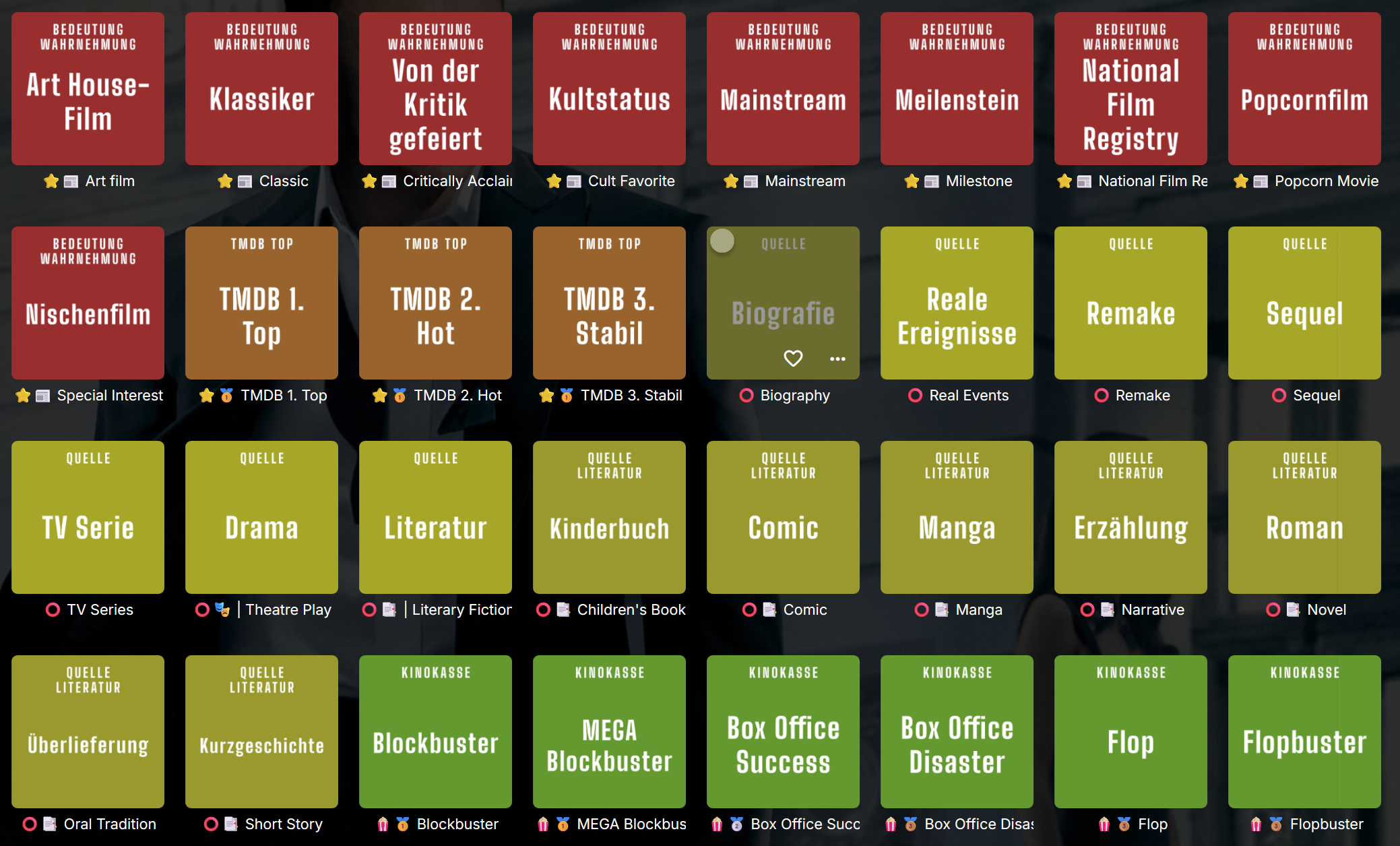
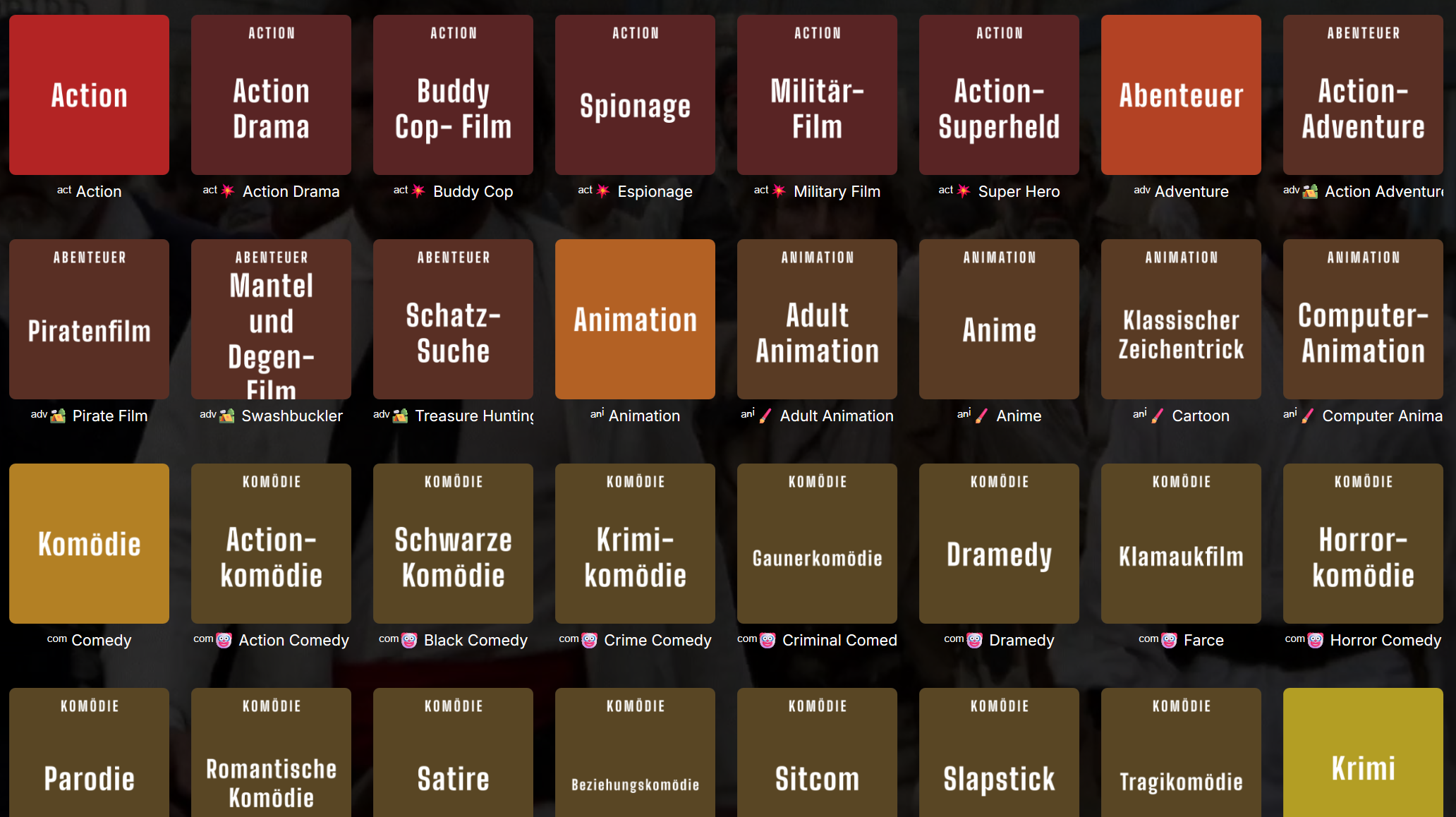
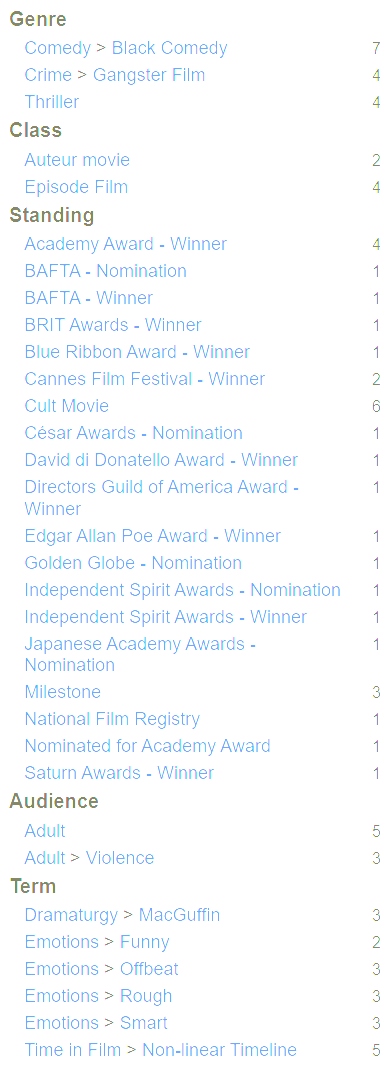
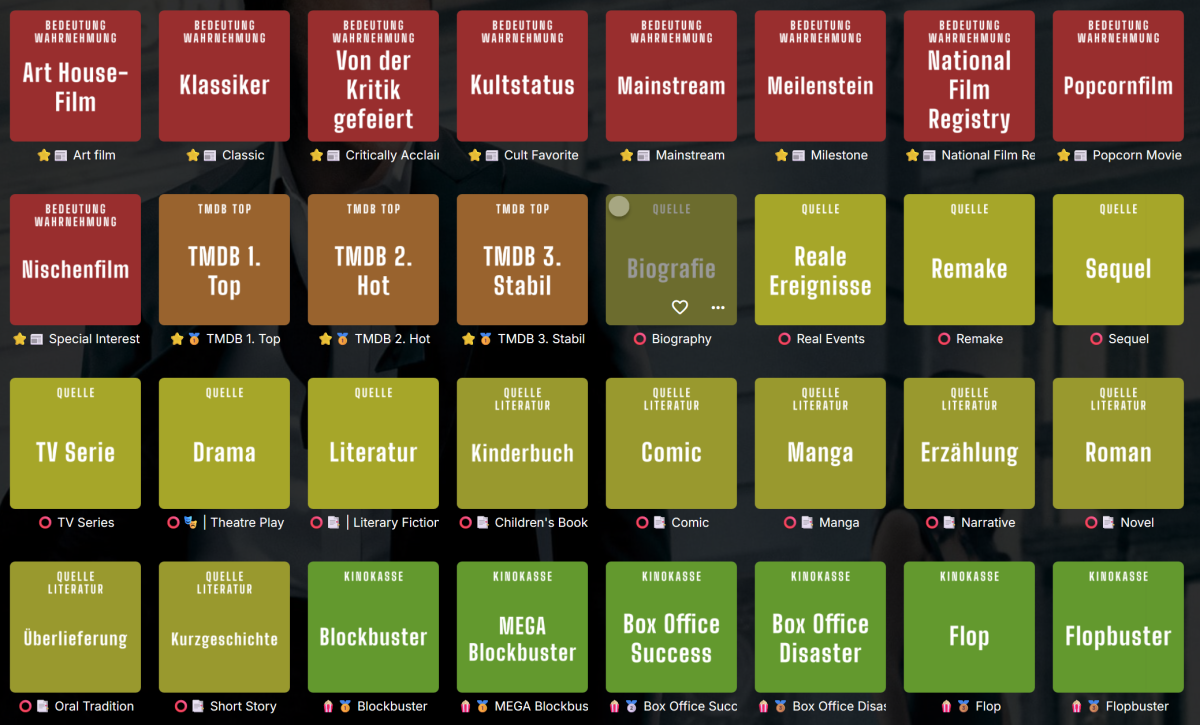
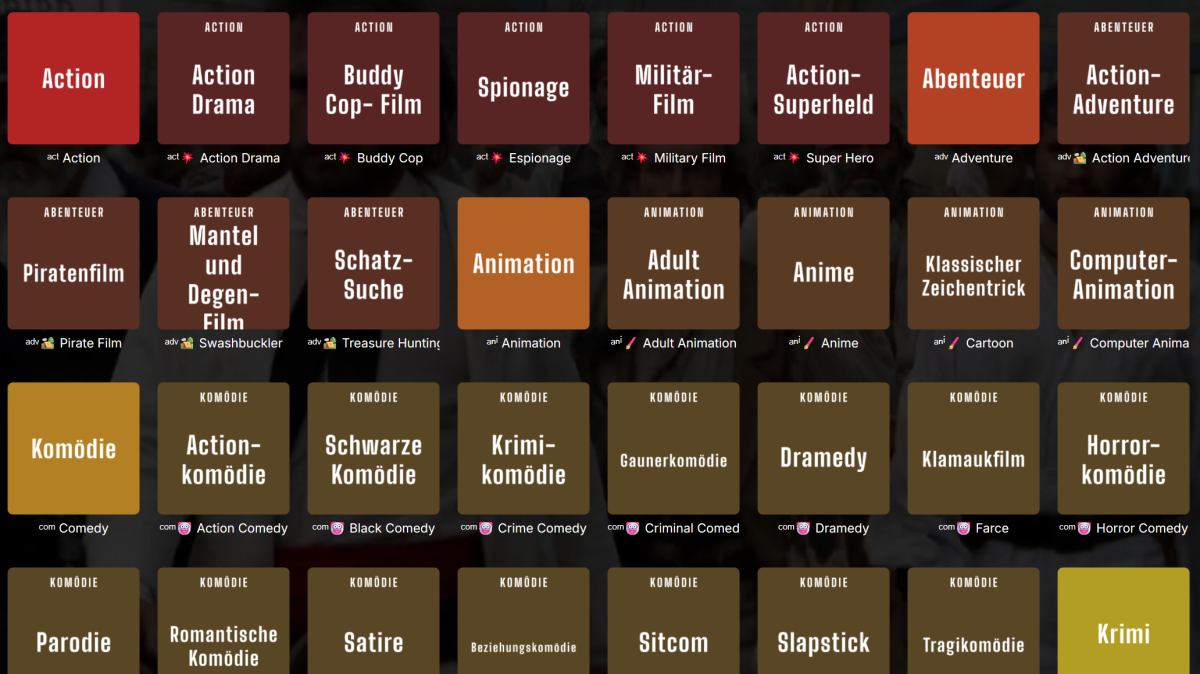
I've been working on a script in the past few weeks which organizes tags and genres. I've found that TMDB, TheTVDB, WikiData and OMDB hold the best info for genres and tags (tvdb also for movies). OMDB is using a tree-like structure for its tags and genres, see example to the right for an example (Pulp Fiction). It's possible to download the database dumps as csv from their website. I've also scraped the hierarchy for most categories, see my modified genres yaml attached. To reproduce the hierarchy in Emby, I've found that using Unicode icons is the easiest way to add some depth. Genres / Tags for 'Pulp Fiction' Genres ᵈʳᵃ Drama, ᵗʰʳ Crime Thriller, ᶜʳⁱ Gangster Film, ᶜᵒᵐ Black Comedy Tags omdb_Boxer_2792, omdb_Dealer_2231, omdb_Redemption_11115, omdb_Theft_1349, wikisubject_organized crime, Critically Acclaimed, Cult Favorite, Milestone, National Film Registry, TMDB 3. Stabil, Blockbuster, Non-linear Timeline, Independent Film, Adult, Mid Budget Film, Bleak, Funny, Goofy, Intellectually Stimulating, Auteur movie, Episode Film, Neo-noir, Academy Award - Winner, BAFTA - Winner, Cannes Film Festival - Winner, Directors Guild of America Award - Winner, Golden Globe - Winner, Academy Award - Nomination, BAFTA - Nomination, César Awards - Nomination, Directors Guild of America Award - Nomination, Golden Globe - Nomination, Screen Actors Guild Awards – Nomination, Vereinigte Staaten, | 1990s, ♁ | Los Angeles, Alcohol, Blood, Car Crash, Death, Gore, Gun Violence, Kidnapping, Sexually Explicit, Smoking, Torture, Violence Genres overview Tags overview 1-Genre.yaml
 1 point
 -
Version 9.1.0 Notes: Please do not forget to leave an up to date textual review on Play Store. Your feedback plays a crucial role in building the app’s ranking, ensuring a future for Symfonium. Added: Added support for smart playlists in smart playlists. Added played percentage filter to smart filters. Added new center text option to home overview grid styles. Added grid style option to “More from artist” in album page configuration. Playback speed now allows more precise values. Added new setting for Replay Gain normalisation. (Normalise the LUFS target for Opus and other files to the same target) Added Turkish translation. (Thanks Orhan) Enabled support for external image art for albums for Cloud providers and SMB/WebDAV (folder.jpg, album.jpg, cover.jpg, …) (May need to clear tag cache and sync again) Enabled export to Downloads folder for playlists. Added new option to hide the now playing queue button in some expanded player styles. (Remember that you can always swipe up to show it in all styles) Added web search action to song / now playing bottom sheets. You can now disable renderer sort in cast bottom sheet. Renderers are then added is discovery order to avoid missclicks. Added a new advanced function to export songs user data like ratings, playcounts, … to a json file. Changed: Prevent clicks on drag handle in now playing queue to reduce wrong actions. Prevent clicks in playlists when in edit mode to prevent unwanted play action. Source media provider is now shown in album / artist page when enabled. Google drive provider now support shortcuts to folder as music folders. Playback state is now always saved, the option is removed. Multiple media queues is now always enabled, the option is removed and end of current queue unload it. (You can remove the queues shortcut in home settings, and can still reload last queue easily). Above changes allows to vastly simplify play count and resume point handling. - Please report any new issues about them. Update Compose material 3 to a new version that will allow expanded themes in the future. Please report any color oddities or other interfaces bugs. Fixed: Try to sanitize special ICY data from some radios. (Contact me with logs if there’s other radios special cases) Fix some edge cases where track replay gain was applied instead of album one when using auto mode. Fix possible race condition leading to wrong track played with playback cache. Ensure media queues are properly saved before loading new ones. Fix provider backups missing some of the new fields. Fix possible position detection issue in UPnP with gapless and repeat mode. Fix custom headers not always sent for images. Fix some smart filters negative filters not working with possibly null fields. Fix some offline actions like rating update sometimes lost and not pushed to server. Fix some cloud providers being shown as offline in China. Fix some cases of missing images with Emby 4.8 newly scanned albums. https://support.symfonium.app/t/version-9-1-0-released/37851 point
-
As someone who uses a password manager and 32 character passwords, this would be a godsend.1 point
-
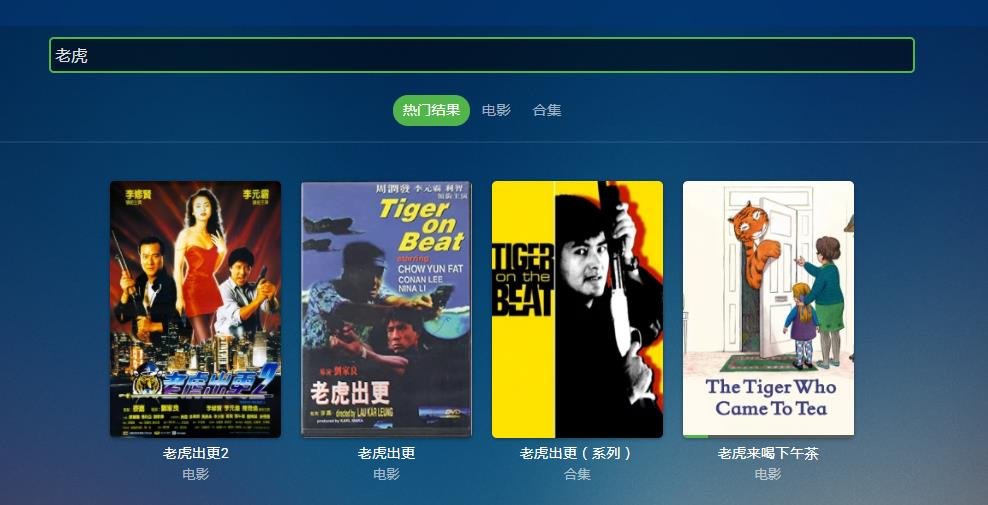
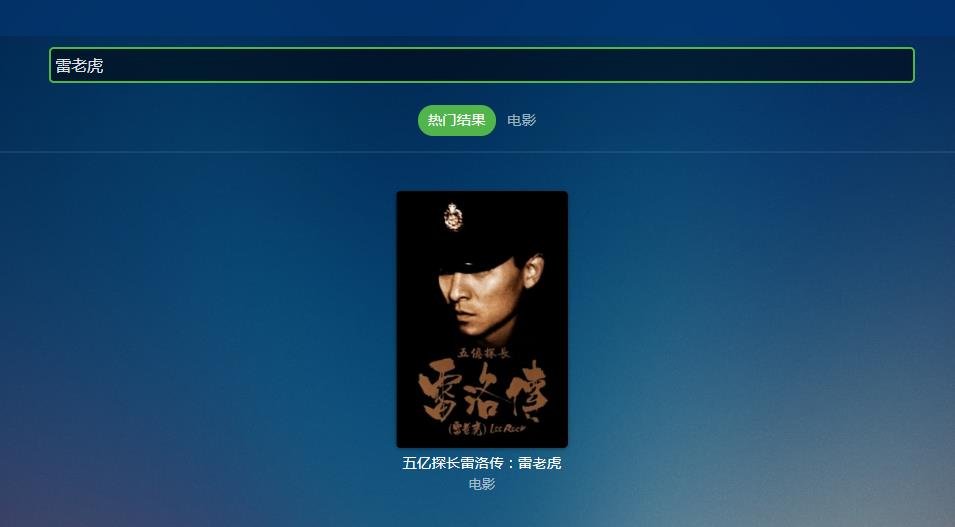
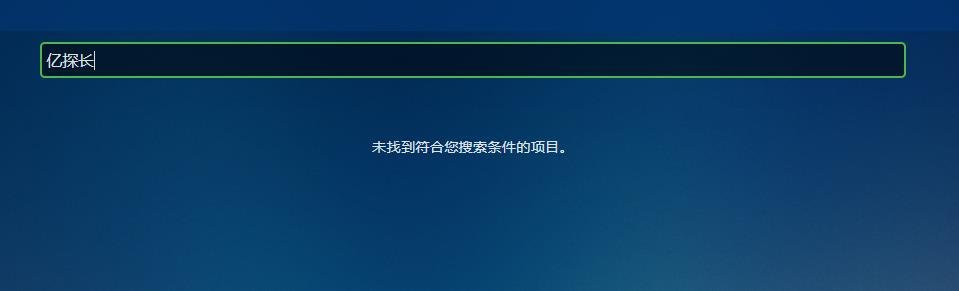
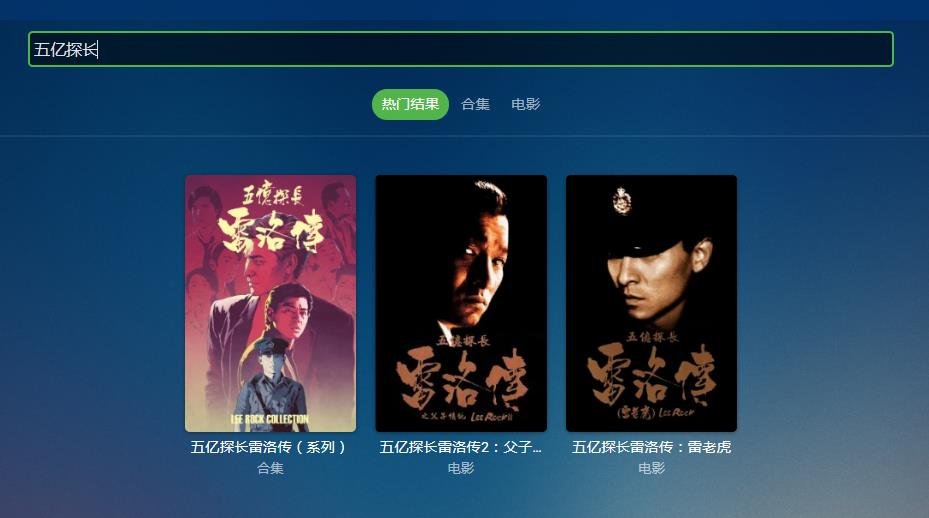
I am a loyal user of EMBY. I have been using EMBY for several years, but the shortcomings of Chinese character search always exist. The search keyword must contain the first Chinese character of the movie, otherwise there will be no results. If you search for the first Chinese character after the punctuation mark in the movie name, results will also appear. Take this movie as an example 五亿探长雷洛传:雷老虎
 1 point
 -
2020 and we still do not have this requested feature. Do we have any new information?1 point






















.thumb.png.f4cb0545e98b51fd9b00e427622ab761.png)