Leaderboard




Popular Content
Showing content with the highest reputation on 10/29/24 in all areas
-
When it comes to media server solutions, we believe that Emby is the number one product for users who value privacy, customization, and reliability. Today, we're going to take a closer look at some of Emby’s key strengths that make it an ideal choice over other media server solutions. 1. Prioritizing Privacy and Security Security is a central part of Emby’s design. Unlike some media server alternatives that have limited security options, Emby gives users control over who can access their media and how they access it. With Emby, you can setup secure HTTPS connections, ensuring data is encrypted as it’s transmitted or easily set up access via a reverse proxy amongst other options. User permissions are also straightforward to manage, giving you full authority to create individual access levels for each user in your household or server network. Your media is yours, and Emby ensures it stays that way by giving you the ability to implement strong encryption options that protect against unauthorized access. 2. Simplified, Intuitive Setup From the moment you install Emby, you’ll notice a streamlined, easy to navigate interface. Whether you’re setting up for the first time or managing your media library, our layout is intuitive and user-friendly. Emby is accessible to both beginners and advanced users, with step-by-step guidance to get you started and powerful customization options available for those who want to tailor their media experience further. Want to hide your remote users from a login screen? You can do that! Want to set up those same users with an easy way to access your server? Emby Connect allows you to do that! There are so many ways in which Emby simplifies user management and access to make it easier and more secure for your users! Other media servers can be clunky and involve multiple steps to perform basic tasks, but Emby simplifies this with a unified interface that makes media organization and management easy. 3. Seamless and Efficient Transcoding As mentioned in our previous blog, transcoding is a key feature for media server users, and Emby’s transcoding engine is optimized to handle media formats and devices with impressive efficiency. Whether you're streaming a 4K movie, using HDR tone mapping, or watching a video on a low-bandwidth connection, Emby has the ability to dynamically adapt to your network and hardware capabilities, delivering smooth playback across devices without unnecessary buffering or interruptions. Emby can also utilize hardware acceleration (Emby Premiere only), ensuring that high-resolution content plays seamlessly without consuming excessive CPU resources. This is particularly helpful if you have multiple users streaming from the server simultaneously, as Emby ensures each session gets the best possible quality. 4. Comprehensive Library Management Emby’s library management capabilities are designed to provide the best possible organization and personalization options. With Emby, you can create custom collections, tag media, and even use rich metadata that automatically pulls in posters, descriptions, and trailers to enhance your experience. The smart playlists and customizable views allow users to organize their media in a way that feels personal and unique. For those who have extensive media libraries, Emby also makes finding and managing content effortless. Search filters and sorting options let you locate titles instantly, and Emby’s advanced metadata scraping ensures your library looks how you want it to. 5. Cross-Platform Compatibility In an age where we use a variety of devices daily, Emby is engineered to be versatile. Emby offers applications for nearly every platform, including Windows, macOS, Linux, Android, iOS, Roku, smart TVs, Android TV, tvOS, web browsers and more, giving users the flexibility to stream and manage their media library from practically any device. The versatility that our server provides doesn’t stop there – it also supports a wide range of formats, ensuring that no matter what file type you prefer or where you choose to watch, Emby is ready to deliver the best experience. 6. Constantly Evolving Features with a Supportive Community Emby is continually updated with new features based on user feedback and technological advancements. Our development team and community via these forums, work hand-in-hand to enhance Emby’s performance, refine its interface, and introduce new options that make media management a more rewarding experience. As an Emby user, you’re part of a passionate community that we believe values innovation, feedback, and the enjoyment of seamless media streaming.4 points
-
When it comes to media server solutions, we believe that Emby is the number one product for users who value privacy, customization, and reliability. Today, we're going to take a closer look at some of Emby’s key strengths that make it an ideal choice over other media server solutions. 1. Prioritizing Privacy and Security Security is a central part of Emby’s design. Unlike some media server alternatives that have limited security options, Emby gives users control over who can access their media and how they access it. With Emby, you can setup secure HTTPS connections, ensuring data is encrypted as it’s transmitted or easily set up access via a reverse proxy amongst other options. User permissions are also straightforward to manage, giving you full authority to create individual access levels for each user in your household or server network. Your media is yours, and Emby ensures it stays that way by giving you the ability to implement strong encryption options that protect against unauthorized access. 2. Simplified, Intuitive Setup From the moment you install Emby, you’ll notice a streamlined, easy to navigate interface. Whether you’re setting up for the first time or managing your media library, our layout is intuitive and user-friendly. Emby is accessible to both beginners and advanced users, with step-by-step guidance to get you started and powerful customization options available for those who want to tailor their media experience further. Want to hide your remote users from a login screen? You can do that! Want to set up those same users with an easy way to access your server? Emby Connect allows you to do that! There are so many ways in which Emby simplifies user management and access to make it easier and more secure for your users! Other media servers can be clunky and involve multiple steps to perform basic tasks, but Emby simplifies this with a unified interface that makes media organization and management easy. 3. Seamless and Efficient Transcoding As mentioned in our previous blog, transcoding is a key feature for media server users, and Emby’s transcoding engine is optimized to handle media formats and devices with impressive efficiency. Whether you're streaming a 4K movie, using HDR tone mapping, or watching a video on a low-bandwidth connection, Emby has the ability to dynamically adapt to your network and hardware capabilities, delivering smooth playback across devices without unnecessary buffering or interruptions. Emby can also utilize hardware acceleration (Emby Premiere only), ensuring that high-resolution content plays seamlessly without consuming excessive CPU resources. This is particularly helpful if you have multiple users streaming from the server simultaneously, as Emby ensures each session gets the best possible quality. 4. Comprehensive Library Management Emby’s library management capabilities are designed to provide the best possible organization and personalization options. With Emby, you can create custom collections, tag media, and even use rich metadata that automatically pulls in posters, descriptions, and trailers to enhance your experience. The smart playlists and customizable views allow users to organize their media in a way that feels personal and unique. For those who have extensive media libraries, Emby also makes finding and managing content effortless. Search filters and sorting options let you locate titles instantly, and Emby’s advanced metadata scraping ensures your library looks how you want it to. 5. Cross-Platform Compatibility In an age where we use a variety of devices daily, Emby is engineered to be versatile. Emby offers applications for nearly every platform, including Windows, macOS, Linux, Android, iOS, Roku, smart TVs, Android TV, tvOS, web browsers and more, giving users the flexibility to stream and manage their media library from practically any device. The versatility that our server provides doesn’t stop there – it also supports a wide range of formats, ensuring that no matter what file type you prefer or where you choose to watch, Emby is ready to deliver the best experience. 6. Constantly Evolving Features with a Supportive Community Emby is continually updated with new features based on user feedback and technological advancements. Our development team and community via these forums, work hand-in-hand to enhance Emby’s performance, refine its interface, and introduce new options that make media management a more rewarding experience. As an Emby user, you’re part of a passionate community that we believe values innovation, feedback, and the enjoyment of seamless media streaming. View the full article4 points
-
I have a shovel you can borrow. Let me know if you need it.4 points
-
I was referring to Neminems and visproduction's comment on the nameless file. The issue is resolved at this time, but a cause was never discovered.3 points
-
Did you add the correct port? In your first post you said server IP is 192.168.125.1 in your second post you mentioned server IP is 192.168.125.35 What client do you use on your TV? Is there any error message on your TV?2 points
-
Exactly. Personally, I would pay in a heartbeat for a music "module" (lifetime payment) that includes a native app on devices (smarthphone / TV). Even Plex realized that "decoupling" major media types into their own dedicated apps it's way better and provides a future for such cool stuff down the road. They did a cool job with Plexamp, now they are decoupling Photos and provide the Plex Photos app as standalone, while keeping the main Plex app video-centric. They get it ! It's simple: You can't really throw everything and the kitchen sink into an app and provide the same level of focus, cool media-type specific features compared to a dedicated focused experience. The problem is Emby doesn't have the courage (my 2 cents, no offense intended) to just be lean and just throw away excess "baggage" that are done poorly. I get, you try to compete with Plex / Jellyfin but you can be better than both of them, by focusing on just 2 things and doing them AMAZING well. For the things I mention below, yes, some people will throw a tantrum and scream .... until they realize there are better "self-hosted" solutions out there : 1. Throw away Audiobooks - Emby it's light years behind Audiobookshelf and audiobooks needs also a special treatment similar to Music. No, you can't put them in the same bowl again. 2. Throw away Books - Any hardcore books fan out there who needs a server, needs also a book management platform with E-Reader integration / sync supporting all the major e-reader brands out there (Kindle, Kobo etc.). If Emby can't provide a proper book management platform with E-Readers integration ... why support books at all ? 3. Throw away Photos / Home Videos - There is Immich, look at what these guys are doing. Everything from the object / faces recognition with AI to the huge effort invested in the server, dedicated app etc. Emby will be playing catch-up forever and simply can't match their level of features and user experience. What Emby can be the best at ? A. Movies / TV Shows / Live TV - It's your golden expertise that you are doing exceptionally well. Not much to say. B. Music - Server side the potential is there. UI/UX is cool, multi-artists are cool etc. - Music is the next best thing, implemented pretty well server-side I would love to have a "lean" media server with just these 2 areas of expertise done exceptionally well. Let others do the "bloating" poorly. There is so much that can be done with music: - music dedicated Home Screen with music-centric suggestions and immersion pulling you further into personal library: artists, albums, songs, moods ... music played today last year, recommendations ... so much can be done - multi-room: use the dedicated smartphone app to control and play music on various endpoints thru the house. - proper offline sync / download ...... I could continue a lot. Anyway. I hope Emby will become more aware, lean and courageous. Cheers !2 points
-
You won't be able to control that from within Emby.Instead, but we can add an argument to the flatpak script to prevent automatically lauching a web browser. Will let you know when it's available, most likely in the next beta.2 points
-
I'm a plex life time member, but I have been using Emby for over six years continuously, but there is a feature which I have always thought is missing in Emby which I would like and encourage the developer to consider including especially in this dispensation where families can social or commingle due to COVID 19. Today, I received a notification from Plex about it new feature titled Watch together you can read about it here https://support.plex.tv/articles/watch-together/ The feature allows friends and families at distance to watch same movies together instantly, you simply invite all your buddy, once they signed to the system which can be seeing in the server then play and pause as needed, this I think is cool feature should be added to emby. Let's here your though if Emby developer should consider adding this feature to our beloved Emby Media https://www.bing.com/news/search?q=Plex+Watch+Together&qpvt=plex+watch+together&FORM=EWRE1 point
-
https://github.com/Shurelol/Emby.CustomCssJS EmbyCustomJS_Css Note the risk of cross-site scripting attacks This plugin is based on mediabrowser.server.core 4.8.0.24-beta Admin page Provide scripts for All users, User can choose to use it or not unless the script is forced on User page Choose to use scripts provided by the admin or not Write own scripts, which are stored in localStorage The state of scripts is stored in localStorage, if there is an error, you can reset it
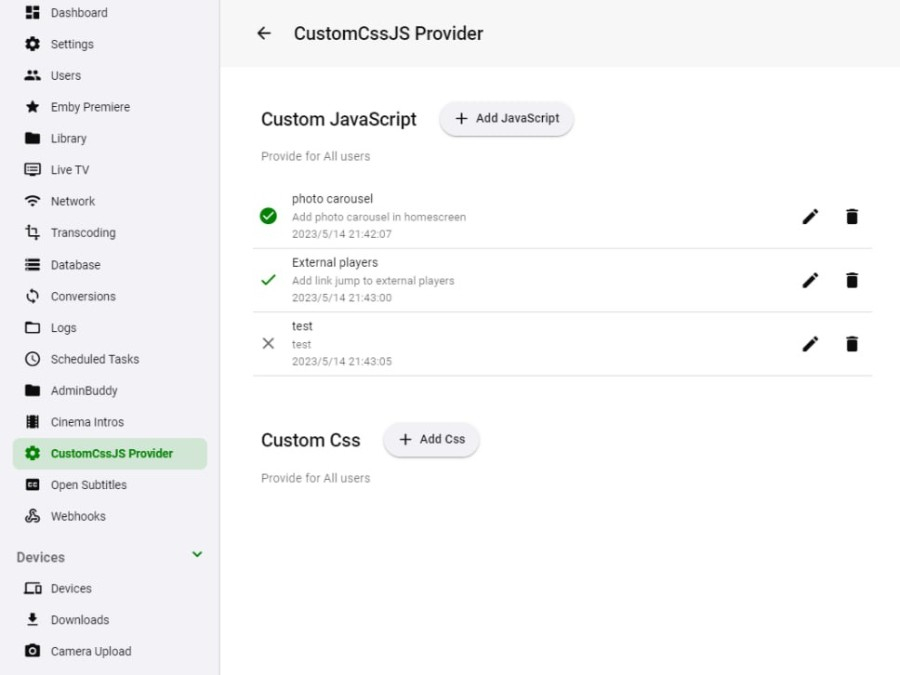
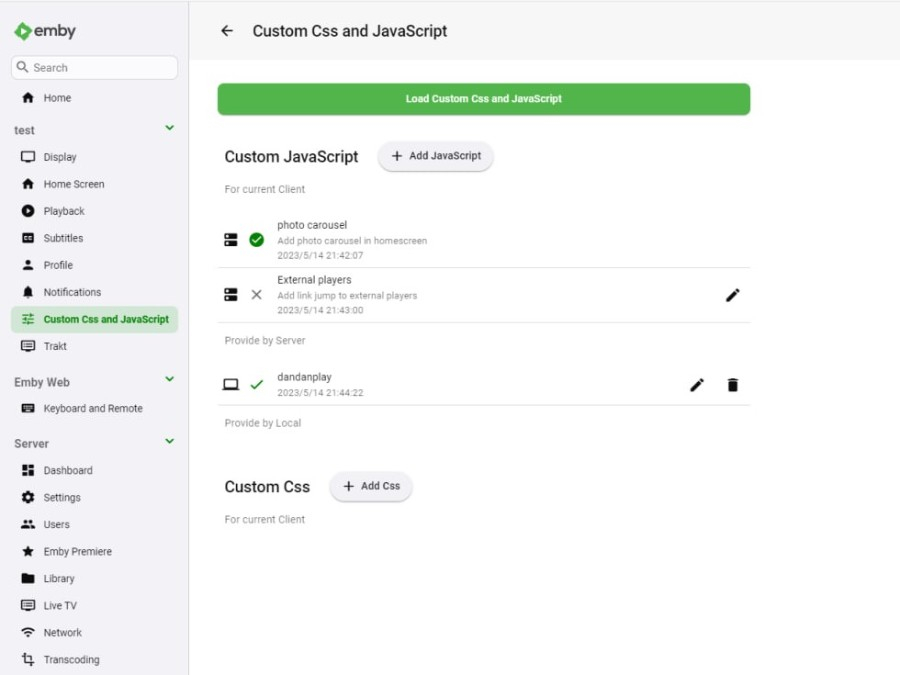 1 point
 -
I know the answer to this is probably going to be no..... ...but.... A standalone music player for iOS would be very useful. Trying to get the wife to use the full client for music is just not happening. Something that was simple and intuative and quick and easy to use would be killer, something like spotify. The simpler the app is to use, the better. If all else fails, I have a project that's on the back burner that was an iOS music player for subsonic, but I could always target emby as well. It had an spotify a-like interface. Screenshot from as far as I got with the UI, it was playing back music from the server.1 point
-
I have the movie and TV show theme music addon. If I am viewing a supported title that plays music and exit the app the music does not stop. The music only stops if I back out of the episode or movie first.1 point
-
Can we please revert the change where no matter where you touch on your touch screen it pauses/plays video, it used to be you’d have to hit the play/pause button and tapping anywhere on the screen it would show/hide the OSD. Now if I touch the screen the OSD pops up, the video pauses and then I can select subtitles, info, chapter, settings, screen brightness then I have to touch the screen anywhere again to play then wait for the OSD to disappear. This is just a nuisance.1 point
-
Latest Release - Updated to latest Whisper - Support for all languages that Whisper supports translating to English. You will need to update the runtime for this release. Run SubtitleCreator -languagelist to get a list of the supported languages.1 point
-
Hi, we are looking into this. Thanks for reporting.1 point
-
UPDATE: I painstakingly went through ever album I had using MP3TAG and looked for any odd characters. None. It was not all a loss. I was able to fix a few issues I had with naming, but still Roku showing the extra letters.1 point
-
Yep, ran the refresh metadata and it pulls in a description. That seems to be the only difference.1 point
-
Yes is driving me insane!1 point
-
Hi man. I think I spoke too soon. Got it working in house here and connected through vpn while at work, but later one of my kids told me their emby loaded without pictures... Tried it then on 5g on my phone and she was right no pictures and nothing played. Noticed you asked @Carloabout nginx setup. I dont use nginx. He also mentioned authenticated sessions(dont know what he referred to, emby or proxy) and as long im authenticated on my reverse proxy it work from home for now it seems. Not remotely. I'll try more and let you know. So for now you better hear what @Carlohas to say about his solution1 point
-
Thanks, will enable. If I now 'refresh metadata' will that fetch anything that might have been missing? Curious to see if there are any differences.1 point
-
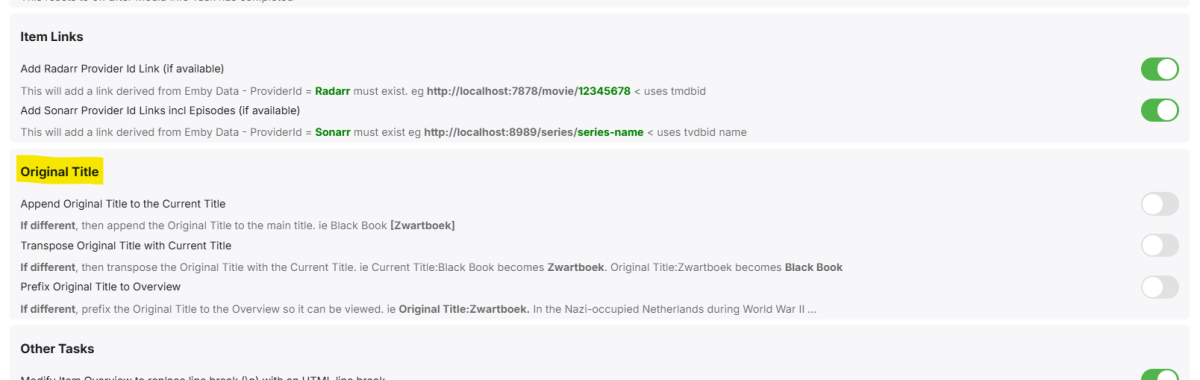
Not published yet - ran out of time - but will try and get this out sometime this week. I completed the options in the GUI, which believe it or not is the hard part ..
 1 point
 -
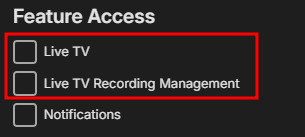
Under your user setting -> profile disable this
 1 point
 -
You can lend your support here: Also, @rbjtechhas made some updates in that respect to his MediaInfo plugin, don't know whether those are already published, though.1 point
-
thank you Luke1 point
-
Make sure your users aren't HIDDEN from the login screen, which may be why you have to enter the username each time. If not, then log in the users you want and switching users is very simple in both apps.1 point
-
Lo deseable sería que todo esté en la red mesh. Al router de movistar yo solo tengo conectado el deco tv y tengo la wifi desactivada, el resto de dispositivos cuelgan de la red mesh. Para acceso remoto, tengo que hacer un doble reenvío de puertos. Del router movistar al router mesh y del router mesh al dispositivo.1 point
-
Currently there's no way to have the user select screen shown upon startup. It remains an open item (#56) on the list in the Mega Thread However, it's pretty quick and easy to switch between already logged in users via the Sidebar (left slide out), or top Profile icon1 point
-
I got it working! I started watching that video but I had already installed the Nvidia driver and GPU Statistics plugin prior. I forgot that I could click on "advanced view" when looking at docker settings, I then found another thread where adding --runtime=nvidia was mentioned so I went ahead and added that and like you said, several options appeared under advanced. I just tested playing back the same files I've been using to test and it is working with TrueHD 7.1 and PGSsubs enabled! I can see the load on the GPU in my dashboard through the GPU Statistics plugin. I'm going to finish watching the video either way, but it is definitely working and all I did is 1. installed the Nvidia drivers, 2. install GPU Statistics, 3. enable hardware acceleration in Emby settings (although I think this was on by default), 4. add --runtime=nvidia to the extra parameters field of the docker settings (after enabling advanced view).1 point
-
Oh lord. So, looks like iOS has been requiring additional permissions for Emby since I don't when. I'm testing things now to be super sure, but I just found in iOS Settings -> Apps -> Emby that Local network access was disabled. Enabled that and tada, local network playback works. I'll keep testing and return.1 point
-
My daughter who lives many hours from me and I love and have used tis feature on Plex many times. i recently decided to move to Plex due to lack of support from Plex and being hacked, I mis this feature greatly as does my daughter and son. Thank you, Dusty1 point
-
hi luke, just a quick update, i installed truenas scale and emby and seems to populate perfectly. not sure if the issue lies with truenas core or emby cheers1 point
-
Correct I’ve seen this, but some songs appear on several albums.The option to search an individual playlist would be great!1 point
-
Well, this was the result of a previous fiasco where my Itunes database was corrupted. I don't remember the details, but I had to recreate the playlists from the XML file which was intact using a utility that I found , and this is when the "title" line got created. It seemed to work fine for some months, but somehow when I deleted ONE tune from ONE playlist that playlist got messed up. Trying to fix that, I recreated the playlist library and now they were ALL messed up! Then I went into the m3u files and removed the line from all of them, recreated it again and everything is working. Sheesh! FYI the line that caused the trouble (the first line) was #Playlist: 'xxxxxx' where xxxxxx us the name of the playlist followed by a bunch of other stuff. I found out that evidently Itunes is now exporting playlists in "extended M3U" format which has a "#EXTINF:294,I Can't Tell You Why - Eagles" before each song (for example). Emby has no trouble with this. #PLAYLIST is a legal extended M3U command. Best I can tell, there is no difference in the file extension. I don't know if ignoring all the # lines would break something or not, but I doubt it since my files now have none of these lines (except for one) and they all work. Probably more than you wanted to know...1 point
-
Plus one for this feature request1 point
-
mouse is still not visible and therefore constantly blocking the overlay. also still video in background not possible to bring back via notifications only stopping and reopen helps1 point
-
That sounds like a great solution. Thanks a lot.1 point
-
I also experience this on Sony Bravia TV, i can get all the way to playing a Youtube video and Emby is still playing is still playing theme music. FWIW I think this may be tangentially related to the OP in that Android client sometimes doesn't feel like it has as tight control as the web client on theme music. This might be a misplaced sentiment clouded by my testing on a web client which is on the server as opposed to remote tv; so something might be going on more in that regard.1 point
-
@hjason7812I get the sense you haven't really read the thread.1 point
-
The app unlock option is gone, now you get a free limit of 5 devices instead Android TV Beta 2.1.22+ changes1 point
-
Needing to know and follow all this does everything but simplify.. Thanks1 point
-
The error happening is Command line: /app/emby/system/EmbyServer.dll -programdata /config -ffdetect /app/emby/bin/ffdetect -ffmpeg /app/emby/bin/ffmpeg -ffprobe /app/emby/bin/ffprobe -restartexitcode 3 The ComSkipper plugin does not call anything in the ffmpeg family. Whatever is happening, is happening on your server.1 point
-
@edwardflorawould like to do this, can you help, or are you just a ai bot ? Since this is your first post !!1 point
-
Yes - unless the client can do tone mapping itself or has an HDR display path.1 point
-
How would transcoding to a different codec negate the need for tone-mapping HDR material?1 point
-
Tmdb has director in the headee itself, right under overview and before cast. My point is that it is pretty much universally accepted that director and typically writers are core pieces of information that should be as prominent as the top billed cast. This is as true from a user's perspective on emby as anywhere else imo, as is evidenced by frustrations in our home. My emphasis here however is not on whether it should be in the combined row or not, rather that director and writers should be quickly accessible without having to scroll through sometimes nearly a hundred cast members. Presumably the emby team agree with this given that at least director is usually more prominent than cast on non android tv clients.1 point
-
IDEA As a first starting point you can literally just "decouple" the Music functionality from the current smartphone app and just "paste" it into a dedicated music app. I can live with that for a while until you start develop it further. At least it is a small step into the right direction ... and you take it from there improving the interface, adding cool music focused features and so on. I'm not a programmer but i assume you have the codebase already, so why not doing it ? I don't think should be that much work ... it's just a matter of "board" decision and realizing how important Music is in people's everyday lives.1 point
-
i would like to have a rss feed for my user see from my server only. is it possible.1 point
-
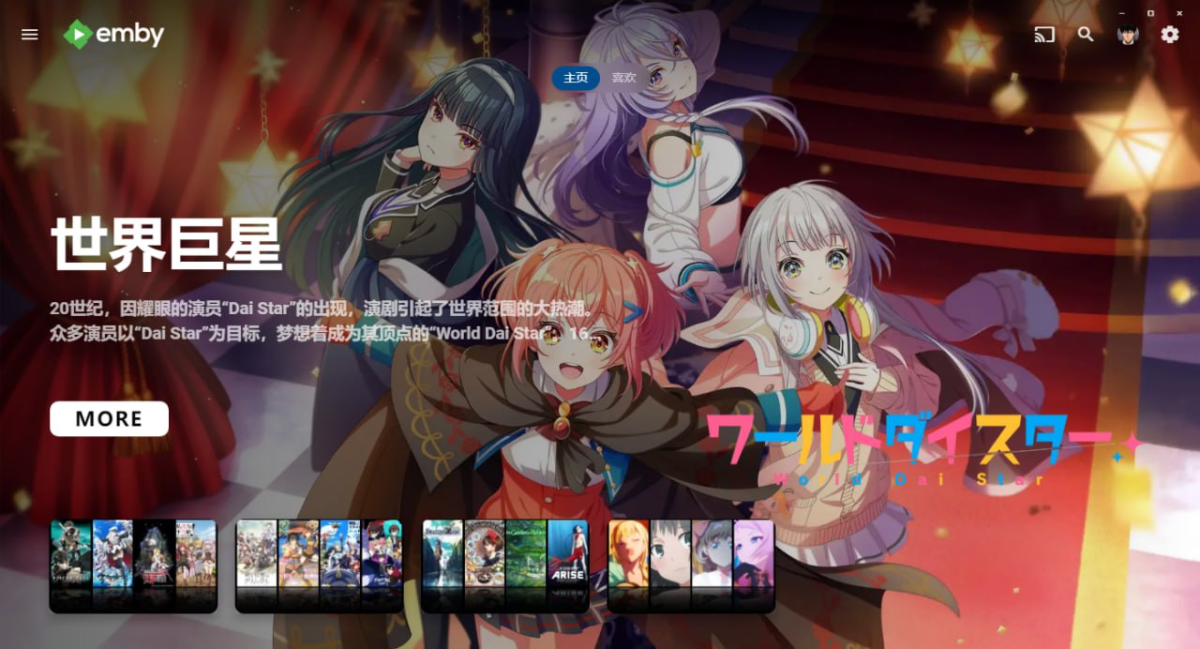
Follow https://t.me/embycustomcssjs to get more scripts
 1 point
 -
https://t.me/embycustomcssjs this telegram channel share scripts that can use can be used by the plugin I have no develop experience on IOS and just suggest that modify your client refer to the changement on Android1 point
-
well you could both also just use vlc and shout very loudly so the other person knows when to press play if we're reducing things to the lowest common denominator...1 point
-
This might be a longshot but maybe if enough interest is generated someone would be willing to take this on. Pretty much a request for a PVR backend to connect to Stalker Middleware. Much like the Kodi backend. https://github.com/kodi-pvr/pvr.stalker1 point