Leaderboard




Popular Content
Showing content with the highest reputation on 10/19/24 in all areas
-
Hay que alejarse de las version que no tengan el "plus". Son maliiiisimas. La CPU se satura con mirarla, y la RAM es muy escasa. Emby no puede hacer transcodificación con CPU que no sea Intel (en el caso de los Synology), o sea que en este caso no sólo tienes que buscar el "plus", sino que tienes que ver cuál de los "plus" lleva Intel (algunos llevan AMD). Otro tema además es que el DS223J sólo tiene como para 2 discos, por lo que una de dos: o "pierdes" un disco al RAID, o no pones "RAID" y te arriesgas a que si muere uno de los 2 discos, pierdas la información de absolutamente TODO. Si tienes 4 discos, "pierdes" un disco al RAID-5, pero cuando muere un disco, no pierdes nada de información. Yo empecé con un NAS de 4 bahías, le puse 2 discos, "perdí" uno al RAID-5 (o sea que me quedé con la mitad de la capacidad), pero luego le fui añadiendo discos según se me fue agotando el espacio. Por cierto, otra opción es tirar por ejemplo por un Terramaster F4-424, que el precio del Hardware le da mil vueltas a Synology (yo tengo el Synology 918+, que es similar al 423+ actual, y tengo que reconocer que para transcodificar a veces se queda un pelín justo). Ale, ahí mis recomendaciones. ¡Un saludo!2 points
-
So, usually this place is filled with the series/season thumb or an fanart pic. I guess that's okay, no spoilers and all, but it gets boring real quick and to me it would make much more sense to have the episode thumb/screenshot there (maybe with the series logo added somehow). The only way to get it that way, is by deleting thumbs and fanart completely, but the latter are used on different places too, so I want to keep them. How about an option to use ep-thumbs for "continue" and "next up"?1 point
-
Hi, I was thinking that it would be great if the original movie title would be shown on the main movie page. below the localized one.1 point
-
Is it possible to make a Startpage category that shows random movies and series to make the Startpage more useful?1 point
-
Emby Premiere Feature Matrix1 point
-
I use wireguard vpn to my server if I go to a foreign country. Not so much for my servers sake, but privacy.1 point
-
I don't know if I've tried with the / but I'll give it a go cheers1 point
-
Where does that forward slash come from "/" in your classifications? That's Fu#$edup, you will have to map as you see.... with the "/" ...... "US:PG-13 / US:Rated PG-13"1 point
-
I upgraded to LibreElec 12 with Kodi 21; tweaked the Embruary config to allow that to be recognized as a skin in Kodi 21; updated all of the plugins; switched to the latest public testing version of emby-next-gen 11.x; did a factory reset... and it worked! Some combination of the above now permits my server URL to be properly saved between reboots. Thank you!1 point
-
Nein, denn bis auf die Öffis, Tele5 und ein paar andere kleine Sender ist alles DRM geschützt. Ich hatte mir mal ein Live TV Plugin geschrieben welches OBS Studio als Quelle genutzt hat. Das hatte bis Anfang des Jahres ganz gut funktioniert. Aber seitdem bleibt es im Browser von OBS einfach schwarz. Man brauch bei OBS aber auch gar nicht nachfragen. Die wollen auch gar nicht, dass man DRM geschützte Streams aufzeichnen kann! Ich arbeite an einer neuen Lösung, aber das kann noch dauern. Von Emby-Seite aus wird niemals was kommen!1 point
-
@Borskhas this helped?1 point
-
nice, I disabled the IPv6 on my Synology NAS, it worked like a charm1 point
-
Do you have admin privileges? Where are you looking for it? It is located under any item three-dot context menu, either on item poster or on item detail page.1 point
-
Here's a list of things you can try. Emby Server Install the latest version of Emby Server Run CHKDSK Scan Press Windows + S to go to Windows Search and type cmd, then run it as Administrator. At the elevated command prompt run this chkdsk /f /r C: Change the C if needed to your first drive letter Repeat this command for each hard drive (changing the letter each time) Windows Updates Press Windows + S to go to Windows Search and type check for updates Open it then select Advanced Options Turn on Receive updates for other Microsoft products Select any optional updates if present under Additional options Click the left arrow top right to go back to the main Windows Update page Click Check for Updates Install all updates if present Reboot if prompted After reboot repeat this process again to make sure all updates have been installed Check RAM Memory corruption is one of the primary reasons behind this error; hence, check the RAM. You can run the Windows Memory Diagnostic tool to test your RAM. This Windows built-in utility checks for issues with the RAM (if any). Follow the given steps to run this tool: Open the Windows Memory Diagnostic tool through Windows Search. Select the 'Restart now and check for problems. The system will initiate the test after reboot. Once the scan is done, you'll see the scan results on the screen. If it shows several RAM issues and instructions on how to fix them, follow the instructions. Scan PC for Malware Press Windows + S to go to Windows Search and type Windows Security, then run it. select Virus & threat protection Scroll down and click the Scan options, under Quick Scan. Select Microsoft Defender Offline scan, then click Scan now. Once done, reboot your system and see further instructions to remove the virus (if found). Run SFC Scan & DISSM Press Windows + S to go to Windows Search, type cmd Select the option to run as Administrator Run the following at the elevated command prompt: SFC/scannow after that completes run DISM /Online /Cleanup-Image /RestoreHealth Update Device Drivers Press Windows + X and select Device Manager Expand the Disk Drives category, right-click on the driver. Now, from the available options, choose Update driver. Select Search automatically for drivers If a new driver version is available, download it and reboot your system. Repeat this ion each hard drive if you have multiple Repeat this process for Network Drivers Repeat this process for Display Adapters If you have and AMD or Nvidia Graphic card, run the update software installed on your computer or check the manufacture website for the latest driver. If you updated any drivers reboot Windows Try running Emby Server again to see if the Exception is gone If not try turning off DEP (below) Turn off Data Execution Prevention (DEP) Press Windows + S to go to Windows Search, type cmd Select the option to run as Administrator Run the following at the elevated command prompt: bcdedit.exe /set {current} nx OptIn then run bcdedit.exe /set {current} nx AlwaysOff Reboot Windows again Try running Emby Server again to see if the Exception is gone If still throwing an exception we could try running the server in safe mode, but I think we can skip that and setup windows to create a dump file on a program excepting. We can use that to determine what was happening. Carlo1 point
-
Once I broke the different library types into their own folders it worked. Appreciate the help getting this resolved.1 point
-
exit code c0000005" is an access violation error that can occur when the computer is unable to process the files and settings required to run a program. This error can be caused by: Faulty RAM, PC file errors, PC setting issues, and Invalid interfaces used for virtual desktops. It could be a corrupted file in the .NET framework as well. Here are some suggestions for solutions: Use the system repair command to repair: using the following commands (Please run the command prompt as administrator ("Win" logo key + "Q", type "cmd", select "Run as administrator") and type the following commands one by one.). sfc /scannow DISM /Online /Cleanup-Image /RestoreHealth Let us know if this finds or fixes anything.1 point
-
muchas gracias agregado a la nueva versión Emby3.6.1.txt
 1 point
 -
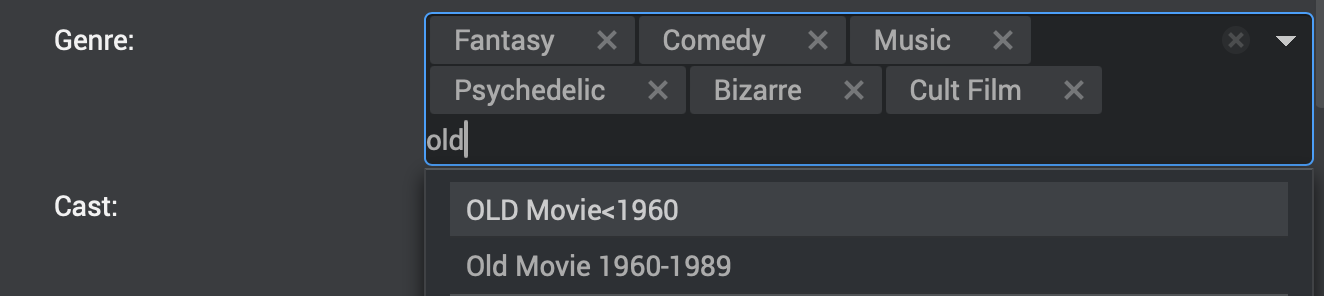
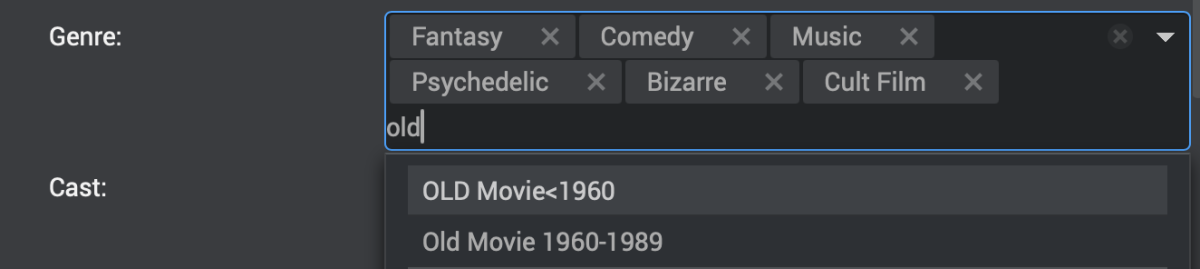
I like to create custom genres for some films (like Film Noir, Historical Fiction, Old Movies 1960-1989, Classic Literature, RomCom, etc). As I am typing a genre name into the field to add one to a film, it would be helpful if existing genres with the same spelling started to pop up in a list that I could scroll down to select from. This would save me from having to type the full genre name I have already entered for other films and keep me from having mis-spelling duplicates that would also lead to mis-categorization errors later. This could also apply to "standard" genres that one might like to add that weren't included with the initial indexing. Perhaps, having a database(DB) of existing standard & added genres for the software to choose from would be helpful. You could include a DB of the standard genres with the initial installation, but make it locally managed, so each server would be capable of adding new genres to its own DB, rather than having to make it available to all Emby Users. Adding to playlists shows a list of already created playlists to choose from below the option to add a new one - this is another possibility. The screenshot shows an example of my suggestion as implemented by another software package I have used. As I type the world "old" into the genre field, the 2 "old movie" options pop up in a list I can select from.
 1 point
 -
We wanted to share a quick review of Emby that was recently done by Sergio Ambrosio, a popular tech blogger in Spain. We are excited to see that people are taking note of the product that we pour a lot of effort in to here and look forward to more reviews in the future. Thank you Sergio for taking the time to review Emby! You can read the article HERE Later this week, we will be posting another blog focused on transcoding and some best practices to make sure your server is setup properly to utilize this great feature! View the full article1 point
-
I think at this point Emby must have the only video player out there that doesn't support gestures. I don't understand, honestly, why the resistance to them. From what I understand it used to have them and then some users said they didn't like them, so instead of offering an option they removed them altogether? I don't get it. Pinch to zoom, swipe for ffw/rwd, volume/brightness up and down, double tap to advance, keep pressed to speed up... It's not like those things were invented yesterday.1 point
-
Seems fixed in 4.9.0.30 beta. Aspect ratio is now preserved, whatever the container.1 point
-
Instead of 'distant future,' could you just re-add the double-tap to go forward and back sometime soon? Like @newyorker said, pulling up the OSD just to seek is super annoying and feels ccounter productive.1 point
-
Hello, I have a problem with the volume control on the desktop theater app. I'm using win 11 on the latest update. I change the volume with the media keys on my keyboard. The app and windows both recognize the input, but the volume is not changing. The strange thing is, that changing volume on music files works (flac/mp3), but I can't change the volume on movies and shows (usally mkv format with 5.1 dts/eac). changing volume in my web browser (chrome) works fine, but I prefer using the desktop app, because subtitles always have weird stuttering when using emby via browser. 20240728_170730.mp4 ffmpeg-remux-3476c632-6cce-4328-bfea-862542817de9_1.txt1 point
-
Use the Plugin attached, I added some debug code and an error trap so that it will continue with the library scan, just skip the movie its having an issue with and report it in the ADM logs. Can you turn on all the ADM logs and reproduce this and send them in pm if you dont want to post them? The new DLL will report "[ADMImageProvider-GetImages] Exeception Thrown!" - where this happens and should state the movie name too. That error should not occur, but in the code where that might happen is if a file or folder might be recognised as having the year value twice in the name. Like so: Moviename (YYYY)(YYYY) ADMv2(19-04-2024).zip1 point
-
Hi, this feature has not yet been added to Emby for Apple TV but is planned for future updates. Thanks.1 point
-
I don't know what OMDb provides and doesn't provide. The average user shouldn't be expected to know either. There should be an option to disable ratings appearing, that 1) is cross-platform (ie. not CSS); 2) doesn't require you to disable an entire metadata source, especially given their generic and unhelpful names; and 3) doesn't require a library-wide metadata refresh. It should simply be hidden. You shouldn't be required to erase it from your server's database, much less to erase any and all metadata from a given source simply because that source includes ratings.1 point
-
PJ Well, then excuse me for taking any interest. I will make a note that my effort has no value to you.0 points
-
OK, if your system doesn't do it, you could also get an convertor HDMI split to digital optical + HDMI passthrough back to the TV. https://www.amazon.com/s?k=hdmi+surround+sound+audio+splitter+5.1 It's your system that splits the signal out, not Emby. Emby delivers the audio content for all media through whatever connection you use, Wifi or Ethernet. Your TV or your AV amp decides what to do with the audio, not Emby. You could have a version of a TV show or Movie that is already converted down to stereo. That should bump through to your nicer speakers. Converting media to stereo can be done with audio and video editors. Perhaps it may be possible to force a conversion with Emby, but that is not really an optimized way to do it. That would mean you would store the original media in 5.1 or higher surround and then everytime someone asks for it, it converts to stereo on the fly which would also cause a video conversion, because you cannot, as I understand it, just convert audio with Emby. Does someone know if that is possible? Anyway, a better approach would be to leave your media alone and not bother converting it. It's much easier to get your home theater playback to pull the surround out and send it to where you want. In order to do that you need either a larger surround sound system with big speakers or a digital convertor working in your AV amp that converts surround to stereo on the fly and sends it to the speakers, or use one of the sound splitters. They sometimes have audio delay and noise issues. Read the reviews. There are used AV amps around that handle HDMI surround sound conversion to stereo that are older that can be found for around $150. Hope that makes sense and helps.0 points
-
PJ, Did you try to connect the HDMI video to your AV amp / pre amp? Many of these AV Amps can grab the surround and then pass the video with another cable to the TV. You need a more recent amp to be able to handle the HDMI video pass through. Hope that helps.0 points