Leaderboard




Popular Content
Showing content with the highest reputation on 10/14/24 in all areas
-
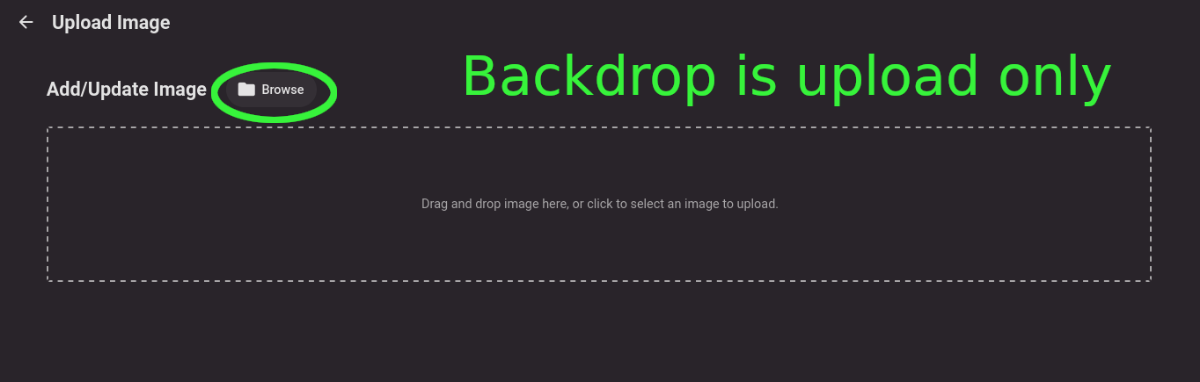
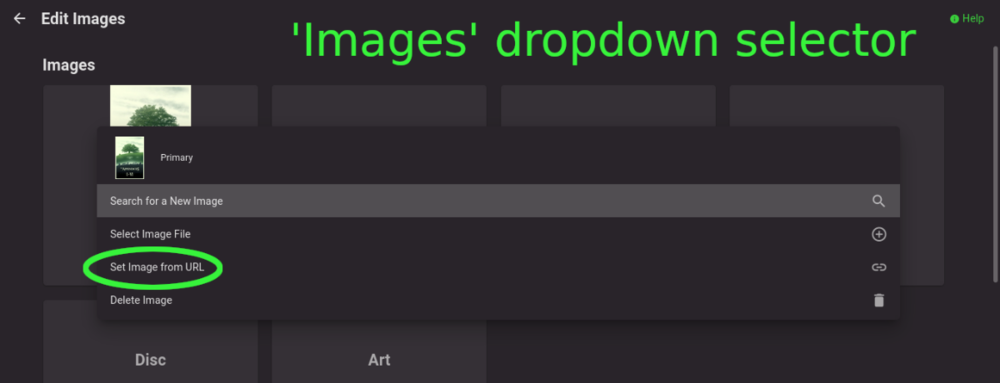
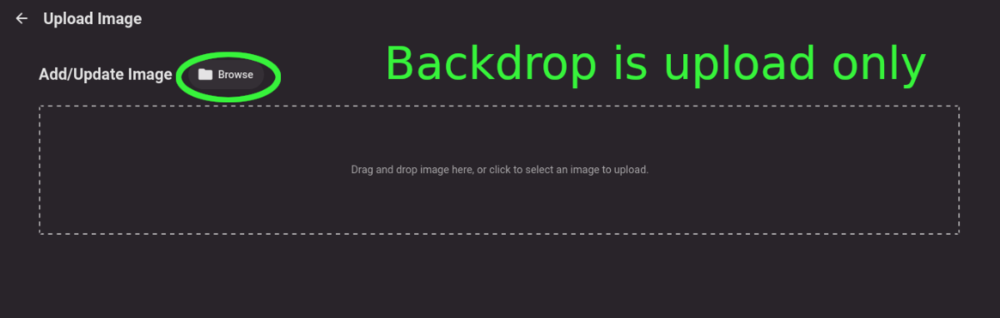
Title describes what I want but also here are some web app screenshots: The Image editor for all the types under 'Images' has a wonderful selector that includes a 'Set Image from URL' option: The Backdrops section only allows for adding images by file upload: I'd like to add Backdrops from URLs please.
 2 points
 -
That is why it is like it is as it just works. And then ones say hey I don't like you limiting my quality. Well you can manually adjust it to a higher value of your choosing that your network can handle as Emby has no real mechanism for this at this time. As AUTO does not work on every client Remotely in every condition known to the internet so it will fall back to a know hardcoded value. To me it seems pretty simple to just adjust the client quality to something that works for you as there will never be a correct answer for everyone. I don't really see controlling this from server side ever really happening either but I am just a user like everyone else. This is why I tell all my users to set the quality to MAX and I will throttle them to share my low upload speed here on a normal home connection. But Auto hardcorded value is technically more than enough here.2 points
-
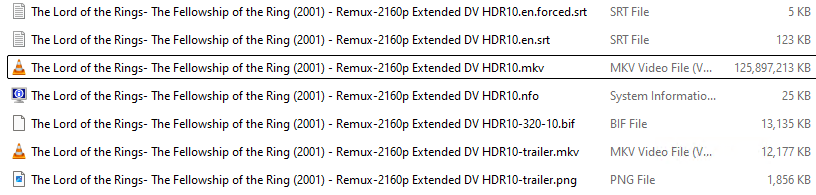
Well the logical explanation is extracting subtitles from say a 50-100 Gbyte 4K Remux is going to take significantly longer than extracting from a typical 5-15 Gbyte 1080p file. From a NAS it effectively means dragging the entire file over the network to do so. Thus 'real-time' extraction is not going to be realistic. Pre-process all files to extract the SRT's in advance seems an obvious thing to do as the majority of players will pick up SRT's without the dependency on reading the main file. This is what I have always done over many many years and I've never seen 1 file transcode because of subtitles. I actually go one step further are remove the text based embedded subs, but I leave the PGS embedded for those players that can direct play those as they generally look nicer than text based subs. Some extreme examples will take a long time to process @ 125 Gig - I believe ROTK is even bigger @ 140Gig ...
 2 points
 -
Now its working. After change the <CollapseVideoFolders> to false I need delete and recreate the library again2 points
-
Following back up on this - I found a "solution" So at some point my Ecobee thermostat stopped connecting to their servers. Went thru all sorts of troubleshooting. Rebooting my router fixed the issue for a few days. It looks like this is a widespread problem recently with TP-Link firewalls. I couldn't find a long term fix. I was in the process anyway of deploying an opnsense firewall and this was enough for me to dust it off and finish setting it up. So in the process of replacing my firewall to fix a dang thermostat I accidently found a fix for my parents not able to connect to my emby server. No clue what was going wrong with the TP-Link to stop just my parents Roku from connecting. Especially when other people could connect fine. If anything changes I'll report back.2 points
-
We wanted to share a quick review of Emby that was recently done by Sergio Ambrosio, a popular tech blogger in Spain. We are excited to see that people are taking note of the product that we pour a lot of effort in to here and look forward to more reviews in the future. Thank you Sergio for taking the time to review Emby! You can read the article HERE Later this week, we will be posting another blog focused on transcoding and some best practices to make sure your server is setup properly to utilize this great feature! View the full article2 points
-
I'd really like to have 2 Factor Authentication added to the login screen. It's just this (optional) extra layer of security to help secure the server (which, especially if people use camera uploads) contains pretty private data. There are for every type of programming language quite a few libraries available, so implementation on a server shouldn't be too hard to realise1 point
-
The default sort order is set to 'Folders'. I would prefer to have all libraries I select to default to release date. I know I can manually set it, but I have to do that for every folder in the library. I would like to see the ability to have it automatically set the default sort order for all new folders I create.1 point
-
Hey Everyone, My journey from Plex to Emby has been pretty smooth with the exception of setting up SSL encryption. There are lots of great posts on this forum and elsewhere on how to do this, and I consider myself pretty computer literate. But I'll be honest, this was a bit overwhelming for me as I have no experience at all in hosting web servers, DNS, or encryption certificates. After many hours, I've got it all working, so I thought I'd share what I've learned. I'm going to try to write this for the newbie, so don't be offended if it seems like I'm explaining lots of simple stuff. That's really what I needed a week ago, so maybe it'll help someone else in my shoes. Also, this is for Windows, although most of it applies to any OS. There's lots of text, but it's really very easy. Let me also say, I understand that a reverse proxy gives you lots of benefits and flexibility for securing your server. But that was a step too far for me. If you want a reverse proxy this post is not for you, but there are many posts in this forum to help you. If you want to access your Emby server from outside your home network you will want to require secure connection mode for all remote connections (see "Network" tab in Emby server configuration). To do this you need an SSL certificate. To get an SSL certificate you must have your own registered domain name. Here's a step-by-step. Domain Name Registration A domain name is the readable text part of a web address. So emby.media, or google.com, or media.yourdomain.net. Most home users don't have one, but you need one to get an encryption certificate. While (Edit:)There are many options for purchasing a domain (godaddy.com being very popular), I chose to buy my domain from domains.google. It cost me $12/year, and this is the only cost to getting your Emby server working with encryption. Go to https://domains.google, pick a domain, pay your money, and you're ready to go. For the rest of this discussion let's say you registered the domain name yourdomain.net. Now you need to associate your new domain with your home IP address. Most home users get their IP address assigned to them by their internet provider and it is "dynamic," meaning it can change. So you need to be able to tell your domain provider what your address is and update it when it changes. This can be done automatically, and is called dynamic DNS (DDNS). (Edit:) Before obtaining a domain, ensure the provider supports Dynamic DNS. Google domains supports this easily, here is the help page explaining how to set it up. Fortunately, my ASUS router has this capability built in so it was easy, but it's easy even if your router doesn't (follow google's directions). (Edit:) In case you have a static IP (obtained from your ISP), DDNS support is not mandatory. That's it for domain name registration. Now yourdomain.net points to your home network IP address. SSL Certificate Now you need to get an SSL certificate. This has the encryption keys you need, and must be issued by a recognized certificate authority or it gets blocked by your browser. Lets Encrypt will give you a free SSL certificate but it has to be renewed every 90 days. This was the part I was most confused by, but it's actually really easy. The part to understand is that Lets Encrypt must have some way of proving you own your domain name before they can issue you a certificate. There are two options, 1) they give you a little text file to place on your web server in a certain location. I don't have a web server so this is a no-go. 2) They give you a text string to add to your DNS registration in what is called a "TXT Record." You do this with google domains, it's very easy. To get a certificate you need an ACME client program that knows how to talk to the lets encrypt server. They recommend certbot, but it doesn't work in windows. Dig enough and you'll find ZeroSSL, they have a nice downloadable program that does it all and is really easy. Download here. Make a directory on your computer (I used c:\ZeroSSL). Put the le64 (or 32) exe in this directory. A single command will create your certificate. I think the easiest way to do this is create a text file in the same folder as the program, call it "get_cert.bat" and put the following three lines of text in the file. Edit the second line to have your actual domain name (instead of "yourdomain.net"), and to have your actual password for your PFX file (whatever you want it to be, just replace "yourpasswordhere" in the code below. @[member="Echo"] off le64 --key account.key --csr domain.csr --csr-key domain.key --crt certificate.csr --domains "yourdomain.net" --generate-missing --handle-as dns --export-pfx “yourpasswordhere” --live pause Save the text file as get_cert.BAT and then double click it to run. This runs the le64 program, creates the public/private key pair, asks lets encrypt to generate a certificate, saves that certificate, and converts it to a PFX file format that Emby requires. All in one command! When you run this, a command window will appear and you can see what it's doing. After a few seconds it'll pause and ask you to place the TXT record in your domain. It gives you a name and value, the name will be something like _acme-challenge.yourdomain.net, and the value will be a bunch of random letters and numbers. The program pauses here for you to put this into your domain. So now you just log in to your google domain again, go to "DNS" on the left menu, scroll all the way down and enter a "Custom Resource Record." The type is TXT, the name and value are what le64 gave you. Put them in, wait a few minutes for the change to take effect (took just a couple of minutes for me). Then go back to the command window where le64 is running and press enter to continue. It'll then verify your TXT record is there and issue your certificate. You'll find a file certificate.pfx in the le64 directory, that's it! Emby Setup Now log in to your Emby server setup. Go to "Network," in the field "External Domain" you put your domain name, so yourdomain.net or whatever you chose. For "Custom SSL certificate path," browse to the .pfx file that was created by the le64 program. In the "Certificate Password" field put whatever password you used in the .BAT file above when you created your certificate. Then for "Secure Connection Mode" I recommend you choose "Required for all remote connections." You also have to log in to your home router and forward port 8920 to the computer running your Emby server. I'm not going to give directions on how to do this, it depends on your router, but it's super easy. That's it. You need to restart your Emby Server, and then you're done! You can now access your server remotely and securely at https://yourdomain.net:8920. Certificate Renewal Now, I mentioned before that the Lets Encrypt certificates are only good for 90 days. So every 90 days you have to renew the certificate. Take that "get_cert.bat" file you made earlier and make a copy of it called renew_cert.bat. At the end of the second line, just add the text "--renew 20" (without the double quotes). When you are within 20 days of your expiration date run this file, it'll renew your certificate. I believe it'll ask you to place a new TXT record in your domain, so certificate renewal cannot be made fully automatic. You'll have to run it manually and add this TXT record into your google domain just like when you created the certificate in the first place. But it takes just a few minutes and then your certificate is renewed. You'll have to restart your Emby server for it to take. The file locations all stay the same, so you don't have to update anything in the Emby setup, just restart Emby. That's it! Well, I hope this helps someone. Sorry for the long post. I would have benefited from this level of detail a week ago, so maybe it'll be good for someone. If anyone sees something wrong here, feel free to correct me.1 point
-
I only brought it up because it seems like one of the goals here was to eliminate transcoding, which I took to mean that whatever media they are providing, they've already determined that it isn't enough to saturate their own upload speeds or the download speeds of their users. Another user mentioned a band-aid, which is why I suggested it. FWIW, I agree that this isn't a good idea, and I would not enable it for my own configuration. I don't even think it's a good idea for the people in this thread to use it, considering that it seems like their users don't notice or mind the reduced bitrate in the first place. I know I would absolutely lose my mind if whatever show I was watching paused every 3 minutes to tell me that I _could_ switch to a higher resolution, only for some uncontrollable external factor to choke the connection afterwards. give me the conservative 4mbps default every single time over _that_ option.1 point
-
One could make everything considered local but then stuff will most likely stutter play as the REMOTE connect will not be able to handle the excessive bitrates the majority of the time on all that high bitrate content that will most likely never stream seamlessly. Or one could say they just expect AUTO to do better at querying the connections speeds and play things as higher than the conservative coded rate now. Easy fix all clients should be defaulted to Max and the server admin will be required to throttle their users to a value that works for them and their remote users.1 point
-
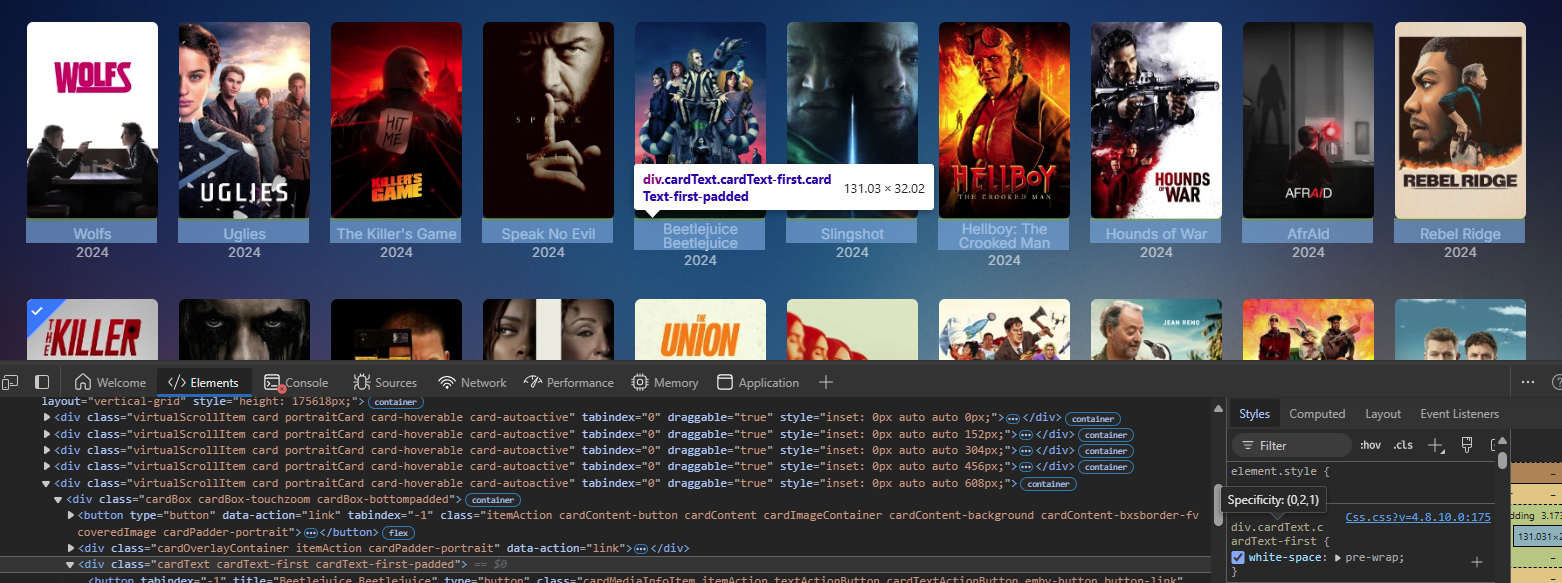
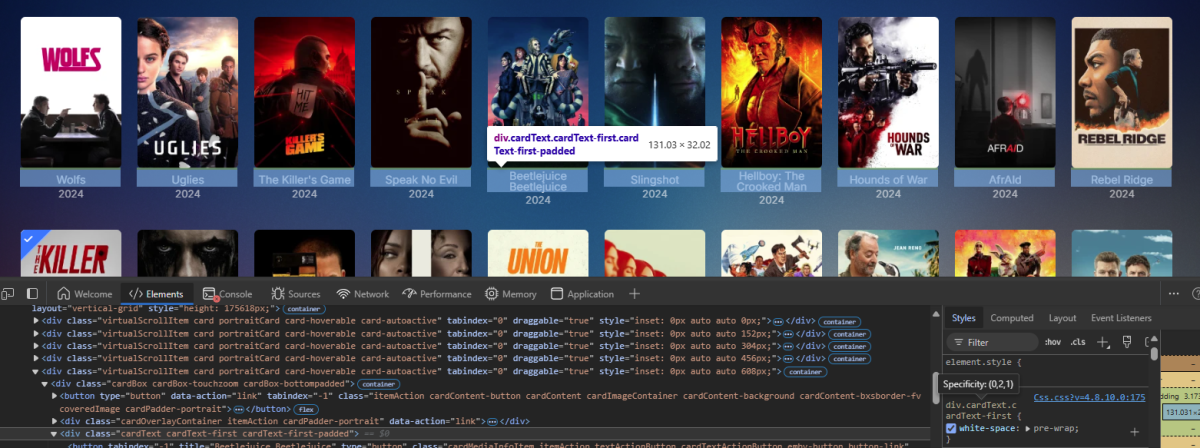
Something like this for card text. div.cardText.cardText-first { white-space: pre-wrap; } As for font size you can play with font-size as this is the overall default. html {font-size: 90.15%} So depends on if you want to adjust font everywhere or just specific areas? But if your bring up the browser debug console (F12) you can navigate the elements or find what is applied to a specific element.
 1 point
 -
According to the author of MKVToolNix, the blocks of a subtitle stream are spread through the file in order so that all streams have the data for a particular time close to each other. If this is true, then extracting the subtitles first is exactly what you should not be doing. However, on reflection, this cannot be true in all cases. If I extract an ASS stream from a file, it will be returned in whatever time order the maker of the subtitles used - and very frequently the subtitles for the OP and ED songs are grouped at the start or end of the file for some reason. When seeing that, I have always presumed that in this case the subtitles are stored as a block which could be fetched quickly for sorting by the client - but actually, this isn't consistent with my experience of subtitle extraction, which in the program I use clearly goes through the whole file. So I've probably been insulated from the consequences of sorting out subtitles by the small files I generally have (and the fact that I always sort ASS subs into time order). I don't know if SRT subs are required to be in time order, but if not, that would explain why it's necessary to get them all in advance. OTOH, there is also in some situations a presumption that subtitles will inevitably be streamed at a point close to the corresponding audio and video - any live or broadcast stream, for instance. I guess it's just more of a mess than I allowed myself to acknowledge, so the most consistent solution is - yes - curating your media to avoid embedding SRT or ASS subs into large files; plus having a really fast route to your disks - which is one reason why I have all my media on disks (hard or SSD) attached to the server's motherboard. But of course there's no excuse for the subs to be out of sync, ever. They are timed and so that should be that. Paul1 point
-
If you're doing this on the same host then backup/restore is not needed. The same configuration used for the bare-metal Emby will work for the container based Emby. The key is getting the UID, GID, GIDLIST and the bind volume mappings right. You might only want to backup the Emby data path as a precaution in case something doesn't map correctly then you can reset and try again. This would be an external backup, not using the plugin. Or as some might do copy the bare-metal Emby data to a different location for the container config.1 point
-
Isn't this just Emby choking on the smb paths for metadata and images? 2024-10-13 09:04:53.754 Info MediaProbeManager: ProcessRun 'ffprobe' Execute: /var/packages/EmbyServer/target/bin/ffprobe -i "http://127.0.0.1:8096/Items/File?Id=smb%3A%2F%2F192.168.1.19%2Fvideo%2FFilms%2FThe+Wolverine+(2013)%2FThe+Wolverine+(2013).mkv" -threads 0 -v info -print_format json -show_streams -show_chapters -show_format -show_data 2024-10-13 09:04:56.730 Error ProviderManager: Error in metadata saver *** Error Report *** Version: 4.8.8.0 Command line: /volume1/@appstore/EmbyServer/system/EmbyServer.dll -programdata /var/packages/EmbyServer/var -ffdetect /var/packages/EmbyServer/target/bin/ffdetect -ffmpeg /var/packages/EmbyServer/target/bin/ffmpeg -ffprobe /var/packages/EmbyServer/target/bin/ffprobe -nolocalportconfig -ignore_vaapi_enabled_flag -pidfile /var/packages/EmbyServer/var/EmbyServer.pid -defaultdirectory /volume1/Public -updatepackage emby-server-synology7_{version}_x86_64.spk -noautorunwebapp Operating system: Linux version 3.10.108 (root@build8) (gcc version 8.5.0 (GCC) ) #42962 SMP Fri Mar 24 12:30:20 CST 2023 Framework: .NET 6.0.25 OS/Process: x64/x64 Runtime: volume1/@appstore/EmbyServer/system/System.Private.CoreLib.dll Processor count: 4 Data path: /var/packages/EmbyServer/var Application path: /volume1/@appstore/EmbyServer/system System.IO.IOException: System.IO.IOException: Create Handle Failed: Films\The Wolverine (2013). NTStatus: FILE_DOES_NOT_EXIST at EzSmb.Transports.Shares.Handlers.Bases.HandlerBase..ctor(SmbType smbType, ISMBFileStore store, String path, HandleType handleType, NodeType nodeType, HandleArgs args) at EzSmb.Transports.Shares.Smb2Share.GetHandler(String path, HandleType handleType, NodeType nodeType, HandleArgs args) at EzSmb.Transports.Shares.Bases.ShareBase.CreateFolder(Node node, String folderName) at EzSmb.Node.CreateFolder(String folderName, String relatedPath) at Emby.Server.Implementations.IO.SmbFileSystem.CreateDirectory(String path) at NfoMetadata.Savers.BaseNfoSaver.SaveToFile(Stream stream, String path, LibraryOptions libraryOptions, CancellationToken cancellationToken) at NfoMetadata.Savers.BaseNfoSaver.Save(BaseItem item, LibraryOptions libraryOptions, CancellationToken cancellationToken) at Emby.Providers.Manager.ProviderManager.SaveMetadata(BaseItem item, LibraryOptions libraryOptions, ItemUpdateType updateType, IMetadataSaver[] savers, CancellationToken cancellationToken) Source: Emby.Server.Implementations TargetSite: Void .ctor(EzSmb.Params.Enums.SmbType, SMBLibrary.Client.ISMBFileStore, System.String, EzSmb.Transports.Shares.Handlers.Enums.HandleType, EzSmb.NodeType, EzSmb.Transports.Shares.Handlers.HandleArgs) As all the other libraries are not SMB paths. Devs recommend mounting to local path.1 point
-
Hi, I used my domain (godaddy, confirmed with CNAME in Win-Acme) I just changed it before posting. Thanks for checking about it though it could be easily missed.1 point
-
Assuming no collections exist, it is mentioned at the end of the guide.1 point
-
Thanks again for the help. Just finished fully updating all three systems and they are all working as intended. Greatly appreciated.1 point
-
No I'm not ready to actually do it yet. Just information gathering for now.1 point
-
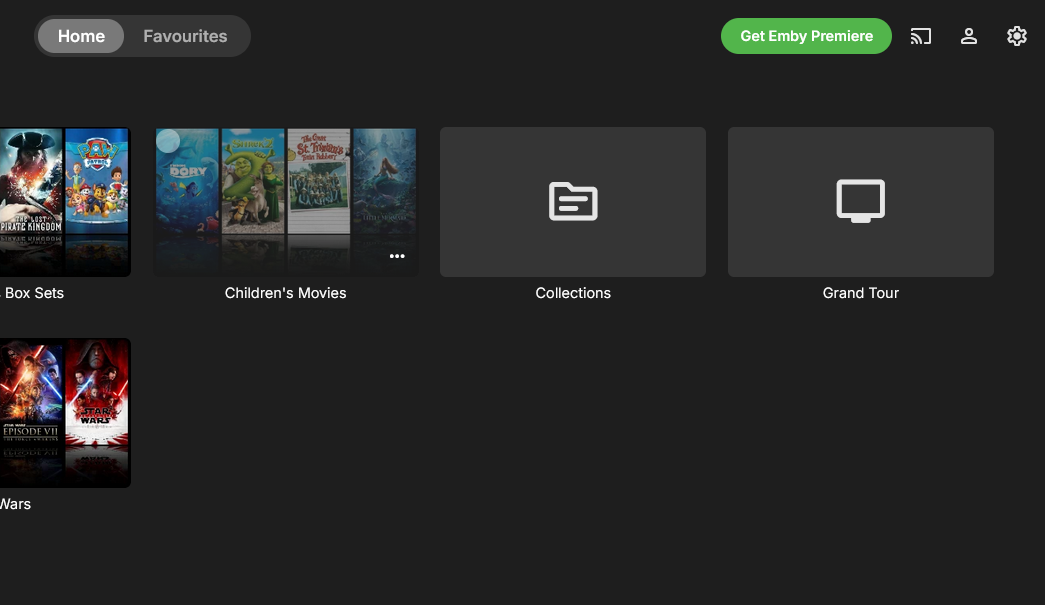
This is the normal Home folder Now in Settings > Library Right click on Collections folder Right click on another folder What do you need to see?
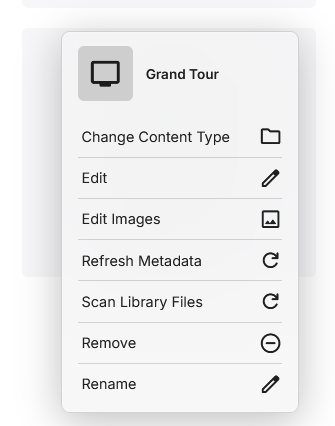
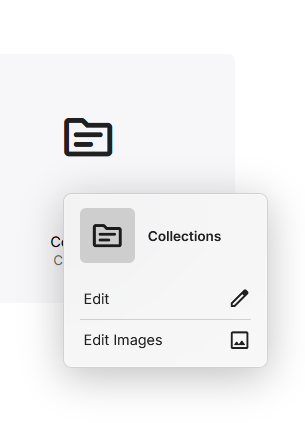 1 point
 -
Totally agree from proving support over the years on this using Windows. Drop the drive mapping and use UNC naming. One giant headache later, you'll be glad you switched! Carlo1 point
-
Since I never have this issue with 1080p files, and there have been many threads with issues playing 4k files specifically - even Direct Playing - I do wonder what is so different, and whether the problems arise from something in the server or in the players concerned. While I'm happy to endorse or recommend work-arounds, they are just that, and should not be allowed to divert from fixing the problem itself. Paul1 point
-
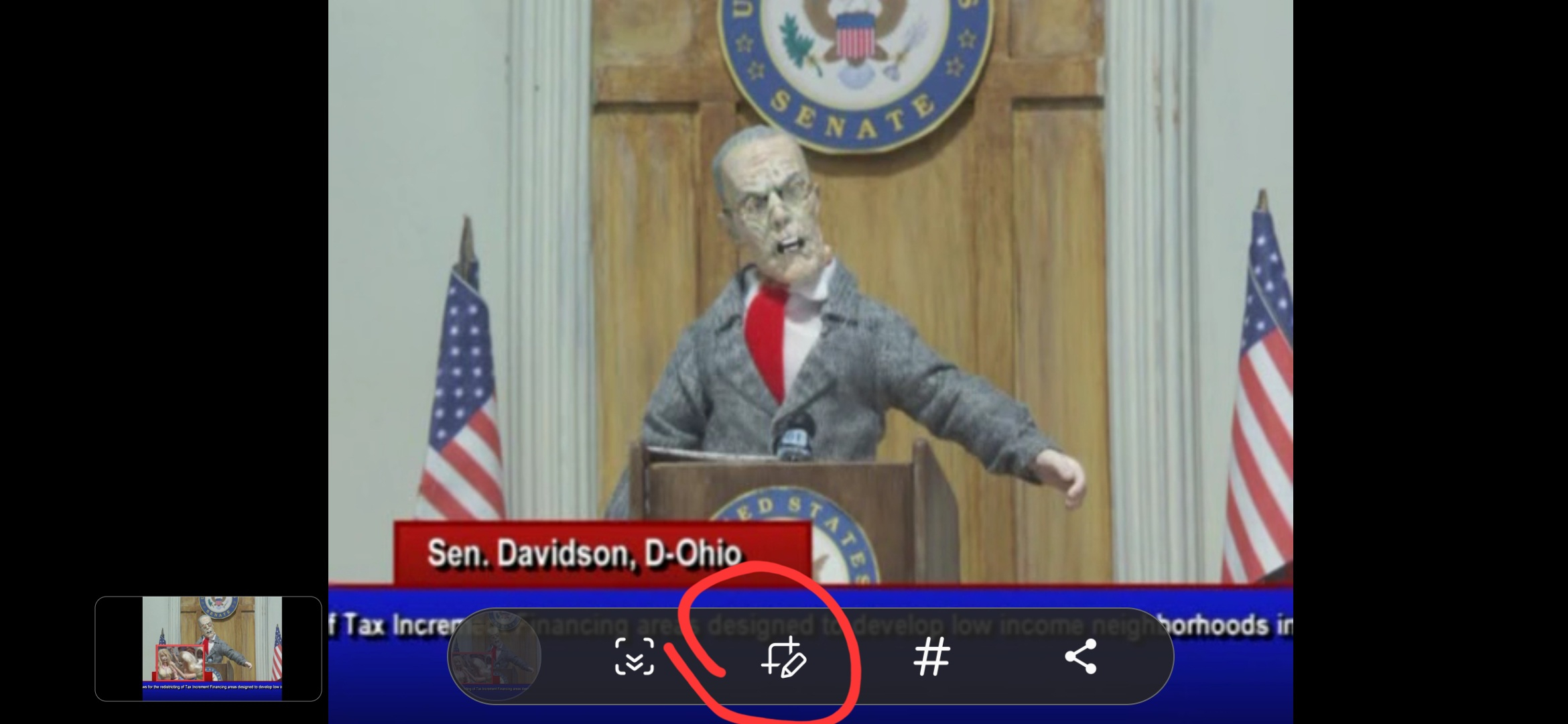
When talking a screenshot on android, which is usually done with a hardware key combo like volume down+lock; you get a popup overlay with actions to perform including edit, where you can crop out the unwanted parts of the image.
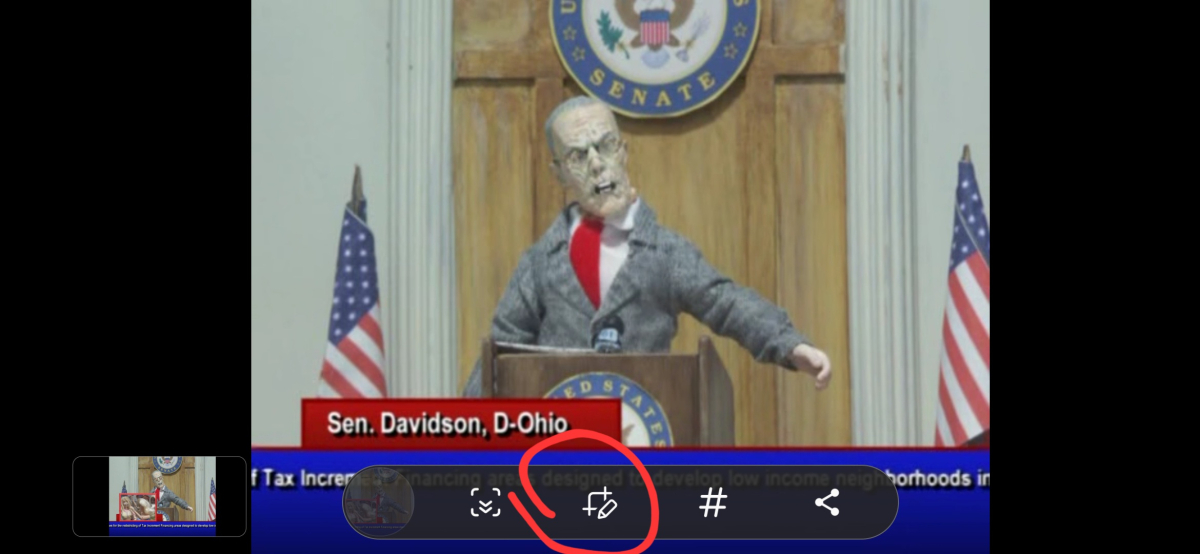 1 point
 -
@feerlessleadrand @Tremas, I have finished the part of the tool that selects the media from the Emby libraries that you want. I now need feedback. The latest code is attached below. Vic1 point
-
@ronmramsayii Appears to be a database corruption issue. When was it working ok ? and what versions of Emby Server did you launch since then? Info App: Sqlite: 1 - no such column: Album in "select type,Id,StartDate,EndDate,IsMovie,IsSeries,IsKids,IsSports,IsNews,IsRepeat,IsNew,IsPremiere,IsLive,CommunityRating,CustomRating,IndexNumber,IsLocked,PreferredMetadataLanguage,P Error TaskManager: Error in IsHidden *** Error Report *** Version: 4.8.10.0 and SQLitePCL.pretty.SQLiteException: Error: no such column: Album - select type,Id,StartDate,EndDate,IsMovie,IsSeries,IsKids,IsSports,IsNews,IsRepeat,IsNew,IsPremiere,IsLive,CommunityRating,CustomRating,IndexNumber,IsLocked,PreferredMetadataLanguage,PreferredMetadataCountryCode,Width,Height,DateLastRefreshed,Name,Path,PremiereDate,Overview,ParentIndexNumber,ProductionYear,OfficialRating,SortName,RunTimeTicks,Size,Container,DateCreated,DateModified,guid,ParentId,IsInMixedFolder,DateLastSaved,LockedFields,OriginalTitle,CriticRating,SeriesName,Album,AlbumId,SeriesId,PresentationUniqueKey,Tagline,ProviderIds,Images,ProductionLocations,TotalBitrate,ExtraType,ExternalId,SeriesPresentationUniqueKey,Status,DisplayOrder,ThreeDFormat,ChannelNumber,RemoteTrailers,SortIndexNumber,SortParentIndexNumber,IndexNumberEnd,IsPublic from MediaItems where Id=3 SQLitePCL.pretty.SQLiteException: Exception of type 'SQLitePCL.pretty.SQLiteException' was thrown. at SQLitePCL.pretty.SQLiteDatabaseConnection.PrepareStatement(String sql, ReadOnlySpan`1& tail) at SQLitePCL.pretty.DatabaseConnection.PrepareStatement(IDatabaseConnection This, String sql) at Emby.Server.Implementations.Data.SqliteItemRepository.GetItemByIdInternal(IDatabaseConnection db, Int64 id) at Emby.Server.Implementations.Data.SqliteItemRepository.GetItemById(Int64 id) at Emby.Server.Implementations.Library.LibraryManager.GetItemById(Int64 id) Error SqliteItemRepository: Error saving items As the server did actually launch - there would be log files here Info Main: Logs path: /Users/iamronr/.config/emby-server/logs Do not share the raw log files here as they would not be anonymised Do you have any database backups to try to go back to?1 point
-
Ah ok i see. Thank you :))1 point
-
That plugin is deprecated, Auto Box Sets have been made part of Emby core (per-library setting).1 point
-
New PUBLIC TESTING version available 11.1.2: Delta changelog 11.1.1 -> 11.1.2 minor logging changes add SeriesPrimary artwork as fallback for episode thumb artwork hold upcoming episode cache for 1 day1 point
-
If it "direct play" then it's out of the servers hand and up to the client/device to handle the video. Based on the screenshot you are using an Apple TV, so most likely the Apple TV that has a problem. (Know you wrote ist's the username but without knowing what client precisely i can only guess. ) Apple TV is kinda picky with videos in MKV containers and a badly made one can cause the stutters and audio desync you see. A sample of one 4K file is not much so i would try and get another file that might be encoded better and see if that works.1 point
-
I deleted all files in that folder, disabled the recycle bin function and set the directory to hidden with the filename change. Emby seems to have completed the update now. Thank you everyone for your help. Now I just have to fix a database error in Sonarr and everything should be back normal.1 point
-
Hi @Luke, just tested and while it didn't freeze up after an episode wrapped, it didn't update the home screen showing the next episode either until I force quit and relaunched. Still on 1.9.0 as well, no change as well and I'm not on Test Flight.1 point
-
Off-topic: I can't wait until DanMachi season 5 is compllete.1 point
-
The intro is different music. The battle music is always the same battle music across the episodes in the music anouther anime it happens in is Bleach1 point
-
HI, we'll take a look at it. Thanks for reporting.1 point
-
Emby Server Data Folder1 point
-
Use another app for ebooks or audiobooks. Emby does not do those particularly well and other apps are much better. Just because Emby can do ebooks does not mean it should. ************ I deleted the remainder of my post due to the fact that a mod of this forum correctly deleted the entire junk post. Thanks @Abobader1 point
-
In the end it would be displaying the exact same thing. Just how it is presented would be slightly different but I know I would get annoyed with it if it did not have a disable option.1 point
-
Looks to be fixed in the latest TVDB plugin update, thanks.1 point
-
99% of the time it will come back to a Windows issues not a Emby issue as I have many programs that have dumped mapped drives over time and it is not the programs fault Windows is causing the issue. All the devs usually come back with the same as posted above as it is a well-known Windows issue.1 point
-
If you can maintain an .ignore file or possibly change it to a folder that begins with a period Emby should ignore it. But yes it it can be configured to outside of any configured library path would be best.1 point
-
I would remove that from Emby, since it is discarded media. Also remember that all the Arr's can edit delete your media, and those changes will be seen by Emby. And Emby will refresh that media.1 point
-
I've always used UNC share's - even on local file systems - as they provide the maximum flexibility and are 100% reliable. Using drive letters is outdated and leads to issues when you add drives etc (you need to remap all the drives manually). ie create a share for your m: for example '\\servername\sharename' . The bonus is you can change the actual mount point (if you move to drive pooling, add a bigger drive or whatever) and as long as you keep the UNC sharename the same, then emby won't care and doesn't need to change. To note, any local 'share' will not go through the network stack, as Windows is intelligent enough to know it's local.1 point
-
i have just recently restarted using my Shield for Emby. (I am using live TV more than I used to) I have found that live TV functionality on my Roku is lacking quite a bit but, on my Shield it is a lot more stable and faster. I quickly rediscovered that the supplied remote is woefully lacking to the point of being nearly unusable for me. However I tried pairing some other remotes and I found that an old (a year or two old) Fire TV remote would pair and provided all the functionality i need. With that remote every key i use is both available and in a good position for me. The Fire remote is not ideal but it is quite workable. I have a few other Bluetooth remotes and I have been able to pair most of them but they either do no work correctly or the buttons are badly misplaced. The Fire remote is MUCH better than the Shield's remote for me. I am going to investigate some other Bluetooth remotes and, since my Shield is again connected to my Harmony hub the Harmony Android app also works and with a little tweaking I suspect that all buttons will work correctly on it as well. This post was intended to give a few alternatives and alternative ideas to the Shield's remote not as a strong recommendation for any other remote. I am still still experimenting with remotes but, it seems to me, that some universal Bluetooth remotes might work a lot better than the Shield's. I even have checked "Remote Central" but their discussions often tend to be a bit obtuse and hard to understand so I may end up resorting to making a list of remotes that "might" be better for me and ordering them one at a time and testing and returning until I find one that is "right" for me. I do not like to do that but, in this case, it may be very hard for me to find a remote for everyday use without testing and I cannot afford to buy a bunch of remotes just to end up with most of them in a drawer somewhere.1 point
-
YES! It finally worked! Thank you so much @sa2000 You made it all happened. So it's just about giving permission?1 point
-
It's a problem with the clients as discussed in another thread. Only Emby for Android TV and the FireTV clients run a test once in a while and set bitrate accordingly if set to auto. Would be awesome if all TV clients ran a test once in a while to some google server and sat bitrate according to sat and then server admins could set a max bitrate to what their server can handle. Maybe a popup when installing the client like many other programs like "Are you on wired, wireless or mobile connection?", do a test and set accordingly, if on wireless/mobile then set a bit lower. Or do what the big streaming companies used to do back in the time, If stutter is detected then popup a "is the stream stuttering/buffering? Consider lowering your quality". Another thing that could help would be if changing the quality while watching a video would stick and people didn't have to look for the quality settings in a (for people with little technical knowledge) hidden place. Until it's fixed our graphics cards are just going to be working hard and we have to laugh off that people are watching bottom tier streams on their 4K OLED TVs because they don't know any better.1 point
-
yeah I will try.. it is running on TrueNAS so give me a bit, I will try tonight if time allows1 point
-
Startup crash still happening on ios 12.5.7 with app version 2.3.31. App crashes instantly while opening1 point
-
Hi, there is another network event that we can stop listening to on macOS. The combination of disabling both of them will resolve this. Thanks.1 point
-
I like "Default", then change "Auto" to "Random" and keep both as options.1 point
-
Good Evening Everyone, I'm running Jellyfin AND Emby. Does anyone have some documentation regarding running the two simultaneously? Of course I can import users one at a time, however, it would be better to bring them in via batch. But, the "type" wouldn't show correctly either, although, looking at the sample yml file, it looks like the word emby is simply substituted like a Paper Tiger, having very little meaning; I keep reading that Jellyseer has support for Jellyfin AND(not or) Emby, Of course this is the first time I'm playing with docker, so, maybe I'm wrong and I'm totally missing something. Thank you Edit: Yup, looks like I'm wrong, that will definitely change the type properly. But, how can one do both?1 point