Leaderboard




Popular Content
Showing content with the highest reputation on 10/09/24 in all areas
-
We wanted to share a quick review of Emby that was recently done by Sergio Ambrosio, a popular tech blogger in Spain. We are excited to see that people are taking note of the product that we pour a lot of effort in to here and look forward to more reviews in the future. Thank you Sergio for taking the time to review Emby! You can read the article HERE Later this week, we will be posting another blog focused on transcoding and some best practices to make sure your server is setup properly to utilize this great feature! View the full article4 points
-
It could be an issue when looking things up internally by a tmdb id, grouping things by it, etc. so the tvdb plugin needs updating to normalize it3 points
-
I'm a plex life time member, but I have been using Emby for over six years continuously, but there is a feature which I have always thought is missing in Emby which I would like and encourage the developer to consider including especially in this dispensation where families can social or commingle due to COVID 19. Today, I received a notification from Plex about it new feature titled Watch together you can read about it here https://support.plex.tv/articles/watch-together/ The feature allows friends and families at distance to watch same movies together instantly, you simply invite all your buddy, once they signed to the system which can be seeing in the server then play and pause as needed, this I think is cool feature should be added to emby. Let's here your though if Emby developer should consider adding this feature to our beloved Emby Media https://www.bing.com/news/search?q=Plex+Watch+Together&qpvt=plex+watch+together&FORM=EWRE2 points
-
Thanks. So this is already a feature request from last year - https://emby.media/community/index.php?/topic/122577-release-date-by-physical-or-digital-release-date/#comment-1291943 It doesn't appear to have any support - so I'll probably just add it to MediaInfo Plugin to get and use the Digital or Physical date if it's available, unless that's an easy fix for you if you are already getting the TMDB data during discovery...2 points
-
Hotfix image #2 9.1.2 (33.2.0.252) has just been released. Second HotFix (33.2.0.252): Match Frame Rate (beta) enhancement Resolves issue with SHIELD drive filling up Fixes the issue of No audio heard when headset is connected to controller and DAP is on Resolves issue of Geforce now crash after launch Ability to clear HDMI 1.4 flag via factory reset Fixed video distortion on "RGB 8-bit Rec.709" display mode Resolved USB HDD/Flash drive showing corrupted after hotplug NAS folder info shows 0 B and not the actual capacity Mounted storages aren't listed after upgrade Fixes occasional crashes in DRM apps https://www.nvidia.com/en-us/geforce/forums/shield-tv/9/522242/shield-experience-upgrade-911-hotfix-image/3478201/2 points
-
Also, It would be cool if we have various m3u lists and have the option to choose/assign each m3u list for each user.. Example. In user settings we can choose which library to give them for VOD so this shouldnt be hard enough to do it for live tv too no? USER 1 - Playlist 1 - Playlist 2 - Playlist 3 USER 2 - Playlist 3 USER 3 - Playlist 1 - Playlist 3 Etc etc.... *** Delete this message from another topic I opened because I posted it by accident there1 point
-
Thank you! Well at least at the Villages, you know at least someone will be getting some. LOL1 point
-
You seem to be under the impression that devs are cheap .... I doubt you could pay for more than a few days (and that's stretching it) of dev time with the amount you claim to have paid over the past five years.1 point
-
Yeah, I don't know. It was a long time ago.1 point
-
There are plenty of threads and existing requests for this - please use the Search to find them and contribute.1 point
-
@feerlessleadr Wait!!!! I now see something wrong. You are right... I will fix it ASAP. Vic1 point
-
Thanks for uploading the logs. A dev will have a look at them.1 point
-
You would sign there with existing credentials (like this account you're posting from now) if user on that sever was already linked with an existing Connect account. If you created two additional accounts and they're not verified - they're not active yet @Abobader1 point
-
Where do I find a pass-through setting in Emby ? You had me thinking about file formats you evoked, and to that I might add it could also be codec thing. so I re-watched the same episode earlier this morning and this time, it all wen thru with zero glitch, all good. Another intermittent problem to figure out, but the house isn't out in flames.1 point
-
Here are the log files as I have found them...does this help? embyserver.txt embyserver-63863856000.txt embyserver-63863942400.txt ffmpeg-directstream-b2940f0e-aea9-4350-842f-8a5eb882826a_1.txt1 point
-
Must be the store as I got v2.1.21g but dev will probably have to comment as I really don't know how the versions works for these and only to limited testing on my tablet.1 point
-
I think the percentages for the resume playback and mark as finished would be better as absolute values of time. This example is extreme, but the difference between an hour movie or a 2 hour movie should be the same for both, I would think. However, I solved my problem, so thank you!1 point
-
emby for LG v1.0.44 There is no setting for "Image size".1 point
-
I'll show you how to easily create a PFX certificate with automatic renewal for Emby on Synology 7.2: I assume you already have your own domain. Next, in Synology - Control Panel - Security - Certificates, create a new certificate using Let's Encrypt for your domain "website.com." Next, a short command via SSH or Synology - Control Panel - Task Scheduler - User-defined Script as root, which is used to extract certificates from Synology: cp -Rf /usr/syno/etc/certificate/ /volume1/homes/ In this way, you will copy all the Synology certificates to the homes folder. Now, you need to find location of the certificate you created earlier for your domain. A helpful tool for this is the website where you can decode the .pem file: https://certlogik.com/decoder/. So, go to homes/certificate/_archive and check folder by folder. Edit the .pem file, copy its content, and paste it into the provided website to decode the certificate. Now, you know the location of the desired certificate. You need folder name for later mine is AaJQI1 In Synology - Control Panel - Task Scheduler, create a new Scheduled Task - User-defined Script (in the General tab, set User: root, and in the Schedule tab, set it to 3 months so that the certificate is renewed in proportion to the validity of the Let's Encrypt certificate for your domain. In the Task Settings, paste the following script: asuming that your homes is at volume1 cp -Rf /usr/syno/etc/certificate/ /volume1/homes/ cd /volume1/homes/certificate/_archive/AaJQI1 sudo openssl pkcs12 -export -out cert.pfx -inkey privkey.pem -in cert.pem -certfile chain.pem -passout pass:yourpassword synopkg restart EmbyServer AaJQI1 - this is my folder, you will have a different one. Don’t forget to change it in your script Next, go to Emby Settings - Network and set the certificate location to volume1/homes/certificate/_archive/Your folder. That's it! Personally, for aesthetic reasons, I don't keep this in the homes folder but in the Emby folder, so my script looks a bit different. cp -Rf /usr/syno/etc/certificate/ /volume1/@appdata/EmbyServer/ cd /volume1/@appdata/EmbyServer/certificate/_archive/AaJQI1 sudo openssl pkcs12 -export -out cert.pfx -inkey privkey.pem -in cert.pem -certfile chain.pem -passout pass:yourpassword chown -R emby:emby /volume1/@appdata/EmbyServer/certificate synopkg restart EmbyServer Good luck!1 point
-
@CarloÄltere Samsung TV´s bei meiner Schwägerin und Panasonic TV meiner Eltern und die älteren Amazon Tablets meiner Nichten. @Happy2PlayDanke und ja ich würde beide Server parallel betreiben wollen. @FrostByte@Happy2PlayDanke, das ist also das was ich mit Putty dann ändern muss? Ich muss mal schauen wie man ddas genau macht um mein Ziel zu erreichen. Keine Sorge ich bleibe trotzdem bei Emby, habe ja auch einen lebenslangen Key dafür und werde nicht zu Jellyfin wechseln.1 point
-
HI, we'll take a look at it. Thanks for reporting.1 point
-
You can have mulitple playlists with the same name.1 point
-
Hi, we are looking into this. Thanks for reporting.1 point
-
I like to create custom genres for some films (like Film Noir, Historical Fiction, Old Movies 1960-1989, Classic Literature, RomCom, etc). As I am typing a genre name into the field to add one to a film, it would be helpful if existing genres with the same spelling started to pop up in a list that I could scroll down to select from. This would save me from having to type the full genre name I have already entered for other films and keep me from having mis-spelling duplicates that would also lead to mis-categorization errors later. This could also apply to "standard" genres that one might like to add that weren't included with the initial indexing. Perhaps, having a database(DB) of existing standard & added genres for the software to choose from would be helpful. You could include a DB of the standard genres with the initial installation, but make it locally managed, so each server would be capable of adding new genres to its own DB, rather than having to make it available to all Emby Users. Adding to playlists shows a list of already created playlists to choose from below the option to add a new one - this is another possibility. The screenshot shows an example of my suggestion as implemented by another software package I have used. As I type the world "old" into the genre field, the 2 "old movie" options pop up in a list I can select from.
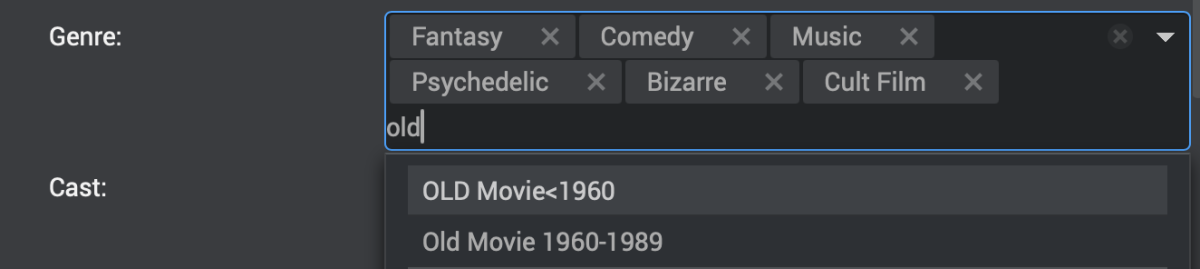 1 point
 -
1 point
-
Might be the devices internal player not fully supporting the formats being used in the video. Displaying things like pass-through or setting to down mix to stereo might help and be further proof of this. Had that problem with Kodi at one point.1 point
-
@SamES I just go the 1.9.0 (4) update on my tvOS 18.1 and this same issue persists. I also noticed an icon formatting bug that has appeared in this new version as well but I will make a different thread for that one.1 point
-
hi Luke, sorry it doesn't work fine, the subs do extract and appear on the screen as plain text so they "seem" to work, but the sub track is badly out of sync and the subtitles appear on the screen several seconds too early. I could understand it being a performance issue if they were appearing late but they appear several seconds before the audio they're supposed to align with. disabling this mode puts the subs perfectly in sync. this happens consistently with every sub track on every video I try with this mode enabled, I searched this problem and found a bunch of posts from other people having similar issues with the subs being out of sync when in this mode, going back over several years so it looks like it's been an issue for a long time and therefore not really a priority which is fine, I wouldn't even need to look at using this mode, except for the fact that embedded plain text SRT subs are burning in anyway for some reason, and the only way to stop this seems to be manually extracting them and storing them as a separate file. this is more what my thread is about as this seems like incorrect behaviour and something that should be quite easy to solve? identical plain text SRT subs should exhibit the same behaviour whether they're embedded in a container or stored as a separate file, no? one thing I've noticed is that when the subs are embedded, they appear in the selection box as SUBRIP format, and when they're a separate file they appear as SRT format. I'm not sure if this actually indicates anything but I figure it's worth mentioning1 point
-
Still getting the same error... Edit: Actually, I think it worked! I just needed to restart the server for some reason. Thanks!1 point
-
1 point
-
Since you do not write nfo file, only thing I can think of would be Emby is removing and readding your media so it will lose the DB only data as it the item gets purged from the DB and then Readded, just a guess without logs from when it happened. Has Emby every saw your media/libraries offline/inaccessible?1 point
-
Oh my, it was all my own fault. @Happy2Playled me to the right direction! Some weeks ago, I installed netbird (something like ZeroTier) to be able to securely access my home network from my mobile and my tablet. Therefore I had to enter my netbird ip range in the emby server network tab so that it will be recognised as a local network, which I did. I completely forgot to add my own home network ip range. Done that now and hurray: it works again! No transcodings, just direct play. Thanks to all your help! Nathan1 point
-
Thank you so much1 point
-
Here are some other commands to run if you docker.img is filling up on unraid. If you run docker image ls from a terminal on the server, you'll get a list of all images that are being stored including their size. If you run docker system df , that'll provide a summary showing total size of images, containers, volumes, build caches, etc.1 point
-
ok... will do that when i get home - sometime tomorrow1 point
-
HI, we found one additional thing that will be in the next update to Emby for iOS, so please let us know if this resolves the issue for you. Thanks.1 point
-
Ha ha so the mobil app can't downmix to 2.0 or mono. Great to have a app that cant do that, when most phones only have 1 speaker
 1 point
 -
Recently updated to 4.8.10.0 and noticed sorting Programs by "Resolution" was added back in! Many many many thanks, Mr. Luke.1 point
-
@verlagueOK we'll take a look at it. In the meantime, you might want to take a look at this: Thanks !1 point
-
You can bulk find and replace in files with ultraedit https://www.ultraedit.com/support/tutorials-power-tips/ultraedit-linux/tar/ You can also do it with notepad++ via wine in linux https://superuser.com/questions/1003790/how-to-find-and-replace-lines-in-multiple-files-using-notepad/1003801#10038011 point
-
Hi, I haven't seen any posts with updates but I apologize if there have been. I would really like to see support for accessing downloads in Android Auto. For me I download and listen to podcasts while driving. If you have any updates on this Feature Request, please let me know.1 point
-
Just to ping this conversation again, but I would love to have the feature back where I can run a report on my library and see in an Excel sheet format any episodes I may have forgotten about. I don't watch everything I have because it's not all for me so I don't pay complete attention to everything, and when a library gets fairly large it becomes easy to miss episodes. I don't want to spend a lot of time checking each series one by one when it could be done using a top level report feature. So please, if possible, bring this feature back. It was very useful to some of us.1 point
-
Sorry to resurrect an old thread but this feature would mean the world to me. I have over 1700 movies and scrolling through them doesn't work at all. It can't keep up and sometimes just stops loading movies. If we could get an alphabet similar to what is seen in other apps like the Firestick or Android TV apps. Even the web browser shows an alphabet on the side. I will pay $100 to get this feature into the Apple TV app. That is how much I want to get this feature into the Apple TV app. Hell even the IOS app has the alphabet on the side. Can we please get this feature into the Apple TV app? I am dead serious about the $100. If that is what it will take then so be it. I just want this feature in the Apple TV app. I have attached an image as a reference. This was taken from the web browser. If needed I can also take an image from my IOS apps or fire sticks or Android TV.
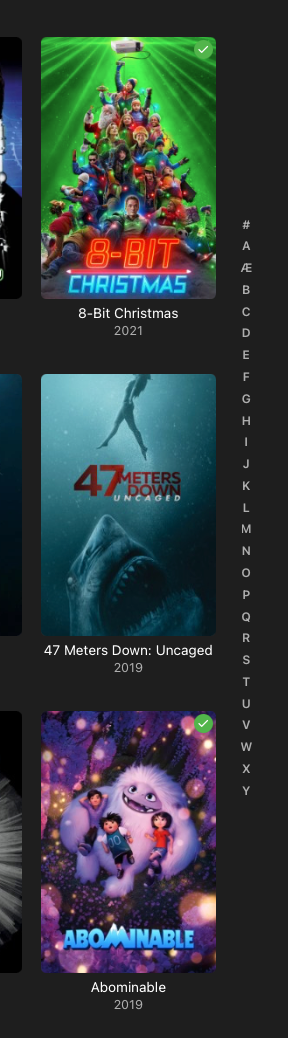 1 point
 -
I'd love an update on this as well. it makes it a nightmare to navigate the library. Im having the exact same problem where I cant find titles that have titles in them. For instance if im looking for Skylar Vox but the title is called Skylar.Vox it will yield no results.1 point
-
Clairement, ils pensent que je suis trop fort !1 point
-
I have set up the debug on the Emby ATV app. I just wanted to do as much troubleshooting my self to help them eliminate issues. UPDATE: @JayceDK was right! I used ffmpeg to convert the audio from 7.1 to stereo and remove the 7.1 track and it plays fine. It does transcode and its super fast. So the issue here is that Emby is forcing the video to transcode when the audio needs to. Thanks @JayceDKyou bloody champ. Now all I need to do is get those logs to emby and see if the devs can sort this out.1 point
-
Hi, we'll take a look at it. Thanks for reporting.1 point
-
would love to see Emby play ISO, especially 3D frame packed ISO files.1 point
-
Absolutely this! I have ~15 close friends and family who access my emby server. They accessed it when it was a Plex server, but I know none of them are still using the Plex client for the content they provide. Plex lost its way back in 2018 when it started making users connect to their services to access local content along with questionable privacy policies. I'm glad I jumped ship back then and have no regrets, although I'd love something like Tautulli on Emby.1 point
-
Great news. Emby for Samsung is now available in the Samsung app store for more countries. If you're in any of the following countries, you can now install the Emby app using the Samsung app store: Argentina Australia Canada Czech Republic Denmark Finland France Germany Greece Iceland Ireland Italy Netherlands New Zealand Poland Portugal Spain Sweden Switzerland Turkey United Kindgom United States Virgin Islands We are working on adding more countries so stay tuned! View the full article1 point














.thumb.png.1ddf135ad99a72646a26d671a28ffe35.png)