Leaderboard




Popular Content
Showing content with the highest reputation on 10/07/24 in all areas
-
Worked perfectly. THANK YOU SO MUCH!!!2 points
-
This is one of, if not THE best Emby plugin IMO. The various options have been entirly our fault as users because we want them. Not every option needs to be filled out. Also, I have a Roku and while it isn't as smooth as perhaps other options - I've used the plugin from day one with it. There are lots of people, including the creator, willing to help you out if you ask us.2 points
-
There are so many options because users have requested them. But you don't have to use them all. Like you said a name, logo and genre condition is sufficient for a channel. From other posts of you, i can see you are an Roku user. "Playlist Playback" will not work with Rokus for a WAN connection and results in a 60 seconds black video. But this is not something you should blame the plugin for. Blame Roku for their super restrictive app policies or yourself for buying such crippling devices. Anyway, nobody is forcing you to use this plugin. If you still want to try it and it doesn't work, just come here and ask for help (which you didn't do yet) or do not use it at all, but do not come here to only complain.2 points
-
Oh yeah, have seen some already watched ones during import and now also favorites are appearing. Seems like favorites take longer - but the scan is also not complete yet. So all fine. I'm a premium user - haven't configured the backup & restore yet. Probably a good reminder to do so now.2 points
-
That would be great, Luke.2 points
-
"Guestimate" may be more accurate. Sorry, couldn't help myself. I think "Default" would be better than "Auto" as well. "Auto" to me conveys the notion it will choose the best resolution/bitrate for each stream, which a end user could easily take as being the best or optimal choice. "Default" conveys a value that will try to work for most people but doesn't convey it's the "best" or "optimal" setting. Carl2 points
-
I can bulk set the lock flag with the process I use...so that is what is what I did and it worked. To close this one out, this is the process that works as I was hoping: Set the "lock" flag to "False" in the .nfo file for all movies in the library. Rescan the library (this reads the lock tag and sets it to false in Emby) Refresh Metadata on the Library with the setting "Search for missing metadata". Once done, reset the "lock" flag on all movies in the library. Rescan the library (this reads the lock tag and sets it to True in Emby). The people pictures are all populated now (for the ones it find of course). Thanks for the help everyone, I appreciate it.2 points
-
"Default" should do, as that's what it seems to be in most cases... Paul2 points
-
I think that it would be a good idea if Emby rethinks the way it looks at audiobooks. Currently, it would seem that Emby is treating audiobooks in the same way that it treats music. While I understand the ease of this for the programmers, as they basically just use the same a mp3 player as they would with music. I would argue that audiobooks should be treated more as TV series than albums/cds. 1) With an audiobook divided into chapter each chapter would be treated the same way as an episode in a TV series. With Emby marking each chapter as played or not, and remembering where in the chapter that the user stop listening. For those who don’t have their book broken into chapter Openaudio is a great program for this, and I am sure that there are others. 2) Treating each audiobook as an individual series would allow for a continue listening (instead of watching) row on the main page. 3) It would also make it easier to navigate audiobooks as the audiobooks page would first display the books themselves and not the author. Having the ability to sort by author is nice but not a necessity when looking for a title. 4) With treating audiobooks in this manner, one could also then set up “collections” such as “Harry Potter” or “Sherlock Holmes”. 5) Emby would then get rid of the “shuffle” button on the play menu inside of an audiobook, as this is unnecessary in that you don’t shuffle a books chapters (unless someone really wants a head trip) like you would the tracks on a cd.1 point
-
We wanted to share a quick review of Emby that was recently done by Sergio Ambrosio, a popular tech blogger in Spain. We are excited to see that people are taking note of the product that we pour a lot of effort in to here and look forward to more reviews in the future. Thank you Sergio for taking the time to review Emby! You can read the article HERE Later this week, we will be posting another blog focused on transcoding and some best practices to make sure your server is setup properly to utilize this great feature!1 point
-
They are after you check "Allow remote connections to this Emby Server."1 point
-
Thank you. So no new seen issues when comparing the new build to the previous build in 4.9.0.141 point
-
Not seeing this issue with 1.9.0, thanks1 point
-
Then he simply needs to visit https://www.imdb.com/ and search there for the movies he might want and then find somewhere to purchase the ones he wants or he needs to find them in his live TV guide and set them to record, assuming he has premier.1 point
-
Hope this helps. Thanks for looking into this. screen-20241005-080859.mp41 point
-
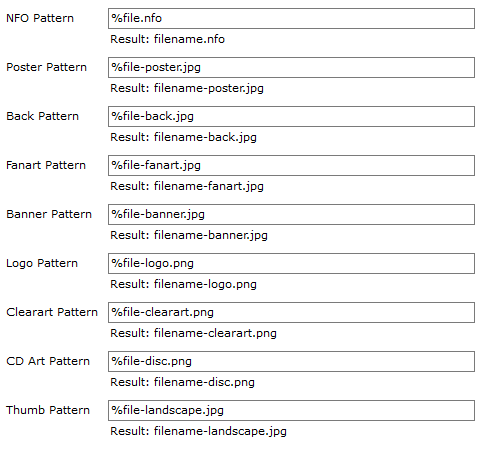
Yea, those of us that have been around in this since the Xbox Media Player days on the original Xbox have gone through a lot of changes to stuff. To be honest though, the filename included in the artworks was originally done for XBMC I think, and from what I can tell is still support by Kodi today...though I can't be sure because I use Emby, where I know it is supported, and then the companion to Kodi...so maybe that is the only reason it works in Kodi. It would be really cool to have the ability to change the naming convention to one or the other perhaps. This is what it was setup for originally (way back when, I can't tell you exactly): I understand the priority of this in the grand scheme...so I fully understand it isn't likely anytime soon. Thanks @Luke
 1 point
 -
Thanks, I'll look at that.1 point
-
Thanks...I was afraid that was the answer. It would be really nice if there was. I was hoping to use one library as the "staging area" to be able to get the metadata how I want it before moving it to the main library. I do that today and it works ok...except that the filenames that Emby creates for the Video Artwork do not match my other toolsets, so I end up with duplicates. Appreciate the feedback.1 point
-
Yeah seems a bit crazy. But I have noticed they always say they will implement a feature but 8 years later they still havent. It seems to be a common theme with Emby. I love Emby way better than jellyfin and plex but I just wish they were more honest and open. But the downmixing to stereo is in the android TV app just not the android app....even though they keep saying that the android app is the one they're focused on...ah well.. I'll just deal with it I guess..its not like we have anything better?1 point
-
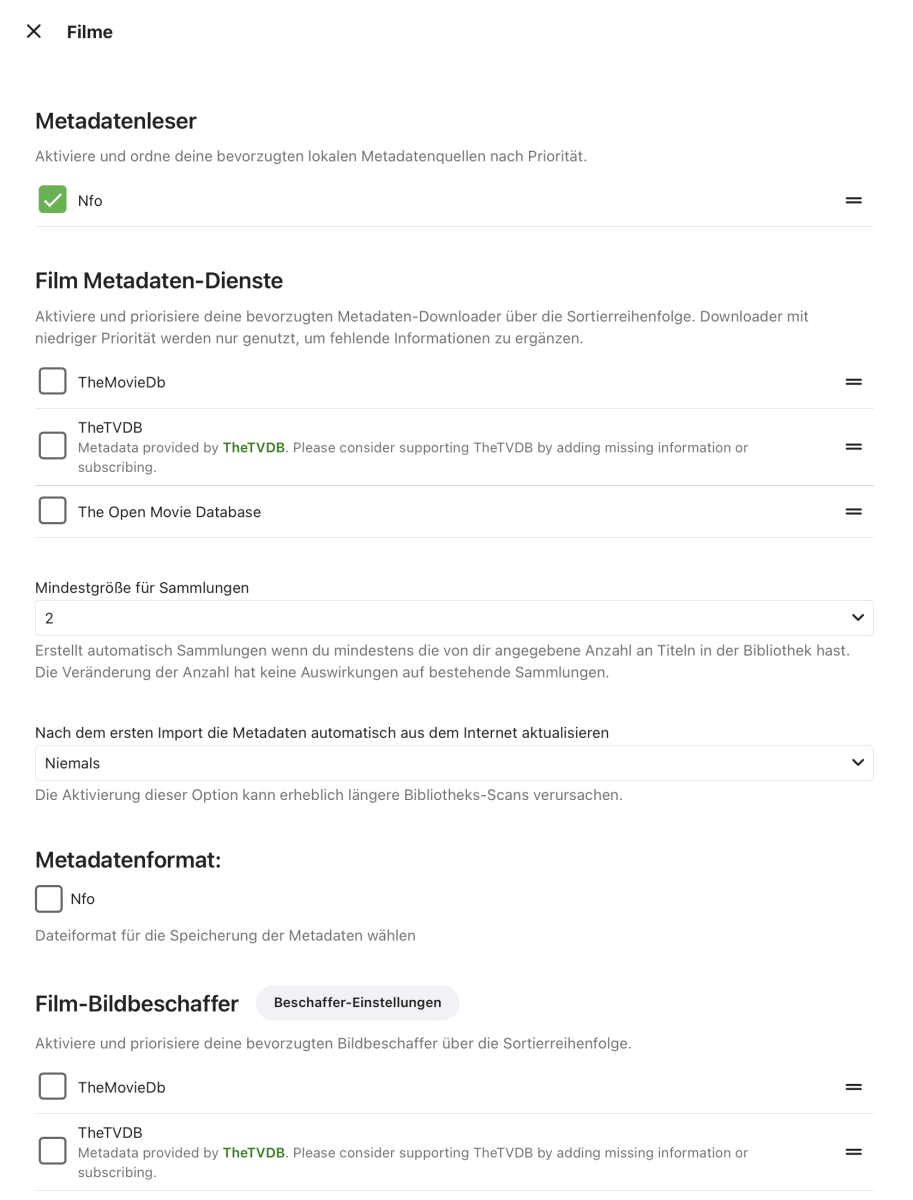
Sorry, then I misunderstood. With the setting he found the movie and the pictures, but no genre, for example. Now I've set it that way and it looks like everything worked. It has recognized all the data from TinyMediamanager and so far has not destroyed my database.
 1 point
 -
We wanted to share a quick review of Emby that was recently done by Sergio Ambrosio, a popular tech blogger in Spain. We are excited to see that people are taking note of the product that we pour a lot of effort in to here and look forward to more reviews in the future. Thank you Sergio for taking the time to review Emby! You can read the article HERE Later this week, we will be posting another blog focused on transcoding and some best practices to make sure your server is setup properly to utilize this great feature! View the full article1 point
-
Okay but does the media have existing metadata with it? What files are in the media folder? If you have nfo files what are the contents of that file? But from a clean install/portable with media with NO existing metadata I cannot create Collections with the library option disabled when importing media. So we need the entire picture of your media, content with media as something beside Emby has to be applying the required information.1 point
-
Ha ha so the mobil app can't downmix to 2.0 or mono. Great to have a app that cant do that, when most phones only have 1 speaker
 1 point
 -
Yes this is the best option as Emby will just read what you have and posibly add what it want directly to the database. I do this as I still use xml metadata from MCM.1 point
-
You can't currently on AndroidTV devices, only on Android devices. The only way to activate is if you have Emby Premier.1 point
-
Standard Android app currently requires active Premiere subscription for Full Playback on TV devices. App Unlock is feasible only on mobile devices.1 point
-
Haha, well done Pünk... well done.1 point
-
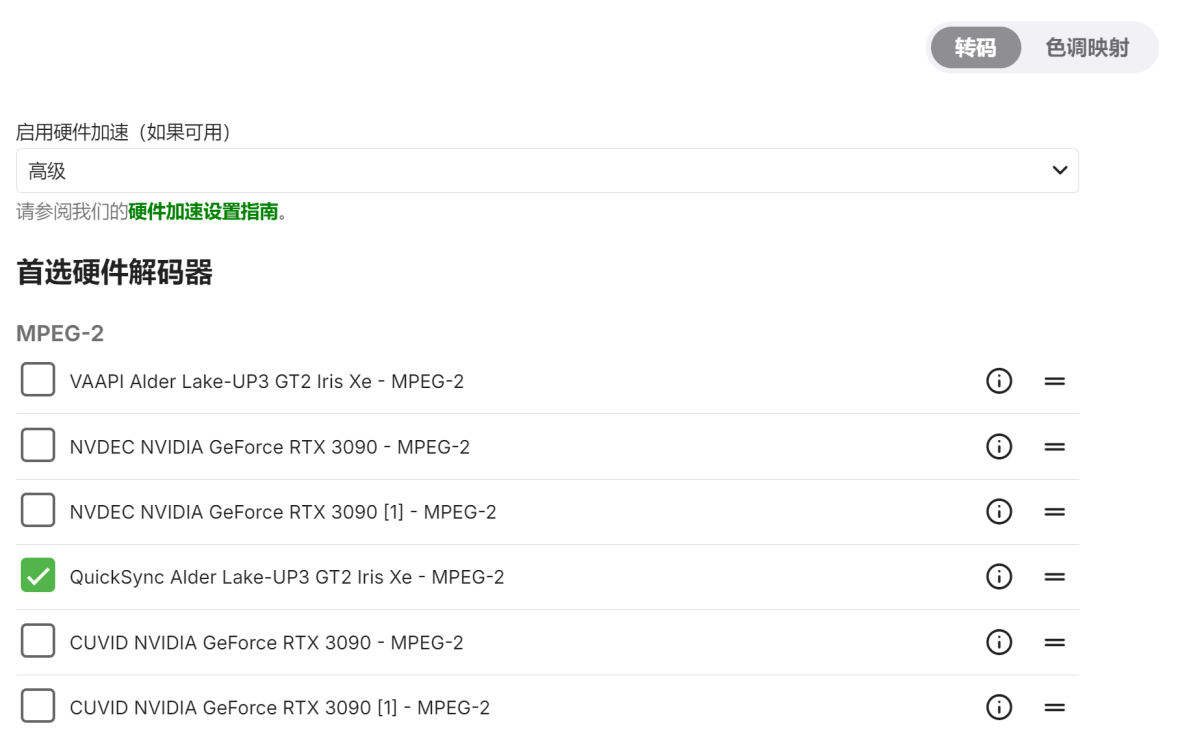
This weekend after I update redpill loader to 24.10.0 and emby to 4.8.10.0, the problem solved. I am not sure which update was related....
 1 point
 -
I corrected a few bugs that I created when I added "HomeVideos". Mostly this concerned preventing users from adding Photos or audios to a channel. I have on my to do list to add audio files in the future. The TV Platform is already equipped to support them. Vic1 point
-
Never mind. I found how to do collection. While it will be a bit of work this will look a lot better than how the Tv Series looks and behaves. Thanks for the follow up.1 point
-
Recently updated to 4.8.10.0 and noticed sorting Programs by "Resolution" was added back in! Many many many thanks, Mr. Luke.1 point
-
OK, will do. Thank you for your response.1 point
-
haha oh i did not think about that! Never used it before!! Thank you1 point
-
Ok so if the server chosen preferred order is correct then an autoplay action can be created, it would just play the "FIRST" one in the list returned by the severe automatically. I can add an option for this in the settings.1 point
-
Thank you Grim I never seen that and I will check it out.1 point
-
OK this is a use case that we are looking into improving for all users without having to enable any missing episode option, so stay tuned.1 point
-
Thank you guys I will not be opening any ports.1 point
-
Hi, we can look at adding this .Thanks.1 point
-
No, not anymore for me Luke. Currently running fine with 4.9.0.30-beta Can't speak for OP though.1 point
-
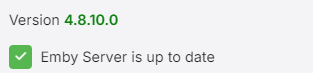
Sorry just saw all these messages. For me typing "update" in my Emby console did not work. root@emby:~# update -bash: update: command not found The only thing that works for me is typing what I've mentioned above: bash -c "$(wget -qLO - https://github.com/tteck/Proxmox/raw/main/ct/emby.sh)" So whenever you see something like this in your Emby server management: Just run the code I've mentioned and you should get everything up to date without losing all your settings.

 1 point
 -
A simple bandwidth test done just before playback simply works - AndroidTV/FireTV has done it for years - and 100% of my remote clients direct play on those devices. Using any other client, Samsung Client, LG Client etc they get transcoded when I know it should direct play with ease. I'm really not sure why Emby can't implement what AndroidTV does .. OR allow the Emby Admin to set a value in 'devices' to assist with the so called 'auto' calculation .. reducing it to 'something low quality but is likely to work' is really not an acceptable technical solution in 2024 imo.1 point
-
Just so it doesn't get lost in the discussion I want to make it clear that LARGE majority of us aren't asking for adaptive streaming or expect it from an app like Emby. We realize that it would require multiple versions of every media file or transcoding all the time. What we do want is improvements to the initial quality selection and/or more transparency around what "auto" does.1 point
-
I think calling it Auto is confusing and not representative of what a user expects it is. When I see auto I expect the maximum quality my internet can handle, not the lowest common denominator that will work for the average user without issue. Just show the quality the app defaults to rather than the ambiguous "Auto". If the app is going to default to 1080p 4Mbps just show that. If a user sees a low quality by default they are more inclined to increase it, but if they see auto they assume they are already getting the best quality. The mobile apps already have separate settings for Home Network and Internet quality. A streaming device or TV app shouldn't worry about internet connection quality and consistency.1 point
-
Hi Luke, thanks for replying.. yes.. yes I have tried it and I am using it.. it is the one I always use when installing the Samsung Emby app via USB. And it is still the same.. and as I mentioned, what I find very strange is that when creating collections the background appears correctly. Greetings1 point
-
OMG I just made a big deal out of nothing removed ALL movies and made one with all my catrgorized movies (with path) and so much better organized now! Thanks!!1 point
-
First search result brought me here. Many thanks from the future for this applicable solution!1 point
-
Si grazie1 point
-
You mean the device which offers the easiest access combining all of the FAST streaming services into one place? Well..It already exists. It is on the Roku. Users with that mindset should use the "Roku Channel" and "Roku Live TV". They rotate content all the time and movies/tv bounce from service to service and Roku keeps track in their channel where it has gone. If people are interested in FAST channels they should just invest in a Roku which already has contracts in place with all the streaming services to host them inside its Roku Channel application. The Roku channel has instant on demand titles available from all streaming services available on Roku. The Roku Live TV channel is pretty much PlutoTV with even more content and channels. In contrast Emby allows the user to curate their own library of content which never expires and contains no interstitial advertising. Why would you want to add streaming services into Emby and then be forced to watch commercials while you watch content. I do not understand. Roku does not allow this behavior of tracking another channels FAST content to launch from your own app. I am sure every major app store has similar terms and conditions.1 point
-
You would have thought by now the sound engineers would have figured this out and made an adjusted 5.1 audio track for release on disc, streaming, or cable networks......but Hollywood lives in a bubble. Sometimes the sound is so bad I simply run the CCs so I don't have to keep rewinding trying to figure out what someone said. Sound engineers don't know how to master music anymore either.....then again there isn't much these days one could consider music. We're doomed.1 point