Leaderboard




Popular Content
Showing content with the highest reputation on 10/05/24 in all areas
-
All valid points - but I think emby are missing the essential data of what is available in the first place. If a quick test, reveals that 40Mbit download is available, then even if they halved that to 20Mbit to be 'really conservative' then even 4K would typically direct play. If only 10Mb download was available and again, it halves it, then transcoding is going to typically happen - but at least that's valid based on a technical decision, not a guess. The point is - if you have the upload bandwidth (and are willing to use it - the Admin has the choice via the Emby user config) and the client has ample download bandwidth - then it should be used on fixed devices. Even on mobile - a 'reasonable' effort can be made to get in the right ballpark. Emby need to utilise newer transport technologies that are available to them - if FTTH is available, then I expect the Emby user wants to use the bandwidth they are paying for - and the remote user will not want to see some transcoded bit-starved stream on their new shiny 4K TV. Emby frankly need to up their game in this area - especially as they have a working model of it with experience on how best to implement it (on AndroidTV/FireTV) - it just sounds like excuses to me on why this is not implemented on other 'TV' based clients .. sorry.3 points
-
I use it frequently to do bulk tagging of TV channels. It works just fine. If you have a large number to tag it might seem frozen but let it run and eventually it will finish. Easier method is to break the channel tagging into smaller numbers of channels like 100 and then just run the tool a few times.2 points
-
You can't do that with Emby, as fare as I know. If save to Metadata Savers "nfo" i enabled it will save changes. You would need to make the nfo files in another program, that supports emby. And disable emby Metadata Savers "nfo" But you could set nfo files to read only, but that would give you errors in your logs, that would fill up your log drive.2 points
-
I wasn't really talking about adaptive streaming. My point is, simply, that the auto setting isn't working as expected by the user. It is counter-intuitive, because it suggests that it automatically chooses the best setting, that is possible, considering the server side limits that have been set and the user's personal internet connection. But then there are people who are using the web client, who could easily stream with 20 mbps or more, because they have 200+ mbps download, but they are stuck with a maximum of 7 mbps. I never see it go beyond, and a lot of stuff has to be transcoded because of that, which increases the workload and power consumption of my server. I have limited every single stream to 12 mbps, but web client users never reach it, while Fire TV users always reach it (if the media has a higher bitrate of course) And sometimes I see users streaming with 2 mbps, or sometimes it goes even down to 768 kbps. And they just watch it that way, which is ridiculous, but they do. A simple restart of the media would probably fix this, but they won't do it, for whatever reason. Maybe because they think, it's all that they get. People don't like changing quality manually, because they are used to the fact, that you don't need to manually adjust such things nowadays, and that you're always getting the best quality, that is possible in your environment. So, in my opinion, there has to be something to take these users by the hand. Like a bandwidth check every few minutes or so, that checks if the current quality setting is still the best one in the current situation. And then show a message like: "We have detected, that you could choose a higher quality. Would you like to change now to: 1080p (15 mbps)?" And if he chooses yes, just change the quality like you would do manually. And the same with reducing the quality. But maybe you should just do it then to prevent buffering. Or for a start, just implement the same technique that you use for the Fire TV Android App, into the other clients and get rid of these hardcoded values. At least do an initial bandwidth scan and set the quality accordingly. This could be still leading to situations where a user is stuck with a low quality setting, because the test failed, or the connection was bad exactly when the test happened, but that would be still an improvement.2 points
-
A connection to Emby will be just that, only Emby, nothing more. So long as you configure the Emby user(s) allowed to access remotely to have no rights to change anything, there is no great risk. That is not to deny that bad things can happen; but that is not limited to Emby - just using email or browsing unknown sites is probably a greater risk! Some additional security can be gained by setting up a secure link (SSL/HTTPS) or a VPN - but for most people the effort involved will not be worth it. Paul2 points
-
Thank you for the clarifications! I have an idea for the test video, and I hope to be able to work on it after the weekend. I'll update here.2 points
-
A new beta of the TV only app has been put up. This beta fixes the issue with frame rate switching on the new GStreamer (actually, related to Android 14) but it also implements our new policy of making playback in this app free for normal single-family use. As of this version, playback is free for up to 5 TVs. No other Premiere features are included of course and any use beyond that limit will require a Premiere subscription. Previous unlock purchases are still honored but the unlock is no longer an option going forward. We feel this strategy brings the most value to our common users and makes it more difficult for illegal streamers to get around the device limit. Thanks for your support.1 point
-
I developed an alternative to the AutoCollection plugin - the plugin that merged different movies with the same providerID into one. I missed the features in the original plugin - merging by Kinopoisk provider and splitting the movie by providerID. Features of the plugin: runs automatically on movie add (configuration "Run Automatically"). merge movies in separate libraries or between all libraries ("Merge Across Libraries"). ignore locked movies ("Do Not Change Locked Items"). merge can be invoked manually in Scheduled tasks - "Merge Movies" in the "Movie Auto Merge" section. global (all movies in all libraries) split can be invoked manually in Scheduled tasks - "Split Movies" in the "Movie Auto Merge" section. split of a particular movie in the plugin configuration by providerID (search in all libraries). merge by all available Emby metadata providers - IMDB, TMDB, Kinopoisk, etc. complementary merge, e.g. if the first movie has TMDB, the second - has IMDB, TMDB, and the third - has only IMDB, and all those movies are the same, they all will be merged into one movie. site: https://github.com/luzmane/emby.movie.auto.merge/releases/latest/download/MovieAutoMerge.dll1 point
-
This is maintenance release, primarily targeting Linux users. Here are the changes: Fix hardware transcoding regression on some Linux platforms1 point
-
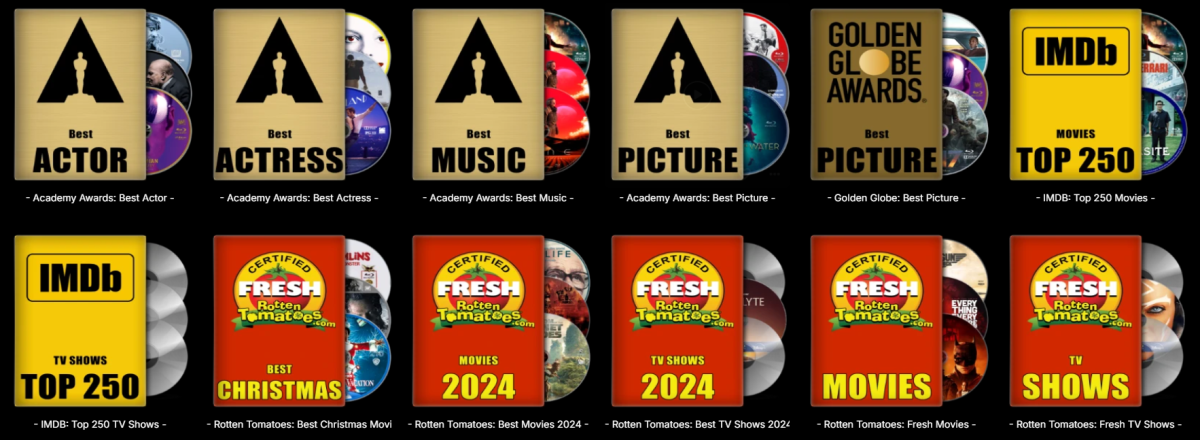
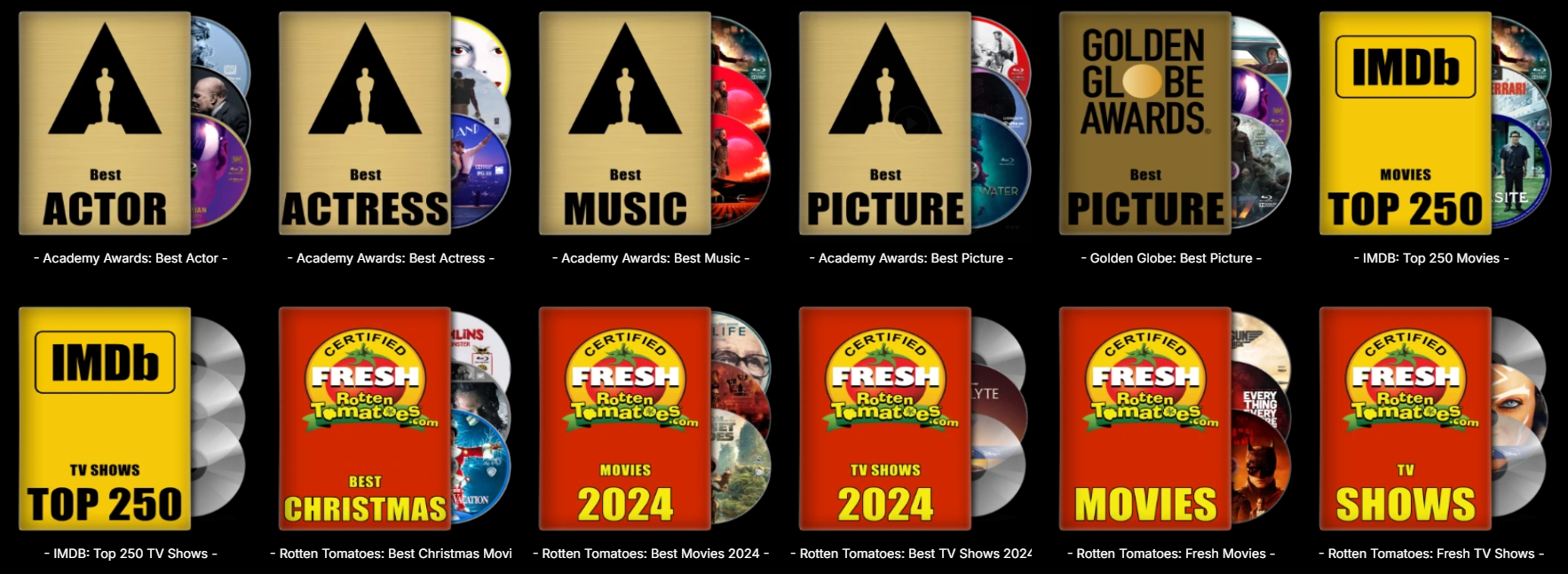
Now that the "Trakt List to Collection" plugin is working for me, I made some images for the created collections. Thanks again @bakes82for this great plugin! I also added a GIMP file with all the layers in case someone wants to create his own images. Font used is Impact Condensed. 20240706_Collection_Images_Awards.zip
 1 point
 -
Hi Emby Team Since updated to the last version, when you're playing anything and you quit playing (by pressing back button on apple remote as done always), the audio of the video keeps playing until you try to play another thing (or the same thing again) or you kill the emby app from running on Apple TV. Curiously if you try to play the same video the interface loop back to the previous screen. The video below shows this issue: IMG_1897.mp4 Can u please fix it asap ¿?1 point
-
That’s all good. I wasn’t sure if a new version was available yet. It should be soon so please let me know if it’s any better when that version becomes available.1 point
-
Flat out AWESOME! It works and fixed the problems. I REALLY thank you for doing this. I and my family use my Mediaportal/Emby set up everyday. Being without LiveTV was frustrating. -LeeTXJD1 point
-
Hi, Perhaps the best method would be to remove the number from the filename, so Emby can identify them correctly. You would then manually edit each movie to edit the sort title entry, then lock it after the edit. Something to keep in mind is that the title or sort title field is character based and not number based which means the sort order would be similar to 1, 11, 111, 1111, 2., etc Careful use of the sort title knowing this would still allow you to achieve this however, Perhaps a better method would be to get everything scanned in properly, then setup a playlist using the order you want them to appear in. You could then see the movies normally in the movie view or see them ordered as you want using the playlist view. Carlo1 point
-
I agree your points are all valid as well. Certain device/platforms have more functionality that allows Emby to pick a resolution/bandwidth used to stream that works better than on other devices. There also seems to be two different schools of thought on bandwidth use: 1. Make the most use of bandwidth available which would favor direct play when available or using the highest transcode resolution/bandwidth it can. 2. Conserve bandwidth (especially for the server) to make the best use of limited bandwidth available. Many of the "problem" clients seem to fall into #2 when the admin would prefer it defaulted to #1 when using the client auto setting. What might help a lot would be a new config setting on the network settings page, used for remote users. "Remote Client Bandwidth Optimization. It could have a dropdown with 2 choices as above, or maybe a 3rd that's somewhere between the two choices using a reasonable upper bitrate limit in the 8Mb range. This would allow the admin to setup the server for remote users that would make the most use of resources available to the server. The Emby client would then use this global setting if auto were active, to choose the res/bitrate fitting the criteria. Now instead of defaulting to use a "conservative" amount of bandwidth as it seems to do, causing extra transcoding that wasn't needed, it could default to using a higher amount of bandwidth giving the user a better-quality stream as well as often skipping the need to transcode in the first place saving server resources for better use. At present, there are multiple settings and environmental condition that affect the client choice but typically the decision seems to be too conservative for many systems. Having this new global setting would allow the server to start the decision process with a low, medium or high bitrate default choose that wouldn't be lowered unless the bandwidth check determines there isn't enough bandwidth to support the global setting, at which point the client would pick the best quality resolution/bitrate for transcoding. Just a thought, but I think this could be easily implemented and give the admin far more control and guidance on the remote client's default use of resources available to it. Carlo1 point
-
You're probably referring to Horizontal Home Screen (available only in TV layout): 1. Settings>Display>"Display Mode": TV 2. Settings>Home Screen>"TV mode home screen": Horizontal1 point
-
I'll try to investigate and send you data... thanks!1 point
-
Yep, I just came back here to say that, after double checking everything, I looked at the app name You are 100% right. I stupidly installed the wrong version. All working now, and thanks very much for such a quick response.1 point
-
1. Message is seen on all Emby clients when starting media playback (Android, Windows, browser, Firestick). 2. 7.2 is not (yet) available for NAS. 3. Updates have to be done 'manually' so server is shutdown and restarted during the upgrade. 4. Performed about 10+ updates like this But: restarting the Emby server using the Server Dashboard on the gui solved the problem! Prevents me from fiddling around and installing the old version or restoring Emby from backup! Thanks!!1 point
-
Does your VPN provider support port forwarding? Have you configured it? Or set split-tunneling, if that method preferred?1 point
-
Because your servers are "unaware" of each other, each server keeps track only for its users. Because Emby operates on a different principle, there is no central auth server, each server is completely separate/self-contained. You'd need to use some external service/plugin, like Trakt.1 point
-
Each to their own. I prefer a device that is a fraction of the price, uses very low power, doesn't need any hacking or drivers to get it to work, plays HDR and DV and HD Audio out the box. Media PC's had their day - 10 years ago, things have moved on imo where you can get 95% video and audio capabilities of the source media from a decent streaming box with a simple plug and play setup.1 point
-
Laut @pünktchenpasst alles mit moviedb.org. Ich weiß nicht, was Du gesehen und interpretiert hast, aber bestimmt nichts mit einem API-Key. Nebei wird tmdb nicht nur für Bilder von Schauspieler usw. benötigt, es lässt sich auch leichter die Filmkollektionen finden. Ich habe lediglich omdb rausgeworfen. Und meine Videos sind perfekt bezeichnet. Da wird das in der Regel auf Anhieb gefunden. Nix WLAN. Alles über Kabel. Bei der Renovierung des Hauses habe ich nahezu das gesamte Gebäude mit CAT7 Kabel vernetzt. Den Mist mit WLAN fang ich erst gar nicht an. Das sind für mich vorprogrammierte Fehlerquellen. Außerdem spiele ich nicht über TV, sondern Nvidia Shields, wie man an meiner Signatur sehen kann. Meine IP-Adressen sind allen Geräten, welche am Kabel hängen, fest zugewiesen. Da braucht man keine Hand anlegen. Einmal eingerichtet, und es läuft. Außerdem ist bei mir alles lokal abgelegt, keine Cloud oder sonstwas. Ich weiß auch nicht, wie Du darauf kommst, dass die direkte Wiedergabe fehlschlagen würde. Tut sie nicht. Bis auf eine Tonspur (DTS:X Profil DTS-HD HRA) wird jedes Format sauber unter der Emby APP Android for TV wieder gegeben. Auf HighEnd Audio wird in keinem Fall verzichtet. Wozu hab ich mir dann diese tolle Anlage gekauft? Damit ich dann langweiligen und matschigen Sound über guten Verstärker und Lautsprecher anhöre? Bestimmt nicht! Bin keiner, der sich einen Porsche holt, und dann mit 80km/h über die Autobahn schleicht. Bevor ich auf HD-Sound (nach Deinen Angaben wohl auch auf einfaches Dolby Digital und Standard-DTS) verzichte, schieße ich Emby, Plex, Jellyfin zum Mond und steige komplett auf Kodi um. Hat pünktchen schon getan. Laut seiner Erkenntnis wird da gar nichts transkordiert. Und dank seiner Hilfe konnte ich erkennen, dass lediglich die vielen Aufgaben, die bei mir Emby "gleichzeitig" ausführen wollte, das Problem waren.1 point
-
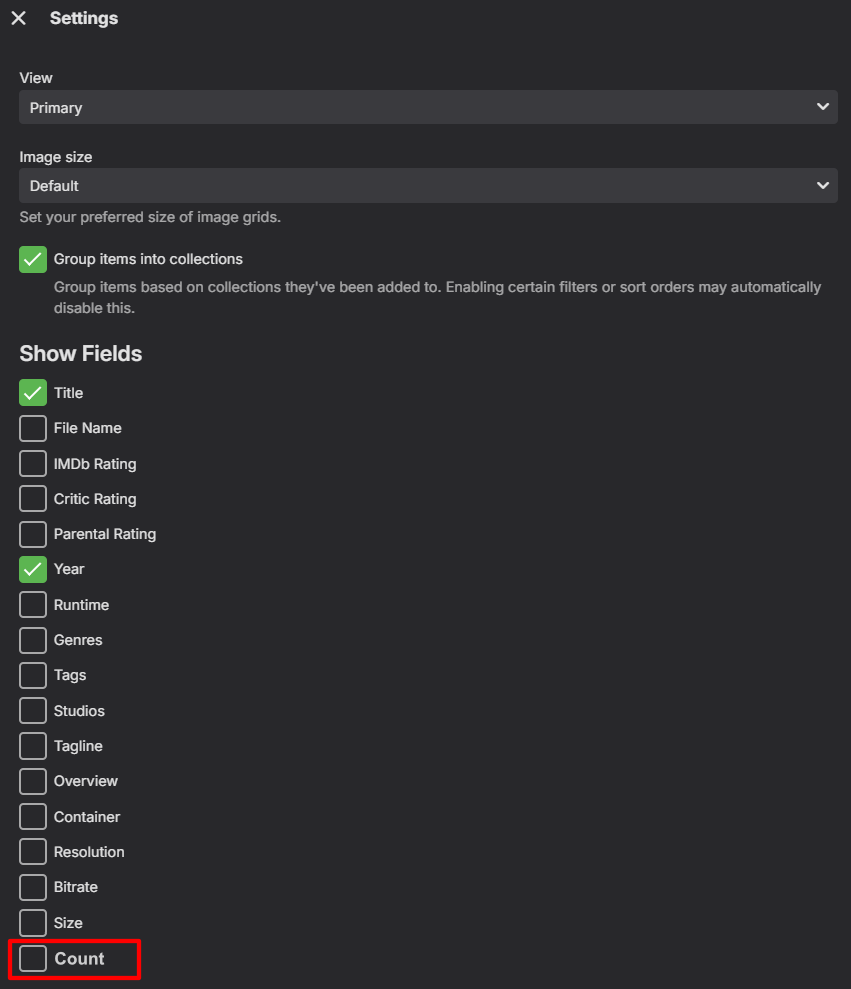
I think the best is to make it as an option of the view:
 1 point
 -
Guys this forum is not ment for download questions. Take it elsewhere, reddid is a better place for this discussion.1 point
-
Articles go missing like a mofo on usenet but the thing is the speed for what does work is what keeps people using it. Download at 100 or download at who knows.1 point
-
I’ll be looking forward to it! Thank you very much.1 point
-
Good place to start: Quick Start1 point
-
OK we'll take a look at it. Thanks.1 point
-
Here my Experiences how to set up the LDAP Access with Active Directory on Synology. I wasted 2 hours to find correct parameters - maybe it saves you this pain. 1. LDAP server address Use the server address you find in Synologys DSM Control Panel - Security - Certificates. Choose the certificate which is used by Active directory. You usually find it easily as its name ist DISKSTATIONHOSTNAME.DOMAINFORMACTIVEDIRECTORY and it is self-signed. (Download the Certificate, you need it later.) Do NOT use ldap:// as prefix, it wont work! Just the bare server name. Do NOT use IP Address, as it will cause a certificate error later (i learned it the hard way) I have here diskstation.mydomain.local 2. LDAP server Port number: You need 636. If you select unsecured port, it will fail because not enough security I got following error: "ldapexception: strong authentication required (8) strong authentication required". 3. Activate SSL 4. SSL certificate thumbprint (SHA1): You need the fingerprint of the certificate of the Active Directory Server. It was difficiult to point out, but here's a reliable way. Attention - I have a localized Windows, maybe my translated english terms may be slightly different. Open Microsft management Console on windows (WIN+R - mmc.exe) Load the Certificates Snap-in (File - add SnapIn - Certificates) Open "Own certificates" - "Certificates". Rightclick on an empty space in right section of the MMC and choose All tasks - Import. Select the certificate you downloaded on #1 above. It should now be imported. Open the certificate (double click on it) and select Details. At the bottom, you should find the searched Fingerprint. Click on the fingerprint list entry and copy the fingerprint ID with CTRL-C Paste it in Emby Now you may delete the certificate in the MMC and close it. --> Taken from I tried an online tool, but it gave me a wrong Fingerprint. I got following error: "ldapexception: The remote certificate was rejected by the provided remotecertificatevalidationcallback". 5. Bind DN I suggest to create a new User in Active Directory without permissions to do anything for security reasons. Then enter the users DN - in my case it is CN=EmbyAuthUser,CN=Users,DC=mydomain,DC=local You may use AD Explorer from sysinternals (Microsoft) to find the correct name [2] 6. Bind credentials: Just the password of the user you selected as Bind DN. 7. User search base: Simply enter the Domain Base. It's the last part of the Bind DN usually. In my case: DC=mydomain,DC=local 8. User search filter: For Active Directory, use this: (&(CN={0})) I try to figure out how I can limit access to members of my specific Group grp_EmbyUsers, but that's still a challenge. The examples above did not work so far. Maybe i find it later. 9. Login Now you should be able to log in with AD username and password. Do NOT use the domain as Prefix, i.e. mydomain.local\username this will not work! Just use the bare user name username and password. Happy watching! Remarks: To test everything, Microsofts ldp Tool was very helpful. (WIN+R - ldp.exe). With this and the webpage of kemptechnologies [3] i played around with parameters until I got something that did work. You need File - Connect to test Server, File - Bind to test Binding above (Access to read Data in AD) and Search to find a search filter. Links: [1] https://learn.microsoft.com/de-de/dotnet/framework/wcf/feature-details/how-to-view-certificates-with-the-mmc-snap-in [2] https://learn.microsoft.com/en-us/sysinternals/downloads/adexplorer [3] https://support.kemptechnologies.com/hc/en-us/articles/204990569--How-to-troubleshoot-LDAP-Authentication-issues-using-ldp-exe I1 point
-
When i originally opened the topic it was the previous tvOS build. I upgraded the tv's to see if it would change anything and it did not. In fact our last tvOS box that was still on the previous version just updated last night when I was checking.1 point
-
Hi, yes we can look at adding this. Thanks.1 point
-
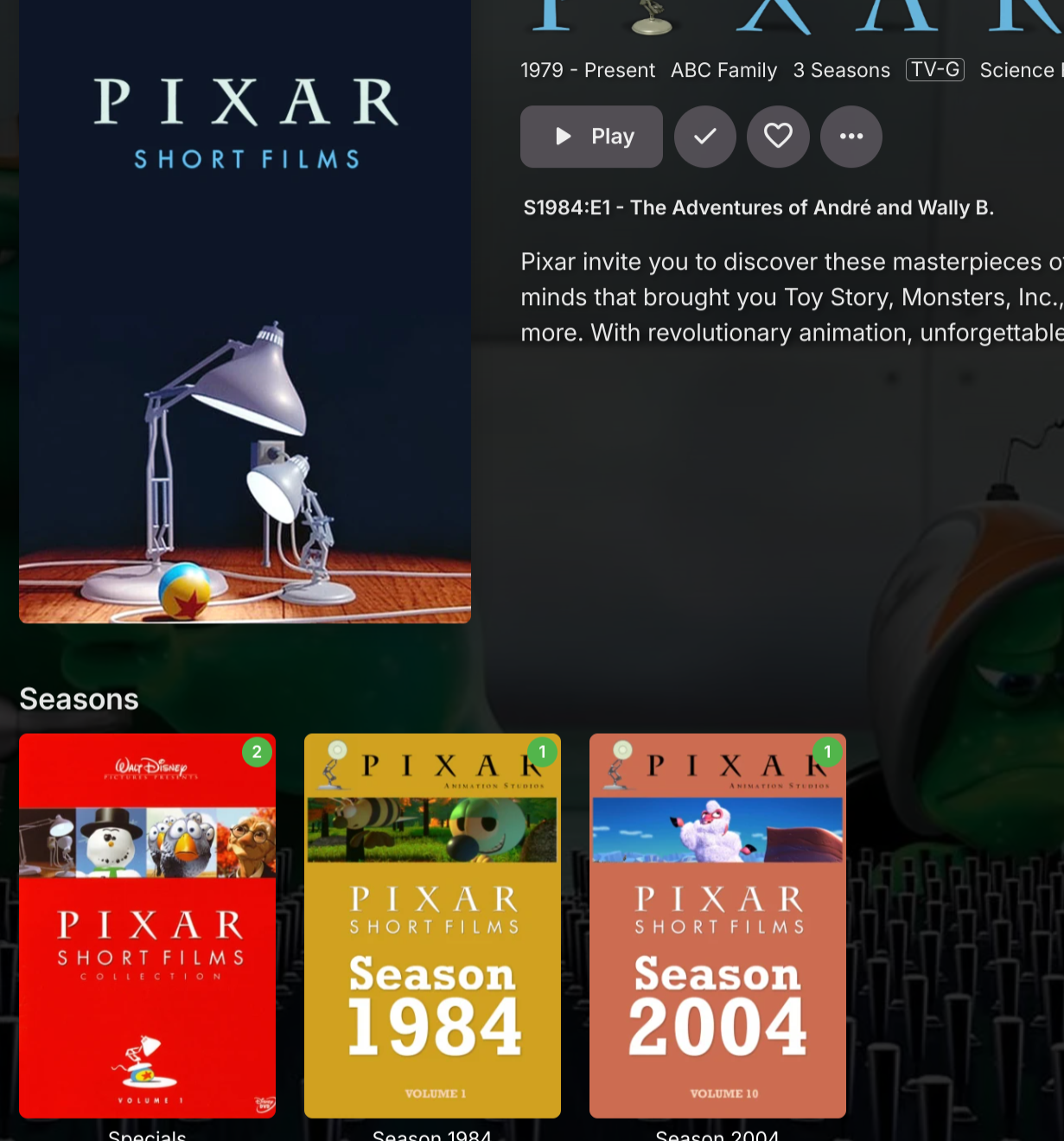
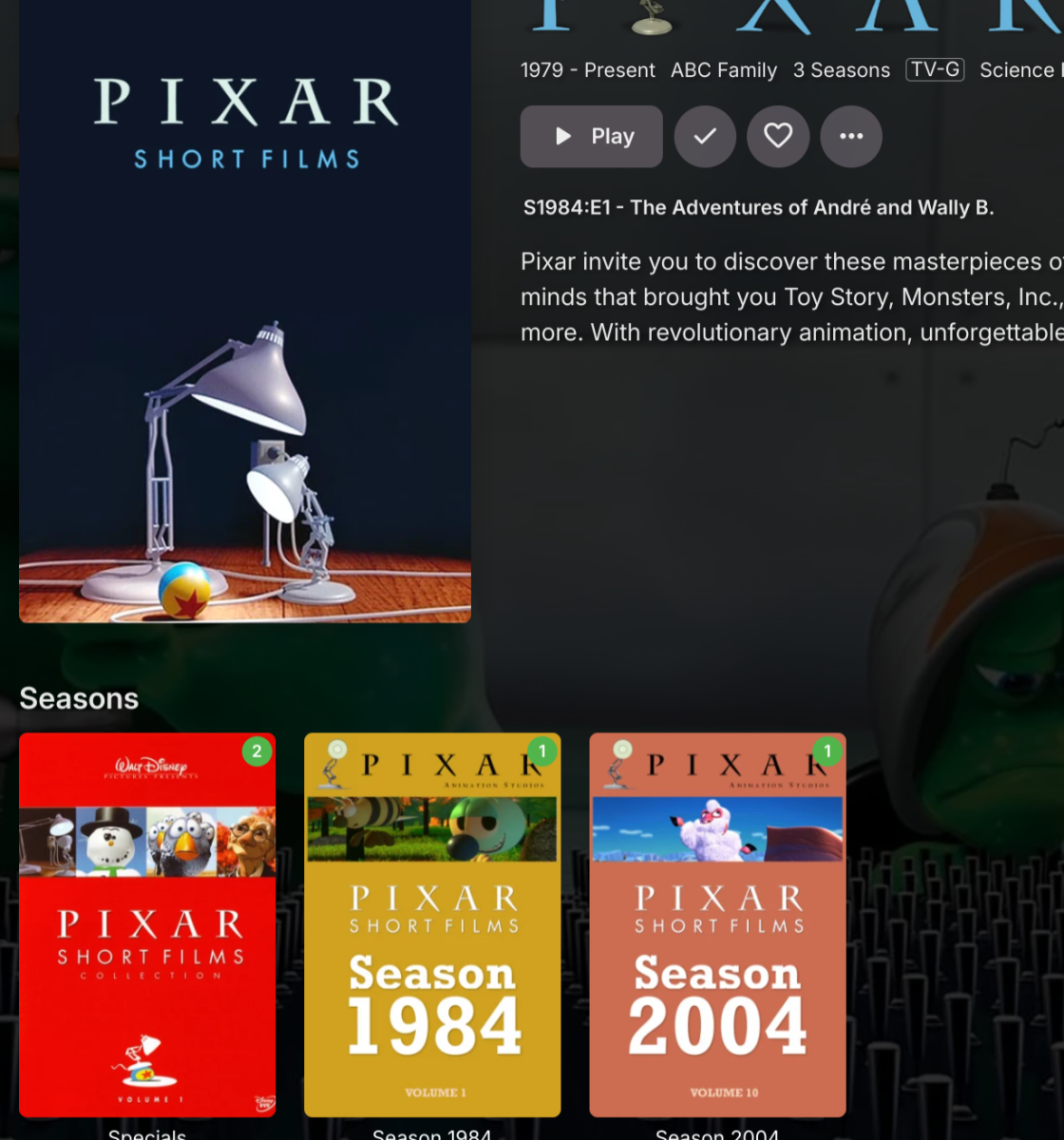
This is really weird how TVDB has the data for these "seasons". It's not correct based on the DVD I have. Thier data is breaking the files up by year and the DVD has a collection of many years worth of shorts per DVD. IMDB has the data correctly before but now it's gone. Emby is also the making "Extras" directory as a Specials season as seen below.
 1 point
 -
A simple bandwidth test done just before playback simply works - AndroidTV/FireTV has done it for years - and 100% of my remote clients direct play on those devices. Using any other client, Samsung Client, LG Client etc they get transcoded when I know it should direct play with ease. I'm really not sure why Emby can't implement what AndroidTV does .. OR allow the Emby Admin to set a value in 'devices' to assist with the so called 'auto' calculation .. reducing it to 'something low quality but is likely to work' is really not an acceptable technical solution in 2024 imo.1 point
-
New PUBLIC TESTING version available 11.1.1: Delta changelog 11.1.0 -> 11.1.1 fix server remove1 point
-
Just so it doesn't get lost in the discussion I want to make it clear that LARGE majority of us aren't asking for adaptive streaming or expect it from an app like Emby. We realize that it would require multiple versions of every media file or transcoding all the time. What we do want is improvements to the initial quality selection and/or more transparency around what "auto" does.1 point
-
New PUBLIC TESTING version available 11.1.0: Delta changelog 11.0.9 -> 11.1.0 change playerbusy threading increase aysnc conmmands timeouts to 3 seconds set highest resolution for multiversions by Kodi (as an option, default is on) autoselect best quality multiversion for episodes etc. (classic multiversions selection) (as an option, default is off) improve tvshows deduplication notifyall on content add/content updated/content remove/content userdata changed/library add/library remove (option) fix delete season/tvshow support multiversion content delete fix server remove when server is offline improve http error messages fix edge case http communication issues fix sync stalled when plugin content update in progress and Emby server restarted Comment: Database reset is mandatory Content notification (API) can be enabled under plugin config menu -> Advanced -> Emable Kodi API notifications Notification API: Sender = "emby-next-gen" Method = "Other.content_add", "Other.content_update", "Other.content_remove", "Other.library_add", "Other.library_remove", "Other.content_changed" Data = json string includes (as applicable) KodiId, EmbyId, KodiType=audio, episode, genre, movie, album, actor, musicvideo, season, tvshow, studio, tag, set, artist e.g. Data -> {"EmbyId":"4598382","KodiId":"17554","KodiType":"movie"}1 point
-
Hi, this is resolved in the next update to Emby for Apple TV. Thanks.1 point
-
Cool! I could have sworn that it went to 4-6Mbps with auto but glad i'm was wrong. Guess i should change Emby version on my dads old Android satellite box then. He always changes it to auto even when i set it juuuuuust right and tell him not to.1 point
-
I use MakeMKV to rip my DVDs, when you open the disc you just un-check the subtitles you don't want.1 point
-
Never seen this before, but my suggestion would have been to do power cycle or hub reset as a last resort if it didn't clear up. Good to see that wasn't needed though.1 point
-
@Luke This is been happening since 1.8.8 (2) version and before TVOS 18 upgrade. I've reported this to you here: In fact, in my case does not need a device restart, just kill the emby app in apple tv and open it again.1 point
-
The attached version 2.0.0 should fix your issues: MediaPortal.2.0.0.0.zip @LukePlease update the plugin catalog with the above version. The changes are in my repo: https://github.com/puenktchen/MediaPortalTVPlugin/commit/e51dcbe81cbb5b31ca5186978af96ce559bc41071 point
-
I bought a lifetime license a long time ago but, until recently, I have not really needed it. I only need it now for live TV as that is a premier feature. The actual reason I bought the license was to support Emby and a little bit so I would not have to pay more if I decided I needed it later. Of all the media managers Emby, for me, is by far the best. It is not perfect but it is better, much better, than anything else. If I did not have a lifetime license at this time I would, probably, buy one as Emby makes my media consumption easier than anything else I have looked at or heard about. Emby is, for me, the best software investment I have ever made.1 point
-
Hi, we work very hard on Emby and we thank you for your support.1 point
-
Sounds like you've answered your own question.1 point
-
Is there a place to up-vote this feature?1 point
-
I think Stremio allows aggregating streaming content in one place to some extent (Netflix, Prime). Long-term (5 years out) whatever media software can master having all the streaming services (IPTV, Netflix, hulu,etc) under one platform will end up the winner. The days of people storing personal media on dozens of hard drives seem to be coming to an end and replaced with online services that offer unlimited content.1 point
-
1 point
-
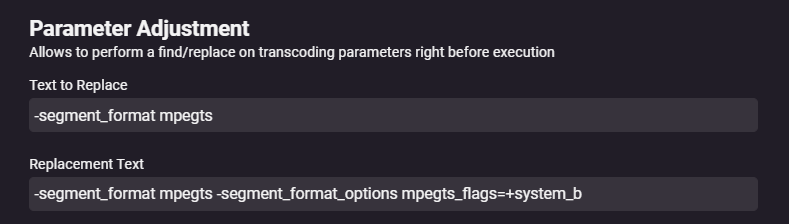
Currently as a work around. To do this, you need to install the Diagnostics plugin, reboot, then go to Diagnostic Options and scroll down a bit to see the two text fields. Find: -segment_format mpegts Replace: -segment_format mpegts -segment_format_options mpegts_flags=+system_b It appears to be that the TV doesn't support ATSC-style E-AC3 descriptors in MPEGTS (when the HLS protocol is being used), but it supports the DVB-Standard EAC3 descriptors. The latter are actually also a bit more common. This seems to be more related on the Samsung TVs. Emby is currently working on a solutions. For now if anyone is having a simulator issues please try above commands.
 1 point



















.thumb.png.1ddf135ad99a72646a26d671a28ffe35.png)