Leaderboard




Popular Content
Showing content with the highest reputation on 09/25/24 in all areas
-
We would like to make a quick announcement that Emby Server 4.8.9 has been released. This is an incremental update over 4.8.8 that had various improvements and fixes. For those that are curious on how to find the release notes, it is as simple as clicking on the server version on your Emby dashboard. This will bring you to the the release notes and you can scroll through the various versions to see the continual work by the Emby team on each subsequent release. View the full article6 points
-
Thank you all for the advice etc it has been really useful. I have attached a windows powershell script that I tweaked after the help from ChatGPT. Anyone is free to use it if it helps them as its automated the process. Basically in the script you input your source folder, and then destination folder (where I wanted a copy of my library). I have added the common video extensions but these can be expanded / changed. The script then does the following. Scans the source folder for sub folders, then scans for media files. Then script the script will replicate the folder structure in the new directory, it will then create an ".strm" with the movie name and then inputs the source path to the media. The script then copies all other files within the source folder such as NFO data, images etc. The script also checks to see if the data in the source has already been copied and strm created etc and skips if it has, to save time re-creating items already there. Only downside is if you change a media image, this will not re-replicate to the copied destination. I then rescanned my new library and everything loaded and played as normal. As per any script you get from the internet, please test this on sample folders etc first before running on your live stream. The script was created and ran on Windows Server 2022 Datacenter Hope this helps someone else as there is a alot of conflicting things over the STRM which I found confusing etc. This script really will help now as I have ran it as a scheduled task so that any new media in a source folder gets added to the copy folder. I have seen loads of comments saying why would you need copies etc, and people have there own setups with there own requirements. Without going into detail my set up was putting a family members DVD's into a library (he is keeping all the dvds etc just to make it easier to watch), so the library needs to be just his films and nothing else. I then want to have his films included in my films library which is when I seen that others said this can cause problems etc. So happy to say all sorted and have it automated. So thank you for your responses and I hope this thread helps others down the line. Anyone is free to do what they like with the script, change it, modify etc. Cheers Chris EMBY_Clone_Library_to_STRM.zip2 points
-
It needs a little more data also though if it were pinned.2 points
-
Emby does not upload it to the store. They submit updates to the Samsung's developer portal for evaluation. Samsung then tests the app against TVs in each tier (premium, standard, and basic), but only for TVs built within 5 years. Samsung then uploads the apps which pass evaluation to the store. When you log into the Samsung store your model number is detected and Samsung controls which TVs see an update. If an update fails testing for your model, or if your model is never tested because it is too old then you will never see it in the store.2 points
-
Yes it can take longer for the script to update the Download page than it takes to go to GitHub. Release 4.8.9.0 · MediaBrowser/Emby.Releases (github.com) https://github.com/MediaBrowser/Emby.Releases/releases/download/4.8.9.0/emby-server-synology72_4.8.9.0_x86_64.spk2 points
-
Yes, 1.8.9 fixed the thumbs being chopped off. I can also navigate around now without it jumping around. Thanks Luke.2 points
-
Playlist support has been updated, this should be released in the next couple of days. Until amazon supports playlists for multiple languages, I suggest naming the playlist a single word e.g. "Rock", "Chill"2 points
-
it took a while to scan everything, but it seems like things work pretty well with the correct permissions2 points
-
I have searched the Feature Requests thread, and I know similar requests have been made, but only for general karaoke support with people requesting support for old depreciated formats as .mid and .kar. CDG+MP3 is by far the most common file format in Karaoke, and also the format used by most professionals. The sound and music quality is by far superior to the midi based file formats. CDG+MP3 is also directly supported in Ffmpeg, and can be transcoded on the fly using a simple command. The video format is only 300x216 (304x224 buffer dimension) so transcoding it would be very cpu friendly. The Ffmpeg command to convert the file is as follows: ffmpeg -copyts -i "01 - Rihanna - Russian Roulette.cdg" -i "01 - Rihanna - Russian Roulette.mp3" -b:v 1M -y "01 - Rihanna - Russian Roulette.MP4" This will force a 1meg video.. I don't know if that is a necessity, as it will produce a larger file than if you omit the -b:v 1M -y option.. The -copyts is there to ignore timestamps in the files, as sometimes this will induce a sync issue with the lyrics shown. Works flawlessly. Now, cdg+mp3 files are normally stored in .zip files to keep them together and for easy management. If there is a problem unzipping and using the files then deleting them after use, I see no problem unzipping the files and leaving them as pairs on the server.. The zipping is purely for ease of use and does not offer much of a space requirement reduction. Please consider this, as a Karaoke Jockey as a side gig, I know a lot of people enjoy this, and in these covid times, no shows are held, and people need entertaining. I serve my immediate family and friends with content, and to be able to add karaoke singing on the fly with emby would be a valuable addition. Best regards, dexus.1 point
-
Hi guys. First of all, thanks for the great work you are doing. Emby is a great media swerver and it's worth the money I spent for the premiere license. Now the issue. Performing a search while typing is a great feature wth nice user experience but it may be problematic when you have a huge database. I have more than 100,000 titles (plus actors, performers and all the other types of related entities) and the search is just too slow and very annoying as, for every letter you type in the search box, it starts to search my huge database. Is there any way to set the "type speed" or, better, simply disable the feature "search as you type" and let the server start the search only after you press 'ENTER'? It shouldn't too complex to implement. If not, would you consider to add it in one of the next releases? As you may understand, the search feature is very important on a database of ten thousands of titles... Thanks, Gerry1 point
-
Sounds like @ebror @Lukeshould take a look anyhow.1 point
-
Not a single reaction from the devs in 10 days - very disappointing!1 point
-
I just answered my own question. I had to search for the app using the voice search button on the remote. It doesn't show up using the search box in the Apps section for some reason.1 point
-
Shame on samsung.... makes me rethink about buying thier tvs.1 point
-
Hi, the website will be updated today. Thanks.1 point
-
It worked in my Windows environment fine with the dot. But in the new Linux environment not. Maybe the variables are different on the two platforms. Now i'm smarter for the next time Again thanks for the quick help1 point
-
Release 4.8.8.0 > 4.8.9.0 4 Months in the making .. it appears to be a maintenence release - as to me, no new functionality got added ? Improve camera upload error handling Fix libvips image conversion with smb paths Fix automatic reconnect of live tv m3u Fixes related to matching recordings with episode files already in the library Improve multi-version default selection Improve remote image content-type detection Fix database error when removing libraries with overlapping paths with other libraries I guess maybe a lot of pre-work was done for the 4.9 Release .. (Smartlists & which are hopefully configurable on the Home Screen ...?)1 point
-
Nothing to configure as it should just be picking from within your libraries.1 point
-
Edit: i removed the dot of ".hackSIGN" and it worked i made a stupid mistake. Thank you for the help. I didn't now, that the dot is for "ignoring"1 point
-
Yes as mentioned above you can get per GitHub. Release 4.8.9.0 · MediaBrowser/Emby.Releases (github.com) https://github.com/MediaBrowser/Emby.Releases/releases/download/4.8.9.0/emby-server-rpm_4.8.9.0_x86_64.rpm https://github.com/MediaBrowser/Emby.Releases/releases/download/4.8.9.0/emby-server-rpm_4.8.9.0_aarch64.rpm1 point
-
Maybe a pinned post? Some of that applies to everyone. Even a brand-new TV may not see an update when an older TV does because it fails testing by Samsung. Apps are tested by year and also tier within a year so it can get very specific who does and who doesn't see an update.1 point
-
A dev or mod should add it to the Notes on the USB install page.1 point
-
Looks like info that needs to be added to a facts page.1 point
-
Correct this the delay that happens when iNotify triggers the refresh event on item/library. Yes you would have to postscript trigger a scan once said task was complete.1 point
-
Are you talking about RealTimeMonitoring ie the default 90 second delay in your system.xml? <LibraryMonitorDelaySeconds>90</LibraryMonitorDelaySeconds> But sounds like you may just need to disable RTM and do on demand library scanning triggered per api call on library or schedules scans at specific times of the day.1 point
-
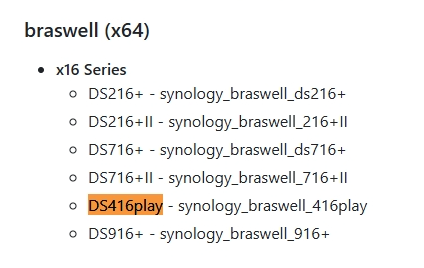
Since it is a x64 is it pretty simple (64-bit) but determining factor will be your DSM version. You can see the package info at the top of a server log.
 1 point
 -
Correct. Correct. Only movie sets available on TMDB. They will happily co-exist; I would assume a number of users (myself included) are using them in that exact setup. No, it just adds different treatments/overlays to existing posters. You could, there's number of rules you can configure.1 point
-
Unknown; yesterday is the first time this has happened and the last time it happened I just decided to turn off the TV.1 point
-
And that's all I saw as supported in the user log that was submitted using one of these devices.1 point
-
If you do not have this option, then @Abobaderwill have to assist you.1 point
-
awesome, thank you!1 point
-
Update Well I got everything moved over and I was able to install the portable version with no issues ATM. Question: What file/folder has the information about my channel mappings so that I can possibly copy that file/folder over to the new setup. This will save me a huge amount of time. Thanks for all the help it is appreciated.1 point
-
no pero es facil e intuitivo , yo aprendi en segundos , mas o menos1 point
-
https://getchannels.com/ https://community.getchannels.com/t/use-channels-dvr-as-a-tuner-for-emby/224861 point
-
I tried updating my docker container with docker pull emby/embyserver:latest but was greeted with this message: Error response from daemon: unauthorized: authentication required I tried taking off ':latest' tag -- same error message. Was I somehow blocked from docker or something?1 point
-
Must've been a fluke or fixed cuz I was just able to pull it again after 15 mins of retrying.1 point
-
Hi, we'll look at improving this. Thanks for the feedback.1 point
-
It's always something super easy lol. But i would change it back to 99,100. Unraid was intended to use 99 and 100 (nobody). You don't need the GIDLIST either for passthrough to work on unraid.1 point
-
I picked one up today. Curiosity got the best of me but I mainly wanted it because it integrates with my nest doorbells to prompt on screen when someone is at your door. I don't need HD Audio on the tv it will be hooked up to but I will test it on my main theatre system just to see if it supports True HD and DTS-MA passthrough.1 point
-
As well as showing up in Admin Dashboard activity, it may be nice to send an email to the admin. Perhaps using CURL. Here is an example of CURL email sending to a gmail account. https://stackoverflow.com/questions/14722556/using-curl-to-send-email Also perhaps a small alert in the top header for admin only to show that there are new issue reported and a quick turn off alert option.1 point
-
It is not, read Strm files link above. You just point those to your media files.1 point
-
Stumbled across this thread as i had a similar issue where aac stereo audio on my samsung Q65 tv that was playing direct would play fine for a minute or two then just cut out. Stopping the stream and resuming playback would bring the sound back for a minute or two and then would cut out again. I narrowed this down to any aac audio stream that was greater than 160kbps had this problem. This is also clarified by the OP's images where the stream with the issue was 199kbps and the stream without an issue is 130kbps. So for anyone else experiencing this try down sampling your audio to 160kbps and the problem should be solved.1 point
-
After any reboot of macOS Sequoia (15.0) the Emby app will fail to play media from an emby server on the same LAN until the Settings > Privacy & Security > Local Network > Emby setting is toggled off and on again (despite being set to on to start with). In other words, this Local Network access permission seems to be forgotten on each reboot (even though the macOS UI shows it as turned on) and toggling this off and on again reapplies the permission so the Emby app can work as usual. Also, if Settings > Privacy & Security > Local Network > Emby is turned off, the Emby app crashes (rather than prompting that Local Network access permission is required).1 point
-
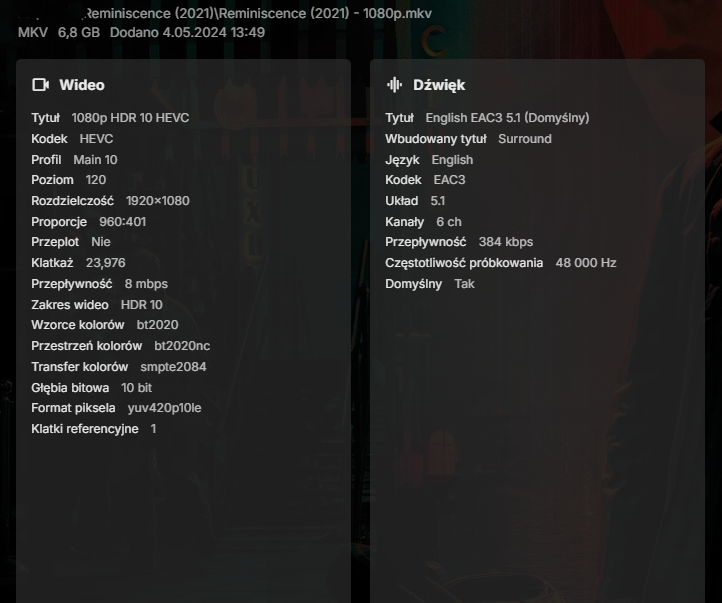
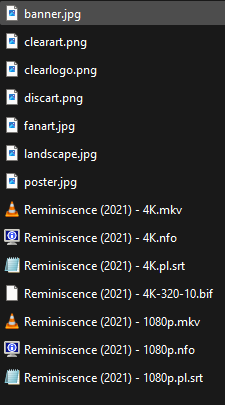
Hi, I had similar problems, after several attempts I gave up transcoding on the fly for remote users. For about a year now, I have been converting each added 4K movie with a higher bitrate (over 15mbps) to an 8mbps version, usually in 1080p, EAC3. Since then, I haven't had any problems with remote playback, the user simply selects the version of the movie they wants to play. I do the conversion with a great free program Handbrake. You just need to follow specific file names for your videos to have option to choose resolution in the description of movie. Examples in the screenshots below.
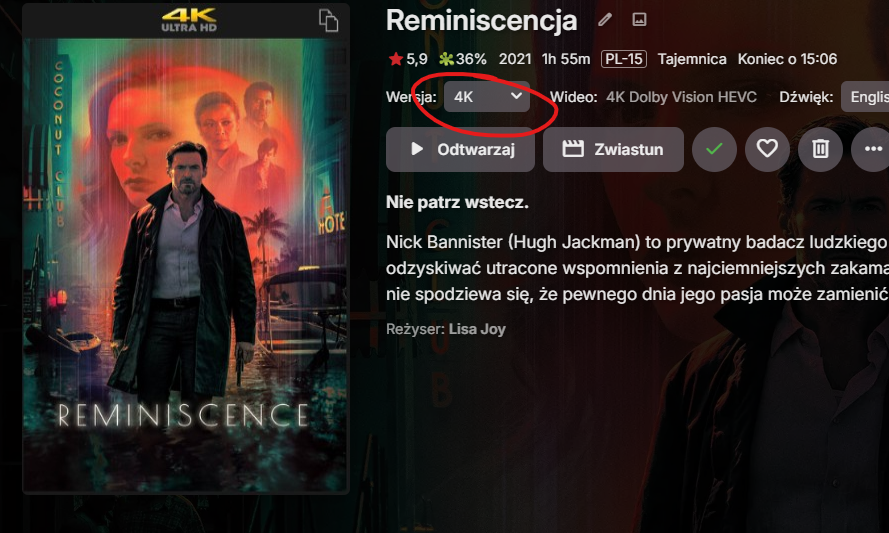
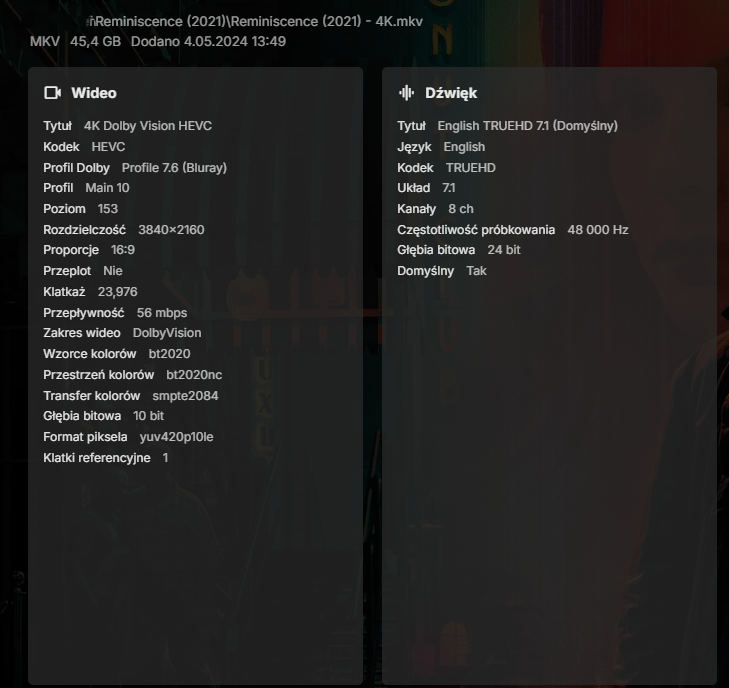
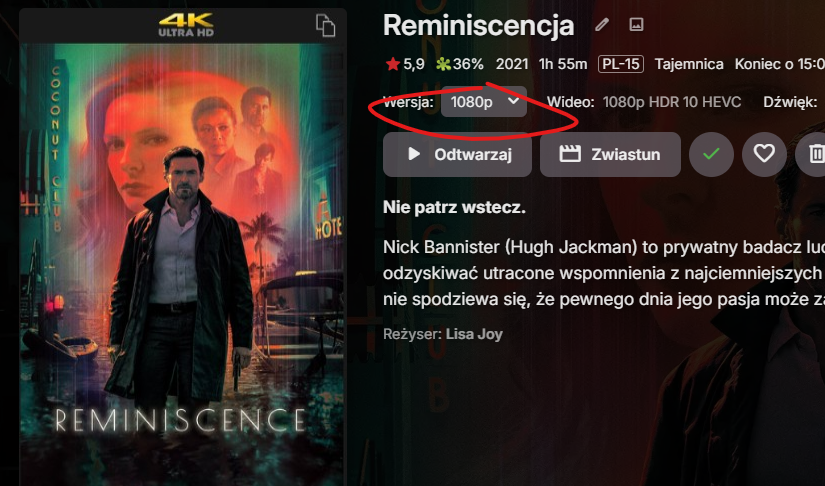
 1 point
 -
Version 11.3.0 Notes: Please do not forget to leave an up to date textual review on Play Store. Your feedback plays a crucial role in building the app’s ranking, ensuring a future for Symfonium. Added: Importing playlists from Emby now automatically import the associated tags too. Added new option to configure album size in rows in album and artist detail pages. Added recently added songs as possible home row to Android Auto. Added new API command to regenerate playlist thumbnail from song thumbnails. Added new API command to trigger offline cache cleanup. Added new API command to start a backup with selected parameters. You can now select a folder as destination for the backups. Added new setting to control the maximum number of simultaneous downloads. You can now check the detailed last sync status from the filter bottom sheet. Added new option to force HTTP/1.1 when streaming to local device to workaround some server / proxy issues. Added new context menu to songs to mark them played to help manage audio books. Added new setting to Emby/Jellyfin providers to skip syncing collections (Tags in Symfonium). Speed up sync if you do not use them for music and have many for videos. Artists and genres multi select now have a button to start a personal mix from the selection. Changed: Major update of the Symfonium tag parser library. In theory there’s no changes, but as usual if you have issues contact me. Manage offline cache list now show more details about the cached media and can be filtered. Faster media skipping for queued items when the server is offline, and increase the number of skips in that case before auto pausing the queue. Amplitudes are now only extracted when Symfonium interface is visible to reduce possibly unneeded battery usage. Throttle Google drive scanner to reduce risks of reaching the abuse limits. The Slower downloads settings is renamed enforce HTTP/1.1 and now only controls HTTP/1.1 enforcement. See new Maximum simultaneous downloads options if you need to limit to 1 download. Updated handling of invalid MBIDs combinations for artists, while it should fix some cases for others it can generate duplication of artists if there’s too many different MBIDs for the same artist. Fixed: Fix sometimes wrong media played with playback cache. Added workaround for some invalid m4a files. Fix automatic restart of playlists in continuous mode sometimes failing. Fix automatic offline cache of smart playlists not always starting after media is played. Fix lyrics support for hours timestamps. Properly handle Subsonic Internet Radio imports to avoid duplicates on url changes. Fix repeat one mode not working with local renderer. You no longer need to clear tag cache when you add a new external lyrics/cue file (or update them). Fix song action play (no automatic queue) option not working from search results. Properly expose buffering status to Android Auto. https://support.symfonium.app/t/version-11-3-0-released/53331 point
-
Ok sorry had an issue with airplay, had to restart the phone and everything is fine1 point
-
For the record, it decided to get all the images/info last night and there's nothing changed in my system or network. However, that's not to say that in a week or two that it won't have the same problem again which would last for perhaps a week again. Like I said, it's almost random and I can't figure out what is going on.1 point
-
I see. Well, thanks for the quick response; I would like to request this feature. I collect as many shows as I can in English and Mandarin to help my son be bilingual. The nature of this is that they are different video files, and not separate audio tracks. Depending on the day, I like to pick which language I use for shows that I put on shuffle for him to watch.1 point
-
The discussion about searching individual libraries has been going on for some years. These are my views as to why this is still a vital feature to improve: Emby’s strength lies in managing diverse, extensive media collections. However, its current search function retrieves results from all libraries at once, regardless of the content type. This all-encompassing search approach, while useful in some cases, often hinders users who know exactly what they’re looking for. Adding the ability to limit searches to a specific library would vastly improve efficiency and user satisfaction. 1. Streamlined Search in Large, Multi-Type Libraries In collections containing varied media—such as films, music, interviews, and more—it's often impractical to search through irrelevant results. For example, when looking for a particular soundtrack in a large library, the user may also see results from unrelated media types like movies or interviews. This creates unnecessary clutter and requires users to manually filter results, slowing down their process. Searching by library would allow users to target only the media they want to find, drastically improving search relevance. 2. Simplified Media Format Management Many users maintain separate libraries based on media quality or type, such as an older collection of standard-quality audio files and a newer library of high-resolution formats. Without the ability to limit searches to a particular library, users must sift through multiple versions of the same content, even when they know which library contains the desired media. Allowing searches to focus on specific libraries would help users find exactly what they need, without the frustration of comparing file specifications manually. 3. Alignment with Standard Operating Systems On commonly used systems like Windows and macOS, users can limit searches to specific folders or expand them to encompass the whole system. This approach is intuitive and familiar, allowing for efficient file management. Emby should follow suit by enabling users to choose whether to search across all libraries or narrow their search to a single one, mirroring these standard operating system practices. This would provide users with more control over their media management experience while maintaining flexibility. 4. Catering to Diverse User Needs Emby serves users with a wide range of media collections, from audiophiles with meticulously organized music libraries to film buffs with large video collections. Different users have different expectations when it comes to searching for content. An audiobook enthusiast, for instance, might want to search only within their audiobooks library, while a podcast lover may prefer to search exclusively within their podcast collection. Adding library-specific search capabilities would ensure Emby meets the unique needs of its broad user base. 5. Improved Performance and Speed Searching all libraries at once inherently takes longer than narrowing the search to a single library. This is particularly true for users with large collections, where searching across many libraries can slow down the process considerably. By giving users the option to search a specific library, Emby could significantly reduce search times, improving the overall responsiveness of the software and enhancing user satisfaction. --- Implementing search-by-library functionality would elevate Emby’s performance, offering users greater precision, speed, and control in managing their media collections. This feature would benefit both casual users and those with extensive, multi-format libraries, making Emby more efficient and enjoyable to use. Cheers.1 point
-
@visproduction thank you for your thorough calculations. However I think your overestimating some numbers here. What Emby sells is a "Cinematic experience" with curated trailers for upcoming movies - somewhat tuned to the genre of the film your about to watch. So I don't think there is a need to offer 20.000 trailers a year. A low four digit number should be easily enough for enough variety. Real theaters have around a hundred trailers on rotation in a year. Secondly: this is a paid service for Emby premiere members. I admit I've no idea how many subscribers there are, but I would be very surprised if they got anywhere near the numbers where you'd need the services of Akamai or something similar. And we're not talking about constant streaming, we're taking about serving a handful of trailers before a user watches a movie. This should be something you can handle with one ir maybe a few properly connected servers somewhere in a server farm. And renting those isn't that expensive nowadays. Or to put it the other way around: if the demand were to be in "Akamai-territory" Emby should also pull in some serious money from subscription fees. And thirdly: since they also control the client they could even incorporate their own load balancing by letting the clients download and cache some trailers in advance, so they have something to show if the server load were to high.1 point