Leaderboard




Popular Content
Showing content with the highest reputation on 09/23/24 in all areas
-
This is a kudos post to the Emby Team, I wanted to know how much I appreciate the work you are doing, and the Emby Server product I am very happy to see you have not gone down the path that Plex chose, and making everything online only with advertisements and other features locked behind a paywall. I have been using Emby for almost 9 years, I think I have been Emby Premiere for almost as long as well. Over the past few years the stability of Emby has been second to none, I can't think of a single issue that I have encountered after updating. My system is used daily by 5 or more people with Android Tablets, Fire Sticks, & Roku and there have been no problems. In my opinion Emby is the best media server and most stable, before setting up Emby in 2015 I had used Plex for years, I am very happy I made the switch back then, I can't imagine the pain I would be in now if I was still trying to use Plex. I am already an Emby Premiere member, but if there is a way to contribute more, please let me know? Some statistics: Emby Server running since Nov 2015 Disk Space: 110TB Movies: 1993 TV Series: 695 TV Episodes: 48,383 Duane5 points
-
A lot of people when watching movies or TV shows utilize subtitles. They can be for watching a movie in a foreign language or helpful for those with hearing difficulties to enjoy their favorite TV show. Whatever your reason for using subtitles, Emby has a few great options that individuals can set up at the user level to make subtitle usage easier for themselves every time they watch their favorite media. Did you know that every user on your server can set up different subtitle settings that best fit their individual needs? They can edit the preferred language, change the color, positioning and more to best suit their needs. One of our favorite features here at Emby are the various subtitle modes that a user can take advantage of. This setting allows them the ability to have the same subtitle settings for every media file they play and is very helpful for those that use subtitles every time they watch something on Emby. The individual settings are as follows for subtitle mode: Default - Subtitles are loaded based on the default and forced flags in the embedded metadata. Language preferences are considered when multiple options are available. Smart - Subtitles matching the language preference will be loaded when the audio is in a foreign language. Only forced subtitles - Only subtitles marked as forced will be loaded. Always play subtitles - Subtitles matching the language preference will be loaded regardless of the audio language. No subtitles - Subtitles will not be loaded by default. They can still be turned on manually during playback. These settings can be changed by going to the app settings and under the subtitles section, clicking on subtitle mode. These are great options for users to take advantage of when someone commonly uses subtitles for a variety of reasons. View the full article3 points
-
They will come from the providers (if available). Example TMDB will list multiple tags for country (origin_country, production_countries) and language (original_language, spoken_languages). Edit: There, jaycedk, that should make it more bearable.2 points
-
Nothing wrong with that format, I use it myself. One thing you could benefit from would be to add the year to the folder name, eg. Bear, The (2022) Or for the best accuracy, you could append the tvdbid, eg. Bear, The (2022) [tvdbid=403294] However, just adding the year alone seems to work just fine for me. For reference: TV Naming2 points
-
Here is the latest list of versions for Emby software across the server and clients. Emby Server Stable: v4.9.5.0 (2026/05/18) Release Notes Beta: v4.10.0.14 (2026/06/04) Release Notes For other platforms, please refer to the download page. Emby for Android TV Google Devices Stable: v2.1.23 (2025/12/27) Beta: v2.1.46 (2026/04/15) Amazon Devices Stable: v2.1.23 (2025/12/27) Beta: v2.1.46 (2026/04/15) Stable Release Notes Beta Release Notes Universal Android app Stable: v3.5.16 (2026/01/26) Beta: v3.5.36 (2026/05/10) Release Notes Download the latest Beta here. Emby for Kodi See here for the latest information. Emby for Roku Stable: v4.1.63 (2026/05/04) Release Notes Beta: v4.1.64 (2026/05/13) Release Notes Emby for Windows (Windows Store for PC & Xbox One) Stable Release Notes Beta release notes Emby for Linux Beta Release Notes Emby for Samsung Smart TV (Orsay) E-series to H-series TVs only Release Notes Emby Theatre for Samsung Smart TV (Tizen) Release Notes Emby Theatre for LG Smart TV Stable: 1.0.50 (2026/01/19) Emby for iOS Stable: v2.2.53 (2026/05/16) Stable Release Notes Beta: v2.2.52 (2025/04/11) Beta Release Notes Emby for Apple TV Stable: v2.0.3 (2025/12/26) Announcement Beta: v2.0.6 (2026/04/11) Release Notes Emby for tvOS (Apple TV) Stable: 2.1.6 (2022/12/23) Release Notes - TBA Beta: 1.5.1 (10) (2021/03/02) Beta Release Notes Emby For MacOS Stable: 2.1.6 (2022/05/09) Details here. I will keep this post up-to-date as much as possible, but please send me a PM about anything I haven't updated, or is missing. Special thanks to @Borskfor supplying a lot of the updated information. Thanks.1 point
-
Hi, I am a new Emby user and I can say I am impressed with it. I have been using Kodi for a long time and I rely to nfo files (it's my preferred choice for dealing with my media). Since Emby can't parse artwork from NFO files, I decided to give a try to local artwork. My problem now, my artwork is not in jpg and png files, I prefer it to be in webp format (smaller filesizes, massive savings especially in png files since png is lossless and huge in filesize). If I rename the webp artwork to png (for example poster.webp to poster.png) Emby reads and displays the webp artwork fine. So what I am requesting.. is it possible for Emby like Kodi does to read more image formats for local artwork and not only jpg and png? It's only an import issue, Emby imports and displays the webp artwork fine if I change the extension to png. Thank you in advance for any reply to my request Emby devs.1 point
-
A lot of people when watching movies or TV shows utilize subtitles. They can be for watching a movie in a foreign language or helpful for those with hearing difficulties to enjoy their favorite TV show. Whatever your reason for using subtitles, Emby has a few great options that individuals can set up at the user level to make subtitle usage easier for themselves every time they watch their favorite media. Did you know that every user on your server can set up different subtitle settings that best fit their individual needs? They can edit the preferred language, change the color, positioning and more to best suit their needs. One of our favorite features here at Emby are the various subtitle modes that a user can take advantage of. This setting allows them the ability to have the same subtitle settings for every media file they play and is very helpful for those that use subtitles every time they watch something on Emby. The individual settings are as follows for subtitle mode: Default - Subtitles are loaded based on the default and forced flags in the embedded metadata. Language preferences are considered when multiple options are available. Smart - Subtitles matching the language preference will be loaded when the audio is in a foreign language. Only forced subtitles - Only subtitles marked as forced will be loaded. Hearing Impaired - Subtitles matching the language preference will be loaded, with a preference given to tracks that are marked as hearing impaired (SDH). Always play subtitles - Subtitles matching the language preference will be loaded regardless of the audio language. No subtitles - Subtitles will not be loaded by default. They can still be turned on manually during playback. These settings can be changed by going to the app settings and under the subtitles section, clicking on subtitle mode. These are great options for users to take advantage of when someone commonly uses subtitles for a variety of reasons.1 point
-
This is a direct result of how you structure your media/which folders you add to Embys libraries. You want to add folders that are contained inside the mountpoint for the external NAS. Not the mountpoint itself. For example: you have a mountpoint at /mnt/media To that, you mount a share from the nas, so the folder now contains movies: /mnt/media/Madagascar (2005)/<video files> If you add /mnt/media to an emby library; when the NAS is not mounted, the folder '/mnt/media/ still exists, but is empty. Emby sees this empty folder and thinks you've deleted all the content that was in it, so it removes it from its database. Now instead, mount a share that contains the structure /movies/Madagascar (2005)/<video files>, so you end up with: /mnt/media/movies/Madagascar (2005)/<video files> Then add /mnt/media/movies as your folder in emby. With this structure, when your NAS isn't mounted, you're left with an empty /mnt/media folder. When emby scans this, it is completely unable to find the root folder '/mnt/media/movies', instead of finding that folder but empty. Emby will then recognize the root folder is missing entirely, assume it will be back, and not remove the media from its database. As you are using docker, it's important to ensure the container sees the same behavior. Don't mount /mnt/media/movies to the container, mount /mmt/media then add the root folders (/mnt/media/movies) to Emby. If the root folders still exist when the mount isn't mounted, emby will see them as empty instead of missing and remove the content from its db.1 point
-
I would understand this request to refer to "origin_country," don't think anyone (or at least maybe only a fraction of userbase) would filter by locations where the movie was shot. Ditto for "original_language". Filtering on anything save those criteria would make those filters practically useless with too many hits.1 point
-
Thanks @GrimReaper1 point
-
OMG my scroll wheel is dizzy1 point
-
Not to hijack this thread but is this a server plugin or an external too that you're using to view the log files. Looks very useful.1 point
-
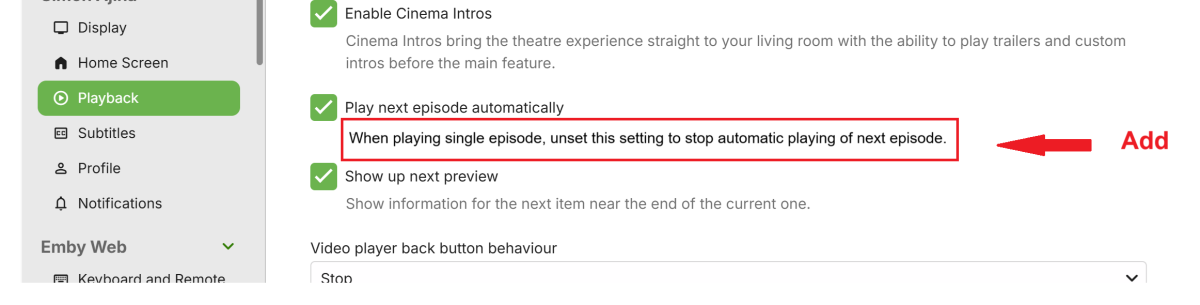
Fine. But I would like us to have some explanatory text associated with the Playback setting. How about adding this sentence ? I could not find any support articles relating to most items in the user settings for Display, Home Screen, Playback .. I think, if we add a sentence like the suggestion above for the" Play next episode automatically" user setting, it would be sufficient and there is no need for a support article. The above suggested text assumes we stick to the default of that setting being preset as selected.
 1 point
 -
Nope. Emby is probably the best software for a self-hosted media server right now, but the lack of transparency drives me crazy. I don't want them to tell me everything, but I'd like to know if they're working on anything bigger than bugfixes and small improvements here and there. What the OP of this thread wants, is implemented in Plex for many years now. The libraries and the frontpage are just needing more diversity and customization options asap. Even Jellyfin is slightly ahead of Emby in that regard.1 point
-
ADM doesn't do trailers at all at the moment, but emby itself does support them if you put them in your media directory with the movie like this: Filename-trailer.mp4 And then refresh that item so it gets picked up and added to the database. It will then appear in the detail screen.1 point
-
Just have to necro this. I have uninstalled the trailer plugin do to , bad / low quality picture and sound. But I can guess why this is still present in my movie library. I DO NOT want this if its uninstalled. At the lease show my own "good quality" local media trailers. Emby knows I have them, I can play them from movie detail screen.
 1 point
 -
It was the interface issue. On the three I mentioned. I just rebooted the computer and all is well now. Thanks. Still can't set volume to -30 tho1 point
-
Thanks for TV Videos fix. Still have the issue with TV Songs, Movie Songs and Movie Videos even though they've been updated and I restarted Emby. A fix coming for those soon too? Also, used to be able to set Target Maximum Volume to -30. Now it seems to allow me to go only to -15. I like it low so I can play Movie at a normal volume, (loud, lol), and be not overwhelmed by themes when browsing Movies or TV.1 point
-
Hi, thanks for sharing your results. Yes, improvements to this are coming.1 point
-
Kindly requesting to add the movie Entergalactic
 0 points