Leaderboard




Popular Content
Showing content with the highest reputation on 09/20/24 in all areas
-
A lot of people when watching movies or TV shows utilize subtitles. They can be for watching a movie in a foreign language or helpful for those with hearing difficulties to enjoy their favorite TV show. Whatever your reason for using subtitles, Emby has a few great options that individuals can set up at the user level to make subtitle usage easier for themselves every time they watch their favorite media. Did you know that every user on your server can set up different subtitle settings that best fit their individual needs? They can edit the preferred language, change the color, positioning and more to best suit their needs. One of our favorite features here at Emby are the various subtitle modes that a user can take advantage of. This setting allows them the ability to have the same subtitle settings for every media file they play and is very helpful for those that use subtitles every time they watch something on Emby. The individual settings are as follows for subtitle mode: Default - Subtitles are loaded based on the default and forced flags in the embedded metadata. Language preferences are considered when multiple options are available. Smart - Subtitles matching the language preference will be loaded when the audio is in a foreign language. Only forced subtitles - Only subtitles marked as forced will be loaded. Hearing Impaired - Subtitles matching the language preference will be loaded, with a preference given to tracks that are marked as hearing impaired (SDH). Always play subtitles - Subtitles matching the language preference will be loaded regardless of the audio language. No subtitles - Subtitles will not be loaded by default. They can still be turned on manually during playback. These settings can be changed by going to the app settings and under the subtitles section, clicking on subtitle mode. These are great options for users to take advantage of when someone commonly uses subtitles for a variety of reasons.2 points
-
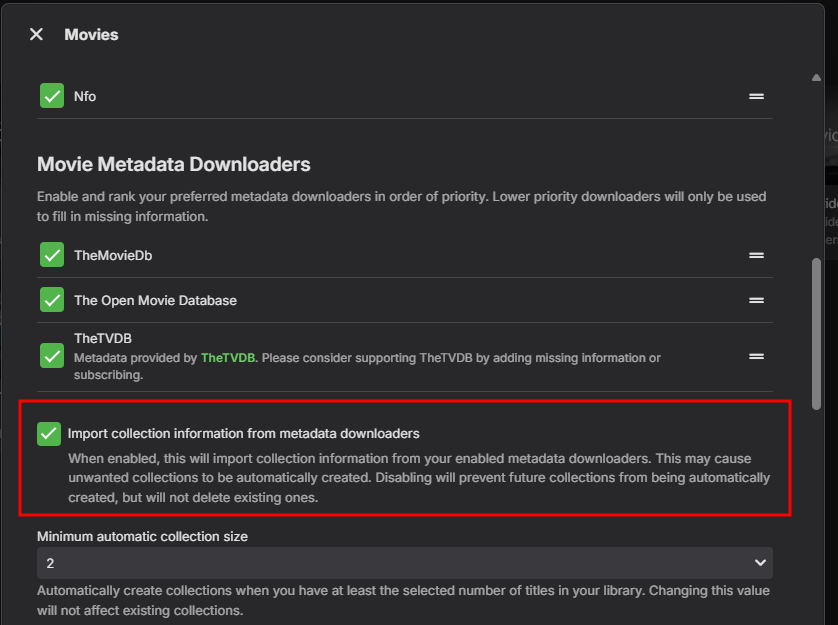
Because TMDB is disable as the info comes from them.2 points
-
Try enabling this in your library, and then update metadata.
 2 points
 -
Hi Quickmic, I have a suggestion, can it be possible to classify the version of plugins etc in subfolders to make it easier/faster to find and install? Because now it is all mixed v10 and v11... and olders Maybe something like this: ./Public testing/v10/plugin.service.emby-next-gen-10.0.47.zip ./Public testing/v10/plugin.video.emby-next-gen-10.1.1.zip ./Public testing/v10/plugin.audio.emby-next-gen-10.1.1.zip ./Public testing/v10/plugin.image.emby-next-gen-10.1.1.zip ./Public testing/v11/plugin.service.emby-next-gen-11.0.8.zip ./Public testing/v11/plugin.video.emby-next-gen-10.1.2.zip ./Public testing/v11/plugin.audio.emby-next-gen-10.1.2.zip ./Public testing/v11/plugin.image.emby-next-gen-10.1.2.zip I'm sure this is not the best way, but anything that makes more sense for you and that will help to not scroll hundreds+ of files into Public Testing! What you think?2 points
-
I moved from Plex to Emby and even though I think Emby is superior in its flexibility there are some things I like better with Plex, especially in terms of its looks. This theme is trying to fix that by making it a bit more similar to Plex but with some, in my opinion, improvements. The CSS is attached to this post for anyone interested and below are some screens to show it off Good to know I only use Chrome so I can't guarantee this CSS works as expected in other browsers. If you want the sidebar menu to look like in the screens, make sure to pin the sidebar. Watched badge/banderoll is inverted which means that the badge will not be shown if media have been watched, like in Plex. For desired look, please use the "Dark" theme for both Theme & Settings theme in the display settings. Emby-Stable-style-v3.6.txt





 1 point
 -
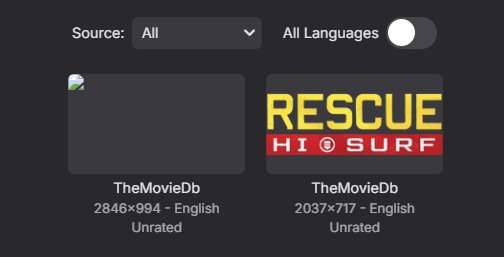
Anyone else seeing an issue with TMDB SVGimages and Emby imageprocessor? 2024-09-15 20:13:03.971 Error ImageProcessor: Image conversion failed for Z:\ServerFolders\Videos\TV Shows\Rescue, HI-Surf (2024)\clearlogo.svg *** Error Report *** Version: 4.8.8.0 Command line: A:\Emby-Server\system\EmbyServer.dll -noautorunwebapp Operating system: Microsoft Windows 10.0.19045 Framework: .NET 6.0.30 OS/Process: x64/x64 Runtime: A:/Emby-Server/system/System.Private.CoreLib.dll Processor count: 16 Data path: A:\Emby-Server Application path: A:\Emby-Server\system System.Exception: System.Exception: ffmpeg image conversion failed for Z:\ServerFolders\Videos\TV Shows\Rescue, HI-Surf (2024)\clearlogo.svg at Emby.Server.MediaEncoding.ImageConversion.MediaImageConverter.ConvertImage(String inputPath, String outputPath) at Emby.Drawing.ImageProcessor.GetSupportedImage(ItemImageInfo originalImage, String currentImagePath, String inputFormat, IImageEncoder imageEncoder) Source: Emby.Server.MediaEncoding TargetSite: Void MoveNext() Not sure how long TMDB has been providing this format. Appears to display okay in UI except edit images.

 1 point
 -
I searched and didn't find anything, so I thought I'd request a modification to your docker logs to continue outputting after the "All entry points have started" message? Ideally, this could be governed by an environmental variable for those who don't want to worry about their docker logs directory getting blown up. To be clear, I want to see output from Emby Server logging when I run something like docker logs EmbyServer -f.1 point
-
Auto Sync for Subtitles was recently added in Plex: https://support.plex.tv/articles/auto-sync-subtitles/ It uses the voice activity data so doesn't deal with signs etc. like in ASS subtitles, but it is still a significant improvement, especially when downloading subtitles on demand from OpenSubtitles etc.1 point
-
Since these are 4k HDR/DV they should really be direct playing instead of transcoding. If you have 300 Mbps up I don't recommend limiting to 50 Mbps. Remove the limit and see if they have any playback issues when direct playing.1 point
-
Wow - how did that happen - keyboard used to do it ! But it has been 5 months, it should have forgotten that sequence of letters !!!1 point
-
Yes and it worked, but this is a real PIA. Should be simpler...1 point
-
I have two JBL headsets, the big one over your head (slight delay) and the "earpods", bigger annoying delay. I also have it with vlc, but there I just have configured it to have a audio delay by default of 200ms.1 point
-
alright, well it looks like it's working then, thanks for all the help guys! Especially Happy2Play1 point
-
It is tag driven, so renaming files won't make a difference.1 point
-
Just finished, it took 48 hours, a bit longer than I expected it to! All seems fine though, I've re-enables realtime monitoring on those folders and hopefully it'll be back to normal. Thanks!1 point
-
I am finishing up testing of a app that can be run by Emby after recordings are complete that uses Whisper AI to generate a subtitle SRT file for the recording. Once I am happy with it, I plan on making it open source and provide executables as well. I'll post in the utilities area on here after that happens.1 point
-
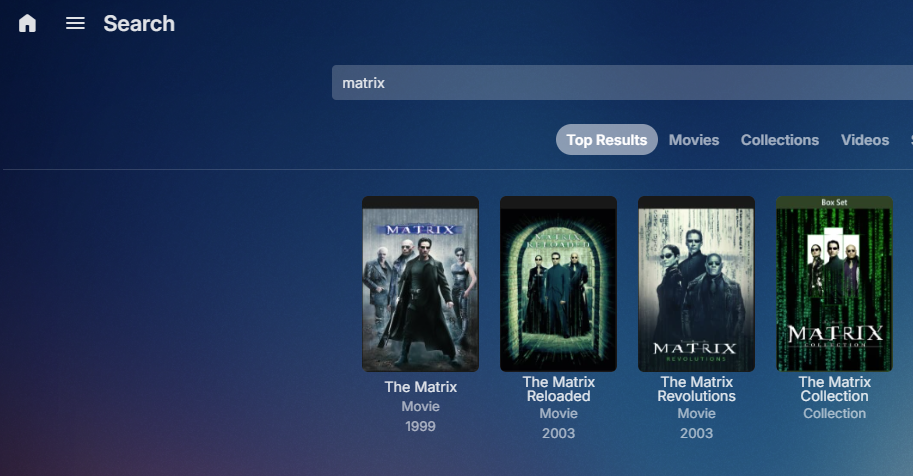
We would need to see the metadata for the movies. nfo from The Matrix
 1 point
 -
Yes that is the suggested workaround as not much technically supports the A1/B1 method via the digital era.1 point
-
Emby still does as long as your media has the required metadata no different than when the Autoboxset was a plugin the moved to server core. There is zero difference right now. Can you go over a specific example that does not work to include item metadata?1 point
-
Cool, I wasn't sure. Thanks man!1 point
-
Yes I understand tre subtle difference in behaviour now. My expectation was that yes play the season but do not auto advance. One can argue that when selecting an episode and pressing Play on that episode then the auto advance setting should never apply and we should only play that episode as that is what the user asked to be played. In fact, one can take this argument further and say that the auto-advance setting should only apply when selecting Play on a Season1 point
-
New PUBLIC TESTING version available 11.0.9: Delta changelog 11.0.8 -> 11.0.9 improve TVShow deduplication fix minor http request queue issue fix special character "&" issue in nodes1 point
-
Cool, thank you I'll give it a try soon.1 point
-
Thanks for looking into this. Interesting. Well, I'll check it again when I go back to 11.X. Yesterday, I've reinstalled the device using CE 21.1.1 stable and 10.0.47 to see whether I could reproduce the playback glitches. And I could. Have started a discussion with the CE team to see what they make out of the debug log (at least once I can upload it there... seems difficult at the moment). For the time being I'll keep the device on CE stable and emby-for-kodi-next-gen stable. Once the playback glitches have been sorted out, I'll move back to 11.X. Thanks @quickmic1 point
-
Sorry for the late reply, I have been very busy and forgot to post here lol. I have been using old version which is available on Samsung store and has this glitch with language switch. One time I tried Plex again and it was horrible went back to Emby with this glitch. Plex is so bad right now that it's almost useless. Almost everyday it would just give me this error that content isn't available and that my server was off and had to restart both TV and server and I'm not even saying anything about the junk they added to Plex with "free stuff" which is infested with ads and things like podcasts no one asked and god forbid you say something in their forum that contains criticism or complaint, power hungry mods will simply ban you and lock your thread. I had enough of their tyranny and shitshow and uninstalled Plex from my server once and for all. Never again! So, I have been using this old version with language glitch all this time, but today I decided to follow your instructions and do the manual update via USB flash drive. It worked like a charm. No more audio glitch or anything and works great. Thank you so much... The only feature I'm missing in Emby that Plex had was "search for subtitles", which Emby has in a premium package, but it's not something that bothers me. I can live without that feature and if I need subtitles very much for a movie, I could download manually and install it in a movie. So, I'm fine. So, in short, I'm happy with Emby. The only few things I would recommend are: Give us option to change time format from let's say 15:30 to 3:30 PM (in Tizen app). Would be nice if we had faster fast forward or rewind like Plex has (when you're holding the button player keeps speeding up the process).1 point
-
This sorted the issue for me, an excellent idea, wish I had thought of it. I wonder if other routers could also do this, but I doubt most ISP supplied boxes could. I'm behind CGNAT, on starlink, so couldn't use the emby address option.1 point
-
Have you considered upgrading the kernel to the mainline version? The one you're running did not include support for Raptor Lake CPUs and maybe a newer one could nudge things in the right direction. For your containers it's simpler to map the /dev/dri path and not the individual render devices even if you list all of them. https://wiki.crowncloud.net/?Installing_the_Linux_Kernel_6x_on_AlmaLinux_91 point
-
Correction suggested by @andy22 in Skin Embuary 2K adopted skin.embuary2k.teddyknuddel.zip skin.embuary4k.teddyknuddel.zip1 point
-
You may also want to try the latest beta version once, just to compare.1 point
-
Another thing i recorgnized is, that the plugin starts downloading the theme song, and afterwards, it is checking of there already exists a theme.mp3, so it would improve the process and the speed a lot, if the check if the file already exists happens before the downloading, normalizing etc. 2024-09-20 09:30:13.546 Info App: Movie Theme Songs - Found movie theme song for Der König der Löwen 2024-09-20 09:30:13.547 Info HttpClient: GetTempFileResponse url: http://download1336.mediafire.com/s17w6kzhykpgHA1kKgAmayPy6dmu79sAA7YLCwVj8PvVOL0JClQj1yDfrrMoqzqAcqWX2US-uUzG1FxV0LwPs5Kh02DoTvGadnSv8Sleaon_-zlWXez3UyeLR5XFXrHLx5yqfDYXBi950w33XSobvaXPjDYI6TmUxe84cV13cgSZ/u1x8a07skft3r7a 2024-09-20 09:30:13.547 Info HttpClient: GET http://download1336.mediafire.com/s17w6kzhykpgHA1kKgAmayPy6dmu79sAA7YLCwVj8PvVOL0JClQj1yDfrrMoqzqAcqWX2US-uUzG1FxV0LwPs5Kh02DoTvGadnSv8Sleaon_-zlWXez3UyeLR5XFXrHLx5yqfDYXBi950w33XSobvaXPjDYI6TmUxe84cV13cgSZ/u1x8a07skft3r7a 2024-09-20 09:31:35.402 Info App: Movie Theme Songs - Moving C:\Users\Painkiller\AppData\Roaming\Emby-Server\programdata\cache\temp\5d411158-2698-4d8a-a332-64895bf58669.tmp to D:\Der Koenig der Loewen (2019)\theme.mp3 2024-09-20 09:31:35.403 Info App: Movie Theme Songs ffmpeg path : C:\Users\Painkiller\AppData\Roaming\Emby-Server\system\ffmpeg.exe 2024-09-20 09:31:35.403 Info App: Movie Theme Songs ffmpeg params : -i "C:\Users\Painkiller\AppData\Roaming\Emby-Server\programdata\cache\temp\5d411158-2698-4d8a-a332-64895bf58669.tmp" -t 10 -af volumedetect -f null – 2024-09-20 09:31:35.453 Info App: Movie Theme Songs ffmpeg path : C:\Users\Painkiller\AppData\Roaming\Emby-Server\system\ffmpeg.exe 2024-09-20 09:31:35.453 Info App: Movie Theme Songs ffmpeg params : -i "C:\Users\Painkiller\AppData\Roaming\Emby-Server\programdata\cache\temp\5d411158-2698-4d8a-a332-64895bf58669.tmp" -acodec libmp3lame -ac 2 -ar 44100 -ab 128000 -af "volume=0dB" "C:\Users\Painkiller\AppData\Roaming\Emby-Server\programdata\cache\temp\5d411158-2698-4d8a-a332-64895bf58669.tmp.mp3 2024-09-20 09:31:47.446 Info App: Movie Theme Songs - Volume Normalised Successfully 2024-09-20 09:31:47.469 Error App: Movie Theme Songs - Error downloading file from host *** Error Report *** Version: 4.8.8.0 Command line: C:\Users\Painkiller\AppData\Roaming\Emby-Server\system\EmbyServer.dll -noautorunwebapp Operating system: Microsoft Windows 10.0.19045 Framework: .NET 6.0.30 OS/Process: x64/x64 Runtime: C:/Users/Painkiller/AppData/Roaming/Emby-Server/system/System.Private.CoreLib.dll Processor count: 16 Data path: C:\Users\Painkiller\AppData\Roaming\Emby-Server\programdata Application path: C:\Users\Painkiller\AppData\Roaming\Emby-Server\system System.IO.IOException: System.IO.IOException: The file exists. at System.IO.FileSystem.MoveFile(String sourceFullPath, String destFullPath, Boolean overwrite) at System.IO.File.Move(String sourceFileName, String destFileName) at MovieThemeSongs.Search.LocalMovieThemeSongDownloader.DownloadMovieThemeSongForItem(BaseItem item, CancellationToken cancellationToken, String html, String data, String uploadedhtml, ILibraryManager libraryManager) Source: System.Private.CoreLib As you can see in the last few lines it is writing the file exists, but the download and all other stuff happens before this is checked. Just an idea to improve and speed up this process1 point
-
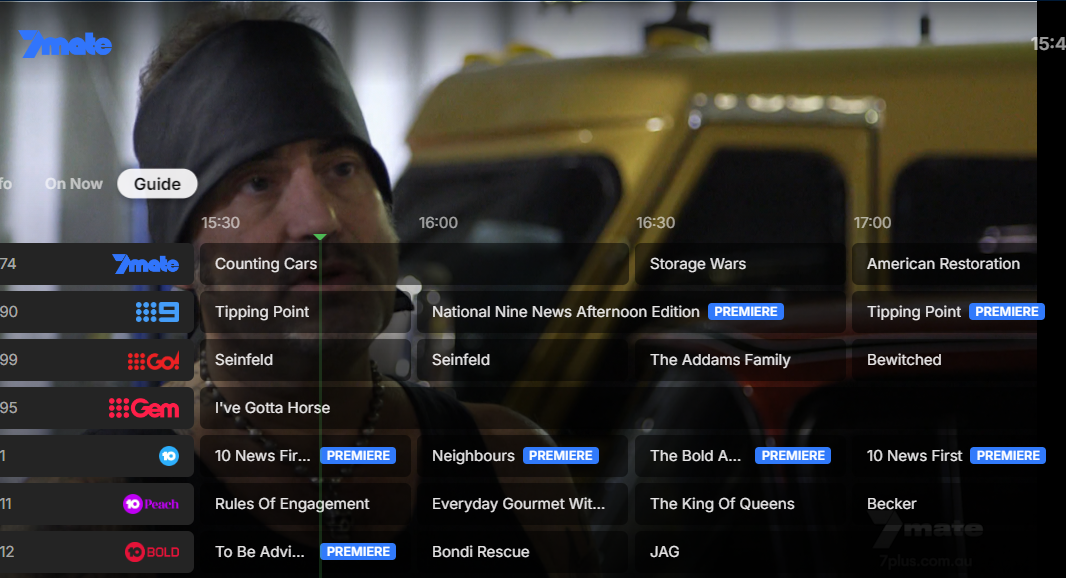
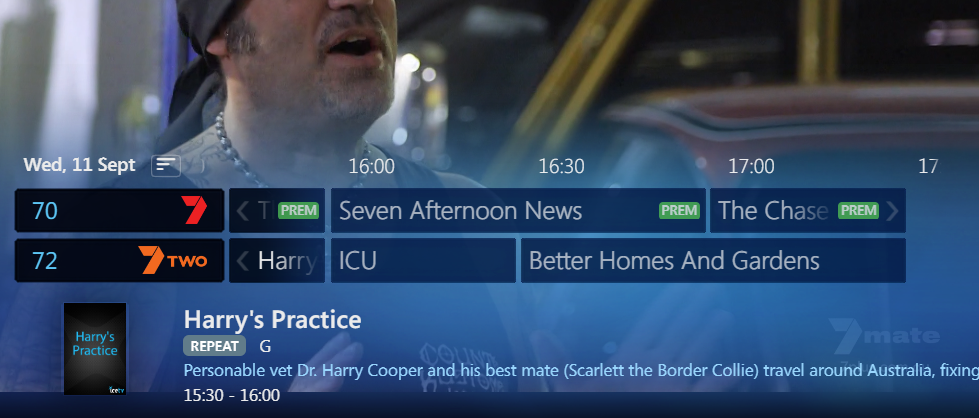
Any chance the tv guide WMC UI fixes can be pushed to Theater as the tv guide is still not navigating properly. When a long programme is on its' the most evident. In WMC when you click on a long programme it doesn't take you to the end you are still staying in the time you are searching in. WMC UI the guide is working as intended. I have attached a video of Theater and WMC UI. Can there be also an overlay underneath the mini tv guide as in bright videos it's very hard to see the guide. Screen Recording 2024-09-10 131752.mp4 Screen Recording 2024-09-10 132003.mp41 point
-
@denz- I've split this out into the right forum so that it doesn't get lost1 point
-
I think you tagged me in by mistake @Luke I appreciate you and I love Emby project! Keep up the great work!1 point
-
Yes it is the "&". I'll fix it in next version.1 point
-
Remote connections are hit and miss as Clients set to Auto will usually fallback to hardcoded 4Mbps. You would need to have all remote users set client to higher value but everyone's connections speed/types will be different so there is no magic answer as there are no adaptive changes in streaming within Emby. So when the internet gets congested at peak hours and providers throttle or traffic shape their network the stream can be affected. But in the end change client side quality setting.1 point
-
Hi, He realised that he has a firestick so he is just using that now. Thanks for the help though.1 point
-
Yes indeed. We'll need to get svg supported as an image type.1 point
-
Thank you very much for your help. Finally, the server took its final shape. Emby, in accordance with the transcoding recommendation, will be at 12700K, which will probably translate into lower electricity bills. However, from time to time I will want to play, that's why I managed to get an RTX 3070Ti. We'll see how this combo works in streaming 1080p gameplay through Sunshine and supporting several EMBY users at the same time. I believe in him.1 point
-
So I've been using Emby for a few weeks and want to revisit this with my thoughts. We use our media server like our own personal Netflix complete with binge watching, so credit markers are important to us, and dealing with credit markers in Emby genuinely sucks. To call them frustrating to work with doesn't even begin to do it justice. I get it that automatically detecting credits can be resource intensive for the host machine and doesn't have a 100% success rate for accurate detection regardless of method used, but this is one area where I would encourage the devs to consider that perfect is definitely the enemy of the good. When you have a large existing library it is absolutely painful to manually add these markers for each and every video. This is compounded by the fact that you have to do this for every video added to the server going forward as well, and it makes upkeep an enormous task. I would MUCH rather go back and manually edit videos that didn't automatically get it right the first time. The whole reason I started experimenting with EMBY in the first place is my dissatisfaction with the direction of PLEX, but it is honestly hard to get away from their software because of this. To be fair PLEX's system isn't perfect either, but once again in this instance perfect is the enemy of the good. Even with being imperfect their system is so much more advanced as to be almost laughable. Given that the intro/credit detection plugin is no longer available I implore the devs to reconsider their stance on this. I understand that the Emby team is relatively small and you have to be smart about where you allocate your resources but people have been asking for this for more than two years now across multiple threads.1 point
-
Yeah, I wasn't going to suggest that for fear he would forget to put it back .1 point
-
In addition to that, OP can simply delete Scan media library scheduled task and move required media around, re-add scheduled task once completed. That way server is available for viewing other content throughout the operation.1 point
-
If the move of files takes longer that 12 hours. I would shutdown Emby server until the move is done.1 point
-
Hi. Go to the libraries in question and disable "Real time monitoring". Then confirm through scheduled tasks that your library scan task is set to only every 12 hours. Then restart your server and initiate a library scan manually. Let it complete. Commence to moving your media around as that should give you 12 hours to do so. Make sure the media locations look exactly the same to Emby as they did before. Drive pooling software is a great way to abstract this from anything accessing the locations (and provide a lot more flexibility). P.S. Also, if you have all your images and metadata saved to the media directories, this will make this operation much safer in case it doesn't work seemlessly.1 point
-
As far as I am aware, the Plugin is simply using the ability to jump to a time which has been previously identified by the EDL file. Emby is not 'aware' of these details, nor does it store them. This is how the original Emby Introskip Plugin worked in the early days. It's a missed opportunity, as Emby has the functionality to actually properly store any type of data as 'markers', but since it's introduction a few years ago now, they have only used this for Intro markers. It could be used for credit/outro markers, previously on markers and simply import from an EDL for the commercial break markers ... It's the clients that would need the most work - as they would need to recognise the new 'commercial break start/end' hidden markers and act on them. As the mechanism already exists for IntroStart/IntroEnd (that's what brings up the 'Intro' button..) - I don't believe it would be that much more work to add the ability to highlight on a timeline (and skip) commercial break markers either .. but that all needs to be done by the Core Dev's - it's nothing a plugin can do. @BillOatman1 point
-
Installed the updated version from the second page on omega. some layout issues on the 2k version: "Embuary_Poster_View_51.xml" needs "height" changed to 1440 or the bottom row is always invisible/off-screen. "Embuary_Wide_View_50.xml" needs "height" changed to 1440 and "width" to 2690 or right column is cut-off1 point
-
A little cosmetic improvement that would be helpful is if the mini guide had an overlay underneath, so it is easier to read. WMC UI has it and it makes it much easier to read.
 1 point
 -
@Luke can you please import the fixes so we have a proper working guide. It's a good opportunity to have this working with the new app. Hopefully it can be fixed before the Australian tennis season starts as it is a pain in the backside to use the tv guide when the sports are on.1 point
-
There is 2 things that are frustrating about the blog announcements. 1. They rarely happen. 2. You guys repeatedly reply as if you will get right on it and don't. I've brought it up numerous times over the years and get the exact same response above. The last blog for the app was Feb 2023. I love Emby but the lack of the release notes is annoying. Especially when there is precedent for removing features. I'm at the point now where I have to keep ignoring the spam to update the app on the TV because I don't know what it's going to do. I usually wait a week to make sure no obvious issues are brought up on the forums. The worst part is I come across as the prick complaining about it when it's something that should just happen by default. I know I'm wasting my time but I felt like a rant. And I understand the admin replying on here may have no control over it and are just placating the masses but if there is some higher up cracking the whip so hard you don't have time to post an update blog, let them know I hope they step on some lego.1 point
-
Within my network my pfSense devices acts as the DNS resolver, so when my device asks for https://my.custom.domain it returns a 192.168.x.x based address because that's what I've configured, when I'm outside my network and I ask for https://my.custom.domain the request will go to a different DNS provider, could be Cloudflare or Google or whatever DNS host, those will resolve the external address, whatever that may be. So if I'm on my cell phone for example and I'm on my wifi and I open the emby app it will connect using my reverse proxy using the internal IP returned from the DNS query and if I close the app and turn off my wifi so now I'm on my cellular data and I open the emby app it will connect using the external IP returned from the DNS query. I don't have 2 entries, both internal and external are using the same domain name, just a different IP address is returned from the DNS query.1 point
-
I have found; 1) start with a small group of books and experiment to get what you want your library to look like; 2) if I provide the image Emby will usually pick it up and use it or I can add it in Emby using "Edit Images"; 3) “Calibre” has been very helpful in providing many of the images for epub files (haven’t started pdfs yet), but I still have to search for some of them; 4) “Calibre” can also provide me with the “Metadata” for me to put into the “Overview”, but this is one at a time (this would be a nice place where Emby could help me, maybe using Calibre's opf file?); 5) now I can at least “see” what ebooks I have and can then download what I want to my devices to read; 6) I used Emby to organize my Audio book library and following a similar format for the ebooks. Thank you for Emby! I can now find and enjoy my media anywhere/everywhere. It was horrible spending more time looking for something than enjoying it. I did see the reference to “audiobookshelf” that is something I will have to look into when I have the time.1 point