Leaderboard




Popular Content
Showing content with the highest reputation on 09/17/24 in all areas
-
Auto Sync for Subtitles was recently added in Plex: https://support.plex.tv/articles/auto-sync-subtitles/ It uses the voice activity data so doesn't deal with signs etc. like in ASS subtitles, but it is still a significant improvement, especially when downloading subtitles on demand from OpenSubtitles etc.2 points
-
hola y buenas noches , quiero compartir con vosotros lo s backdrops animados que estoy creando os dejo una pequeña muestra vale fondos acorralados.mp42 points
-
Just read about it myself feeling a little jelly. I'll have to try it out when it hits the actual beta. I stream a lot of sports from my week home connection and the option to drop the bandwidth a bit at the same quality would be very helpful.2 points
-
Looks like I need to do a refresh of the metadata from folder view and choose the specific folder I want to update. Previously I was doing a rescan/refresh of the metadata from the artist/album artist view, but that doesn't seem to work correctly.2 points
-
Been testing this on Plex this week now that they added it in their latest beta. So far I've been pretty impressed with the difference in quality between 2mbps h264 and 2mbps h265. Biggest benefit to me will be watching videos on my phone while on a mobile connection away from home.2 points
-
Dev will have to comment as both imageprocessors appear to be having trouble and don't think they exist or issue with path. 2024-09-17 11:20:40.342 Error ImageProcessor: Error getting size from libvips for 三上悠亜/TEK/TEK-080/TEK-080-1080P-poster.jpg *** Error Report *** Version: 4.8.8.0 Command line: /Applications/EmbyServer.app/Contents/MacOS/EmbyServer.dll Operating system: Darwin 22.6.0 Darwin Kernel Version 22.6.0: Mon Feb 19 19:48:53 PST 2024; root:xnu-8796.141.3.704.6~1/RELEASE_X86_64 Framework: .NET 6.0.21 OS/Process: x64/x64 Runtime: Applications/EmbyServer.app/Contents/MacOS/System.Private.CoreLib.dll Processor count: 12 Data path: /Users/jionme/.config/emby-server Application path: /Applications/EmbyServer.app/Contents/MacOS NetVips.VipsException: NetVips.VipsException: unable to load from file 三上悠亜/TEK/TEK-080/TEK-080-1080P-poster.jpg VipsForeignLoad: file " 三上悠亜/TEK/TEK-080/TEK-080-1080P-poster.jpg" does not exist at NetVips.Image.NewFromFile(String vipsFilename, Nullable`1 memory, Nullable`1 access, Nullable`1 failOn, VOption kwargs) at Emby.Drawing.LibVips.LibVipsImageProcessor.LoadImage(String path) at Emby.Drawing.LibVips.LibVipsImageProcessor.GetImageSize(String path) at Emby.Drawing.ImageProcessor.GetImageSizeFromImageEncoders(String path, String format, Boolean requiresOrientation, Boolean logException) Source: NetVips TargetSite: NetVips.Image NewFromFile(System.String, System.Nullable`1[System.Boolean], System.Nullable`1[NetVips.Enums+Access], System.Nullable`1[NetVips.Enums+FailOn], NetVips.VOption) 2024-09-17 11:20:40.343 Error ImageProcessor: Error getting size from Skia for 三上悠亜/TEK/TEK-083/TEK-083-1080P-poster.jpg *** Error Report *** Version: 4.8.8.0 Command line: /Applications/EmbyServer.app/Contents/MacOS/EmbyServer.dll Operating system: Darwin 22.6.0 Darwin Kernel Version 22.6.0: Mon Feb 19 19:48:53 PST 2024; root:xnu-8796.141.3.704.6~1/RELEASE_X86_64 Framework: .NET 6.0.21 OS/Process: x64/x64 Runtime: Applications/EmbyServer.app/Contents/MacOS/System.Private.CoreLib.dll Processor count: 12 Data path: /Users/jionme/.config/emby-server Application path: /Applications/EmbyServer.app/Contents/MacOS System.IO.DirectoryNotFoundException: System.IO.DirectoryNotFoundException: Could not find a part of the path '/ 三上悠亜/TEK/TEK-083/TEK-083-1080P-poster.jpg'. at Emby.Drawing.Skia.SkiaEncoder.GetSKFileStream(String path) at Emby.Drawing.Skia.SkiaEncoder.GetImageSize(String path) at Emby.Drawing.ImageProcessor.GetImageSizeFromImageEncoders(String path, String format, Boolean requiresOrientation, Boolean logException) Source: Emby.Drawing.Skia TargetSite: SkiaSharp.SKFileStream GetSKFileStream(System.String) Path: 三上悠亜/TEK/TEK-083/TEK-083-1080P-poster.jpg But will guess an issue with the path / 三上悠亜/ as it would appear to have a leading space, but that is just my guess. Per the current log it has happened to about 150 images.2 points
-
Moving the issue from this thread, here is a formal request to add to all Emby apps the ability to adjust / sync the audio playback / delay, in the same way it apparently is currently possible to do in Emby Theater.1 point
-
I recently found a need to look up additional information on a director. I was hoping to look at the director's profile and see not only the movies I had in my collection but also a list of other movies that they have directed. This would be displayed below the library's current movies. ex: My movies: Movie 1, Movie 2 Other movies by this person: Movie 3, Movie4 ================ This could help one expand their library and to discover a missing gem.1 point
-
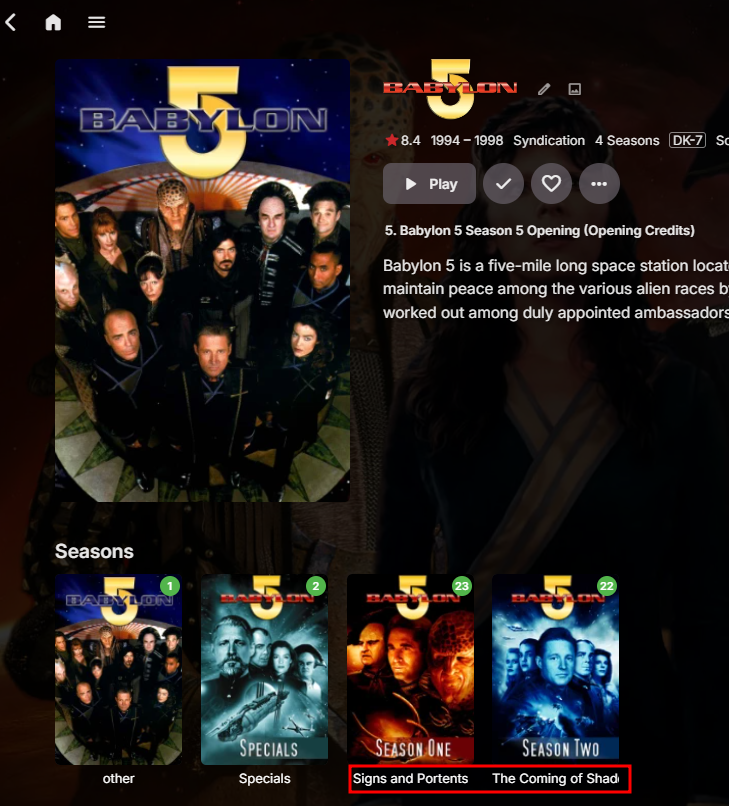
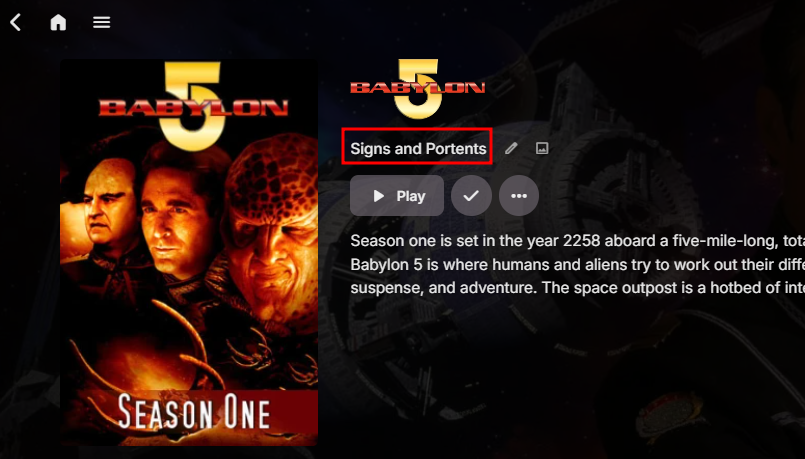
Hi all. How do I turn off the funny season naming ? It use to be Season 1 etc. But now it has some name to it instead. I think its something I'm over looking, since i can't be something added with out a off switch.
 1 point
 -
Server Version 4.7.1.0 When I use the Emby client, everything works fine. Files like CD2, CD3 will appear in Additional Parts. But when I play these videos via DLNA, only CD1 will be played, the rest will not be played. Even if I browse by folder, I can't see the CD2 and CD3 files, all videos are considered as one movie and only the first part can be played. I have tried two folder structures : #1 \FolderName FileName-CD1.mp4 FileName-CD1.nfo FileName-CD1-poster.jpg FileName-CD2.mp4 FileName-CD3.mp4 #2 \FolderName FileName-CD1.mp4 FileName-CD1.nfo FileName-CD1-poster.jpg FileName-CD2.mp4 FileName-CD2.nfo FileName-CD2-poster.jpg FileName-CD3.mp4 FileName-CD3.nfo FileName-CD3-poster.jpg I tried different Content types like Movies, Home videos & photos, Mixed content, and the result was the same, I can't play CD2, CD3 via DLNA. Besides using software to merge video files, the only solution is to put each part of the video in a separate folder. But this would result in the same movie appearing multiple times in the video library, which is not easy to manage. So, how should I fix this issue now? If this issue cannot be solved in the current version, are there any plans to improve it in the future? Thanks.1 point
-
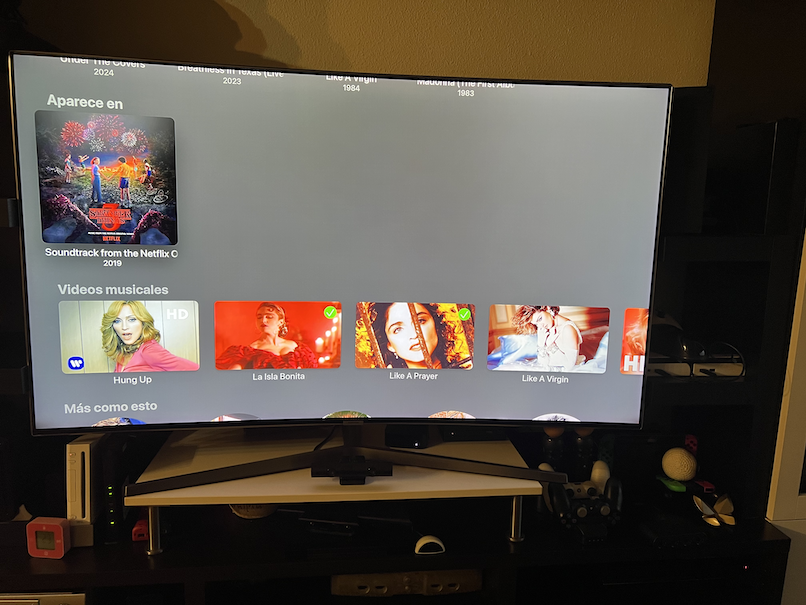
Hi Emby Team, I would like to request some things for the Music Libraries and the Music Videos Libraries. 1st.- Music Videos and Music (Related to the same artist as are shown in the same interface when this is properly identified) Music Videos are impossible to be sorted by Year, the same as are done in Albums from an artist, in fact I can find the criteria emby is using for sorting music videos: A As you can see in the above screenshot, videos and artist are linked and Albums are sorted presenting first the newest one and last the oldest one. This does not apply to the music videos that are completely random sorted. Can those please be sorted equal to Albums by Year/ release date? And before you ask, this happens too even when there are only Music Videos and no Albums, even the entire Music Video Library is sorted by Release date (newer to older): You can only saw those sorted by year (or criteria chosen) by clicking on "Music Videos", and going to the Artist Music videos, then those are presented in the right order: 2nd - Music Videos on Apple TV: As you can see there's no additional info than the title presented on the Apple TV interface, can at least have the year ? 3rd.- Lyrics (Karaoke?) As you can see the Browser interface presents the option to show the lyrics for a song: But in the Apple TV interface this option has gone (If I remember correctly it was in tha past), as you can see in the below screenshot.... anyway can be this implemented on the Apple TV Client to match the web client? Additionally, will emby support karaoke subtitles if those are embedded into the file with timetags ? Plex supports those. 4th.- Naming Convention for Music Videos and Videos linked to songs/album: According to https://emby.media/support/articles/Music-Naming.html#:~:text=To identify the artists and,links to the music videos. this needs to be done manually per each video, something that is a completely waste of time. Can I suggest to use similar naming convention that we use in TV Shows ? ARTIST>YEAR ALBUM>SONG At least this information will be completed automatically without any need to edit metadata on the file as well to not have to match https://imvdb.com/ that instead of album release date uses the music video release date, this makes usually to get the single release date instead of the album release date. Anyway, no matter how the information is matched, I would like to request the ability to play a music video from the album, same way as Plex does by linking the song to the music video and presenting it with a clickable video icon: Will look fantastic on the right side of the Heart icon: Or at least being able to present the music videos related to an album at the bottom of the album. 5th- Bonus : Artists and Actors and Book Authors. Any possibility to link a Music Artist with an Actor Profile and book Authors so you can see all related to one person in a single place ? Additionally: Any possibility to use the same type of image for "people" everywhere (square or round - better square) ? Music: Movies/TV Shows: Books Authors: Thanks in advance for considering this changes.









 1 point
 -
That wasn't my question, but mabye someone else can share some experience regarding it: "Have you ever seen such latency issues when using Windows Media Player?" Wouldn't you be able to use the TV's audio delay adjustment in this case? My current mission is the new Windows app which is in beta since last week and there are multiple layers of considerarion with regards to audio/video latency: Out-of-the-box functionality Does it play videos with audio in-sync in the best possible way (without any adjustments made)? "best possible way" means the way how Windows Media Player (and other players) are able to do it Means to find out whether there are cases where we don't do it as good as other do it Static Adjustment Feature This is meant to compensate delays due to audio/video hardware paths which cannot be controlled/known by the player Find out whether it works sufficiently well and in a consistent way Find out whether a separate delay setting for 24fps videos is really needed and why Dynamic Adjustment of Audio Delay During Playback Find out whether it can even be done with MPV player 1 and 2 are essential and current focus 3 is a nice-to-have and subject to prioritization/decision making in the future (your feature request) So all my questions here are about 1 and 2 - hope this clarifies things a bit.1 point
-
Tbh, it doesn’t really matter where the lag comes from (whether it's the TV, soundbar, the file itself, and so on). This feature already exists in VLC, MPC, and Kodi. A simple +/- offset that can be added through the OSD should be feasible and would likely be a feature many people would appreciate, making a lot of sense to implement. IMHO.1 point
-
HI, thanks for following up.1 point
-
@Luke Why is this not an optional library option ? I do NOT want this .... Why would you force this on everybody, without an clear exit.1 point
-
hay va otro jajaja , estoy to motivao jajaja blade backdrops.mp41 point
-
It was added from this thread and the suggestion is turn it off in the season providers for now: At minimum, I would also expect the display to atleast look something like Season <number> - <Title>, which is how TVDB also lists them. Showing just the titles just confuses users without adding some kind of overlay to the season poster to indicate the number.
 1 point
 -
Clairement, ils pensent que je suis trop fort !1 point
-
J'espère que les fils seront impressionnés !1 point
-
@fillidillThanks for the data - I am working on the problem Vic1 point
-
I can get onboard with adding both TVDB and TMDB features. I just ran into a series that I hand to edit the metadata because 6 episodes were actually released where there should of been 3.1 point
-
This is ridiculous and about as short sited at the OP. I have been using live TV on Emby since it came out. OTA and Cable card. Yes we took a hit with many providers moving away from cablecards. But I still use OTA often. Would be silly to take away a working feature. I used it long before the .m3u option. But I am not aware of any legitimate uses for the m3u as you said.1 point
-
Seems fixed in 4.9.0.30 beta. Aspect ratio is now preserved, whatever the container.1 point
-
use case: I use an XGIMI projector which has Android built in, and when sending audio to my receiver using eARC, the audio gets delayed - probably in passthru processing, etc., etc. Running audio directly thru the built in XGIMI speaker results in good sync, so no problem with Emby. I solve this in Kodi by setting 250ms audio difference, and apply to all. I wish I could do the same with Emby (delay video vs audio, or advance audio from video). Therefore I too wish for this feature.1 point
-
Another vote for this feature. I'd use it extensively.1 point
-
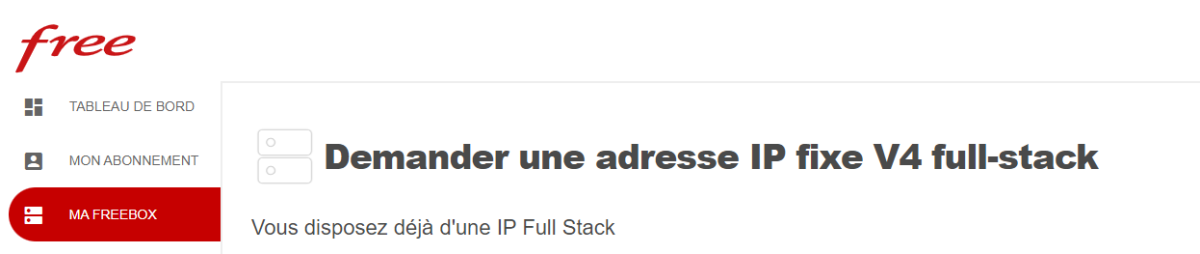
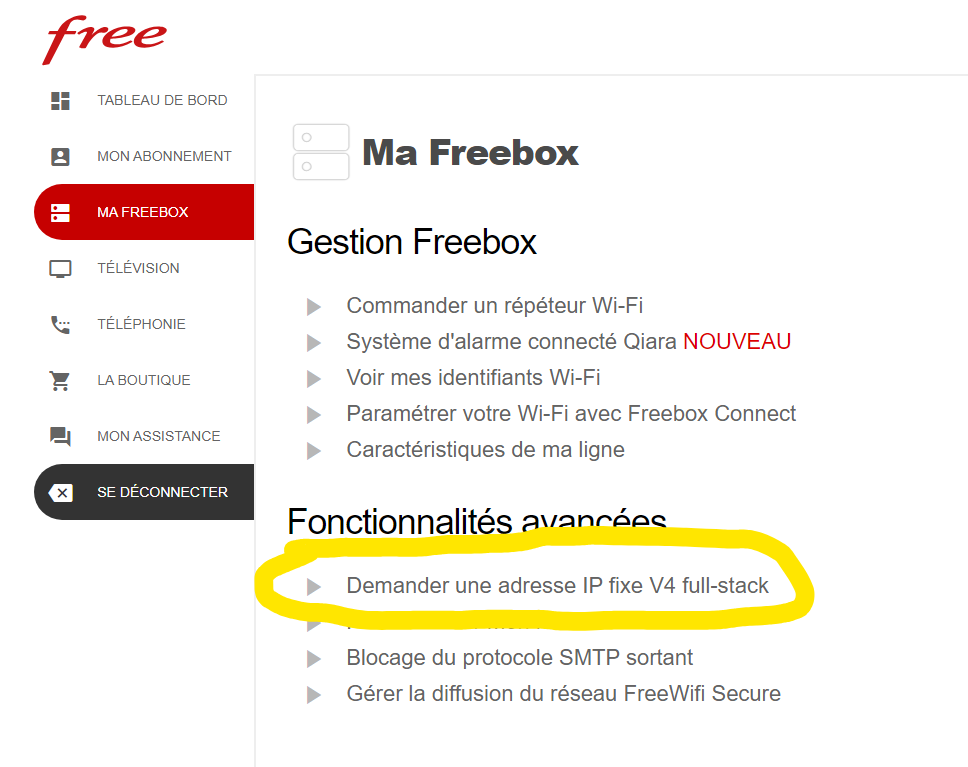
Bonjour, Sans en être sûr, est-ce que ta ligne freebox est une full stack ? Tu peux le voir en te connectant sur ton espace client
 1 point
 -
Oops. Fixed.1 point
-
For anyone following this thread who would like to encourage the Emby devs to add adjustable audio delay to other Emby clients/apps, please go to this new thread and chime in.1 point
-
last EP in the raw EPG is the same as shown on top of the guide: S10E28. no E29 nor E30 that explains the gap1 point
-
¿Por qué crearías bibliotecas separadas para ese propósito? Para eso están las colecciones. De todos modos, si desea tener bibliotecas sin mover elementos de su ubicación actual, puede usar archivos strm y apuntarlos al mismo contenido. Edit: @sa2000Maybe opening paragraph in the above linked KB article could be expanded to denote that it can also apply/be used for locally stored and/or shared files (ditto for Usage section)? Granted, examples further down in the article do show usage in that scenario, but it is not obvious/apparent when reading feature description alone.1 point
-
Maybe you've added second one inadvertently - edit that library, both folders will be shown/listed near the top.1 point
-
OK and yes ,these language params are certainly possible.1 point
-
You should uncheck all the options except for "Hide users from login screens on devices where they haven't authenticated". Thanks, that works great. Now I can switch between two users. Regards.1 point
-
@LukeThere appears to be an issue here. I manged to get it to auto play next episode when the setting was disabled and the config.xml for the user did correctly show EnableNextEpisodeAutoPlay is set to false. This was on 4.9.0.30. Interestingly, disabling and re-enabling the setting below it in Playback settings resolved the problem. Toggling "Show up next preview" in playback settings So unticking "Play next episode automatically" was ignored on next playback. But when going back to the settings and unsetting "Show up next preview" or unsetting it and re-enabling it, the next episode did not auto play1 point
-
I might have found an update here: It seems that, in the Apple TV system settings, going under Settings -> Video and Audio -> and then enabling the Match Content settings might have alleviated my issues. I'll report back after further testing. I'm interested to see that it doesn't seem to be an Emby or Infuse issue, and instead, potentially an issue with the config of the Apple TV, itself. Regardless, this has been a major annoyance for me so I'm ecstatic to have found a potential solution! Additional reading: https://community.firecore.com/t/apple-tv-settings-for-infuse-pro/41001 https://www.reddit.com/r/appletv/comments/nmf6ws/apple_tv_4k_settings_app_guide/?share_id=DwmgFziBd3-Ju2HylJ9Lh1 point
-
That is exactly what I was typing to see if you verified the Collections library settings.1 point
-
Ok cool, well annoying that it was reset and we dont know the cause. But i will redo them and lock em thx1 point
-
Hi, Thanks for your fast reply. The existing users were already there from the initial setup, didn't add any new. They have access to all libraries. But browsing over the user settings, I see that parental control tab, I never touched it before. There was nothing selected, blanc option. Now I just tick on highest level (18+) and allow everything - seems this did the trick and solved my problem. All good now. Thanks again.1 point
-
Hi, yes we'll take a look at this. Thanks !1 point
-
Correct I just remove the strings but believe you can remove the entire node as you highlighted. Then a Library Refresh is needed for the server to rewrite all the SortTitles in the database. <SortRemoveWords /> As for Star Wars yes you would have to manually correct these unless they are already locked as Refresh metadata will not touch locked items.1 point
-
HI, we know what the issue is. We are working on it. Thanks.1 point
-
These things need to be viewed from a much wider angle, especially with regards to timeline. Just look at how long it took for H.264 to become such a widely used codec like it is now. Many patents have expired already and a few remaining ones will expire in the following years, but these are for encoding. For basic decoding, all patents have expired already - for H.264. For H.265, there are still active patents, even for decoding, that's why Chrome had refused to support it for a long time. They made a turn recently - but well, just sort of: they support HEVC decoding through hardware only. This allows them to get away for free because the GPU vendors are paying the patent fees for their video codec implementations. After the H.265 patents (needed for decoding) have expired, we'll most likely see Chrome(ium) to implement software decoding of H.265 as well, but there are still a few years to go. Side note: Microsoft have different goals - they want to support H.265 video playback even without hardware support (software decoding) on Windows, but they're using a trick: They require users to install the "HEVC Video Codec Extension" from the MS Store (sometimes free, sometimes for a small fee, I don't get the logic behind this, tbh). This way, they don't need to pay license fees for all Windows installations but only for those who really need it - which they can count by the number of installations of the store item. Now, when we look at the timeline: H.264 was introduced in 2003, H.265 in 2013 and H.266 in 2020. It will still take a few years until H.265 decoding will be patent-free. For H.266 it will take many more years, so there's no point in spending any thought on it right now. AV1 is claiming to be free from patent restrictions, but it's still at a very early stage. These things take time until it's all working flawlessly and in a power-efficient way, and until it's really widely supported. Most YouTube videos I watch are being played using the VP9 video streams, even though AV1 streams would be available. My system isn't really outdated (maybe like 2 years behind the latest stuff), and so there must be other reasons for why they're making the decision to use VP9 instead of AV1. AV1 is definitely an interesting codec option, but it still has a few years to go until hardware acceleration for AV1 will have fully arrived in the mainstream (i.e. be available on average and low-cost devices, including the whole range of NAS devices).1 point
-
Hi, yes we are working on improving the way the server search handles periods. Thanks for the feedback.1 point
-
+1 I need this feature. It's impossible to sync the audio with some devices when using external audio gear that can't be fed by the TV's audio output, especially when using a TV that doesn't support HDMI or have an audio passthrough.1 point
-
Addendum: I was unsure what exactly to do and i tried the following with a test library (movies): I added another path to this library with exact the same content and did the scan. The result was, as expected, that i then had _two versions_ of the same content in this library. Basically as another item with another cover again. I would have to update metadata manually. But i was ok with it, at least i can copy stuff around in the emby-interface easily. I thought with shows it would function the same way but i am now into a (long) scan of my shows-library, and it hasn't finished yet, but what i see now is following: There is no double entries of shows. Also no double entries for seasons. Also no double entries for episodes. If i open up a specific episode it shows "two versions" of the same file with exactly the same filename that can be chosen in a dropdown-field. Metadata stayed the same. The custom images i chose are the same. The descriptions and tags stayed the same. Watch history stayed the same. My hope is that after the scan is finished i can then through normal UI remove the old path, wait for automatic scan to finish, and it will detect that those versions of the 'old library' are no longer there, and it will keep only the "new versions" and all the metadata. This would mean, at least for shows, a pretty frictionless migration to another library-content path. And everything stays online/available during the process. Just takes some time.1 point
-
I have tested this a few times in the past, but not recently. I am assuming that there is still no feedback on the timeline so you can see where cuts are made, correct? (IE: something like chapter markers, or sections in a different color that signify where a commercial has been detected)1 point
-
Lend your support here:1 point
-
Hello everyone. I completed unoffical web API for csfd. https://czechapi.000.pe/?name=potter azkaban https://czechapi.000.pe/?name=potter azkaban&lang=fr All possibillities are: others => 'sk', 'at', 'gb', 'us', 'de', 'es', 'fi', 'fr', 'hu', 'pl' https://czechapi.000.pe/?id=1354750 by csfd.cz/film/XXXX or by imdb code https://czechapi.000.pe/?id=tt27534307 It will return also nice images, but without resolution in hires array. If you want to get resolution, I can do this, but it is superslow. So now it is disabled for better performance. There is cache for 1 month. If movie is made by year as now, there is 14 days cache. Within two months after the premiere is, there is 7 days cache. API is hosted via free hosting, so please dont blame me for speed. On my VPS it can parse about 10seconds with 50 images with hires resolution.1 point
-
HI, we are looking into improving this. Thanks.1 point
-
From current research and mentioned in other topics, this information is currently only accessible via their web site. Their is no option via their api to get this info. I would assume when they release v4, it will be availble. unanswered topic https://forums.thetvdb.com/viewtopic.php?f=118&t=63620&p=173843&hilit=api+netflix+order#p173843 Another topic with a answer https://forums.thetvdb.com/viewtopic.php?f=41&t=57220&p=166068&hilit=api+netflix+order#p1660681 point