Leaderboard




Popular Content
Showing content with the highest reputation on 09/15/24 in all areas
-
I have left Plex to comeback to Emby. after a number of years. I hope Plex users see this. In short, had lots of problems with the main account being kicked out, hell of a time getting it to reconnect. Plex is not a personal media application anymore, and that's what I paid for, but that's gone now. Plex had more links to their crap in the side menu then I did...LOL. It's not easy to manage users or set them up, They do not care about the users, it's about how many plugins they can insert to generate more cash. Since I have moved to Emby, huge difference! Great management with the app, Plex doesn't have that, theirs's is garbage. Very easy to add users, and my users like it much better. Emby blows Plex away. Is it perfect?, No, close enough for me and I know they are going to keep working on it. I urge Plex users, give it a try. Keep up the good work Luke...please do not change your path or the vision for this software. I think Emby is going to see a lot more Plex users come their way. Thank you!1 point
-
Any update on when this will be fixed?1 point
-
You should also test if the crash by the "Play On" feature also happens if nothing else is already playing in the Apple TV app! And when creating your bug report, do not mention VirtualTV! It will just confuse the devs while the bug in reality has nothing to do with the plugin. It's all about remote controlled playback with the "Play On" feature.1 point
-
Well whoever split off first is petty and should have changed the ports that's lame.1 point
-
Yay. Knew I'd get something right eventually...1 point
-
You are.1 point
-
5th times a charm I guess , finally worked1 point
-
Right, that's why I was bewildered by "data.tmsapi.com".1 point
-
YOUR domain name - anonymization is about protecting your privacy. What would be the point in hiding those, as one would generally want to see those to know what queries/calls have been made, especially for troubleshooting purposes? Don't see the reason why it should be, maybe that's side effect of masking domain names in general, however what is important is that no remote addresses are identifiable/exposed.1 point
-
That is exactly what I was typing to see if you verified the Collections library settings.1 point
-
Nevermind... I swear I checked the boxes for the art on the collection library, but apparently I didn't.... So, after i did that, it appears to be working just fine.1 point
-
Hi. I only see a local address. Am I missing it?1 point
-
Thanks for the hard work ! If there is any way I can help to facilitate let me know.1 point
-
Fantastic, thank you Luke1 point
-
Your dynamic libraries fix works great, the advanced options can now be disabled.1 point
-
The command is well received by the player (200 code) and the app starts. But it ends on the Emby main menu, without the content playing.1 point
-
That's what I assume too. You have a special setup and I think I missed a case in the http communication. I use a low level (self written) http communication code based on pure socket I/O. Proxy is fine and tested (I use it myself), also cloudflare was tested and also fine. Redirects the same, also tested and works. SSL surly also tested. You use a different setup I haven't tested.1 point
-
OK yes we'll take a look at this. Thanks.1 point
-
Hi, yes this is something that we need to look at improving. Thanks for reporting.1 point
-
Hi, yes this makes sense and is something we can add. Thanks for the feedback.1 point
-
OK, I would say yes, that's certainly possible.1 point
-
Hi, the new windows app currently in beta testing no longer uses electron.1 point
-
Hi, there is some good advice here I think:1 point
-
You don't already have your downloads on the cache drive? My flow all on the cache drive is download -> use ARR to manage the file -> unraid moves file after 14 days to array off cache.1 point
-
It is currently in beta testing, so most likely a few weeks away from everyone getting it.1 point
-
I found this a few years ago and like it https://www.tweaking4all.com/home-theatre/rename-my-tv-series-v2/ Tweaking4All.com - Rename My TV Series. For me it has seemed to be consistent with TVDB and IMDB.1 point
-
To be completely honest here, we need to add the "DisplayContent" and a few of the others into the app still. @Luke@ebrWe need #1308 merged. As far as the "Play" options with images, this will be a problem. We only gave the external controller access to the videoplayer and audioplayer, not the photoplayer. We can add playback support for images to the casting support. This was an oversight and something we forgot. I have added this to our issue tracker. Reference: Issue #1638: [Casting] Add support for photos during casting playback1 point
-
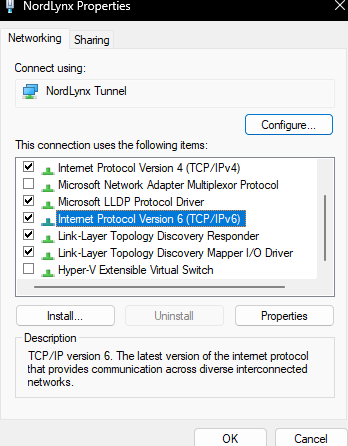
HEY THIS WORKS! All this time I thought it was an issue with Nord's Split Tunnelling feature. Thought it might be since Nord actually enables ipv6 even if they don't support it. You can see this in the adapter properties. I suspect this to be the issue because when I disconnect my VPN, Emby has no problems getting metadata. It's only when I connect to a VPN server that issues arise, even with split tunnelling disabled. Editing the config file and then restarting Emby Server solved the issue. EDIT: I should note, I did not enable IPV6 in properties before. It is disabled on my main Wi-Fi adapter. Not sure why it's enabled for Nordlynx/NordVPNs Tunnel.
 1 point
 -
te ejo un enlace de muestra por si lo puedes poner por hay que no se donde ponerlo vale1 point
-
ok perfecto , por cierto estoy creando backdrops animados , de mis peliculas , si quisiera compartirlos con la comunidad como tengo que hacerlo , por si le gusta a alguien , gracias1 point
-
Yes I did exactly that. According logs, only this two médias fails ... On about 800 films and 2000 TV show files. So I'm not sur that only a question of permission. I confirme that switch the default getway to "LAN1" instead of VPN was the solution.1 point
-
Browser was an older version of Waterfox. Updating to the latest fixed the issue. Thanks for the reply's!1 point
-
Sounds reasonable.1 point
-
Correct.1 point
-
Yes, this feature would be useful especially when watching some 'educational videos' in hidden libraries. From user perspective could be as simple as flag in the library indicating - " Library listed under Continue Watching? " triggering the same 'Remove from Continue Watching" automatically for a particular library.1 point
-
Yes, at least 4 - if not 3, since, as said: TV-Y7=3 TV-Y7-FV=4 But either would work.1 point
-
Hi all, thanks a lot for the input, I'll try to elaborate below. @Happy2Play, true, but using DDNS on a dynamic WAN IP is a lot easier then to remap it all the time. but yes, you are correct. @Luke, sorry, i misunderstood (...) The ISP is waoo (https://www.waoo.dk/). And the challenge, ehh, is slightly complex.. So, here we go, sorry. At our place we have multiply floors, thus to cover (wifi wise) the entire place we have two routers, for the sake of argument lets call them R1 and R2. R1 is connected to WAN and is the one provided by the ISP. R2 is set as "Accesspoint" and is physically connected to R1, the server is physically connected to R2. So, the challenge is that as R2 is an "Accesspoint", i cannot controle portforwarding on that router, thus only R1 can be used for that, but settings that i make and apply in R1 cannot get applied "through" R2 as R1 is not in direct contact with those units... I don't dare to move the server to anywhere near R1 as it is not a safe place for electronics (water and vibrations), the ISP wants a lot of money to put their router R1 in bridgemode which would allow R2 to be the "main router" (sry, can't translate that name). So, at this point i don't know what to do about it. FYI, R1 is an Icotera i5850 while R2 is an TP-link Archer AX1500. This dilemma is also what prevents me from using DDNS on my server as this setup simply does not forward the signals correctly. In the past, I have tried to use portforwarding roules on R1 to the server (which, yes it can see and ping, the server can also see and ping R1), but without succes. I have also tried to engage the DDNS option on R1 and bind it to the server IP and mac, but without success. So, in short, the network here is annoying and i got no clue what to do about it, i would prefer if the WAN in emby could be bound to the synology quickconnect, as this somehow works, how it works is beyond me as i have never "fixed" it. I simply plugged it in and it worked...1 point
-
The realtime monitor could have started one, if that option is enabled on your libraries.1 point
-
Also curious why Emby decides to transcode HEVC to AVC when the Apple TV, using the native player, starts playback of a media file that is HEVC encoded? This request from the Apple TV app appears to explicitly call for h264, but it seems as though hevc should be an acceptable format for the native player? 2024-09-02 19:05:00.441 Info Server: http/1.1 GET http://host1:8096/emby/videos/4249540/master.m3u8 ?DeviceId=010F8C35-069E-44D2-A040-58FCFB7C522F &MediaSourceId=0dfa3b665c052cac9249638958703ad2 &PlaySessionId=50ebe9a25c444e418391ea96b6932b69 &api_key=x_secret2_x &VideoCodec=h264 &AudioCodec=ac3,eac3,mp3,aac &VideoBitrate=199808000 &AudioBitrate=192000 &MaxWidth=3840 &AudioStreamIndex=1 &TranscodingMaxAudioChannels=6 &SegmentContainer=ts &SegmentLength=3 &MinSegments=1 &BreakOnNonKeyFrames=True &SubtitleStreamIndexes=-1 &ManifestSubtitles=vtt &h264-profile=high,main,baseline,constrainedbaseline &h264-deinterlace=true &h264-level=42 &aac-audiochannels=2 &TranscodeReasons=ContainerNotSupported.1 point
-
Hey Everyone, I've been exploring Emby's fantastic features lately, particularly the ability to fine-tune what content I track directly from my Emby interface. It's incredibly convenient and adds a whole new level of customization to my media experience. However, I've noticed that while Emby seamlessly integrates with Trakt, offering users the ability to adjust tracking preferences within the app, the same level of control isn't available for Simkl integration. Currently, Simkl integration requires manual adjustments from the server side, which feels a bit outdated in comparison. What if we could bridge this gap and bring the same user-controlled functionality to Simkl integration within Emby? Imagine being able to effortlessly decide what content to track or not directly from our Emby libraries, and easily link and adjust our Simkl accounts without leaving the app. I believe that by enhancing Simkl integration in this way, we can further empower Emby users to tailor their media experience to their liking, while also strengthening the bond between Emby and Simkl. Could we kindly request the Emby development team to explore the possibility of implementing this user-controlled Simkl integration adjustment feature? It would undoubtedly elevate the Emby experience for users like us who appreciate seamless integration and customization options. Let's rally together and show our support for this idea! Your thoughts and feedback are greatly appreciated.1 point
-
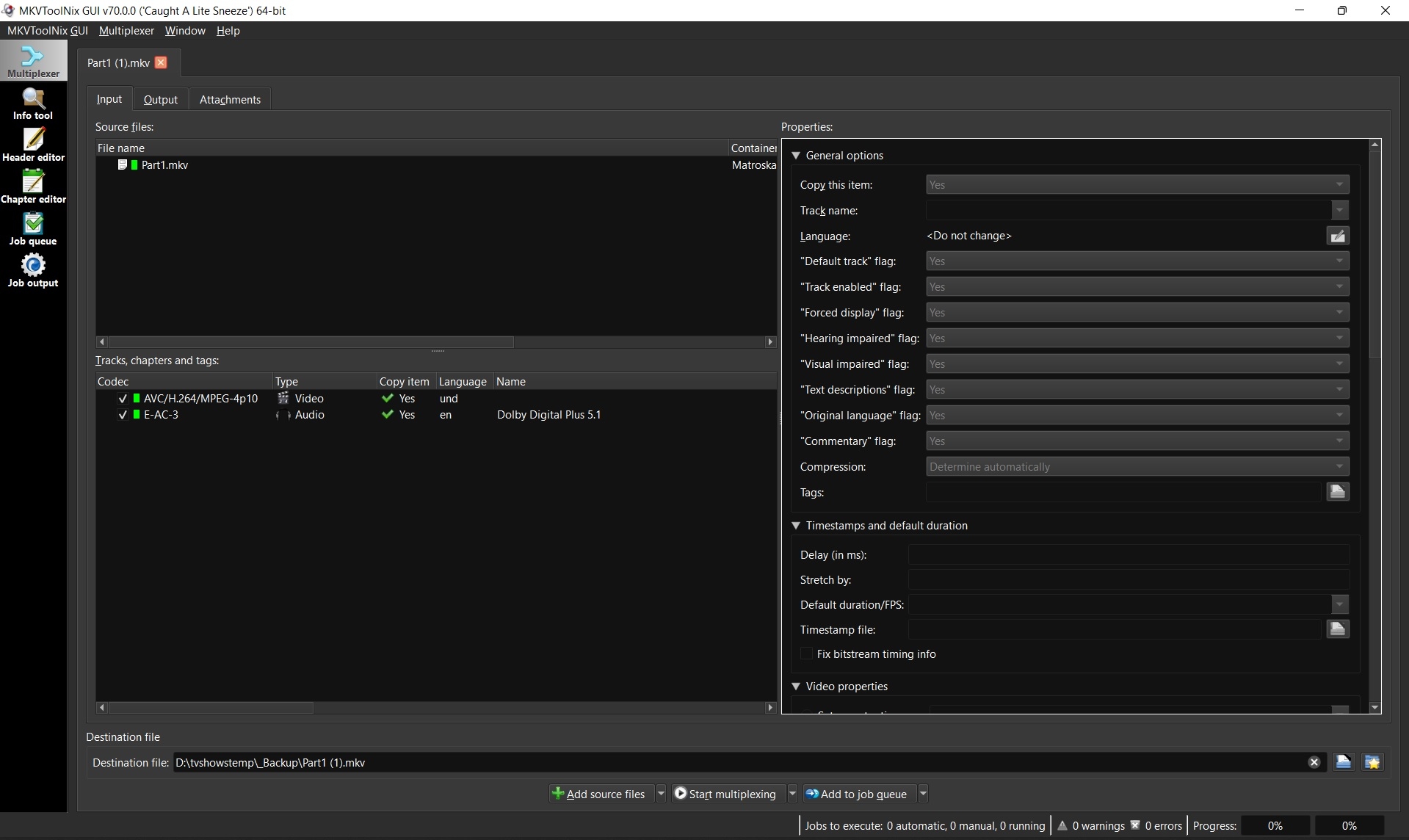
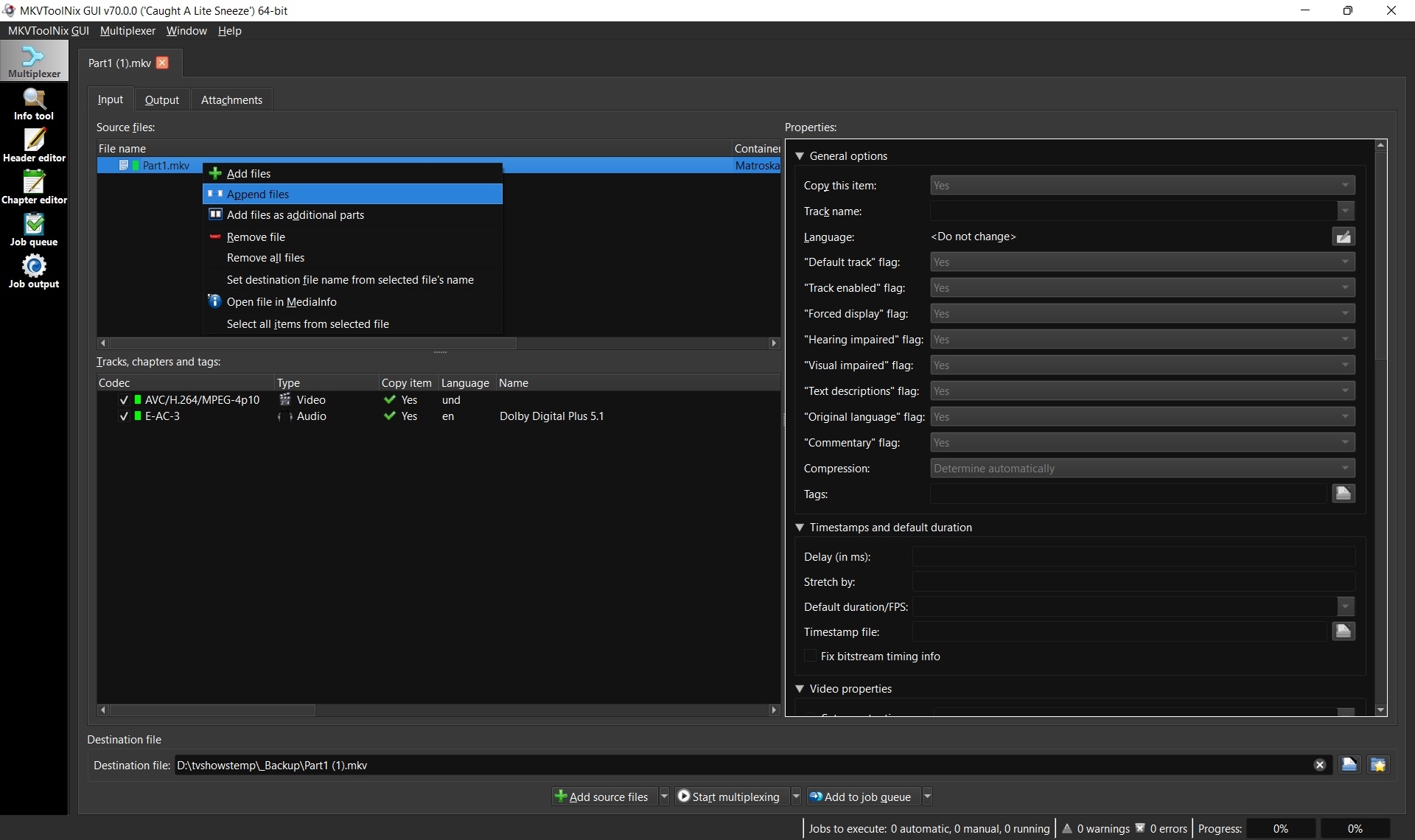
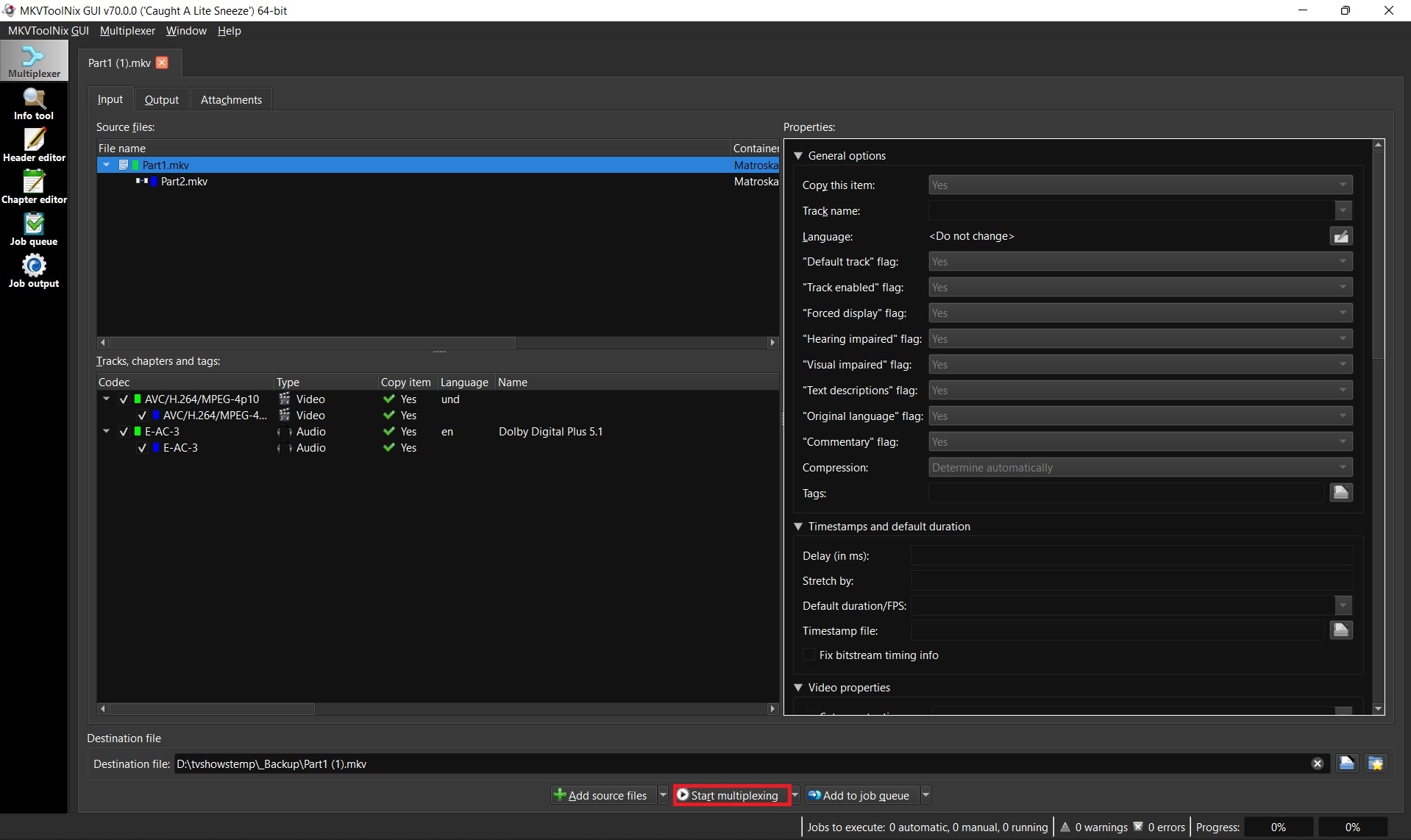
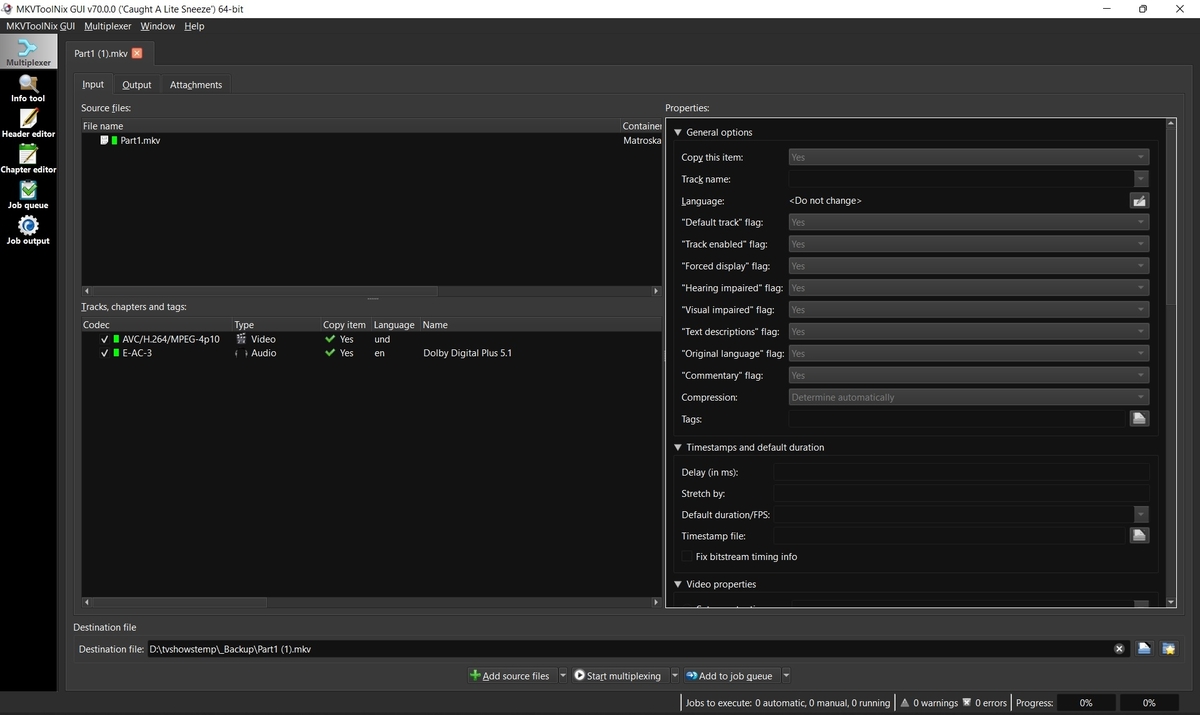
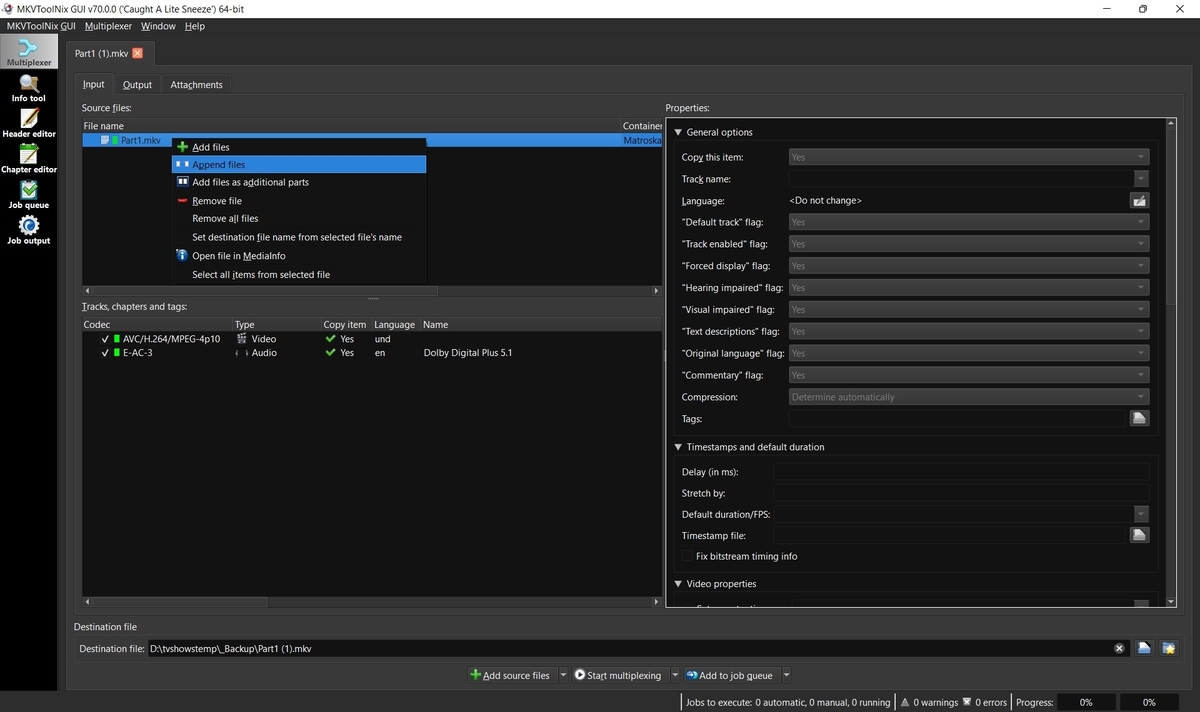
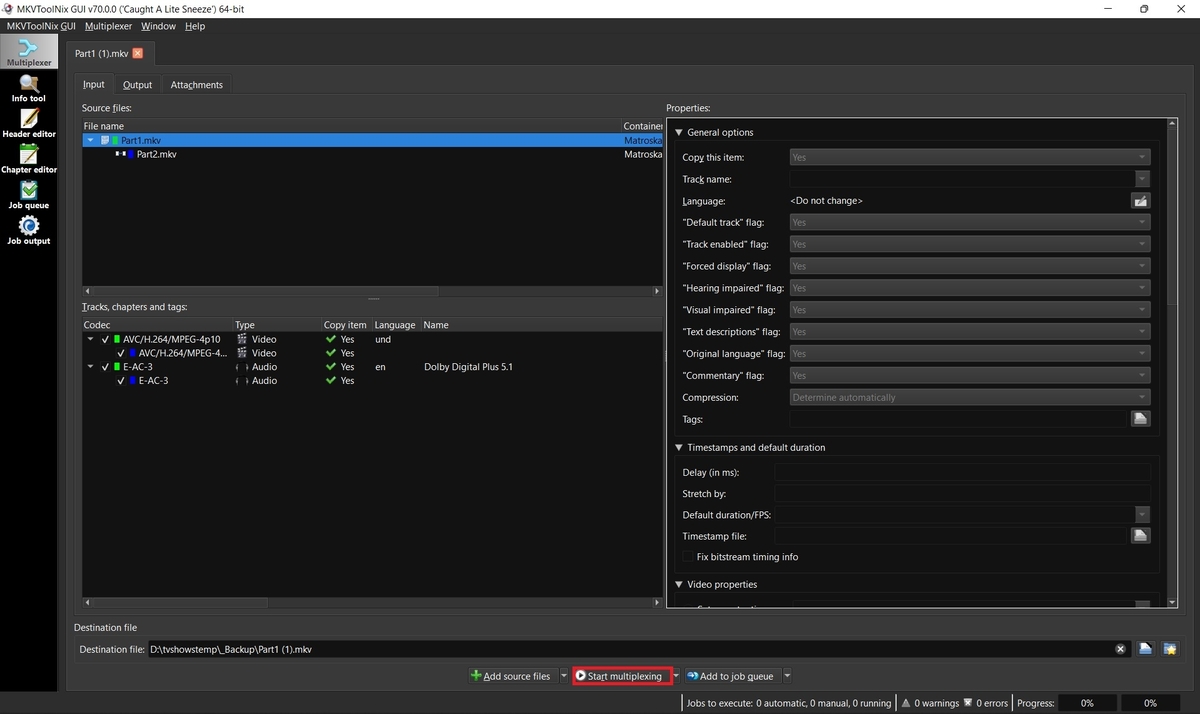
Some movies such as Lawrence of Arabia 4K are too big to fit on one disc and thus when ripped create two separate MKV files. Emby supports these multiple part movies, but merging them into one larger file is always recommended for better playback, resuming, etc. 1. Download and install MKVToolnix Click the link below if you don't already have MKVToolNix MKVToolNix Downloads – Matroska tools for Linux/Unix and Windows 2. Open the first part of your movie Start MKVToolnix Drag-n-drop part 1 of your movie to the "File name" box 3. Append part 2 Select and right-click on part 1 in the file name box Select "Append files" and open part 2 3. Start merging files together Click the "Start multiplexing" button
 1 point