Leaderboard




Popular Content
Showing content with the highest reputation on 09/07/24 in all areas
-
This topic describes the added and updated features which are available in the new Windows and Xbox apps. NOTE: This topic is locked. Please create a new topic for any questions.3 points
-
I hit "play all" on a collection and it doesn't show the next film in "Next Up" after I quit out of it. This is apparently intended behaviour, and the same applies to playlists. This is absurd. Why even have the "play all" option? Who's sitting down to watch a full collection's worth of films, or a full playlist? I have playlists for The Prisoner for its various episode orders, and there's no way I'm getting through them in one sitting. I was going to make that my next show to watch but if I'm going to have to keep track manually of my progress through the playlist it makes the playlist fairly pointless TBH. There's no reason playlists or collections shouldn't show up in Next Up.2 points
-
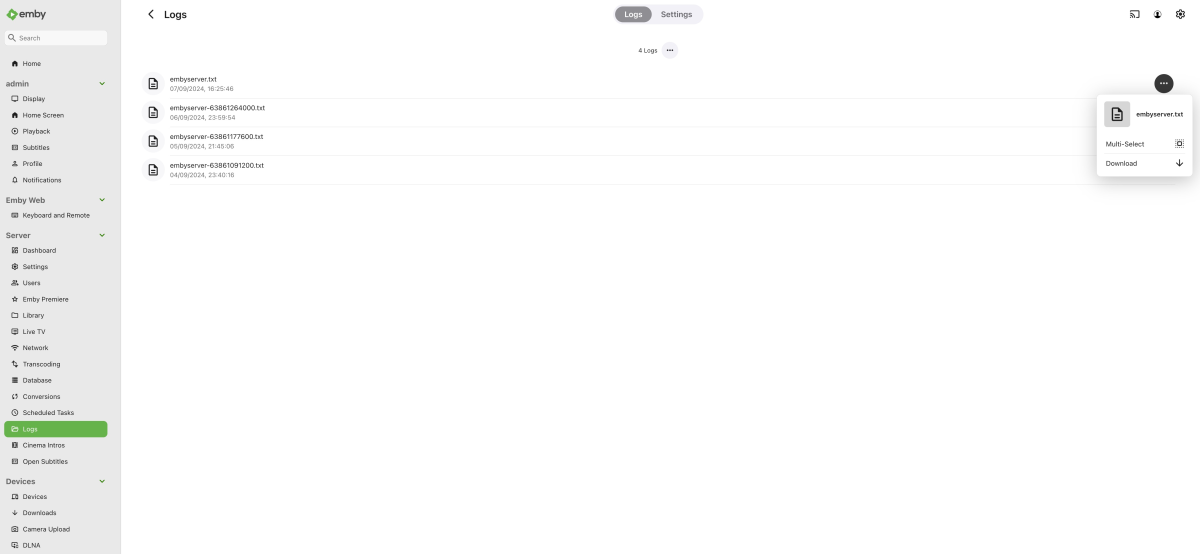
I needed to use this again recently, and I still have some problems with how emby is doing this. Surely the default should be an anonymous log? If I go into the Admin console, select logs, click the hamburger icon, and select download, I don't download an anonymous log. This should be the default, surely? You have to click into the log file where you see the anonymised switch and click download from there. Also, if you have an IPTV service set up, the details, including the password, are displayed in the log file regardless of whether you have anonymised selected it or not. This isn't good! 2024-08-25 12:46:54.917 Error HttpClient: Connection to http://URL:8080/username/password/109 timed out Can this be reviewed again to ensure that nobody is being asked to post private details on a public forum to receive support? Thanks
 2 points
 -
Thanks, I can see the problem. I'll fix it in next version.2 points
-
These things need to be viewed from a much wider angle, especially with regards to timeline. Just look at how long it took for H.264 to become such a widely used codec like it is now. Many patents have expired already and a few remaining ones will expire in the following years, but these are for encoding. For basic decoding, all patents have expired already - for H.264. For H.265, there are still active patents, even for decoding, that's why Chrome had refused to support it for a long time. They made a turn recently - but well, just sort of: they support HEVC decoding through hardware only. This allows them to get away for free because the GPU vendors are paying the patent fees for their video codec implementations. After the H.265 patents (needed for decoding) have expired, we'll most likely see Chrome(ium) to implement software decoding of H.265 as well, but there are still a few years to go. Side note: Microsoft have different goals - they want to support H.265 video playback even without hardware support (software decoding) on Windows, but they're using a trick: They require users to install the "HEVC Video Codec Extension" from the MS Store (sometimes free, sometimes for a small fee, I don't get the logic behind this, tbh). This way, they don't need to pay license fees for all Windows installations but only for those who really need it - which they can count by the number of installations of the store item. Now, when we look at the timeline: H.264 was introduced in 2003, H.265 in 2013 and H.266 in 2020. It will still take a few years until H.265 decoding will be patent-free. For H.266 it will take many more years, so there's no point in spending any thought on it right now. AV1 is claiming to be free from patent restrictions, but it's still at a very early stage. These things take time until it's all working flawlessly and in a power-efficient way, and until it's really widely supported. Most YouTube videos I watch are being played using the VP9 video streams, even though AV1 streams would be available. My system isn't really outdated (maybe like 2 years behind the latest stuff), and so there must be other reasons for why they're making the decision to use VP9 instead of AV1. AV1 is definitely an interesting codec option, but it still has a few years to go until hardware acceleration for AV1 will have fully arrived in the mainstream (i.e. be available on average and low-cost devices, including the whole range of NAS devices).2 points
-
You're better off working to ensure that malicious code does not get free rein on your network. Being able to snoop Emby locally is a comparatively minor deal in comparison with what malicious code in your network can do elsewhere using standard commands. Paul2 points
-
Hi guys, I am sharing my server with my parents and my sister. My sister and I would like to have the metadata in English our parents on the other hand need to have a different language as they don't speak English. Have been looking in the settings but couldn't find anything that would allow this. So, is it even possible to set two languages for the metadata and then depending on the users language showing the one or the other language?1 point
-
I am looking to see if a SAML2/OAuth plugin is something others would use. I myself would love this feature to share Emby publicly with family members and friend and worry a little less about insecure passwords that some may use. I personally am a big advocate for security as I work in IT and see how a lack of good security can cause havoc. I love Okta and what it offers. Anyone can sign up and use it for free under 1000 users if you sign up as a Developer. That is just plain awesome. Let's see who else is interested. I am excited to find out! Thanks1 point
-
Hello pals, I'm using short term Emby server to serve my Movie and Music collection and I'm fully satisfied. After installed XMLTV server plugin I can watch and my TVHeadend IPTV received TV programs. Now I've though (just an idea because don't look at server plugins in depth) - if the XMLTV plugin uses ffmpeg or avconv to cast TV channels is it possible to make choose second channel and produce resultant stream from both channels with Picture in Picture. I know with FFMpeg is relatively easily like ffmpeg -i pipInput1.flv -i pipInput2.flv -filter_complex "[1]scale=iw/5:ih/5 [pip]; [0][pip] overlay=main_w-overlay_w-10:main_h-overlay_h-10" -profile:v main -level 3.1 -b:v 440k -ar 44100 -ab 128k -s 720x400 -vcodec h264 -acodec libfaac PIP_output1.mp4 or more simple ffmpeg -i master_video.mp4 -vf "movie=second_video.mp4, scale=800:-1 [inner]; [in][inner] overlay=70:70 [out]" completed.mp4 ffmpeg -i rtsp://serer/mp4:1.mov -i http://serer2/sample-video2.mp4 -filter_complex “[1]scale=iw/4:ih/4 [pip]; [0][pip] overlay=main_w-overlay_w-10:main_h-overlay_h-10″ -ar 44100 -f flv rtmp://localhost:1935/Stream etc more variants. Could be possible to be created such PiP IPTV plugin server side ? Thanks to anyone in advance.1 point
-
Enhanced Gamepad Support Support for gamepad input has been significantly updated. On the technical side, unnecessary power drain is avoided and the reliability of key input detection has been improved. Functionally, mappings have been extended, allowing to control more things with game pad buttons. The new settings UI serves two purposes: It provides an overview over the functions assigned to individual gamepad buttons and sticks It allows to test all controls as to whether they are recognized by the app Emby_Enhanced_Gamepad_Support.mp4 How to... ...access the game pad settings view? Go to Settings (Gear icon), in the sidebar choose "Game Pad" Applies To Windows App Xbox App1 point
-
You appear to have a network issue as Emby can not talk to external provider sites. Resource temporarily unavailable (mb3admin.com:443) Resource temporarily unavailable (api.github.com:443) Resource temporarily unavailable (api.themoviedb.org:443) Resource temporarily unavailable (private.omdbapi.com:443) Resource temporarily unavailable (api4.thetvdb.com:443) Resource temporarily unavailable (webservice.fanart.tv:443) And you have an iNotify issue. The configured user limit (8192) on the number of inotify watches has been reached, or the operating system failed to allocate a required resource.1 point
-
Display Control: Refresh Rate and HDR Mode Switching The new Windows and Xbox apps include an entirely new component for controlling display refresh rates and automatic switching of HDR enablement. Display-Control.mp4 Features Detects GPUs, connected displays and the connection type Detects possible refresh rates for each connection (depends on GPU capabilities, display capabilities, connection type, current resolution, current color mode) Detects availability of HDR mode for each connection Detects the display on which the Emby app is currently being shown (Windows app only) Dynamically updates the settings view when changes are made to OS settings or displays are connected/disconnected Allow manual switching of refresh rate and HDR mode (three-dot menu) Automatic switching of refresh rate and HDR mode on playback start can be enabled independently and separately for each display This will only be applied to the display on which the app is currently shown Revertion of refresh rate and HDR mode on playback stop can be disabled to reduce display mode changes (which can take a few seconds) How to... ...access the Display Control settings? Go to Settings (Gear icon), in the left sidebar choose "Display Control" Applies To Windows App Xbox App1 point
-
Brightness Attentuation The new Windows app has a brightness attentuation control which allows to reduce the brightness of UI elements without affecting the colors and brightness of video playback. This feature is the first of its kind in Emby, meant to test what can be done in this area. For technical reasons this is currently limited to the Windows theme only! BrightnessAttentuation.mp4 How to... ...enable the brightness attentuation feature? Go to Settings (Gear icon), in the left sidebar choose "Display", find setting "Theme" and make sure that "Windows" is select. Then hit the "Theme Settings" buttons below and use the dropdown selection to control the brightness attentuation strength Notes: Changes are applied instantly; "Minimal" attentuation is very subtle Applies To Windows App with Windows theme enabled1 point
-
Windows Theme The new Windows app includes a new and exclusive theme: "Windows" WinTheme Overview.mp4 Features Fully adheres to the latest Windows design guidelines: https://learn.microsoft.com/en-us/windows/apps/design/ Uses outlined icons Uses the "Segoe UI Variable" font Precisely resembles Windows UI elements down to the pixel level Precisely resembles Windws UI coloring and dynamically adapts to changes at the OS level Follows Windows theme settings for applications (light/dark) Follows Windows accent color setting Allows overriding the Windows theme (light/dark) for the app specifically Uses original Windows application background materials On Windows 11 and later: Mica Material On Windows 10: Background Acrylic Supports Windows High Contrast Themes Adaptive logo display (left top) Large when sidebar visible Icon-only when sidebar is minimized Small when no sidebar and during video playback to save screen estate Rotating icon while wait cursor (spinner) is shown Dual Color Mode When light theme is active and the app changes to dark background for showing backdrops, the sidebar remains to have a light background Dropdown popups are positioned according to Windows guidelines View options and filters are shown as panel (right aligned) rathern than as dialogs In-app dialogs have the same appearance like Windows dialogs Cards are shown as integral elements (all captions are inside the card borders) Color intensity effect for card hovering Intuiitive control of sidebar appearance (show, hide, mini) Improved keyboard navigation with focus indicators following Windows guidelines Brightness attentuation setting in theme settings Rounded-corner appearance for main layout and video playback in windowed mode (like latest MS Edge browser) How to... ...enable the Windows Theme? Go to Settings (Gear icon), in the left sidebar choose "Display", find setting "Theme" and select "Windows" ...override the Windows (dark/light) theme for this app only? Go to Settings (Gear icon), in the left sidebar choose "Display", find setting "Theme" and make sure that "Windows" is select. Then hit the "Theme Settings" buttons below and use the options to select an override mode Note: Changing this setting requires a restart of the app Applies To Windows App (exclusively)1 point
-
Right, and this .js "if" function that maybe doesn't work, like the reason I suspected, would result in the problem happening for everyone in any OS. Testing it is tricky, because like Yocker posted, it worked for him but maybe his browser version was recognized by the .js function and then other browsers get the undefined browser type result and this causes the issue. It sort of takes code dev person to go in and monitor with browser types or add comments to the code to see which browser fails. We can't do that on the outside.1 point
-
Startup Animation EmbyStartAnimFlat.mp4 Why it Exists It had turned out that it takes a number of seconds until the web app environment is initialized and ready for the actual startup process which takes another few seconds until the app is ready for use. This cannot be accelerated, so the only option was to cover that time span with something visual. Showing a spinner is always the worst option for those situations because it doesn't provide any indication about progress, so you're unable to see how much time is still remaining (that's why spinners are typically used for cases when the duration is unknown). A progress bar can be followed and indicates the remaining amount of time, but too often those are used in a way that progress stops at 90 or 95% for much longer than it should, so nobody trusts them anymore these days. The start animation in turn has a fixed duration and once it's finished, the app is (almost, like 99.9%) guaranteed to be ready. The predictability of it makes it subjectively feel faster than a spinner or a static logo display. Can the animation be disabled? There's a "Hide" button at the bottom right which allows you to hide the animation and see what's behind. On fast systems and when you're already logged into to a specific server, you may gain 2 seconds by doing so, but no more and at the cost of seeing some ugly display changes. And not always. Applies To Windows App Xbox App1 point
-
Hi @user24 check out navidrome/navidrome: Modern Music Server and Streamer compatible with Subsonic/Airsonic (github.com) until emby gets it act together1 point
-
Hi @quickmic, can you take a look at this log file ? After some time, kodi doesn’t report anything to emby server, also while playing there is nothing in the activity section of the server. Thanks. kodi 3.log1 point
-
TLS certificates offer encryption and authentication (validation) and self-signed certs are missing the authentication part. Aside from browsers few devices and apps let you bypass the authentication or update the trust store. For the devs to put effort into something that won't work for the vast majority and at the same time breaks one of the basic principles of PKI and security is a waste of time when the few who really want something like this have other tools available.1 point
-
Thats good to know, thank you1 point
-
No, you don't need it, you can have as many Emby Connect accounts linked to users on your server as you want, it is not dependent on whether server has an active Premiere license/subscription or not.1 point
-
That is correct. There was no response to my first question asked in German, which is why I assumed that no German-speaking member could help me. So I tried again, this time in English.1 point
-
Would it make it more understandable if it was rephrased to something like: "Choose the file formats (meta)data from your database will be saved to" "Choose the file formats (meta)data from your database will be written to" "Choose the file formats for the external file(s) (meta)data from your database will be saved/written to" ?1 point
-
@LukeYes it helped, it answered my question but didn't really get me the function i wanted. Not a complaint but a feature request! Thank you.1 point
-
Haven't tested all my library yet I've seen it in another one, but most of the files are working I'll try some more files later on to find if there is something common1 point
-
I use now symlinks, not strm to overcome the problem1 point
-
OK we'll take a look at it. Thanks for reporting.1 point
-
I dont know how or why but i think this is working now. i am connected at the moment streaming to my Mobile phone on 5G , going to check over at my parents house later1 point
-
Ok just wanted to post back here to say that I finally found the issue. And it indeed had nothing to do with EMBY and or ROKU. That was just where i was seeing the problem. It turned ot it was a hyper specific issue related to my setup. My files were stored on a separate server that was sharing the files to a lxc container running emby via an NFS mount in proxmox. Something with how proxmox was handleing the NFS mount was timing out and causing the network stuttering. I have solved the issue now by changing how the NFS mount was being handled on the proxmox server and the issue has gone away. I think the network pings I was seeing where incidental but may have been related to what was causing the network storm that was crashing the NFS server. Man that took way longer than it should have to work out. Thanks1 point
-
Hi Luke cracked it. add the following to mpv.conf hwdec-codecs=all All 1080i content now uses hardware acceleration and runs mint.1 point
-
Yes you create a second caddy and create dns entries pointing to it. You should really be putting your Emby server in a DMZ and use firewall rules and vlans to segregate access your network if you’re that worried about a hacker.1 point
-
The Emby is the least of my worries if someone is snooping on my LAN. They can have the Emby, there's nothing of real value there for me. Get distracted with the Emby while I lock down everything else... Like @pwhodges says, anyone using a reverse proxy can create a self-signed cert for the backend/upstream hosts. The frontend will need a trusted cert and for most that means from a real CA.1 point
-
It does thanks for the help1 point
-
Resolved the issue by installing the Emby Diagnostics plugin and then enabling 'Force subtitles burn-in" under Diagnostics settings.1 point
-
There are multiple ways to do what you want. Since you're using Caddy your public certs are likely handled automatically for you. If you want to use an HTTPS upstream for Emby then you can create and configure a long life self-signed cert that can be used for the backend and trusted by Caddy. By generating your own 5 to 10 year cert you can include any names and IP addresses you want for the CN and SANs without having to worry about renewal. Emby will enable and continue to use the HTTPS port when you add a cert even if you disable remote access later. But the server includes settings for reverse proxies so you don't really have to disable remote access in Emby.1 point
-
People who come here from that website that sells Embyshares needs to get banned. Anytime someone says they are using "Jupiter" or "Neptune" server should equal an immediate ban. Time for playing games is over. Their customers not ours. Get rid of them. People who defend this behavior should also get warnings and banned. Respect the service or do not use it.1 point
-
Hi, not yet but stay tuned.1 point
-
Hi, I would just look over user permissions and grant or deny access to various things based on your intentions. You can, but I probably wouldn't because if you use Emby Connect personally then you probably want to sign in with a different user other than guest.1 point
-
Only the very latest Nvidia GPUs support AV1 encoding and similar applies to Intel. From support requests, we have a pretty good picture of the GPUs that are used with Emby Server, and those latest models which can do AV1 encoding are used by far less than 1%. That's why it's not "a shame" but rather very reasonable that we are focusing on work from which a wide range of Emby users will benefit rather than niche cases. Of course this will change over time and conversions to AV1 is surely something that will be added in the future.1 point
-
Folks - we do not seek to support the illegal re-distribution of content via torrents or other means. Please keep the discussion on topic for our usage for personal media. Thanks.1 point
-
Version 11.2.0 Notes: Symfonium now have a Wear OS companion app in production. See forum for details. Added: Added new setting to always prefer server version when connected and offline cache is transcoded. You can now start Internet radio by name via the API and radio ids are exposed in the bottom sheets for easier usage. Added new Overline setting to home rows headers. Added new Show as card setting to home rows. Added new Genius search in song/album action bottom sheets. You can now configure item spacing in grids in most views via the normal display mode bottom sheet. When navigation bar is removed, the top button bar shows an home button when deep in hierarchy. (Can be disabled in settings). You can now long press shortcuts in playback speed bottom sheets to change the values assigned to them. Added new small icon, and left align icon options to home page icon settings. Added new option to hide the lyrics close button (Remember that you can use the Android back button / gesture to do the same). Changed: Major libraries update and internal changes. (Update can take some time to migrate the database, and as usual report any new issues). Handle more album release type tag separators. The prefer server version settings now properly take in account the actual cached file quality and not the general settings that can be overridden for specific files. Show waveform in lyrics view if enabled in settings. Rewrite of the media queue engine to ensure faster playback actions with large database, under high load and during syncs. File mode now also display the button bar (Play, shuffle, queue) if not disabled in settings. Fixed: Fix some Jellyfin playlists not seen after their undocumented change. Fix waveform extraction for some Cloud providers. Fix notification and media session not showing dynamic internet radio images. Try to workaround unwanted skipping to start or end of playlist on some devices. Fix possible issue with the logger generating out of memory errors. Fix unwanted auto sync with Plex due to possible sort issue in their API. Fix artist count not updated when filtering out composer only artists. Fix rounded corner settings issue with some playlist views. Fix navigating via composers and skip artist page settings. Fix end of playback for some mp3 files. Fix rediscover songs row missing thumbnails. Workaround some devices mounting SDCard too late but not returning an error when trying to access it. Fix min playback duration for resume point saving not properly handled. Fix possible lyrics sync issues when staying on the lyrics screen between songs. Properly apply the Playable media only filter to playlists. Fix possible duplicated playlists when restoring and auto importing. Reduce memory usage with auto offline cache on very large smart playlists. Do not attempt to workaround UPnP device seek issue on state restore to avoid unwanted playback. Workaround tag extraction for some invalid media causing very slow scans. (If you now miss durations on some mp3 please contact me) Fix song sort title and album sort title not always properly extracted by Symfonium custom parser. (You need to clear tag cache in provider settings to rescan the files) Fix Emby/Jellyfin add wizard failing with some exotic proxy configuration. Fix obscure bug with Japanese IME and filter bars. Fix possible race leading to repeated download of automatically cached media after a sync. Fix shuffle button in filtered album lists sometimes shuffling all albums and not the filtered ones. Properly ignore trashed media for Google Drive provider. https://support.symfonium.app/t/version-11-2-0-released/5121 ________ [Wear OS] Version 1.0.0 is now public and available for everyone. Notes: This is the first version, there will be missing features and maybe bugs, please report issues and make feature requests as usual on the forum. This is a companion app that requires the main app on the phone, it’s main purpose is caching media to play without the phone. Added: Stream media from any of the supported providers by proxying via the phone application (With transcoding by the phone to allow efficient offload on the watch, quality is configurable) Download and cache media from any of the supported providers via the phone app to play without the phone when running for example. (With transcoding by the phone to allow reducing space used and efficient offload, quality is configurable) Special secret mode to allow playback on the watch speaker. https://support.symfonium.app/t/wear-os-version-1-0-0-is-now-public/51201 point
-
How is there not 2FA yet? That's ridiculous, there should at least be that option1 point
-
I still wonder why i see all kinds of "but and excuses" statements instead of giving users the ABILITY to have MFA. All i see is "but it does not make your server more secure, etc." Just give users and Admins the OPTION to use MFA, as long as Emby is not a managed service and is doing all the maintenance for the linux or windows servers etc. people are using, this is nothing you have to bother about. When someone has a microsoft Entra Tenant, microsoft is not responsible for any misconfigurations if you have the wrong sharing options or not using conditional access etc. Why are you trying to make people feel like you do a full managed service and you need to ensure they have secure environment? You give people a program to host their own media server, nothing more, you are not managing my security or something else. If people forget their password or just use 12345 as a password, this is nothing you have to bother. Just give us the option out of the box, to enable MFA for those who wants it. No needs to discuss the whole 7 OSI Layers and security. Thanks1 point
-
Good to see the 2024 update to this 2,372-day-old thread. I wonder if we'll still be debating whether or not something that has been pretty much standard on any internet-facing service for the past 2-3 years will have been added to emby before the 2025 update? The lack of MFA after all this time is indefensible.1 point
-
I used this to get my security camera feeds into Emby. I just pointed it to their RTSP streams.1 point
-
I have already displayed it here! "aktivieren" NOT "aAktivieren" I'm not going to trawl through any links to translate ONE word.0 points
-
Hi, currently the android server does not support transcoding on Android 12 & 13 but we are working on it, so stay tuned. Thanks.0 points