Leaderboard



Popular Content
Showing content with the highest reputation on 09/03/24 in all areas
-
There are neither technical nor organizational blockers for restarting the TVnext beta channel. During the past year, I've been working on the new Windows and Xbox clients, which are built upon an entirely new architecture (regarding the outer, target-specific platform code), which is meant to serve as the basis for other clients as well in the future. This is a very complex project, and TVnext is a very complex project as well. That's why I had asked that we conduct and complete the beta for the new Win/Xbox apps first, before resuming TVnext. What I cannot explain though, is the delay of the beta for the new Windows/Xbox apps. These are ready to go into beta for several months already.3 points
-
How much experience have you of programming complex systems? The fact that there is an old working beta doesn't mean that it is now trivial to incorporate it into the current system which has had many developments in the mean time. I certainly am not wanting to be an apologist for why it took so long for Emby to commit to going ahead with this; but now there is a road-map, wailing about it will not help anyone. If the plan is allowed to slip again, I shall be as vociferous as anyone in complaining about it. Paul3 points
-
Success!!!!!! When I first ran C:\Program Files\Git\usr\bin>openssl pkcs12 -export -out C:\Users\me\AppData\Roaming\Emby-Server\system\my.domain.com.pfx -inkey C:\Users\me\AppData\Roaming\Emby-Server\system\my.domain.com_2024\PrivateKey.pem -in C:\Users\me\AppData\Roaming\Emby-Server\system\my.domain.com_2024\my.domain.com_2024.crt -CAfile C:\Users\me\AppData\Roaming\Emby-Server\system\my.domain.com_2024\IntermediateBundle.crt I got the error: pkcs12: Extra option: "C:\Users\me\AppData\Roaming\Emby-Server\system\my.domain.com_2024\IntermediateBundle.crt " pkcs12: Use -help for summary. Digging thru the openssl docs, I changed the -CAfile command to -certfile and re-ran but still got the same error. I then asked Microsoft CoPilot. lol. It suggested that I reverse the slashes in and put quotes around the file paths. I did and it worked! I then pointed Emby to the new certificate and voila' I am able to connect via https! Thank you very much for getting me here! @Lessaj's suggestion to recreate my certificate using Openssl was the solution. And I learned a lot.3 points
-
Oh silly silly me... I was browsing other topics on here and found another user who was having Connect issues and it was suggested for them to unlink and relink their Connect email. I hadn't thought to try it because I had just recently configured the reverse proxy and that's when I started having difficulties. Anyway, I unlinked and relinked my connect email and it's working now. To the both of you who offered your help in troubleshooting, thank you and I am most sorry for wasting your time.3 points
-
At least we got the required 10k steps per day in... nowadays it laptop to fridge and back to laptop...2 points
-
From what I remember, there's supposed to be some actual progress after 4.9, which you've mentioned, but 4.9 is supposed to be the Smartlists edition, and I haven't seen a lot happening with that either.2 points
-
Not really about labels as it is about why does Disc 1 not get that disc number header title like the other discs?2 points
-
Yea, Me too, lol. Oh well. All's well that ends well.2 points
-
Any news are we getting near the testing stage that we all are eagerly awaiting.2 points
-
I made a dumb mistake. While testing a few new ideas I commented out some code for testing. This caused the state not to be saved. The problem is corrected in the code below. Vic ALSO: I fixed another problem that prevents the plugin from displaying the first screen. PseudoTV.dll PseudoTV.zip2 points
-
I want to give a little bump to this, i think that this could be a good solution for the specials showing on their respective season. Making this a user preference instead of a server side option.2 points
-
Hi, Since I am using more and more TMDb, (since tvdb is more and more a mess), I am missing a very important feature. tvdb had the feature of grouping stuff into aired, DVD and absolute, which is supported by emby. TMDb had also this feature. See this example for "La casa de papel" (Money Heist, Haus des Geldes): The Original Order is allways the "aired order" of the original country. "La casa de papel" was originaly released by "Antena 3" and was taken over by Netflix, which results in different episodes ordering, which is a mess. They solved it in episode grouping. This feature is missing from emby, but it's integrated in their API and is allready supported in other apps, like kodi. At least, Banana a TMDb Mod claims it, that it's supported by Kodi: https://www.themoviedb.org/tv/71446-la-casa-de-papel/discuss/5e7032d84f9a99001152704f?page=1#5eb76872ca7ec6001f7c53cb Is it possible to add this feature into emby? It is the last scraping feature, I really really miss for TMDb on emby. It adds much flexibility and is overall a much better solution, than on tvdb with their aired, dvd and absolute order. Another great example is Dragonball Super: As you see, it adds much more flexibility for different regions over the world. It's in my own eyes a must have for emby!

 1 point
 -
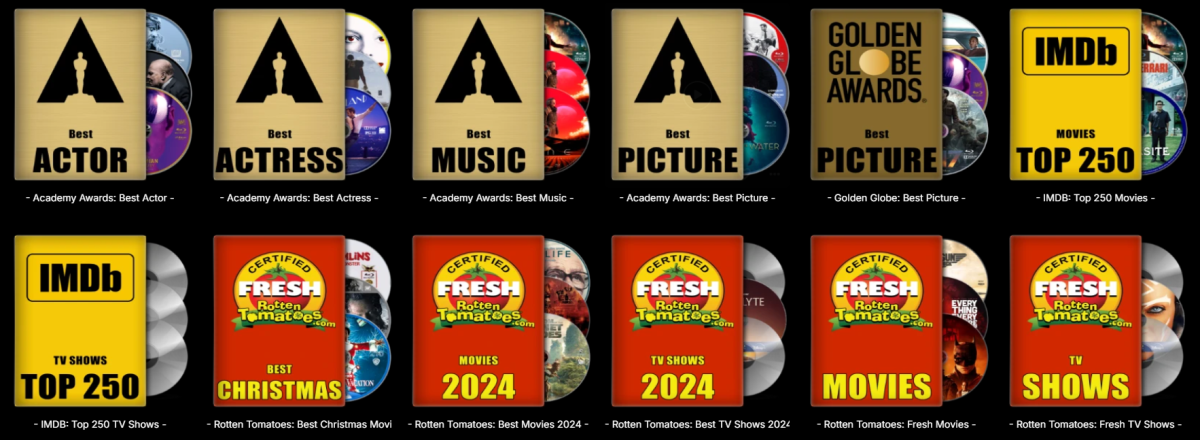
Now that the "Trakt List to Collection" plugin is working for me, I made some images for the created collections. Thanks again @bakes82for this great plugin! I also added a GIMP file with all the layers in case someone wants to create his own images. Font used is Impact Condensed. 20240706_Collection_Images_Awards.zip
 1 point
 -
But technically this exact question/request has been asked numerous times. Looks to be at least 5 years now.1 point
-
HI, yes looks like we are just using the first rating. We will have to make that selection a little more intelligent. Thanks.1 point
-
Mystery of the version solved. Google was doing a phased rollout. I forced it to 100% just now.1 point
-
I recommended they be set because Emby is running in docker and by default it detects the internal docker network and shows the wrong URLs in the dashboard.1 point
-
Off topic but I had to smile seeing this! Because me too, I could still use a manual card punch if I had to Those were the days when you sent the cards off in a box to be run ovenight, and got your compilation back in the morning - 1 compile a day… OK Everyone you can go back to complaining about Emby now!1 point
-
Its all in the first post...1 point
-
1 point
-
Hi, yes we are actively working on it. Thanks.1 point
-
Might it be trying to force https even though you specify http in one case but not the other? That can be an issue these days, but there are browser settings to prevent it. Paul1 point
-
After some testing I found http://app.emby.media/ works just fine when I am incognito so I have no idea why my regular signed in browser does not work even after deleting cookies. Regardless though I think we are good here, thank you for your efforts @ebr @Abobader1 point
-
I just tried on shield number 3 with 9.1.1 hotfix. No difference.1 point
-
1 point
-
He's an odd duck1 point
-
What is ridiculous is having a completed project that will greatly enhance a user's experience (I'm assuming here) being held up by a completely unrelated release! As much as you'd like to be the apologist @pwhodges, the reason for the holdup doesn't make sense.1 point
-
Not quite. In general, it does follow ACID principles, but in cases, it favors performance over consistency. The bottom line is rather that it's simply not designed for being accessed in parallel - primarily it's about write operations, not that much about reading. Also, the DB schema can change from one version to another without notice. The exclusive lock makes it clear that directly accessing the database is not a supported scenario. That sounds like a sane and safe way.1 point
-
No idea - I reinstalled yesterday and was shown 2.1.14. Checked again today and no update was offered.1 point
-
@Lukeit's almost been a year since you said it was planned for future updates (I think it was Dec 2023 when you posted). Do you have any up-to-date info that is more specific than "future"? Would be nice if we had a window?1 point
-
Ridiculous!1 point
-
Glad you got it working. Surprised the provided pfx doesn't work...1 point
-
New PUBLIC TESTING version available 11.0.5: Delta changelog 11.0.4 -> 11.0.5 fix database vaccum function fix episode remove bug1 point
-
BTW: the above problem started with 11.x. I wasn't having any problem in 10.x1 point
-
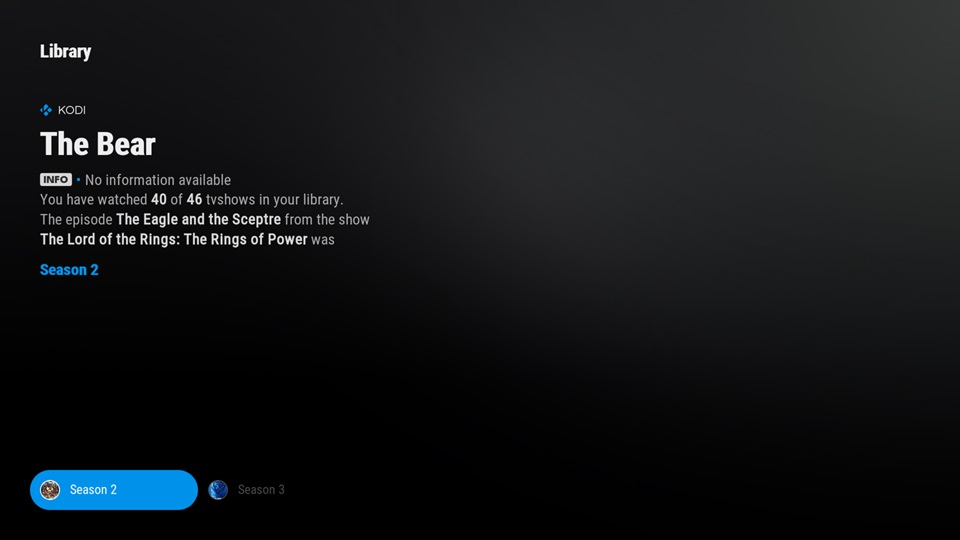
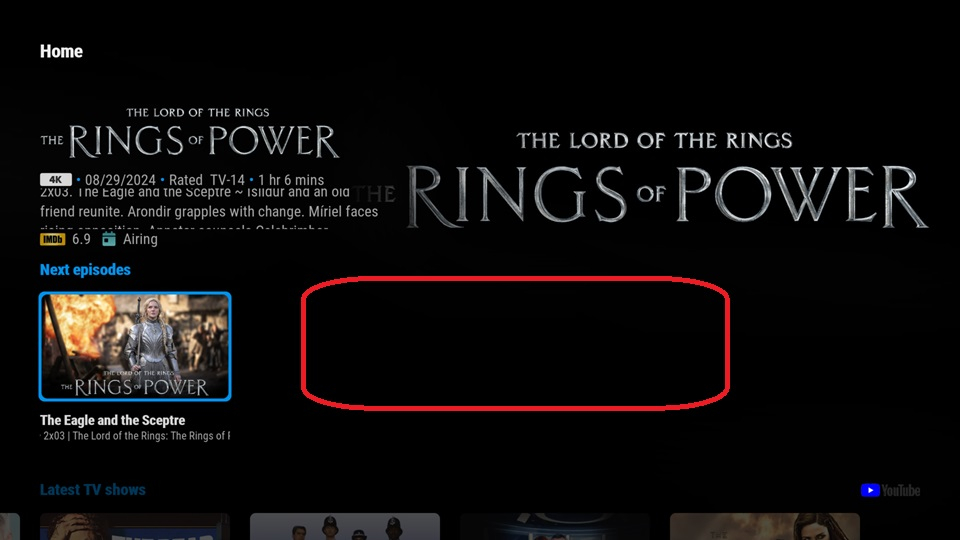
I'm having an issue after deleting episodes (using file system) where the nodes stop showing any episodes for that season until I do a repair of the TV library. Normally I keep the last watched episode (so that Next Up still works) and delete anything older. I've been able to duplicate this several times after watching two shows ("The Thin Blue Line" and "The Bear") deleting one episode from each series and every time both series wouldn't show any episodes for the season in which I deleted an episode. However, the unwatched episode count is always correct for both series even though the nodes don't show the episodes for that season. Emby server 4.9.0.30 beta Kodi 22 nightly E4K 11.0.4 Steps: Delete old episode using File Explorer or File Station (Synology). Rescan TV library in Emby and verify episode was removed Start Kodi and let the E4K syncing process complete The two series don't show up in Next Up node anymore and when viewing the appropriate Season for each series it displays nothing. Repair TV shows and everything is okay again Log: https://paste.kodi.tv/sesozarige.kodi Pic 1: No episodes are displayed for season 2 in which an episode was deleted. There should be 3 episodes here (the last one watched and two unwatched). All episodes in season 3 where no episode was deleted are shown correctly. Pic 2: I'm expecting to see The Bear and The Thin Blue Line here also.
 1 point
 -
Done.
 1 point
 -
I downloaded the trailer from YouTube and add the file in the same folder as the movie or TV series.then it will show up on Roku. Yes, time consuming but worth it, because YOU choose which trailer you want to use1 point
-
Regarding the issue of other version movies not playing. I tried on my main player which is still running 10.x and that is also not working. I think it is safe to say it's an emby issue at this point. (Running server beta)1 point
-
Jumping onboard with this topic as well, the main filter I would like is for the entries with "Automatically convert new content" as these are not 1 off conversion jobs and will continue executing (as long as the show / season is airing). I'd also love to see some kind of indicator on the normal Show / Season screens as well to show there is an automated conversion active for the respective Show / Season. Possibly using All / Subset indicators similar to the Windows "Files on Demand" icon styles: A solid icon to indicate this Show / Season and everything within it is being automatically converted. A hollow icon at the Show level to indicate only a subset of Seasons have an automatic conversion enabled. Then a solid icon at the Season level.
 1 point
 -
That's probably it then. The NFO files may have regenerated. Thank you!1 point
-
Resolved when media rescanned1 point
-
Merci de votre aide . Je viens de découvrir la page à télécharger . Je la mettrais en copie ici , après le prochain défaut .1 point
-
Hey, probably that'S relevant for you. In another thread we got an updated version of the Nfo plugin that now gives game support. I haven't tested with persons, you can see my example NFO a little above. But as it's the same NFO plugin I assume that it could work. I'm not sure if that version of the NFO plugin is already released on the official catalog or if it is only in the thread.1 point
-
Okay, I manage to resolve the issue while trying to fix the Store app. It turns out that while I had the latest server version installed, it did not registered in the apps. I used the store app to restart the sever and the server version was updated to the one I was using in the apps. Now the Desktop version works again.1 point
-
As small amount of collection covers (currently RT, Oscars, Globes, Metacritic, Palme D'Or, CC) plus a GIMP template to do more by yourself can be found here.1 point
-
@LukeNo, I think it was resolved, actually!1 point
-
I would love the ability to allow a user to create collections (and edit item metadata and images). I would call those power-user features where a user can be allowed to edit but not delete nor have access to the full admin console. In my use case, I am the admin and I spend a good deal of time making collections or editing metadata for home home movies and video clips for which metadata is not available. For security reasons I would like to create a user who is able to create collections and do those things remotely, but restrict most of sensitive admin tasks to LAN only. Right now it's all or nothing. Either a user has access to the entire admin console, or they can't create collections, update metadata, or replace a poster image on a playlist they just made.1 point
-
Hey everyone, First off: great program! Recommended Emby to all my friends and I know a few have bought Premiere after being so impressed, keep up the great work! I was wondering if it's possible to add in the ability to fully clear the "Continue Watching" section in a single go? Unfortunately I have issues with the Xbox One app sometimes crashing during playback where it no longer responds to controller/remote inputs, although the video continues to play fine. This causes the episode to appear under the "Continue Watching" section as Emby believes I stopped watching part way through. I know I can clear each episode manually by using the web interface, selecting each episode and clicking "Play" and then stop, but this has been an ongoing issue so I've already cleared out what feels like 100 partly watched episodes and the list keeps going! I wish I'd just kept on top of this from the beginning! If a feature could be implemented where you can basically clear or reset all videos currently flagged as "Continue Watching" that would be great. Even better would be the ability to configure Emby so it automatically clears the partly watched status on a video if it remains in that state for say 7-14 days (If this is user configurable even better). I know personally, if I've only partly watched an episode and a week or two goes by, I won't be able to continue off where I left it without forgetting parts of the story. Thanks, M_Taylor401 point
-
Hi, it's possible for future updates. Thanks.1 point
-
On the home screen click the gear icon next to My Downloads. From there you can use the trash bin icon to delete.1 point