
Leaderboard




Popular Content
Showing content with the highest reputation on 08/26/24 in all areas
-
I converted a file to HEVC and it worked2 points
-
Brilliant , I had not thought to do that before. Ended up tracing the problem back to windows firewall getting changed due to vpn app.. This is a DOH moment for me, but thank you for steering me in the right direction.2 points
-
I frequently use the filter of Unwatched for movies and TV shows. And with music, you get recommendations based upon "similar" artist or songs. I would like a flag option to mark media as "Not Interested" or whatever verbiage would be better for the masses. This would have to be at the user level and not stored in a NFO file since I would like to filter out things my family likes, but only on my profile. As my libraries grow, I am having more content for my family. Since I am the only male in the house, my users have tastes that are distinctly different from mine. Whether it be real surgery shows, true murder, sappy romances, or telenovelas; these are things that I will never - and I do mean never - watch. The same thing goes for the music collection. I don't mind classic musical soundtracks, but my daughters collection of Broadway musicals is vast. And annoying. Now I could make them as Watched, but then that would go into the algorithm "Since you watched this, you might like this...", I would like to avoid doing that. I've poked around quite a bit, but I don't see anything like this currently nor did I see anything like this requested. If it has been requested but called something else, I would love to know about it so I can like that post. Thanks in advance.1 point
-
So the Steam Deck is pretty hyped now. They showed it as a streaming device in some videos today. It's powerful enough to play pretty much anything directly, heck it could even be a server quite easily with it's specs. A lot of people got to talking and now people are saying Plex is going to release a version to Steam so that it'd just run through that and play onto SteamOS without the user having to muck about outside of Valves ecosystem. There are plenty of free tools / video players in Steams Software section, so it'd be a pretty neat little thing I imagine.1 point
-
Since we can now detect end credits, or manually add them in other cases, it would be nice to see this, rather than an automatic percentage/time remaining, trigger the "next episode" popup and decide whether an episode is resumable or not. Even better if it could expand to movies for the latter point.1 point
-
It'd be nice if there was an option to hide individual library items depending on the user. Use case would be two people using the same library and one of them does not like violent movies and images. They could hide those from appearing when they browse the library. I guess it would also need a menu in the server management to manage hidden items so you could restore them later if needed.1 point
-
ffmpeg-transcode-e66915c9-4cd2-443b-bcef-9e4ab96972eb_1.txt I manually stopped it after a while1 point
-
I don't have an Intel processor, so no hardware assisted transcoding using vaapi. However, I'll try forcing a transcode when this is done. This is taking a long time compared to other updates.1 point
-
Removing the underscore and adding one at a time worked. I'm finding that odd because the underscore has been my convention for when the title has a colon for years and years, I think even Handbrake and MakeMKV default to doing that too. I have the underscore on the files in 21 Day Fix and TurboFire too, and those worked automatically. I've attached the debug logs from both attempts to recreate the folder. embyserver.txt embyserver-63860292983.txt1 point
-
Yes that was my thinking as I don't know how they are removing functionality local. So if the NAS can not process these codecs it would cripple Emby I would think.1 point
-
But from a transcoding standpoint does it still work?1 point
-
Yes you will need to verify xml or m3u along with there content, would have to do some looking on when this change happened but 4.8 added usershares so there was a change there with where new ones are stored also.1 point
-
Since you still have the old playlists you could try copying them to the new location and then do scan. Open it up first and make sure everything is still correct. /volume1/@appdata/EmbyServer/data/playlists1 point
-
And what is the content of that folder? I will guess either old backup was before Emby change to m3u format or path change in existing playlists. As that is really the only way to have blank playlists.1 point
-
Another comment makes it sounds like HEVC, etc have just been moved to an addon and you can still get them. I'll wait a bit for kaj and try it myself.1 point
-
What you don't want to be the first to try it out? Release Notes for DSM | Synology Inc. Looks like issues may be coming per the discussion on Reddit.1 point
-
Actually ran into another issue Deleted my Movie Library and then tried to add it back, but it would not appear, so I tried again and again, refreshing the page each time. Only for it to finally appear, as 3 Movie Libraries, Oops! But strangely, Emby would not let me delete any of them no matter what I tried. But in the end this was a good thing, I was using the Qnap app, so I simply uninstalled it and installed Emby as a docker instead, same as all my other services. I had updated the nfo files to use the file creation date instead, so they where now all correct and simply re-scanned everything, was extremely fast and then used Trakt to sync up the watch status.. So 30-40 minutes and everything was back to normal. I've got to give Props to Emby, it Scans VERY fast. Zidoo media player took hours even with the nfo files, Emby seemed to be done in 20-30 minutes1 point
-
Sorry no as they don't publicize what they are working on or what will be in any perspective release. All we get is what is added in release notes or specific functionality testing when something is added to beta.1 point
-
I had disabled this function in the administrator account. However, I forgot to check in the other user account. My apologies. Thank you.1 point
-
Requested here. Do not know the technical aspect of Auto on how it probes the connection but there is a hard coded value to fall back to in every client when Auto is selected. But in the end Auto does not really work the way anyone thinks it should and devs probably need a definitive answer on its functionality. But personally tell all remote users to set client to max and throttle via user limits. As Emby has no adaptive functionality if your connection gets worse or throttled you will see playback issues when streaming at high bitrates.1 point
-
I get that but to have a page with several text fields one below the other that the user has to navigate through in sequence that will make the TV app keyboard popup is not good design. I didn't say it was done on purpose. it's fine for desktop and mobile and you have said that the standard android app is also the future for the TV version. therfore for a unified solution the design is not quite good enough. Not all the settings pages have only text inputs, so moving down through these fields to togglr a button is quite frustrating.1 point
-
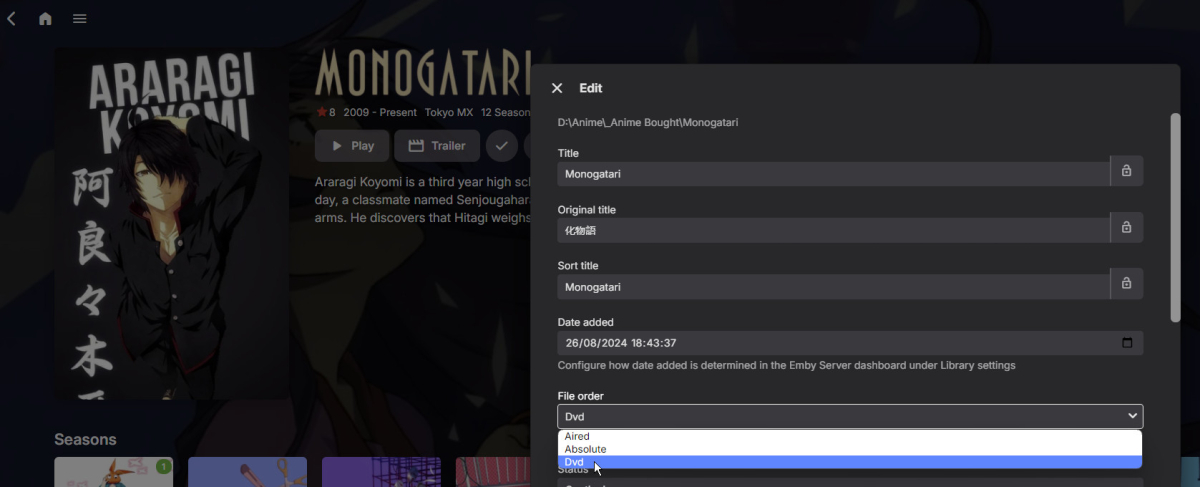
Near the top - make sure you are in the series metadata, not a season or episode. Paul
 1 point
 -
I just did the edit option on the series itself or on the season and all the options are just the regular ones where I can edit the links to the TVDB IDs or IMDB IDs or choose the default language for the series metadata. Am I missing something? been using Emby for like two years now and I think i'm missing something1 point
-
1 point
-
it's not actually just the click, it's really slow to move down, wait for the keyboard to pop up, exit the keyboard and then move down again, wait for the keyboard to pop up etc . you're talking quite an amount of time to change a parameter at the bottom of a page. im not sure if your reply was sarcasm but it's not just a click. it's a design issue because the TV has no mouse to move or touch screen like a mobile phone does. .1 point
-
Thank You @Schleudertraumafor the logs above and the raw log files you zipped and sent to me together with activitylog db and other databases I can see errors arising when skipping - playback was at offset 00:40:39 of the movie then selle skipped to the last segment or penultimate segment at offset 01:38:41 - this gave an error 500 because of what looks like some timing issue with killing the existing transcode and starting a new one for the new offset. I have passed my analysis and logs to the development team. Not sure at this point if the error 500 after the skip to very near the end was a factor.1 point
-
Don't worry Luke.. I was just asking because when you go out and you're not there and you also don't know how long the application waits for it to stop working... well, it's better to ask. Thanks, I've already seen it.. download and install it. As for what FrosByte says, I agree that it would be better. Regards1 point
-
works, thanks a lot!1 point
-
The app doesn't really check to see if there is a newer version, it's more a warning that the app will be expiring soon. It's programmed to automatically start showing up as a warning before expiring so you aren't surprised when the app no longer works when you sit down to watch something. It just so happens that a newer version is usually uploaded by the time the warning starts showing up. You can always check if there is a newer version by going to GitHub and checking the date there (just remove the filename from the download link). If you click on history, it says the last commit was on 27 July. https://github.com/MediaBrowser/Emby.Releases/tree/master/tizen Hopefully, @SamES or @Lukecan recompile it soon though since it looks like we are almost out of time.1 point
-
@LukeYes, it fixed the issue. Thank you! As for the season naming, I'm looking forward to the next beta.1 point
-
Lo ideal es que separes el contenido y hagas una biblioteca para películas y otra para series. Y en tu ordenador, o donde tengas guardados los archivos multimedia, también lo separes: un directorio para películas y otro para series. Saludos!1 point
-
Hi, there's already an open request for this or something functionally equivalent. Please join in and contribute to the existing discussion at:1 point
-
Oh didn't notice that, I had it set up to auto-update so assumed it was on the latest version. Will have a look at either updating or getting the new app onto it. Thank you!1 point
-
You are basically saying "if it's broken, don't use it." I guess I was hoping for a bit more than that. Yes, I am certainly capable of setting the quality manually according to the bandwidth that is available wherever I am with an iPad. I could constantly run speed tests not just to a geographically distributed system like speedtest.net, but to the speed test server I host on my own network, and then set the quality in the app to a level appropriate to my current connection so that the video I'm watching is transcoded at a level that does not cause stuttering, but does not present at an unnecessarily low quality either. The thing is, Emby is not for me, and I will never use it. The few people who will be using it are not tech savvy enough to know how fast their home network is, or how fast their mobile connection is at a given time or location, or even to know what bitrate would be appropriate if they knew what bitrate was in the first place. Auto will work in terms of playback, since it's choosing a very low bitrate. I could probably have them set it manually to around 10-20mb and be fine. But there is this feature called "auto" and it doesn't appear to work. If your answer as part of the Emby team is "yes, we know, we don't care, don't use it," I can live with that. It's just unfortunate.1 point
-
Having started using LiveTv recordings - one thing i cant find and i think is missing is a notification that x recording failed because of y reason As i only have one dual tuner (at the moment) its quite easy to have more than two recordings of more than one series scheduled to happen in the same time period. Other than i assume something in the logs to note this - there appears to be nothing in Emby to show what and why a recording is missing. Also as the schedule updates as time passes the "historic" conflict is lost - so its not immediately obvious that a recording failed. So could we have a notification in say the dashboard/notifications page or similar? Also a conflict notification before the recordings would be good as well I did a quick search and did not find a similar request - although there might be1 point
-
My primary topic of concern is audiobooks, so I only pop in occasionally to voice my continued frustration about the lack of support.1 point
-
That seems to have done the trick. Thank you.1 point
-
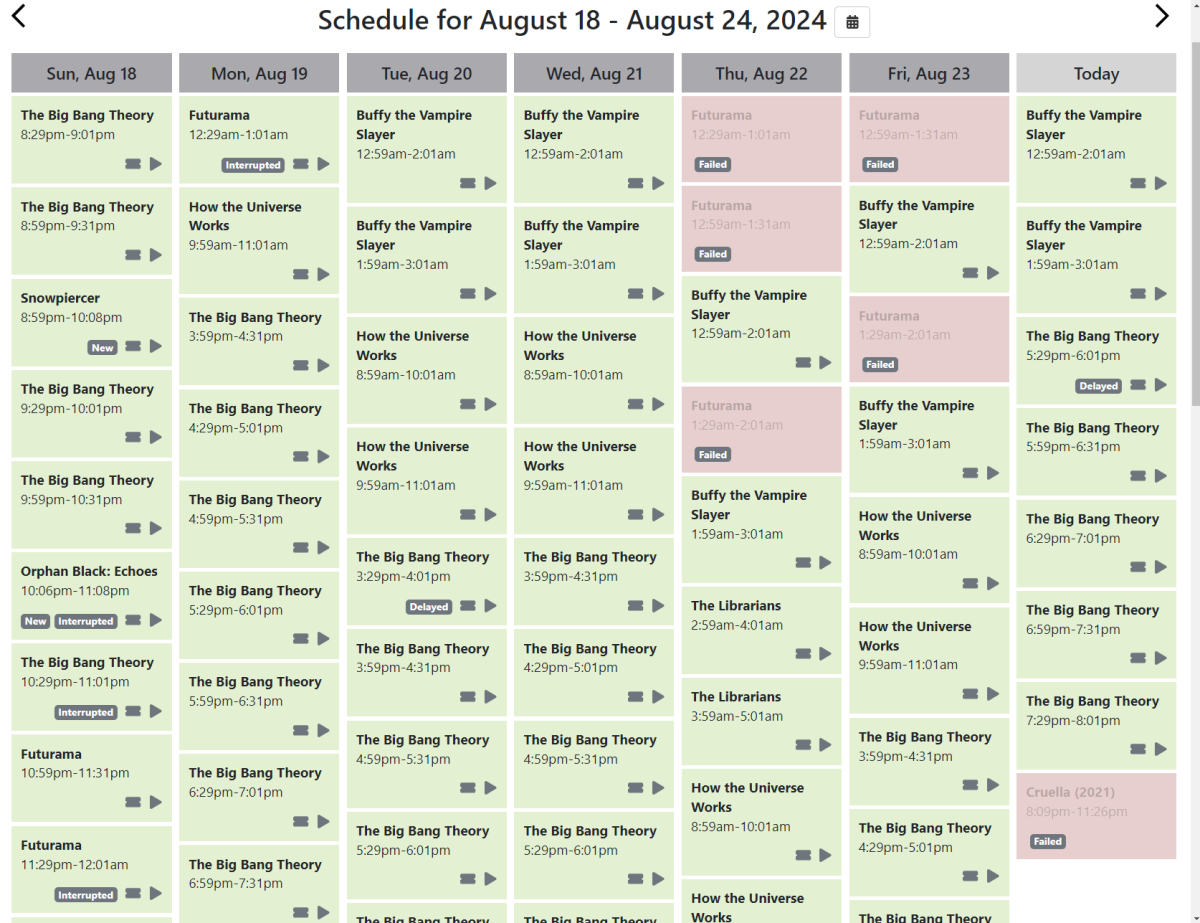
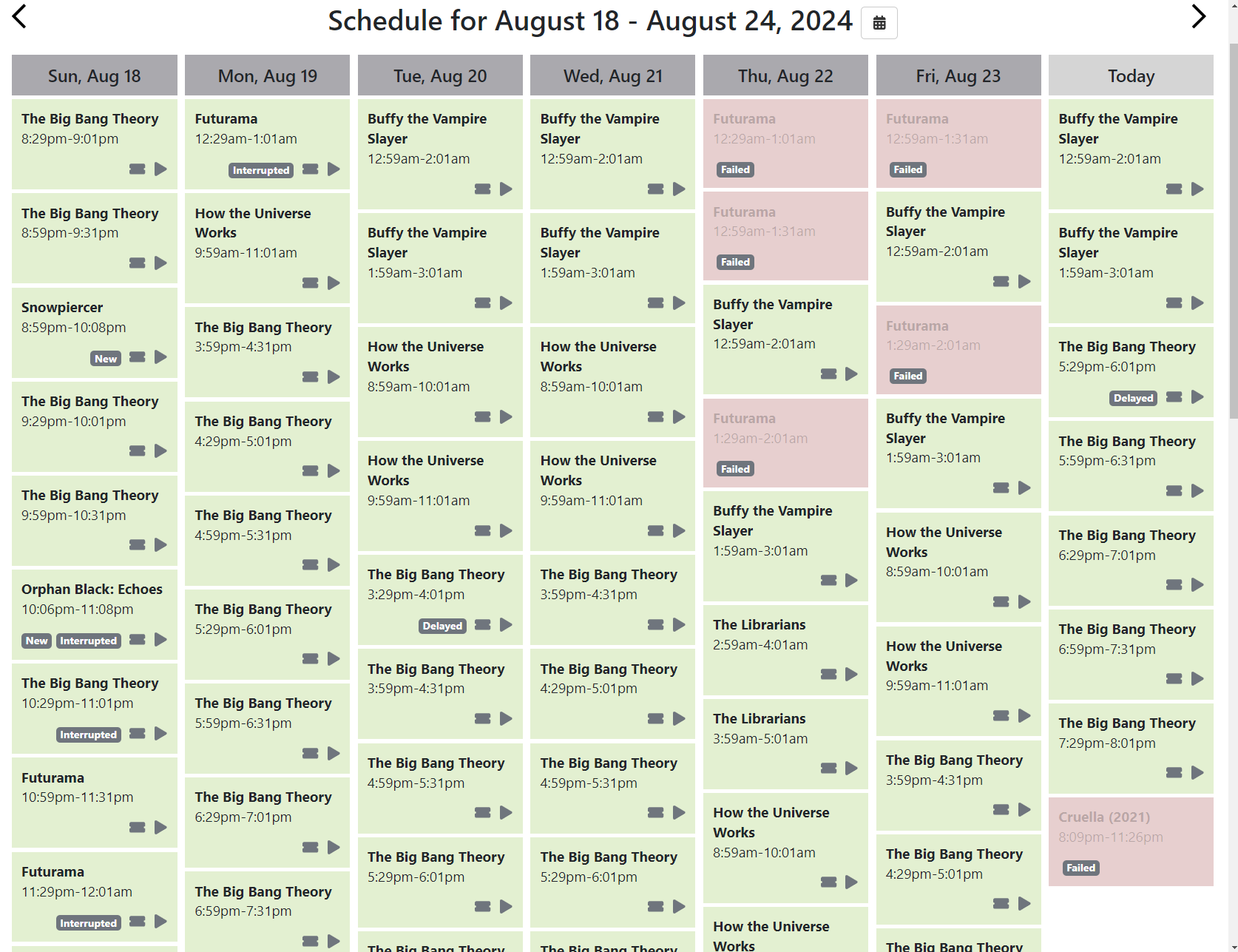
Please provide feedback of failed recordings somewhere, not just the text logfile via "ServiceUnavailable" entries. Doing so in the "Live TV -> Recordings" panel's content seems like a good place. Similar in function to what the Channels DVR server's UI gives me. Note the panels shaded in red: TL&DR version: This aspect of Emby recordings has been a thorn in my side and I hope it can be remediated one day not too far off in the future. I.e. the lack of feedback and visibility when a recording fails due to the "ServiceUnavailable" exception. In my case, they happen as no fault of Emby's operation; there's always a problem with the source. The request here is to provide feedback and visibility of that fact when a recording has failed. it has been months now with my HDHomeRun devices and antennas that I need to closely count how many concurrent recording I have going over the course of a day, to prevent exceeding free antennas. I have two devices, for a total of 8 tuners, the last 2 of 8 being ATSC 3.0. And either when more than 8 channels need to be recorded concurrently, or more than 2 ATCS 3.0 tuners are needed but they are already in use, the well known "ServiceUnavailable" condition will persist until the needed type of tuner doesn't free before the recording retries expire. But, unless I go scour and search for "ServiceUnavailable" and pay attention to the recording name and whether the recording started after a few of them, I won't know of an error. I have multiple TVE sources configured in my Channels Server. Which I've configured in Emby as both a m3u8 source and XMLTV guide data. In the last few weeks various programs and channels started having problems, rapidly degrading the last few days (corrected it by switching over to use the beta). Again however, there is no UI based visibility to this fact. But since over the course of the last few weeks I'd moved all movie recordings and a few Series recordings from Channels to Emby -- to enjoy its superior presentation of new shows and movies both visually and thru the unified/consolidated list -- the number of failures I'd been experiencing in Emby had probably been 10x or 20x more than you see in that screencap. And I had no idea! What you see in that screencap is what they call their "Calendar". It's loosely similar to Emby's "Live TV > Recordings" panel. But with the all important twist that they show a card for both successful and failed recordings. If the Emby Recordings panel's content were modified to include some type of generic error image graphic for failed recordings too like the Channels Calendar -- could be made configurable thus show failures optionally -- the very user unfriendly and time-consuming task of viewing and scouring the log files and searching for multiple instances of "ServiceUnavailable" for missing recordings, could be ended. Hope folks feel this "up vote" worthy. Thanks all.
 1 point
 -
I've been experiencing freezes, etc., and sometimes have to reboot the TV box to resume viewing. Given that, I just realized that the best way to deal with the matter barring getting a more powerful (and expensive) TV box as well as a new soundbar is to just set Kodi to default in the audio settings, and then turn on passthrough and AC3 encoding. That leaves the ability of the TV box to transcode videos with some codecs like AV1. I found out that if that doesn't do well, e.g., skipping etc., then the Emby app works (but you have to buy it for a few dollars). Side note: the only catch is that Emby is still working on smart lists (I had difficulties with the plugin), which Kodi has. So I use Kodi until I can't get a video with unusual codecs to play, so I switch to the app. One more thing: the Internet connection problem was caused by the Android OS needing an update.1 point
-
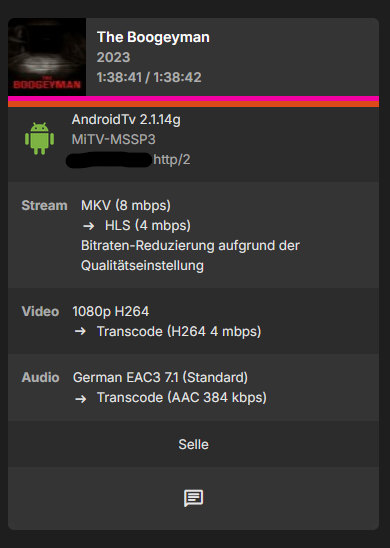
Hey friends, some time has gone now and there it is again: the abandoned session on the dashboard. This time it is not the user Sandra, it is the user Selle. It seems that it's not related to just one specific user as i thought in the beginning, as the issue occured only on Sandra. I'll attach the emby logs here and send all related data as zip to @sa2000 I enabled the debug feature, so the logs are relatively big but maybe you can investigate quite better. There are again some database errors in the logs saying "database locked" but i don't know what that is and this time there are no ombi related database errors. embyserver.txt embyserver-63860224265.txt embyserver-63860235065.txt
 1 point
 -
thank you very much @Happy2Play1 point
-
Yeah. Finding and resolving a specific example can lead to understanding the root-cause of wider problems. Troubleshooting problems can also sometimes be a frustrating process of elimination (especially if not knowing all the technicalities of any system). (FWIW) Here's something else you could try: Temporarily remove your problem WAV files from your library and store elsewhere. Rescan to remove any data from Emby system. Download the equivalent WAV files from Bandcamp. Run through Picard. Rescan your library. If the new WAV albums show correctly in Emby, then perhaps there is a problem with your specific WAV files? If the new WAV albums show the same error, then perhaps there is a hardware/software/structure/settings problem with your specific Emby setup?1 point
-
I don't have access to the server at the moment but it's the chunk options in hls-proxy, one controls how many are visible on first request from a client and the next controls how many it will download at a time.1 point
-
Glad you guys are finding this useful! I just updated so you can have multiple MDBList URLs in a single collection. I wanted to have fewer collections so, for example, combining Trending TV Shows and Trending Movies to a single collection is pretty useful. Example: [Kids Trending] Source = https://mdblist.com/lists/tvgeniekodi/trending-kids-movies, https://mdblist.com/lists/japante/trending-kids-shows Frequency = 100 update_items_sort_names = True I have not been keeping the thread up to date, but my other favourite updates are: I was really annoyed that I could not easily glance at a collection and see what was newly added. Now you can update the sort names of all items within a collection so that the newly added items appear first. This comes with the caveat that the sorting of the items within that collection are also affected outside it. Personally it doesn't affect me as I never go into Movies or TV Shows and sort by name. You can always turn it off to reset the sort names. I was also annoyed that the ratings of brand new newly releases was often incorrect or missing at the time of adding them. Then they would stay missing or incorrect as the metadata was not refreshing. Now you can check for newly added items and refresh the metadata for a period of time until the rating has settled. Only works for items within collections.1 point
-
No problem always welcome, but I need to know how access functions if it's not stock Kodi or something I'm familiar with. I don't know all skins and its features1 point
-
setup some tooling such as ProcMon to see what processes are being called during the http request. I'm pretty sure emby will be just using existing http libraries for web requests - so it's probably that sub-process that also needs routes on your vpn.1 point
-
I've always recommended that people running Emby on any Linux platform should mimic what the bare metal installer does. Create a user emby and group emby (or media, etc.) then grant this user access to the storage volumes/pools/shares/etc that will be used for media. Use this account for all Emby related stuff and you'll avoid access or "cross contamination" problems going forward. If multiple users need to access the media files and directories (like the *arr's) those accounts, if unique, can share a common group - ie: media. ACLs where supported and/or umask settings can insure the group members have the access they need to create and manage the media files. At a minimum create a unique account even if using one for all media and related applications instead of the built-in daemon (2) and nobody (varies). These are meant to be low privilege and unprivileged accounts though it's best practice to have dedicated accounts to isolate applications and services. Escape from one process running as daemon or nobody would still have access to the resources of other processes running as the same user.1 point
-
Hi, we’re looking into this. Thanks.1 point
-
Gracias, lo que tiene ser novato y no fijarse en todo.1 point
-
¿Qué tipo de contenido seleccionó al crear esa biblioteca? Teniendo en cuenta que se llama "Movies", supongo que se trata de 'Películas'. Debes seleccionar 'Programas de TV' durante la configuración de la biblioteca para que esos elementos se muestren correctamente. Elimine la biblioteca existente y cree una nueva biblioteca tipo Programas de TV. Edit: Como también tienes películas allí, también puedes seleccionar el tipo "Contenido mixto" si quieres combinarlas.1 point




















.thumb.png.f4cb0545e98b51fd9b00e427622ab761.png)



