Leaderboard




Popular Content
Showing content with the highest reputation on 08/19/24 in all areas
-
Update 2: Problem solved ! Updated emby for samsung tv app. vast majority of tv's on system using latest version of app from samsung store -1.2.6. Looked at devices and found one user had version 1.0.68 and and a few others had 1.0.77. Updated these all to 1.2.6 and memory has now been steady at 1.5 gigs for a few days now.2 points
-
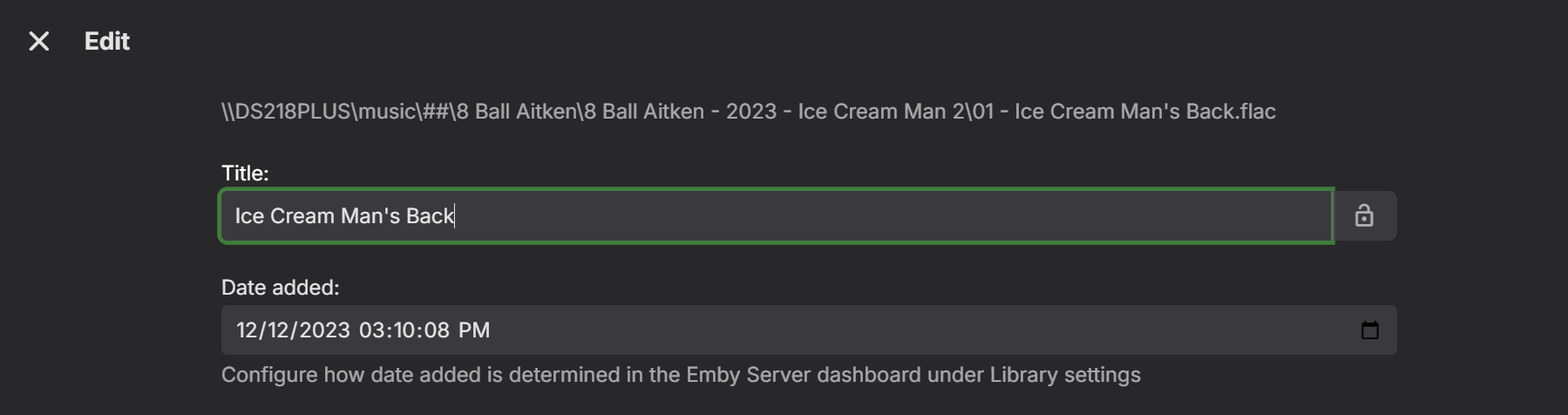
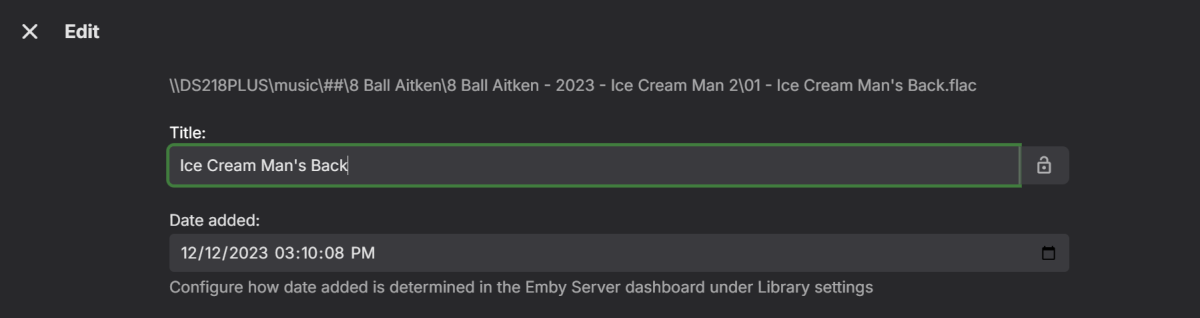
Hi, perhaps a first step you could try is to check the duplicate songs paths within Emby: Click on the 3 dots at RHS of the songs Select Edit Metadata The song path will show at the top There is also "Dated added" info Something similar to this: If the paths and dates are different for the duplicate songs, then you may have an unknown duplicate album somewhere? If the paths and dates are the same, then there could be a problem elsewhere that may need further investigating...
 2 points
 -
I am using mostly shield experience 8.2.3 as it is most stable. The best tutorial i have found is this one. https://florisse.nl/shield/ Some have said the files are hard to find but i have them still including drivers.2 points
-
... as I was tired of manually grouping all my movie versions into groups after each recreation of the db, I created a plugin to help with that. The use case is having movies, that belong together spread around and not being able to easily match the emby naming conventions, but still having the desire to present them as one item with multiple versions. The plugin works similar to the auto boxsets, but does the "movie versions grouping" - it will group all movies based on their TMDB id into one item, regardless of where they're placed and how they're named. I made that for myself - however, if anybody is interested, attached is a plugin that solves this issue. Attached version is for current 3.6.0.49 beta Server, do NOT use it with stable release! Plugin is alpha state, you should only use it, if you are willing to backup your db (there is no way to revert the changes otherwise!) and manually put the dll in the server plugin directory. Do not use it in your production environment before having tested in a test environment that you're fine with what it does - seriously! ;-). Note: There is a known bug in the web GUI presentation which is described here, which needs to be fixed on emby side. Edit: the mentioned display bug in BoxSets is fixed in Emby now, thanks Luke. AutoCollections-for3-6-0-49-betaServer.zip AutoCollections-for3-6-0-75-betaServer.zip AutoCollections-for-4.1.0.15-betaServer.zip AutoCollections-for-4.2.0.17-betaServer.zip (4.6.0.10 and before) 4.6.4.0 and above (does not require beta server as version number has been surpassed) AutoCollections-for-4.6.0.22-betaServer.zip Note: Original version will cause issue with other new plugins like Top Picks. Updates by community members: v.1.0.0.4 New update thanks to @Cheesegeezer Looks like we've managed to update the plugin, to be current Emby Server 4.7.7 (minimum). Some Changes to be aware of Automatic Library scan and updates are disabled, too many things are triggering library scans at the moment and entering into an endless loop which will crash the server. Moved to a Scheduled task now. Fully Locked item Metadata can be ignored in the Plugin Settings for grouping. (Partial field may have worked before but you need to Lock the item itself now) ".strm" files are ignored from any processing New plugin Graphics with a big nod to MikePlanet This is always Mikes plugin and the work he has done is fantastic. - We only did essential maintenance to keep this alive for you peeps. AutoCollections_1.0.0.4.zip v1.0.0.5 Removed Top Pick Items from the available item list re introduced the auto scanning... this will take place 1 min after an item event is detected re introduced auto run after a library scan tested against top pick plugin and there is no endless looping... but please test fixed the locked items bug. Good luck and let me know how the testing goes. AutoCollections.v1.0.0.5.zip v.1.0.0.9 New update thanks to @Hoptional Added option whether to Merge items across different libraries Compatible with nested folder structures, the "Top Picks", and the "New Releases" plugin Improved logging AutoCollections_1.0.0.9-libraryoption.dll1 point
-
Hi Emby devs, i would like to request to have an option when creating a new library name to to be displayed on the homescreen as is. Like for example i created a new library named Coming this week and should be displayed on the homescreen as "Coming this week" instead of "Latest Coming this week". Hoping this to be included on the next update :). Thank you Emby team.1 point
-
HI, we'll get it added. Thanks.1 point
-
Turn's out this was a skill issue from my side for not reading good enough what it says. This was exactly what i was searching for.1 point
-
Hi, I don't have an update ,but yes, some of the ideas here are certainly possible for future updates. Thanks.1 point
-
OK we'll take a look at it. Thanks.1 point
-
It all depend on how much transcoding is needed as almost any system can be a server. But if transcoding is needed it needs to be powerful enough for it and from a software only standpoint a NAS will not have the cpu power to do multiple streams if even one. Both your examples above are converting hevc to h264. One for bitrate limit and the other would appear to be unsupported codec. There are really too many variables to list but for this system you would need media that can direct play to client/apps.1 point
-
No, she uses the same account as me. I've reinstalled the app, though, and it seems to have fixed the issue (for the series that were tested, in any case). Will report back again in case of problems.1 point
-
Emby for LG TV's 1.0.44 has been released. Stay tuned to the blog for the release announcement.1 point
-
Make sure to turn that back on after testing.1 point
-
Problem found. Somehow the shield absolutely wants the server name. However, the optional network path was entered everywhere for my IP addresses. And the app didn't accept that. Another problem: with 8.2.3, DTS-HD HighResolution no longer works. If I deactivate DTS-HD Passtrough, DTS-X and DTS-HD Master are also passed through as PCM. What can I do about this?1 point
-
found the problem I added the Media folder as mount point. But you have to use a direct mount point to the folder per library. As in for movies a mount point to media/movies, for music a mount point to media/music and so on1 point
-
Not a bad idea, I hadn’t thought of that! In the end, the issue resolved itself. And when I add other albums, there are no more problems, haha... Thank you anyway for your time and help ! Have a great day,1 point
-
Btw luke this was solved when i upgraded my Linux packages. Now ram usage is around 20-25% constant no matter how many streams. Basically like before.1 point
-
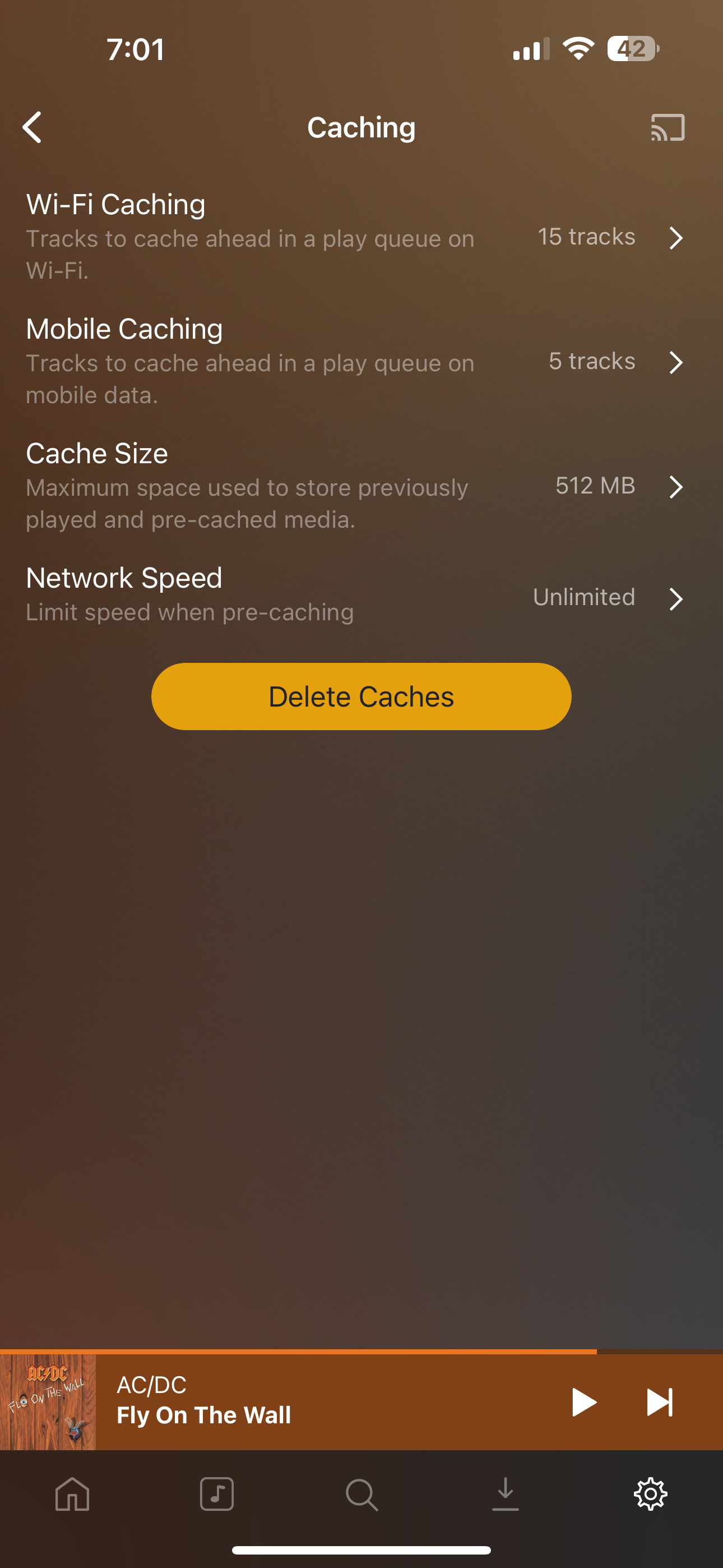
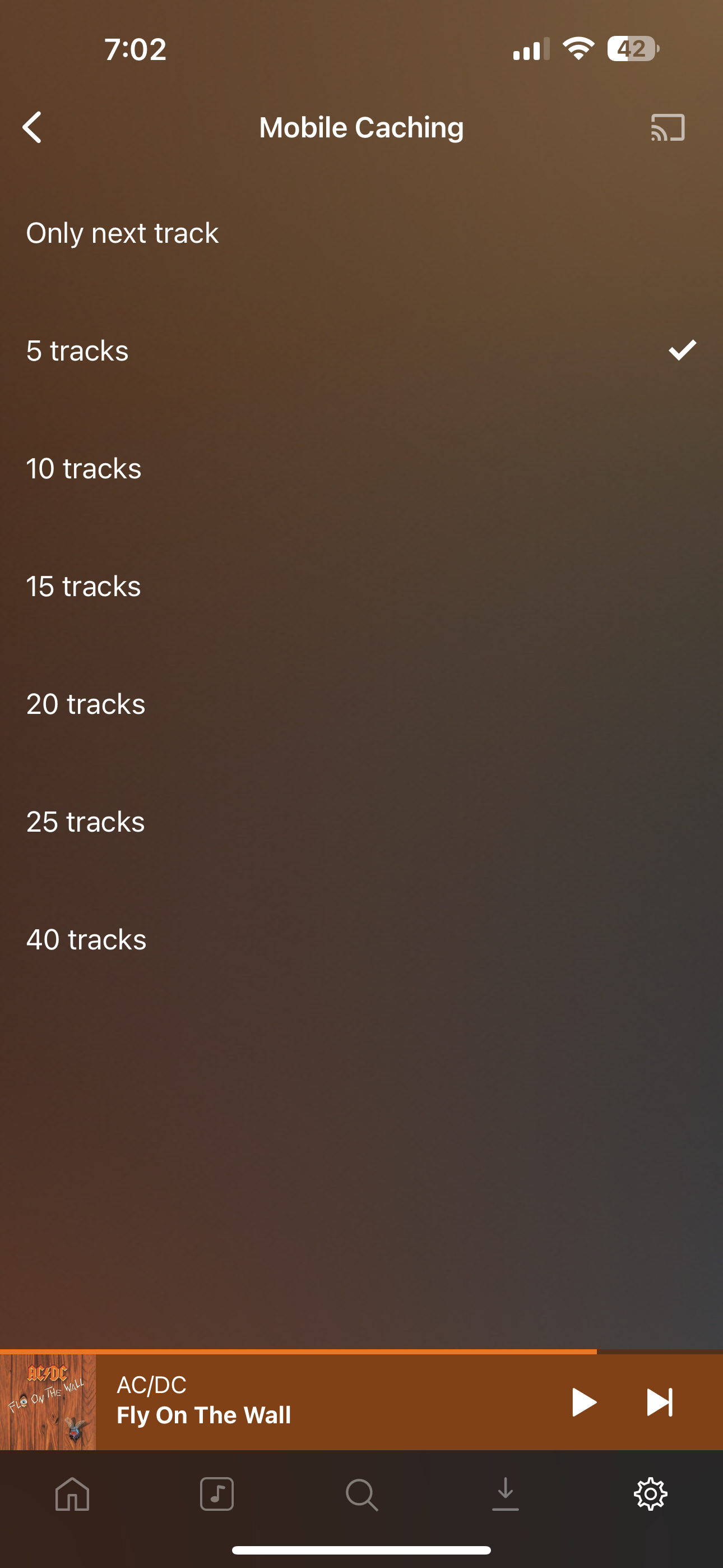
I have recently moved from Plex to Emby. The biggest thing that Plex does that Emby does not is gapless audio play back of music. I listen to a lot of electronic music and they are usually continuous mixes broken in to tracks on a CD. Plex does handle gapless audio by pre-downloading the next track before the current track has finished. They have a sperate app called Plex amp which you can specify the number of tracks to predownload. A feature like this would be great in the emby client apps. At this stage I will continue to use Plex for music. For my use case Emby is less than Ideal. I like almost everything else about Emby. Is gapless playback every going to happen in Emby apps? Is it even on the radar of the devs? Images of plex settings attached for and idea of whats needed.
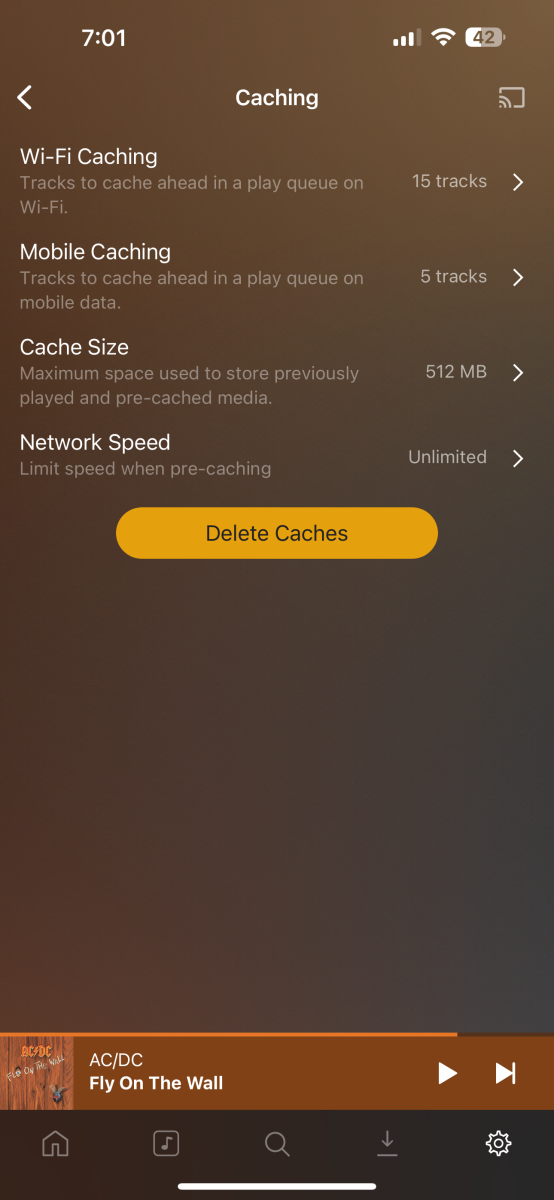
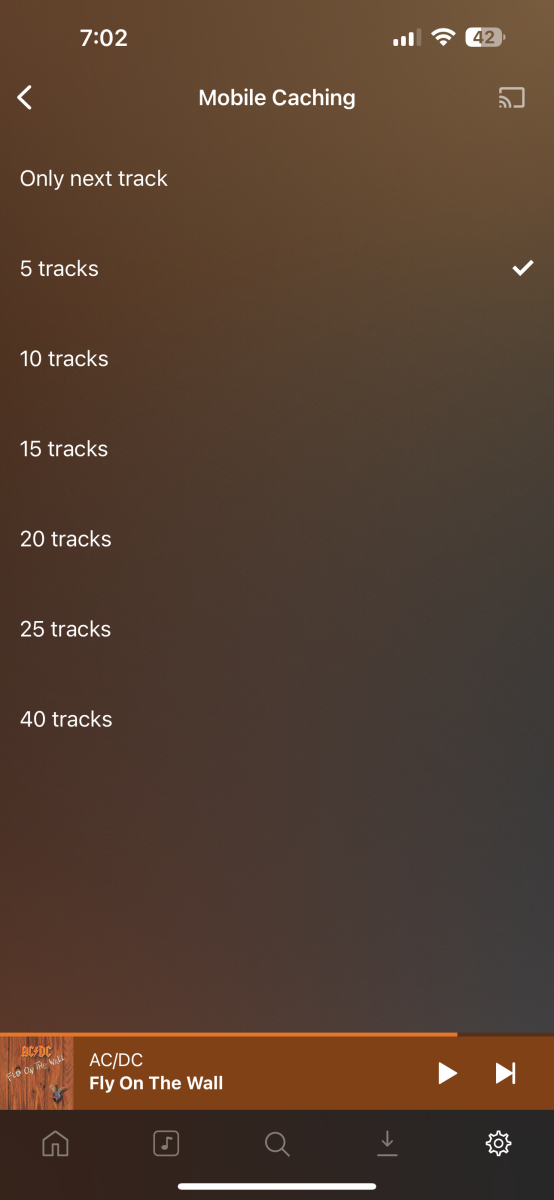 1 point
 -
Hi All, I have recently moved from Plex to Emby. The biggest think that Plex does that Emby does not is gapless audio play back of music. I listen to a lot of electronic music and they are usually continuous mixes broken in to tracks on a CD. Plex does handle gapless audio by pre-downloading the next track before the current track has finished. Emby does not have gapples play back on iOS or Android.going to be implemented in Emby? At this stage I will continue to use Plex for music. For my use case Emby is less than Ideal. I like almost everything else about Emby. Is gapless playback every going to happen in Emby apps?1 point
-
marking as solved and starting new topic for ipad issue as its not related to Roku, sorry about that1 point
-
Good Morning Finally I solved it. "Happy2Play" and you got me on the right path to change the settings for "Allow remote access to this Emby server". It works now perfectly from my iPhone, iPad and my sisters TV. Thanks very much to everybody for your help and your patience!1 point
-
The media management aspects of sonar and radar are simply unbeatable as they use the same structure and provider lookups as emby. You can then specify the formatting and it will rename them and continue to do so as new items or episodes get added.1 point
-
For audio, yes, for video no. As has been said above, people see the playlist as a watch list because frankly thats all emby offers on the limited interface. 'I'd like to watch that show sometime, or let me watch the first few episodes' - clearly i don't intend on watching the entire show in one session, so why would i want to add each individual episode ? Playlist/watchlist mgt has been #1 on the feature list for 8 years Eric, does this not tell emby that the playlist functionality within emby today is a very outdated implementation where you have just bolted on video to something designed for audio ? People want a 'library' with their genre, their 'picks', their favorites, their interests, their generation. Emby offers nothing other than a playlist (useless for tv) or a collection - that can't be pinned as items. Filters are all but useless as you can't use and/or combos. Do you see the problem here ? When you have 1000's of movies/shows to watch, people just want to see a custom subset of that, and emby offers very little in terms of a solution to this problem. (And this isn't just me with this feedback, every one of my friends and family have asked how do I do this, my response is embarassing when i say it can't be done ..)1 point
-
took awhile, but they are there now, thanks.1 point
-
Any data getting through to China needs to go through their great firewall and will be severely throttled. There is nothing you can do short of using a VPN which I'm pretty sure is illegal in China.1 point
-
Well you have to shutdown Emby and delete the activitylog.db (or manually edit it) to clear the dashboard area or wait I believe 7 days for them to disappear or get replaced.1 point
-
Filebot, Rename My TV Series and ReNamer are all good utilities. You do not want Emby to ever be in control of file renaming as it could potentially destroy your entire library.1 point
-
When what i want is naming that works in Emby I use "Filebot" with a simple format string: " {n.replaceTrailingBrackets()} - {s00e00.lower()} - {t}" for TV shows and for movies I keep it very simple and just use the default after making sure the date is always included. ie. "Movie Name (year).ext" For other bulk renaming tasks I use the little program called "ReNamer lite." There are a bunch of other tools for renaning files but those twt do the job for me. I do all my renaming completely outside Emby and I strongly recommend against even having the folder you are changing at a location where Emby cannot see it. Renaming files that Emby is actively monitoring simply carries too much "risk" for me. I hope renaming is never handled inside Emby as then I would be apt to try it and, with my luck, have things go horribly wrong.1 point
-
Yep, I found it. I was indeed using the Emby for Android TV app, I switched to the Emby for Android App, and now it functions the way I wanted, which is the same way the Web App functions.1 point
-
Well, most -if not all- of my media doesn't have that set, or not correctly. I've never checked if it is correct. And since most non-german original media with a german dub has the german as the default language, such that a player in germany plays it in german by default (which is sensible of course). I doubt that would work the way I'd want it to. Regardless, default track is a per file setting, what I want is a per account setting. Which track should be the default anyway, 7.1, 5.1 or stereo of the same language? I wouldn't know how to decide.1 point
-
I really appreciate your insight! After touching the files everything is how it should be. I'll look into tdarr further because after several years with this setup this is the first time this has happened.1 point
-
There was a reason I downloaded that plugin and I can't believe I forgot about it. I had a backup from earlier in the day and everything is looking good, thank you very much!1 point
-
I understand this ask, as I've wondered the same thing. Part of the problem is people want a "Watch List" (Netflix style) where you can add a top-level series or season, however Emby playlists are not that, they are designed for individual items as ebr said. Both have their own use cases, but we only have one function at the moment.1 point
-
Hello, I fixed the issue by unlinking the account and linking it again. Thanks for your help!1 point
-
@Lukeis suggesting that you place the certificate file in the path that's mapped to /config in the Emby Docker container. Create a directory "ssl" so that you end up with /config/ssl in the container, place the pfx file there and use the /config/ssl/<filename>.pfx in the Emby settings. The second part is that the file must be readable by the Emby runtime process. Preferably the UID/PUID you're using for the Emby container should own the pfx file and be able to access the /config/ssl directory.1 point
-
Hi, stay tuned. Coming soon. Thanks.1 point
-
UPDATE: Nevermind, stupid me forgot to save credentials on my htpc for shared folders everything works as it should.. sorry for the trouble I'm having similar problem, and I think few years ago it worked differently. so I have separate computer where I store all my movies; emby server is installed on that computer. all folders containing movies on that computer are shared, and when I created library in emby server I specified for each folder its "shared folder" equivalent. in the past when I had it configured like that and I used emby theather application with external player set to MPC-HC - emby theater was opening MPC-HC passing it actual file path to the movie (could be BDMV folder path, or MKV file path); now I see that it passing emby server application URL to either original.mkv or stream.mkv (in case of BDMV container) is it possible to configure emby theater so it will pass actual file path (e.g. "\\myserver\movies01\back to the future 1\back-to-the-future-1.mkv") instead of URL to "original.mkv" on emby server? I dont want emby server to do any transcoding or any kind of processing when I run emby theater app from my dedicated HTPC which belongs to the same LAN where computer running emby server belongs thanks!1 point
-
HI, we are looking into this. Thanks.1 point
-
Is that really what the user wants? If it is, why didn't they just add that episode? That setting would not have an impact when playing in a playlist. A playlist is a list of items you wish to play in a specific order so branching out to items not in the playlist does not make sense. Because playlists are lists of individual playable items. A show is a collection of items. When you look at a playlist, you expect to see each specific item that will play and in what order. Do you know of an example of any other playlist interface that has collections of items in the list?1 point
-
I'm also having issues with the new 3.0.21 version. I'm running on Fedora 40 and using the RPM package from Github. Videos will play fine, but all media controls are missing, so I can't control the video using my mouse or even close the window. Keyboard shortcuts seem to work fine though.1 point
-
@Luke daaamn ! i didnt know that there is a diagnostic plugin tool! i had to recompile the entire ffmpeg app from scratch and removing those parameters manually lol Anyways, yes i can confirm that it works perfectly now. i have installed the diagnostic tool and i have replaced the following paramters : -reconnect 1 -reconnect_on_network_error 1 -reconnect_on_http_error 5xx,4xx -reconnect_streamed 1 -reconnect_delay_max 8 by removing these my live streams are now working. here is a sample of the logs: !!!WARNING!!! Applied Diagnostic Command Line Change: '-reconnect 1 -reconnect_on_network_error 1 -reconnect_on_http_error 5xx,4xx -reconnect_streamed 1 -reconnect_delay_max 8' >> '' Original: -y -print_graphs_file "C:\Users\strange\AppData\Roaming\Emby-Server\programdata\logs\ffmpeg-transcode-bfa0b088-4c0c-48fc-a87e-4c307b9d0317_1graph.txt" -copyts -start_at_zero -analyzeduration 3000000 -f hls -stream_loop -1 -c:v:0 h264 -noautorotate -user_agent "VLC/3.0.0-git LibVLC/3.0.0-git" -multiple_requests 1 -reconnect 1 -reconnect_on_network_error 1 -reconnect_on_http_error 5xx,4xx -reconnect_streamed 1 -reconnect_delay_max 8 -i "file.m3u8" -filter_complex "[0:0]scale@f1=width=720:height=404[f1_out0]" -map [f1_out0] -map 0:1 -sn -c:v:0 libx264 -g:v:0 150 -maxrate:v:0 1308000 -bufsize:v:0 2616000 -sc_threshold:v:0 0 -keyint_min:v:0 150 -r:v:0 50 -pix_fmt:v:0 yuv420p -preset:v:0 veryfast -profile:v:0 high -x264opts:v:0 "subme=0:me_range=4:rc_lookahead=10:partitions=none" -crf:v:0 23 -c:a:0 copy -disposition:a:0 default -max_delay 5000000 -avoid_negative_ts disabled -f segment -map_metadata -1 -map_chapters -1 -segment_format mpegts -segment_list "C:\Users\strange\AppData\Roaming\Emby-Server\programdata\transcoding-temp\30D801\30D801.m3u8" -segment_list_type m3u8 -segment_time 00:00:03.000 -segment_list_entry_prefix hls/30D801/ -segment_start_number 0 -individual_header_trailer 0 -write_header_trailer 0 -segment_write_temp 1 "C:\Users\strange\AppData\Roaming\Emby-Server\programdata\transcoding-temp\30D801\30D801_%d.ts" Modified: -y -print_graphs_file "C:\Users\strange\AppData\Roaming\Emby-Server\programdata\logs\ffmpeg-transcode-bfa0b088-4c0c-48fc-a87e-4c307b9d0317_1graph.txt" -copyts -start_at_zero -analyzeduration 3000000 -f hls -stream_loop -1 -c:v:0 h264 -noautorotate -user_agent "VLC/3.0.0-git LibVLC/3.0.0-git" -multiple_requests 1 -i "file.m3u8" -filter_complex "[0:0]scale@f1=width=720:height=404[f1_out0]" -map [f1_out0] -map 0:1 -sn -c:v:0 libx264 -g:v:0 150 -maxrate:v:0 1308000 -bufsize:v:0 2616000 -sc_threshold:v:0 0 -keyint_min:v:0 150 -r:v:0 50 -pix_fmt:v:0 yuv420p -preset:v:0 veryfast -profile:v:0 high -x264opts:v:0 "subme=0:me_range=4:rc_lookahead=10:partitions=none" -crf:v:0 23 -c:a:0 copy -disposition:a:0 default -max_delay 5000000 -avoid_negative_ts disabled -f segment -map_metadata -1 -map_chapters -1 -segment_format mpegts -segment_list "C:\Users\strange\AppData\Roaming\Emby-Server\programdata\transcoding-temp\30D801\30D801.m3u8" -segment_list_type m3u8 -segment_time 00:00:03.000 -segment_list_entry_prefix hls/30D801/ -segment_start_number 0 -individual_header_trailer 0 -write_header_trailer 0 -segment_write_temp 1 "C:\Users\strange\AppData\Roaming\Emby-Server\programdata\transcoding-temp\30D801\30D801_%d.ts" C:\Users\strange\AppData\Roaming\Emby-Server\system\ffmpeg.exe -loglevel +timing -y -print_graphs_file "C:\Users\strange\AppData\Roaming\Emby-Server\programdata\logs\ffmpeg-transcode-bfa0b088-4c0c-48fc-a87e-4c307b9d0317_1graph.txt" -copyts -start_at_zero -analyzeduration 3000000 -f hls -stream_loop -1 -c:v:0 h264 -noautorotate -user_agent "VLC/3.0.0-git LibVLC/3.0.0-git" -multiple_requests 1 -i "http://site:8090/s/a3b30377/12-kanal-il.m3u8" -filter_complex "[0:0]scale@f1=width=720:height=404[f1_out0]" -map [f1_out0] -map 0:1 -sn -c:v:0 libx264 -g:v:0 150 -maxrate:v:0 1308000 -bufsize:v:0 2616000 -sc_threshold:v:0 0 -keyint_min:v:0 150 -r:v:0 50 -pix_fmt:v:0 yuv420p -preset:v:0 veryfast -profile:v:0 high -x264opts:v:0 "subme=0:me_range=4:rc_lookahead=10:partitions=none" -crf:v:0 23 -c:a:0 copy -disposition:a:0 default -max_delay 5000000 -avoid_negative_ts disabled -f segment -map_metadata -1 -map_chapters -1 -segment_format mpegts -segment_list "C:\Users\strange\AppData\Roaming\Emby-Server\programdata\transcoding-temp\30D801\30D801.m3u8" -segment_list_type m3u8 -segment_time 00:00:03.000 -segment_list_entry_prefix hls/30D801/ -segment_start_number 0 -individual_header_trailer 0 -write_header_trailer 0 -segment_write_temp 1 "C:\Users\strange\AppData\Roaming\Emby-Server\programdata\transcoding-temp\30D801\30D801_%d.ts" 07:56:19.983 ffmpeg version 5.1-emby_2023_06_25 Copyright (c) 2000-2022 the FFmpeg developers and softworkz for Emby LLC 07:56:19.983 built with gcc 12.2.0 (Rev10, Built by MSYS2 project) 07:56:19.984 Execution Date: 2024-08-17 07:56:19 07:56:20.122 [hls @ 000002822e19bdc0] Opening '/2024/08/17/07/55/46-05120.ts?token=a3b30377_1mav' for reading Luke, i am not sure how important it is to have these parameters, if you could elaborate on that and explain - would be awesome. but if these parameters are not crucial, i would highly appreciate if you could remove them and release a fixed version. thanks!1 point
-
Thank you! I'll give that a try!1 point
-
Emby is intended as a personal server for individuals and families, not to be run as a business, so relying on external support is not appropriate. As for your 55 minutes... My servers log intrusion attempts every few seconds, and have done so for about 20 years; none has ever got in. Preventing them getting in is more important than stopping them trying. Paul1 point
-
I'm voting for this as well, e.g. Futurama has a different streaming order than TV order and renaming the episodes and finding out what goes where is not very fun.1 point
-
I was searching for how to set a sleep timer and found this forum thread. I too would like to support this feature and wonder why it is taking so long to implement such a simple improvement.1 point
-
Been waiting almost 2 years for the options to be added. I can't use the standard app as my daily use, as it doesn't transcode non-supported audio to Dolby Digital like the Android TV app does.1 point
-
Hi, we'll try to get to it soon. Thanks for the reminder.1 point
-
Hello, there have been many discussions about it, like 6 years ago, but I kind of want to ask something else. When I play recent movies in browser (currently FF) I can see that audio is getting transcoded to AAC 384bit (stereo i guess?). As we all know, regular downmixing to stereo is never a good thing, what I do for selected movies is "nightmode" downmixing beforehand which is kind of... annoying. (See https://superuser.com/questions/852400/properly-downmix-5-1-to-stereo-using-ffmpeg > Downmixing with Robert Collier's Nightmode Dialogue ) The difference is quite big! My question is, is it possible to add an "dynamic stereo" option to Emby playback (mostly browser and mobile might benefit from it) that forces stereo downmix with above option. So lets say, my source file has an ENG 5.1 DTS, I currently only see 5.1 as audio channel, and when I play it, it gets downmixed to stereo in a quite bad way (usually voice is much quieter than anything else) which is always been bad. As soon as the action scenes come, its getting too loud, and when you turn it down, you might not understand conversations anymore. So the new option with add an "on the fly" stereo channel, additionally to the 5.1. which will force emby audio to transcode, but using a specific downmix mode like "Nightmode Diaglogue" or whatever. (Admins might be able to add/select their own "filter" in the server managements transcoding/advanced options or disable this feature ). Example (hardcoded): The new dynamic option instead can be show as italic or "*" ed option, to mark them as something special. This way, I can turn the - already happening - downmixing into a more useful one. I don't need to transcode the audio beforehand, and I save some storage from just adding "Nightmode Stereo" to all movies, while I only need it once in a while. I guess hardware these days is fast enough to allow this ? Cheers
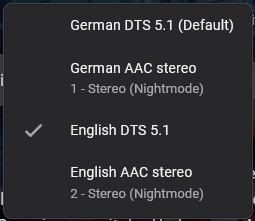 1 point
 -
Try disabling MPV player in Apple TV app, to see if there are differences1 point
-
This is building on what I've mentioned previously ( https://emby.media/community/index.php?/topic/41937-questions-about-media-stubs/ ). Being able to create custom Media Stubs ( https://github.com/MediaBrowser/Wiki/wiki/Media%20stubs ) would be ideal, but I realize that is probably unlikely. So what I propose instead is a new Media Stub called Online, which could be indicated by ".online" instead of ".disc" (or even ".disconline" would be fine). I think with more and more media moving to an online context (ie, Vudu, iTunes, Disney Movies Anywhere) there is a place for having this kind of Media Stub. Now, would could then provide a relatively easy way that users could define their own online providers via Media Stub be allowing for the following naming convention: ".provider.online". So the user could just use ".online" or they could enter whatever continuous (ie, between ".") string they want to identify a given online provider (eg, "Terminator (1984).vudu.online") and then Emby would parse that and add it to an internal list of online providers. Then, using my other feature request of custom messages for Media Stubs ( https://emby.media/community/index.php?/topic/44010-emby-theater-external-player-custom-messages-particularly-for-media-stubs-and-tags/ ) Emby could provide a way to pick from the list of any Online Providers using the same UI I described for selecting Tags) when setting up an External Player of type "Media Stubs". Or, we could skip all that and just allow the user to manually enter strings to match of off (eg, ".vudu.online") -- this would basically be allowing Externally Players (in this case to display a custom message, per the other feature request) to be matched by arbitrary filename string patterns. In some ways that might actually be the easiest way to go (ie, the least work). And personally, I could live with that as I could then just create my own naming scheme using the existing Media Stub structure (eg, "Terminator (1984).vudu.online.disc") and match off of that for my custom messages (once the other feature request is implemented). Thanks! PS - If this is something you might like to see implemented, be sure to "Like" this top/first post (as well as any subsequent posts in this thread that highlight particular aspects of what you are interested in) -- "Liking" the top/first post helps the Devs to know how much interest there is in a given Feature Request.1 point