Leaderboard




Popular Content
Showing content with the highest reputation on 08/14/24 in all areas
-
I agree that this is a power-user feature, and I agree that consideration for "stepping" on existing tags or "locking" tags could cause issues for regular users. The counter-argument would be that there are a number of power-users who are already writing plugins and using other workarounds to get this information into emby via tags. So weather it is supported or not, power users are engaging in this behavior. If there is not clarity on how to officially handle this data, any eventual solution in the future has the possibility to break existing setups and disappoint more people than it pleases. I suggest making "use moviedb keywords as tags" part of the "advanced" library settings menu, make it off by default, and make it additive (not erasing existing tags). For the people who already use tags, the kludge doesn't need to affect them unless they choose to do so.2 points
-
Not sure on original colors but here
 2 points
 -
Good day, We will update the forum. Today before the update I will remove most of the modifications, we will add most of them back after the update but not immediately. My best2 points
-
Would it not be a good idea to have a metadata option for music videos that is actually for music, so that if there's nothing available in a music video db it could be identified from a music db ?2 points
-
More items in the Latest row(s) would be nice. I just added a bunch of new TV shows / series and 16 isn't enough. If I click on Latest TV, it goes to Suggestions, which is useless, I would like more Latest TV not Continue Watching or Latest Episodes. I can sort TV by date added but that doesn't show new series added to existing ones (series 5 of The Expanse) for example. Similar for Movies please.1 point
-
TL;DR Ubuntu actually make it really easy to install the right nvidia drivers however there are separate packages for NVDEC & NVENC so you need to find the right packages. The magic sauce (at the time of writing) is... sudo apt install nvidia-headless-525-server nvidia-settings nvidia-utils-525-server libnvidia-decode-525-server libnvidia-encode-525-server Background I'm running Emby in a VM (on TrueNAS SCALE). I decided to add a GPU and PCI passthrough for hardware accelerated transcoding. All the advice on the Emby pages say that you should install the nvidia driver from the nvidia homepage and NOT from the package manager. I couldn't get this to work and it felt wrong as I wouldn't get automatic security patches. There seemed to be other users on the forums that had installed an entire xserver dekstop on their VM's just to get the drivers to work. I was adamant that I wanted to use the package manager. Nvidia drivers can typically be installed with a simple... sudo apt install nvidia-headless-525-server ...however that obviously didn;t work. You have to specifically install the nvidia libraries for NVDEC & NVENC... sudo apt install libnvidia-decode-525-server libnvidia-encode-525-server ... the rest is just gravy which give you tools like `nvidia-smi`... sudo apt install nvidia-settings nvidia-utils-525-server I hope this is of use to someone else.1 point
-
Hi, we'll take a look at it. Thanks for reporting.1 point
-
Wasn't sure of the platform. Not sure if the value you have is usable.1 point
-
user24, I hadn't noticed that "is in the range" option before. Nice! I love the simplification!1 point
-
Hi. As you said you continue to improve the Android App, there is a function in the TV I think it would be great to have in the standard app too : to be able to select the default user/account at startup. I logged both my account and generic family account and I'd like that at start up the family account was the one to be selected. And, if I want, I can easily switch to my account without to have to switch back to generic account before switch off. Thanks team! The app is amazing!1 point
-
Hi Luke, i have found a possibility where i can delete/rename the html-code under: Libraries - (...right mouse) Rename - new name ciao chineselein1 point
-
I am not sure about that, it might depend on what type of library it is since in the case of the show I tried with it used the Season backdrop, and when I removed the season backdrop it took one from the show level. But glad setting the theme to black helped.1 point
-
Will the system actually see a duplicate entry as 2 different tags? In my experience, if I add a tag more than once to the same item, the system resolves it to a single instance of the existing tag. I accept the point that removing a tag from the source would not be removed in emby. Yes, and I for one agree with this point. However, we must also consider that many are already doing it successfully, and we have the wonderful "Bulky" plugin to assist in removing unwanted tags and managing others. Personally, I use custom tags to identify franchises across media, white-list parental access, and identify sub-genres/keywords to expose relationships and new insights into my media. I don't use tags for TV listings, so I can't speak to that, but I otherwise I'm using custom tags as keywords already. I would love an automated way to get more metadata and also add things like awards, nominations, keywords, ratings details etc. Isn't that what emby is all about? It's frustrating know that so much of this data is out there, and they are available through the metadata fetcher APIs, and yet we still have to rely on scripts, plugins, and 3rd party tools to get them into the system. I respect that aggregating metadata from different sources can be hard, but it is really at the heart of how emby should empower our media collections.1 point
-
Thanks! This worked for getting it to go to black! Would be cool if the backdrops worked, but this is *much* better than the dark grey!1 point
-
I did not have that option set, thank you. However, even after setting it (and exiting and rentering the WebOS app) I still don't see the backdrop between videos. I have a backdrop set for the whole library, though. Does it need to be set for each video? Unfortunately, that's not feasible as I have a very large number of videos.1 point
-
You can also try setting your theme to Black instead of Dark.1 point
-
1. I am on Linux (RPI4-8GBram-512SSD), tampering with ramdrives was/is easy. 2. I use dreambox(one) for LiveTV 3. created ramdrives [ignore plex] a. makefolder.sh #!/bin/bash sudo mkdir -p /opt/ramdrive/emby/transcode sudo mkdir -p /opt/ramdrive/plex/transcode sudo mkdir -p /opt/ramdrive/emby/record sudo mkdir -p /opt/ramdrive/plex/record b. mountramfolder.sh #!/bin/bash mount -t tmpfs -o defaults,size=1G,x-gvfs-show embytranscode /opt/ramdrive/emby/transcode mount -t tmpfs -o defaults,size=1G,x-gvfs-show plextranscode /opt/ramdrive/plex/transcode mount -t tmpfs -o defaults,size=1K,x-gvfs-show embyrecord /opt/ramdrive/emby/record mount -t tmpfs -o defaults,size=1K,x-gvfs-show plexrecord /opt/ramdrive/plex/record dd if=/dev/zero of=/opt/ramdrive/emby/record/full dd if=/dev/zero of=/opt/ramdrive/plex/record/full c. (optional) umountramfolder.sh #!/bin/bash umount /opt/ramdrive/emby/transcode umount /opt/ramdrive/plex/transcode umount /opt/ramdrive/emby/record umount /opt/ramdrive/plex/record d. (optional - adjust home folder) sudo systemctl --force --full edit ramdrive.service [Unit] Description=<ramdrive> After=network.target AssertPathIsDirectory=/home/mihai/ramdrive/ [Service] WorkingDirectory=/home/mihai/ramdrive/ ExecStart=/home/mihai/ramdrive/mountramfolder.sh #ExecStop=/home/mihai/ramdrive/umountramfolder.sh User=root Group=root [Install] WantedBy=default.target 4. Using VU+ Plugin helped (dreambox), vs xteve/threadfin 5. Can no longer fill drive(SSD) if Wife presses record (by mistake/when in hurry/etc). 6. Still testing vs Plex, but right now, Emby beats even in transcoding. (on my/our setup) Thank you, still on monthly on both (Emby/Plex) will decide to buy Lifetime.1 point
-
Luke, I have forced the user to buy a Firestick TV 4k , also I have moved my subdomain to get managed by Nginx Proxy Manager on a rpi5 and used @pir8radio settings on the NPM. The user is currently out of city so when he comes back I will ask him to try again on his Samsung Tv and let me know of the result. It is very odd since he is the only one having the playback dilemma. I have like 4 to 5 other users with older Model Samsung TVs that have no issues on the playback. Thanks for following up on this, will keep you updated in the matter!1 point
-
I have downloaded the android standard app and it work fantastic on my TV. First time I only searched for emby and the TV version was the only one I found. Searching Emby for android and both versions showed. I am 76 years, I have ripped all my blue rays for much easier access and playback. I have many music dvds which I have picked tracks from to make playlist by group and artist, like creating the best of ... I admire the quality of your software the user friendliness and the added service in the premiere subscription.1 point
-
The system is not designed for more than one poster image so any existing gets replaced not added another. All images except backdrops are limited to one and the only way around is manual images of a different name. So if you wish to have more than one image for this image type you will have to manually put in folder as the UI will delete existing.1 point
-
The point I'm trying to make is that if you want to import these tags and use your own custom tags at the same time, then mashing these two things together might not be a great fit.1 point
-
You can't as you are replacing not adding. Only way would be a manual process of adding a folder.jpg as there is an order of precedence when multiple images exist. https://emby.media/support/articles/Movie-Naming.html#video-images So saving images with media or not will not preserve existing image as changing existing on will always be deleted. And images with media will always take priority.1 point
-
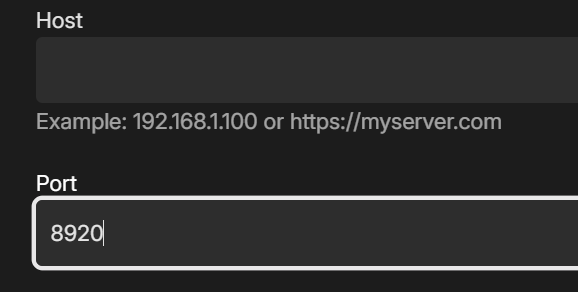
Yes assuming you have configured https on your server and shows that way on Dashboard.
 1 point
 -
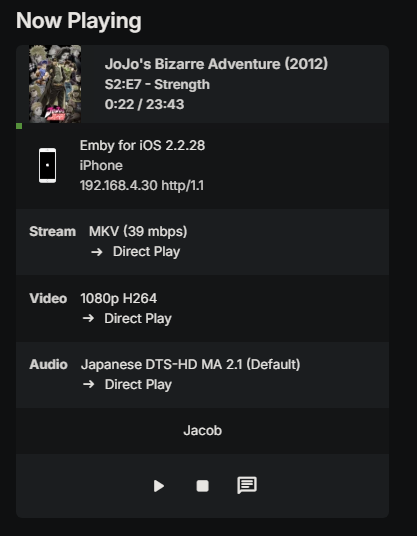
Sorry for the delay, I just tried it on my iphone and it started playing instantly, no buffering no delay. I have attached the logs and a picture of the playback, looks like it was direct play. I was also on my local network when I tested it. embyserver.txt
 1 point
 -
Thanks ! A very nice work here1 point
-
Hi. That question used to come up a lot when we first started (over 10 years ago). I think the fact that it hasn't been an issue in all that time makes it not such a pressing question any more. We have no view into the future and, technically, you have this risk with just about any piece of connected software you purchase today but, other than a catastrophic event wiping out our entire operation (which would have to occur over a very broad area as we are spread out) we would try to leave you with a functional system if we could foresee something changing. But, I'm afraid, there no way we (or anyone) can guarantee you anything.1 point
-
Switching to the beta server release. AFAIK, you can't switch back and forth between beta and stable, unless that has changed.1 point
-
Hi. I'm afraid that optical media (what ISO files are trying to replicate) is all but dead so, never say never, but I don't see much payback on us spending resources to support it when the entire industry is moving away from it.1 point
-
I saw that site,but it has been written for Windows. I'm using Android. It is not good. I've started a thread here : https://caddy.community/t/installing-ssl-https-using-a-reverse-proxy-like-caddy-on-android/25182/ and I made progress,but it still does not work.1 point
-
What issues are you having with the Tizen app? It might be better for us to try and resolve that for as playback via the browser may be limited.1 point
-
Please try to add Emby for Thailand. It is so frustrating using the USB, and does not work well. Tried updating after 30 days today, and it now tells me that it is not recognized, even after deleting, restarting, and nearly hitting with a bigger hammer! Samsung QN901 point
-
HI, we are looking into this. Thanks.1 point
-
@Raleblue Hi there, let's look at an example. Please attach the information requested in how to report a media playback issue. Thanks!1 point
-
Thank you very much! Sorry I forgot to follow this topic. I'm using the TV Shows one right now. Would love that same image and style, just the word Series instead. TYSM!!
 1 point
 -
Thanks for sharing this.1 point
-
I will have to give this a try. I guess it never hurts to try, right. Thanks for the tip.1 point
-
Thanks, I found out it's in relation to my booster - when I unplugged the synology and connected it directly to the router it worked! For some reason my booster however can't seem to connect to the internet (even when I plugged it directly to the router via an ethernet cable) so will need to figure out how to fix that. Thanks for all the suggestions everyone, it really is appreciated.1 point
-
fwiw i saw similar behavior when I kicked off a very long-running transaction (deleting a library with 22 folders and more tv shows than i'd care to admit in it). Server would throw these exceptions for pretty much any request while the database was churning away, but after enough patience the embyServer process completed (I had done an exit) and after that was able to restart with everything checking out as ok.1 point
-
Hi, the next update to the Emby Apple TV app will be a significant one that will catch up in a number of areas. Thanks for the feedback.1 point
-
Great news. The Emby Alexa skill now supports German !1 point
-
Nope, but that is where it was. Thanks. I had looked under the general settings and library and series settings. But not the user display settings.1 point
-
Edit: Never mind, i found the problem and unrelated to Emby. Sorry for that. The Info App: Sqlite: 284 was still curious to me though. And thank you for that explanation.1 point
-
Bonjour, Suite à une mise à jour faite aujourd'hui tout est rentré dans l'ordre. Merci beaucoup. Cordialement1 point
-
There was a commitment by the devs earlier this year to introducing it in the beta after the current one - i.e. not in 4.9, but in 4.10 or 5.0, whatever it gets called. Paul1 point
-
Hey, sorry for the delay in replying. I finally got around to stripping out all but one subtitle track and now I can resume it without issue. It still gets stuttery if I skip forward and/or back, which I'm beginning to think is due to my ageing hard drive. Replacements are on the list, but replacing ~60TB of drives is not cheap so I've been putting it off.1 point
-
I changed my library setup to look at symbolic links, which then link to different hard drives in the background. Since I did that, adding files doesn't automatically trigger a library scan and I do this manually at the moment. Is my assumption correct, that this is caused by symbolic links or do I have to look for something else?1 point
-
I see this topic is 21 months old. How are these things prioritized, and is there any kind of reporting on the status of these requested fixes or enhancements? I really like the "Latest" feature on the Home screen — there just are not enough, 18 videos and 16 photos, can this be increased to, perhaps, 50 of each. (Or better yet, could it be User Definable through Settings?) Is there any update as to when, or if, this may be implemented?1 point
-
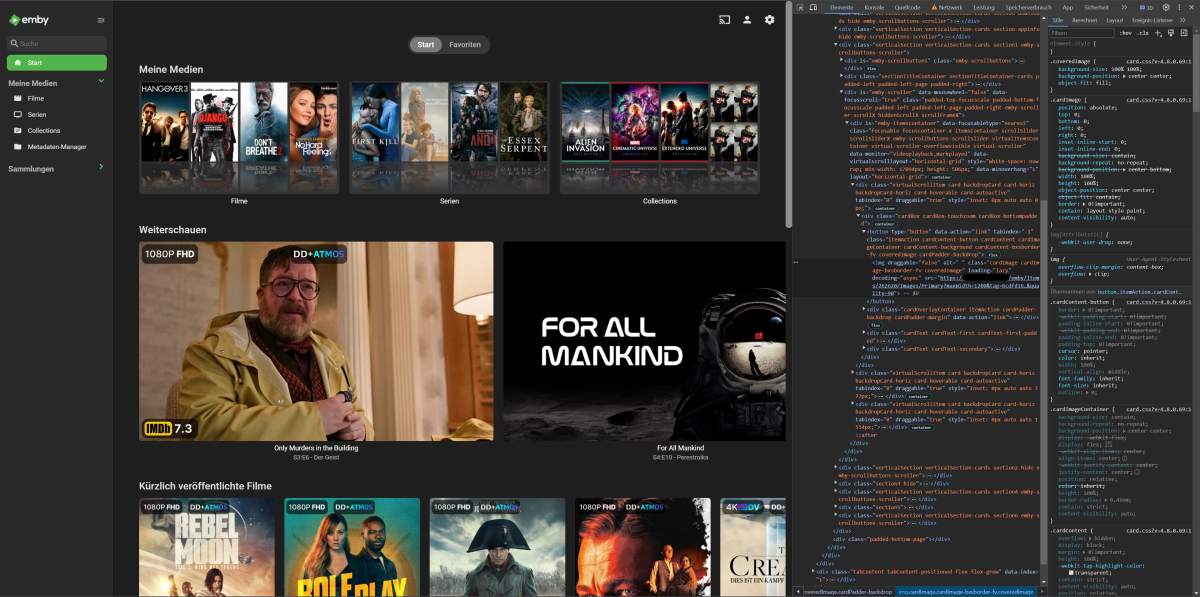
I really don't know why it isn't there already. Jellyfin has this for ages. It's probably one of the easiest changes they could possibly make. All the data they need for this is already there in the request results. It includes the image tags of the item that is showing, as well as the image tags for its parent item. So all that's missing is a new setting whether or not you want to see episode thumbs instead of show thumbs and a conditional statement in the code that checks for that setting and if it's an episode or not and then change the image link accordingly. I was able to quickly change the image just by swapping a few arguments of the image URL (item id and image tag. Image type changed from Thumb to Primary). All the values were already there in the item object, which can be viewed in the browser network console. So it shouldn't be that hard to do in my opinion.
 1 point
 -
Can't the app(s) just request more items as you click to the right? Isn't that what's happening when we click down on the wall of posters on the actual library page? The items get requested and loaded as you click, correct? Couldn't the same thing happen on the main menu, just horizontally?1 point
-
In my case, this would be a disaster, as I have a few thousand files and the identification of some movies is not reliable enough. I had to fix quite some identifications manually, something that I don't want to do again. It would be cool if there were an option to serialize the DB into files (nfo?) so that they can remain stable during a complete re-scan..1 point