Leaderboard




Popular Content
Showing content with the highest reputation on 08/12/24 in all areas
-
I think I have a weird problem now ... I just force a transcode of a 1080p hot hdr to 720p and it did it software again... Edit : Well nevermind... I restarted my container and now transcoding works as expected. Weird, when nvidia card doesn't link to the container correctly the transcoding parameters doesn'T show it as available for transcode, but now it was showing but not working. Thanks for your insight!2 points
-
@rbjtech I have added a new section of general tips before the existing SSL configuration text. Updated article is now live https://emby.media/support/articles/Secure-Your-Server.html2 points
-
ComSkipper ... A Emby Plugin that skips commercials in recordings using output from comskip. This plugin will work with EDL files generated by Comskip, ShowAnalyzer or any other application capable of generating them to automagically skip past commercials when playing back recordings in Emby. A visual localized notification will be presented on the screen when this happens. UNC network mappings are fine - as long as the .EDL file is in the same filename as the media file. A PDF is included in the download that explains all of the details. But one thing should be made clear up front. And that is this plugin does NOT contain comskip, show analyzer, or any other program that detects the commercials and creates the EDL files with the skipping information. Also, the donator version of comskip is required because Emby stores its recordings in .TS format. I'm told the donator version is no longer required. User @vdrovergraciously created a PDF file on how to get this working on Ubuntu. It can be found in the Github repository in the doc folder and will be included in future releases. The PDF file also shows an easy way to configure Emby to automatically run comskip after each recording on a Windows server. Linux server users will need to figure out the best way to do this for their flavor of Linux. I am not a Linux advocate or user, however I did find this information in the NextPVR forum that is encouraging, and I encourage Linux users to help each other out with this as I will be of little to no help in this regard. https://forums.nextpvr.com/showthread.php?tid=60803 Building Comskip is really quick and easy on Ubuntu, so probably the same for any Debian based distro: $ sudo apt-get update $ sudo apt-get install ffmpeg libavcodec-dev libavformat-dev libavutil-dev autoconf automake git libargtable2-dev libtool $ git clone git://github.com/erikkaashoek/Comskip $ cd Comskip $ ./autogen.sh $ ./configure $ make $ sudo make install Once this is out long enough where I am pretty sure it is stable, I'll make its GIT repository public. Git Repo Getting it into the plugin catalog could follow after that, assuming the Emby team approves. I rarely record, my main use case is NFL football games. I record our local teams game, which when complete runs comskip on the recording which takes about 40 minutes. We then watch the game while eating dinner that evening. Skipping halftime (manually) it brings the time from 3-4 hours to 2 to 2.5 hours. Comskip does a very good, remarkable really, job on all of my recordings including the games to date. I have attached the comskip.ini that I use. It works well for me in the US. If you add this to your ini (make sure your system has the processing power to handle it), it will greatly reduce he time comskip takes to process your file (requires donator version). thread_count=2 Have fun and enjoy commercial free recordings Current Release Version 2.2.0.0 - Updated Emby library to latest. Version 2.1.1.0 - Added popular .editorConfig for consistent coding standards. Upgraded to latest Emby library. Version 2.1.0.0 - A change in Emby 4.8 caused a code update to be required in how DL files are read. If the plugin stops working in server 4.8, update to the latest plugin. Version 2.0.0.0 - Allows for chapters to identify commercial points if they exist. PlayOn and perhaps others identify commercials that way. Version 1.6.0.0 - Allows configuration of time message is displayed on the screen. Allows configuration of message displayed on the screen. Optionally displays the skipped time in minutes:seconds. Version 1.5.0.0 - Added optional commercial duration skipped to the on screen message by request. Version 1.4.0.0 - Made a couple log messages info from debug by request. Version 1.2.3.0 - Upgraded to Emby server 4.7. Version 1.2.2.1 - Added German (de) translation. Version 1.2.2.0 - Culture set so EDL file can be parsed everywhere. Version 1.2.1.0 - Real time no longer experimental. Session ID fix for LG (and maybe other) clients. Version 1.2.0.0 - Experimental feature to allow commercial skipping when watching during recording Initial open source release. Version 1.0.0.2 - Initial release. Version 1.0.1.0 - Addition of configuration switch to disable on-screen notifications. **Note** You will need to clear your browser cache due to the config UI change. comskipper.ini1 point
-
I'm a plex life time member, but I have been using Emby for over six years continuously, but there is a feature which I have always thought is missing in Emby which I would like and encourage the developer to consider including especially in this dispensation where families can social or commingle due to COVID 19. Today, I received a notification from Plex about it new feature titled Watch together you can read about it here https://support.plex.tv/articles/watch-together/ The feature allows friends and families at distance to watch same movies together instantly, you simply invite all your buddy, once they signed to the system which can be seeing in the server then play and pause as needed, this I think is cool feature should be added to emby. Let's here your though if Emby developer should consider adding this feature to our beloved Emby Media https://www.bing.com/news/search?q=Plex+Watch+Together&qpvt=plex+watch+together&FORM=EWRE1 point
-
Hey there, Not sure how much demand there would be for this but something I noticed scrolling through Netflix last night was how many of the videos I have in my library are now on Netflix / Prime...it made me think as I now access Emby through devices that have access to Netflix / Prime I should be able to remove the movies physically from the server and instead link through from my Emby library on certain devices. I know it's not everyone's cup of tea, but for me it makes sense to only hold the movies that I need to on physical disc taking up space and for the others to link through to the appropriate store if I have a subscription. Meaning I have one central Emby repo for all my links, whether that link is to a local share hosting the media locally or to an online repository such as Netflix / Prime. Clearly this is a little niche but is probably where we are all going at somepoint in the future... There would be a lot to work out in the logic of it I'm guessing and is probably based mainly on the client side with an "emtpy" move / tv holder being placed on the server to be ignored by clients that are told they don't have access to the streaming service. Thoughts appreciated on whether this is a stupid idea or one that makes sense? I know I can setup watchlist and in turn I can and do use the PlayOn Channel which gives me the option to view those streams, but it would be slick if they were natively in my library as is now Cheers mini1 point
-
Hi there, Currently testing Emby and have to say: Good Alternative to Plex. There are two things im missing: 1: Photo Timeline. A View of all photos not sorted by folders. A Scrollable Timeline would to navigate. 2: Show Photos by specific days: In Amazon photos i have a great function, that changed my behaviour for watching photos: Watch photos that were taken exactly 1 year ago or 2 or 3 or.... Both Requests offer the ability to not only browse photos by browsing folders. You get photo recommendations. Whats better than watching photos of your kids 3 years ago? From my understanding it could be done by making a Select Statement each day that dynamically updates the year folders. I think it would be Great!1 point
-
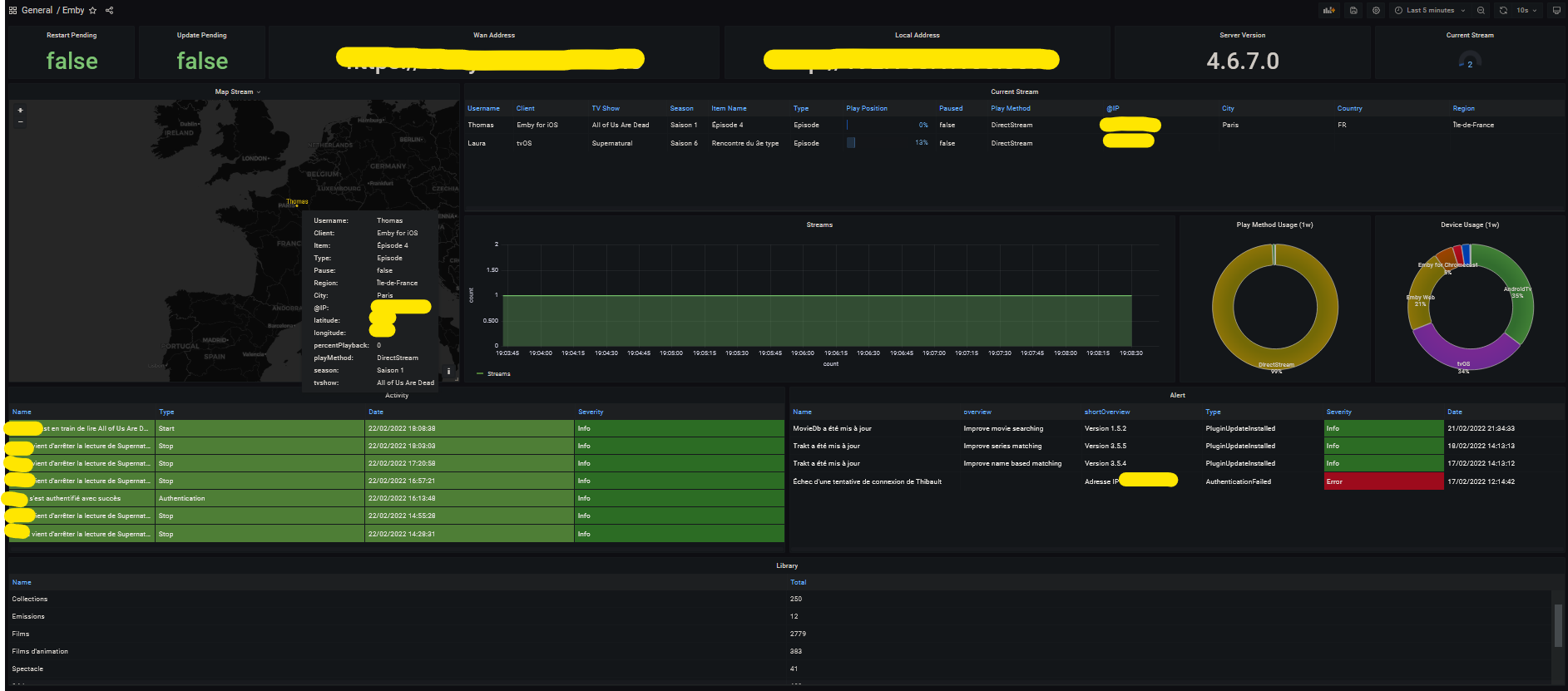
Hi everyone I did a quick export of some emby metrics for prometheus. It's still a first in alpha alpha alpha alpha alpha version but it seems to work If some volunteers want to try it and give me some feedback it would be really cool. I have in mind to add geoip to have a small map in grafana for example. If you use docker you just have to type this command: docker run -d -it \ --name=emby_exporter \ -e CONFIG_FILE=NAME_OF_YOUR_FILE.yml \ -v '/path/to/your/config/file.yml:/config/file.yml' \ bagul/goemby_exporter:latest Config file example: server: url: "http://<ip|domain name>" port: 8096 token: "your token" userID: "your userID" You will find your user id in the URL on your profile (on your server of course). And you will just have to add the exporter in your jobs in your prometheus config. As you can see the information is still recovered are thin but you can already make a small dashboard. I have the number of stream in progress and a map showing me the location of my users (approximate of course ) I think to add with time the information of Ombi for example. https://github.com/TOomaAh/emby_exporter_go My Dashboard: Emby Dashboard-1655999358418.json
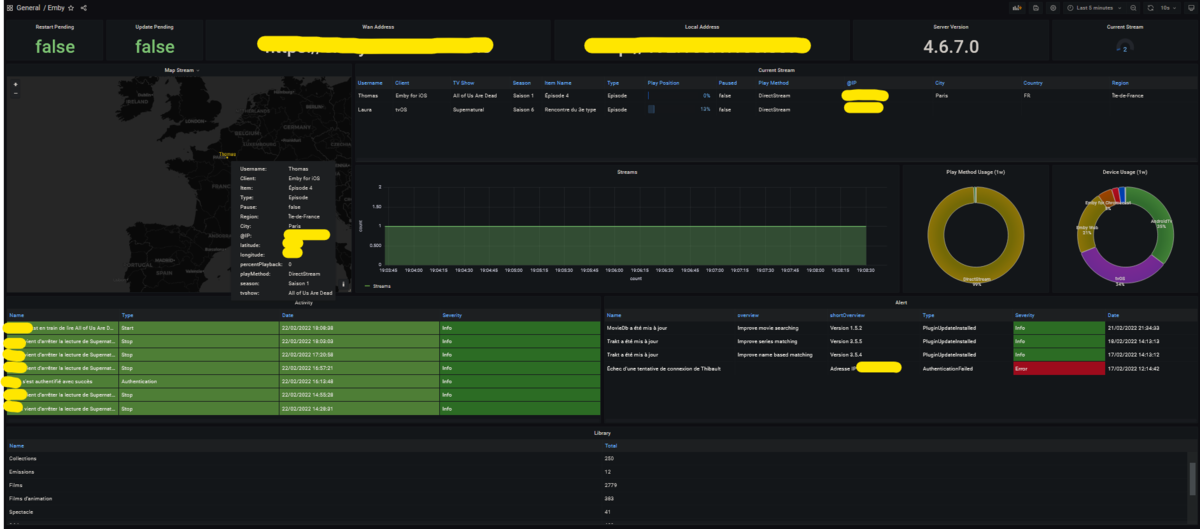 1 point
 -
I can't see any addon settings that I changed from default other than the Fancy popup box. In skin settings is this checked?
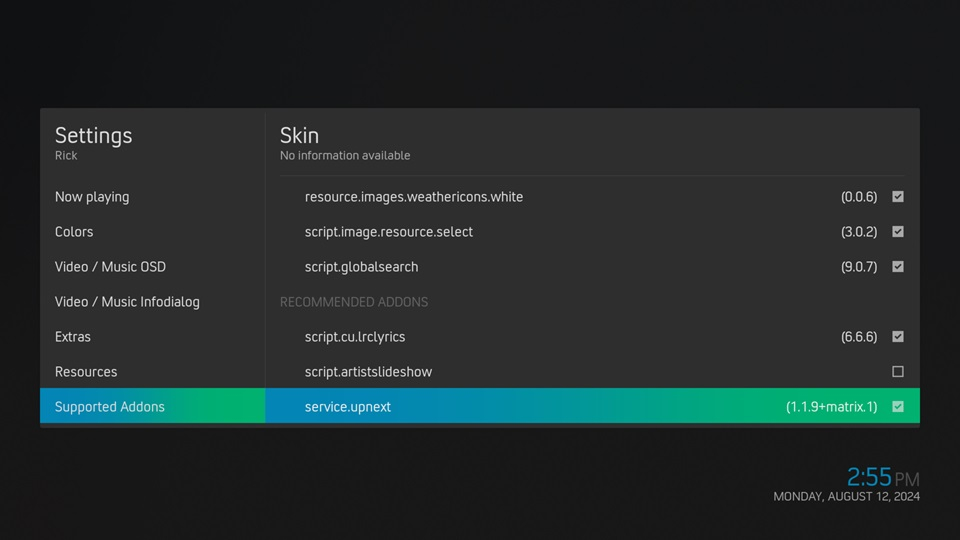 1 point
 -
Thank you appreciate it1 point
-
Vielen Dank @Teddyknuddel dachte schon ich krieg den Embuary Skin nicht mehr ans laufen. Aber deine Version funktioniert super!1 point
-
Of course there's lots of things that could be done in addition but when you start talking about tracking things that are not a part of the current Emby install, it gets complicated quickly. Blocking an existing user for some period of time can be done by just adding an attribute to an existing user record. But blocking a user that doesn't exist now means we need a whole new database table and management system for keeping track of things that aren't there. And then what happens when someone creates a new user - we have to now go look and be sure thy aren't in this list of users that weren't there before. All of this introduces complexity which translates to future bug potential and also takes time to design and implement. All for something that, arguably, should be handled at a different layer of access. Shouldn't we be spending that time on core features of the media system instead? Like I've already said - future improvements are possible as they make sense within the scope of everything else but the current implementation is not unreasonable and is within the scope of our system.1 point
-
I think Luke is hoping for late summer. But as always, "it's ready when it's ready"... Paul1 point
-
Ah, got it....doh! Thanks.1 point
-
I've asked them again about it.1 point
-
I have already responded to you in your other thread. Please refer to the guides that have been provided to you and let's keep the discussion to a single thread, thanks.1 point
-
Everything seems to be staying as it should now that I am using a CIFs mounted volume.1 point
-
But you previously requested us to block by IP - which is what I was responding to. I'm not saying improvements aren't possible but you calling the current implementation "sloppy" was not accurate nor fair in my opinion.1 point
-
You could search for SQLiteException in the logs and see if you are getting any and see what the errors are. In my case, to recover, I recreated from scratch all the libraries that had library folder paths that were below the parent folder that i inadvertently included as a folder path in another library1 point
-
Upgraded what to what? What problems do you have with login? What do you mean by "enter http"? The only thing I can say that might relate to anything there is that you can't go back from the beta to the stable release without rebuilding all your libraries from scratch. Paul1 point
-
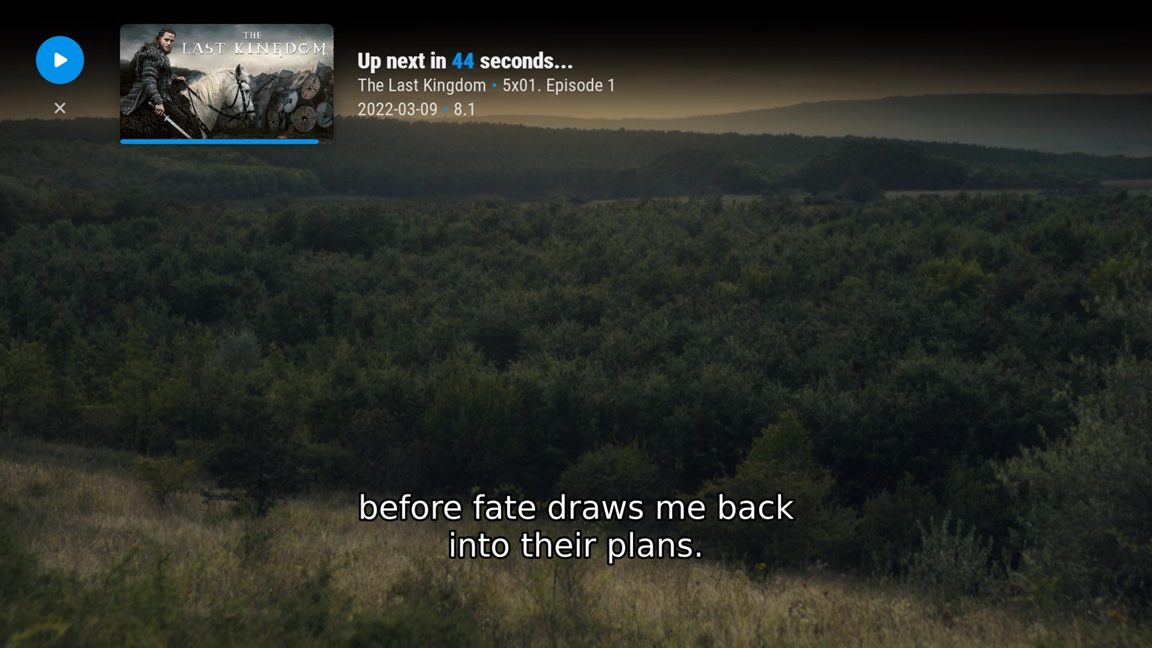
I'm using the Up Next addon with no issue using both Arctic Fuse and Arctic Zephyr Reloaded skins.
 1 point
 -
Hi Luke, I've been away so haven't tried the fix yet.1 point
-
Hi, you can use .ISO files in Emby. You just need to configure external players in Emby apps in order for them to play.1 point
-
Hi, the next update to the Emby Apple TV app will be a significant one that will catch up in a number of areas. Thanks for the feedback.1 point
-
Hi, we are looking into this. Thanks.1 point
-
A great example of why blocking by IP isn't as valuable either (in your case, if we blocked the IP, it wouldn't have stopped any of those). Most of these bots use a random one on each attempt to try and get around that.1 point
-
OK thanks for the help, I will mount the folder in Ubuntu and point to that instead.1 point
-
Bonjour et bienvenue parmi nous Quand tu parles de se mettre à jour, tu veux dire qu'il ne les reconnait pas ou pas correctement ? Si c'est le cas, as-tu suivi les directives de nommage des médias ? https://emby.media/support/articles/TV-Naming.html Il existe également un très bon logiciel pour faire cela de façon assez automatique qui s'appelle Filebot. https://www.filebot.net/ Bon amusement Vincèn1 point
-
I can agree with you for sure, the Linux-based version I can imagine is much easier to develop and predict than freeBSD (being a developer myself). I would love to use the Linux version, but FreeBSD's stability is hard to match. Core has much more time being developed than Scale, considering Core is basically FreeNAS. Later I will try the Scale again at least in a Virtual Env to see how it's going, but the last thing that I described about SBM and Containers Storage not being compatible is a huge downside still. With scale gaining popularity on Emby side vs Core, are there any plans to stop or slow down the compatibility with FreeBSD or this is not a thing?1 point
-
Lend your support here:1 point
-
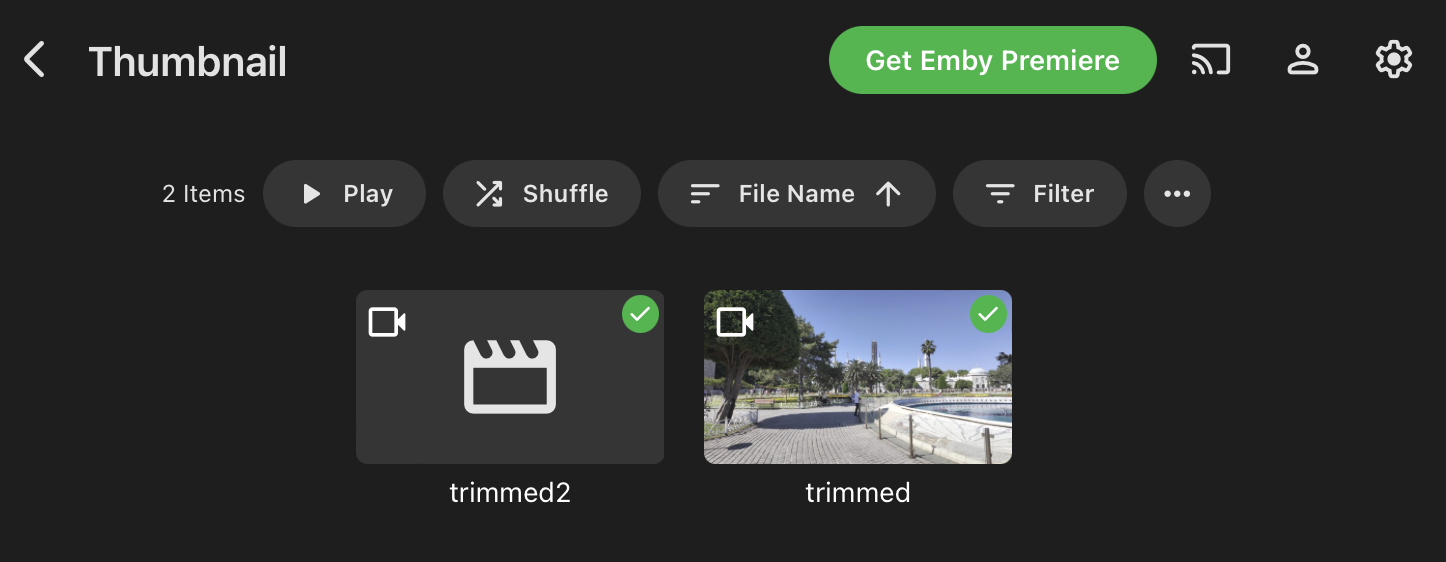
@sa2000and @Luke Please find attached logs and a sample 1 minute video file (called trimmed2.mp4) that fails during Ember server scan. If I manually run the same command that Emby Server uses then it works fine....but that it takes ~ 1.5 MINUTES to run...maybe that's the problem where some process is not waiting long enough. See it run manually : root@omv:# /opt/emby-server/bin/emby-ffmpeg -skip_list 20 -f mp4 -threads 1 -i file:"/export/d1/video/Test/Thumbnail/trimmed2.mp4" -an -sn -update 1 -vsync 0 -f image2 test.jpg ffmpeg version 5.1-emby_2023_06_25 Copyright (c) 2000-2022 the FFmpeg developers and softworkz for Emby LLC built with gcc 10.3.0 (crosstool-NG 1.25.0) Execution Date: 2024-08-10 00:44:35 -vsync is deprecated. Use -fps_mode Passing a number to -vsync is deprecated, use a string argument as described in the manual. Input #0, mov,mp4,m4a,3gp,3g2,mj2, from 'file:/export/d1/video/Test/Thumbnail/trimmed2.mp4': Metadata: major_brand : isom minor_version : 512 compatible_brands: isomiso2mp41 encoder : Lavf59.27.100 Duration: 00:01:00.09, start: 0.000000, bitrate: 9655 kb/s Stream #0:0[0x1](und): Video: hevc (Main 10) (hvc1 / 0x31637668), yuv420p10le(tv, bt2020nc/bt2020/arib-std-b67, progressive), 3840x2160, 9333 kb/s, Level 153, 59.94 fps, 59.94 tbr, 60k tbn (default) Metadata: handler_name : VideoHandler vendor_id : [0][0][0][0] encoder : Lavc61.3.100 libx265 timecode : 00:03:53;14 Stream #0:1[0x2](und): Audio: aac (LC) (mp4a / 0x6134706D), 48000 Hz, stereo, fltp, 317 kb/s (default) Metadata: handler_name : SoundHandler vendor_id : [0][0][0][0] Stream #0:2[0x3](eng): Data: none (tmcd / 0x64636D74) Metadata: handler_name : VideoHandler timecode : 00:03:53;14 Stream mapping: Stream #0:0 -> #0:0 (hevc (native) -> mjpeg (native)) Press [q] to stop, [?] for help [swscaler @ 0x1041c00] [swscaler @ 0x104ebc0] deprecated pixel format used, make sure you did set range correctly [swscaler @ 0x1041c00] [swscaler @ 0x16b1040] deprecated pixel format used, make sure you did set range correctly [swscaler @ 0x1041c00] [swscaler @ 0x17270c0] deprecated pixel format used, make sure you did set range correctly [swscaler @ 0x1072400] [swscaler @ 0x107f400] deprecated pixel format used, make sure you did set range correctly [swscaler @ 0x1072400] [swscaler @ 0x16b1040] deprecated pixel format used, make sure you did set range correctly [swscaler @ 0x1072400] [swscaler @ 0x1728dc0] deprecated pixel format used, make sure you did set range correctly [swscaler @ 0x16cef80] [swscaler @ 0x1041c00] deprecated pixel format used, make sure you did set range correctly [swscaler @ 0x16cef80] [swscaler @ 0x1684880] deprecated pixel format used, make sure you did set range correctly [swscaler @ 0x16cef80] [swscaler @ 0x1709380] deprecated pixel format used, make sure you did set range correctly [swscaler @ 0x16cef80] [swscaler @ 0x1041c00] deprecated pixel format used, make sure you did set range correctly [swscaler @ 0x16cef80] [swscaler @ 0x1684880] deprecated pixel format used, make sure you did set range correctly [swscaler @ 0x16cef80] [swscaler @ 0x1709380] deprecated pixel format used, make sure you did set range correctly Output #0, image2, to 'test.jpg': Metadata: major_brand : isom minor_version : 512 compatible_brands: isomiso2mp41 encoder : Lavf59.27.100 Stream #0:0(und): Video: mjpeg, yuvj420p(pc, bt2020nc/bt2020/arib-std-b67, progressive), 3840x2160, q=2-31, 200 kb/s, 59.94 fps, 59.94 tbn (default) Metadata: handler_name : VideoHandler vendor_id : [0][0][0][0] timecode : 00:03:53;14 encoder : Lavc59.37.100 mjpeg Side data: cpb: bitrate max/min/avg: 0/0/200000 buffer size: 0 vbv_delay: N/A Skip-Option - Write output: pkt_pts_time:0 pkt_dts_time:0 input_pts_time:0 Skip-Option - Seek performed to: 20 input_cur_dts: 0.016683 Skip-Option - Write output: pkt_pts_time:20.0033 pkt_dts_time:20.0033 input_pts_time:20.0033=off speed=0.000179x Skip-Option - Seek performed to: 9.22337e+12 input_cur_dts: 20.02 elapsed=00:01:34.62 frame= 2 fps=0.0 q=0.0 Lsize=N/A time=00:00:20.02 bitrate=N/A throttle=off speed=0.212x video:847kB audio:0kB subtitle:0kB other streams:0kB global headers:0kB muxing overhead: unknown EXIT I trimmed the same video file to only 1 second long (called trimmed.mp4 in the attached) and added it to the library; then a thumbnail is successfully generated and displayed. Here's a screenshot: If I run my "refined" command to extract the thumbnail then it takes less than 2 SECONDS to run (on the 1 MINUTE sample video): root@omv:/export/d3/stora/downloads/test# /opt/emby-server/bin/emby-ffmpeg -skip_frame nokey -i /export/d1/video/Test/Thumbnail/trimmed2.mp4 -qmin 1 -qmax 1 -q:v 1 -vframes 1 -update 1 test2.jpg ffmpeg version 5.1-emby_2023_06_25 Copyright (c) 2000-2022 the FFmpeg developers and softworkz for Emby LLC built with gcc 10.3.0 (crosstool-NG 1.25.0) Execution Date: 2024-08-10 01:20:31 Input #0, mov,mp4,m4a,3gp,3g2,mj2, from '/export/d1/video/Test/Thumbnail/trimmed2.mp4': Metadata: major_brand : isom minor_version : 512 compatible_brands: isomiso2mp41 encoder : Lavf59.27.100 Duration: 00:01:00.09, start: 0.000000, bitrate: 9655 kb/s Stream #0:0[0x1](und): Video: hevc (Main 10) (hvc1 / 0x31637668), yuv420p10le(tv, bt2020nc/bt2020/arib-std-b67, progressive), 3840x2160, 9333 kb/s, Level 153, 59.94 fps, 59.94 tbr, 60k tbn (default) Metadata: handler_name : VideoHandler vendor_id : [0][0][0][0] encoder : Lavc61.3.100 libx265 timecode : 00:03:53;14 Stream #0:1[0x2](und): Audio: aac (LC) (mp4a / 0x6134706D), 48000 Hz, stereo, fltp, 317 kb/s (default) Metadata: handler_name : SoundHandler vendor_id : [0][0][0][0] Stream #0:2[0x3](eng): Data: none (tmcd / 0x64636D74) Metadata: handler_name : VideoHandler timecode : 00:03:53;14 Stream mapping: Stream #0:0 -> #0:0 (hevc (native) -> mjpeg (native)) Press [q] to stop, [?] for help [swscaler @ 0x2ccd680] [swscaler @ 0x2cda680] deprecated pixel format used, make sure you did set range correctly [swscaler @ 0x2ccd680] [swscaler @ 0x2d44900] deprecated pixel format used, make sure you did set range correctly [swscaler @ 0x2ccd680] [swscaler @ 0x2dba980] deprecated pixel format used, make sure you did set range correctly [swscaler @ 0x2d860c0] [swscaler @ 0x2d93080] deprecated pixel format used, make sure you did set range correctly [swscaler @ 0x2d860c0] [swscaler @ 0x2cd1a80] deprecated pixel format used, make sure you did set range correctly [swscaler @ 0x2d860c0] [swscaler @ 0x2d43e40] deprecated pixel format used, make sure you did set range correctly [swscaler @ 0x2deaf00] [swscaler @ 0x2d675c0] deprecated pixel format used, make sure you did set range correctly [swscaler @ 0x2deaf00] [swscaler @ 0x2db1440] deprecated pixel format used, make sure you did set range correctly [swscaler @ 0x2deaf00] [swscaler @ 0x2d27440] deprecated pixel format used, make sure you did set range correctly [swscaler @ 0x2deaf00] [swscaler @ 0x2d675c0] deprecated pixel format used, make sure you did set range correctly [swscaler @ 0x2deaf00] [swscaler @ 0x2d94740] deprecated pixel format used, make sure you did set range correctly [swscaler @ 0x2deaf00] [swscaler @ 0x2d08f80] deprecated pixel format used, make sure you did set range correctly Output #0, image2, to 'test2.jpg': Metadata: major_brand : isom minor_version : 512 compatible_brands: isomiso2mp41 encoder : Lavf59.27.100 Stream #0:0(und): Video: mjpeg, yuvj420p(pc, bt2020nc/bt2020/arib-std-b67, progressive), 3840x2160, q=2-31, 200 kb/s, 59.94 fps, 59.94 tbn (default) Metadata: handler_name : VideoHandler vendor_id : [0][0][0][0] timecode : 00:03:53;14 encoder : Lavc59.37.100 mjpeg Side data: cpb: bitrate max/min/avg: 0/0/200000 buffer size: 0 vbv_delay: N/A elapsed=00:00:01.93 frame= 1 fps=0.5 q=1.0 Lsize=N/A time=00:00:00.01 bitrate=N/A throttle=off speed=0.00863x video:1495kB audio:0kB subtitle:0kB other streams:0kB global headers:0kB muxing overhead: unknown EXIT Hope you have enough to reproduce & determine the cause of the problem. Logs-n-sample.zip
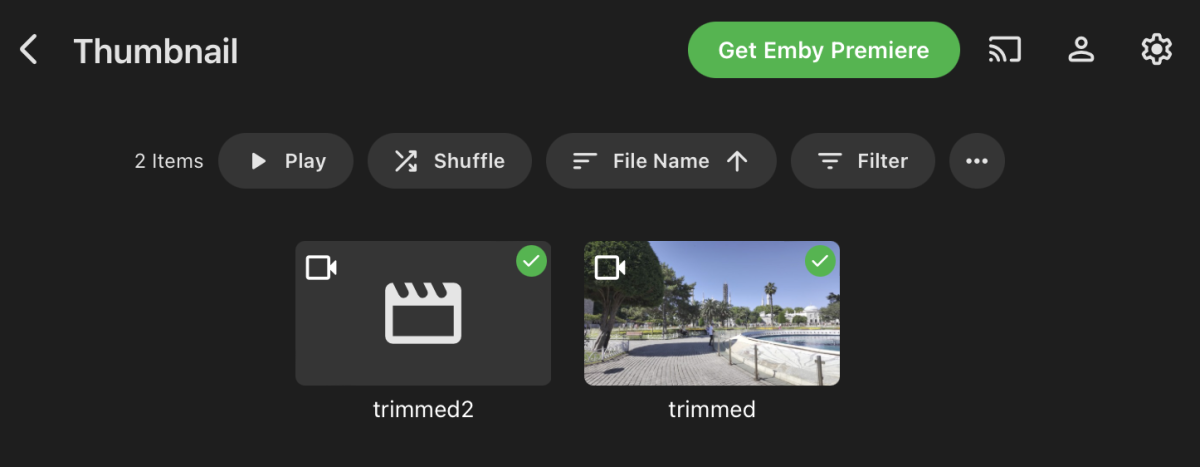 1 point
 -
That fixed it for me as well. Thank you!1 point
-
me too. and maybe also VIDEO-TS-folder. I have many of them, really of lot made by myself years ago, with DVD-Labs. many movies that aren't shown anymore on TV or the streaming-platforms.1 point
-
would love to see Emby play ISO, especially 3D frame packed ISO files.1 point
-
update: I was able to diagnose the problem, one of the movies I have caused it to hang, I tried to scan that movie with latest version of BDInfo and it showed the same symptoms, it just stuck at "scan your folder" stage. so I decided to delete that movie from my library, and then everything worked just fine... would be good if emby would skip such problematic movie when its doing scanning1 point
-
I get where the OP is coming from. I too spent a lot of time trying to recreate the Game of Thrones menu systems for each season, they had beautiful video backdrops, which I ripped seperately and used (shame many of the emby clients don't allow video backdrops) but it all takes TIME and trying to identify which m2ts is what extra is a special challenge all in it's own right ! Automating this creation is simply not going to happen though, as the 'structure' of the m2ts is not labelled with what they actually are - it's just a 00001.m2ts - you have to play it and then relate it to the ISO menu, rename it etc ... not fun. Thus I only do it for the really special UHD's.1 point
-
I've been doing this with Emby for a short time now. I really like being able to have extras with the movie that they came from. Menus on discs (DVD or BD) are mostly terrible. They are slow and require you to figure things out for every individual movie. I mostly don't want to mess with menus at all. Just play the movie or the extras. However, I do acknowledge that some menus are a legitimate art form. There is a lot of creativity and inspiration in some of these menus. Some have really made me smile and provided their own little form of entertainment. That said, I'd rather not have them because of the hassles involved. Thus I rip everything to MKV. Brian.1 point
-
I have a full backup in ISO (over 800 Bluray FHD/UHD/3D, some few anime DVDs).. i moved away from MKV long time ago, back in the time I was convinced that I had to rip everything to MKV ("you won't lose anything", "better experience", blablabla..) so I ripped my collection to MKV (around 400 discs back in that time) .. it was a pain to rip but it was more a pain to use.. MKV cripples a lot of things that for some people are optional but to many other people are *must have*.. you have to get rid of the menus/extras, you have to get rid of seamless branching, you have to get rid of DoVi FEL.. and for what? I understand that some people doesn't deal with ripping.. they just "download" the MKV from somewhere and call-it-a-day.. but for the people the actually wants to backup their collection, they use to like to have the full experience (it's a pain to have to go to the storage, search for the bluray... etc.. whenever we want to play the extras) So I re-ripped again the 400 BluRays i previously converted to MKV and ripped again everything in good old un-crippled ISO. I still use Emby as frontend/cataloguer, Emby functionality is very crippled in that sense.. we do not even get information about the audio track / subtitles in the cataloguer.. we are told that this is complicated to implement, but cataloguers in the Dune/Zidoo players support that, or rippers like DVDFab can get *full* information of the ISOs. Next to the crippled EmBy catalogue functionality, player is also not going to work (even in direct play, I do not care about transcoding) It would be possible to ignore the menus and play the main movie (Zidoo offers that possibility as well) but even that it's not supported by Emby.. the only possibility is using Emby as (crippled) cataloguer and then have a external player (hardware or software, I use a OPPO player for that). Could we have a better experience? yes... but we need a friendly developer that believes that this is worth it (Kodi in way more advanced in that aspect)1 point
-
Kevin Bacon1 point
-
Hi, a Timelineview for Pictures and Homevideos would be nice ("new" on Plexserver). I sort my Pictures like Year->Month-Day. And when I want to play them I have to browse all the Folder ... thats very annoying ... Hope that is possible in Future with ember too ... Many thanks for your great work !!!!1 point
-
Guys give it up. Physical media will no longer exist shortly, and supporting it is far too difficult. Rip your media and hoard your ISO files. This is NOT going to go the way you like, and we know all you'll do is complain and complain. The rest of us have moved on. It is time you do as well.0 points
-
Hi there, you can enter your Emby Premiere key into your Emby Server here: Then you can start enjoying your personal media with all of the Emby Premiere features.0 points






.thumb.jpg.f1b8a241f8d4781dfa20c612b00b7f34.jpg)