Leaderboard




Popular Content
Showing content with the highest reputation on 08/03/24 in all areas
-
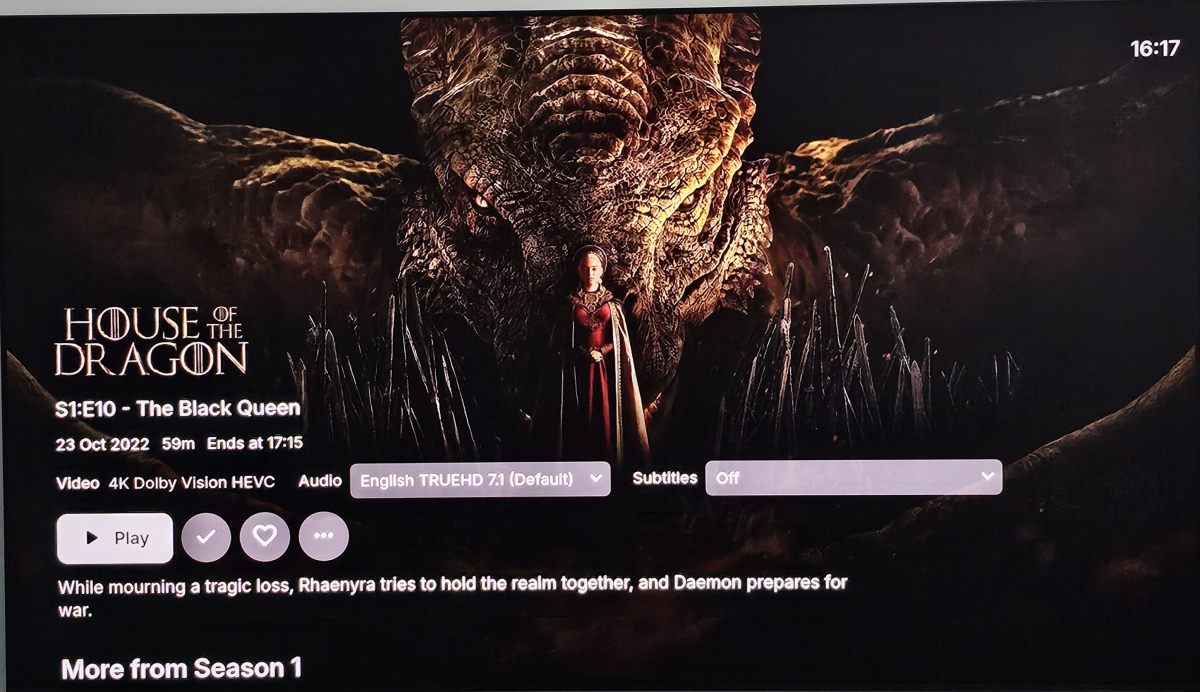
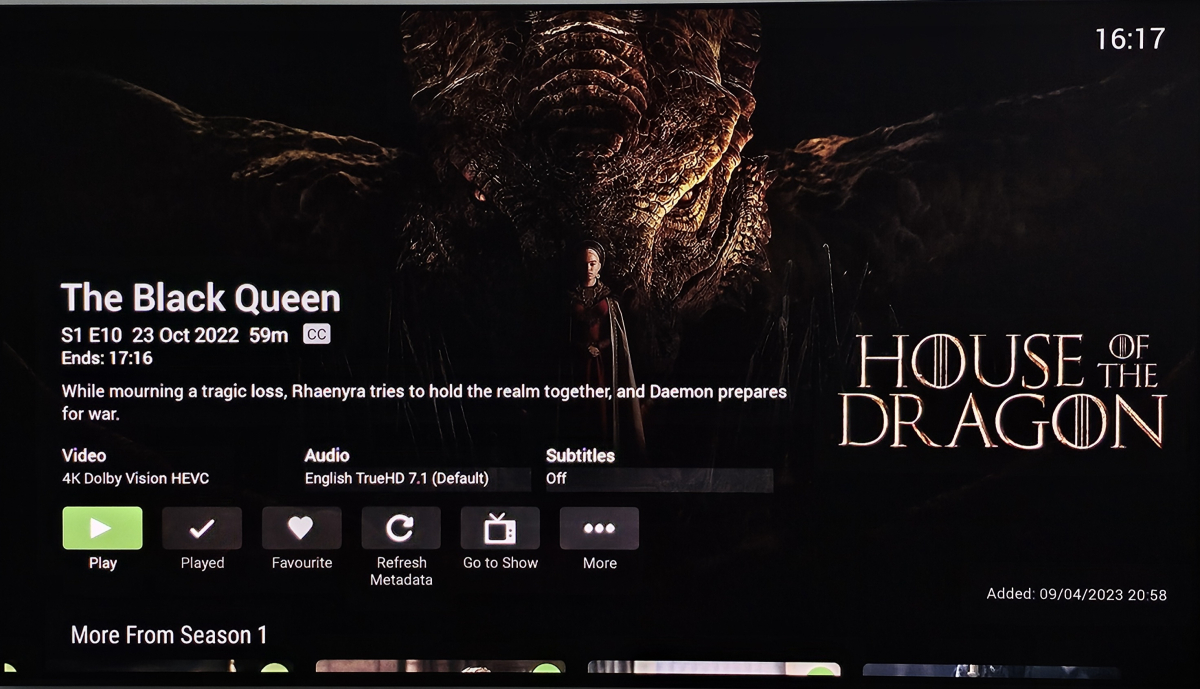
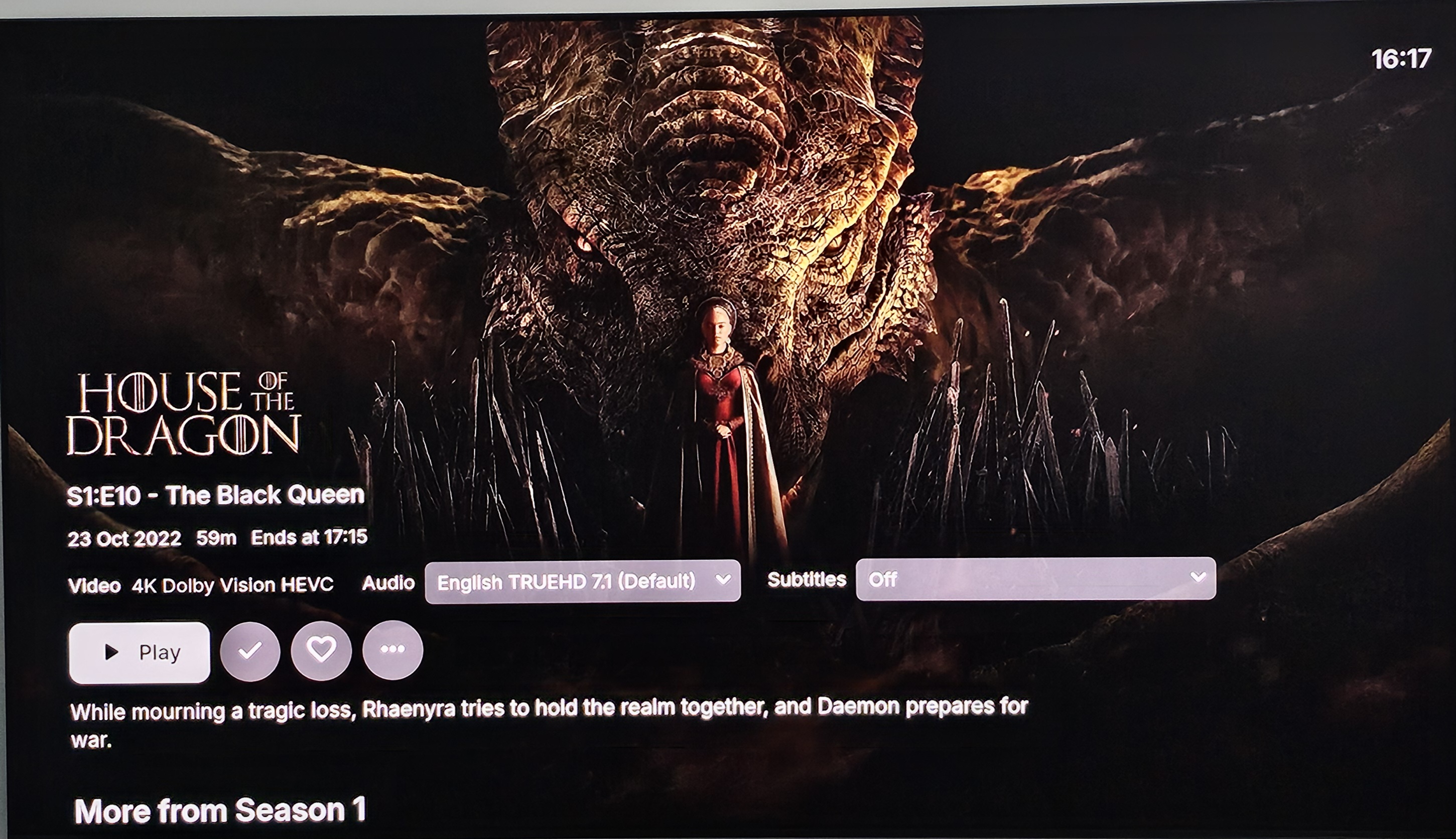
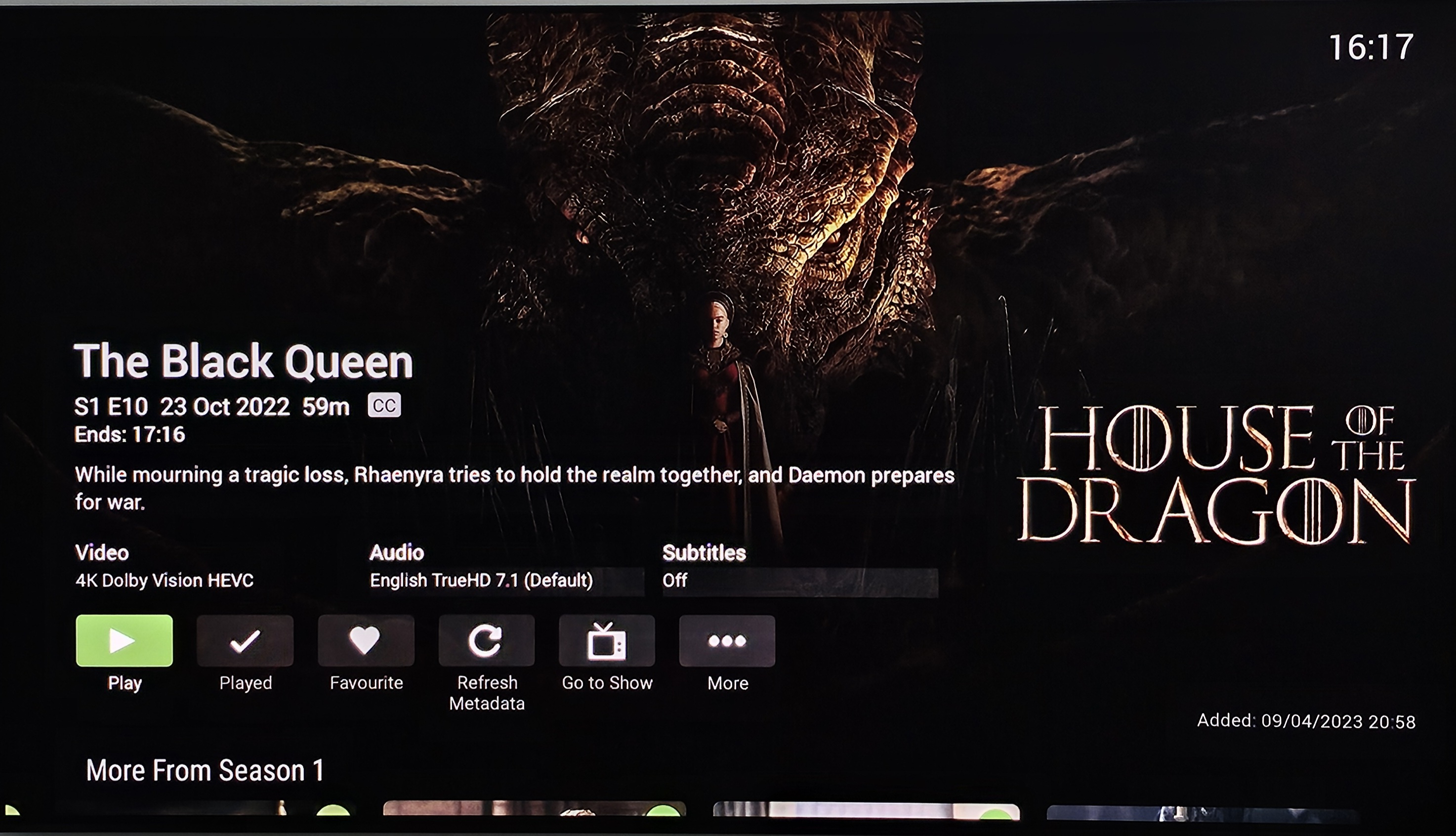
Hi there, I believe the Standard Android App will be overtaking the Android TV app as the main one going forward. I've been using it on my Nvidia Shield and find it works well. However I find the Synopsis on TV Shows/films being below the media info/play button, instead of above as on the Android TV app to be an odd choice. It looks a little lost there to me and your eye isn't drawn to it. Images below to compare. Intrigued to see if anyone else feels the same
 3 points
 -
Hi, yes a major update is nearly ready. Thanks.2 points
-
Bug or not you're better off with a proper LB proxy or web server as reverse proxy. You'll have better control over your security, they have a much larger user base, vulnerabilities are discovered sooner and get fixed much faster. Nginx or any of the other big ones is the way to go. Now that you have it working you might as well keep it.2 points
-
Ok got it working...finally! For some reason, my on board GPU was disabled in bios. I've had a headless setup for over two years and never needed a GPU... But this also sent my Nvidia 3060 into a crashloop, 3 minutes after rebooting (lots of posts about this issue). But once I enabled the built in GPU as the primary, the Nvidia stopped going into a crashloop and was available for transcoding within the app container setup. Thanks for your suggestion @jaycedk2 points
-
What is the current progress of this feature? I'm really hoping appropriate progress is being made on this feature. Bonus content and Special Episodes must be considered as different types of media. They should be in distinctly separate areas of the UI.2 points
-
If you don't want it connecting to the main router you can forget the network or change it to not connect automatically, because unless you're connecting an ethernet cable you could only be connecting wirelessly to it. Your IP is different every single time you've provided the details about the device so it seems this main router is not holding the DHCP lease long enough, or you're disconnected from it long enough to get a new lease next time it connects, so you need to isolate the wireless connection to the access point you actually want to be connected to, and you'll want to get a static IP from that access point so the IP doesn't keep changing on the device.2 points
-
As many may know connecting Emby to QNAP SSL Let's Encrypt certificate require some coding and this as been discussed many times here.. I wanted to do a collection of what I've found and best solution form me. I will give a manual mode that require to be repeated every three months and an automatic mode that uses crontab REQUIREMENTS: - Let's encrypt certificate on your QNAP, working and autoupdating - Ability to SSH to your QNAP - root access (sudo) or anyway an user that can use command with elevated privileges -----------------MANUAL MODE---------------------------- SSH to your NAS then: 1 - reach cert path (99% should be the same for all): cd /etc/config/QcloudSSLCertificate/cert 2 - create a p12 cert version openssl pkcs12 -export -out emby.p12 -inkey key -in cert -passout pass: note1: if you are not root/admin user you'll need to put sudo before the command (given your account have privileges to do so) note2: if you leave pass: you'll have no password set, otherwise you can write pass:mypwd where 'mypwd' is whatever you prefer 3 - on Emby settings > network in custom cert field /etc/config/QcloudSSLCertificate/cert/emby.p12 4 - put certificate password (if not empty at point 2) 5 - Save and restart Emby server Note!!: you will need to do this every 3 months, because let's encrypt certificates are updated automatically by QNAP this way. So put a warning in your calendar for not forgetting. -----------------AUTOMATIC MODE---------------------------- this is by using visual interface but you can do all this using VI editor (preinstalled in QNAP) or nano or using also SFTP to access files on qnap A - whereever on the nas with file station or from windwos ora else.. create a folder and call it as you prefer (I used CustomScripts as from sources) To obtain the 'real PATHTOSCRIPTFOLDER' needed for script you need to add /share/ to the path you see in file manager, for example: if you created folder in Archive/myfiles/CustomScripts then your pathtoscriptfolder is /share/Archive/myfiles/CustomScripts B - with text editor (e.g. notepad on windows) create a .sh file named as you prefer (used CertRenewPKSC12.sh as from source... filename for reference..) and copy inside this code now="$(date)" cd /etc/config/QcloudSSLCertificate/cert [[ -z `find cert -mmin -60` ]] if [ $? -eq 0 ] then echo "Certificate key has not changed - $now" > pathtoscriptfolder/check-pfx.log else /etc/config/QcloudSSLCertificate/cert openssl pkcs12 -export -out emby.p12 -inkey key -in cert -passout pass: echo "Created new certificate.pfx at $now" > pathtoscriptfolder/check-pfx.log fi note1: change pathtoscriptfolder with your full path to folder (see point A) note2: on line 8 if you leave pass: you'll have no password set, otherwise you can write pass:mypwd where 'mypwd' is whatever you prefer C - open the folder (in file station and drag and drop the .sh file created at point A (you can anyway modify it after using for example tex editor app directly from qnap web interface) D - SSH to your NAS 1) Run for giving correct permission to script chmod +x pathtoscriptfolder/filename (for example: chmod +x /share/Archive/CustomScripts/CertRenewPKSC12.sh 2) Run for not having issues with unix/dos file ending dos2unix pathtoscriptfolder/filename 3) test your script (go in the script folder to see if a log is generated) /bin/sh pathtoscriptfolder/filename 4) set your timing for script execution via crontab (go to https://crontab.guru/ for help in understanding timing) your code can be something like: 0 19 * * * /bin/sh pathtoscriptfolder/filename meaning: execute CertRenewPKSC12.sh every day at 19.00 5) Write your crontab in your general QNAP crontab list echo "0 19 * * * /bin/sh pathtoscriptfolder/filename" >> /etc/config/crontab 6) restart your crontab crontab /etc/config/crontab && /etc/init.d/crond.sh restart 7) verify crontab is in (should be the last) crontab -l for any detail about crontab in qnap look at https://wiki.qnap.com/wiki/Add_items_to_crontab All cudos goes to all the people who found those solution. I only collected them all Main source: https://emby.media/community/index.php?/topic/67479-how-to-connect-emby-through-qnap-letsencrypt-certificate/ Feel free to report me any error/suggestion Have fun1 point
-
TheTVDB now supports more alternative orders than just Aired/Absolute/DVD. Can Emby query these additional orders and add them as options? Two examples of shows I've seen this used are Re:Zero which has a "Director's Cut" display order and Money Heist which has a "Netflix" order. https://thetvdb.com/series/re-zero-starting-life-in-another-world https://thetvdb.com/series/la-casa-de-papel1 point
-
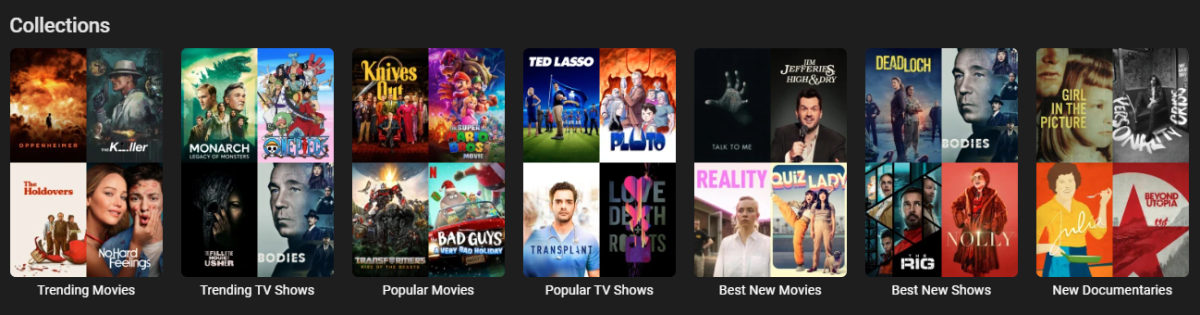
Edit: There is a plugin version available now, please see ACdb thread. Emby MDBList Collection Creator URL: https://github.com/jonjonsson/Emby-MDBList-Collection-Creator This tool allows you to convert lists from MDBList.com into collections within your Emby media server. MDBList aggregates content lists from various platforms including Trakt and IMDB. Features List Conversion: Transform MDBList lists into Emby collections Metadata Refresh: Keep ratings up-to-date for newly released content Collection Images: Upload local or remote images for collections posters Seasonal Collections: Specify when a collections should be visible Collection Ordering: Show your collections in order of which one was update Backup & Restore: Additional utilities to backup and restore watch history and favorites Prerequisites: To use this script, you need: Python installed on your system "Requests" Python package (install with `pip install requests`) Admin privileges on your Emby server A user account on [MDBList](https://mdblist.com/) The script has been tested with Emby Version 4.8.8.0 and later, but other recent versions should also be compatible Please check out the GitHub Link for more detailed information
 1 point
 -
I've been using the premium plugin for video backdrops and I'm not satisfied with the quality. I started creating video backdrops from anime openings and i want to share them. The backdrops are HD or FHD, 10-140mb (depending on source) and audio normalized. They are mostly japanese audio. //This is used for cutting the openings ffmpeg -ss 00:00:00 -to 00:00:00 -i theme.mkv -c copy theme2.mp4 //This is used for audio normalization ffmpeg -i theme2.mp4 -filter:a loudnorm theme.mp4 Download link: DIGI Drive Install: Just copy the backdrops folder inside the corresponding anime folder, and rescan library. Do not forget to enable video themes from the user profile settings. I'll keep adding more and share them.1 point
-
Hi, Are there any platforms that allow you to see the user list upon opening the app, like modern streaming apps? Or is the only way to change a user by going to the top right picture and switching there?1 point
-
I want to give a little bump to this, i think that this could be a good solution for the specials showing on their respective season. Making this a user preference instead of a server side option.1 point
-
Lend your support here:1 point
-
Interesting assumption. might be true. but you realize that this is the most and most often requested feature by the community? if you are right, this just means that the emby team doesn't really care about their community. I'm not saying that this is the case but there are only so many reasons after 7 years of inaction. at some point, a 'it's on the roadmap' doesn't cut it and is the same as doing nothing, which leads me back to them not caring. in that sense, I'm with @bandit8623and a no we aren't doing it would be much better and at least honest.1 point
-
You need another rule in addition to the library selection, for example "release date", to populate any guide data. Without guide data, no playback!1 point
-
HI, we'll take a look at it. Thanks for reporting.1 point
-
Hi. Make sure the channel is mapped correctly to the guide data.1 point
-
+1 Emby server is now my only container that still relies on LDAP Looking forward to what the team or community can come up with1 point
-
Couldn't you also just unpack the ISOs into folder structures and have the same thing...?1 point
-
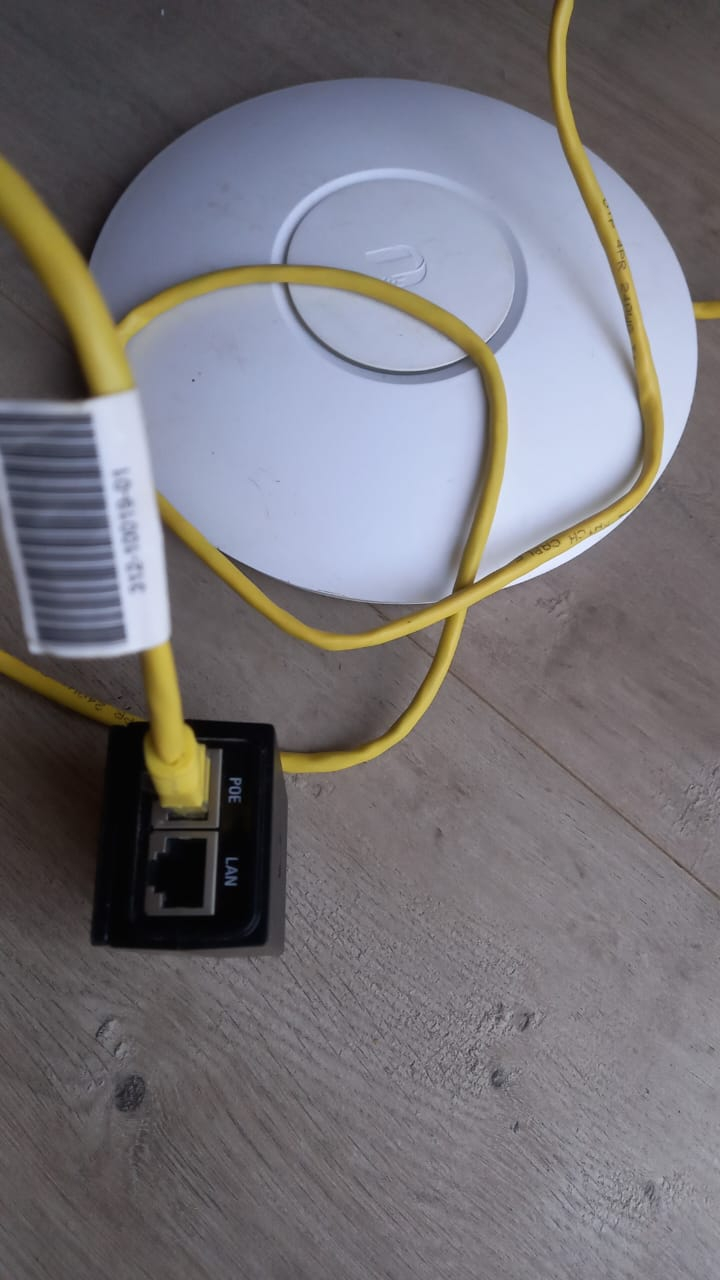
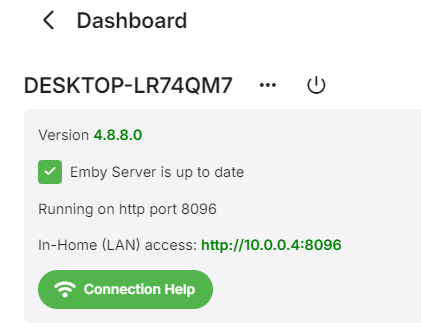
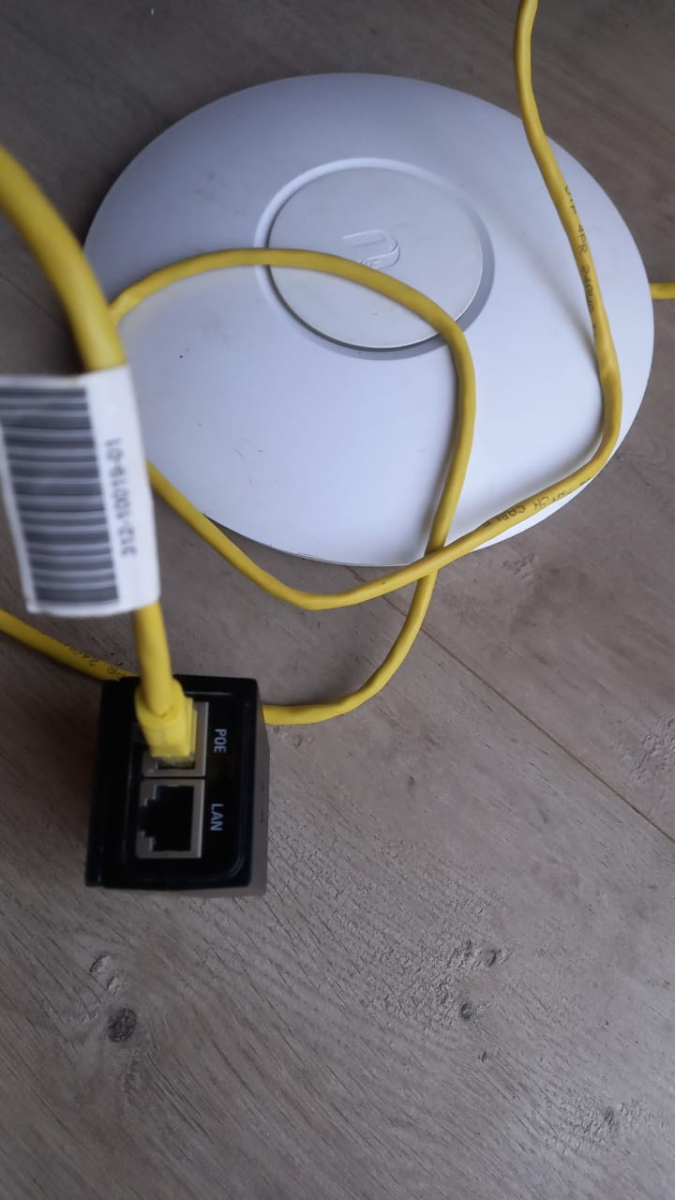
Now my laptop has connected to the second router after messing around with trying to get the Unify working trying to find the power cable, plugged lan cable back into the router and my laptop assigned this ip, so now Emby is working until it switches back to the main router. Will try find power cable for Unify POE tomorrow. Im assuming this might be better at managing the network?
 1 point
 -
That will give you the isolation between your connection points, yes, so you know for sure which one you are connected to and which one you need to access the management page of to make changes. It looks like the second router is using the first one for DNS based on your screenshot from your TV with the DNS as 192.168.3.1, but if it's providing 10.0.0.0/24 addresses it's running its own DHCP server, so it's a downstream network and not part of the same network as the first router.1 point
-
i still need to finish copying my files inti the new location, i'll do changes Monday and let you know, but pretty sure it will work like you'v showed, it's pretty much the same thing with portainer Thanks you1 point
-
I have seen that a few times. I will let you know if I see it anymore I just updated to .461 point
-
Will take few week, priority is 10.X. especially when issues are reported.1 point
-
Non-Windows here, no issues at all with .46 Just awaiting to test 11.x and multi version play.1 point
-
Thanks, I'll check it. Actually not related to the next-gen plugin directly, but maybe I find something.1 point
-
i done the first search using "test" and worked fine next one using "emby" and crashes kodi.log1 point
-
I use this naming convention in Radarr Filename : {Movie CleanTitle} {(Release Year)} {TmdbId-{TmdbId}} Foldername : {Movie CleanTitle}{ (Release Year)} {TmdbId-{TmdbId}} But you should get Radarr to stop downloading multible files. And that is what you are seeing.1 point
-
I've never had so much trouble! redone repo and now see v 10.0.44 uninstalled old repos and then when search for emby in the addons it crashes. dont have an issue searching for anything else... finally navigated through and installed v10 and it works now. still cant search for emby in addons though it crashes kodi. yet could before I installed new repo.1 point
-
Sorry, I had already read it and clarified it.1 point
-
I know this topic hasn't been active but I just started using Homarr and have the same annoyance lol1 point
-
@Happy2Play@TMCswThank you very much for giving me a specific drive to focus on, you both saved me loads of time trying to narrow things down. I'm going out of town tomorrow, so, I plan on handling that permission issue on Storage_12 when I get back on Tuesday. Everyone in this thread has been super helpful and I really appreciate all the help that has been given to me. Thx again, and I'll post an update on Wed/Thurs when I get things rolling again on my emby-server. Have a great day Everyone1 point
-
Okay, darauf muss man erst mal kommen: In der Konfiguration funktioniert es. Danke vielmals!1 point
-
Think you meant to say “This is a must for Pirate’s abusing Emby.” Pro/non-Pro legitimate emby server administrators know/track what media they OWN/can LEGALLY obtain (public domain or otherwise legal where they live) and would not buy ‘Duplicates’ or re-download them. This “feature” would only benefit disorganized Pirates. There are plenty of other duplicates file finders available. Emby already helps out sort/track/combines … Emby should not (does not as far as I can see) cater to (ab)users whom indiscriminately re-download Pirate Media . .1 point
-
If both routers have wifi enabled, make sure they have different wifi SSID's, or make sure they are on the same subnet, otherwise your devices will connect to the nearest router but may end up on the wrong network. I would also recommend that your router, emby server (laptop) and TV all have fixed/static IP's. As mentioned previously, you can just hard code these on each device and make sure they're unique, or setup static DHCP reservations so that they are centrally controlled by one of the routers, whichever is acting as the DHCP server.1 point
-
I'm not one of the devs but... What do you get wiith the fallowing command? namei -mo '/home/nostradamus/Storage_12/TV-Shows/Just Shoot Me!' Also how are the drives mounted?1 point
-
I doubt they'd even notice... I think Nvidia's focus is elsewhere these days. I'd like to see updates but, honestly, it just works for everything I throw at it right now. Actually not all that new and it hasn't exactly taken over. I'm not sure there is anything really wrong with x265.1 point
-
TV Browsers often block access to IP addresses and either go to a search lookup for the IP address, which does nothing, or just gives you an unable to access alert. LG Web TV is one of those TV brands that have this limit built in. Do you have admin ability to change a website? Try embedding the remote IP address, when you get that working, on some hidden website page that is not linked to by the main web page. Perhaps linking with an image click. Then aim the TV browser to the website that you are admin on, go to the hidden page and click on the link. That will often bypass the built in TV browser limit on going to IP addresses. Alternatively, you can use a mobile phone, tablet or notebook browser and then cast the media content to the TV. Again, LG locks that out from happening easily. It's their design choice. I think you can use the proper Emby android app and that might help find the LG TV. Otherwise, just installing Kodi on the LG, if they allow it and just turning Kodi on the LG TV should make Emby able to see the LG TV. I think LG blocks adding Kodi and maybe even adding a lot of other apps. When I looked into buying a TV, I gave up on LG because it was too restricted. They design it this way to avoid support problems. Hope that helps.1 point
-
New BETA version available 10.0.45: Delta changelog 10.0.44 -> 10.0.45 fix dynamic node "recommended" (double items) -> "recommended" is the node name, not an instruction fix upcoming dynamic node when item name not reported fix soundtrack tagged as compilation add context menu refresh option for seasons and series add config redirect from helper plugin fix boxset/collection updates Comment: Helpers are also updated @scherzekingAs Luke pointed out, dvdsub substitles cannot be fixed due to Emby server limitation.1 point
-
No. Just no. There is no point in going backwards. NONE. Move forward with everyone else. This is so 90's.1 point
-
Client side display settings are no good. The problem is the folder display view and the fields that are displayed on folders (fields are displayed differently depending on the view). They're on local storage, which means they will be lost if you change your web browser, your device, clear your local storage, etc. This information currently doesn't go to the server at all, and the client-side javascript will send the list of fields it needs to the items endpoint every time it issues a request for folder data. This is terrible. Every time I want to change the display to something that suits my needs, I have to use a great many clicks to change the view and to enable and disable several fields. I cannot really find a way to set any defaults, even locally, so I have to do this for every folder. But even if I could do it locally, I wouldn't be able to set defaults for my other users, which would result in an inconsistent experience for every user, creating misunderstandings and making troubleshooting difficult. If I'm adding information via plugins, I also need to make sure every user can see that information, but no one is going to bother issuing ten or fifteen clicks to reconfigure every folder on their own. The way it currently exists, the feature for changing the folder display view and associated fields is nearly useless, which seems like a waste of something that's clearly intended to be used. I imagine this is probably another symptom of the narrow use cases people generally have in mind for the software, and how relatively unimportant support for generic folders and the home media library type seems to be.1 point
-
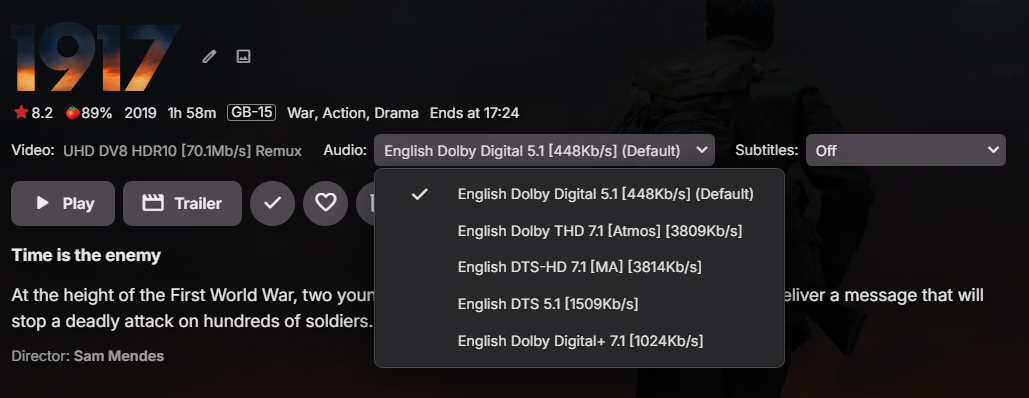
I don't see this - only the Embedded Title Track ? This is the standard web client... Single Audio Track shows the Embedded Track as well .. ? All generated from the MediaInfo Plugin .. I do NOT want to see the Emby generated values, as they will just muddy the screen and present less accurate info than my embedded titles.
 1 point
 -
@CaffNoirI just edited my post with some info. Please read1 point
-
Switfin, the native iOS app for Jellyfin, is still in its polishing phase, but it looks native and functional. It's just a matter of time before they implement new features and refine it. These kinds of messages are being posted every once in a while. It had started right after the fork. People predicted that it will shortly quickly become superior to Emby "because it's open source". But those predictions haven't held true. They made progress of course - but we did either, so in total, I'm not sure whether they even managed to reduce the distance. Maybe they did, mayber not, but if they did, it's not that much and nowhere near of what they claimed they would achieve quickly and also nowhere near Emby. I think that any buzz about personal media servers is only good for Emby. It's just natural that something that is available for free is generating more interest as it has a much lower entry bar. Many people try it, just because it's free, even though the actually do not need it, so I'm pretty sure that the ratio between users who install it and users who stick to it for regular use is on a totally different level when comparing between Emby and JF. Once somebody has installed it and is serious about using it alone or within their family, they will sooner or later switch to Emby, where everything is working and you don't need to hear your family complaining regularly.1 point
-
i dont wanna open new thread, rather have same problem so; had a same error like in #entry674749 checked random icon and tracked route line from my error, that im interested System.IO.FileNotFoundException: System.IO.FileNotFoundException: Could not find file '/config/picon/1_0_1_C22_1E78_71_820000_0_0_0__TVP 2 H.png'. e2servicereference, from that emby vu+ plugin generate icon name: <e2servicereference>1:0:1:C22:1E78:71:820000:0:0:0::TVP 2 HD</e2servicereference> what happening? enigma2 (or openwebif, i donno) added to servicerefference ":TVP 2 HD" this is added when channel had custom name, so i had an error, but can be other type, because enigma2 distro or iconpack can have own vision how picon name should look (mostly servicereference, or channel name like op had). next, i checked how openwebif generate picon name (function from github): this probably is the best method, but imho too many things to be checked, mostly is file exist next, i checked how kodi vu+ plugin do this: first, they do the same as emby (#L180) but next they used an undocumented api call from openwebif (#L273) in my option - http://vusolose/api/getservices?picon=1&sRef=1:7:1:0:0:0:0:0:0:0:FROM%20BOUQUET%20%22userbouquet.dbe00.tv%22%20ORDER%20BY%20bouquet and get: { "services": [ (...) { "servicereference": "1:0:1:C22:1E78:71:820000:0:0:0::TVP 2 HD", "program": 3106, "servicename": "TVP 2 HD", "pos": 2, "picon": "/picon/1_0_1_C22_1E78_71_820000_0_0_0.png" }, (...) ], "pos": 179 } and we get picon name, but propably supported by only newer openwebif. Unfortunately i cant write on c, or i donno in what language emby vu+ plugin is writed to implement first or second solution, so i leave buxfix method1 point
-
Sure, On NAS Control Panel Terminal & SNMP Enable SSH and click Apply Download and install WinSCP on Windows machine https://winscp.net/eng/download.php Protocol SCP Host NAS/Emby IP Port 22 User admin Password use your admin pw Interface should look like Windows file explorer1 point
-
8 Years and nothing happend seriusly. Listen to people. This is a must for Pro Emby users.0 points



.thumb.png.f4cb0545e98b51fd9b00e427622ab761.png)