Leaderboard




Popular Content
Showing content with the highest reputation on 07/22/24 in all areas
-
It is really cool that Emby has the ability to support multiple versions of the same movie. It would be nice to have a setting on the client side to allow the user to set which version should be selected by default. This could be as simple a user-entered string, or it could be a list of detected strings to choose from. It could allow multiple entries and it would choose them in the order entered. On the Kodi side, it would also be nice to get the "Choose the Best Version for Me" option that the Emby app has.2 points
-
The issue might have been structure pushing monitor back one level (E:\TV Series\Season 1) making TV Series as actual show. But if everything is working now you should be all set.2 points
-
I'm requesting a feature that could play alternate endings of movies by stopping a movie at a specified timestamp and playing an Alternate Ending file. Randomizing the endings would be a neat feature as well. Use Cases: Clue (1985) - Has 3 different endings that were all theatrically released at the same time. I Am Legend (2007) - Its alternate ending drastically changes tat "after-movie" feeling. Titanic (1997) - This movie is a classic and its alternate ending is wild in comparison to the original. Fan-Made endings could be played as well, if you're into that. I'm honestly making this Feature Request for Clue but being able to pick between the endings of any movie would be really cool! Especially with .strm files, if the endings weren't released on DVD.1 point
-
OK, I did not try that because the folders are not added as individuals but just one folder that contains all the sub folders of artists then albums etc. Oh my, do I really have to remove everything and then add again? I have a lot of custom pictures for artists that emby could not find. I do not want to go through that again. EDIT: I was able to get it to work by just refreshing the metadata at the root directory for the artist. A file scan did not work but this did without going to any trouble.1 point
-
I don't know what happened but after restarting my pc today and letting emby update it is working just fine. Didn't realize I had unchecked auto update. Every channel works now. No playback errors. Virtualtv plugin is working just fine as well.1 point
-
Found the issue, just realized hardware acceleration was disabled.1 point
-
Thank you. That worked. I shall look at the naming more carefully in future. Glen1 point
-
Funny update: I installed emby theater from scratch on my notebook. Now I downloaded the 3.0.6 (3.0.18 works too) from github and extracted it on my desktop and started emby. This works. I'll try a little more and keep you updated.1 point
-
@MrMackey @Reytec- Yes, this appears to be the same issue. This might be resolved in the latest beta (28). We made some updates to the Intel stack and had successful tests. => EDIT: It's in .27 Would you be able to (re)try with the beta? @Reytec- Please note that you might not be able to go back to stable after upgrading, be sure to make a backup.1 point
-
Yes, it's driving me mad. But the good news is no soaps on holiday, bad news, not happy wife....1 point
-
Sorry, with older version (4.7.x) the library refresh updates all items (maybe a bug, not tested long time ago). With 4.8.8.0 it's not refreshing so the topic can be closed.1 point
-
It ended up being a problem with the version of Truenas. I migrated to Scale and the problem went away.1 point
-
@n0tanks87can you please provide a new log file example? Thanks !1 point
-
Is there a status update on this?1 point
-
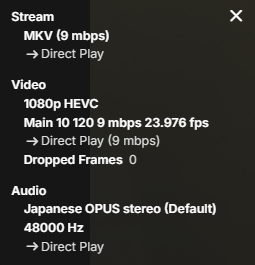
Absolutely, seems to be direct play. I took this from the web browser but the only difference from the TV textbox is instead of dropped frames it says "Video resolution:1920x1080"
 1 point
 -
More options to control this are possible for future updates. Thanks.1 point
-
I see why this happens. Never saw this before. Very nice find @roakuThank you Reference: Fix #1631: [MessageBlock] Fix issue with background color1 point
-
Sorry, I have attached the log - does all look OK? it seems to be working fine, I played the same file as I did the other day which created the thumbnails and is OK this time, I will poast back if it happens again. Thanks embyserver (1).txt1 point
-
Is this the only library you have setup? Can you show the other library paths. As this suggests a issue but not positive it previous structure caused this.1 point
-
Thanks. I'll turn the notification back on to see if I can replicate this again, and then send you a new log file if the problem does persist.1 point
-
Yes, that appears correct now. I mean in relation to my first reply, 2 problems were listed: 1. and 2. Your action/properly naming TV show folders/subfolders as stipulated in the KB article took care of 2. But 1. is still pending, as one of your libraries has a folder path of plain "E:\". You should revise your libraries setup. Overlapping/nested folder structure (library paths) are not supported and might break your db.1 point
-
2.2.23 fixed it1 point
-
@LukeThank you for the fix 2.2.23 fixed it for me1 point
-
Hey GrimReaper, the files are now showing after changing the path and renaming the folder holding the files, thank you1 point
-
Hi. Please note I clarified Grim's statement. It is the Google account that matters here since the purchase is with them. Thanks.1 point
-
That is the second part of your promblem, as what TV show should: E:\TV Series\Season 1 be? How should Emby decipher that? TV Naming As for the first part:1 point
-
@Luke I took a recording mpeg file to USB, it plays with no problem. So the TV does have support for MPEG.1 point
-
I guess some ISPs might like to charge for putting you back on a routed IP address; but only recently some other users here have been changed back with no hassle and no charge - so yes, it's well worth asking. Paul1 point
-
So stupid, all transcoding was disable for me in user management.1 point
-
Call your ISP and simply ask them to put you back as you were - unless you have signed a new contract - they cannot change the T&C's mid term. For 99.9% of people, this makes no difference so they try and get away with it. Alternatively, just leave for an ISP who provides a real public IP address.1 point
-
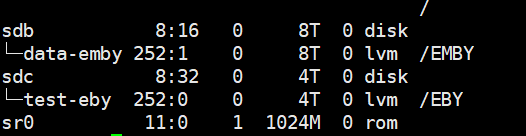
good job! I have no problem at the moment, as I have already split that video folders to difference disk and upgraded EMBY from 4.8.8 to the beta version 4.9.0.27
 1 point
 -
That goes back for several years. There's a hack in the attached links in below topic if you want to pursue that option.1 point
-
How are your files named and organized on your new E:\ drive? How many libraries have you created and with which paths? As it appears that you have both overlapping/nested folders issues: and filefolder naming/structure issues:1 point
-
Either this problem self resolved or I was doing something wrong. Either ways it's fine now.1 point
-
@Happy2Playagreed, looks like the case since I just tried to connect to Google from the app's shell, which failed. Notably, it got an IP address so DNS seems to be working. Aaaannndddd fixed it. I had tweaked my server's network settings and ended up leaving "Route v4 Interface" and "Route v4 Gateway" blank in Apps -> Settings -> Advanced Settings. After setting these to the appropriate values, works like a charm. Thanks for rubber ducking with me guys!1 point
-
Possibly ipv6, DNS, VPN, security software. But may need to see complete server log but something is probably blocking all external communications for Emby.1 point
-
HI, typical causes of this are firewall, security software or VPN. Can you look into those and let us know what you find?1 point
-
In the meantime I've posted a compatibility update to the reports plugin to resolve this issue. Thanks.1 point
-
HI, we'll take a look at it. Thanks for reporting.1 point
-
Try "Star Trek (1966)"1 point
-
Yes some zip codes are working so you could map to another one for now. Unbelievable that so many people care about The Jetsons, Bullwinckle etc. Martin1 point
-
Once I changed the Docker container I was using from the official one to one made by linuxServer.io, it worked fine. I don't know why.1 point
-
ebr already linked to the hidden setting that controls this on the previous page of this thread.1 point
-
This thread is loosely-related but I'm tacking it on for awareness.1 point
-
Para usar uma lista M3U gerada pelo Emby no aplicativo XCIPTV, você pode seguir os seguintes passos: Passo 1: Gerar a Lista M3U no Emby Acesse o Emby Server: Abra o Emby Server no seu navegador (geralmente acessível em http://localhost:8096 ou http://<seu-endereço-ip>:8096). Faça login com suas credenciais administrativas. Gerar a Lista M3U: Vá para Configurações > Bibliotecas > TV ao Vivo. Certifique-se de que os canais de TV ao vivo estão configurados corretamente. Acesse a seção de Bibliotecas novamente e selecione a opção de exportar a lista M3U. Copie o URL gerado para a lista M3U. Passo 2: Adicionar a Lista M3U no XCIPTV Instalar o XCIPTV: Se ainda não tiver instalado, baixe e instale o aplicativo XCIPTV na Google Play Store ou Apple App Store. Adicionar a Lista M3U: Abra o XCIPTV. Vá para o menu de Configurações ou Playlists (listas de reprodução). Procure a opção para adicionar uma nova lista de reprodução M3U. Insira o URL da lista M3U gerada pelo Emby. Passo 3: Configurar o Acesso Remoto (se necessário) Se você pretende acessar o Emby de fora da sua rede local, é necessário configurar o acesso remoto no Emby: Ajustar Configurações de Rede no Emby: No Emby Server, vá para Configurações > Rede. Certifique-se de que a opção de Permitir Conexões Remotas a Este Servidor está ativada. Configurar o Encaminhamento de Portas no Roteador: Acesse as configurações do seu roteador. Vá para a seção de Encaminhamento de Portas ou Port Forwarding. Adicione uma nova regra de encaminhamento de portas para a porta 8096 (ou a porta que você configurou para o Emby Server). Direcione essa porta para o endereço IP local do seu servidor Emby. Passo 4: Testar e Usar a Lista M3U no XCIPTV Testar a Conexão: Após adicionar a lista M3U ao XCIPTV, navegue pelos canais de TV ao vivo para verificar se estão funcionando corretamente. Acessar os Conteúdos: Use o aplicativo XCIPTV para navegar e reproduzir os conteúdos de mídia listados na sua lista M3U. Considerações Finais Manter a Segurança: Certifique-se de que sua chave da API e suas configurações de acesso remoto estão seguras. Atualizações: Verifique regularmente se há atualizações no Emby e no XCIPTV para garantir a melhor experiência de uso. PESQUISEI E ACHEI ESSA FORMA DE FAZER, MAS TEM ALGO QUE NÃO BATE, PORQUE UMA LISTA TEM '"LOGIN, SENHA E URL", E NO COMANDO DO EMBY, NAO TEM.1 point
-
Yeah it looks like I was wrong in there(it was still having issues even with transcoding), it seems now to only happen even with the .m3u in Emby or in something like threadfin when doing the transcoding when going in and out of commercials. When it's in the show everything seems to work fine.1 point
-
Thank you to everyone who took the time to ask the Emby team questions across all of the different platforms including here on the forums. There were a lot of great questions that were thrown our way and we've been excited to get the answers out to you. While some of the questions we were not able to answer, we did our best to give you the most accurate and clear answers possible. Now without further ado, here is the first series of questions and answers for you to look over! Please keep in mind more questions and answers will be coming in additional blog posts in the coming days, so not all questions are being answered today. Who owns Emby? Emby LLC owns the Emby product and is a private entity. The owners are undisclosed but note that the development team has full control over the direction of the product. We are not beholden to or under the influence of any investor or investment group. What is the history of Emby? Emby grew out of an open source project called MediaBrowser. Emby's origin in concept came out of that project but there is actually none of that code base still within it. Emby ended up being completely built from the ground up to be a server-based ecosystem as opposed to just a single app as the old MediaBrowser was. Around 2011 what is now the core development team for Emby were contributors to MediaBrowser. We saw the opportunity to build something more flexible than the WMC environment would allow and embarked on creating what we then called MB 3. The core developers spent over a year furiously writing code before anything was released to the public. It was then probably another two years of dedicated development before anything was truly usable as a system. In 2015 it was decided that we had moved so far away from what MB originally was that we needed a new name. A few of the devs got together and came up with "Emby". There are a few reasons behind that name but one of the main ones was that you needed something that wasn't already trademarked and domained. Emby fit that bill and has the benefit of sounding like "MB" when you say it. With the new name, we needed a new logo and we actually held a contest in the forum taking contributions from users and that finally landed us on the logo you see now. Since 2015 we have expanded the team and worked diligently to try and continue to craft the best truly personal media server system we can. We still have a long way to go but have also come a long way to where we are. What are the most popular Emby clients? We do not have exact data on this, due to sideloading and the such, but through the app store platforms we can gain general ideas. Android is the most popular amongst our userbase (both mobile and TV) with iOS in second place as the most downloaded app. What Emby clients do the development team use most for personal use? Our development team uses a wide variety of apps just as our user base does. We have people on the team using Android on mobile and TV, iOS, Apple TV, Roku and Xbox as well. As you can see our dev team really is as diverse as our user base when it comes to how we use the server. These were just a few of the questions about Emby as a product and who we are. In the next blog post we will be covering a few different things such as some of the future goals of Emby as well as release schedules and more!1 point
-
Well i only have experience with their android boxes but i will say this Beelink Support is awful and if they have any bugs in their firmware well they normally just release a new model and you are on your own. Again not had their mini PC but i will say this i will never buy another Beelink product nor would i trust any of the people that review them on youtube and wash over all the negatives so they can keep getting free devices to review On another note i love me some mini PC's and run several in my homelabs and whilst the cpu in that model is only 15W it hits a benchmark of only 5-6K on cpu benchmark. May be worth looking at some of the mini PC's from Hp or Lenovo (the tiny 1l boxes) for example: I have a HP Prodesk 600 G4 Tiny which has a 8500T that has 6 cores and scores between 7-8K on same benchmarks at 35W, As they are all ex business machines you can get dirt cheap i think mine cost me £110 or circa $150 only a few weeks ago. That came with 8GB Ram and a 256GB NVME drive and has space for another NVMe drive so perfect for booting Debian on and running EMBY Server Also nearly brought the same type of PC a 705 Tiny which had a 2400G chip from AMD that scores nearly 9k on benchmarks and was a little bit more but still less than the beelink, not sure how hardware transcodes perform on AMD Vs Intel (presume quick sync is more efficient) Any of these tiny 1L with an 8th gen or more would be much better IMHO than the beelink and still get BIOS updates til this day I quick look on EBAY for example i found this one 9500T HP Thats 16GB Ram, a Intel 9500t, 512GB SSD and PSU for only $160 or best offer. Obviously only an example of one i looked for so if you go down this route do your due diligance, but i normally buy loads of these and they have always just worked like trojans or 8500T HP That's an 16gb Machine with an 8500T and 256GB SSD for circa $139 USD Theres plenty to choose from and if you have some spare ram or NVME/SSD then you can get them for as low as $100 and build your own spec1 point
-
Hi, there is currently no way, although it's probably a good idea to display this info. But you can control who can create recordings via user permissions.1 point