Leaderboard




Popular Content
Showing content with the highest reputation on 07/13/24 in all areas
-
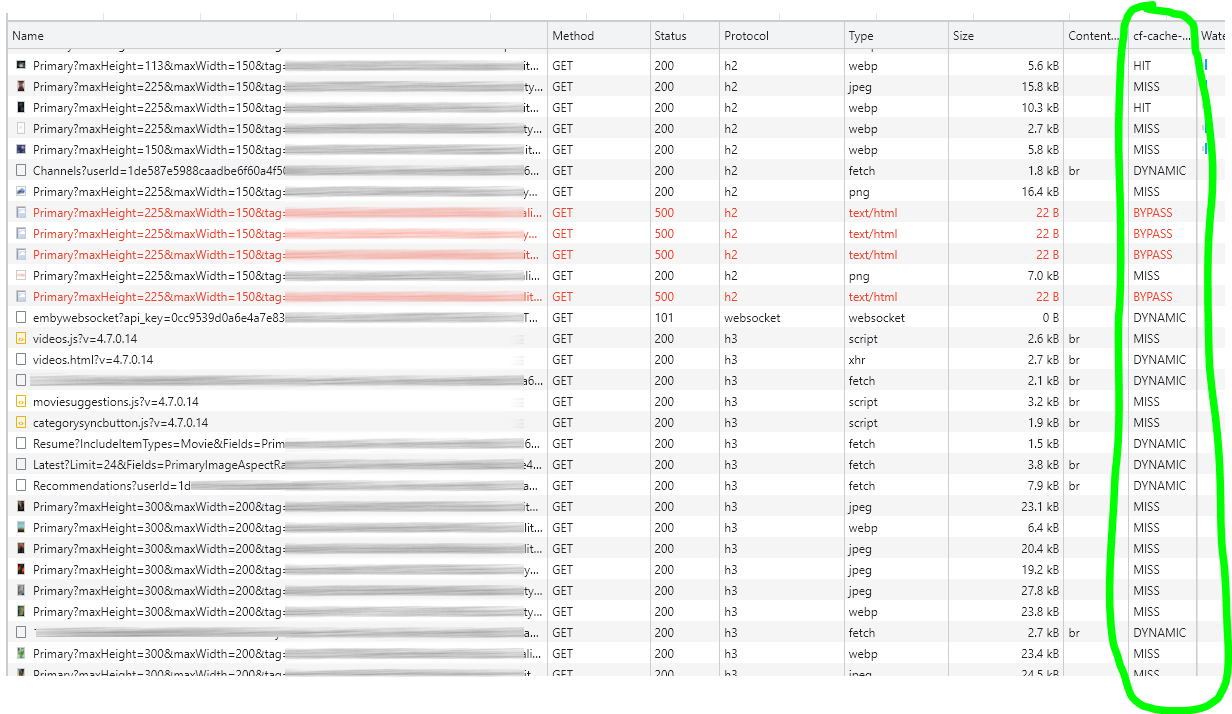
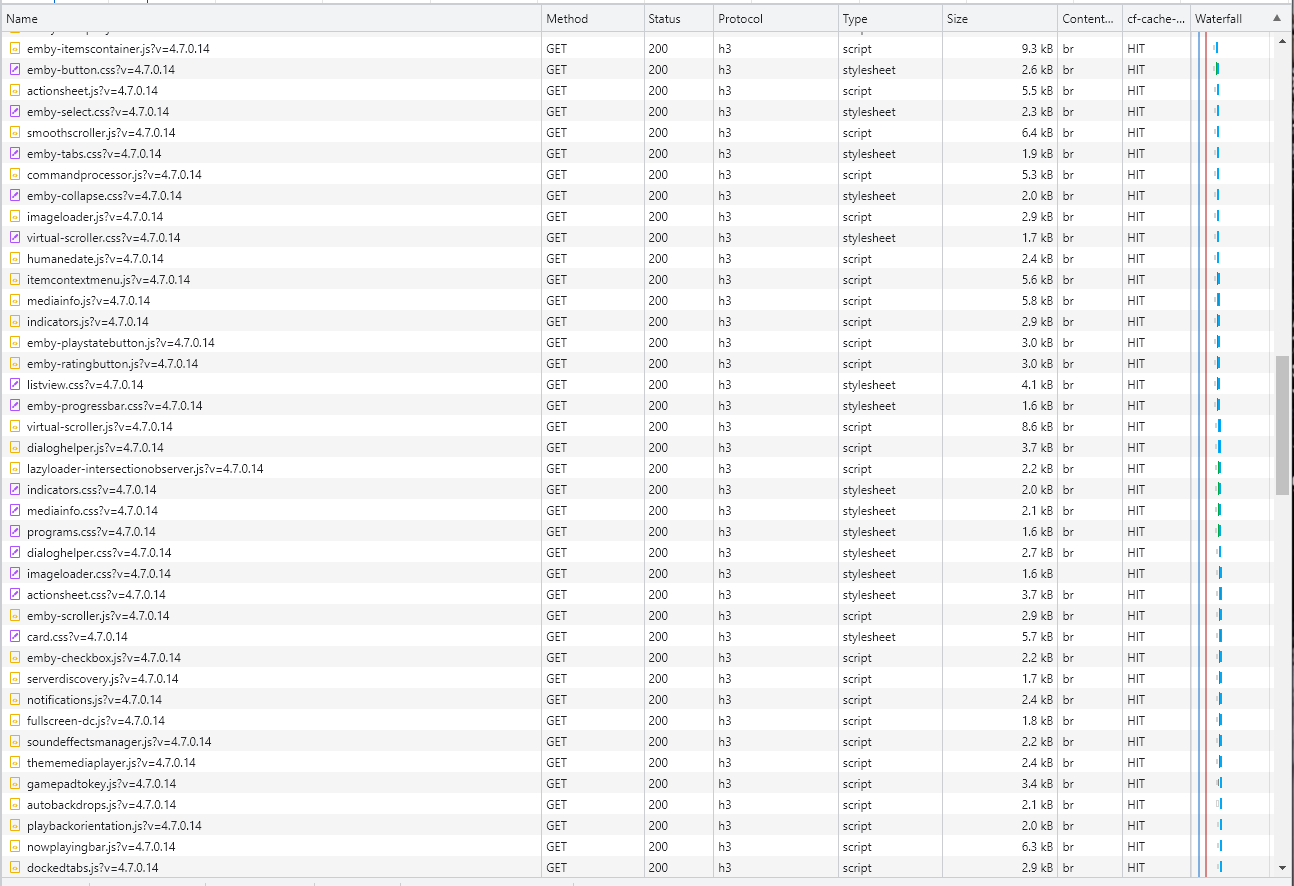
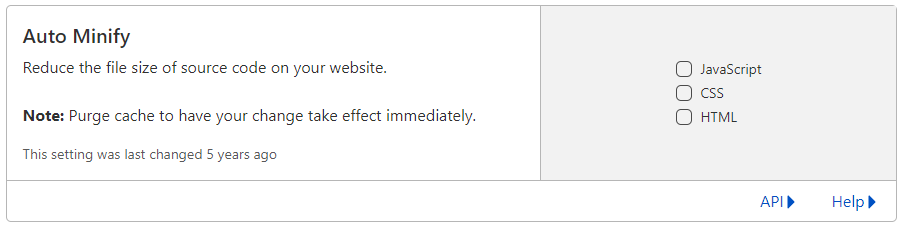
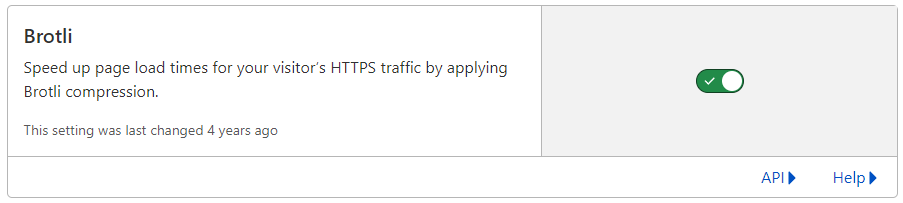
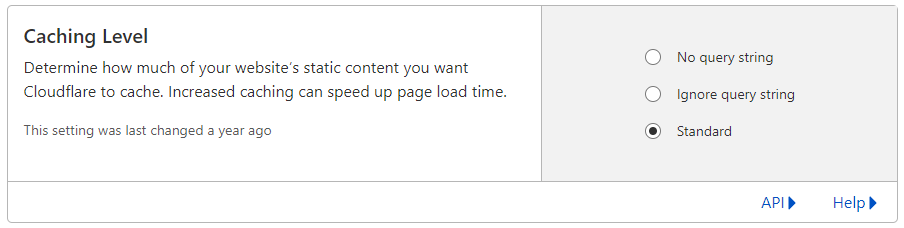
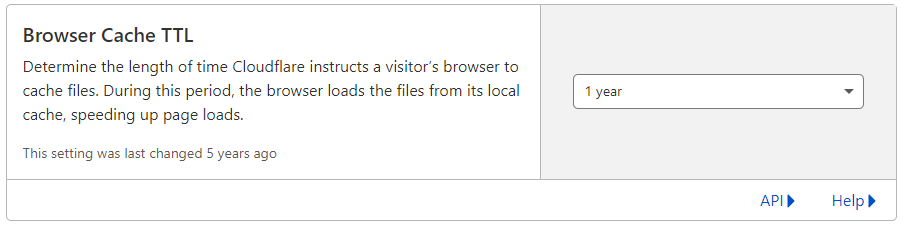
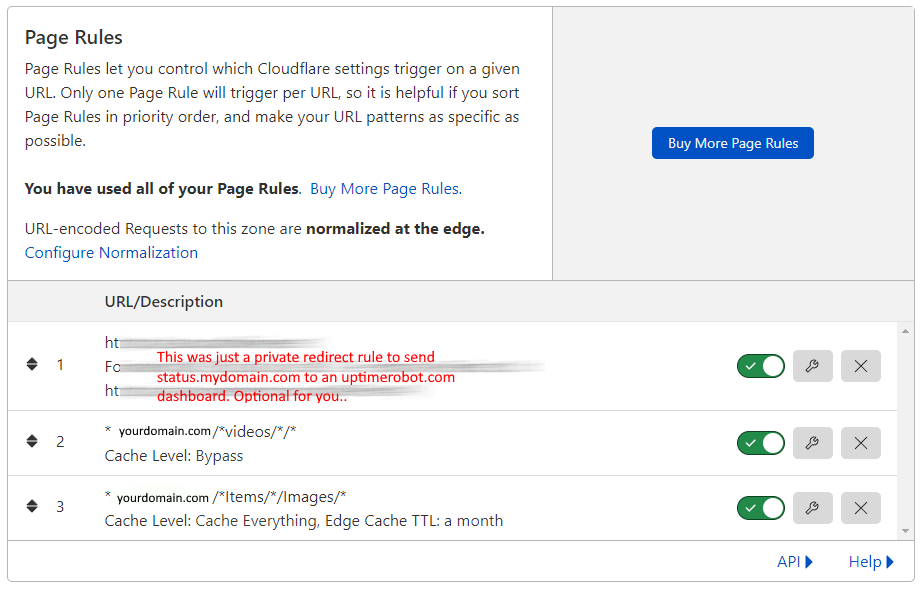
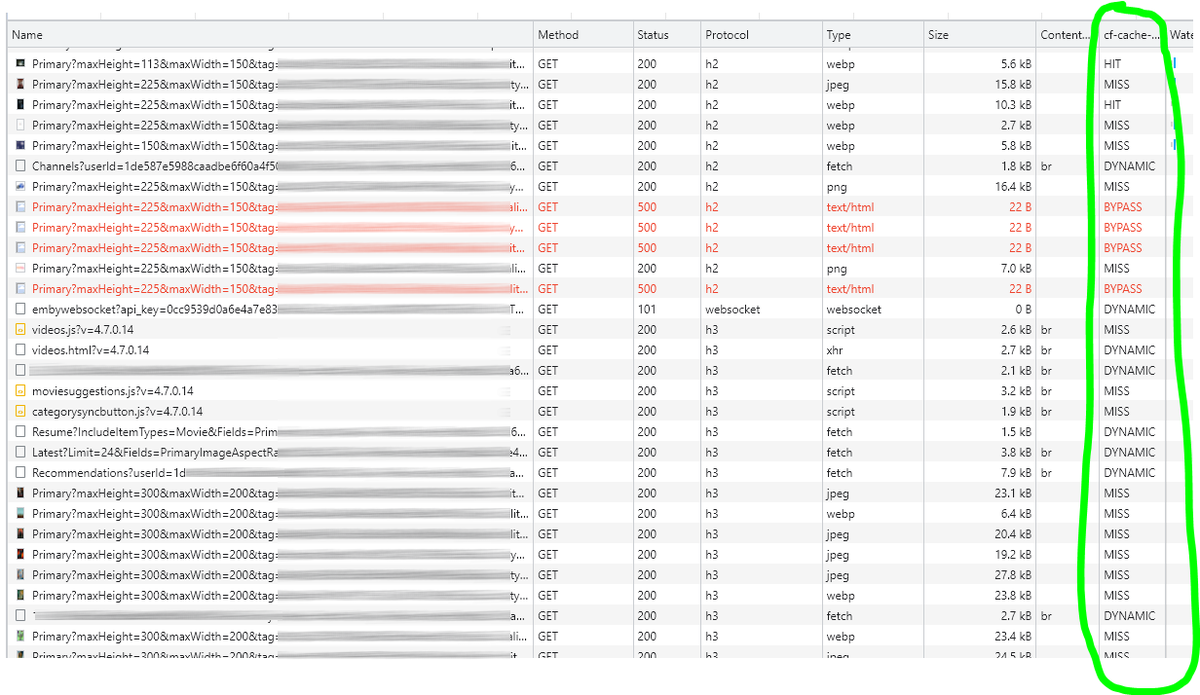
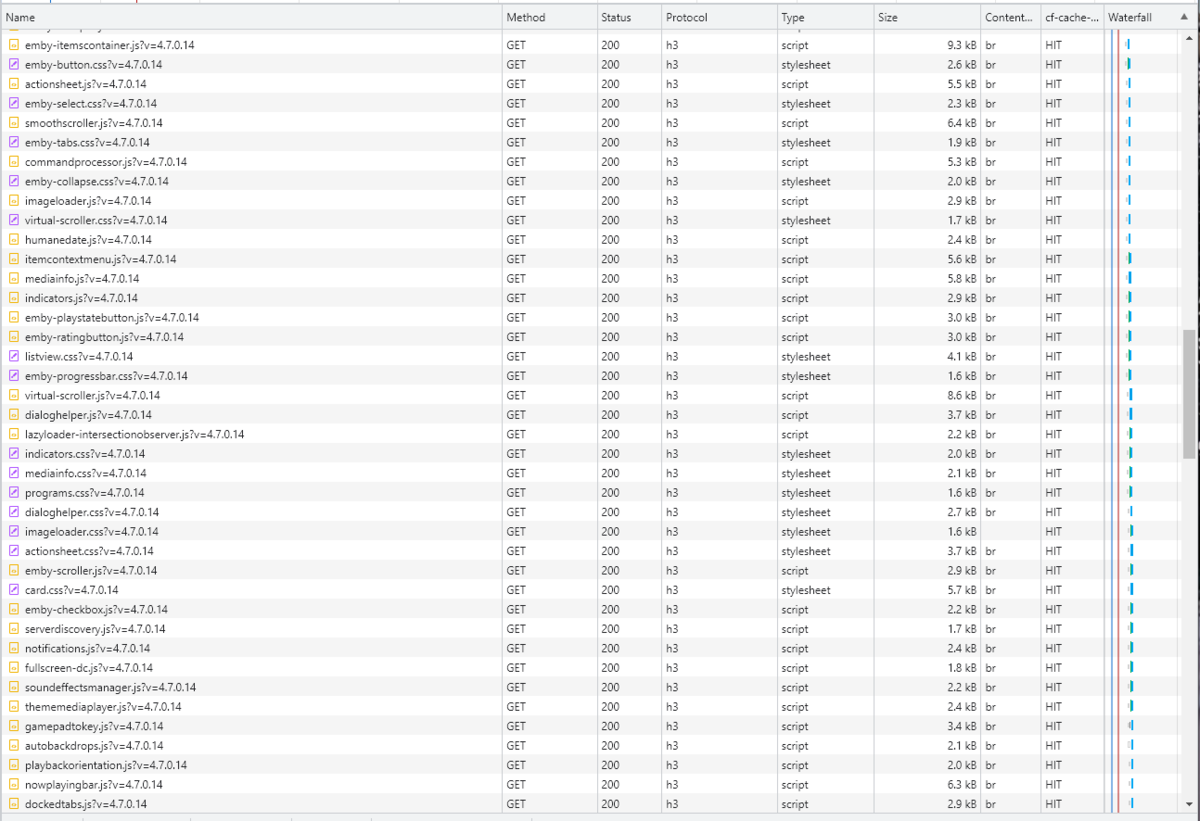
Cloudflare and emby Config Version 1.0.0 Last Update 02-25-2022 Update by Pir8Radio ** UPDATE: I AM HEARING OF EMBY USERS GETTING VIDEO FILES BLOCKED WHEN USING CLOUDFLARE (FREE TIER). IF THIS IS THE CASE, I NO LONGER RECOMMEND USING CLOUDFLARE. Even with the cache bypass rules, your video still passes through their system and is technically against their TOS. Use CloudFlare at your own risk if you choose to continue. I'll update if I get more info. Please post in this thread if you find you have video loading/playing/downloading issues while using cloudflare or have received an email from them about this. MESSAGE FROM CLOUDFLARE: Free, Pro, and Business Plans serving videos or a disproportionate amount of non-HTML content can be in violation of Section 2.8 of the Self-Serve Subscription Agreement (TOS). This will turn into a full Cloudflare how-to. Others are welcome to edit this or PM me with suggestions.. However right now I'm just going to post some recommended settings for people who already have Cloudflare setup. There are a few cloudflare settings that break emby, some break it in obvious ways, some only certain apps in certain situations.. These are the settings I found that work well as of today. I'll try to maintain this post and update the header info should new features come out, or the community discovers better settings than these. As of today, these are the settings available to us in Cloudflare FREE account: First disable the two main things that will break emby, go to the "Speed" tab then "Optimization" sub-tab. DISABLE Auto Minify and Rocket Loader! (screen shots are in the recommended state) Other options on this settings page are optional to enable, I suggest enabling Brotli compression. It's a good thing. Now head over to the "Caching" tab and select the "Configuration" sub-tab. Set your Caching settings as shown below. THIS IS OPTIONAL: Other settings in this settings tab are optional to whatever you like.. I have "Always Online" enabled, its kind of a neat feature that caches as much of your emby server as it can in case your server is down, users will at least see an emby splash screen, that's usually about it.. but its something... kind of useless otherwise.. Handy if you have other websites, it will totally cache normal html websites and users can continue to use your cached site when you have a web server outage. Next head over to the "Rules" tab. Create these two rules: Rule #2 here we will bypass caching 99% of all video. Caching the video will actually slow down the client experience. It screws with the chunks and often times has to fully cache 1 chunk before cloudflare sends it to the client, causing playback delays. Rule #3 here will cache all images on the edge servers for 30 days. We need this rule, because cloudflare only caches known file urls, like picture.jpg or poster.png emby serves up webp images with NO EXTENSION so cloudflare doesn't know to cache these items. But 99% of emby images come from the /items/XXXXXX/images directory so we will just force cache everything that comes from this URL, it should be only images. Keep in mind when you enable this it can take some time to build up cache.. emby serves up different sized images based on browser screen size, apps, etc.. so if you load a page that is minimized to a small window on your desktop emby will serve smaller sized images, if you make your browser full screen, now emby will serve up larger images and those images may load slow the first few times until they get cached too. Go below this screenshot and I'll show you how to check if caching is working. Check to see if Cloudflare Caching is working Well, how do you know Cloudflare is doing its thang'? Use a browser like chrome, or the new Microsoft edge (which is just a rebranded chrome). Open the browser, right click in the browser window and go down to "Inspect" (there is an F key for this too I forget what it is, I should add that here lol). Once the dev window pops up adjust it so you have a good view on the right, click the "Network" tab, hit the reload button on whatever page you are on so some info populates on the right dev screen. You should see something similar to this: Right click on the table header (Name, Method, Status, Protocol) anywhere, just right click the "Name" one. Go down to "Response Headers" then "Manage Header Columns". A little window will pop up hit "Add custom header..." and then add this header: cf-cache-status Now select the little sub tab that says "all" now surf your way to your emby server, and you should see something like the below screenshot. Hit is well..... a hit! this image came from cloudflare and was never requested from your emby server, saving you from sending this image to the client, saving time and bandwidth. MISS is also kind of obvious, it was a miss, either due to never being cached yet (first time Cloudflare has seen this image or document) if you hit refresh a few times, cloudflare will then cache it and it will turn to HIT. BYPASS I'm actually not sure why my server is returning server 500 errors below, this image is being called for by emby clients but the server has no image to serve, but usually you should only see BYPASS on playing video's if your rules above are correct. Or in my case, a server error will not be cached. DYNAMIC this is also a NO HIT response.. this is usually due to Cloudflare knowing this resource changes a lot and doesn't want to cache it so your clients don't get served stale data, or its a video, websocket, or some other format Cloudfare's great automated intelligence deems it should not be cached. That is the basics that will save you a lot of headache and blaming emby for things not working.. There are lots of cool options to enable outside of these basic settings above, ask questions here, send ideas that maybe I have missed that work great for you.. I just wanted to throw this up due to a lot more of you guys using Cloudflare. In the end you should start to see more "HIT" responses... and a noticeably faster loading time for the clients, less bandwidth usage for your emby server, and everyone is happy.. Well..... within reason....




 1 point
 -
Having collections gets very confusing for some of my users because if they have their library set to sort by "date added" in order to show the newest movies first, they will not see some of the latest movies because they were added to an existing collection. Sorting by "date added" just sorts by the date the collection was created. Would it be possible to sort collections by "Date of last addition" or something similar? I like the collections feature, but when the newest movies "disappear" into a collection down the list somewhere it makes it confusing for many users.1 point
-
I'll try to keep this feature request short and simple. When the Emby server needs to transcode audio to make it compatible for the Emby client, it will use a hardcoded value for the bitrate that cannot be changed. For example, if the audio gets transcoded to Dolby Digital AC-3, it will always use a bitrate of 384 kb/s. This value cannot be changed, even though Dolby Digital AC-3 allows a maximum bitrate of 640 kb/s. Although 384 kb/s is a decent compromise between quality and data, it is very compressed and the quality is far from being transparent. The same thing applies to every other audio codec the Emby server may transcode to, such as AAC. So the request is simple, allow users to specify the bitrate that should be used for transcoding audio. Thanks, Charlie1 point
-
My server is up and running on my synology NAS but I can not connect to it on my TV. What username and pssword do I use, because the one I used to sign into Emby website is not working.1 point
-
If you pay someone enough to write a replacement for Emby or Plex to your specification. Or seeing as Jellyfin is open source; pay someone to fork it and write the major changes required to make it possible. In either case, wait a long time... Paul1 point
-
For me the Shield just isn't a box that can do everything for me now. I have more and more HDR10+ every day from streaming services like Amazon and I've been avoiding AV1 because I know the Shield won't like that. What I'm looking for is something that can play additional types of media and has a better PQ. After 5 years surely something has a better PQ than the Shield.1 point
-
Hi, all I can think of is maybe the scan hadn't completed yet or you hadn't restarted the Emby app that this user was signed into after changing their library access. Regarding deletion, if you are signed in as Mom, then you can't delete yourself.1 point
-
I will check it, thanks!1 point
-
But testing in iOS app 2.2.23 I did not see any issue with seeing Tagged items in Tags tab when selecting the tag.1 point
-
The video shows it where tagged items do not show up in iOS but do in Safari when you open said Tag. Can't get my iphone to connect to test servers right now will test on an item in a remote server. Sort of like parental controls was showing empty tags but can't be that if another client displays them.1 point
-
Thanks for the test account. I can confirm it's a plugin http-issue when the webserver (in your case the nginx proxy you are using) sends chunked data. I'll fix it in next version, please let the testaccount enabled for the moment until I solved the problem.1 point
-
It can't see the port. It says connection timed out. I'll go through port forwarding setup again. I have been running emby for a long time and never had this problem before. I'm running the beta server on windows 11.1 point
-
am i wrong to be a bit disappointed by that? a brand new device only matches a 5 year old nvidia shield? i'm quite keen on a shield upgrade - is this really it?1 point
-
Installed it on three shields and its working fine. Easy to use too.1 point
-
Found it. Great thanks!1 point
-
I just did a recent hardware upgrade, re-installed Proxmox and the Emby LXC container. The hardware transcoding is working with the iGPU showing up in the configurations and no code alterations needed.1 point
-
Sounds like you added it after the library was scanned?1 point
-
Thank you for that info. I was wondering if I had a "wrong" version of Emby. Thanks again!!!!1 point
-
Thanks for following up.1 point
-
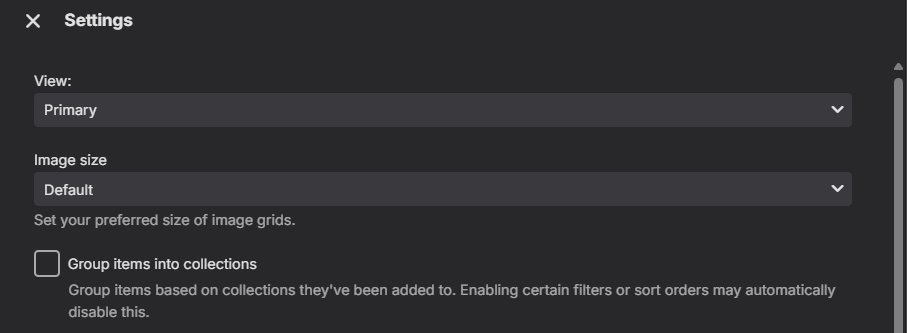
Yes as the library has group in to collections options. But not positive where it is located on each client. But within every library you should have settings.
 1 point
 -
@Luke Hi, I completed the reinstall and everything is working fine. I originally started adding libraries the same as I previously had them, but decided to simplify things as to hopefully not run into issues down the road.1 point
-
But the movies summary will away be in the language gotten from metadata provider. As the UI does not translate this.1 point
-
Not really go look at Reddit lots of people have issues with them. The devices are what 5+ years old at this point. I know others that have replaced thermal paste but it’s not worth it. Apple ui is 1000% better than shield. Maybe after the next switch thing that comes out in what another year they will release a new version. But funny plex works fine with Apple. Emby is the issue not the device lol.1 point
-
I have 3 shields in my house and all have 0 issues. Guess you got bad luck or just an apple fan boy in denial.1 point
-
So that was it. Changing that line in /opt/emby-server/bin/emby-vainfo from" exec $APP_DIR/bin/vainfo "$@" to: exec $APP_DIR/bin/emby-vainfo "$@" has solved the problem at least for my version: emby-server-deb_4.8.8.0_amd64.deb Streams play fine now.1 point
-
You can close this. Just chatted with xtreme hd and they have a problem on their end. I am glad there is someone live on the other end. Why i am moving from nextpvr to you.1 point
-
You'd be crazy to buy a poweredge for Emby. As stated, any modern system is more than enough. If anything, the transcoding capabilities of quicksync are bandwidth limited. Jason at BytemyBits on youtube did a video a few years ago with Plex doing 4k transcodes. He got to 19 before it started to buffer, while using an NVME drive as storage. I currently run my system from a 1235-u laptop and I've had up to 15 people at a time transcoding with no one knowing. The intensive heat has more people staying inside, and my using a laptop produces very little heat in itself so I don't need extra AC. Quicksync is a godsend.1 point
-
I just reverse proxy using Caddy, dead easy. Using Caddy for automatic SSL certificates with Cloudflare - Roelof Jan Elsinga1 point
-
Hi, yes it's certainly possible for future updates. Thanks.1 point
-
If it’s the same check from when the Jellyfin project started, anything starting with “jell” will be blocked.1 point
-
This is probably unrelated to your issue. But I had to post this here because it was so weird... I was scratching my head for days how to resolve this issue of throwing “This Emby Server Needs to be Updated” Error when server is up to date. My version was 4.8.0.39 beta and it was the latest available version. It was running as a pod in kubernetes. I tried running the exact same version in standalone docker and it worked. After hours of debugging network calls using mitmproxy and clearing data multiple times, i found the issue. Guess what? You cant name your server "Jellyfin" !!! I used jellyfin before and just replaced the image in the pod spec to use emby. It worked fine, but i didn't bother changing the pod name. So the server name was automatically configured to be `jellyfin-randomhash`. And for some weird reason, Android app assumes that I'm not running Emby :). Literally any name except `jellyfin` works as the server name.1 point
-
Thank you! (The disto was xubunutu, btw. My bad for not including it.) It'd be really great if info like this could be added somewhere in the knowledge base for those of us near the beginning of our Linux journies. (If it's already there and I missed it, apologies.)1 point
-
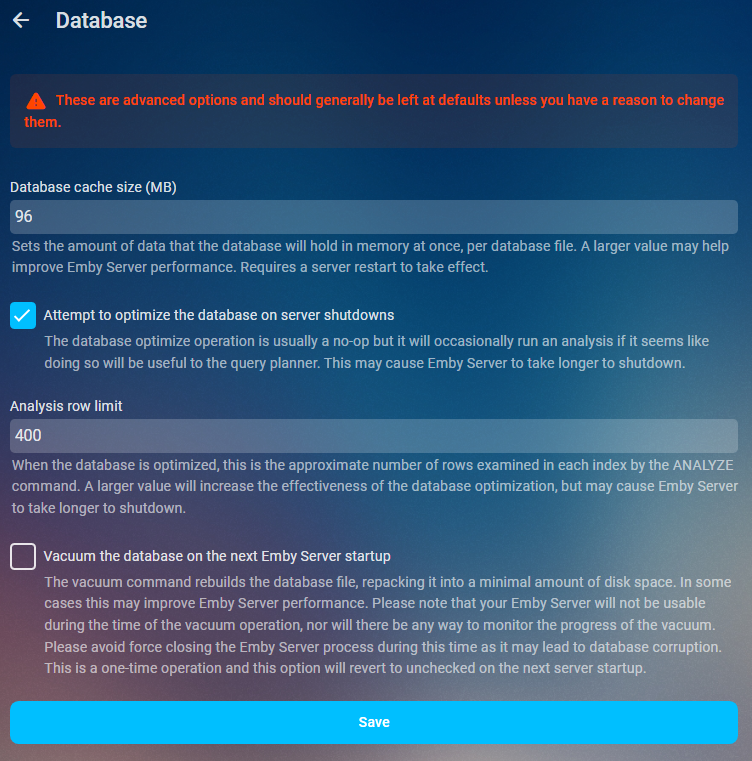
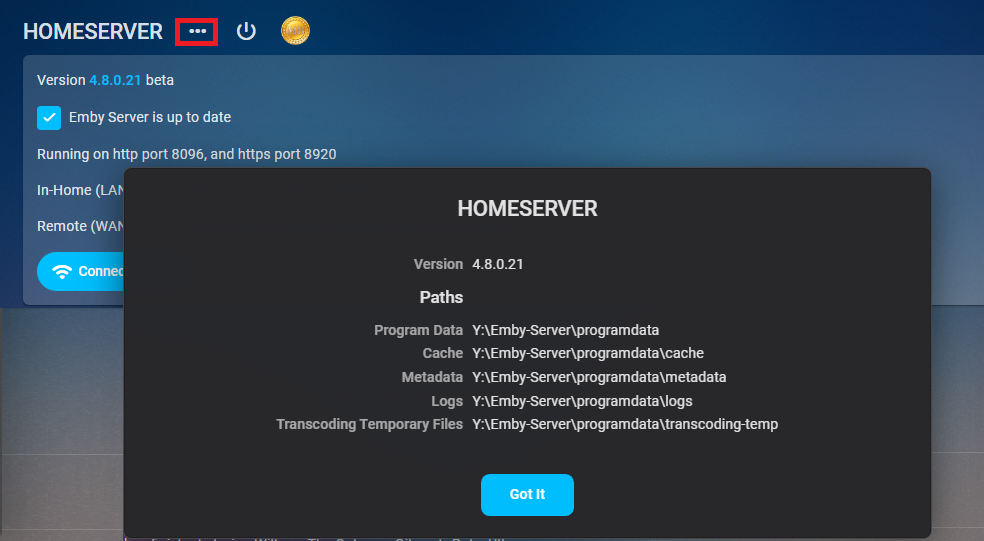
As of 4.9 multiple db connections were added so increasing this value to much could have negative effects on Ram usage. As it could be 5x your value or in some cases from a beta standpoint 20x your value. Will try to update when more info is available. Performace tweaks Database cache size Sets the amount of data that the database will hold in memory at once, per database file. A larger value may help improve Emby Server performance. Requires a server restart to take effect. If you have the available RAM you should set the database cache size to 1.5 to 2 times your library.db size. Navigate to your platform Emby programdata folder and look in the data folder to see its size. You can find your server info on the dashboard three dot menu. App Settings- Database
 1 point