Leaderboard




Popular Content
Showing content with the highest reputation on 06/21/24 in all areas
-
Going by the log, as that is all the information we have - using a decent log tool to search for the tasks - it has 1593 ffprobe's - that's files being read, analysed and stored in the emby db. 3386 files being cached - files being copied from external USB drives (if I recall from previous threads) to the operating system drive. That is simply going to take time if you have 'reset' the libraries. The comment about nobody understanding how Emby works/scans is a little disrespectiful imo - people are spending their personal time trying to help you.4 points
-
FWIW, this was just added in the latest Plex beta.3 points
-
If using a hard drive for the OS yes that can certainly have an impact on the performance of the DB as other parts of the OS fight for disk access at the same time, though I don't believe that's the case here since based on what I looked at the majority of the time is against probing the media files, which from what I recall in other topics are held within a large number of hard drives connected via USB and using Drive Pool. While this setup may work, in my opinion this has many performance implications which I expressed my thoughts in another topic about.2 points
-
Hi, yes we should have an update for this soon. Thanks guys.2 points
-
@Luke Yepperz it is. So I guess this was a work around to make the port change without needing the interface. idk. I'm sure with a voice remote it would have been different, since i probably wouldn't even need the keypad. But I couldn't see spending all that for ATV boxes that i got for free. In the future as updates and stuff come out I can try it again and see if anything improves on my end with these remotes on the app for that port screen. Feel free to message me here or DMs. I do check here often especially around update time.2 points
-
After a lengthy, multi-day troubleshooting fiasco, I think everything is back up and running. I believe the problem was the faulty drive dropping out and causing the BSOD, but now things are resolved and I'm up and running 100%. Thank you for the fast replies!!2 points
-
... as I was tired of manually grouping all my movie versions into groups after each recreation of the db, I created a plugin to help with that. The use case is having movies, that belong together spread around and not being able to easily match the emby naming conventions, but still having the desire to present them as one item with multiple versions. The plugin works similar to the auto boxsets, but does the "movie versions grouping" - it will group all movies based on their TMDB id into one item, regardless of where they're placed and how they're named. I made that for myself - however, if anybody is interested, attached is a plugin that solves this issue. Attached version is for current 3.6.0.49 beta Server, do NOT use it with stable release! Plugin is alpha state, you should only use it, if you are willing to backup your db (there is no way to revert the changes otherwise!) and manually put the dll in the server plugin directory. Do not use it in your production environment before having tested in a test environment that you're fine with what it does - seriously! ;-). Note: There is a known bug in the web GUI presentation which is described here, which needs to be fixed on emby side. Edit: the mentioned display bug in BoxSets is fixed in Emby now, thanks Luke. AutoCollections-for3-6-0-49-betaServer.zip AutoCollections-for3-6-0-75-betaServer.zip AutoCollections-for-4.1.0.15-betaServer.zip AutoCollections-for-4.2.0.17-betaServer.zip (4.6.0.10 and before) 4.6.4.0 and above (does not require beta server as version number has been surpassed) AutoCollections-for-4.6.0.22-betaServer.zip Note: Original version will cause issue with other new plugins like Top Picks. Updates by community members: v.1.0.0.4 New update thanks to @Cheesegeezer Looks like we've managed to update the plugin, to be current Emby Server 4.7.7 (minimum). Some Changes to be aware of Automatic Library scan and updates are disabled, too many things are triggering library scans at the moment and entering into an endless loop which will crash the server. Moved to a Scheduled task now. Fully Locked item Metadata can be ignored in the Plugin Settings for grouping. (Partial field may have worked before but you need to Lock the item itself now) ".strm" files are ignored from any processing New plugin Graphics with a big nod to MikePlanet This is always Mikes plugin and the work he has done is fantastic. - We only did essential maintenance to keep this alive for you peeps. AutoCollections_1.0.0.4.zip v1.0.0.5 Removed Top Pick Items from the available item list re introduced the auto scanning... this will take place 1 min after an item event is detected re introduced auto run after a library scan tested against top pick plugin and there is no endless looping... but please test fixed the locked items bug. Good luck and let me know how the testing goes. AutoCollections.v1.0.0.5.zip v.1.0.0.9 New update thanks to @Hoptional Added option whether to Merge items across different libraries Compatible with nested folder structures, the "Top Picks", and the "New Releases" plugin Improved logging AutoCollections_1.0.0.9-libraryoption.dll1 point
-
If the nfo was written by Emby, then yes it will contain the date added.1 point
-
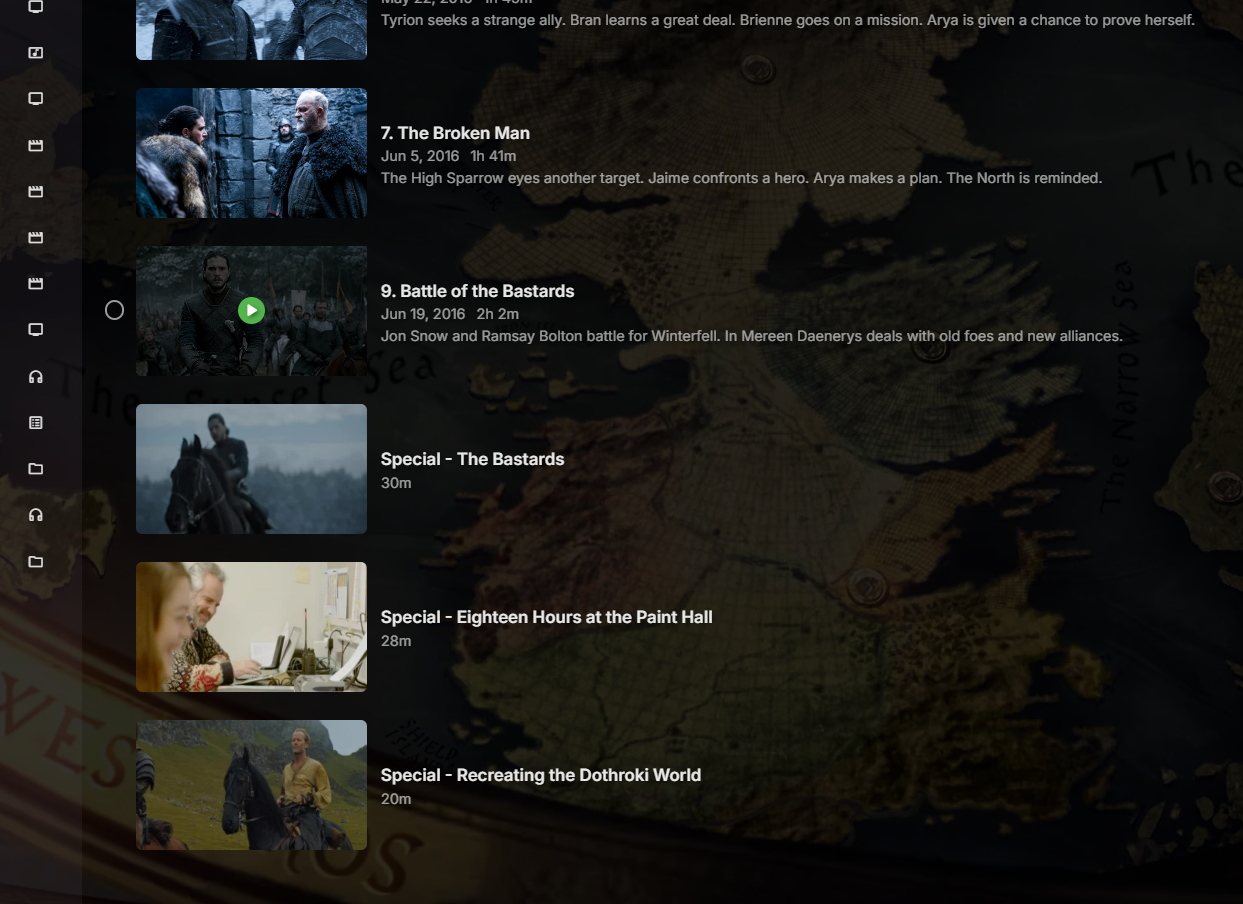
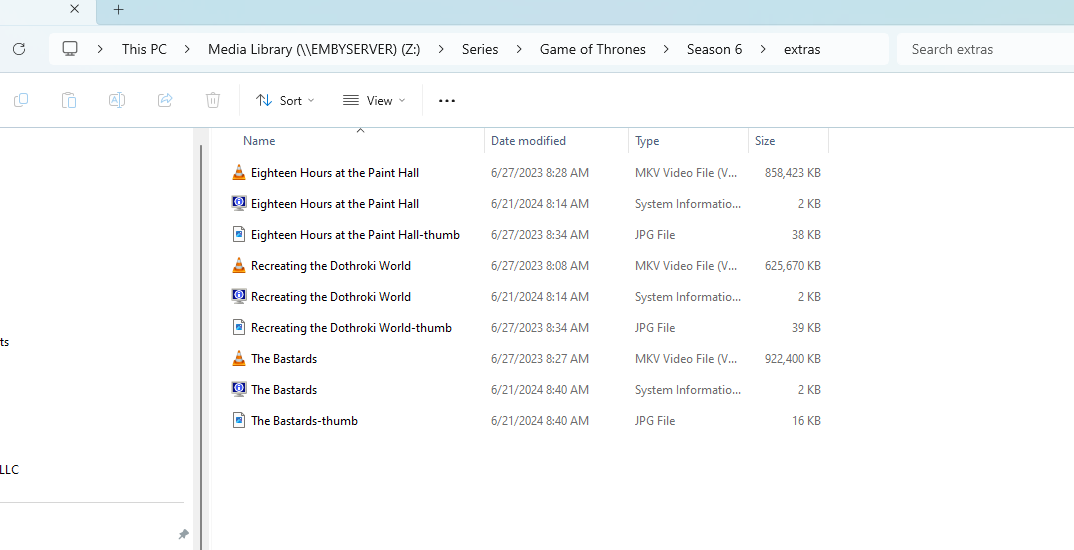
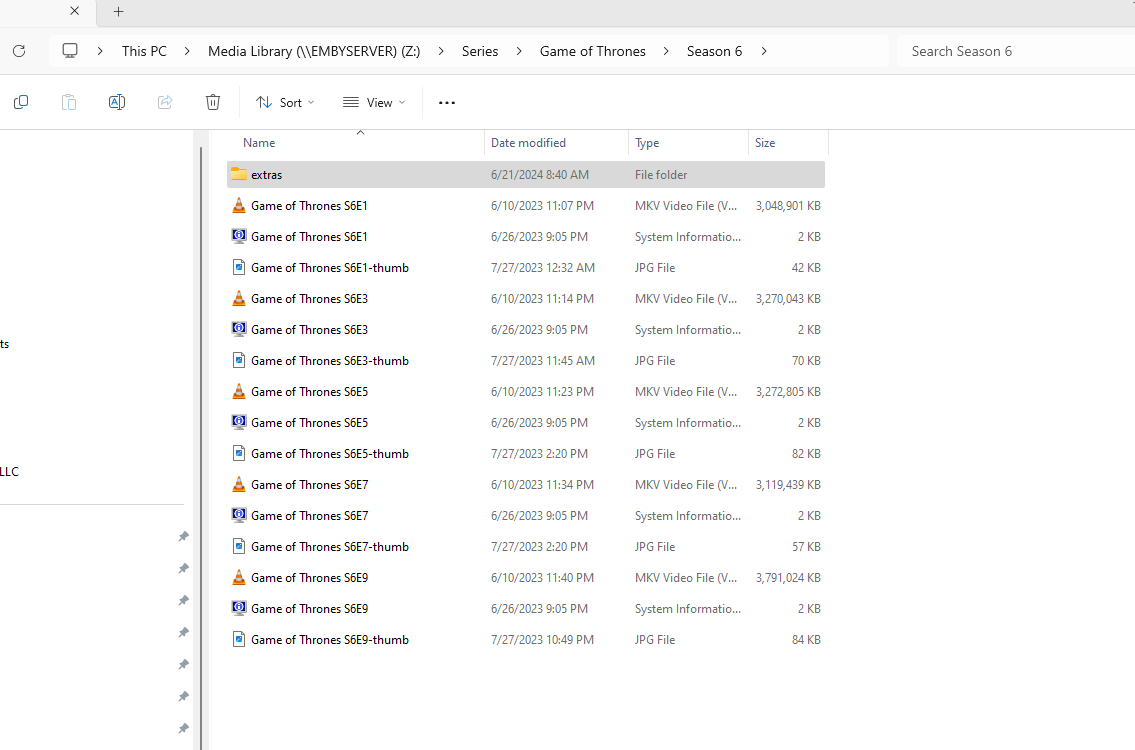
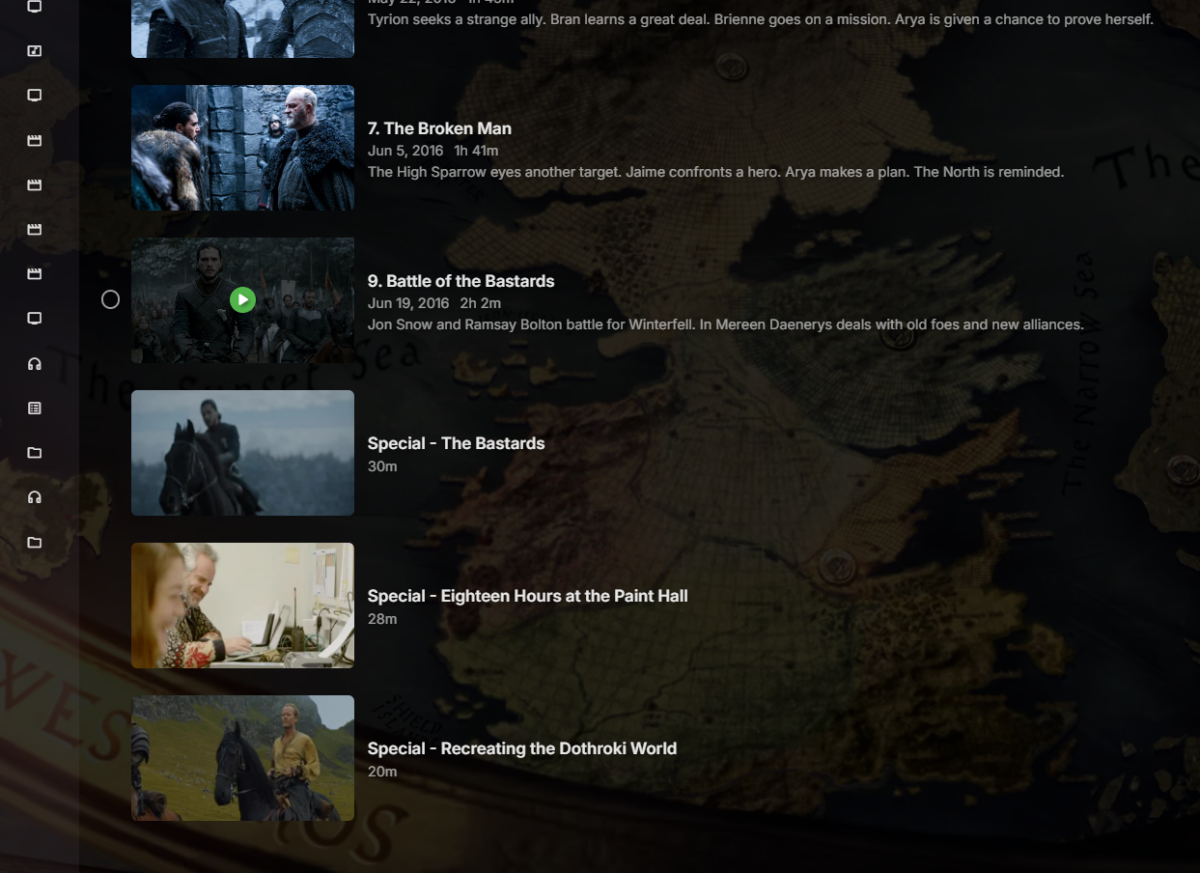
The episodes are grouped in 2's, meaning that S6E1 is episodes 1&2 and so on. This shows what I got after I renamed one of the 'extras' to "The Bastards". Now it works fine. Bit it didn't work fine when the file was named, "Battle of the Bastards", which is the same name that came from the acquired metadata for episode 9.
 1 point
 -
@LukeI just looked at his file and commented way back then1 point
-
Hi, I don't have an ETA but this has come up before so it's something we can look at. Thanks.1 point
-
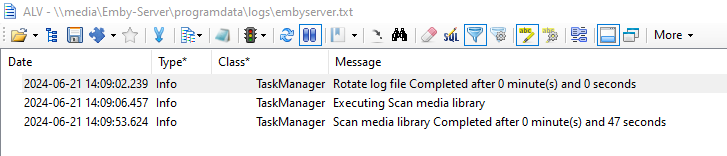
Agreed - and I mentioned this in my response also. Drivepool is not the problem, as I use it myself, but USB connected drives (even USB 3.x) are simply not designed for high I/O @ just over 30K items, my scan takes 47 seconds with zero new items to add. That's using Drivepool with local SATA disks and Emby/DB on NVME. A decent log viewer will read the emby logs, parse them and allow you to filter - I so wish emby would include one in the core product. Emby have one already in their own 'Emby Support Tools' so really not sure what is stopping them. This may help people find and attempt to resolve their own problems.
 1 point
 -
done. many thanks!1 point
-
I took the ffprobe lines from the log provided (the lines that indicate what file it was looking at, and the lines indicating when it completed) and put them into excel, split the data into columns, added a column to calculate the time difference between between each log entry to get durations, then created a graph against the time and duration. If your log doesn't print these lines during your scan you wouldn't see this data, which I would expect for an already established library but this was a fresh import into a newly created library. I think I only see ffprobe entires in my logs when it's refreshing the data at the set intervals - the library option "after initial import, automatically refresh metadata from the internet". I have about 35,000 items in my libraries and it takes about 3 minutes to complete a full scan on already fully established libraries, but I generally don't see any ffprobe entries in my log during that scan or just a few if they've fallen into that 30 day refresh that I set in the library options when the scan runs. Before running a scan just now to verify that number I saw the scan that ran earlier took over 20 minutes but I looked at my logs an there were a lot of probes occuring, so I would expect that to take longer.1 point
-
Thanks for the fast turnaround. Scan is going a lot faster now, even for Movies, since I only use TMDB there.1 point
-
What did you use to create this graph? I have 17TB of Movies and Shows and my scans are usually pretty quick and complete without artificially hanging at 90%.1 point
-
ok - I don't want to confuse the OP any further but a domain on it's own will not resolve to an ISP provided WAN IP - it needs DDNS. The OP has a dynamic IP, they have said so in the first post, so they NEED to use DDNS. So if we are being accurate - and the reason for my original comment - I've made a suggestion on your original statement below.1 point
-
So looks like your options currently are 1. remove subs 2. reorder current subs 3. extract the subs you will always use as external subs Since this is a limitation of Samsung player.1 point
-
No they don't, but you said you deleted the library and added it back, so many things are happening for the first time all over again.1 point
-
@SamES Well I moved the ATV box to a different TV which is my 4K display and it is giving the same exact results. The video format is 4K HDR 60Hz 65". I also tried a different remote but it is unfortunately the same type of remote. I also tried the other 3 boxes and all give me the same results as in the pics I posted earlier today and similar to the OP. I guess I will have to order a Siri remote to get them programed for Emby... All of my other apps are working without issues; Hulu, Tubi, Netflix, Plex, Disney+, Pluto, Apple tv, freevee, discovery+, local now, xumo, & crackle; if that helps any. The devices are Apple TV 4K A18421 point
-
for me the last working version was 4.9.0.211 point
-
He’s probably use some illegal share and thinks emby provides the media.1 point
-
I think that like in most forums, you gain the ability after a certain number of posts. Paul1 point
-
Are there any plans for Android widgets in the next release? I would like to start using Emby for playing and casting music on my phone now that google play music is being discontinued and the replacement youtube music won't play with the phone screen off (!). In my limited testing today, Emby is working for this, but the user experience could be greatly enhanced by a widget or two that would give quick home screen access to playlists and control features. The UI could also use some improvements- when trying to scroll through a playlist with my right hand I always end up rearranging the song order.1 point
-
With a server restart, in fact a full reboot of the server itself, it appears that I have finally forced the order to change. My order of scan is now movies first and TV shows last. I do not really know what fixed the problem as I created a new library and renamed and removed all folders from the original and I rebooted the server and I simplified the library itself by not including all the metadata sources I could. I hope this is fixed and I can quit obsessing about the problem. BTW: The reason I wanted the TV scan last is that it takes a lot longer and, sometimes the time limit I have for scan (6-8 hours) expires before the scan completes and, if the TV library is first then no other library gets scanned. By scanning the TV library last I assure that all libraries have a good chance of getting scanned. I almost left what I thought was a funny typo. I typed "scammed" in place of "scanned" and that last sentence gained a somewhat funny meaning.1 point
-
HI, yes, more options to control this are planned for future updates. Thanks.1 point
-
If your server is running a VPN client this will only cover outgoing requests from the server, IE to metadata providers, but incoming requests will still come in through your WAN IP which is what the DDNS needs to resolve to. Most DDNS services that I know of offer a client that you can use so in that case if you try to run the DDNS client on the server at the same time as a VPN client you would need to exclude it from VPN traffic (split tunneling) otherwise it will end up returning the VPN external address. More than likely you would not want this unless your VPN provider allows you to open a port, then it would be possible to have incoming requests go through the VPN but this is probably more advanced than you'd want to set up and your VPN provider may not offer that. However if the DDNS client runs upstream of the server, such as on your router which doesn't have a VPN client running, it should return the address of your WAN interface so the DDNS can resolve to the right address. It can take a few minutes for DNS to update when the IP changes. EDIT: Also wanted to add, in my case I'm running pfSense with multiple VPN client connections but you can configure the specific interface to use for the DDNS request, not sure if any consumer routers would have something like this even if they have DDNS support along with VPN client support.1 point
-
I like the ability to add lyrics to my music but unless one wants to scroll them manually to keep with the song playing they become pretty pointless. I know other music services such as Apple Music and Amazon Music have lyrics time synced (LRC) to the music. I know this is how subtitle files basically work so it should be able to be implemented in Emby but the playback stream would have to be a video stream I presume. Is there any plans to implement this? I see some things on Reddit and the git for this so it's out there, just needs to be implemented but TVE implementation is of bigger importance if I had to choose what I want Emby to do!1 point
-
Finally got around to this. Downloaded the LRCGET installer from GitHub and it is initializing the library now. I have about 17,000 songs currently in my library and the initialization is nearly complete in the time it took to type this out..1 point
-
You have the same problem as @Inx192The latest beta server has some code breaking changes. I'm waiting for feedback of the Emby devs. You can rollback to 4.9.0.24 for the time being.1 point
-
I'll have to look at the code again to see if any of this is possible. Thanks1 point
-
@Mithrim@Nosunk Below release should fix the problem no matter what setting you use. Emby-Stable-style-v3.2.txt1 point
-
I'll try to come back to this, this weekend, and get some debug logs. I ran into some issues with the samba mount due to a kernal bug. Took me a while to sort out and then kinda forgot about this one...1 point
-
LRCGET seems the best ive found so far for personal use but also perhaps for Emby Project to more officially support. There are more synced lyrics and the lyrics are downloaded next to the media (as .txt or .lrc) which Emby supports (and fits with Emby paradigm of not changing media). They support an api and an offline download of their 16GB sqllite database (a plugin accessing a local file could be very quick). As for the API it says its unthrottled...took approximately 3 hours to download 70000 lyrics. They support crowd sourcing edits.1 point
-
I recently discovered lrcGET. But there are other tools. In the past I used extentions to foobar2000.1 point
-
Hard disagree If the embedded tags are read on ingest, and the musicbrainz option to import discogs tags is only available when the user chooses to do the refresh metadata>scan for missing metadata then the garbage in garbage out loop is broken from the start and will only be started at the users request. The problem is that when a first party source for data is available it should be the priority not a third party that offers "similar" data1 point
-
Submitted a delete request for obsolete data on MBZ. But yes I do agree embedded metadata should supercede provider metadata for external links.1 point
-
There are some infos in the FAQ about the versions. Public testing is currently the only version working with Kodi 21. For Kodi 20 stable or beta is fine.1 point
-
I was a WMC user for many years. It had a wonderful feature that let me rewind live TV. I was wondering if there is a way to rewind live TV on Emby and if so, how to set the buffer time? I know once I pause Live TV on Emby it buffers, but wouldn't it be nice to jump back even a a minute or two and rewatch something you missed? In WMC if you hit record on Live TV it would jump back to the beginning of the current program and record from the start of the program as long as you were on that channel from the start. Being able to set this "jump back time" on live TV would be ideal. Thinks you for your consideration on this. I really enjoy Emby very much. Keep up the great work! HAppy New Year! Jack1 point
-
I wouldn't like this. I understand the reasoning behind it but this is a navigation and management interface to me. I don't want the shape of things on the screen to suddenly change because I waited a moment on a particular poster. In your screenshots I stopped scrolling for a moment to consider if I wanted to watch a 'Has Fallen' movie. A moment later I can't even see the next three collections as the serve helpfully reminds me what's in the highlighted collection. Presumably now if I push right on the d-pad equivalent, I don't go to the Ant Man collection, I go to a 'Has Fallen' movie. It reminds me of the auto-previews in Netflix. Clearly they think they're helping, but the impact on my use is that I learned to make sure to never stop moving long enough to let the freaking noise start up.1 point
.thumb.png.1ddf135ad99a72646a26d671a28ffe35.png)