Leaderboard




Popular Content
Showing content with the highest reputation on 06/17/24 in all areas
-
@iBoss Coded it up last night but ran into a issue where with the setting as you are requesting, as soon as I did a rewind inside the commercial Emby immediately skipped to the defined commercial end which effectively made it impossible to rewind before the commercial unless you set your rewind to be a couple minutes. I remember now, that is a reason I had it not skip more than once in the first place. I'll look at it some more and see if I can detect a rewind was done, but it may not be possible to do what you want via a plugin. Or I suppose accept that as a behavior if you have that option selected. Maybe that's the correct answer.2 points
-
Viel Spaß damit Emby Install.pdf1 point
-
I'll install "Emby for Android" and will see how things look/go. Will need a few days to test it out. Thanks.1 point
-
Alternatively you can configure the networks you're using in the LAN networks field and leave remote connections disabled.1 point
-
apposto. emby sta creando le raccolte automaticamente. gran bel programma emby. complimenti. Farò sicuramente il premiere1 point
-
It's all right, thanks. I just saved that image displayed by tdb as poster.jpg, then created my own thumbnails for the episodes taking screenshots. No big deal at all, and it works fine Good point, after checking I see that I did disable tvdb when I created the library. This because it's written "Please consider supporting TheTVDB by adding missing information or subscribing" ; so I thought it was a service relying on subscriptions, and I don't like using something that lives on subscriptions if I cannot support it somehow. So I chose not to use it. If that makes any sense Thanks to everyone for the help! Super useful.1 point
-
Hey, sorry if I started a new thread on the same topic. Search for "turn off computer" and "shut down computer" didn't return anything, but I see it's all one-word "shutdown". I think it would be very nice to have this feature. Steam Link has this, so I can shut down my computer after playing games in the living room; I find it super useful. I am not sure I understand the pushback regarding Emby Admin possibly not being the machine admin. Given Emby is developed for personal media, I would wager the vast majority of users are private individuals with a film collection, so the Emby admin would likely be the machine admin. Even if this is not true, and there cases where, say, somebody else in the family sets up Emby on a shared computer, it can be assumed people in a family (or in general, people on a shared computer) talk to each other, and they should know if the computer should never be turned off or if tere are other tings going on (e.g. somebody else in the family is watching a movie, too). I guess that's the same spirit Steam Link works with. There could be an option on the Emby server to disable this for all users, so the Admin can decide. There could also be an option of selecting "don't ask me again" and save a user preferences. I think this could be useful on the "non-mobile" apps. Meaning Linux/Win/Android/Android TV. Possibly also the tablet, but not sure. This due to the reasoning that people watching movies on a mobile are likely on the road/travelling (otherwise they would be completely unhinged to use a phone if a better screen is available), so they will likely don't need to turn the computer off (unless a wake signal can also be sent to reactivate it) as they will want to watch more movies during the rest of the trip. These are my thoughts as of now, after having forgotten to turn off the computer 3 or 4 times after the movie ended But it's by no means a critical feature, I just thought it would have been useful since I use this option on Steam Link literally every time.1 point
-
No problem. Seems odd that another program could affect Emby is this way.1 point
-
Thanks for the reply. That is what I will do then.1 point
-
I was able to track down the source of my problem. I use a program ersatztv to generate tv channels from my library. It obtains metadata for movies and tv shows from Emby. Whenever it scans collections, it causes emby server to go offline form streaming, library access etc. However the Server Management Dashboard still works. https://drive.google.com/file/d/1mtGOxAGoSYC87bCSzuMz46KDvG1cT9nV/view?usp=sharing1 point
-
@Lukelet me know if you need any additional information. Thanks!1 point
-
I ended up writing the Emby Fixer program from scratch because the one I found was overly complicated. I has to learn a few tricks to work with an SQLite database, but it seems to be working now. Tomorrow I'm going to install Emby on my MediaMaster Windows system, load the modified database over it, Start Emby, and see if it catches fire and explodes. Once I'm sure everything is working I'll upload the program here. Wish me luck!1 point
-
Thanks Luke...I'll keep an eye out. Greetings.1 point
-
Thanks for sharing.1 point
-
Thanks! Let me know once you have a fix and I can test it via docker again (e.g. some testing image)..1 point
-
Thank you very much @MohamedKhaldi- so they both took more than the 1 minute timeout we have for single image extraction. I am doing some testing with chapter image extractions and will be discussing your results and my tests with the developers. We have a 10 minute timeout for multiple image extractions and it is clear to me that the process takes much longer than that on massive 4K movie media files when testing the process on NAS. I will compare the results with a windows desktop as well1 point
-
nell' applicazione winSCP erano nascosti i file che non vedevo. Approfitto per chiederti quale è la modalità corretta per fare un backup delle librerie ? Grazie1 point
-
TL;DR - I think I fixed it by adding Emby as a service. I have been getting some inconsistent results and trying to narrow down to info that may be helpful. Every time the mini PC hosting Emby restarted, my Emby apps still failed to connect to the dynamic DNS URL (even after making the settings changes to the server described before). For the longest time I thought it had something to do with Caddy because every time I remoted into the PC to manually restart the Caddy service (even though it was already started), the dynamic DNS URL started working again. Eventually I found that simply remoting in was getting it to work. I noticed that when I remoted in, a browser window appeared to display the Emby server. I don't think Emby was starting until I logged into the PC (even though it was set to start when Windows starts). I followed the instructions to make an Emby Service and restarted the PC, and for the first time I didn't have to re-enter the dynamic DNS URL to connect. That might have solved it.1 point
-
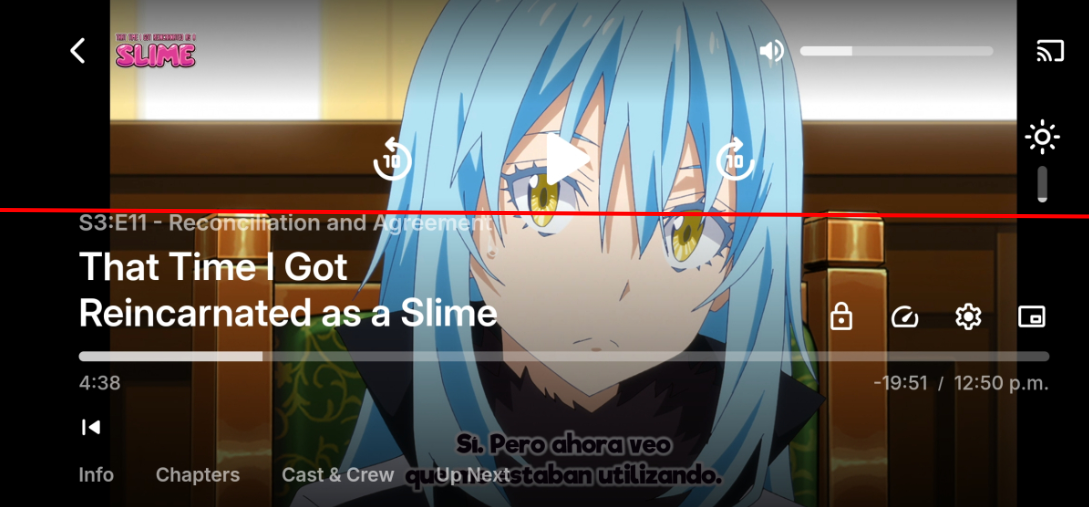
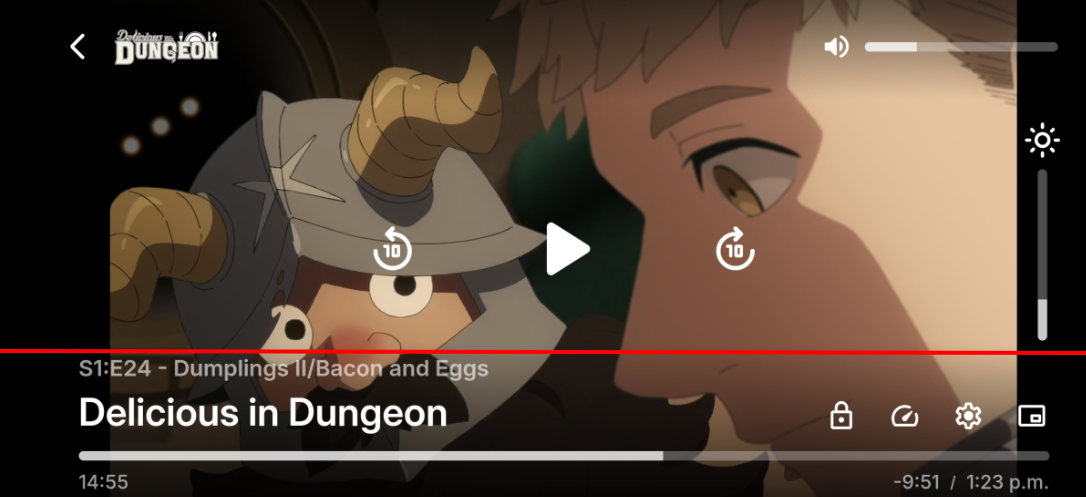
Me parece que tiene que ver con la alineación de la barra de brillo y el texto del titulo del episodio. Es muy notorio, pero aun así lo menciono por si acaso.
 1 point
 -
The file is definitely available. I can play it just fine on VLC either on Windows or Android. And this is true for every single file that's under an "Extras" subfolder underneath a movie folder. If it's really that the file isn't available, why would it only be these files inside of "Extras" folders, and only Emby that can't read them? I can try the mount option I suppose. As you can see from the docker compose file I tried mapping the mounted folder in the host to '/mnt/Video' inside the container but then selecting that mounted path for the library did not seem to work. I haven't tried creating another image that actually mounts the nas inside the container itself. If I do that, is there a way to update my existing library to point at that instead without losing all of the metadata/images/etc I've tweaked for them thus far?1 point
-
Have not tested but do not think Home Video and Photo support Music at all. And a quick test confirms that you only get empty folders. You will need to put the folder in a music library or Mixed content library.1 point
-
I think I'm good now. Thank you very much for your help.1 point
-
Hi, there's already an open request for this or something functionally equivalent. Please join in and contribute to the existing discussion at:1 point
-
@iBoss I assume you are modifying the edl file to skip the scenes as well as the commercials, right? I will add that option when I have time. If you don't see it in a couple weeks, ping me again. If you are skipping scenes due to language, have a look at this . You might like it better.1 point
-
@Luke Here are the latest logs, all from the same system during the time it tries to "load" the channel. ffmpeg-transcode-55a40607-1006-49ac-91ab-666bbacfc2b0_1.txt ffmpeg-transcode-94c85739-bf9d-4998-b1c8-c0e8af3add65_1.txt ffmpeg-transcode-a651ab6a-7891-4f5c-90bc-c49df2450236_1.txt ffmpeg-transcode-ba9978a6-c77b-4f9e-9c7d-94e03750a0b6_1.txt ffmpeg-transcode-bfeb954b-d27a-409e-9775-4bbba7f1a5f5_1.txt ffmpeg-transcode-ccac3d98-a1da-4d88-8f13-184fa02cfdb9_1.txt ffmpeg-transcode-e18bac60-0180-4c4b-9f97-fe988755a93d_1.txt ffmpeg-transcode-f690bf84-3ccd-4db8-8eb0-4e8a28bc0e75_1.txt embyserver(9).txt1 point
-
objectively untrue. my parents ask for me to put stuff on emby for them. i havent watched everything to confirm that the video and audio is good and that i have the right subtitles for my hard of hearing mother. the correct answer is to go and use one of the already working perfectly designed tools for this - i would recommend jellyseer, the emby and jelly branch of overseer. its far better than Ombi IMO1 point
-
OK we are working on getting our embedded mpv player updated to a new version so we’ll take another look at this as part of that. Thanks.1 point
-
Pulled out my old laptop (i7, Nvidia 780m) installed Ubuntu 24, and worked back through the drivers versions to 460 drivers with Cuda 11.4 and transcoding worked immediately. Kept getting the "cannot init cuda" message with any 5XX series driver and Cuda 12. Can't say for sure that's where the problem is because Cuda 11 has been removed from the repros for current OS Versions (22.04.4 ans 24.04.) and RTX 2nd gen cards because it is unstable with 2nd Gen Ampere hardware.1 point
-
I really only use the Android TV app which does have the option to always open to the login screen, basically the user selector.1 point
-
So not all apps have this? You'd think this would be a basic one on the app feature parity list.1 point
-
It shouldn't be adding them in the first place. Every video that already matches the desired output (mkv, hevc, aac) shouldn't be added to the list at all. My movies library, like my tv library; is entirely mkv, hevc, aac (with ~4k files in it). When I add it to the convert queue; only the newly added content that isn't mkv, hevc, aac; gets queued. If there is no content not already in that format; it just queues with 0 items and immediately completes. This is what the tv library should be doing as well. My tv library has over 40k files in it. Of those, the same 400 get added to the convert queue upon starting a task for the library regardless of them already being in the desired format. ~90% just immediately mark as complete without doing anything. The rest: as shown in the attached logs, get recognized as having streams that already match the desired output: copies them to a new mkv, then swaps the files...1 point
-
So Emby needs a different tracking method to ensure they are not converted again? As Emby no long knows Original has already been replaced. I could be wrong but is not checking existing format, it will just convert to applied settings as there is no existing history.1 point
-
For anyone who stumbles across it wondering if it still works - I followed this today for doing the same (I had to update a path for a NAS as the share name changed) and it worked great.1 point
-
Had started another topic as didn't find this when searching for global settings (universal makes sense now) - just here to add my +1 I really don't like the default layout that emby comes up with for the home screen (ie layout of "my media" and the ordering ie Live TV appears over latest media) and reconfigure this. I then end up doing this on all devices / users. Could we get the option to set a global default layout / homescreen setup that is applied to all users / devices they log in on? The option for them to change as they like can still be there (however I find very few if any do actually change it)1 point
-
Hi. If you are just ripping DVDs, all you need to do is rip them to the location you defined for your library and the server will pick them up... I do highly suggest converting to MKV or MP4. Do not do straight video_ts rips.1 point
-
Zero use cases for this outside of commercial servers with pirated content.0 points