Leaderboard




Popular Content
Showing content with the highest reputation on 06/10/24 in all areas
-
Why would I want to archive to ISO? You can't compress an ISO. I have over 60TB now and that is all compressed quite a bit using HEVC. I also don't want all that other crap on a disc. I don't want extras and I don't need all those languages and other useless junk. I want the movie or the show, that's all I want. I tired Kodi when I was deciding what to replace WMC with and I did not like it. I tried emby and it was pretty much exactly what I wanted. It has it's issues but I love it and me and my family used it daily. I'm not sure who you're trying to sell Kodi to because most people savy enough to build and maintain a media server have already tested all the software available and are using the one that suits their needs the best.2 points
-
Initially looks good? But its intermittent so I don't want to say anything just yet. I set it to 1080p -30mbps. I will test over the next few days and see.2 points
-
Sounds good. Appreciate the assistance closing the different client and same back end @quickmicand @Luke I'll open a new post if the stream that remains open after closing/faulting out comes back again.2 points
-
So you prefer not to try to identify and fix a possible problem. Your choice, I guess. Paul2 points
-
When using Emby for audiobooks, playback speed resets to 1x every time you reload the app, both web and android app have this issue. Even worse, accessing playback speed button requires 2 clicks more then ideally needed, making Emby a chore to use with audiobooks.1 point
-
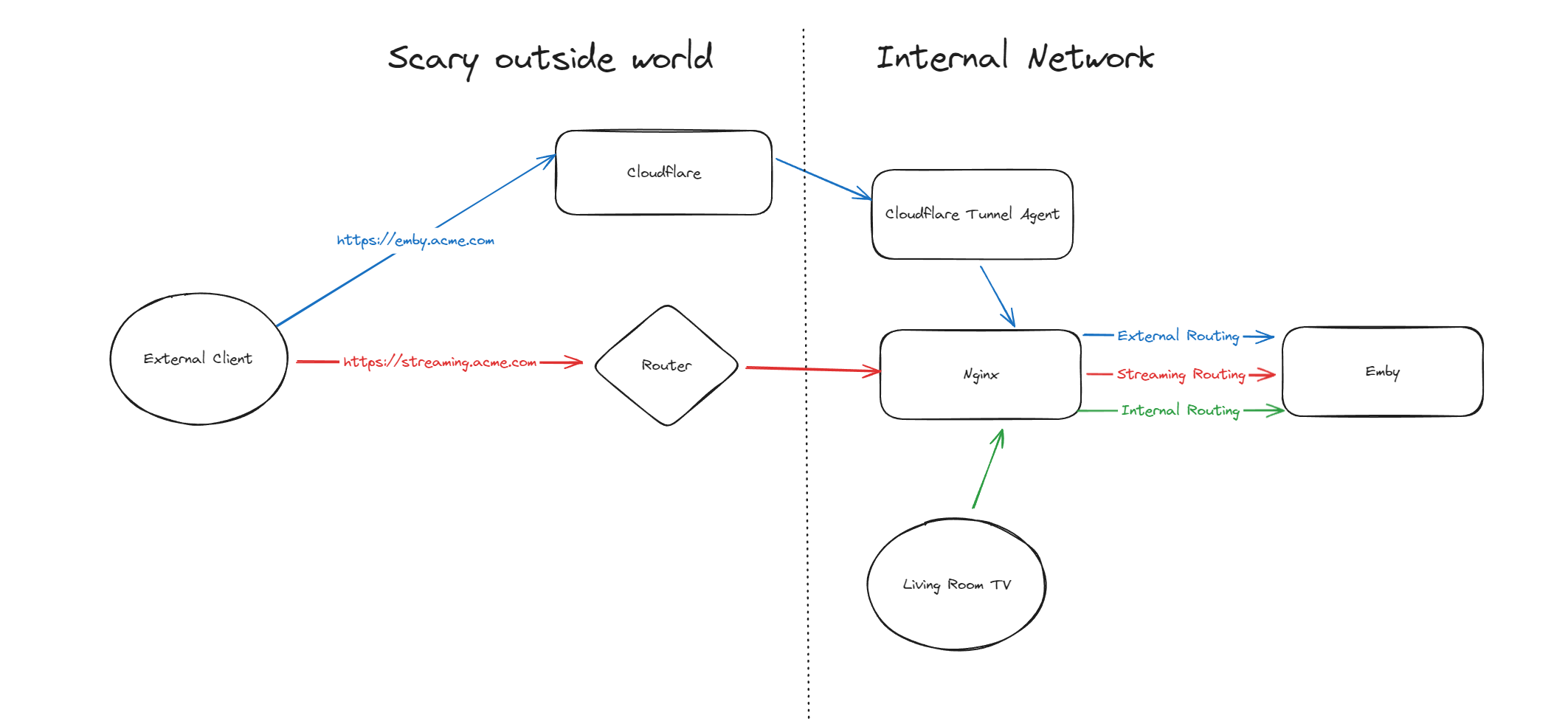
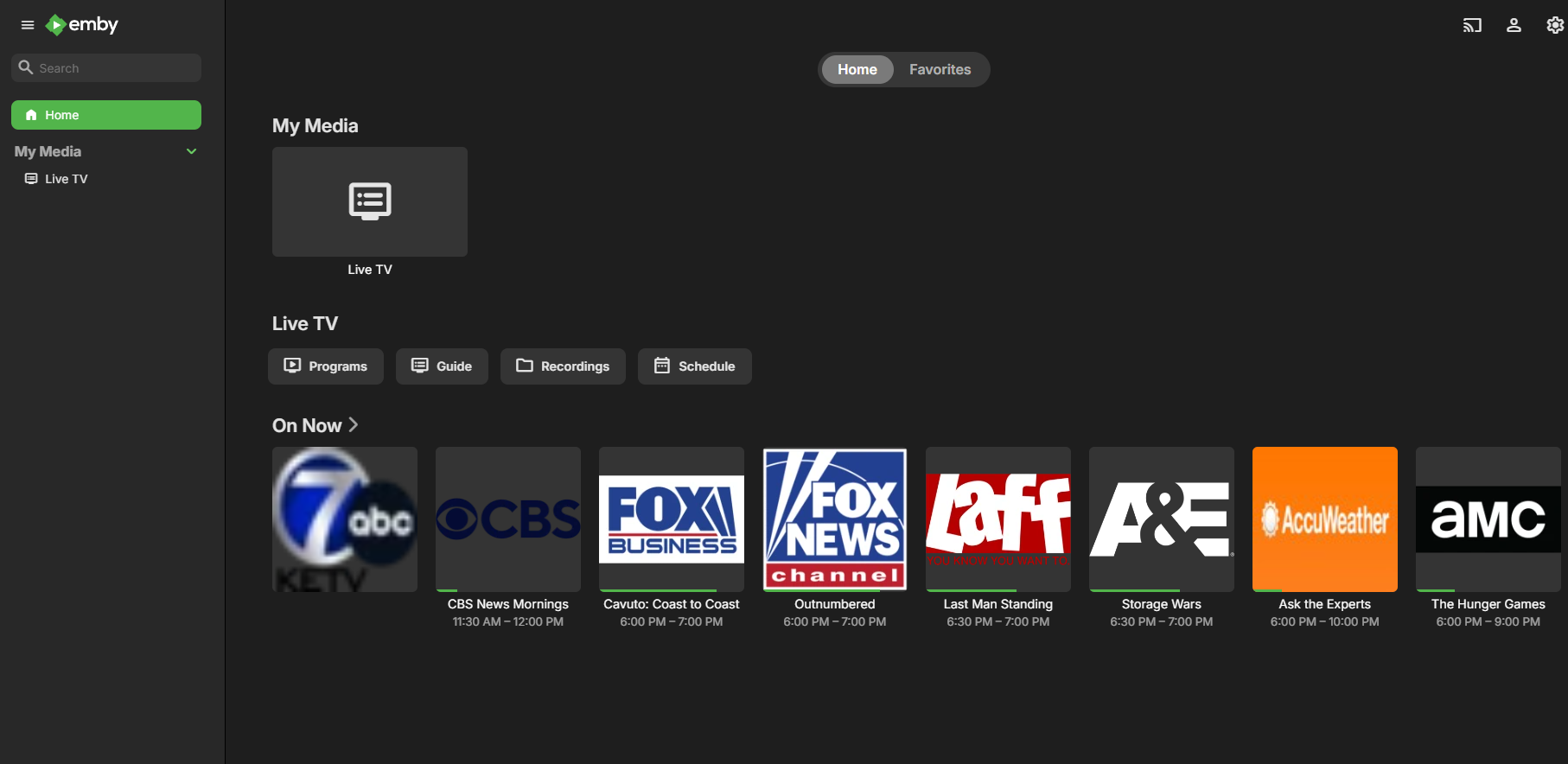
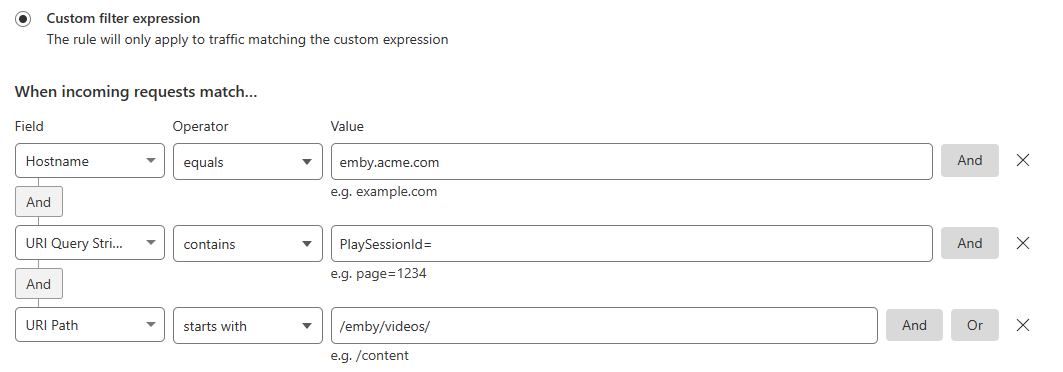
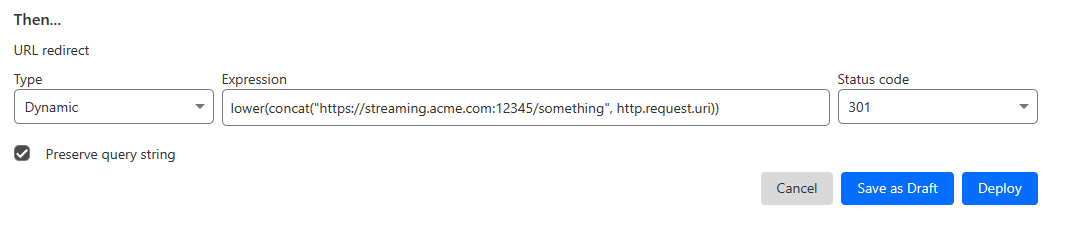
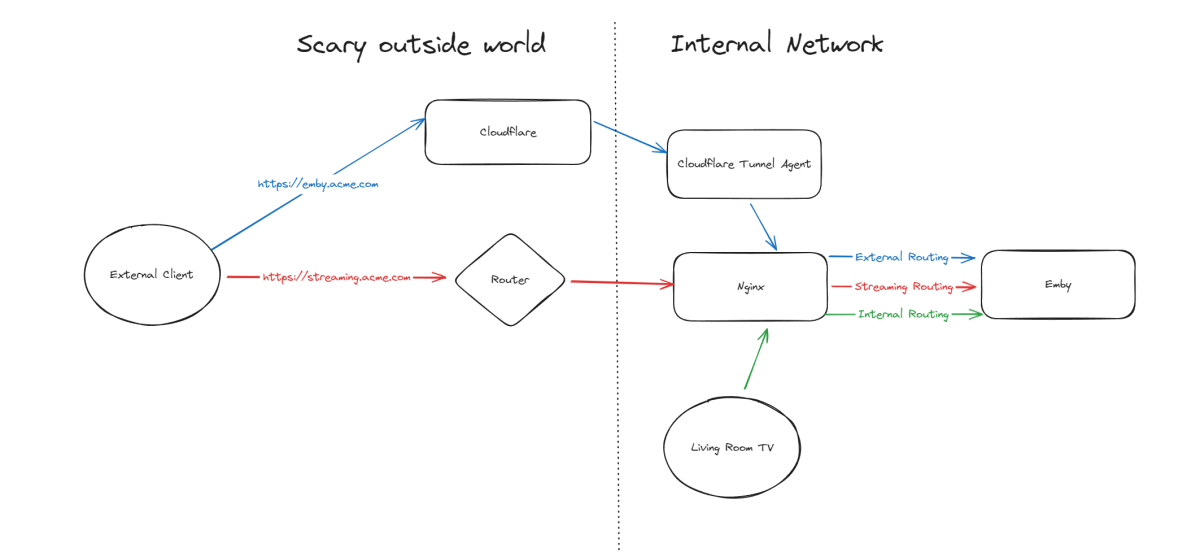
Hello, A few months ago I was in the process of moving away from directly exposing Emby via my home router to using Cloudflare Tunnels, but as it turns out, Cloudflare don't like you paying nothing and yet streaming GB/TB of data through their network. This was frustrating as I really wanted to put Emby away behind something I trust but I also didn't want to get my account banned for streaming media through it. I've read through many posts here about avoiding caching but it seems it's not necessarily the caching that will trigger your account being in trouble, it's the bandwidth usage as well of just piping all that data through their servers. Since I now had some time, I thought I would try to work out a long term stable option using Cloudflare. So what to do? When talking about security with self-hosting anything, I'm not going to go crazy but I like to take away easy wins for bad people. When it comes to running something like Emby, I'll assert that the biggest risk you face is automated attacks at scale. By this I mean that when it comes to hosting Emby at home, I am not really worried about some clever kid that I beat in an online game spending a weekend taking revenge on me or a state-backed hacking groups spending 6 months breaking in - I'm mainly worried about the type of flaws that are easy for people to automatically discover and exploit - e.g. recent examples with Emby and HomeAssistant. Both of these flaws allowed attackers to bypass the authentication layers of the application - no matter how complex your password is or whether you have MFA enabled (in the HA case), it's a trivial exploit once an attacker detects a vulnerable version of your software running. Both of these flaws were exploitable at scale, provided you could find Emby servers online. Given my determination to run things through Cloudflare for several reasons, security included, I wanted to come up with a system that gave me some confidence without being too complicated and without risking my Cloudflare account being banned for streaming through their service. I have not written this for everyone to be able to follow - if you are not familiar with nginx, Cloudflare, HTTP semantics, then this may not be all that helpful. Split Service Where I've landed is a split hosting setup - far from ideal but I think it's better than going all Cloudflare or all direct access. To begin Expose Emby through Cloudflare tunnels as per other guides (I won't go into the details here right now) Expose Emby via reverse proxy for external traffic (and internal too, makes sense to keep things consistent in my view) Setup port forwarding on your router to direct a port from the internet to your nginx service Nginx will have two Emby configurations to start with - one for external and one for internal Once you are able to hit Emby both internally as well as externally, then it's time to split the external. I'm going to imagine that you now have emby.acme.com setup via Cloudflare Tunnels, and you also have streaming.acme.com setup with direct access to your service via your home internet router. What's the difference? emby.acme.com is going to be your main address you use for everything, and that will go via Cloudflare Tunnels. You can use Cloudflare's many, many security options to come up with a setup that is secure but easy for your situation. streaming.acme.com is going to be a DNS only record in Cloudflare, it will point to your home IP and you will port forward this port (can be any random port number) to your nginx server. If we were to leave this setup in place, you would be able to access your Emby service via Cloudflare (with media streaming through Cloudflare), AND you can access Emby via the streaming address, completely outside Cloudflare. So what we can do next is use some clever redirection stuff. Nginx Configuration Now that you have two URLs working with Emby, let's look at Nginx again. In my configuration I have two different `server` blocks in my nginx configuration - one for my internal network and one for external. I don't know if this is strictly necessary but when I started I was an nginx novice and it made sense to be able to apply different rules depending on the origin of the traffic. To complete our nginx configuration, I am actually going to clone my external configuration, giving me a third `server` block. For my third block, I will use the domain streaming.acme.com - this separates it from emby.acme.com which is my tunneled traffic via Cloudflare. Now in my streaming block, I am going to update the rule as follows: This tells nginx to proxy traffic that is destined for streaming.acme.com/something/emby/videos/xxx to your emby server. What it also does (as long as you don't have other `location` sections) is tell nginx to not redirect any other requests that fall outside of this location to your Emby server. Cloudflare Redirect Since we want traffic to go through Cloudflare *except* when it's the actual media stream, we want your main Emby URL to be setup with a DNS address in CF that is proxied through their infrastructure and accesses your local Emby via CF tunnels. To handle the actual stream, we will create a redirect like this Now redirect that traffic to a new location What happens now? Well hopefully it comes together and something like this: if you visit https://streaming.acme.com:port/, then nothing is returned (where previously you could access Emby outside of Cloudflare and directly via your router) - nginx returns a 404 (or if you prefer, set it to return code 444 which drops the connection without explanation). If you visit https://emby.acme.com/ then you will hit the Emby login screen and can log in, and move around the application (this traffic is all via Cloudflare, with caching etc.) If you start to play a video from https://emby.acme.com, Cloudflare will intercept that request and return a redirect to your client, telling it to go and fetch the video chunk/stream from https://streaming.acme.com:port/something/emby/videos/xxx It should hopefully look something like this Why would I go to this trouble? Here is why I think this makes sense 99% of requests will go through Cloudflare, where you can layer on world class security options - you don't need to rely solely on Emby and the development team for security, put a fantastic authentication system & WAF in-front of it. This includes your authentication, requests to delete media and admin operations (These requests benefit from caching) You don't stream the video through Cloudflare - this was our compromise with this design. You are now exposing your nginx service directly to the world, however you may have to do that anyway if you don't want to stream through Cloudflare. Plus you can further protect yourself from autonomous/widespread attacks* You can use all of the Cloudflare security and other features to protect your Emby instance - I am assuming you want to have an easily recognizable URL & use port 443 for ease of use, so now you can do this and then have the Cloudflare firewall and other security features between the client and your service. In my CF redirect, I change the port to a random port number that I then open on my router* In my Nginx service, I drop any request immediately that is not a request to stream an Emby video file (e.g. the login page or any other API/page) If you look in my configuration, I lifted /emby/video off the root location and inserted a `something` - I was exploring injecting a Cloudflare access token as a query string but for now I just added a random base64 encoded string so that streaming.acme.com/emby is not a valid path.* I'm pretty new at Cloudflare, but I'm positive there are a couple of other clever things you cand do, e.g. you could block connections from certain countries, put your friends on an allow-list and block everyone else, or find other creative things to do. * Some people may look at using a random port number or having a random string injected into the path as not that secure, which may be right in some context, however since we don't have complete control over the Emby clients (to setup client certificates or integrate with a real IDP), and since I am focused on being safe from widespread flaws affecting Emby, or the webstack that they build on, or the logging framework they use, or some flaw in some other library, all I need to do for now is make this a pain for anyone to try and exploit. It may not stand up against some state sponsored hackers, but I'd be surprised if you fall victim to a widespread malware dropping activity as part of a critical flaw. Would this have saved me from the two earlier attacks I honestly couldn't answer this right now, it's possible the answer is no, but I am in my infancy with my Cloudflare setup and confident that with a few tweaks (limiting countries, suspicious request blocking) then I will be more confident in the future. Most of all, I would love a way from the Emby client to authenticate securely with a service like Cloudflare - a username and password being sent to the Emby service is nice but as we see flaws that negate this type of authentication, I'd rather try and put Cloudflare or another industry leading provider as my 1st line of defense rather than rely solely on the small teams building the software I enjoy running at home (no offense Emby Team) My goal initially was to move away from hosting Emby directly via my router/home connection, and onto Cloudflare which I believe I have accomplished with a compromise I can live with for now - as I actually get time to spend with Cloudflare I hope to be able to come back and say that I have more confidence that Cloudflare would help avoid attacks in the future.

 1 point
 -
Oh, thanks, then I don't need that. There's an easy way to fill this data, play the file once and I always do when creating a STRM file to check the target is reachable and I did not made any mistake. Thanks a lot.1 point
-
In 2 hours, the server will start nightly tasks. Let's see what I found in the morning (1.15 am here right now).1 point
-
Solved the problem. The provider was rejecting any region outside of USA, changed VPN to a US server and it works fine.1 point
-
Alright, I'll give it a go when I get home. Might have to play around with it a bit because I don't know exactly what syntax the interface wants exactly to define containers and codecs.1 point
-
Well... the short answer seems to be no but yes lol. I looked at the menu settings and I saw all the resolutions and refresh rate options so I thought maybe I did. I went to the fire cube display settings and indeed it was off. That is, the "match frame rate" option was unchecked. I went back into emby again, same behavior, same options. Then I went and turned **on** the match frame rate option. Rebooted the fire cube for good measure and went and checked.... same thing.... same behavior. Went back into the fire cube settings, turned off the match frame rate option. Rebooted it, went into emby... and poof the option is gone and the tuning is much improved. About 5-10 seconds to tune and doesn't hang when going to back to the guide screen. So it would seem turning it on, reboot fire cube, then turn it off, reboot fire cube... fixed the problem. Or least makes it easier to live with. If you have any tips for improving live tv tuning speed I would love any help there. I have an OTA card with 4 tuners on it and wish it would use some sort of predictive tuning on the 4 tuners. i.e. watching OTA channel 1, then OTA channel 2 is tuned. A new OTA tuner is used and the old tuner remains tuned to channel 1. So when I flip back to channel 1, it's "ready to go".... but this is whole thread of it's own :-). Pretty weird... but thanks for helping me fix it!1 point
-
@jaycedk Scratch that. I switched ports over and changed my ddns link and it was working at first. Took 20 minutes or so and made a few more accounts for my family to use and was testing them out and now its throwing the same error again. Here is the relevant log: https://gist.github.com/Jimily412/75c18e96056d5f8af8186bee977e3ecc1 point
-
Hi. This is an issue with the current beta server. Thanks.1 point
-
I completely agree, Extras aren't special and most often don't have a tvdb/tmdb entries. The extras can be show, season or episode specific, and i want them to display inline, like other media servers1 point
-
@jaycedkI provided them in an edit to the original post1 point
-
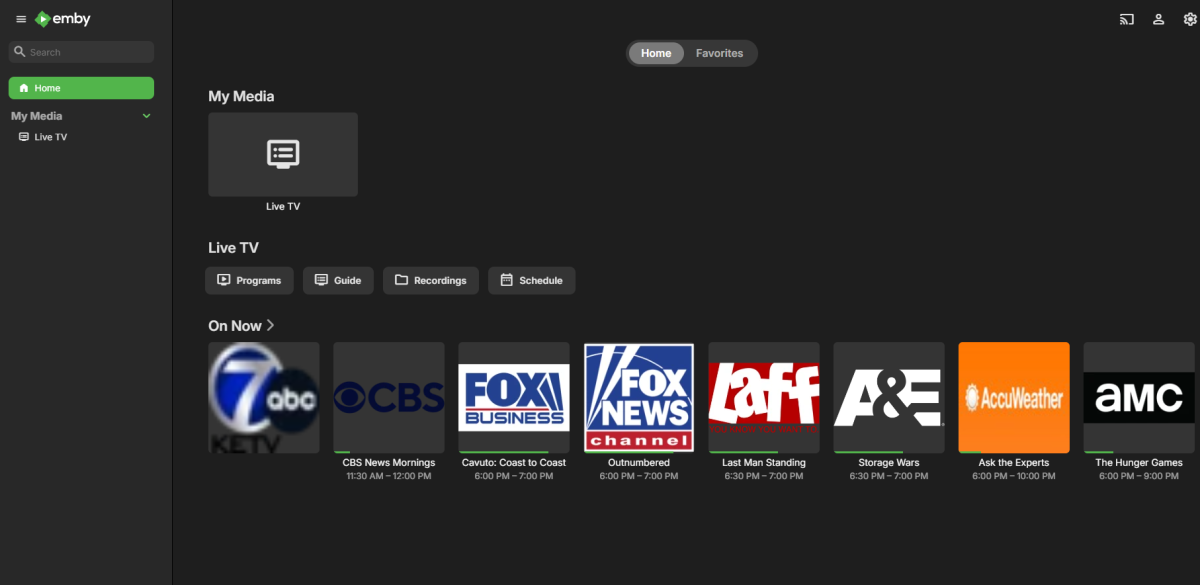
@PeterMacalisterYou need to edit your pictures. AND you need to use a password, I have free access to your server. @GrimReapercan you edit opps post.
 1 point
 -
Hello all, so sorry for delay, some things came up. I just made the changes quoted here, thank you very much for the details. Will monitor over the next few days and see if this solves the issue.1 point
-
I am really sorry for botching a support request like this. In the end I found out an issue with subtitle files copied in that folder that the executable didn't have access to and made a lot of other things work very bad. I am really sorry again and I thank you very much for your support.1 point
-
One more for this feature, in my case per tvshow, remembering playback speed when jumping to the following episode. BTW, just as an idea, what about instead of a button and option at library level "Remember playback speed" ? This will enable to just apply to specific libraries, solving the audiobooks issue, my issue and probably this issue: Hope this helps.1 point
-
I think we just need to add 'Included in' section on the Show Overview page to match the web app1 point
-
Thank you, it seemed to work, i had to activate this option because it was fluttering each time a new subtitle came in. Will see if it comes back .1 point
-
Attached below is the latest code. I tested it yesterday by creating many channels and it worked fine. Bumpers and a third filter have been added. In addition, @TZTZorohas cleaned up the HTML and CSS to give the GUI a nice crisp look. I could have missed a problem, so tread lightly when using the code. For those following the source code, the lines of code have been greatly reduced and everything has been reorganized to make the code more readable. Please alert me to bugs, and I will fix them right away. Also let me know if the code is working OK. Vic PseudoTV.dll PseudoTV.zip1 point
-
Yesterday an hour or after deselecting: Import collection information from metadata downloaders I noticed that my manually built collection was still fully populated but two of the automatic collections had movies that "migrated" out of the collection and into the main list. I manually moved the errant movies back into their respective collections and this morning all collections are still populated correctly. Now we'll see what happens. Also regarding my previous post - it doesn't make any sense to think that the collection metadata would have any influence on the content of the collections. That data would be maintained in the database.1 point
-
Standard Premiere licence is 25 devices (note, devices, not users). Devices fall off the count about a week after their last use. There is a n upgrade to 45 devices available. https://emby.media/support/articles/Premiere-Limits.html Paul1 point
-
Same from my side, although I had downloaded some songs with the broken version and had to delete them and re-download them so that they worked properly? I also haven't done extensive testing, but it seems to be fine so far. Thanks!1 point
-
I did a quick test after upgrading to Emby for iOS 2.2.22. The progress indicator looks normal again and I managed to play 2 full songs over Airplay without interruptions. Will do some more extensive test later today, but on first glance everything looks fine. Thank you so much for the quick fix!1 point
-
Thanks for the reply. I hope to get to it soon. I have one or two more things to share which need improving, but will make different topics for them to be clearer. I am in process of building my smart home architecture and the server for accessing and managing digital media is crucial. Emby do really great job for that! There are some really small things (like the one mentioned above) which is working but are not stable enough and because of that i hope it will not be so difficult to upgrade them as you already build them :-). Best regards and nice week.1 point
-
Hi Team, Since the latest Server beta update, an issue has arisen with the ATV. When I select Blue Radiance, the theme applies, but disappears after force closing or restarting the app. This issue persists across three different ATV devices. Additionally, the PIN request appears more frequently on local network devices, even after selecting Remember This User in the settings.1 point
-
Umm sorry i already got ... just need was change prptocol to tcp. . .... Now aboy tailscale. Is it free ? With tailscale can i play stream remotly using tv's. ? Use external networks but playing on tv1 point
-
Right. Because it's not your Emby server but your Windows VM (client) doing this. If you are using NordVPN you probably have some other Nord security product enabled in that VM functioning as a forward proxy traffic inspector. Maybe you still don't understand so I'll explain but you might not like it. The Nord Threat Protection that is doing this (or some other component. I don't know - don't use it) intercepts the outbound connections you initiate, does TLS termination and establishes a TLS connection with your original destination. So your HTTPS/TLS traffic is in clear text and visible to this component. Now this might not work with all sites and some well known ones could be considered secure and excluded. This is the man-in-the-middle (MITM), machine-in-the-middle or the current sensitive, inclusive and politically correct iteration - On-Path. Very common in the enterprise where you can see that sites are not presenting their own certs but ones issued by a security appliance and/or internal corporate CA. I wouldn't ever use something like this on my private network unless I had one that was home grown, fully managed and trusted by me. In the corporate world that's different because it's their network. I guess NordVPN could pinky-promise that they would never ever do something shady with your data.1 point
-
10.0.29 installed. All good, thanks.1 point
-
Well, got the 2.2.22 ios Emby update and so far so good. Haven't been able to reproduce the problem and have tried on and off my local network. Will just have to see if this fixes it.1 point
-
Ich glaube das Ich'das Problem gefunden Habe. Meine Freundin hat in den einstellungen in HDMI etwas verstellt. Habe das zufällig gefunden jetzt steht das wieder auf Decode und es läuft wie es soll. Also sofern auch andere Mal das Problem haben könnte man eventuell in den einstellung für HDMI im Media Player schauen was dat eingestellt ist.1 point
-
Shield is sadly still the best. Amazon Firecube 3rd gen is a distant second.1 point
-
jellystat will add support for emby soon enough https://github.com/CyferShepard/Jellystat/issues/133#issuecomment-2108412306 it is a bit sad that most of the innovation seems to be with jellyfin and emby gets added after. jellyseer is another that came the same route but is a essential complement to emby IMO1 point
-
Thanks man, this is really sick and a feature al lot of people wanted in the past instead of the Excel or CSV export. Awesome work!1 point
-
No one wants to pay for anything and no one wants ads. Yet, everyone wants a job that they are paid for and no one seems to see the conflict there... Just food for thought.1 point
-
@luke, what's the latest update on this? It's been a few months since your response above, 4.8 has been getting the support it needs and 4.9 has received more than a few updates. To hold up this completed feature just because a new Windows app is taking forever doesn't make a lot of sense to me. Thanks for any info you can give.1 point
-
Live tv could be better imo1 point
-
@krislemkeignore me. I found a typo in the GIDLIST on my docker-compose file for the render option. After correcting that (as well as updating to the latest beta), all of the hardware decoder/encoder options showed up and it's working flawlessly now. Transcoding a 4K H265 stream down to a 720p H264 stream used to push the CPU to around 80% of its capacity and now it's < 5% utilization. Quality is still really good even on the high speed settings, so I'm super happy with the performance of this little N100 processor.1 point
-
I would like to lock a speed level (for example, 1.5x) on each new video. This could be set client side and not persisted on the server. My use case for this is that I use emby to watch training/certification videos, and they are very slow and only last a few minutes per video. One topic might consist of 20-30 videos. Currently, I need to keep speeding them up individually.1 point
-
Docker is not a nice solution on UGreen 4800+ I can't scan the folders and no new medians are shown.0 points
-
While the "new" method for viewing missing episodes (the three dot menu on each show) is less than ideal it is perfectly adequate for finding what episodes are missing. It is a bit clumsy and not as intuitive as it could be but it is functional and has no real drawbacks for my Emby usage. I "can" see missing episodes just fine and that is really all I need. This seems unimportant to me as there are a few (actually several) other, much more serious problems that Emby need to spend their time on.0 points
-
It's not about and not depending on the server. The new Windows app is ready for beta, and that's - well, how should I say that - that's the point in the timeline where we are standing.0 points