Leaderboard




Popular Content
Showing content with the highest reputation on 06/09/24 in all areas
-
So you prefer not to try to identify and fix a possible problem. Your choice, I guess. Paul2 points
-
At the moment, if I assign artwork to Animation in a MOVIE library, then the TV library also has the same image for Animation. Id like my MOVIES library genre artwork to have different artwork to the TV one.1 point
-
I just tried playing a 1080i channel using the latest Emby beta app and the stream is still being transcoded .... can someone else test and let me know if I'm alone ? I'm running the app on a Roku ultra 2022.1 point
-
I went to DrivePool years ago so 24 drives all appear as one. So sure drive wise everything is scattered across all the drives but no program knows that as it only see the virtual drive. Guess you can wait for dev to comment but have never seen what you want/describing ever being in Emby.1 point
-
Yes as this image suggest no AA. As it shows different Artists per track.1 point
-
Hi, we are looking into this. Thanks.1 point
-
Hi, we’ll take a look at this. Thanks for reporting.1 point
-
Nicht zwangsläufig. Kommt halt drauf an wie du es in deinen Bibliotheken eingestellt hast.1 point
-
That did it. Good to know, thank you!1 point
-
Run Scan library files on series or library level or run Scan media library task.1 point
-
I think so up next was working fine Pryor To. .29 only way it works now is if I use dynamic which I have never had to.1 point
-
I did, need to have to pull them from the library and re-add to get the individual disc images to be recognized. Appreciate the work, this is a nice touch1 point
-
1 point
-
That looks like the image captured was going through an outbound security proxy inspecting traffic, basically MITM.1 point
-
Thank you!1 point
-
I mentioned these in a different thread but you could look at the Tiny Mini Micro machines which are 1L ex business units and cost circa $120-150 on Ebay. I use tonnes of these for homelab stuff and they are great, deffo more powerful than a PI. I run one as a NAS using Virtual DSM docker (synology) and that has 2 nvme slots and a SSD, i5-8500T 16GB Ram and runs like a champ all for just a bit more than the PI. If only running emby server on it, then could just install headless linux i.e Debian 12 and run Emby server either direct or via docker. They also sip power so cheap to run ongoing1 point
-
You can start with Caddy in as simple a way as you want. The thread about Caddy and Cloudflare is just that - if you want to use Cloudflare, it's a useful resource. If you don't want to use Cloudflare, then keep it simple; a basic Caddy setup is so simple that it's easy to overthink it. I laid out the basics of Caddy in this post. All you need otherwise is a domain name and knowledge of your router. Paul1 point
-
I can see you use a manual added Emby server address, is this correct? Please send me your "servers_XXXXXXXXXXX.json" file for review. REMOVE the "AccessToken" in this file before posting it! You can find it in: ../userdata/addon_data/plugin.service.emby-next-gen. I think I can reproduce the issue. I'll fix that in next version.1 point
-
Had to fix a bug in the searchbar that was depended on the links getting generated, searchbar is working again. The generated html file now has modifiable stylesheet. You will find it at the top on the media.html, you can adjust the style to your needs. <style> body { font-family: Arial, sans-serif; margin: 20px; } h1 { color: #333; } .menu { margin-bottom: 20px; } .menu button { margin-right: 10px; padding: 10px; cursor: pointer; } .search-bar { margin-bottom: 20px; } .search-bar input { padding: 10px; width: 100%; box-sizing: border-box; } .shows, .movies { display: flex; flex-wrap: wrap; } .show, .movie { flex: 1 1 23%; display: flex; flex-direction: column; align-items: center; margin-bottom: 20px; padding: 10px; box-sizing: border-box; margin-right: 1%; } .show img, .movie img { width: 250px; height: auto; border: 1px solid #ddd; border-radius: 5px; } .show a, .movie a { text-decoration: none; color: #333; text-align: center; } .show a:hover, .movie a:hover { text-decoration: underline; } .show-title, .movie-title { width: 100%; color: #333; padding: 5px; box-sizing: border-box; text-align: center; font-weight: bold; min-height: 50px; display: flex; align-items: center; justify-content: center; } .table-view { display: none; width: 100%; border-collapse: collapse; } .table-view th, .table-view td { border: 1px solid #ddd; padding: 10px; text-align: left; } </style> webview.sh1 point
-
Done You can set link generation on or off and you can choose the image width to be used in the css style, the height gets adjusted automatically. Image width of 250 gives a good result, images are neither to small nor too big. webview.sh1 point
-
Restarted Emby server and is working now. My bad... Thank you!1 point
-
Awesome! Can’t wait to try it out when it is released1 point
-
usa, east coast1 point
-
Thanks a lot Luke, to support.1 point
-
Thanks, pushing a fix out for that.1 point
-
So is having no password at all. You should enforce that each user has a password. An insecure password is also a very bad idea. You should enforce >100bits of entropy. Single factors are also bad practice, you should enforce two factor authentication. Plain HTTP connections could be sniffed, its imperative that you disable any unencrypted connection. No self-signed certificates, TLS 1.3 and only modern ciphers, obviously. Or maybe, just maybe, you don't know everything about the setup and you could leave this security consideration up to the person running the server. Have secure defaults by all means, but why force people into features that add no security whatsoever while impacting usability.1 point
-
No one wants to pay for anything and no one wants ads. Yet, everyone wants a job that they are paid for and no one seems to see the conflict there... Just food for thought.1 point
-
Hi. Duplicate of your own request...1 point
-
While i understand the desire for using an external player I do not think the "external player" needs to be exposed for everybody. It would just confuse many/most users. The option for using an external player already exists in Emby and we do NOT need to add confusing buttons to any user interface. Use the tools that exist instead of trying to add new ones.1 point
-
it'd be really cool to have extras seperated by type. it's hard to scroll through the section when some shows have over one hundred extras. i'd like to choose between featurettes, making of or interviews folders easily. tvdb started seperating the extras this way, maybe it can be implemented?1 point
-
Hi, we are looking into it. Thanks.1 point
-
Is this topic done with? Please tell me it is not so; the new solution is idiotic. Seriously, a running list that never finishes loading, cannot be easily reviewed, cannot be exported or searched... At least you can multi-select!??! Why?!!? To what end?? Is there someone out there that actually thinks this is an improvement? I don't understand; surely there is not a programmer who is proud of the way this implementation turned out. And here is the rub - to make it not offensively stupid, all that needs to be done is to allow the list to be exported to .txt. .csv, .xml... Please don't be done with this, it's just lazy.1 point
-
No. Why is that your main concern instead of trying to make Emby more usable and flexible under these circumstances? Making it hard to circumvent is part of the problem but starting from a place that it needs to be impossible to defeat is the wrong approach.1 point
-
More updates made in the new thread today. More to follow.1 point
-
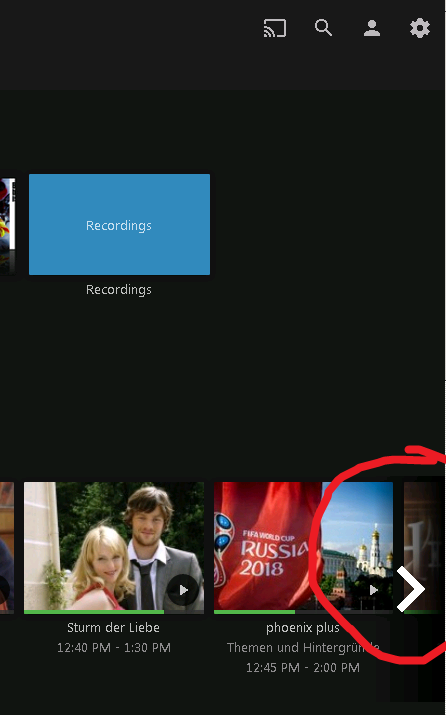
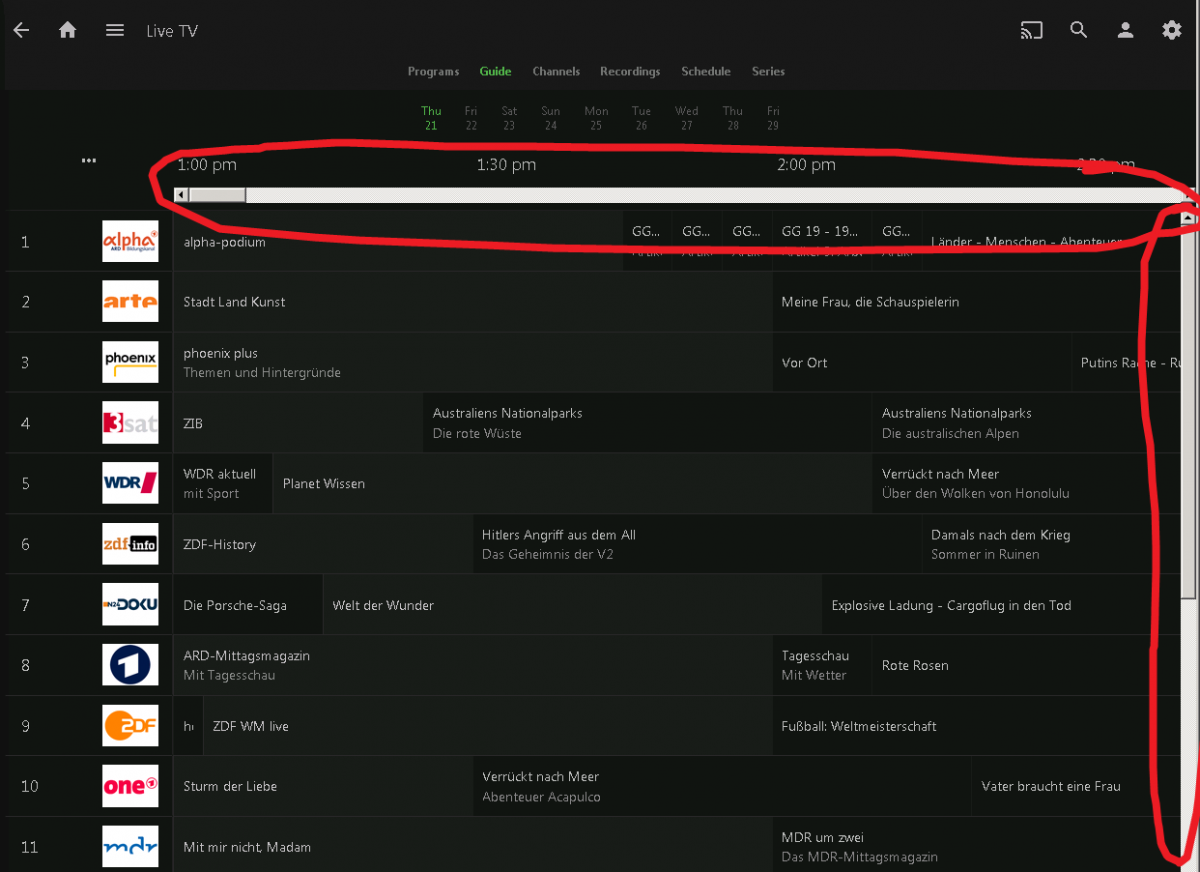
If this is not the correct forum for the webclient (ref: https://emby.media/emby-web-client.html) please move the topic accordingly. I am trying to use emby via web client on a Fire TV but ran into navigation issues. To be more exact, there are two distinct problems: 1) The scroll buttons in the main screen are never visible (see attached "arrow.png" to see which buttons I am referring to). First I suspected that the FireTV SILC / FireFox Browsers just don't support specific Javascript events when moving the cursor to the edge of the browser window. But even when I apply CSS like .scrollbuttoncontainer{ display: block !important; } ... the buttons still aren't displayed at all. (They are displayed permanently on desktop browsers after applying that CSS) 2) Scrolling in the Live TV Guide isn't possible at all, since neither dragging the cursor to the horizontal/vertical edge of the list initiates scrolling and also no scrollbars are shown (see attached "scrollbar.png" to see which bars I am referring to). Are those known issues? I couldn't find anything in any document/wiki about emby that contained minimum requirements for browsers (Javascript / CSS wise). I am using emby server 3.3.1.0 on FreeBSD 11.1-STABLE but couldn't find any hint about such issues being fixed in the meantime inside the changelogs. Feel free to correct me if I am wrong. So, does anyone have an idea how to fix this?
 1 point
 -
While the "new" method for viewing missing episodes (the three dot menu on each show) is less than ideal it is perfectly adequate for finding what episodes are missing. It is a bit clumsy and not as intuitive as it could be but it is functional and has no real drawbacks for my Emby usage. I "can" see missing episodes just fine and that is really all I need. This seems unimportant to me as there are a few (actually several) other, much more serious problems that Emby need to spend their time on.0 points