Leaderboard



_svg.thumb.png.85e4ee6291ddd76347269c05175b5dda.png)
Popular Content
Showing content with the highest reputation on 05/22/24 in all areas
-
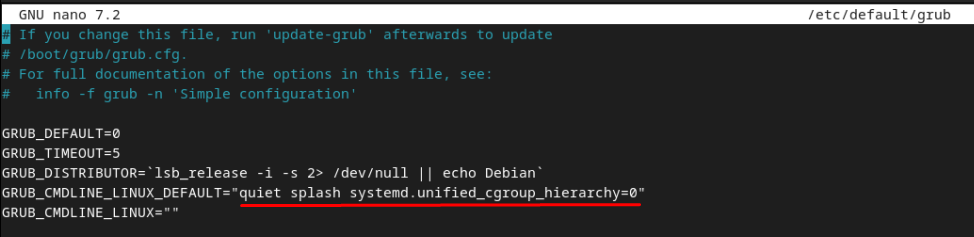
I found the solution by modifying grub update-grub and restart
 3 points
 -
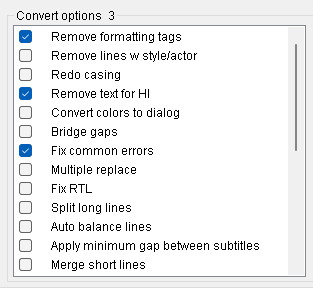
This is an FYI kind of post because I spent some time scratching my head before I figured it out... I use subtitles all the time in the form of external .SRT files and have never had any problems with them working. I just added Generation Kill to my library, ran Subtitle Edit in batch mode to strip out the HI stuff and it all looked good locally through MPC-HC. I copied it over to my Emby server to watch and found that it wasn't showing the subtitles. Emby knew all about the subtitles, they just weren't playing. To make a long story of troubleshooting shorter, I used Subtitle Edit in Batch Mode to "Fix Common Errors" and whatever that did, now the subtitles all worked without any issues. [For multiple Subtitles] Subtitle Edit: Tools > Batch Convert > Check FIX COMMON ERRORS [For a single subtitle] Subtitle Edit: Tools > FIX COMMON ERRORS The screen capture shows the batch settings that I use for every subtitle now. I hope that this helps someone, because it gave me an unwanted something to do for an hour.
 2 points
 -
Character art is popular for TV Shows. I think Emby (<-- spell check) Server should support scraping and saving/serving this artwork for/to the community. Thank you.2 points
-
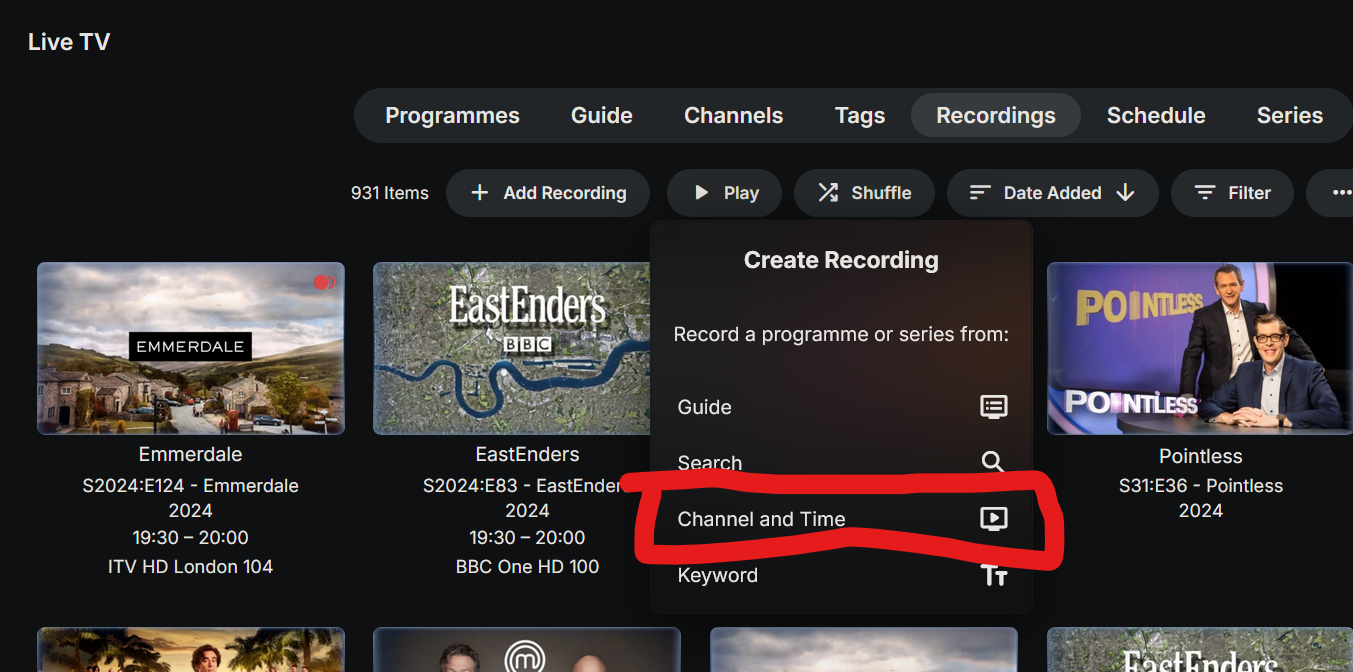
How are you all watching sports? Unlike TV shows, sports programming frequently end AFTER the specified time in the channel guide. I have been doing this Manually select the game I want to record After I hit record, I go into the the settings and enter a value for "Stop when possible" -- I usually put 40 mins which will get most overtimes (unless it goes double overtime). If you don't pad the sports "episode" and rely on channel data you WILL miss the final minutes of the majority of games. Most games (basketball, hockey, football) run at least a few minutes over the scheduled time in the Channel guides. I think the sports recording user experience with Emby would be improved if: We had way to check a box, or otherwise tag arecording, as Live or Live Sports to automatically pad the "episodes" -- ideally this option will be available the same time (i.e. before) I click the "Record" button, so I don't have to pad each episode manually, after setting it to record This could have the added benefit of making a smart "sports" library available under recent recordings etc, since it would already be tagged... Alternatively, I would be very happy with a process where I could just select Channel Start Time End Time (or better yet, Duration) If Emby already supports this (pick channel and start time, instead of using the channel guide) I don't know how to use it. The sports teams I usually watch move from channel to channel. My game might be ABC today, TNT tomorrow, and ESPN on Sunday. Sometimes (during the playoffs) I have the option of recording either the national game or the local cable network version of the game. I use the HDHR Prime with the CableCard to pull in my cable networks.2 points
-
Hi ebr, looks fine. just had a couple of minutes and can confirm that the freezing and the next-episode-info seems to be fixed for merged episodes in the beta app. Thank you!2 points
-
Believe what you want but this is exactly what Genre Cleaner is designed to do.2 points
-
New PUBLIC TESTING version available 10.0.25: Delta changelog 10.0.24 -> 10.0.25 fix sort orders for dynamic nodes improve performance for dynamic nodes change plugin structure (fixes content detection issues for dynamic nodes) Comment: The wizard will migrate the settings. Rollback to pevious versions will wipe the settings. A reconnection to Emby server must be done, but database will stay in sync. If you have downloaded content files located in the plugin's addon folder, delete them BEFORE the update! User icons are not automatically migrated from <= 10.0.24. You can simply reconnect to emby server to fix that. Plugin configuration is now available via: Kodi addons "Services". This is now the "core" module. How to install: 1. plugin.service.emby-next-gen-10.0.25.zip 2. plugin.video.emby-next-gen 10.1.0.zip 3. plugin.audio.emby-next-gen 10.1.0.zip 4. plugin.image.emby-next-gen 10.1.0.zip 5. restart Kodi (manually). the plugin will now restart a second time (after migration wizard completed2 points
-
@LukeThanks for the quick response and for looking into this issue! We all appreciate your efforts and are looking forward to the fix.2 points
-
Ah it looks like a known issue - I will use my android app to update these settings for now. Thanks.2 points
-
I made these simple icons to make the interface easily legible for my parents. I'm posting in case anyone else may have use for them. Basic icons were from the Google fairy. Zip updated Jan 14, 2021. Contains all 255 icons. Flat Icon Set.zip1 point
-
It is really cool that Emby has the ability to support multiple versions of the same movie. It would be nice to have a setting on the client side to allow the user to set which version should be selected by default. This could be as simple a user-entered string, or it could be a list of detected strings to choose from. It could allow multiple entries and it would choose them in the order entered. On the Kodi side, it would also be nice to get the "Choose the Best Version for Me" option that the Emby app has.1 point
-
Hello all, i figured since i got this to work i would share my guide on how you can use no-ip and emby together. I realize this is a paid option and not free (20$ for the year with coupon), but for me its worth it as i dont have to worry about my domain name expiring every month or the ssl cert either for an entire year. hopefully this wall of text isnt too crazy. any q's let me know. ____ ** this guide is assuming you use windows 10 or windows server 2016,2019,2022 and no-ip Enhanced Dynamic DNS - 25 Hostnames*** ** always can get coupon so its 20$ for the entire year*** **Enhanced Dynamic DNS - 25 Hostnames gives you 1 included ssl cert* **NOW CALLED Encryption Everywhere DV**** ** now get a free cert with free version of dynamic no-ip** what i currently use -------- 1-manage user certificates in windows search bar. 2-select personal on left then right click on right open space. 3-all tasks > advance > create custom request 4-can follow this guide -but when done leave cert manager open you will be uploading this file to no-ip -- Remember the "common name" you entered will need this to search for in step 6 https://www.noip.com/support/knowledgebase/generate-csr-windows-10/ **Remember to use 2 upper case letters for state and country** **you can choose where to save this csr as well so you dont have to search later, but they are stored by default in C:\windows\system32 if you need to find later as well steps 5-9 explain the other way** you can wait for your status to validate on no-ip.com (took 15 min for me) they are use for my dns so i can skip the txt part. download the pem file to your server once it validates. 5-now you need to get your private cert from your system 6-go back to cert manager right click personal and click find certs 7-search for your common name you setup before (should be 1 that matches) 8-right click and export 9-below is how to do this (sorry its long) Go to Start > run > MMC. Now navigate into the console tab. Select File and then click Add/Remove Snap-in. Under the Available Snap-Ins column, select Certificates and click Add. Choose Computer Account and click Next. Now select Choose Local Computer and hit Finish. Now close the Add Standalone Snap-in window and click OK on the Add/Remove Snap-in window. Step 2: Export Your SSL/TLS Certificate. Now, open the Certificates (Local Computer) snap-in and go to Personal > Certificates from the left-hand pane. Right-click on the certificate you want to export and go to All Tasks > Export. Once you do this, the Certificate Export Wizard will open up. *** you may need to search for your cert by riight clicking personal and clicking find certificates. search by your "common name" in the cert not the name you made. *** Select the Yes, export the private key option and click Next. Now the Export File Format window will open. Make sure that the option for Personal Information Exchange — PKCS#12 (.pfx) is selected. Tick the box for Include all certificates in the certificate path if possible. Now, de-select Require Strong Encryption. <--may or may not have this option (thanks to Teredactle ) Enter a password for protecting your PFX file and click Next. remember this password! Now choose a file name and the location to export the file and click Next. Finally, verify all the information and click on Finish if it’s okay. 10-install https://slproweb.com/products/Win32OpenSSL.html grab latest version (i used Win64 OpenSSL v1.1.1s) open an explorer window to the directory of openssl and place the 2 files. 1 file is from your export you just completed. the other is the pem file no-ip. once installed open a cmd prompt with admin privilege cd to the directory of openssl (mine is located here C:\Program Files\OpenSSL-Win64\bin ) C:\Program Files\OpenSSL-Win64\bin> openssl pkcs12 -in privatekeyemby.pfx -out localprivatekeyemby.pem -nodes <---converts private key from server to pem file the file will be created in the same place you ran the openssl tool. now u will take the localprivatekeyemby.pem you just exported by command line and combine with the pem file you downloaded from no-ip. C:\Program Files\OpenSSL-Win64\bin> OpenSSL pkcs12 -export -in noiphostnamedownload.pem -inkey localprivatekeyemby.pem -out emby.pfx <--combines pem cert from no-ip and private to a pfx file for emby ****As of Feb 2023 we now need to use the new cert from "Encryption Everywhere DV" there is a bug when downloading the PEM file. the file is all garbled and wont work in the command above. download the pem chain file instead and remove all sections but the first.. save as a normal pem file and use this in the openssl command above see my post on feb 2nd 2023 for more details ****** now go to emby server and select the file. in my case its emby.pfx and add the password you created when you exported the pfx file from your server. make ssl external connections only and reboot your server. make sure your ports are properly open. i use https://www.yougetsignal.com/tools/open-ports/ you can verify your cert is working properly with https://www.geocerts.com/ssl-checker i use the default emby 8920 https port. cheers!1 point
-
Reason for request: I just upgraded some music from mp3 to flac in a different path and lost the memberships of all my playlists. The Request: Whenever ids are about to be removed from the library [due to media no longer present/deleted], the ids metadata and collections/playlist memberships+positions are stored in a "recycle bin" for a few ?hours?. Should the content be reinstated eg different path, updated quality, the new content can be checked/matched to the recycle bin metadata backup, and the content's collections/playlist membership reinstated (if not already present) and the now used backup removed from recycle bin. On recycle bin expiry do a final check for unfullled matches (against match criteria for the itemtype) to restore prior to final removal. (just in case something got missed onmediaitemadded) Each item type might have its own rule...so eg for a song, backup Path, External IDs, Album (By string name), Artist (by string name), Disk Number, Track Number song match criteria might be path (any file extension) OR MusicBrainz Track Id OR Album+Artist+Disc Number+TrackNumber a 'solutionised'? version of related I may have a go myself using scripterX's onmediaitemremoved / added... edit just remembered for some mediaitems the nfo writer can store membership but i dont think songs are supported for nfos1 point
-
Hi, yes, assuming the removal and the addition both happen together, then that could be one way of doing it.1 point
-
People tab missing is bug in current beta already reported.1 point
-
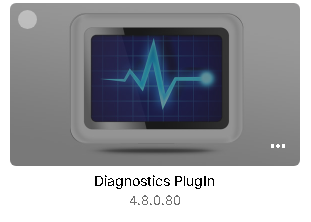
@Arthessia You have to download the Diagnostic plugin. After installation & restart you will get the Options
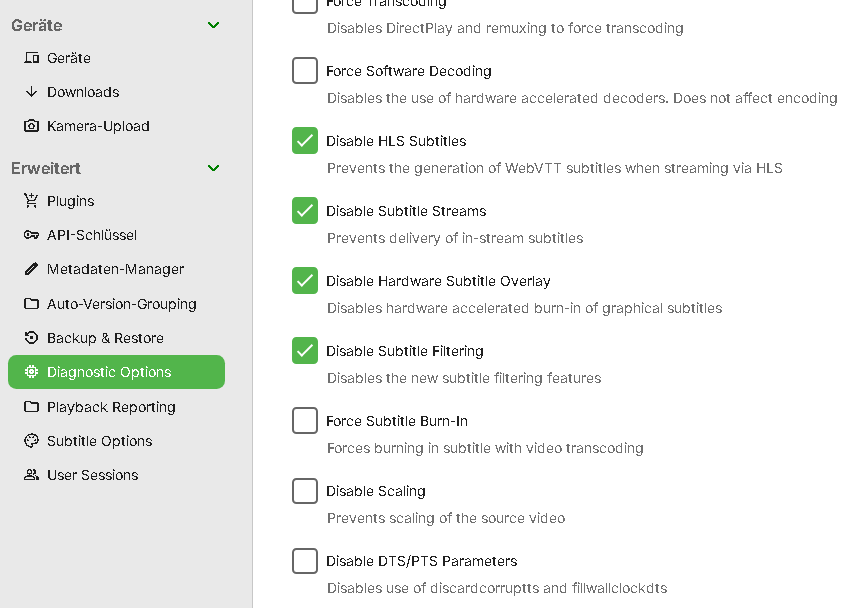 1 point
 -
intro markers were set to never..changed1 point
-
Well, I don't know what's going on now. I downloaded the first episode with the external subtitle. I moved out the "fixed" subtitle and video, and copied in the new downloads and it all worked just fine, subtitles and all. None of them WERE working until I did that Fix Common Errors repair, so I'm stumped as to why the same "broken" SRT would work now. I think that the information that I posted is still good, although super rarely needed. I'm sorry to have wasted your time on this.1 point
-
Shouldn't be required. Actually, I only use 2 dynamic nodes embedded in my skin. Photos content, but didn't need any changes.1 point
-
Ok I'll try to do that soon, thank you for your advice1 point
-
I fixed the SRT files so they work now, but yes, I can provide both Video and the SRT. Well, no I can't. The Video file size is way too big. Attached here are two SRT files. The original download and the one that Subtitle Edit fixed with the "Fix Common Errors" repair. Please let me know if there is some other way to get you the actual video, which is just under 2GB. FIXED__Generation.Kill.S01E01.en.srt ORIGINAL__Generation.Kill.S01E01.en.srt1 point
-
1 point
-
You just need to let it finish. Run both a scan media library and scan metadata folder, then Detect Intro's. Assuming you are not changing settings - It should not be scanning again once it has the info locally. (*) Intro detection, depending on cpu and I/O etc can take DAYS. With ~30K episodes and 2K movies - my scan now takes about 40-50 seconds... (*) the Intro detection does not appear to be faultless in this regard - I have noticed it re-scanning some Seasons for some reason - haven't had time to look into it tbh, but it's only doing for a tiny subset.1 point
-
Hi, thanks for sharing.1 point
-
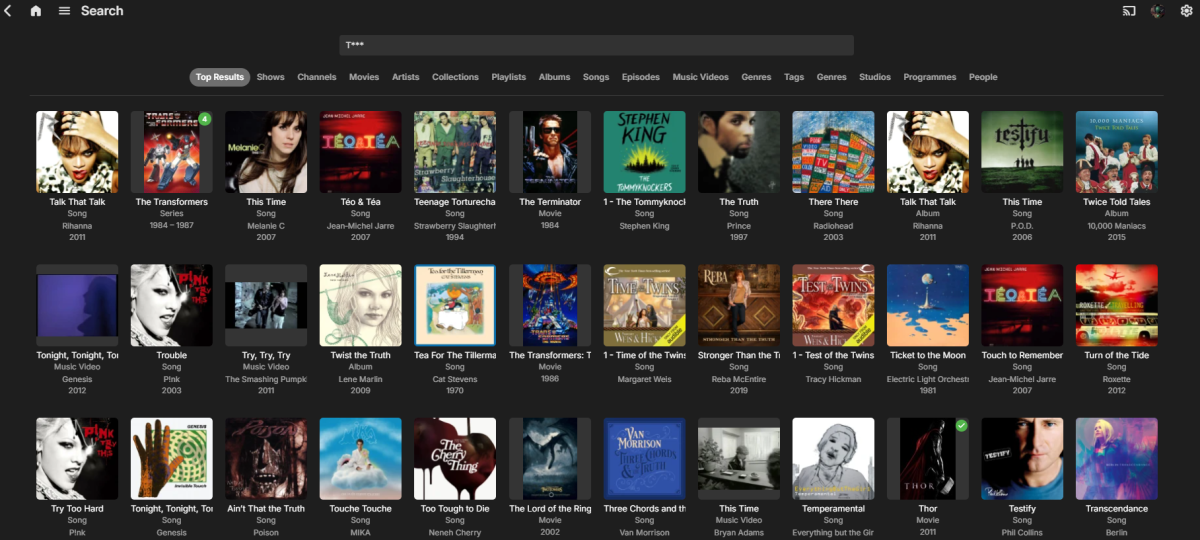
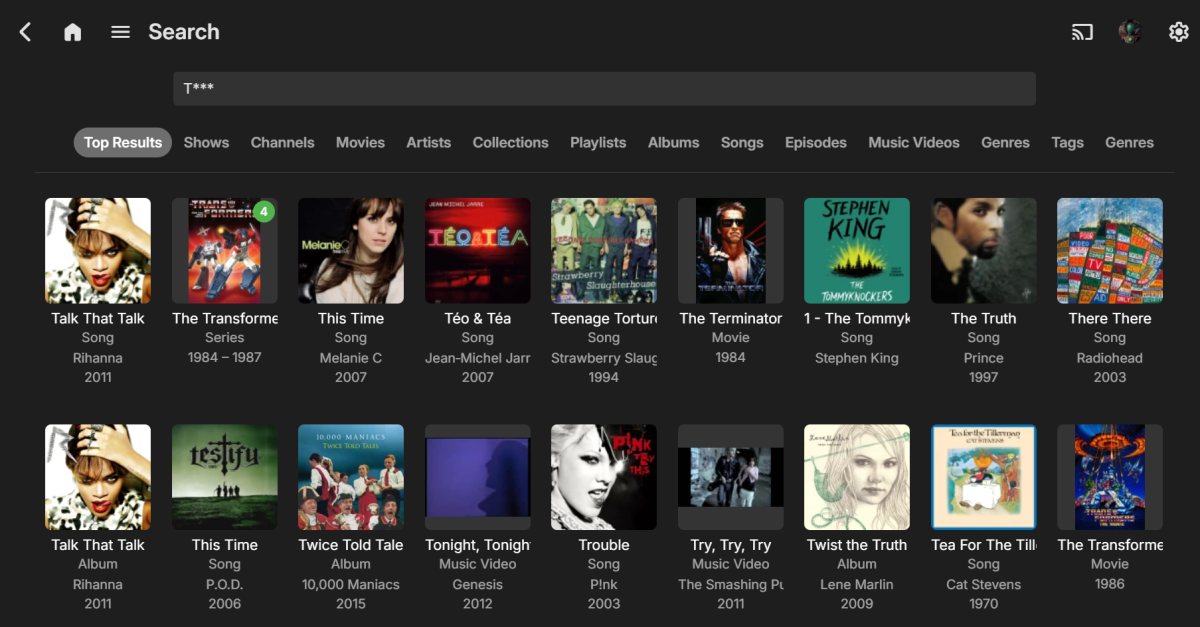
@GrimReaper hmm don't think there is a limit. I'm counting 17 in this case. Zoom in Edge 90% Zooming to 150% before anything disperse.
 1 point
 -
HI @Luke, Emby Team The tabs are functioning as intended; however, my concern and request pertain to the definition of EMBYARTISTS. I apologize for any confusion my previous message may have caused. The crux of the matter is the need for customization in determining which MusicBrainz tags equate to EMBYARTISTS. At present, Emby maps the following MusicBrainz tags: MB Artist MB AlbumArtist MB Composer These are collectively used to define EMBYARTISTS. This grouping, however, should be configurable to cater to individual preferences. @Luke, @ebr and the rest of the Emby Team, this issue has been ongoing for years. Is it possible for the team to prioritize and address this matter now? Or will it be relegated to the backlog with a note to consider for a future release? The ability to configure these settings would greatly enhance user experience and provide much-needed flexibility in managing music libraries.1 point
-
i tested with 4.8.7.0 and it looks like if i do a refresh of the metadata and choose replace existing images it uses the 3840x2160 resolution. i tested it with only one video since the other files are ok and i do not want to risk loosing good thumbnail images1 point
-
Yes, exacly. I would add the download locations as multiple sources, where the external drives would be. When downloading a show or a movie, I would add the location as an option and select one of the possible locations. There I would be able to select the external drive or the internal drive, as I prefer. Some content I'm now watching I want to add it internally, but some content I will want to see later, like when I'm travelling, I prefer it to be on an external drive. I believe that would be a great feature! Thank you very much!1 point
-
Documentation has been updated to cover file suffix extras See https://emby.media/support/articles/TV-Naming.html1 point
-
Hi Luke, it runs on 12.5.7 (16H81) which is the same as before the latest Emby update.1 point
-
Just landed here looking for a solution to this b/c there was an update and I needed to do the same thing. Went back to my server admin, did a shutdown & restarted the system thinking it wasn't going to be an option and BOOM, after it fired back up, the restart button appeared in the admin. Just wanted to say thanks to the devs for all you do!1 point
-
You’re doing nothing wrong. Thanks for reporting it.1 point
-
Hi, for the next update to the Emby android app, this has been changed to a slider, so I think you'll like that. You'll be able to just quickly drag the slider to 10 seconds.1 point
-
I expect that current models all support eARC but it depends on what hardware/software decoders they have provided (which often comes down to licensing costs). Even when they do provide it, they don’t always make it available to 3rd party apps.1 point
-
Cool thanks Luke. I was going crazy looking for this option again and again scrolling up and down lol1 point
-
My only comment would be around the ATMOS support. That depends on whether you are referring to lossless/TrueHD or lossy/EAC3/DD+. As far as I’m aware, lossless TrueHD is not yet supported by the TV, so we can’t overcome it, but if it does become supported then it is something that we should also be able to support. The simple answer is if the file will play correctly via a USB drive connected directly to the TV and using the TVs internal media player, then the Emby app should DirectPlay it in the same way.1 point
-
Couldn't type fast enough. Was going to link that topic and suggest an alternate client.1 point
-
HI, there is a defect in 4.8.7 causing this setting to not be visible. We will be releasing a 4.8.8 maintenance update in the next day or two to resolve it. A workaround in the meantime is to configure the setting using an Emby app such as Emby for Windows or android.1 point
-
Hi, the beta server has been updated to auto-sort tags alphabetically whenever you save them. This way if they're always sorted alphabetically, you don't need drag handles. We'll look into if we can backport this change to 4.8 stable. Thanks.1 point
-
Thank you all for chiming in with your experiences. It looks like we're starting a club here—the 'Can't Start Emby Club'! Seriously though, it's clear this isn't an isolated issue. Hopefully, this thread catches the eye of the developers so they can help us get back to our binge-watching marathons. Developers, we await your magic fix!1 point
-
HI, we'll look into this, but you in case you're wondering, you only need to import it into Emby once.1 point
-
It is in the store, yes. I would just install Emby Theater Desktop and run that in TV mode. The UI will more or less match that. https://emby.media/emby-theater.html1 point
-
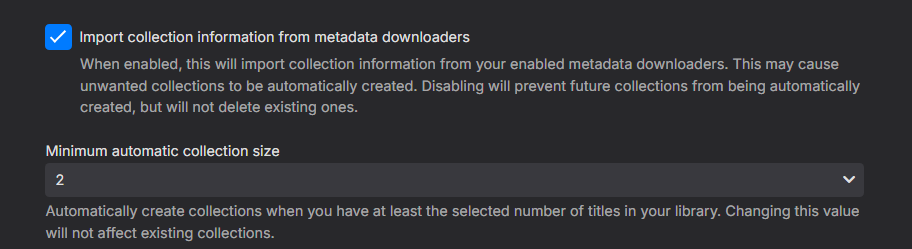
Assuming they have the <set> metadata you would enter the library and click the three dots menu and enable "Group items into collections" option. Note this is a per client option. If you do not have required <set> metadata on each item you will need to go to library setup and ensure you have the option enabled. Otherwise you will have to manually create Collections.
 1 point
 -
مساء الخيرات اخى الكريم عموما انا ما كنت فاهم المشكلة بالاول ولكن الان اتفق معاك ان يجب تغير الخط او اضافة خط اخر وان شاء الله حبيبنا لوك ما راح يقصر بالموضوع @Luke Seem the font with dot bother some personals, as @crusher11 explain the issue, as with my posts, I speak about my personal view that not a problem, but other as the OP see it as a must to change the font, thanks.1 point
-
Please retest your scenario. This specific issue appears resolved in 4.8.7.0 in my tests. Still issues with People/Artists/Genre all searchable (but no linked data). Tags can show up empty via library. Depending on restriction feature used as tag restrictions will show Empty libraries.1 point
-
HI, yes, more options to control this are possible for future updates. Thanks.1 point
-
@schmitty Support for tvg-url and url-tvg is in Emby Server 4.8.3+:1 point
-
Would love to see a server side feature introduced to utilise nvidia cards super resolution features to do server side upscaling.1 point
-
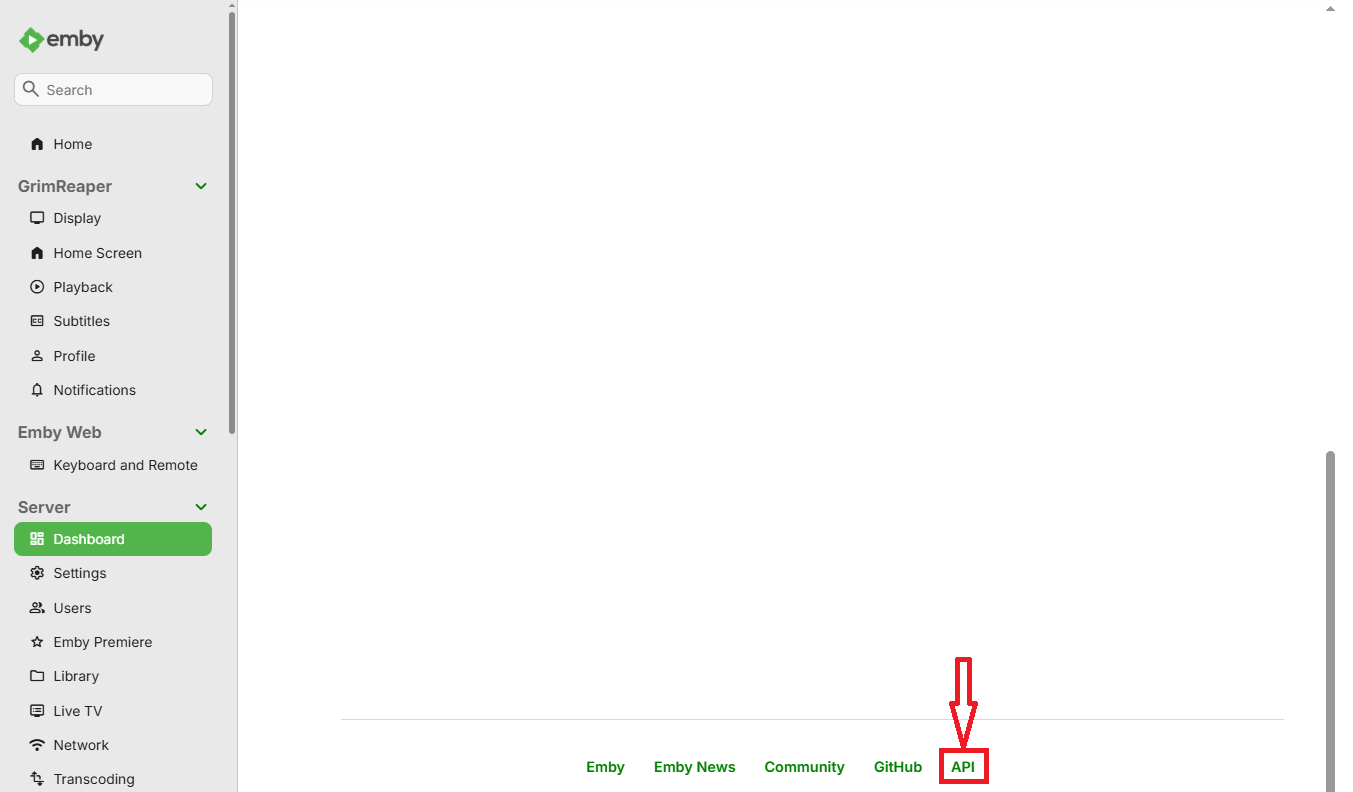
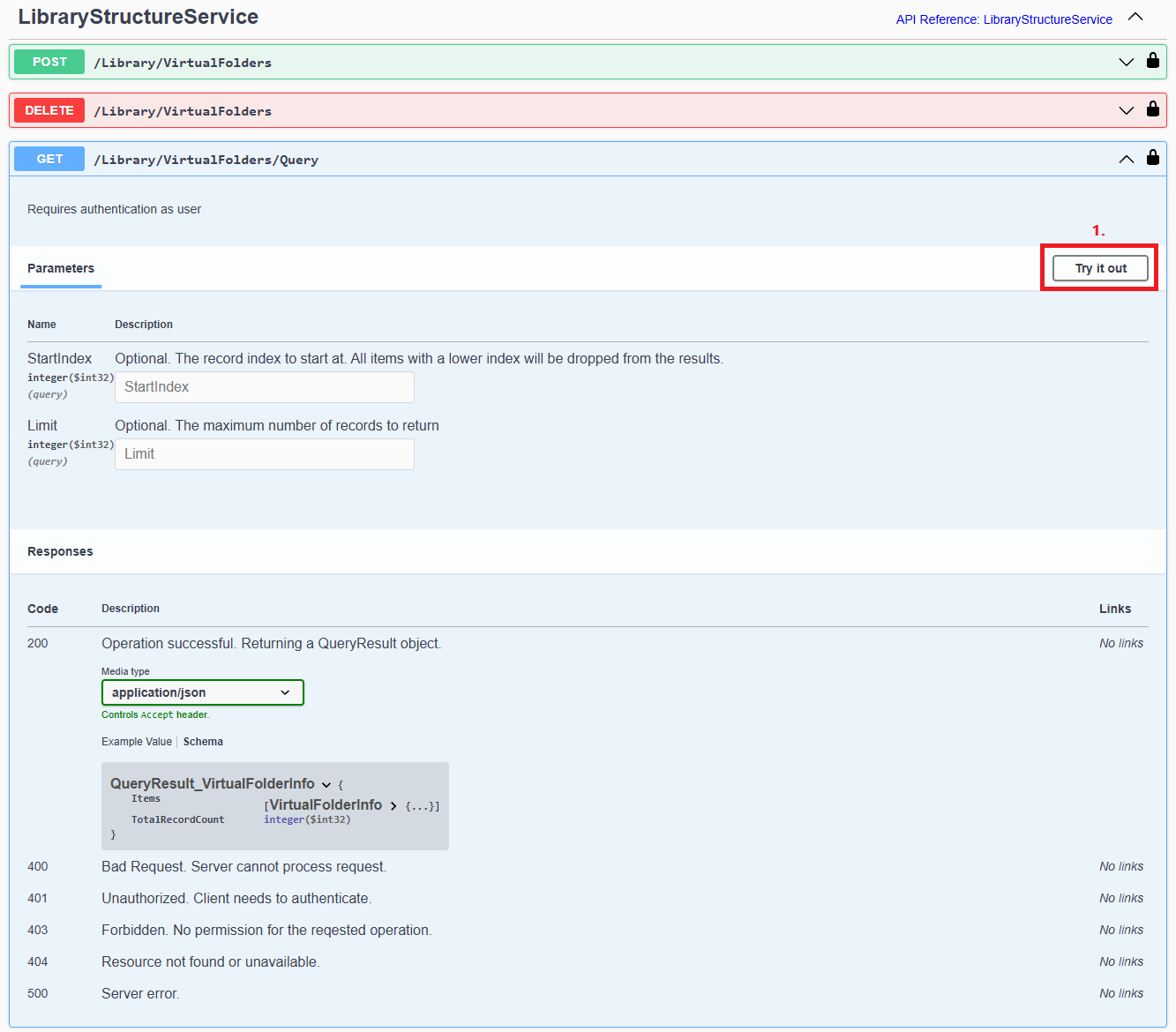
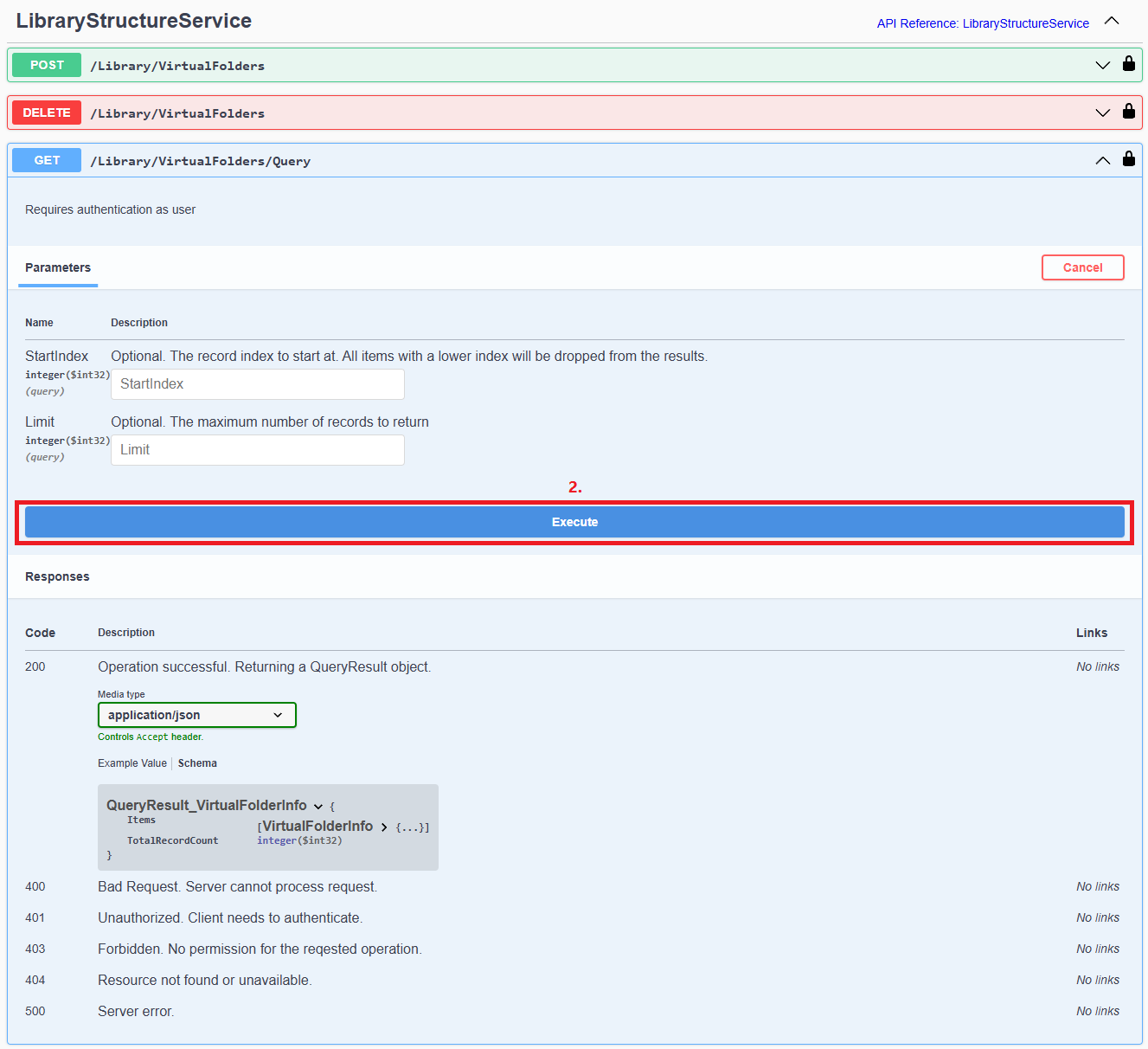
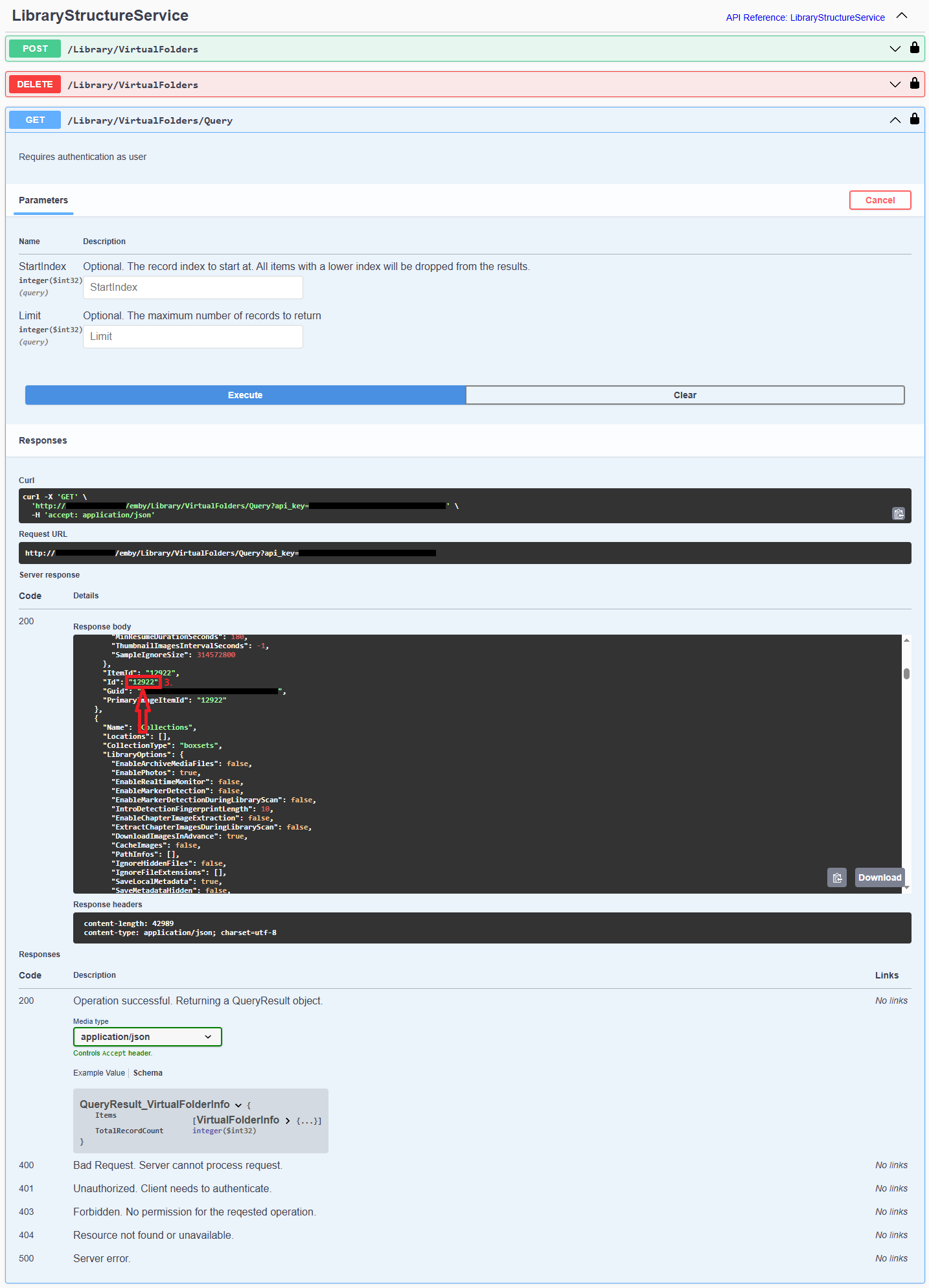
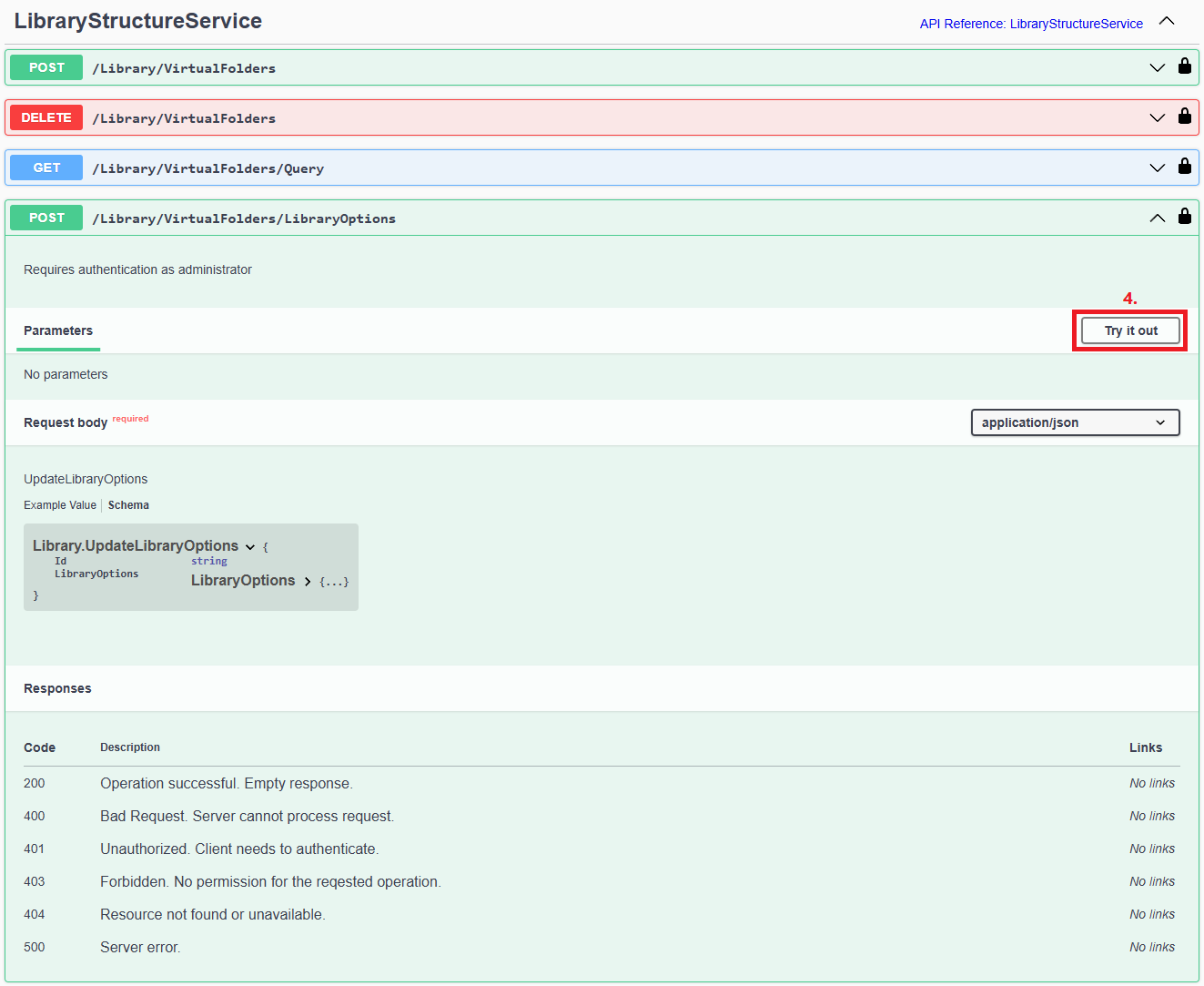
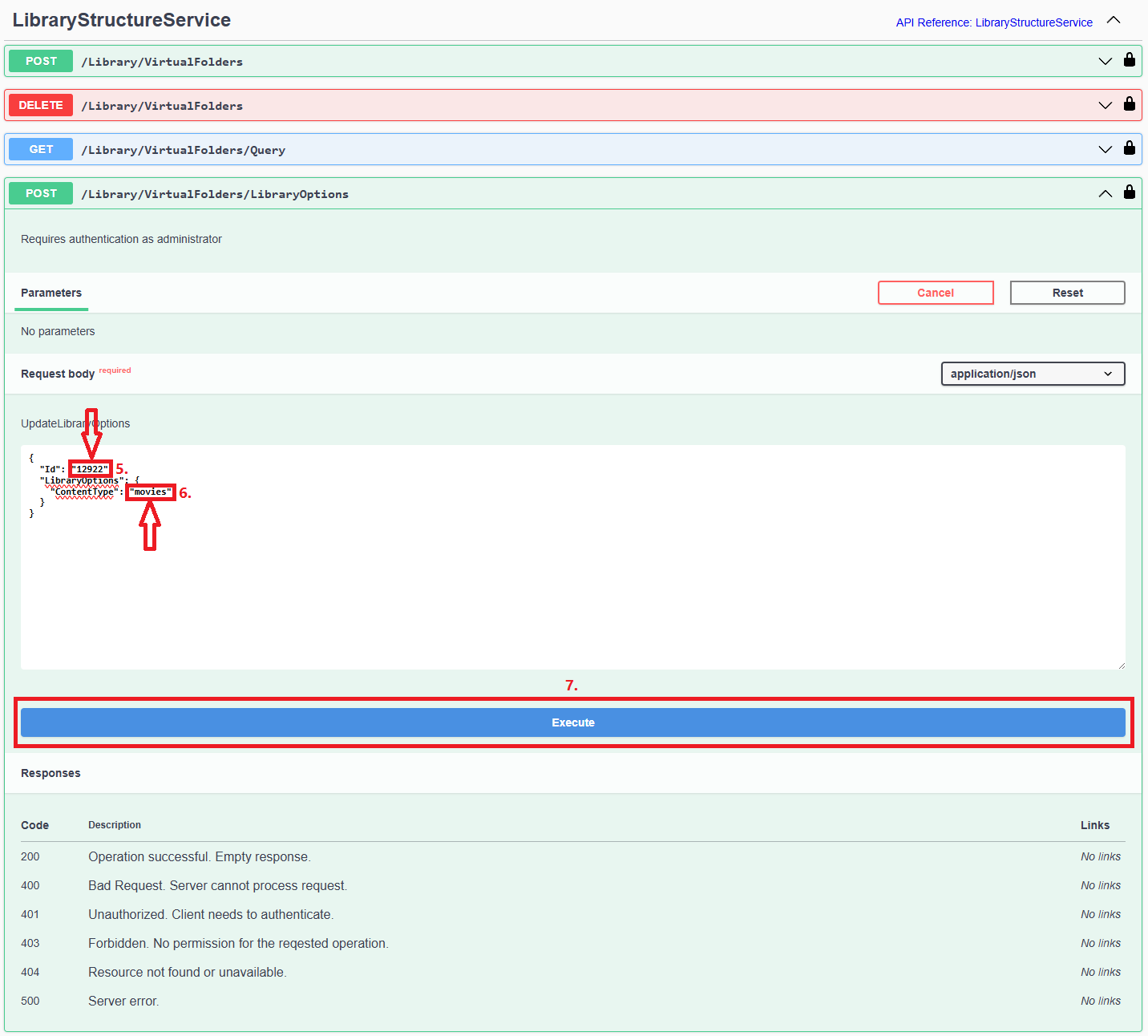
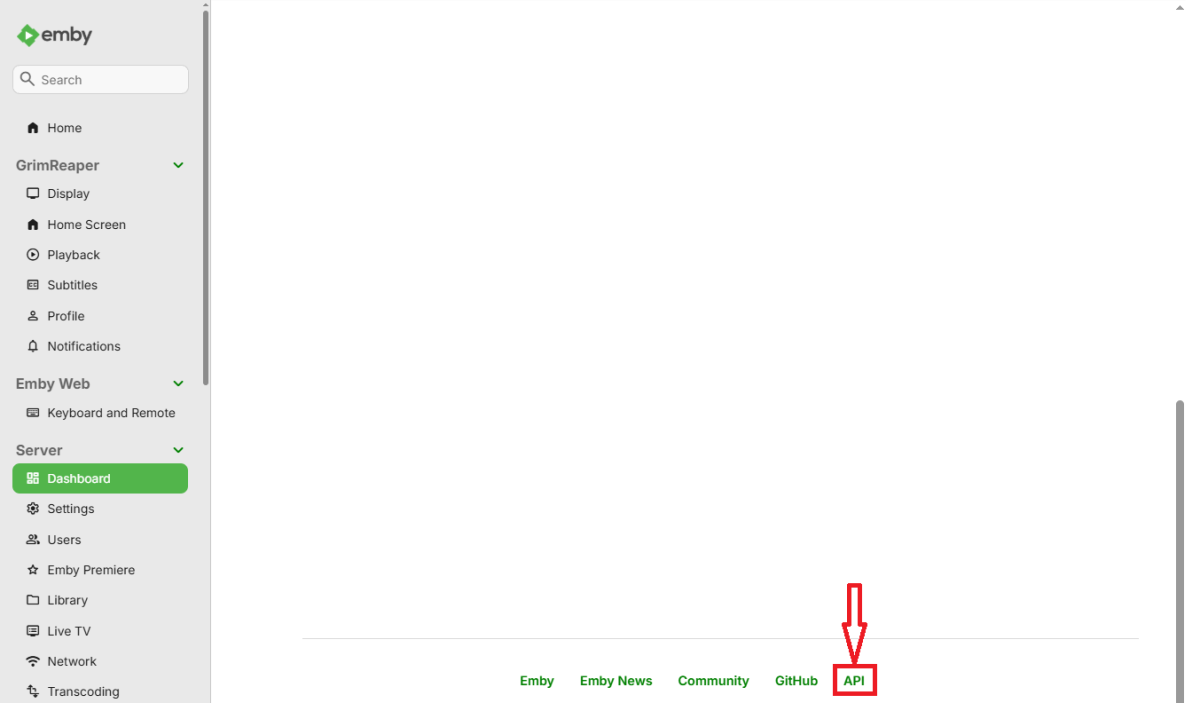
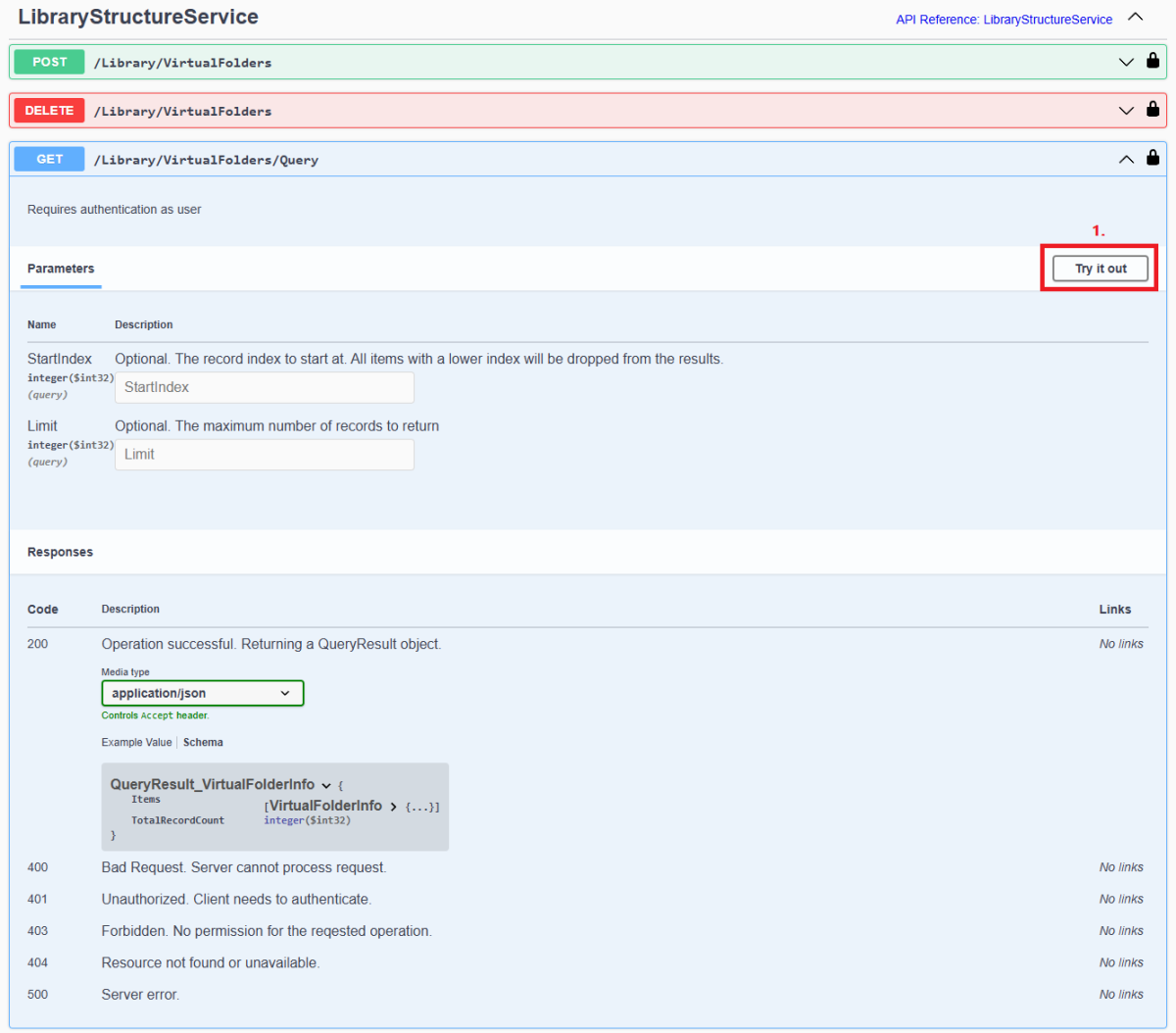
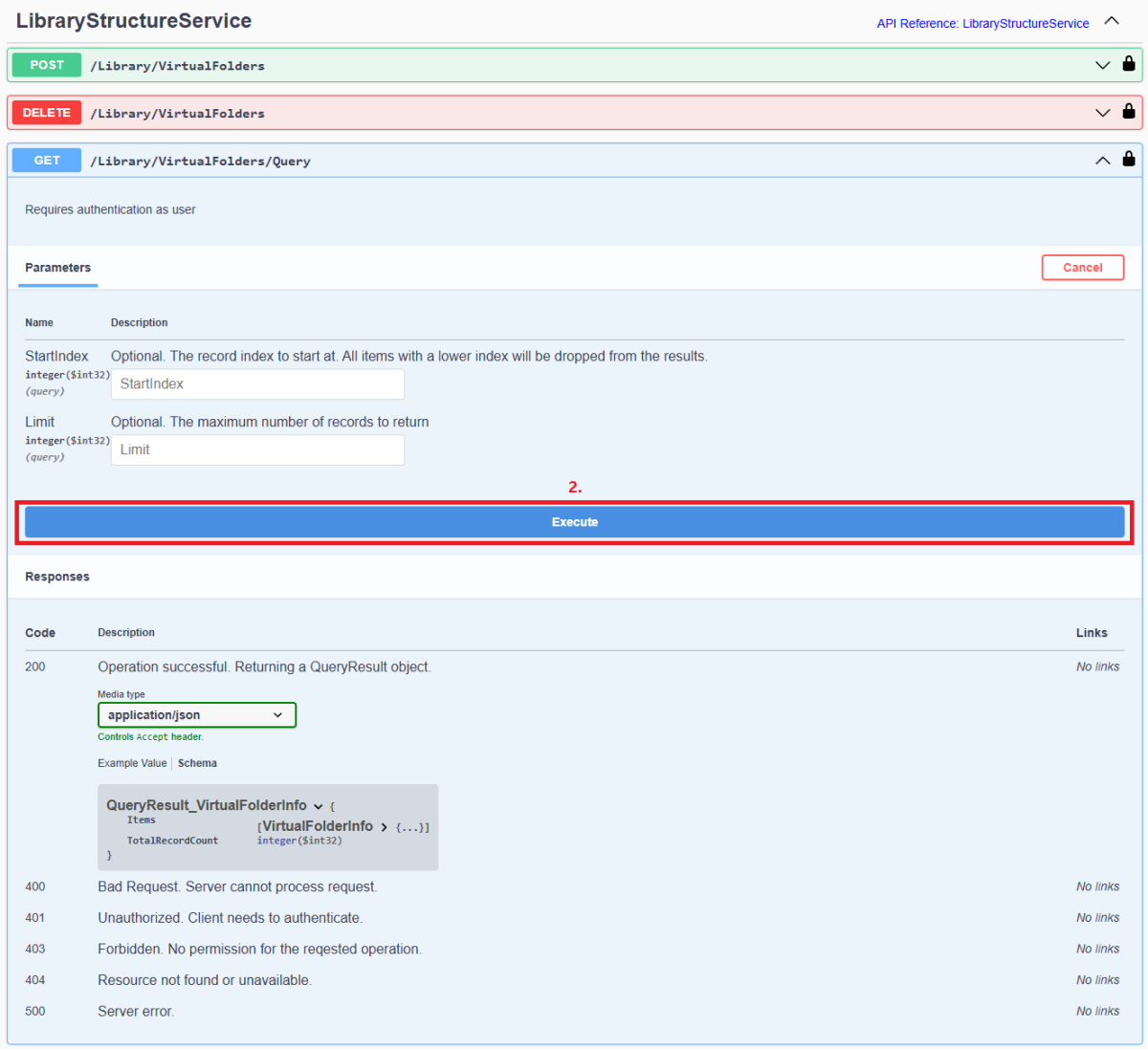
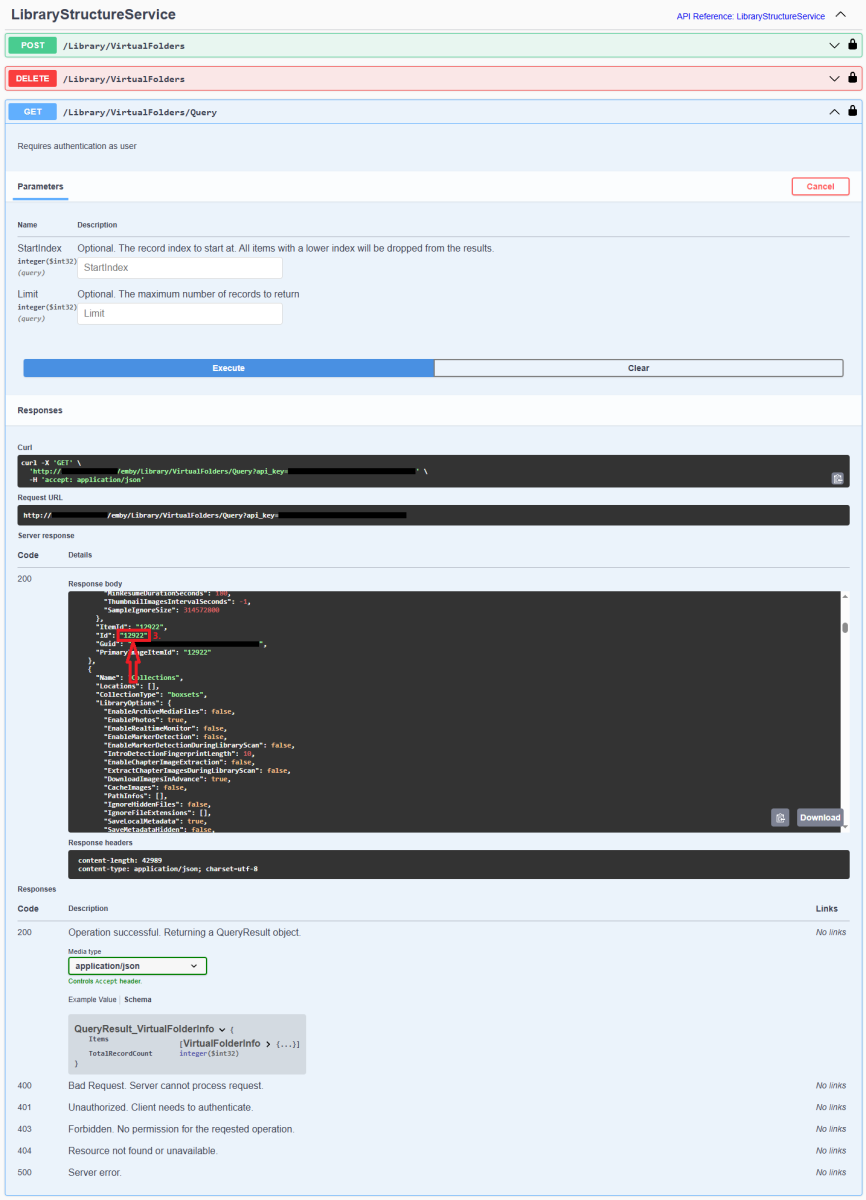
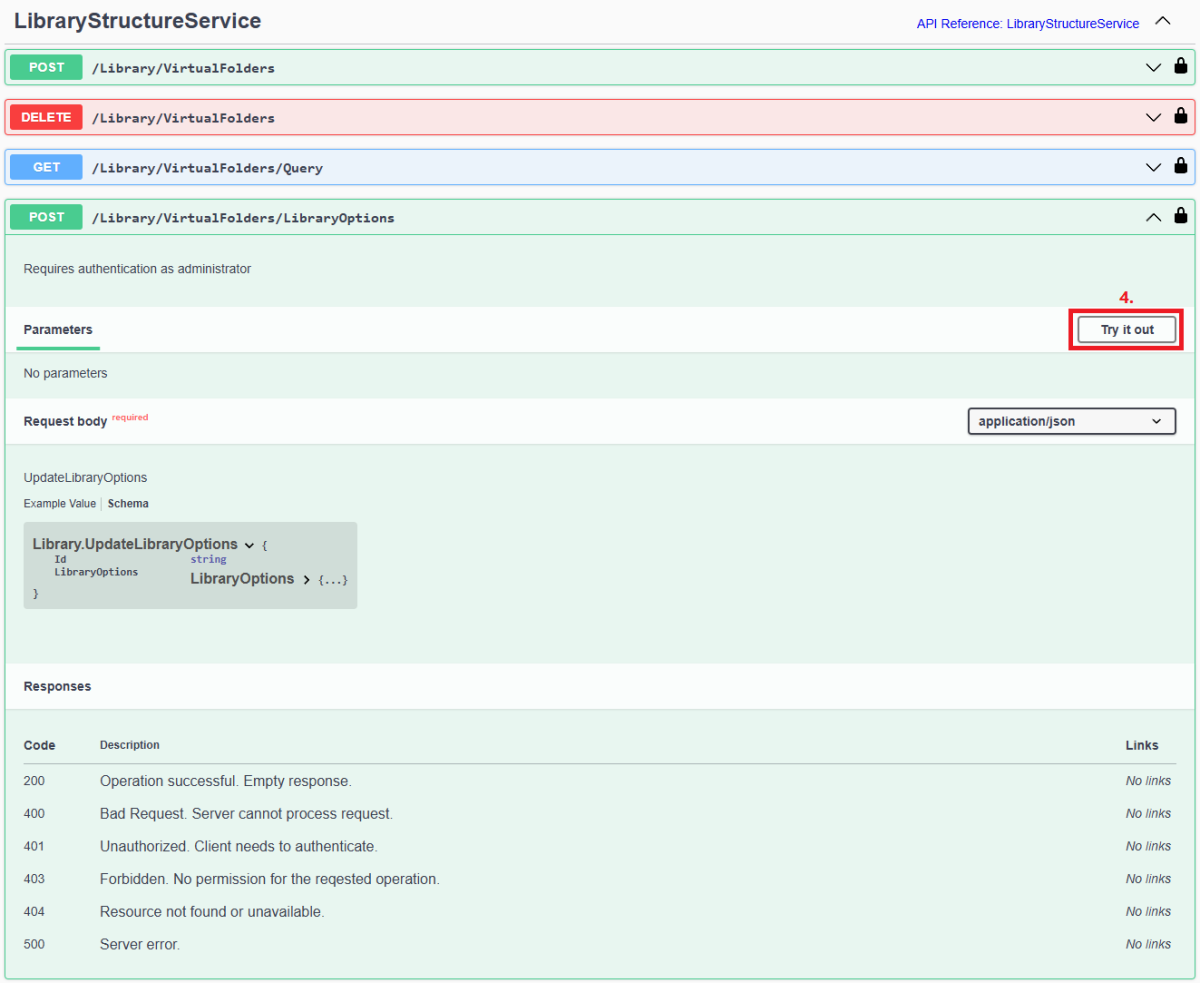
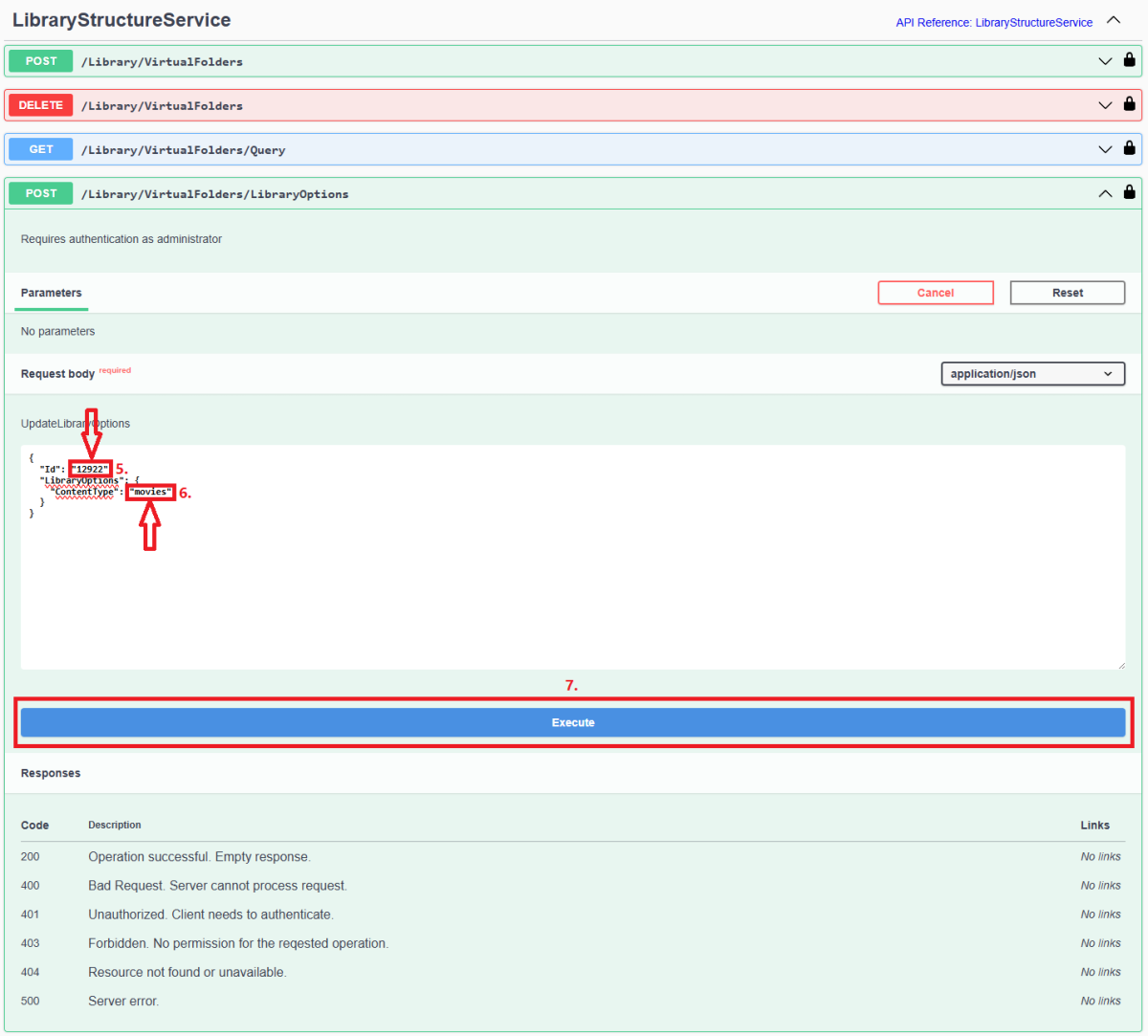
Since server version 4.8+, all library options (including library Content Type) are db-only and any desired changes need to be done via Emby Server REST API service (previous method of changing options via options.xml files is deprecated). Method below describes using Swagger: 1. Access Swagger by navigating to your Dashboard>scroll to the bottom of the page>select "API" hyperlink 2. Obtain library "Id" from /Library/VirtualFolders/Query endpoint: Find relevant library "Id" in the response: 3. In /Library/VirtualFolders/LibraryOptions, change "Id" to the one obtained above and "ContentType" to desired type (valid ContentType strings listed below). Execute. 4. You can check Settings>Library tab or query /Library/VirtualFolders/Query endpoint to confirm Content Type change Valid Content Types Audio books "ContentType": "audiobooks" Camera Uploads "ContentType": "homevideos" Collections "ContentType": "boxsets" Home videos & photos "ContentType": "homevideos" Movies "ContentType": "movies" Music "ContentType": "music" Music Videos "ContentType": "musicvideos" Playlists "ContentType": "playlists" TV shows "ContentType": "tvshows"
 1 point
 -
Often times when I see "Reason for transcodng: Media bitrate exceeds limit." in the info I wonder, what kind of internet connection do they have? I know this can cover multiple scenarios like bandwidth limit set for user, server, client side quality setting, as well as AUTO bandwidth detection... Can you PLEASE add to the dashboard the returned client bandwidth capabilities? The value you are getting from the client that tells emby its bandwidth abilities. While you are at it tighten up the spaces between lines on the transcode items, and align the results to the right instead of center.. MAYBE SOMETHING LIKE THIS :1 point