Leaderboard




Popular Content
Showing content with the highest reputation on 05/15/24 in all areas
-
I can't really argue with this. Premiere features should get premiere attention and effort, they are the money makers. I too wonder why some new obscure feature or "fix" is added within a single beta cycle but other long term and often core foundational ones stay in limbo for years. I've said all I need about this but I'll repeat that I don't think the Emby team's motive is greed. Maybe I'm soft and too easy on them. Yeah, attention to detail matters and this kind of stuff is pretty sloppy. More so when there's a cost and unseen "penalty" that the user can't do anything to correct. I've never been a fan of how the devices are tracked and the info kept hidden. It didn't seem necessary to me but also felt like I understood why the Emby team does it. Maybe poor execution of a needed safeguard? All in all it's a small part of what Emby offers and most users care about. There are many many other things to fix, features to add and people to make unhappy. The corporate world is full of sharks and I don't believe that Emby is one of them. Which is why I posted because it felt like a pile-on for the wrong reasons even when the complaints themselves are legitimate. I get my money's worth from Emby and will stick around until I don't.3 points
-
Solution at the end. I'd been having the same issue with the Emby for Android TV version 2.1.1.10g. If I use the "Clear Data" I am able to open the app and log in, otherwise same as the OP. I had uninstalled the Android TV app a few times to make sure that I have the latest version and the problem persists. This is happening on both my Hisense TV running Android TV and 2 Invida Shields running Android TV. This behavior was new after upgrading to the beta release of the 4.9 branch. Log errors: 2024-05-15 07:51:49.289 Debug HttpServer: InitRemoteConnectionInfo - ipAddressFromHeaders: 192.168.200.49 2024-05-15 07:51:49.289 Debug HttpServer: InitRemoteConnectionInfo - rejecting ipAddressFromHeaders as on local network 2024-05-15 07:52:29.062 Debug HttpServer: InitRemoteConnectionInfo - ipAddressFromHeaders: 192.168.200.49 2024-05-15 07:52:29.062 Debug HttpServer: InitRemoteConnectionInfo - rejecting ipAddressFromHeaders as on local network 2024-05-15 07:52:29.066 Debug HttpServer: InitRemoteConnectionInfo - ipAddressFromHeaders: 192.168.200.49 2024-05-15 07:52:29.066 Debug HttpServer: InitRemoteConnectionInfo - rejecting ipAddressFromHeaders as on local network My solution was to login to the Emby web interface and change my login password. I used the same password as before and now Android TV auto login works again without issue.2 points
-
Hello, I've retested today and even tho I didn't have any more update since last one I can open it correctly today, Thank you for your reply !2 points
-
There have been posts about transcoding-temp not being cleaned up after playback had ended. Those were legitimate and I think they hae been addressed already. What I don't consider reasonable is asking to minimize disk usage while transcoding is in-progress. Following considerations: Emby is all about managing, storing and accessing one's own media library. Those libraries typically comprise dozens, hundreds or even thousands of video items. Even a full transcode of a video typically requires only a fraction of a single video item. So how can it be that somebody has disk space available for dozens or hundreds of videos but not half the size of a single video available for transcoding-temp? Something like 5 GB is just nothing these days and even when you have all your storage somewhere else on the network or running on special devices like Nvidia Shield or RPI, you can always plug in some USB storage for transcoding-temp and you're done. None of the (few) topics where this has come up in the past was about problems encountered by average users (except those about Emby not deleting segments from finished playback), they were all rather special and/or driven by special (and often wrong) ideas. What stands against just-in-time deletion on the other side are substantial benefits and technical issues: Transcoding requires a significant amount of system resources and energy, while the storage of the results does not These results are very specific to the playback session, so there's no point in keeping the results beyyond the lifetime of a session, but while a session is active, there's always the chance that a segment is needed for playback more than once, so when the (expensive) work has been done already, there's no point in throwing it away, taking the risk of having to do the same work once or multiple times again Skipping Delay When a segment is not available in the client cache, it requests it from the server, if the server has it, it can serve it to the client an the client can continue playback almost instantly at the desired position. But if the server doesn't have it, it needs to start transcoding once again. The startup alone can take from a half to several seconds (e.g. if hwa fails and it must fall back to sw transcoding). Then it needs to transcode the segment first, until it can be delivered to the client. If trranscoding is slow, it adds 2-3s plus download time - makes 4s in the worst case. But most clients wait until they have at least two segments. In total, it can easily take 10s when skipping to a position for which the server doesn't have any segments, while it would be just 2s in this example for downloading existing segments. Stream/Segment Consistency Currently, generated segments aren't forward-compatible. This means that when the server has segments 100-500 and the user is skipping back to 90, all future segments (100-500) need to be abandoneded, because the newly generated segment 99 might not semlessly match with the pre-existing segment 100 (video and audio glitches or playback hanging in the worst case) Frequently deleting old segments would make it even more unlikely that existing segments can be re-used for playback when a user is skipping around Emby didn't track generated segments (in the past), so it wasn't possible to safely determine which segments to delete TVnext Will require even larger amounts of storage for transcoding-temp, so there's not much point to invest in segment deletion right now. But it also introduces new mechanisms for segment tracking and segment consistency (see above) which might allow to do smooth bandwidth switching during playback (later on) and also some management of segment deletion. Yet, I'm not a fan of keeping just a small window (like keeping just the past 10 segments), but when running live TV non-stop over hours with transcoding, there needs to be a cleanup at some point of course.2 points
-
I finally made the jump from 4.7.14 to 4.8.5. Since then while watching shows it will sporadically skip back.5s or 1s ish and replay. Just like a quick rewind and then plays that same 1s over and keeps going on with the show. No stopping or errors on screen. It has done it with several different shows now so it doesn't seem to be a bad file etc. I'm running emby on windows 11 and using Rokus. It has done it on 2 different rokus. No subtitles or anything extra. A couple times the app would just crash, I would reopen, start show and it would crash again after a few seconds. One time I noticed on the dashboard that the show was still playing After I rebooted everything I haven't seen that happen again, just the shows skipping back. I found a spot in a show that kept doing it, but after I enabled debug logging on the server and roku it didn't do it again. So I'm still working on getting a log. Please let me know who might work this issue so I can send them my log once I get it, I don't like to post logs publicly. Thanks1 point
-
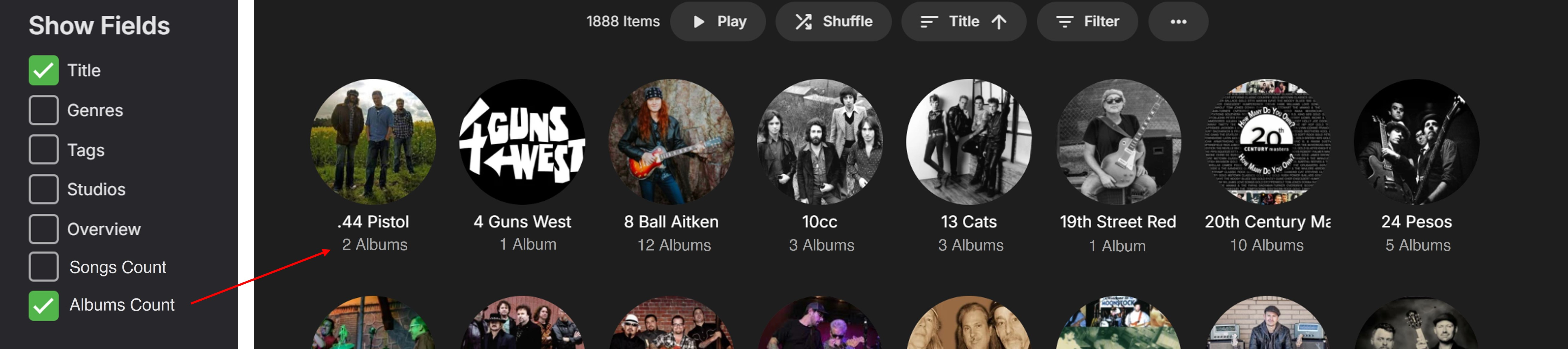
Hi, Presently all the main music Menu Tabs (apart from Suggestions) show a useful Items Count to the LHS of the Play button (1888 Items example shown below): To find the individual counts for the Songs/Albums of a specific Album Artist/Artist/Composer currently takes a couple more ‘clicks’ to get to the relevant page(s). This is quite ok for looking up something specific on a few occasions, but not as nice for continuous top-level browsing through a music library category. If the Songs/Albums item counts were added as options to the “Show Fields” edit settings, for Album Artists/Artists/Composers, then this would show the info nicely for anyone wanting to view it more readily. (I would use an Albums Count as a permanently selected option, but others may like to see the Songs Count?) Anyone not wanting this info displayed below the images would not select the respective option(s), similarly to the current setup. Here is an example showing the Album Artist Title and Albums Count on the main Album Artist summary page: Adding these options would be a great improvement, giving more useful functionality with music viewing. Thanks for considering.

 1 point
 -
-= PLEASE UP VOTE & PROMOTE THIS REQUEST IF YOU WOULD LIKE THIS FEATURE =- DO THIS BY CLICKING THE "LIKE" BUTTON ON THIS POST REQUEST: Properly pool multiple M3u IPTV sources, so when adding more than one with the exact same M3u emby treats them as one source with however many "Concurrent Streams" you set for each. https://emby.media/community/index.php?/topic/63725-multiple-iptv-tuners-double-channels/?p=636718 https://emby.media/community/index.php?/topic/59607-duplicate-channels-one-tuner/?p=607031 https://emby.media/community/index.php?/topic/57420-multiple-identical-m3u-tuners-without-duplicate-channels/?p=560949 Basically once M3u #1 has used all 5 of its tuners, I then need to start using the login info that is within M3u #2... once those 5 tuners are used (now all 10 tuners), then emby issues "no tuners available". This is how emby treats HDhomeruns today, so it can't be to difficult. @@snodrog742 @@manolodf @@robrhedrick @@cayars1 point
-
Right now on the Android TV a notification comes up and blocks about 30% of the screen asking if you want to play the next episode or cancel with about 40 secs. it would be nice to be able to set this to something smaller like 10 seconds or 5 seconds or even allow the episode to end and wait some amount of time. Right now it blocks the actual episode and is just annoying.1 point
-
Vibrations near the racing wheel may be causing different paging commands to be sent to Emby resulting in the side menu opening. This could be just someone touching the wheel hardware, table that it rests on, or even just walking by causing a floor vibration that goes to the racing wheel. Possbily related: https://forum.kw-studios.com/index.php?threads/mouse-problem.7473/1 point
-
Well it's a new iPhone with latest Emby app so, I'd assume user's quality settings. Thanks for clearing that up.1 point
-
So it looks like deleting the library and adding it back has resolved the issue. Thanks. Also as promised, it kept the watch history stuff, so thank you for confirming it.1 point
-
i'm not sure if relevant but I do have a pihole running at the router level. VPNs are only on browsers for me - I wonder if user consumer also has a pihole running? either way, i'm just so happy the problem is solved lol1 point
-
Left it on overnight and it started to work. It's now working somewhat but it takes a while to load and without the folder images. Thanks.1 point
-
We plan to provide more control over sidebar content in future updates. Thanks.1 point
-
omg, yes, this is exactly the problem! thank you so much! everything is back to normal now. as you stated, i just went and re-added my same password and it's all gravy now - thank you again!1 point
-
I spent a bit of time troubleshooting this on my Synology DS2422+ today and eventually got FFMPEG to actually process my .ts files after amending my custom.sh as below. Posting in case it helps anyone else. It's running an AMD CPU, although I'm not sure if that was the cause or not. I'm very new to this so had to piece it together as I went along. ffmpeg -i "$INPUT" -hide_banner -loglevel info -max_muxing_queue_size 512 -c:v libx265 -brand mp42 -ac 2 -c:a libfdk_aac -b:a 128k -ignore_unknown -map 0:v -map 0:a:0 "$OUTPUT" -probesize 100M -analyzeduration 100M ffmpeg -i "$INPUT" -hide_banner -loglevel info -max_muxing_queue_size 512 -c:v libx265 -brand mp42 -ac 2 -c:a libfdk_aac -b:a 128k -ignore_unknown -map 0:v -map 0:a:0 "$OUTPUT" -probesize 100M -analyzeduration 100M1 point
-
there is no live tv buffer setting1 point
-
ah ok - I'll have a play - thanks for coming back to me.1 point
-
Ok, then it's probably not the same issue then. Sorry. Hope you get it figured out!1 point
-
Just went back to the first post and saw I was the second post..1 point
-
i also don't have any problem with the limits being in place. But the lack of transparency is a problem for all users. You can see right here in this thread a new user is unclear whether its worth putting the time and effort into building an emby server as they already have an alternative that is working. This has to be hurting your new user sales! And then as an existing user - i have no idea how many devices i am allowed as i have been here a while and picked up some additional licences that were offered in the past. I am very confident i am well inside the limits but i don't what what the limit is or even what my rough current device count is. Given the consistent complaints over this for a long time its surprising you havent done anything to improve it, even for new users which will benefit yourselves1 point
-
@SammyIt's all in the first post.1 point
-
I think I have it fixed. Your explanation as to what path substitution does and used for really helped. I reset your addon then renamed my advancedsettings.xml to .old and let your addon repopulate it and now we're good! I've noticed throughout all this that if advancedsettings.xml already exists, whether path substitution is enabled or not, it doesn't populate any information into it. Thank you VERY much for clearing this up for me1 point
-
I think Emby must not have recovered properly after my computer went to sleep, but a simple reboot fixed it. Thanks!1 point
-
Do you have a racing wheel connected. Those are know to do weird things.1 point
-
So, really, the device limits would only include are live tv, offline media, Apple Watch and CarPlay/Android Auto support? Assuming paying for full playback on an app also wouldn’t count towards the limit? That would directly contradict the FAQs: “So how do I determine if the limit will be okay for me? Look at the Feature Matrix and note the features you use that are NOT in the "Free" column. Count the number of devices your users will use for just those features.” I don’t get why it’s so vague, unclear and deliberately misleading! I just want to know if Emby is definitely fit for my use, without having to set up my family accounts, help them install etc only to find I hit the limit and end up having to move back to my current set up1 point
-
beta 4.9.0.19 works, thanks1 point
-
I can help with "Farsi" translation if needed. I can see that it's incomplete. Let me know if you need me to proceed.1 point
-
Yes "'use video tags" is disabled in addon mode for a good reason. You don't need that Kodi option. It would extract metadata information directly from files. It's used for Kodi scrapers which are not in use by the plugin. Also it's kind of slow. Every file would be "opened" and analyzed. Also I think you addressing the ac3, atmos etc tags. They are not coming from the files metadata. They are "extracted" from streams. The Kodi option for that would be "Extract video information from files" which are also disabled. https://kodi.wiki/view/Settings/Media/Videos The metadata info (and stream info) from files are read by Emby server and synced by plugin into Kodi's database. All information are there (in Kodi) after sync. How it's shown (or not at all) depends on Kodi's skin. I think the default skin (estuary) doesn't show any of this stream tag information. Some skins/skin helpers also read info from the filesnames which is also supported by the plugin (even in addon mode). The only option enabled (of those three) should be "Extract chapter thumbnails" for reasons I explained in the FAQ, section "Path substitution". use video tags -> off Extract video information from files -> off Extract chapter thumbnails -> on (but can be manually disabled, which I don't recommend) The stream selection (direct play/no transcoding) is native a Kodi function.1 point
-
This is just a logging issue. You can always see this for the first segment when not starting from 0.1 point
-
Thank you! I had to comment out this line # roll_local_time true to get it to work. Otherwise, I got this error Error: adapting config using caddyfile: parsing caddyfile tokens for 'log': wrong argument count or unexpected line ending after 'true', at Caddyfile:14 Thank you again! This was very helpful and educating. I'm going to use Cloudflare and Caddy for some other uses as well now!1 point
-
Same problem here after upgrading from 4.8.3 to 4.8.6.1 point
-
With regards to transcoding-temp, there is generally no need to be worried about "wearing out" SSDs. The way how Emby is using transcoding-temp is actually a pattern that naturally prevents wearing out SSDs: It requires relatively large amounts of storage If that's not available, transcoding fails Deletion is happening only after playback stop Wearing out would only be a risk if the disk would be filled close to capacity and the same small remaining space would be frequently written and deleted - so quickly that the SSD is unable to relocate fast enough for equalizing out across memory cells. But as Emby doesn't act like that, there's really nothing to worry about in this regard. In general, the best measure you can take to avoid wearing out those disks is to: Make sure to keep a reasonable amount of free space available at any time (e.g. 5%) Have a good mix of static (rarely changing) and volatile content (frequently changing) For example: A disk with 10% free space, 70% static and 20% volatile content will have 5 times the lifespan of a disk which is solely used for volatile data. (his is because SSDs are internally relocating memory to equalize out read-write counts) So whenever you are concerned about worn-out SSDs, keep that in mind, this is the most powerful leverage you have at hand for controlling this.1 point
-
Hi, yes we will be updating our ffmpeg libs in the near future to support this. Thanks for the feedback.1 point
-
I read your posts very carefully, you are one of ppl here i mostly totally agree but not on this topic, that's why i jumped in and replied. We started by talking about increasing premiere prices, and i responded that for that they should first deliver some things that they promised years back, and on top of that to fix things that they say its a premiere feature and in reality it is alpha stage component, thats live tv, even if it works for your needs that's ok, but look at the number of posts and number of bitching about it in last several years. Think that covers the topic of live tv "premiere" feature. When they fix it (and if they) than they can talk about increased prices. Secondly, this talk about piracy is so Hypocritical from emby devs, if they care about it as much as they cry about it, ok than lets kill all the licenses, make the emby server 10-15 devices for home users as they continuously market it as "home media server" and 95% of our users are good with defult devices limit. Ok than, kill it, you wont have an issues with pirates, or any other media companies. Why dont they do it @Q-Droid? Well, i m pretty sure you know why they don't want to do it..... But lets continue this horror story of emby premiere and devices, sorry but i was so mad last 2 months that i need to type few things here, ill explain in other post why. The other day i had a crash on emby server playing music, or to be exact trying to play / shuffle music from my favorites. i mentioned in other post my details since issue from other poster was very similar, also music..also favorites, anyways, luke responds with generic AI response "have you tried our other Andorid app..., see how it compares." Ok i went installed other android app, always used ATP app, lets check it and compare and see if crash will happen again. Installed app played a bit, discovered new app bla bla... I need to mentioned that my ATV app was unlocked thru google store and both apps are used on same google profile and on same Sony android TV, 2 days after this new app testing...i login to server and check playback reporting reports and stats, and see that new android app has registered on emby server totally different from ATV app, it registered on Smart TV id model, and registered as another device So no matter that i used ATV app on same TV device, no matter that i bought / unlocked ATV app, nooo, new app registered as NEW device on OLD TV device and used premiere device count. How nice from our caring emby devs, thank you guys. This crap with new app was too much, no more money for me ever, i started building new server for jellyfin and day of migration is just a question of time.1 point
-
@rbjtechI restarted my modem and it cleared the old port forwarding (which is odd because I never set it up in the first place). Set up port forwarding as outlined in the documentation and voila! it works. Thanks for the guidance!1 point
-
Why would you necro a year old post? OP has moved on.1 point
-
AWESOME...1 point
-
Any news on this issue? I am in the same situation unfortunately. If this is not fixed soon it will be a deal breaker for me, I'll have to cancel my Premier subscription and move to something else - maybe it's time for Jellyfin1 point
-
Didn't know I needed this and now think this should be the default way. Thx.1 point
-
Hi again, something else I just thought of... If Songs Count and Albums Count were optional viewable Fields, then they would make worthwhile Sort By selections, as well. I likely wouldn’t use these as standard Sort By views, but there are numerous times when I have quickly wanted to see (e.g.) an Album Artist list arranged by Albums Count, or a Composer list arranged by Songs Count. (Example image below.) Presently, the only Sort By choices for Album Artists/Artists/Composers are Date Added, Random and Title. Having these two additional selections would be very helpful. (Sorry for not including this as part of the original feature request.)
 1 point
 -
Yes they may need their own images size option as the global option does apply but does not help if you like larger images. Only help in web client but I remove scroll. div.catalogMain div.scrollSlider {flex-wrap: wrap;}1 point
-
HI, yes it makes sense. Thanks.1 point
-
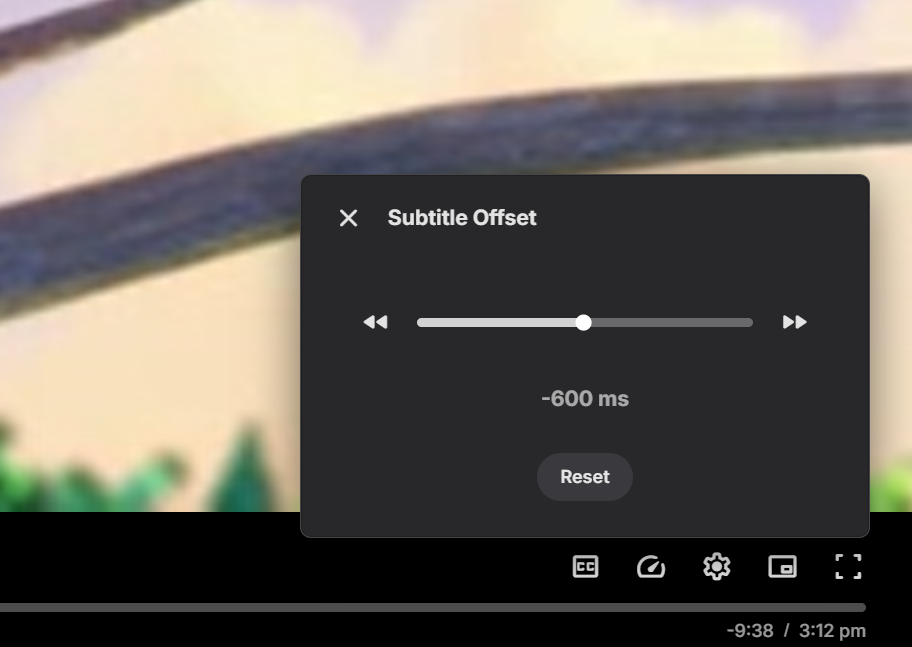
Subtitle offset is being changed to a slider which should make it much easier now, and you still have the buttons to step up/down:
 1 point
 -
Hi, we’ve sent 4.8.6 to Synology for review so it’s just a matter of waiting out that process.1 point
-
1 - Rookie: 0 to 50 posts Search flood control: 20 seconds Display Name Changes: Need to PM me or any other admins to change it for you. Bypass flood control? No (members need to wait 3 minutes before posting again). Can edit own content?: Yes. Edit time restriction: 15 minutes after posting. Can hide (delete) own content?: No. Need to PM an Admin or a Moderator. 2 - Regular: 51 posts and up Search flood control: None. Display Name Changes: Yes. (Can change display name: 1 every month). Bypass flood control? Yes. (Flood control prevents users from making two posts in quick succession). Can edit own content?: Yes. Edit time restriction: 180 minutes after posting. Can hide (delete) own content?: No. Need to PM an Admin or a Moderator. 3 - Top Contributor (this special group that selected by): Mod's team recommended. Help reporting bad posts. His/her answer selected as best answer. Same as Regular group for Display name change, Search flood and Bypass flood control. Can edit own content?: Yes. Edit time restriction: Unlimited. Can hide (delete) own content?: Yes. Plus: Can close his poll. Can lock and unlock own content. Gets access to Emby Support application.1 point
-
Emby is staring from root user sudo systemctl status emby-server.service ● emby-server.service - Emby Server is a personal media server with apps on just about every device Loaded: loaded (/lib/systemd/system/emby-server.service; enabled; preset: enabled) Active: active (running) since Sun 2023-08-06 07:01:26 BST; 1h 7min ago Main PID: 27235 (EmbyServer) Tasks: 15 (limit: 2176) CPU: 1min 13.875s CGroup: /system.slice/emby-server.service └─27235 /opt/emby-server/system/EmbyServer -programdata /var/lib/emby -ffdetect /opt/emby-server/bin/ffdetect -ffmpeg /opt/emby-server/bin/ffmpeg -ffprobe /opt/emby-server/bin/ffprobe -restartexitcode 3 -updatepackage emby-server-deb_{version}_armhf.deb so we need to modify `unit-file` # /lib/systemd/system/emby-server.service [Unit] Description=Emby Server is a personal media server with apps on just about every device After=network.target [Service] EnvironmentFile=/etc/emby-server.conf WorkingDirectory=/opt/emby-server ExecStart=/opt/emby-server/bin/emby-server RestartForceExitStatus=3 User=dietpi # <---- change your user from 'emby' by 'dietpi' in my case. [Install] WantedBy=multi-user.target now, we need to change current folder permissions and restart server. sudo chown -R dietpi:dietpi /var/lib/emby sudo systemctl daemon-reload sudo systemctl restart emby-server.service sudo systemctl status emby-server.service I hope this helps1 point
-
Thanks Grim, that solved my problem.1 point
-
What is your setting for "Date added behaviour for new content" in Settings>Library>Advanced tab?1 point
-
So you want to scale all images? I do this /*My Media card size*/ @media (min-width: 100em) {.smallBackdropCard { width: 13vw;} } /*Portrait card size*/ @media (min-width: 100em) {.portraitCard, .overflowPortraitCard { width: 9vw;} } /*Backdrop card size*/ @media (min-width: 100em) { .backdropCard { width: 15vw;} }1 point