Leaderboard




Popular Content
Showing content with the highest reputation on 05/09/24 in all areas
-
I'd like to have the option to clear 'alerts' in the dashboard. I realize that they go away on their own, but if I can clear them then it's more obvious IF a new alert comes through.2 points
-
Thank you both very much. Renaming folder structure and the TVDB ID you provided helped and everything is as it should be.2 points
-
There are two important points that I need to point out about the new GUI. First, it's a GUI that creates Emby query strings. This restricts what the GUI can do. All of the hard work associated with building the EPG is now done within the Emby server via existing API's. This is why the GUI code is so small. The second point is that I extended the Emby search to include wild cards. This code is part of the GUI and is also quite small. I am working now extending the TV platform to employ my query strings to build channel content. This is simple because Luke intended it to work that way from the beginning. I am very busy for the next few weeks, so progress will be slow. Vic2 points
-
I'd love to see support for proper MKV chapters - either by name (in it's simplest form) or by more advanced features such as Editions. That way detected Intro's (and credits etc) can be written back to the actual media source (MKV). If done properly with MKV Chapter Edition branching, then the any player that supports branching will automatically skip the intro without needing any 'support' of the bespoke emby intro markers... All future imports or rebuilds will then simply pick up the intro's as part of the normal metadata.2 points
-
Thanks @SamES I think a have found a solution too. On my Synology server, I change decodage option from Yes to Advanced and choose Quicksync priority to VA-API. Even it transcode, I can watch the movie.2 points
-
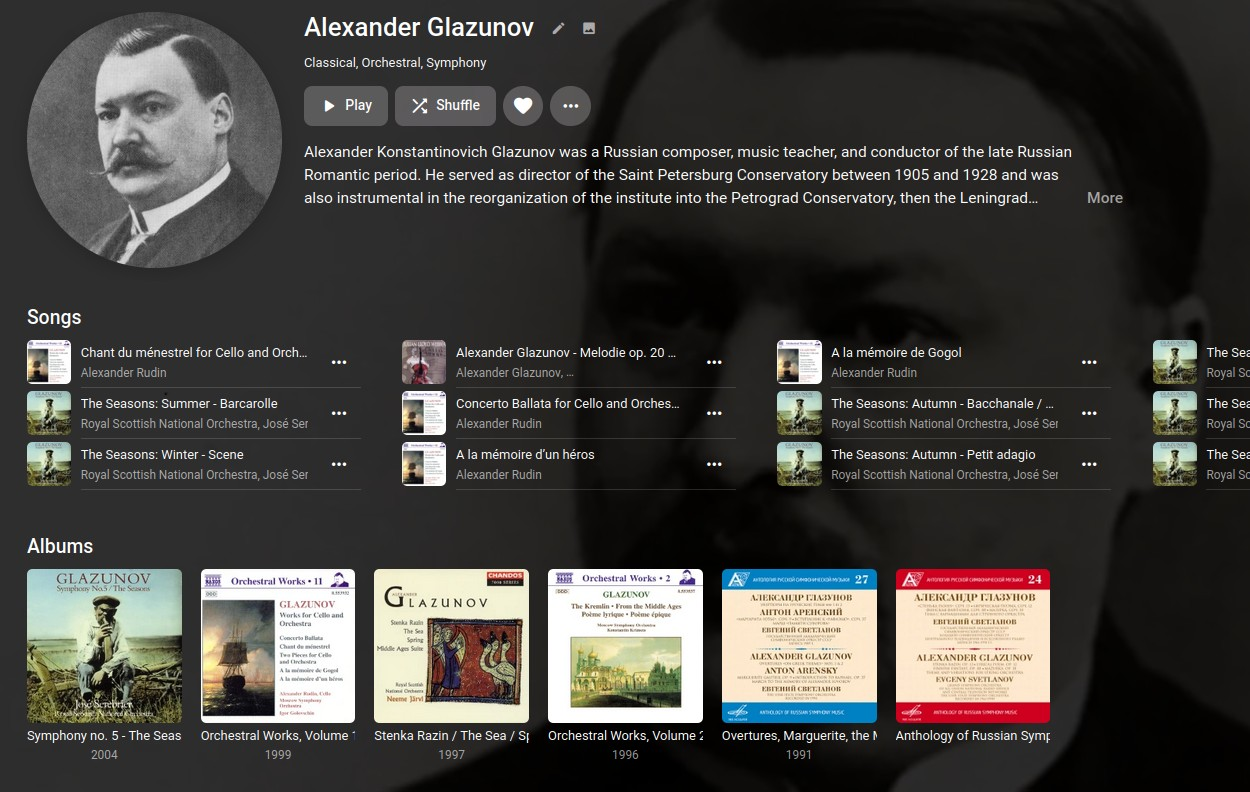
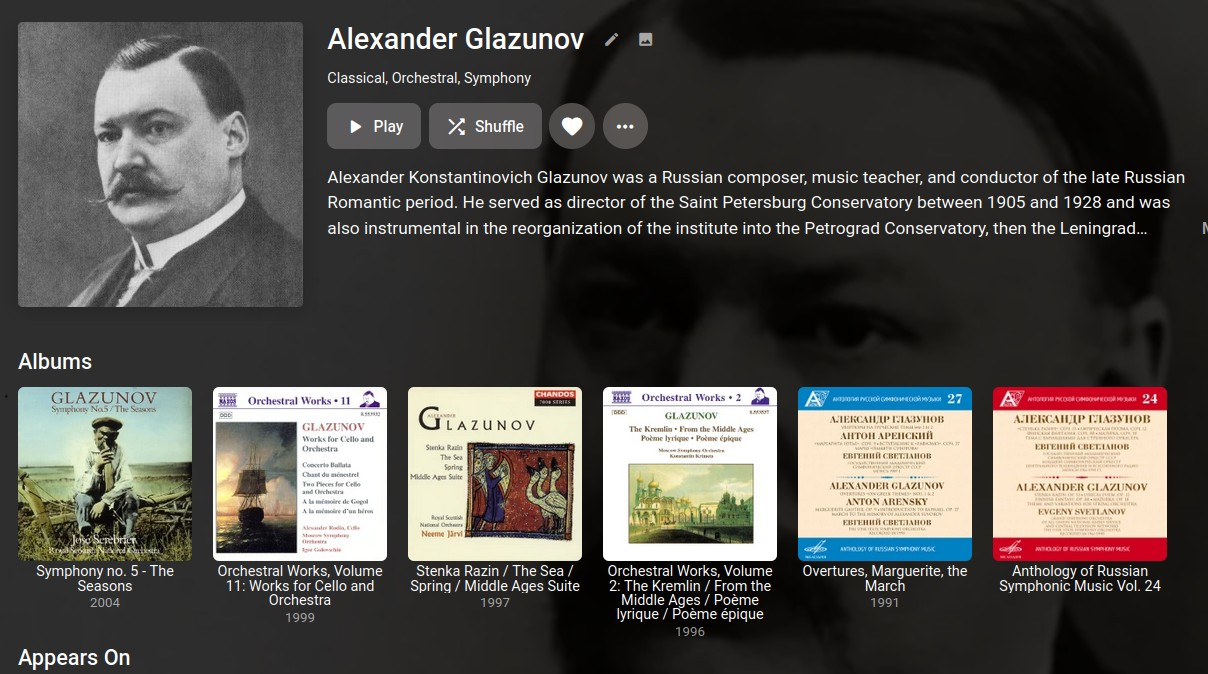
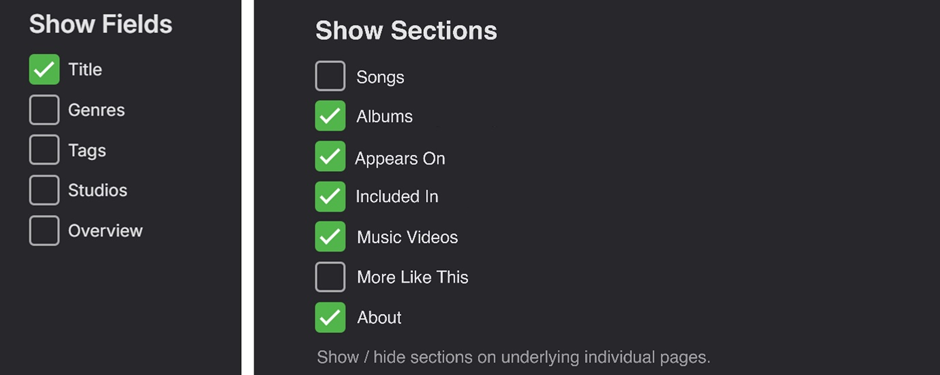
(FWIW) Some more thoughts... There is a “3 dot” settings tab on RHS of the secondary menu of the top-level Album Artist/Artist/Composer pages that allows for changing the view settings of the current top-level page: This edit area could potentially also be a place to make global changes to the view of the underlying individual pages in a similar way. A new “Show Sections” option could work similarly to the “Show Fields” option that exists now: Having this "Show Sections" editing available individually for the respective Album Artist/Artist/Composer categories would give great flexibility by allowing three custom user-defined page views for the three categories. Combining the above show/hide options with the new drag and drop reordering in Emby 4.8.6.0 would be brilliant!

 2 points
 -
You did it again. Cleared the cache, restarted firefox and now it works. Sorry for the unnecessary post!2 points
-
I ran into the same problem on all my distros with the install from flathub after a somewhat recent update to something... Started up my wife's laptop that had not been updated for a while and it worked fine, ran updates and same problem as the rest. Doing the above solved it on all distros, you are currently considered a hero in my family DJAndieK2 points
-
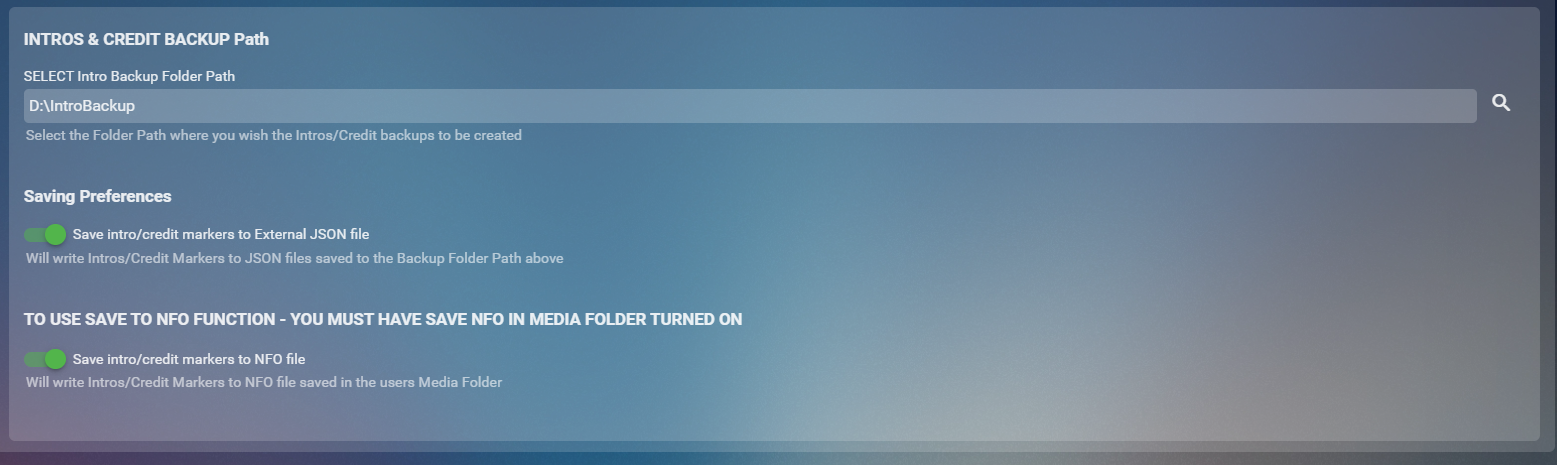
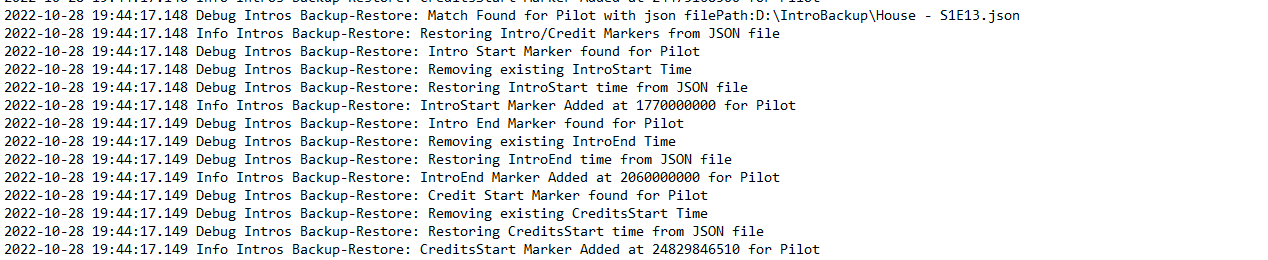
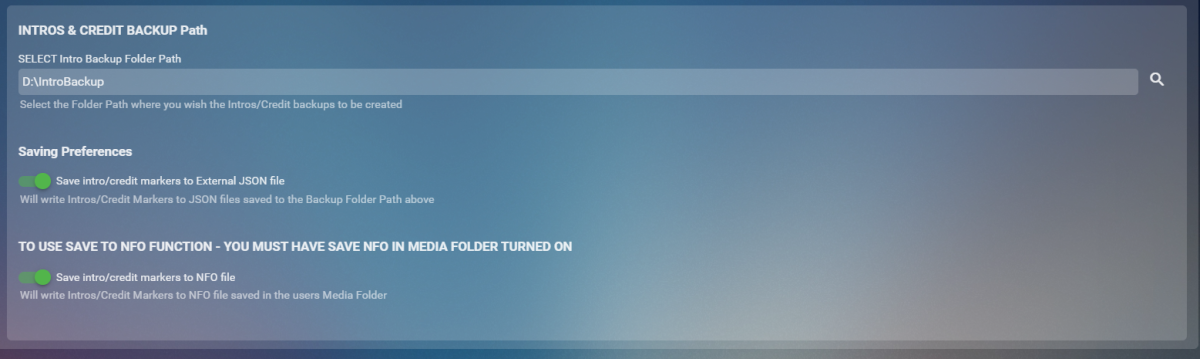
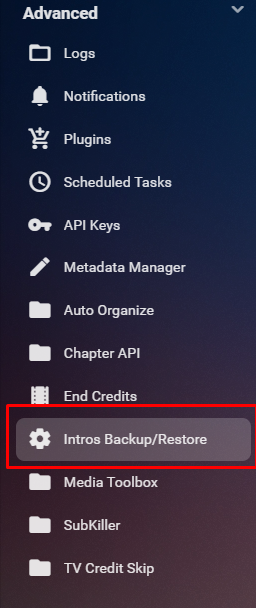
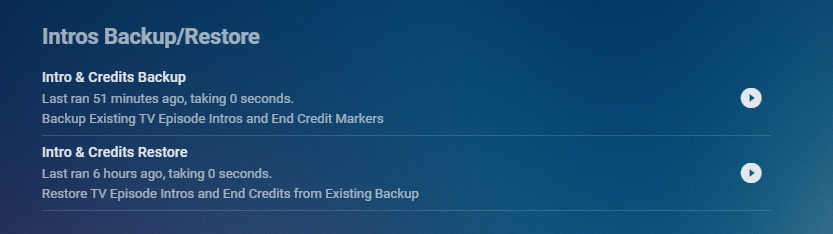
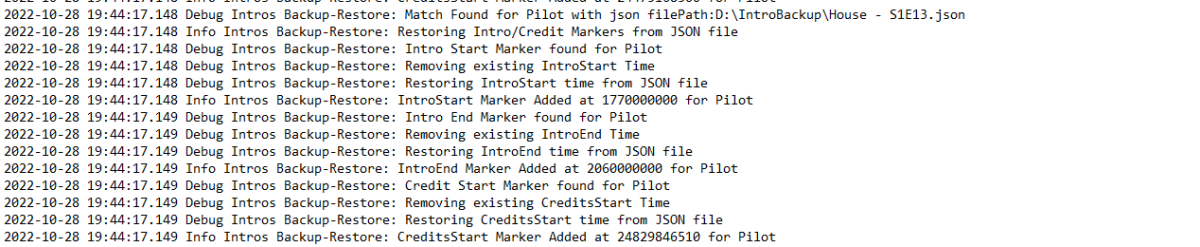
Cheesey Productions brings you Intros Backup for Emby Bringing you a way to Backup/Restore all your IntroSkip and CreditSkip Markers This plugin saves you time after a new install or after refreshing metadata by not having to conduct the process of conducting the intro fingerprint and detection tasks from the core side. Available from the plugin catalogue A huge shout out to @rbjtech and @elpooletfor all their help with this. PLEASE NOTE THAT TINY MEDIA MANAGER CAUSES ISSUES WITH MULTI EPISODE nfo files. I’m currently working to get this fixed but stick to JSON backup option only to ensure your intros are backed up. This plugin works very simply. For BACKUP - The user can Write these markers to JSON files stored in a user specified folder location and/or write directly to the NFO file stored in the Episodes media folder For RESTORE - The user can select to Write information back to episode chapter information markers using either JSON files OR the NFO file setup. BACKUP - takes yout existing markers from the episodes chapter table and will overwrite all previously backed up information. RESTORE will overwrite all currently stored markers and replace them with what is stored in the backup Shortcut in the Server Side Menu Setup your own timing for when to run the backup utility from the Scheduled Task Menu Backup Log Example with Debug enabled Restore Log Example with Debug Enabled Enjoy!! Always a pleasure


 1 point
 -
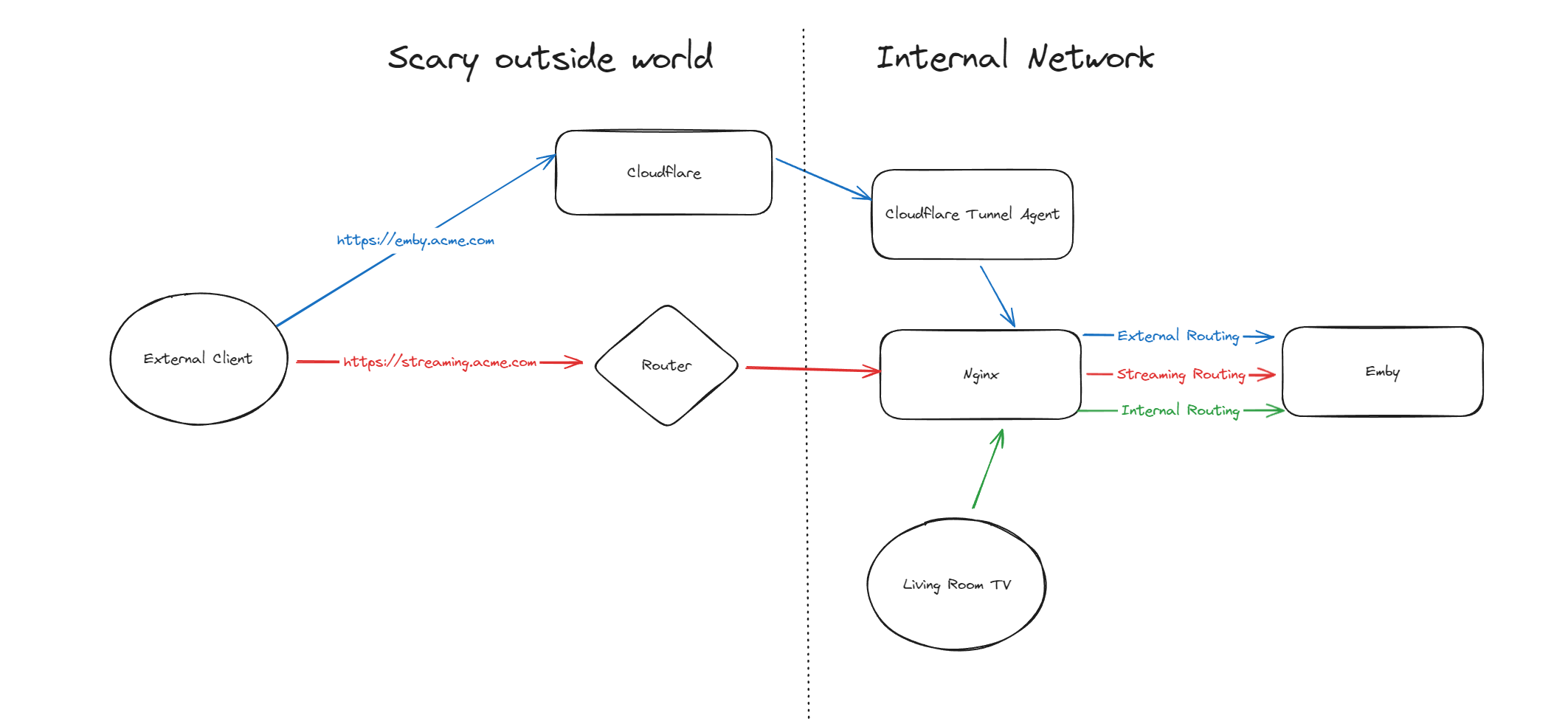
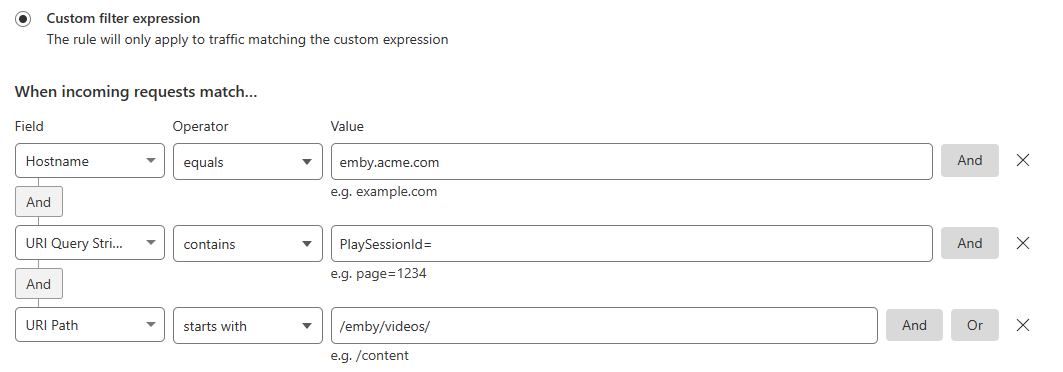
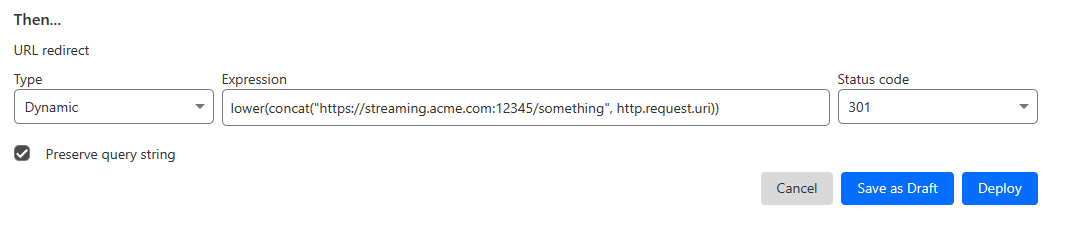
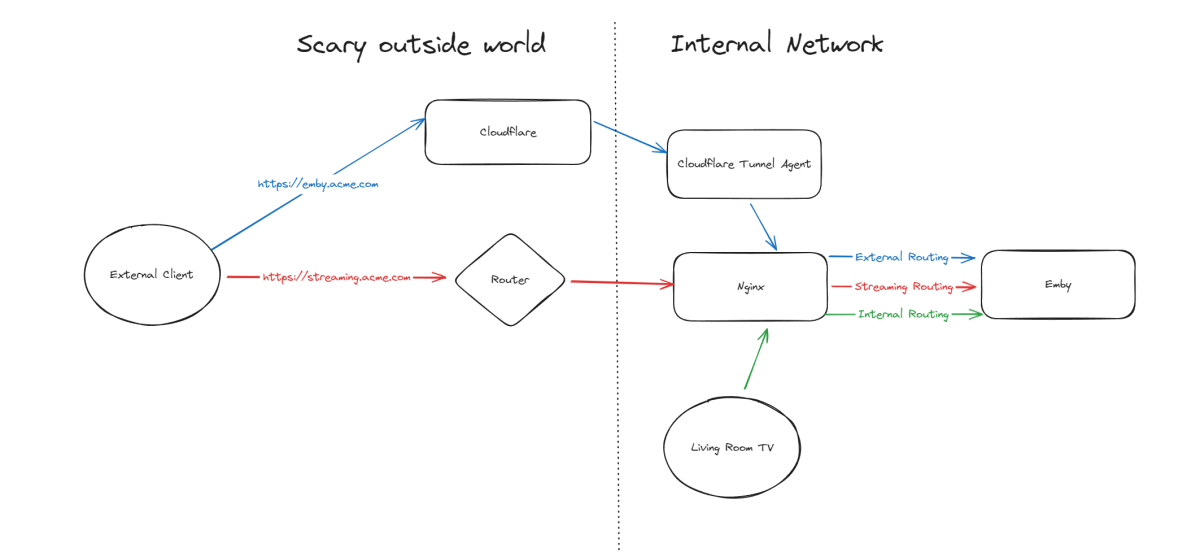
Hello, A few months ago I was in the process of moving away from directly exposing Emby via my home router to using Cloudflare Tunnels, but as it turns out, Cloudflare don't like you paying nothing and yet streaming GB/TB of data through their network. This was frustrating as I really wanted to put Emby away behind something I trust but I also didn't want to get my account banned for streaming media through it. I've read through many posts here about avoiding caching but it seems it's not necessarily the caching that will trigger your account being in trouble, it's the bandwidth usage as well of just piping all that data through their servers. Since I now had some time, I thought I would try to work out a long term stable option using Cloudflare. So what to do? When talking about security with self-hosting anything, I'm not going to go crazy but I like to take away easy wins for bad people. When it comes to running something like Emby, I'll assert that the biggest risk you face is automated attacks at scale. By this I mean that when it comes to hosting Emby at home, I am not really worried about some clever kid that I beat in an online game spending a weekend taking revenge on me or a state-backed hacking groups spending 6 months breaking in - I'm mainly worried about the type of flaws that are easy for people to automatically discover and exploit - e.g. recent examples with Emby and HomeAssistant. Both of these flaws allowed attackers to bypass the authentication layers of the application - no matter how complex your password is or whether you have MFA enabled (in the HA case), it's a trivial exploit once an attacker detects a vulnerable version of your software running. Both of these flaws were exploitable at scale, provided you could find Emby servers online. Given my determination to run things through Cloudflare for several reasons, security included, I wanted to come up with a system that gave me some confidence without being too complicated and without risking my Cloudflare account being banned for streaming through their service. I have not written this for everyone to be able to follow - if you are not familiar with nginx, Cloudflare, HTTP semantics, then this may not be all that helpful. Split Service Where I've landed is a split hosting setup - far from ideal but I think it's better than going all Cloudflare or all direct access. To begin Expose Emby through Cloudflare tunnels as per other guides (I won't go into the details here right now) Expose Emby via reverse proxy for external traffic (and internal too, makes sense to keep things consistent in my view) Setup port forwarding on your router to direct a port from the internet to your nginx service Nginx will have two Emby configurations to start with - one for external and one for internal Once you are able to hit Emby both internally as well as externally, then it's time to split the external. I'm going to imagine that you now have emby.acme.com setup via Cloudflare Tunnels, and you also have streaming.acme.com setup with direct access to your service via your home internet router. What's the difference? emby.acme.com is going to be your main address you use for everything, and that will go via Cloudflare Tunnels. You can use Cloudflare's many, many security options to come up with a setup that is secure but easy for your situation. streaming.acme.com is going to be a DNS only record in Cloudflare, it will point to your home IP and you will port forward this port (can be any random port number) to your nginx server. If we were to leave this setup in place, you would be able to access your Emby service via Cloudflare (with media streaming through Cloudflare), AND you can access Emby via the streaming address, completely outside Cloudflare. So what we can do next is use some clever redirection stuff. Nginx Configuration Now that you have two URLs working with Emby, let's look at Nginx again. In my configuration I have two different `server` blocks in my nginx configuration - one for my internal network and one for external. I don't know if this is strictly necessary but when I started I was an nginx novice and it made sense to be able to apply different rules depending on the origin of the traffic. To complete our nginx configuration, I am actually going to clone my external configuration, giving me a third `server` block. For my third block, I will use the domain streaming.acme.com - this separates it from emby.acme.com which is my tunneled traffic via Cloudflare. Now in my streaming block, I am going to update the rule as follows: This tells nginx to proxy traffic that is destined for streaming.acme.com/something/emby/videos/xxx to your emby server. What it also does (as long as you don't have other `location` sections) is tell nginx to not redirect any other requests that fall outside of this location to your Emby server. Cloudflare Redirect Since we want traffic to go through Cloudflare *except* when it's the actual media stream, we want your main Emby URL to be setup with a DNS address in CF that is proxied through their infrastructure and accesses your local Emby via CF tunnels. To handle the actual stream, we will create a redirect like this Now redirect that traffic to a new location What happens now? Well hopefully it comes together and something like this: if you visit https://streaming.acme.com:port/, then nothing is returned (where previously you could access Emby outside of Cloudflare and directly via your router) - nginx returns a 404 (or if you prefer, set it to return code 444 which drops the connection without explanation). If you visit https://emby.acme.com/ then you will hit the Emby login screen and can log in, and move around the application (this traffic is all via Cloudflare, with caching etc.) If you start to play a video from https://emby.acme.com, Cloudflare will intercept that request and return a redirect to your client, telling it to go and fetch the video chunk/stream from https://streaming.acme.com:port/something/emby/videos/xxx It should hopefully look something like this Why would I go to this trouble? Here is why I think this makes sense 99% of requests will go through Cloudflare, where you can layer on world class security options - you don't need to rely solely on Emby and the development team for security, put a fantastic authentication system & WAF in-front of it. This includes your authentication, requests to delete media and admin operations (These requests benefit from caching) You don't stream the video through Cloudflare - this was our compromise with this design. You are now exposing your nginx service directly to the world, however you may have to do that anyway if you don't want to stream through Cloudflare. Plus you can further protect yourself from autonomous/widespread attacks* You can use all of the Cloudflare security and other features to protect your Emby instance - I am assuming you want to have an easily recognizable URL & use port 443 for ease of use, so now you can do this and then have the Cloudflare firewall and other security features between the client and your service. In my CF redirect, I change the port to a random port number that I then open on my router* In my Nginx service, I drop any request immediately that is not a request to stream an Emby video file (e.g. the login page or any other API/page) If you look in my configuration, I lifted /emby/video off the root location and inserted a `something` - I was exploring injecting a Cloudflare access token as a query string but for now I just added a random base64 encoded string so that streaming.acme.com/emby is not a valid path.* I'm pretty new at Cloudflare, but I'm positive there are a couple of other clever things you cand do, e.g. you could block connections from certain countries, put your friends on an allow-list and block everyone else, or find other creative things to do. * Some people may look at using a random port number or having a random string injected into the path as not that secure, which may be right in some context, however since we don't have complete control over the Emby clients (to setup client certificates or integrate with a real IDP), and since I am focused on being safe from widespread flaws affecting Emby, or the webstack that they build on, or the logging framework they use, or some flaw in some other library, all I need to do for now is make this a pain for anyone to try and exploit. It may not stand up against some state sponsored hackers, but I'd be surprised if you fall victim to a widespread malware dropping activity as part of a critical flaw. Would this have saved me from the two earlier attacks I honestly couldn't answer this right now, it's possible the answer is no, but I am in my infancy with my Cloudflare setup and confident that with a few tweaks (limiting countries, suspicious request blocking) then I will be more confident in the future. Most of all, I would love a way from the Emby client to authenticate securely with a service like Cloudflare - a username and password being sent to the Emby service is nice but as we see flaws that negate this type of authentication, I'd rather try and put Cloudflare or another industry leading provider as my 1st line of defense rather than rely solely on the small teams building the software I enjoy running at home (no offense Emby Team) My goal initially was to move away from hosting Emby directly via my router/home connection, and onto Cloudflare which I believe I have accomplished with a compromise I can live with for now - as I actually get time to spend with Cloudflare I hope to be able to come back and say that I have more confidence that Cloudflare would help avoid attacks in the future.

 1 point
 -
I am looking to see if a SAML2/OAuth plugin is something others would use. I myself would love this feature to share Emby publicly with family members and friend and worry a little less about insecure passwords that some may use. I personally am a big advocate for security as I work in IT and see how a lack of good security can cause havoc. I love Okta and what it offers. Anyone can sign up and use it for free under 1000 users if you sign up as a Developer. That is just plain awesome. Let's see who else is interested. I am excited to find out! Thanks1 point
-
A new Build of the WMC UI is available: https://github.com/EmbySupport/Emby.WMC.UI/releases/tag/0.113.0. Changelog:0.113.0 Maintenance only 0.112.0 Fix GenericUI tabs Fix theme name 0.111.0 Maintenance only1 point
-
So I just requested a site review, as well as generated a new SSL cert. It seems to be working without issue now. That was a great deduction on the cert, thanks!1 point
-
I am directing my comment at the Windows OS, primarily, I am sure any EMBY apps that don't use the system player, is because the one/type they do use is better than the system player. It has equivalent functionality plus more whistle and bells. Though some times the system player does all you need. My use case dopped .flac file on windows edge and the file played correctly.1 point
-
Yes it's transcoding because of a quality setting, I think it pretty much defaults to 4 Mbps on auto. I'd recommend either manually setting a higher quality or see if putting 192.168.0.0/24 in the LAN networks field and probably restart the client app if that works to play at full quality and hopefully also doesn't transcode. It's not using your RX 580 at all.1 point
-
Hi @Luke I don't think you should ever transcode music for anything other than bit rate limits. For instance home network 1gb and most available wifi in my area 30mb-750mb. the OS housing the client supplies the necessary decode/playback codecs. Windows guy and windows has built-in support for all mainstream music audio formats, and most others. So I am in the camp for any kind of music file try direct play first..1 point
-
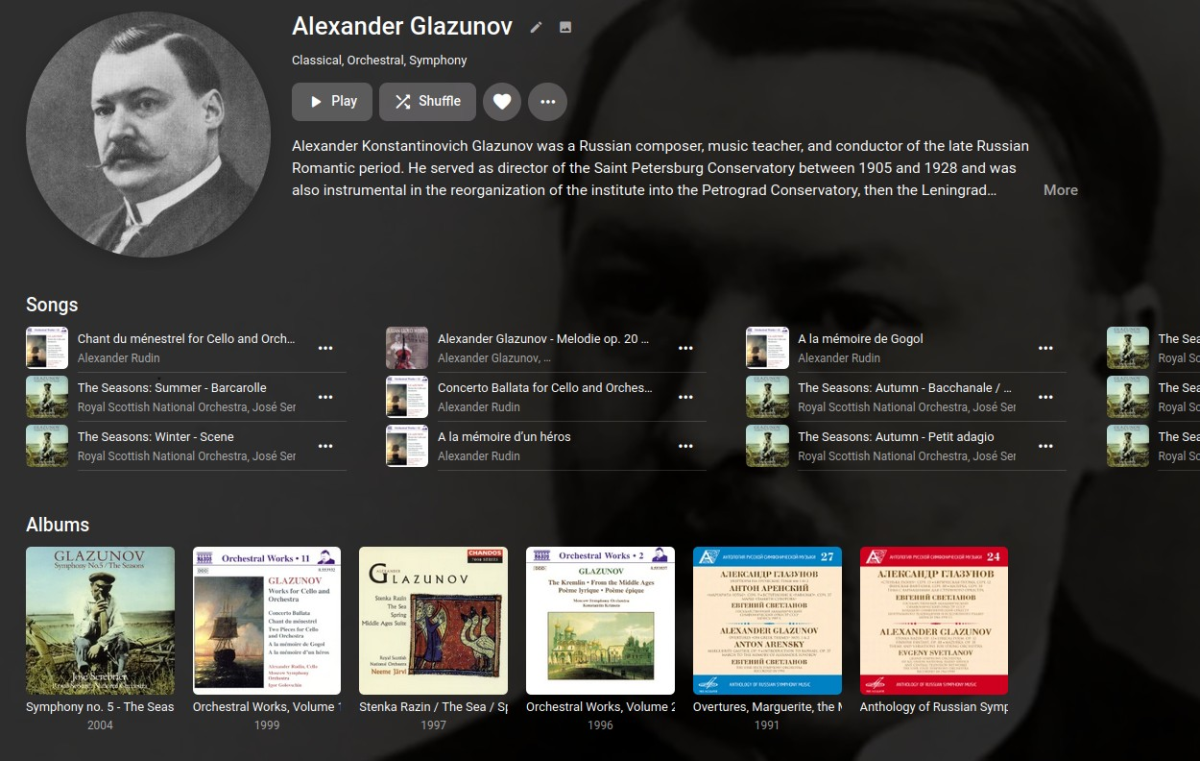
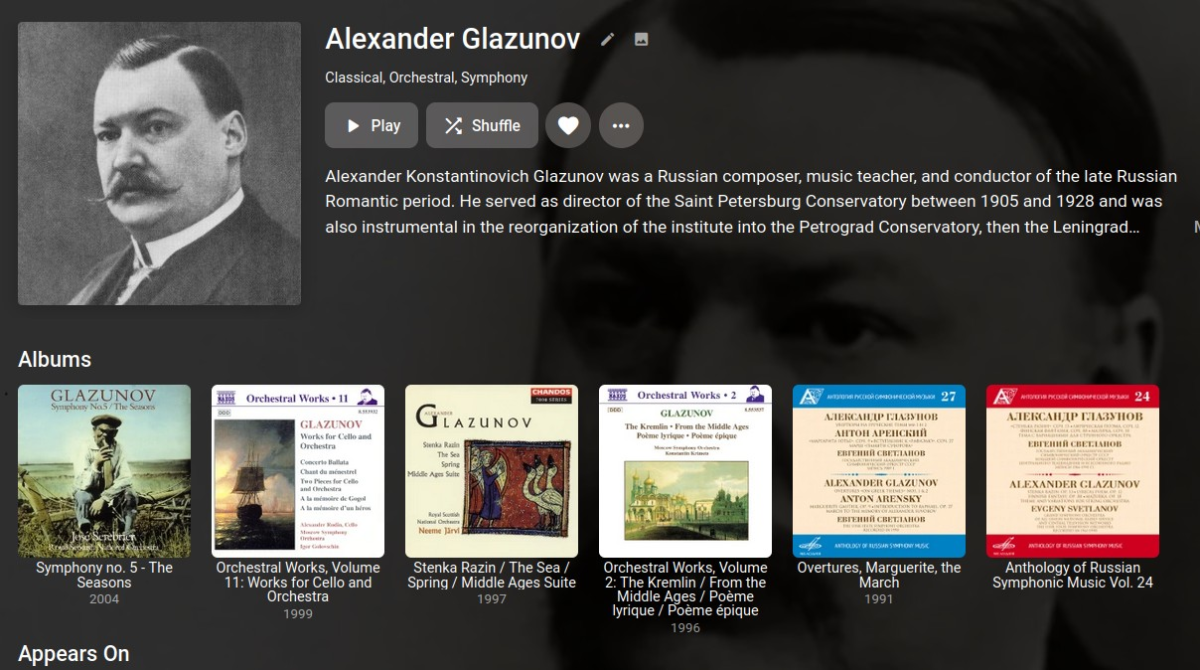
Providing this for anyone who might like it. I'm not a fan of the round artist posters, so I dug through the CSS to find how to change it. Along the way I found a couple other things. The first rule restores the square artist posters, with a very slight rounding of the corners. /* RESTORE SQUARE ARTIST IMAGES */ .cardContent-round { border-radius: .3em; } This rule stops the posters from being distorted to fit a square (or round) aspect. /* DON'T DISTORT ARTIST IMAGES */ .coveredImage { object-fit: cover !important; } I don't care to see the "Songs" section (above Albums) on an artist detail page. This rule hides it. /* HIDE ARTIST DETAIL "SONGS" SECTION */ .artistSongsSection { display: none; } This rule allows the artist name, album name, movie name, etc., below the tiles to wrap /* ALLOW LONG TITLES TO WRAP IN GRID VIEW */ div.cardText { white-space: pre-wrap; } BEFORE: AFTER:
 1 point
 -
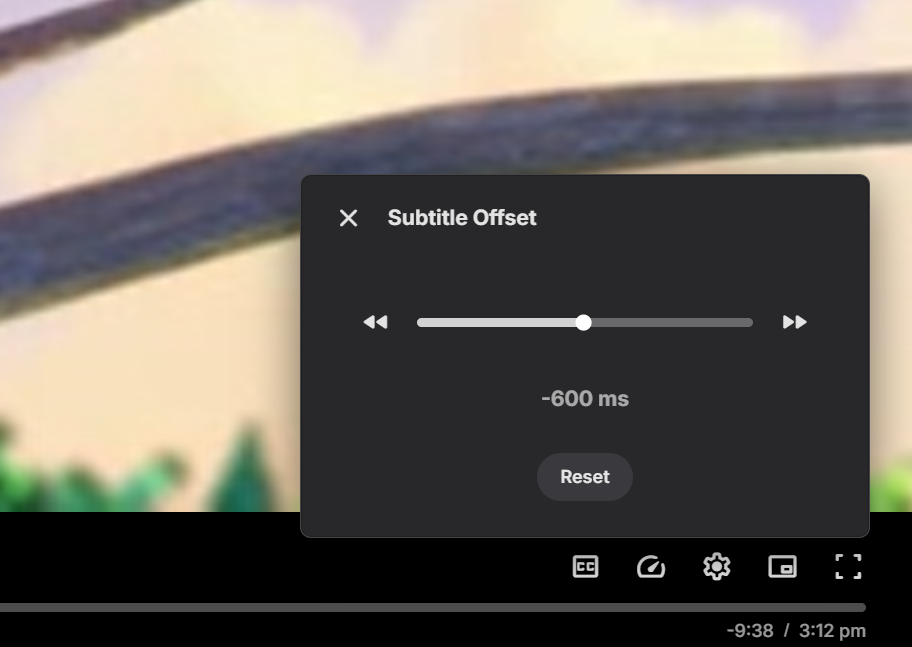
Subtitle offset is being changed to a slider which should make it much easier now, and you still have the buttons to step up/down:
 1 point
 -
HI, yes it takes time for connections to time out and for the app to automatically switch.1 point
-
That worked. But I would still call it a bug. A certificate with included chain should bot break a server. and if it does, I'd expect any kind of warning. A cert sanity check would be nice. Maybe you can update the documentation that the pfy may not contain a chain. Key and cert only.1 point
-
Can you try creating the PFX with only the private key + certificate? My PFX only contains 1 certificate and 1 key. The root and intermediate CA being there shouldn't be an issue but just to rule it out.1 point
-
To a point this is a reason Playlist library will no longer have dynamic images as libraries only have one image for all users so content of Playlists or Collections will reflect for every user. Or should dynamic images be created for the most restricted user and shown for everyone as there is only one image?1 point
-
will do, just wanted to bring it to attention in case it wasn't already known1 point
-
Additional part are not looked at at all so S01E01 part1 is played skipping part2/3 and goes to S01E02. But as talked about in other topic stacking was never meant to be via episodes and by change appear to display correctly via TV Content type.1 point
-
Alright rescanning once more after changing the path to add the same parent folders as my other drives. Once that's done I'll also add the ID @pwhodgesprovided and see if that helps.1 point
-
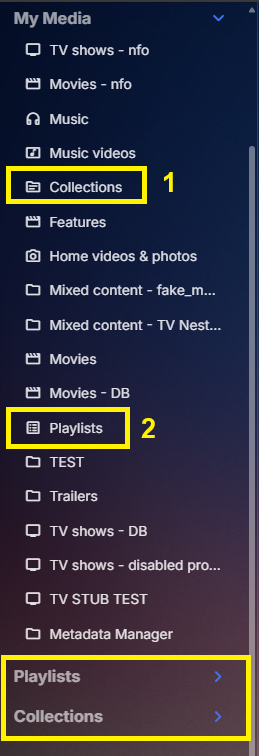
Yes as the drag and drop Playlists and Collections are independent of the actual library connections. As they are hidden correctly in My Media section on home screen and drawer. I guess a better divider section could be needed. 1 and 2 honor Home Screen settings. I guess a better divider section could be needed as they are no longer My Media
 1 point
 -
Hi. A new version of the app was released this morning that will improve this. It should now show you over two hours worth of unique items when playing like this. We will look into extending that to the entire set but this should improve it for now. Thanks. @Gilgamesh_48this version also has the ability to mark/unmark a photo as a favorite. Just bring it up full screen (click on it) then hit either OK or '*' at that point. This will also work during a slide show if you happen to see a photo you want to mark in that context.1 point
-
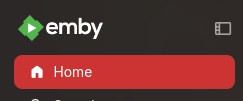
I think this is what you're asking. Click to expand the menu. Then click the icon in the top right to pin the menu.
 1 point
 -
1 point
-
PGSSUB will always cause transcoding, that's the only way they can play as they have to be burned into the video stream. Try and download an srt (text based) subtitle stream1 point
-
Hi, this is not by design. We'll take a look at it. Thanks.1 point
-
I think I found another issue... Happens when folders are updated, I'll check and add another fix in next version.1 point
-
OK we're looking into this. Thanks.1 point
-
HI, we are looking into this. Apologies for the disruption.1 point
-
Thank you so much for your help Luke! You were right to start at the tuner and not xml guide data. Tracked down the issue with my tuner (IPTV provider) and it was an issue on their side. The issue was semi intermittent and it was a coincidence I got through with VLC when I tested there.1 point
-
OK so this is what I was expecting. It looks like the emby android app can reach your chromecast receiver, but your chromecast receiver can't reach your emby server. Are you using a reverse proxy with https? It could be rejecting your certificate.1 point
-
Hi, we’ve sent 4.8.6 to Synology for review so it’s just a matter of waiting out that process.1 point
-
Does seem odd as I would think all browsers would be using the same code/method. But maybe @Luke has an idea unless it is a browser cache issue.1 point
-
Will have to look but is this from a specific client? Have you tried a different client? Issue was seen in Linux ET 3.0.19 and required uninstall reinstall mentioned later in that topic. Appears to be similar/same issue "/emby/Items/71503_ItemImage_undefined_1/Images/Backdrop/1/Delete"1 point
-
What do you see in the live tv channels tab?1 point
-
Right it is able to use all the data. But now that I look at your screens again, I think we're barking up the wrong tree. It's not an issue of guide data because then you'd see empty guide rows. But your guide has no channels at all, so this would suggest a problem with your configured tuner source.1 point
-
New images are being worked on, that should hopefully cover RPi 3 all the way to 5, both armv7 (based on Bullseye) and armv8 (based on Bookworm).1 point
-
New PUBLIC TESTING version available 10.0.21: Delta changelog 10.0.20 -> 10.0.21 fix boxset updates for realtime sync when content was added unify code improve realtime boxset updates sync performance (de-double updates) fix favorites linked by sub-content fix image overlay for favorites, when added via Kodi's favorite option improve internal queue fix sync crash fix dynamic nodes refresh when content was deleted, added or modified supress unnecessary progress updates e.g. after episode playback, season was updated by incoming Emby server notification. fix content detection by PresentationUniqueKey improve init sync speed for multiversion content1 point
-
So it was my Fire Stick Max 4k, I bought a 1GB dongle ethernet and all was fixed.1 point
-
For the one who started this thread...I thank you. As a tech; I deal with computer issues ALL DAY and having the end user tell me exactaly what is going can be a difficult one. Coming from the PLEX world. I see what works and what does not. Certain things that people consider a useless feature some use it all the time. From day one when I installed Emby and for a purposes it does what I want it to do. Even using the Symfonium has been a great expereince for me. I like emby becuase; unlike Plex, I can customize it..Just like the Onn 4K streaming from Walmart; I would rather use that than Roku becuase it can be customized and the product just works for ALL my purposes. However, since ALL my family and friends use Roku. The one issue for the alphapicker is a MAJOR issue for me. BUT..Luke, Speechless and Ebr all of them has been "right on it' they have helped so much and THEY need a high five from me...Unlike plex forums that could takes to get a response back. Still EMBY for the WIN!!1 point
-
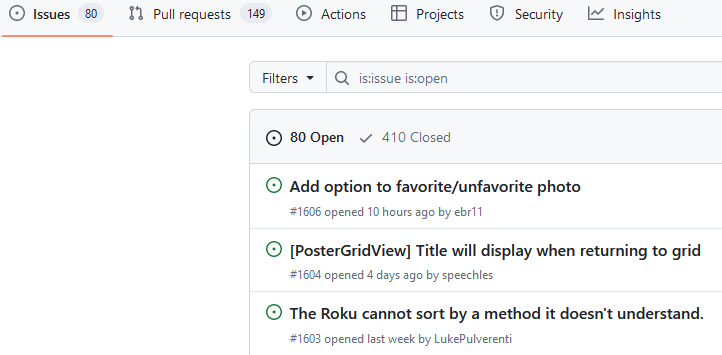
The grid uses a cache. The alphapicker uses chunked loading, just as if you scrolled down, only it can load larger chunks at once. Once it has loaded in the cache subsequent jumps can be instant. But once you move back from that grid it causes the cache to get destroyed at the same moment the grid is destroyed. The cache can also get destroyed if the Roku needs memory and garbage collects as you move into things forward from the grid. That is why you see it jumping instantly on the second alphapicker jump since it can use the cache it has already built and doesn't have to load anything. Also the current store app has a bug where the Folders view will attempt to load ALL the titles at once. This will cause a huge wait for that to load before you can even see any titles. But once it loads everything is fast because it has already been cached. But that initial wait can be huge if the user has a large library. That is why we want it to load in chunks to get to where you need to be rather than load everything at once. That is difference between folder view. This has been fixed in the Beta. We want to fix the alphapicker issue and already have a few solutions. But I need to get with @ebrand see if these solutions are really viable or not. We also have other fixes and improvements happening at the same time. It isn't that we are trying to be deceptive. It is the fact that some of these are very hard to pinpoint a cause. The short answer is there likely needs to be something watching the jump to make sure it completes, such as a Watchdog timer. But please give us some time to implement a fix for this. I know it is fun to pick on the fact it is broken. Damn thing. But please give us a few days to get something together. Thanks. tl;dr - That damned alphapicker hang thing will get fixed. There are many open tickets on the Roku tracker. Mind you some of these are my own suggestions turned into issues. But most of these are coming from users complete with forum posts in the issue tracker. I may get in trouble for showing the below image. But I want to show it to give you an idea of what goes on with the Roku tracker. As you can see we have 80 open issues. We have 149 requests to merge code. All of us contribute to making the app better as you can see. I publish most of my suggestions as pull requests. Some of them make it some of them don't. But they are there later to go back with and build something with. That is what you are seeing happen except without having to read the back and forth of the conversations we have and us argue with each other. We cannot really share out issues because it gives away what we are working on and how we are going to do things. But I can hopefully show the image above without getting into trouble. This is honestly what is happening. Please give us a bit of time to work on the issue tracker list. I am always giving these issue/fix numbers as reference in posts. It gets discouraging when people think we are just sweeping everything under the rug and never listening to them. Believe me it is exactly the opposite. Thanks for listening. I just wanted to make everything clear how we operate.
 1 point
 -
I managed to get it working. I'm not sure why though. Switched to Desktop mode I uninstalled the version that I installed via Discover. Downloaded https://github.com/MediaBrowser/emby-theater-electron/releases/download/3.0.19/emby-theater-flatpak_3.0.19_x86_64.flatpak via Chrome Started Konsole (terminal) cd Downloads flatpak install emby-theater-flatpak_3.0.19_x86_64.flatpak Started Emby and it worked fine. No idea why there would be a difference though.1 point
-
The catch 22 as you say it should recover and transcode and others will complain why is my media transcodings. Does the files play if you drag and drop it in browser?0 points