Leaderboard




Popular Content
Showing content with the highest reputation on 04/27/24 in all areas
-
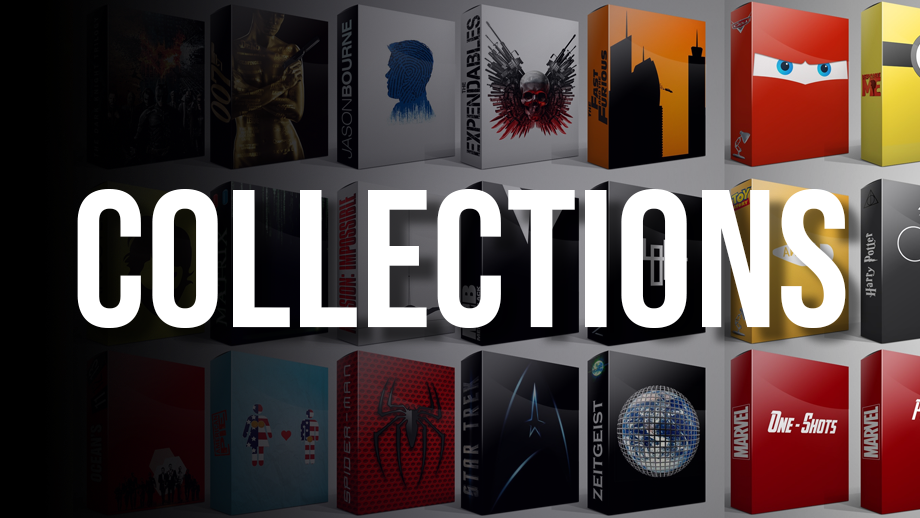
These images were inspired from many of the Libary images posted by members. These were made by 1 of my Sons.







 1 point
 -
Hi There is a lot of problem with Emby for Apple TV app. Missing ABC list in the library side for fast search. Sometimes the app doesn't load the full library, I have got 1000+ movie in my library, yesterday I'm searching for Moana (in my language it called Vaiana) and the app only shows movies from 0 to L, closing the app then reopen solved this issue, but thats not a long time solution. Sorry for said that, but I hate the new login method, I have got little kids and for them is too complicated if last time I watched something (changing user) the old method after app opening shows the users, then they choose the correct user and watch what they want1 point
-
I am experiencing repeated premature terminations of scheduled IPTV recordings on my Synology 1522+ using Emby. Here are some examples where the recordings did not complete as planned: TV total 2024_04_24_20_15_00 - Show, Comedyshow: Terminated after just 4 minutes. Achtung Abzocke - Betrügern auf der Spur 2024_04_25_20_15_00 - Information, Documentary Series: Terminated after 41 minutes. The Voice Kids 2024_04_26_20_15_00 - S12E6, Children, Talent Show: Terminated after 7 minutes. This issue is not isolated but occurs consistently, which is quite frustrating. I've noticed that my IPTV connection sometimes becomes unstable. Could it be that Emby automatically stops recording when there are connection issues, instead of continuing until the scheduled end time? If so, I would appreciate a feature that allows recordings to complete regardless of connection stability. Please let me know if such a solution is possible. I have attached the embyserver.txt log file. Should you need more information, please feel free to contact me. embyserver.zip1 point
-
Hello all, Here of late, I have found myself with an abundance of free time on my hands, and up to now I've been selfishly spending that time almost exclusively playing video games, but even that has grown tiresome so I started thinking of other ways I could occupy myself and the idea hit me one day while digging through old files on my computer, when I found a small collection of Icons I started developing years ago, but I never released publicly because of reasons not worth getting into, that I might like to revive the old project. Then I thought about all the people in this community that have managed to keep my old projects alive, and wondered if after all this time, would there be any interest in a new style being developed? I haven't used any kind of media manager (including emby) for a very long time so I don't really know what sort of styling is being used these days and if my old design would even fit in to the modern UI. So that's where you come in, because I'd like to know if there would be any desire for a new set such as these, and if I were to pick up where I had left off building up this collection, will you guys even use them? Here is a link to download the set so far, for you to play around with to determine if this something you'd enjoy and like to see more of. If you do load these up into emby, please share a screen shot so I too can see how they look in the modern UI! My vision for this new collection is to use the highest quality images possible when creating the new disc's, and to try to not use true disc labels that are covered in badges and unwanted clutter. So these won't be an accurate representation of the disc's in your IRL collections but instead a more aesthetic representation of what I think they should look like. That's about all I have to say on the matter, so go try them out, see how they feel, and then come back and tell me all about it!
 1 point
 -
I started to have the same problem. On the android mobile app I get a black screen while audio continues, on the web and the windows desktop app not even audio is playing. embyserver.txt ffmpeg-transcode-463a969f-23d3-4c6b-b492-f41f9c90f49a_1.txt hardware_detection-63849103247.txt1 point
-
Hi @user24I am sure emby is doing your observation. The question.. 1) Is this by design ? 2) If so, as per your suggestion Can it be made optional. BTW Not trying to pick on Ludwig. As an other example, you can add the modern John (Lennon) he shows up in just about every genre, Ask the same question is Lennon a "Jazz Artist" ? By most standards he would NOT be classified as such1 point
-
Hmmm, my guess is still that Emby is combining Album Artist/Artist/Composer metadata/tags all together into the new Genre Artist section??? I think the only place that Emby really properly separates the 3 is at the top level Music Navigation Tab for the 3 distinct page views. (I could be wrong though.) A similar type of combining happens with Songs, whereby Songs Performed by an Artist are mixed with Songs Composed by the same person, but performed by someone else. I don't have the eminent Ludwig to check this (and it's probably impossible to anyway) but the modern Paul (as in McCartney) causes the same issue. Yes, it's the same person, but the three metadata fields/tags have different meanings and should be treated as such by Emby for all music navigation and playback purposes. Sure, no problem with linking Composers to Genres as a choice, where some people may want to see this, but there are many valid use-cases to have the option to separate/filter linked Album Artist/Artist/Composer Genre/Song relationships from each other. Is there a good rationale for the fixed combining that is happening?1 point
-
Hi Ludwig should get the composer credit he is due. Being a Composer doesn't make automatically make him a "Jazz Artist" It is just like in the example Anothony Jackson and Simon Phillips. They performed on the track, their credits are "Performer" that Doesn't automatically Give them "Artist" credit1 point
-
Yes, you are right. I test it, the "pause" and "unpause" event send all the time. The old code my webhook server can not recieve the pause and unpause event, but when I modify code, it always recieve, I will think about it more.1 point
-
Of your list of things to learn the users (UIDs) and groups (GIDs) is the one I have most issues with. Files and directories, ownership and permissions in linux are a bit of an issue but everything else is not that different in Windows or I had experience of it at work albeit initially in a monkey see monkey do way. I guess a bit of reading and playing with a system will get me in the swing of it and of course the best way to learn is to get on and do it. I'll probably start with a GUI as it tends to be a little more novice freindly and once I've got to grips with the bits I need to know to get the few programs I need to run I'll more than likley go CLI only. The web interfaces for all the programs will be very familiar as I've been using them for years. I've already looked around at the distros and found it quite bewildering. However I have some experience of Mint which I see in your list so I reckon I'll start there. I have another old PC that I'll probably run as a testbed for my linux self training so that I don't make any disasterous changes on what will become a live system at some point. I'll also have a look at OpenMediaVault to see if its something I may want to use. Thanks for your advice, it's definitely given me a better understanding of what to start with and what I need to learn1 point
-
Server 4.9.0.15+ seems to have fixed the shuffle/play issues on Android TV 2.1.10. As this is an Android TV thread I'll continue with the web and mobile problems here Latest update broke Genre even more.1 point
-
Also check - Admin Dashboard - Display Hide Played Media From - Latest Media - More Like This - Suggestions --- If a user has already played media, these checkboxes will cause the media to no longer appear in these areas.1 point
-
If you're new to Linux there are many excellent primers online. You want to learn about: - ssh/PuTTY - shell and command line basics. - files and directories (not folders!) and navigation. - users (UIDs) and groups (GIDs). - files and directories, ownership and permissions. - program execution, processes and threads, runtime users and groups. - Stick to mainstream distributions: Debian, Ubuntu, Mint, openSuSE. Maybe even Fedora but meh... There's a lot more quality info when you need help with a mainstream distro than with the other cool/exotic ones. Avoid Arch and its derivations. - I can't say much about desktop GUI. My installations are headless servers and I haven't touched a Linux desktop interface in years. If you want a GUI look for a light weight version that can run well on low power systems. Many distro installers include multiple desktop options or none. - The apps you listed and Emby have web interfaces. Consider this when deciding what kind of desktop UI you want or if you even need one. - If you want to try the NAS route I can only recommend OpenMediaVault (runs on top of regular Debian) to someone new(ish) to Linux. The others are restrictive and can be confusing to new users. They might be running the Linux kernel but the rest of the system is their own thing. - Docker. It's worth learning and a good launch pad for other containerization platforms. Once you get the concept the others are easier to learn. The storage concepts are pretty much the same across platforms/OSs but with different names and terms. If you know the storage terms and options on one OS then you can pretty much find the translations for the others. Not always 1:1 but close enough.1 point
-
Well, not sure what this "EventName" key actually does. globals()["PlayingItem"][0] is the dict send as sessioninfo to Emby server. Emby should already know what's the state of playback "IsPaused = true/false" however. I'll add the "EventName" as well even makes not really sense to me.1 point
-
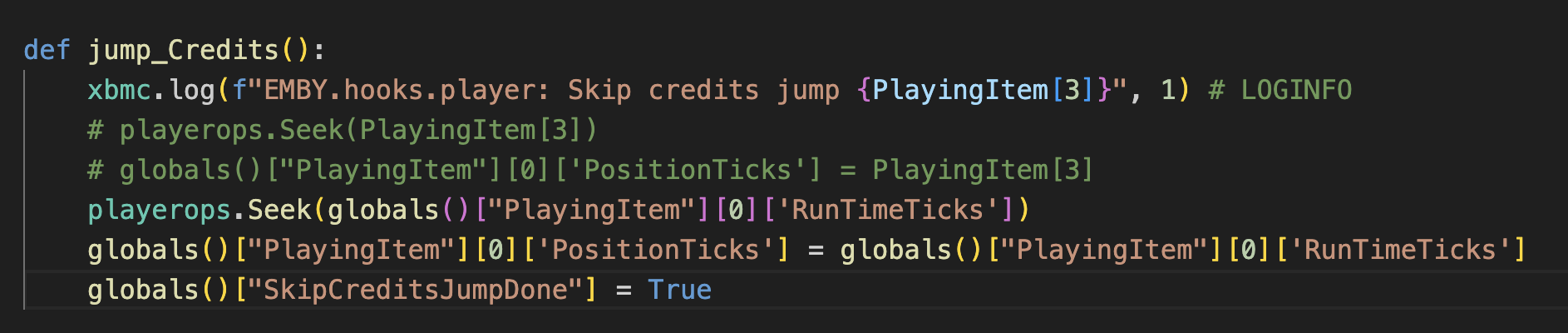
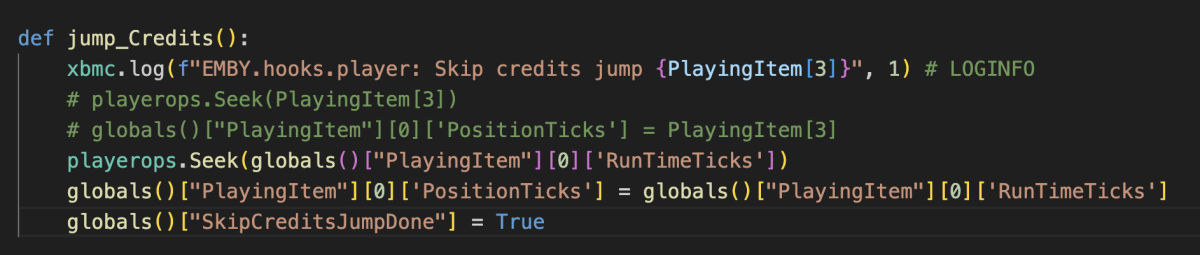
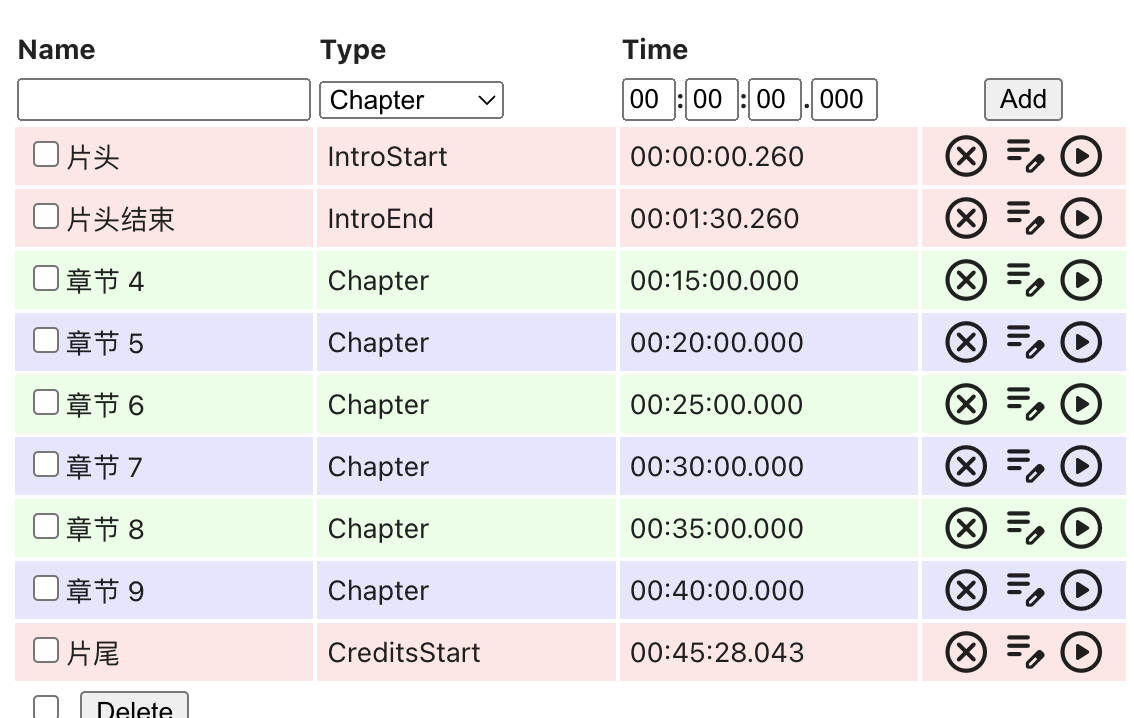
Thanks, I checked the database sync code and credit markers should be correct. "CreditsStart" is the parser label. Your modification in jump_Credits seems to be correct. I used the wrong seek position. Must be the Runtimeticks, you are right. Some additional checks must be added, RunTimeTicks are not loaded in realtime, otherwise (edge cases) player could crash. def jump_Credits(): if PlayingItem[0].get('RunTimeTicks', 0): xbmc.log(f"EMBY.hooks.player: Skip credits jump {PlayingItem[0]['RunTimeTicks']}", 1) # LOGINFO playerops.Seek(PlayingItem[0]['RunTimeTicks']) globals()["PlayingItem"][0]['PositionTicks'] = PlayingItem[0]['RunTimeTicks'] globals()["SkipCreditsJumpDone"] = True else: xbmc.log("EMBY.hooks.player: Skip credits, invalid RunTimeTicks", 1) # LOGINFO1 point
-
I have been ripping tagging and listening to music on my Squeezeboxes for about 24 years. I have never had anything show up in my server that wasn't reflected in my tags somewhere. .........and NOTHING is as frustrating as classical music. I just ripped and cleaned up tags for an album that credited the well know keyboard player Itzhak Pearlman..........1 point
-
I modify these code, then the plugin can skip to end when I click the button "skip credits". The plugin can recognize the credits chapter. This is the Credits chapter that ChapterApi plugin added. Hope this can help you!
 1 point
 -
Still show this on my end: "PUBLIC TESTING VERSION 10.0.15:" but the link is okay! in the top of the thread:1 point
-
Hi there, In this tutorial, you'll learn how to set up a RAM disk space on your Synology NAS. Start by following the instructions provided in this guide: Creating a RAM Disk on Synology NAS (translated into English). Once the RAM disk is created, proceed to configure Emby. Set the transcoding path in Emby to use the newly created RAM disk for optimal performance. A. To create two folders on your NAS, follow these steps: NAS Folder Creation: Choose a location where you want to create the folders. For example, you can create them under /volume1/docker/ramdisk and /volume1/docker/ramdisk-local. Folder Creation Process: Access the file system of your NAS. Create a new folder named ramdisk within the /volume1/docker directory. Similarly, create another new folder named ramdisk-local within the same /volume1/docker directory. You have the flexibility to choose any suitable location for these folders based on your NAS setup and preferences. B. Mount Ram Drive at system start Create a new schedule with user root and run at system start #!/bin/sh # Mounting a tmpfs filesystem mount -t tmpfs -o size=20% tmpfs /volume1/docker/ramdisk # Sleep to ensure the mount has time to complete sleep 1 # Synchronize contents from the local ramdisk to the mounted ramdisk rsync -ahW --no-compress /volume1/docker/ramdisk-local/ /volume1/docker/ramdisk/ #Grant access and ownership to user emby chown -R emby: /volume1/docker/ramdisk/ chmod -R u+rw /volume1/docker/ramdisk/ Steps Explaination: Mount Folder and Allocate RAM: Begin by mounting the folder and allocating 20% of your current RAM to the new RAM drive. Copy Contents from ramdisk-local to ramdisk: Next, copy the contents from the ramdisk-local folder to the ramdisk folder. Grant Access to Emby System User: Finally, ensure that the Emby system user has appropriate access to the RAM disk. After creating the new schedule, execute it to mount the folder with the new RAM drive. These steps will help you set up and utilize the RAM disk effectively, ensuring that the Emby system user can utilize it for optimized performance. C. Create new schedule with user root in order to copy ramdisk to ramdisk-local every minute #!/bin/sh # run me as a scheduled task every minute as the same use the files belong to rsync -ahW --no-compress --delete /volume1/docker/ramdisk/ /volume1/docker/ramdisk-local/ D Add setting Ram Disk path on Emby - Transcoding Emby Menu -> Transcoding -> Transcoding temporary path -> /volume1/docker/ramdisk/ Press Save. Thank you
 1 point
 -
The usual reason for this sort of thing is not following Emby's naming suggestions closely enough. https://emby.media/support/articles/Movie-Naming.html Movies can seem to disappear when they have been identified as a version of another movie; they can be hard to locate when this has happened, so sorting out the naming is the way to go. Paul1 point
-
This may be because Beethoven happens to have a Composer credit on one (or more) of your JAZZ albums??? I get a similar result with my BLUES Genre Artists that show Brian Wilson (formally of The Beach Boys) in the list because he has a Composer credit on one of my Fleetwood Mac Blues tagged Albums. So, possibly not a case of incorrect tags, but of an extensively and correctly tagged music library at Composer level? In some areas, Emby treats Album Artists, Artists and Composers at the same level, despite the three being distinctly different tag entities. (You would know this anyway.) It happens with Song selection and filtering, and now also with Genres. There is another topic about this here: https://emby.media/community/index.php?/topic/98180-menu-option-genres-for-music-music-videos-and-audiobook-libraries-displays-album-view-change-to-artist-view/page/2/ scroll down to: @ginjaninja Hopefully some enhanced filtering/separation of the three entities will stop 'polluting/diluting' what many (most?) people expect to see.1 point
-
Thanks for the help. I checked the logs and everything appears to be fine. The problem lies with the Android TV box: it no longer gets the correct date and time with the local network, and it persists even after I reset the box twice and use wi-fi instead of wired. It happened before for this box and another one in the same network, and then a day later disappeared; I'm guessing that it's some sort of problem with the ISP and accessing the NTP. In any case, I think it works either way: transcode using the Emby server or using Kodi (by setting the audio to default, then activate passthrough and the option to transcode to ac3.1 point
-
Hi, @mbc0 Experience with CloudFlare tunnel has been great! I only really use it for audio, but have done some testing with video and didn't find any difference between having ports directly open or using a reverse proxy set-up.1 point
-
I was curious about this, as I shuffle music a lot (though mainly from different starting points). From some brief experimenting, yes, I think there is some 'weirdness' happening with the various random shuffle modes now: Shuffle all, from the Songs tab, appears to be working as expected. Shuffle all from the Albums tab, returns some strange results. Previously (Emby 4.7.x) it would return a random order of whole albums, as best as I recall. Now (Emby 4.8.5.0) it starts with a random order of whole albums, but then changes to a mix of two albums only, then completely random songs, then back to two albums mixed, then one album all together..... Shuffle all, from the Album Artists tab, also returns weird results, similar to the Albums shuffle all above. I do not think this is 'normal' at all (it doesn't greatly concern me though as I don't use the Album shuffle all mode greatly). If I have time a bit later on, I may experiment some more and provide more exact detailed examples with screenshots. In the meantime, it may be worth Emby having a quick look to see if Shuffle is actually working correctly across the different tabs... it should be easy to replicate what I have described...1 point
-
HI, please let me know if 4.9.0.16 resolves it, once available for your platform. Thanks.1 point
-
That is what's classically know as port triggering - where you open the port 'on demand/dynamically' do what you need to do, and then it closes after a short peroid if no more activity on the connection. Port forwarding will keep that port 'open' forever and just forward what it receives, allowing multiple sources etc. Pretty much every router these days has done away with triggering - and they just use port forwarding. tbh with you, the router/AP doesn't inspire confidence if they can't even label the 'server port/destination port' correctly on their GUI .. You don't need a fixed IP - ddns will allow you to keep a fixed 'dns name' and it will dynamically point you to the new WAN each time it changes. Your router 'may' have a DDNS client built into it ?1 point
-
Hello I want to highlight two iussues whith the actual App (1.8.8) for Apple TV: This one is somewhat annoying as you cannot jump to a specific letter within your library if you are looking for a special movie or series I want to watch. Just so, I have more than 3400 Titles in my Anime library and it is really annoying to scroll forever to get to a specific letter. Please be so kind and add the letter secionts on the left or right side to make it easier to jump within a library! Well, this one is really annoying! This happens always when I sort the library i.E. with "Premiered" or "Added on" or "Last added episode". The app does not show ALL titles within a library, mostly only 1/4 of the titles. Thats not good and should be changed asap. Also there are some things for the settings which are missing: Please add the setting to change how many seconds you want to jump forward or backwards wenn scrolling while playing. At the moment you can jump only 10 seconds forward or backwards. This should be possible to change within the settings. smoon1 point
-
Should be soon.1 point
-
Ohh my ppl. It's a movie, not religion. Peace, love and understanding1 point
-
I updated 10.X version, please try it.1 point
-
have any you try vidhub yet? it's supposed to be like a free alternative version of infuse been using it along side with emby and think it's pretty cool so far.1 point
-
Don't use the Plugins! It's really easy to get emby up and running in a TrueNAS Jail that will run and update for many years to come (well, at least as long as TrueNAS is supported)1 point
-
@ebr Can that be submitted as a bug to Exo? It completely prevents me from using the 4K broadcast channels having me to watch my shows in HD like a savage.1 point
-
I'm responding just so you would get another notification bell... I have a feeling that is important to you. You're welcome.1 point
-
@bakes82You are a strange bedfellow. One who constantly mentions ex-boyfriends and old lovers while in constantly company of the current boyfriend. You do know this is weird, right? Not being mean. Its just you come out just to try to knock us down or something compared to your old boyfriend/lover. Why is that? There is something about the universe that makes it seem to people this is acceptable lately? Because it is very off putting. Just find it strange.1 point
-
thank you very much1 point