Leaderboard




Popular Content
Showing content with the highest reputation on 04/25/24 in all areas
-
The FR below never went anywhere (surprise, surprise..) - CGNAT may well be the issue here - such a simple test to warn the user it may be an issue - it would take a few lines of code to check once the user checks the 'Enable Remote Access' box ... https://emby.media/community/index.php?/topic/122255-cgnat-built-in-test-when-enabling-remote-access/2 points
-
I would download into a separate directory that Emby doesn't scan, and move completed downloads to their destination, which should be an instant action. Paul2 points
-
Yes my network is set to private but I figured it out lol this whole entire time I had to restart my router and modem a few hours later just now it must have took effect and now I can connect to emby on my firestick and apple tv2 points
-
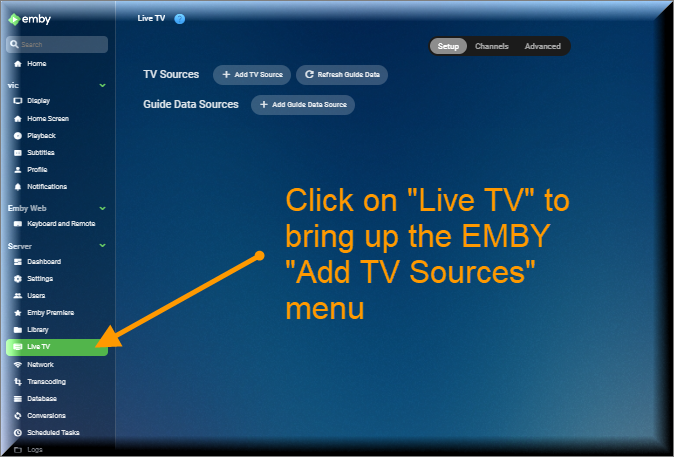
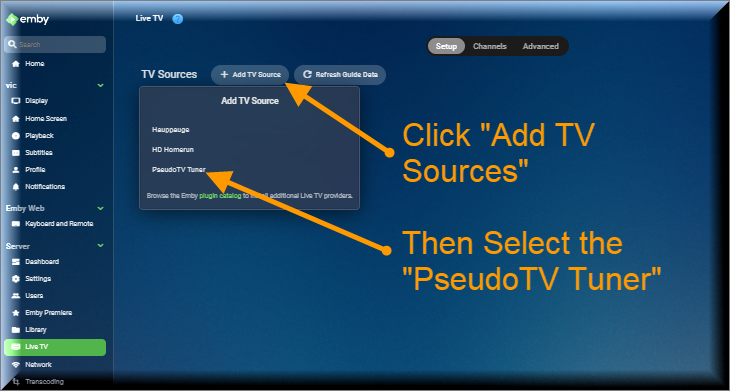
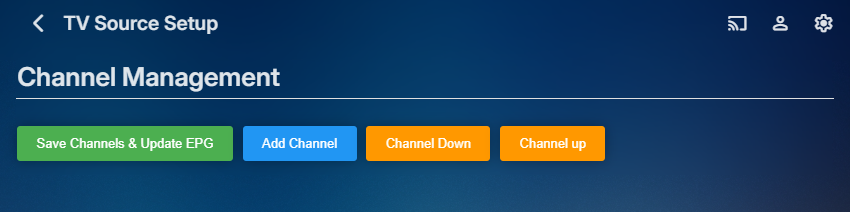
The Pseudo TV plugin is composed of two parts. The first part is based on a TV Tuner Platform created by @Luke. He called the plugin "VirtualTvExample." The second part is a Javascript program that provides a simple GUI for creating and adding channels to the TV Tuner. The code for both parts is attached below. I created the javascript code and several C# additions to the tuner. @TZTZorocomposed the CSS code. PseudoTV is open source and free for everyone to use. PseudoTv is tested on Chrome and Edge. Other browsers may work. I just don't know. To install PseudoTV, copy the plugin dll below to the EMBY plugin directory and RESTART EMBY. Follow the instructions below to bring up PseudoTV. Next add the TV Source for PseudoTV. If you have an Old PseudoTV Tuner installed, you must delete the old tuner before installing a new one. Select the PseudoTV Tuner to bring up the Channel Management menu. Use this menu to Add channels to the Emby EPG (Electronic Programming Guide). Click the Add Channel button to add a new channel. The two videos below, explain basic channel building. Querry-1.m4v The next video is also about channel building, but instead of using an Emby query, media is selected directly from the Emby libraries. File-1.m4v The remaining videos introduce the PseudoTV tool. The first is called the Library Explorer. With it you can navigate across your Emby libraries and view their contents. Libraryexplorer-1.m4v This video explains the Metadata Editor. Metadataeditor-1.m4v Another useful tool is the Playlist Editor. Playlisteditor1-1.m4v The description of the Playlist Editor is continued below. Playlisteditor2-1.m4v The latest plugin (dll) and the source code (zip file) are attached below: PseudoTV.dll PseudoTV.zip
 1 point
 -
OK we should be able to support this. Thanks.1 point
-
I'll try that out and report back. Oh both 51 & 52 belong to the server. 51 is while on WiFi & 52 while on Ethernet. I made changes to the port rules before switching between the two.1 point
-
Hi, the core server has special file system api's that we've added for plugins to use, however I know that many third party plugins from community members are not using it and are just using the stock .net file api's. So that would explain that. I would report it to the developer of the plugin.1 point
-
The problem is fixed! quickmic, thank you!1 point
-
Great. Thanks for accepting it. I figured there was a reason on the json, thanks for letting me know.1 point
-
Based on the screenshots you've provided so far "Source Port" in the table view should be "Server port" in the configuration view. As it stands currently I believe you've basically told it that any incoming port request should be forwarded to your server's http port so it should be: External IP Addr - Empty (which should allow all) External Start Port - 8096 External End Port - 8096 Protocol - TCP Server IP Address - 192.168.1.52 Server port - 8096 If this configuration still doesn't work, do you have a device in front of this one (ISP provided modem/router aka gateway) or does it handle the modem capabilities as well? Have you checked if your connection uses a CGNAT?1 point
-
Never mind. I got it sorted out. I just cleared out the Metadata and let it rebuild.1 point
-
New PUBLIC TESTING version available 10.0.15: Delta changelog 10.0.14 -> 10.0.15 add Next Episodes played node fix websocket close issue fix recording library sync fix delete episode issue in native mode add goto context menu option1 point
-
Hi @Luke FYI, Below is the header for Genre->Type -> Albums -> Show All If I click the Shuffle Button ... The Client (Store: Emby Theater - Release Server) (Web - Beta .14) crashes the Emby Server (it becomes unresponsive, can't shutdown or restart) it requires a machine reboot. Not sure what is going on. Attached are the last three server logs from my test machine. My test run was run this morning embyserver.txtembyserver-63849600000.txtembyserver-63849635001.txt I will test again when the changes are pushed to beta -Vicpa
 1 point
 -
I merged the code, working great. btw, yes I prefer json calls wherever possible. executebuiltin has issues. It took me hours to debug a special case till I figured out executebuiltin triggered the actual problem. I don't trust executebuiltin anymore.1 point
-
4.8.5 still has same problems with 1. Music Playlist cover images using only the first album cover image four times, and 2. Music Genre cover images using Composer or Album Artist images for some or all of the 4 panes.1 point
-
Thanks all. Good to know and think I got it all figured out between Roku and Emby settings!1 point
-
Fair comment. I should have been clearer. I was looking for something more back end that would allow me to hide media browsing in the user interface, only showing playlists there. I definitely see how to do it in the front-end interface when media is browsable. I was hoping for a playlist builder of some sort in the admin UI or offline that could help with that. If not, the front-end works great I just won't be able to hide that for normal use. Chris1 point
-
Yes, a server error. I have right now the latest stable but i try with docker other versions to check if the problem exists. I test with a friend in other debian 12 - nvidia, proxmox - nvidia, same movie and the same error appears I post here too the same problem. Thanks1 point
-
As I read the "help" text on your router page my guess is it's a language translation mixup. Possibly meant to say destination, not source port.1 point
-
Ok, I felt there was something different, it looks nice! I hope we get the same style in the app versions.1 point
-
I'm happy to report that the bug dissapears when moving emby addon to "addon" mode instead of native. So it's a bug found in native mode only. Since my kodi, emby server and media are all connected locally, I always used native mode, but if there is no other disadvantage to going Addon mode, I'll stay in this mode.1 point
-
Then I see the dialogue with username and password. Maybe it should also be added if the path begins with smb://1 point
-
Yes, marked a solution after some more testing1 point
-
Hi, hopefully the set of options under automatic subtitle downloading answers that for you, no? There is one specifically related to this.1 point
-
Hi, does the help text underneath the title explain it? Hopefully it does, otherwise we've failed at that.1 point
-
Here's a patch to add the go to functions, along with a setting to disable them and an en_gb language strings file in case you're interested. There are two "Go To Show" language strings. The first would actually be for the setting name for enable/disabled, the second what appears in the context menu (actually a sub-menu, I put show/season in a sub-menu to save space in the context menu). goto.diff1 point
-
Would you be ok with the addition of "Go To Show" and "Go To Season" options on the context menu for TV show episodes? So that say in a "New Episodes" widget one would have the option of going from that episode directly to the related Show/Season page? I've already written initial code that does it, but I'm not going to pretend that you won't have to look at it and go there's an edge case you're not handling here so it would increase your workload. I've not added the two strings to the translation files either.1 point
-
Will test if current beta goes into stable. QUIC support is the only thing holding me back from ditching Caddy and use Emby without reverse proxy.1 point
-
Ugh. @Lukecan you please make the necessary changes with group by media type? 1- Add seasons back 2-Split movies and shows into their own groups. 3-Add an option to view all items like in ATV1 point
-
@step55I guess I shouldn't be surprised that Luke forced this on us, since that seems to be how he does things. But this one has already been done in ATV and users have made it clear that an option to group by media type needs to be an option!!! I don't understand why he just threw this out there without the option. Plus, even the grouping is half assed. It's not even splitting movies and shows! What a horrible implementation.1 point
-
I'm glad I saw this before allowing the update, else I'd be just as annoyed as rexerm. The changelog note "group collection items by media type" really doesn't do justice to the carnage that's been done here. It's really disappointing that breaking changes to how we view our collections have been forced on us seemingly without consideration to how people might use the software in ways that aren't specifically the same as the developers expect. 1) It's incredibly useful to be able to mix content types. 2) Forced horizontal scrolling is a total blight! You've mentioned that "an option to control this is certainly possible", but you don't say that you're actually going to restore the original functionality, or when. Could you please give us some certainty here?1 point
-
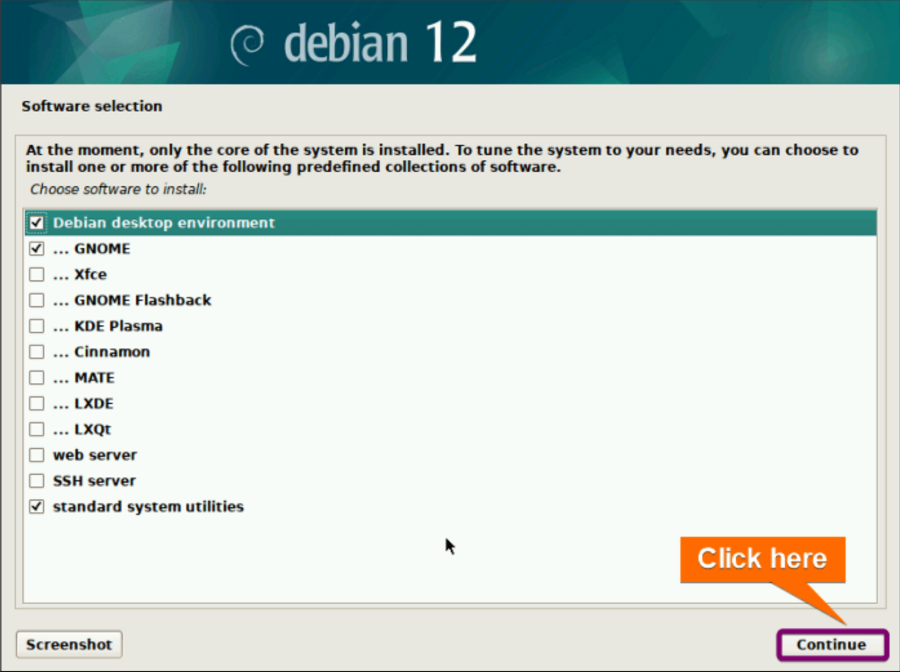
I’m a little late here but I would also suggest (as some above have) keeping it basic here. Start with Debian 12, when you install it it will give you the option to install one or more of the fallowing desktops/options: Source I don’t Recommend GNOME (ugly and clunky out of the box but after a lot of customization is OK (it’s the Ubuntu default) puke!). Cinnamon is the simplest for beginners but MATE isn’t so bad either. I prefer KDE Plasma (more advanced). (Note you can install none if you wish and pick others later from other sources) (also you can also add Proxmox to this later (excellent for VM’s LXC’s etc.) But your best friend for Linux is the terminal (be it launched from the desktop or via ssh). Before you start (if your still waiting or not for the HW) look for info on the following Linux topics on youtube or articles: directory structure permissions systemd SMB(Samba)/NFS
 1 point
 -
In fact this is how it's presented in Plex: At the bottom you can see other Editions, that relates to other versions and includes if you have it in your library even a link to the soundtrack. Definetely we need something like this in Emby
 1 point
 -
Hey All, So after some time, it seems to be running stable in my environment, so here it is... This has been a bit of a battle with compatibility and time, but hope all is good. Please log any issue you may find on the repo. (https://github.com/ShanePe/Emby.SmartPlaylist.Plugin/issues) So to recap, main issue is that Emby front end has changed to not support additional files and they way .js are loaded and additional new backend libs to integrate. I did see an odd toast pop up when saving a playlist but have not been able to replicate. NOTE: I did notice on firefox that I had to manually refresh the page sometimes if it doesn't load, trying to get to the bottom of this. This is NOT backward compatible and built/tested on version Emby 4.8.10. SmartPlaylist-2.5.0.4810.zip1 point
-
You can have a script triggered automatically after a renewal. I wrote the following one that: removes old pfx generates a new one (with a custom password to be changed in the script)The file is generated in /var/lib/emby/cert.pfx. I advise to keep this as default as emby already have access to this folder. You should configure the admin to use this path for the certificate changes its access rights to be accessible by emby user only restarts emby-server Just create a emby.sh file in /etc/letsencrypt/renewal-hooks/post folder, and chmod +x emby.sh. #!/bin/sh set -e # Should be the same password for the certificate in emby admin PASS="emby" DEFAULT_LINEAGE="/etc/letsencrypt/live/YOUR.DOMAIN.TLD/" RENEWED_LINEAGE=${RENEWED_LINEAGE:-$DEFAULT_LINEAGE} rm -f /var/lib/emby/cert.pfx openssl pkcs12 -inkey "$RENEWED_LINEAGE/privkey.pem" -in "$RENEWED_LINEAGE/fullchain.pem" -export -out /var/lib/emby/cert.pfx -passout "pass:$PASS" chown emby:emby /var/lib/emby/cert.pfx systemctl restart emby-server echo "Emby certificate generated"1 point
-
It got a really low rating and for good reason. I guess you like it because it's got that peanut head Patrick Stewart in it...0 points








_svg.thumb.png.85e4ee6291ddd76347269c05175b5dda.png)