Leaderboard




Popular Content
Showing content with the highest reputation on 04/15/24 in all areas
-
Here is the next round of answers from our Emby Q&A session. The feedback from our previous blog post was exciting to see from all of you, and we are excited to share even more answers. The next round of questions and answers will be released next week as well! 1) What are some of the future goals of Emby? Emby wants to continue to grow and be the best media server option available for our users. We hope to move to a quicker release schedule than in previous iterations that is both more efficient from a development standpoint and exciting for our users. We love what we do here at Emby and we want our users and potential users to see that! 2) Would the Emby team ever consider moniterary "bounties" to help offset the development cost. We have actually seen this question a lot lately. We do not believe that this is the best way to decide what goes into development for a few reasons. First and foremost, we do not want people who have more money than others to decide what goes into production while others who may not be able to afford to donate or contribute go unheard. 3) How does the Emby team decide on what's next for Emby? The answer to this is deeper than most people probably think. Feature requests is one place that we look at to form our roadmap of future goals. Sometimes it's as simple as user feedback that something is not working as intended or could be implemented in an easier way to use etc. Other times our development staff has ideas based on industry trends as well as their own experience that they believe should be implemented. We take all of that and as a team decide what should be added and when. 4) In what areas can Emby improve? We as a team are always seeking to improve. We fully acknowledge that as a small company we are sometimes stretched "thin" but we do our best to always be both proactive and reactive with all of you. As mentioned above we hope to move to a quicker release schedule with a more agile methodology that allows us do so. We think we do a pretty great job at communication with everyone here on the forums, but we continue to strive to be even better here as well. Being able to give more flushed out answers and as much information as we can. Our goal is to always continue improving.5 points
-
Here is the next round of answers from our Emby Q&A session. The feedback from our previous blog post was exciting to see from all of you, and we are excited to share even more answers. The next round of questions and answers will be released next week as well! 1) What are some of the future goals of Emby? Emby wants to continue to grow and be the best media server option available for our users. We hope to move to a quicker release schedule than in previous iterations that is both more efficient from a development standpoint and exciting for our users. We love what we do here at Emby and we want our users and potential users to see that! 2) Would the Emby team ever consider moniterary "bounties" to help offset the development cost. We have actually seen this question a lot lately. We do not believe that this is the best way to decide what goes into development for a few reasons. First and foremost, we do not want people who have more money than others to decide what goes into production while others who may not be able to afford to donate or contribute go unheard. 3) How does the Emby team decide on what's next for Emby? The answer to this is deeper than most people probably think. Feature requests is one place that we look at to form our roadmap of future goals. Sometimes it's as simple as user feedback that something is not working as intended or could be implemented in an easier way to use etc. Other times our development staff has ideas based on industry trends as well as their own experience that they believe should be implemented. We take all of that and as a team decide what should be added and when. 4) In what areas can Emby improve? We as a team are always seeking to improve. We fully acknowledge that as a small company we are sometimes stretched "thin" but we do our best to always be both proactive and reactive with all of you. As mentioned above we hope to move to a quicker release schedule with a more agile methodology that allows us do so. We think we do a pretty great job at communication with everyone here on the forums, but we continue to strive to be even better here as well. Being able to give more flushed out answers and as much information as we can. Our goal is to always continue improving. View the full article5 points
-
A new version is available in the catalog now which is compatible with stable releases >= 4. 8.2 and the latest betas! Important: Refresh your browser cache after installation and server restart.3 points
-
Having just installed this for the first time, it looks like it will be a very useful tool for troubleshooting data inconsistencies. On the very first random Music Album that I just tried (out of 1000s) I immediately found a difference between MusicBrainz and Discogs data (Discogs being incorrect). Using this plugin will therefore likely be much faster than having to first check via the individual data provider sites. Great work - well done!!!2 points
-
Tried an old account . hasn't been used in months. Same error. I don;t think it has anything to do with that 5 downloads restriction2 points
-
i am really grateful for your help and patience Q-Droid. As I said before, this is all new territory for me. I'm beginning to understand the structure and the mistakes I've made. Unfortunately, there is hardly any specific help for such cases. It's good that you got in touch, it was only through your answers that I discovered the errors. If it wasn't for the message about an update in the emby dashboard, I wouldn't have done any of this. Then I found a post where someone had a similar problem, where someone explained casaOS how it works. Now everything makes sense as you explained it. I had to read in more depth and watch a few videos but it's starting to make sense. Fortunately, everything is back now and I just have to wait until the casaOS appstore releases the latest version. They say they need a few days longer for whatever reason. You've saved me a lot of work, so thanks again for your help2 points
-
Why did you want to install the Emby package if you're using CasaOS and it's apps, which are Docker images as far as I know? Yes, you now might have a host based installation of Emby plus the CasaOS docker Emby app hence the port conflict. If you're going to stick with Casa then remove the Emby package you just installed and update Emby through Casa. If they don't have the latest version available ask them about it. Shutdown all Emby services. Don't try to start the CasaOS Emby app because if you started 4.8.3 you can't go back to 4.7.x, it won't work. Start the CasaOS Emby after you upgrade it.2 points
-
Confirmed, I think I found the issue. Will be fixed in next version2 points
-
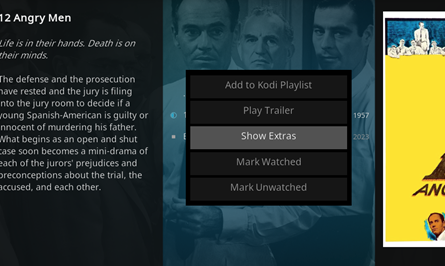
yes if a movie has extras it should show up in the EmbyCon context menu
 2 points
 -
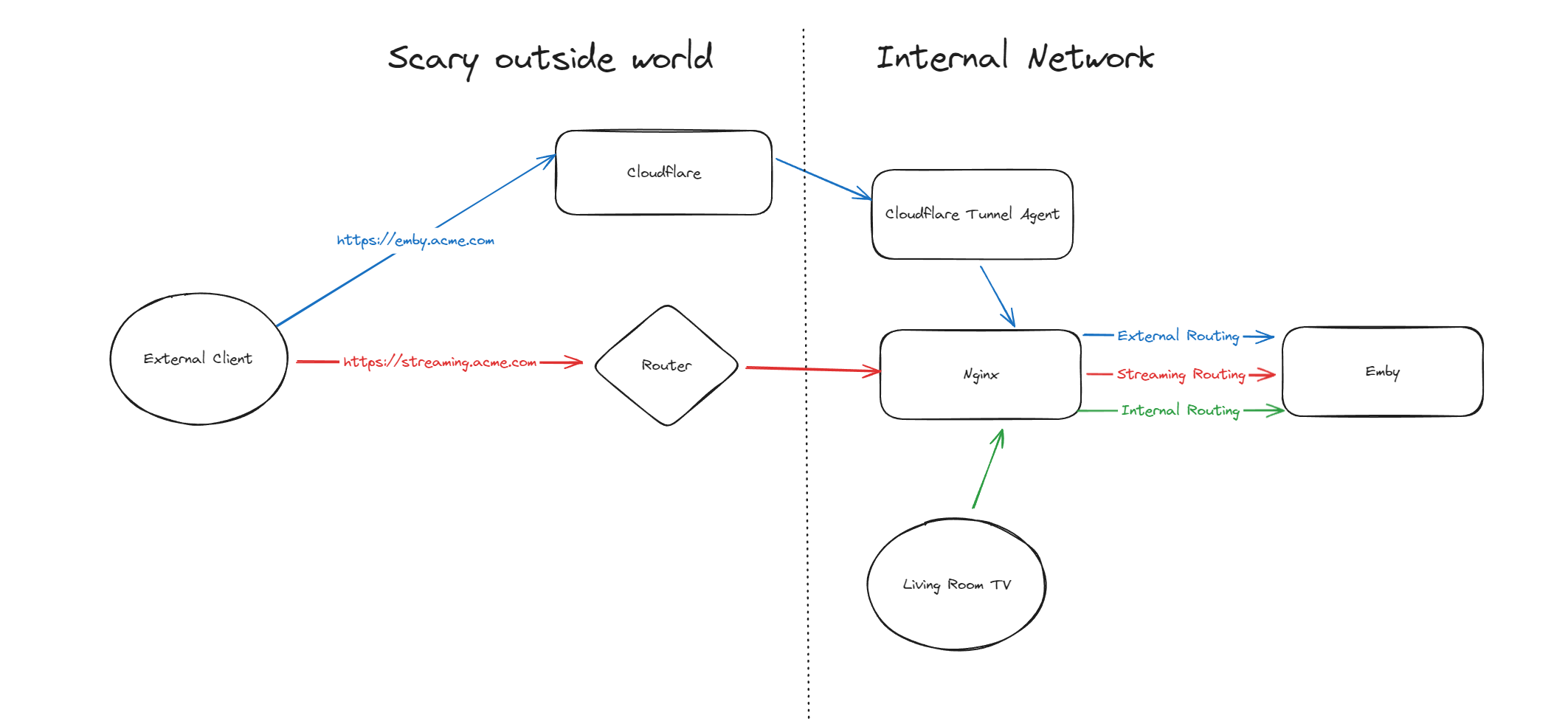
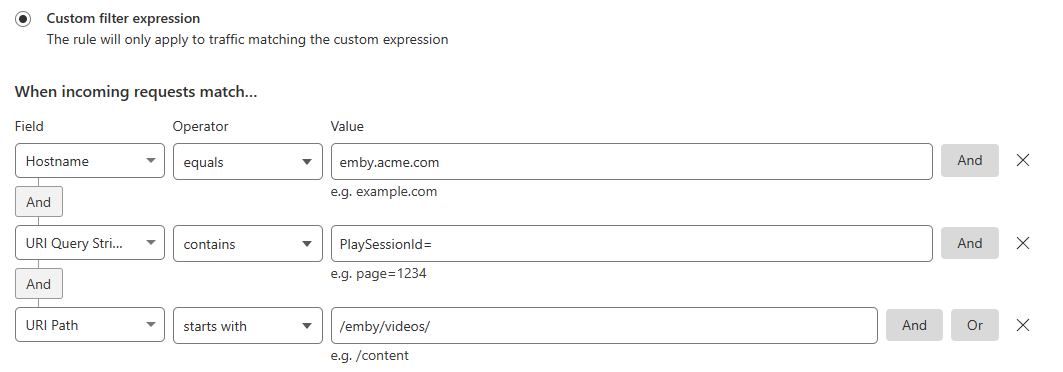
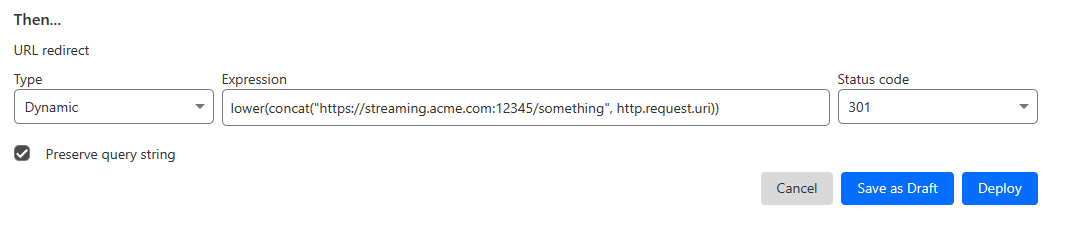
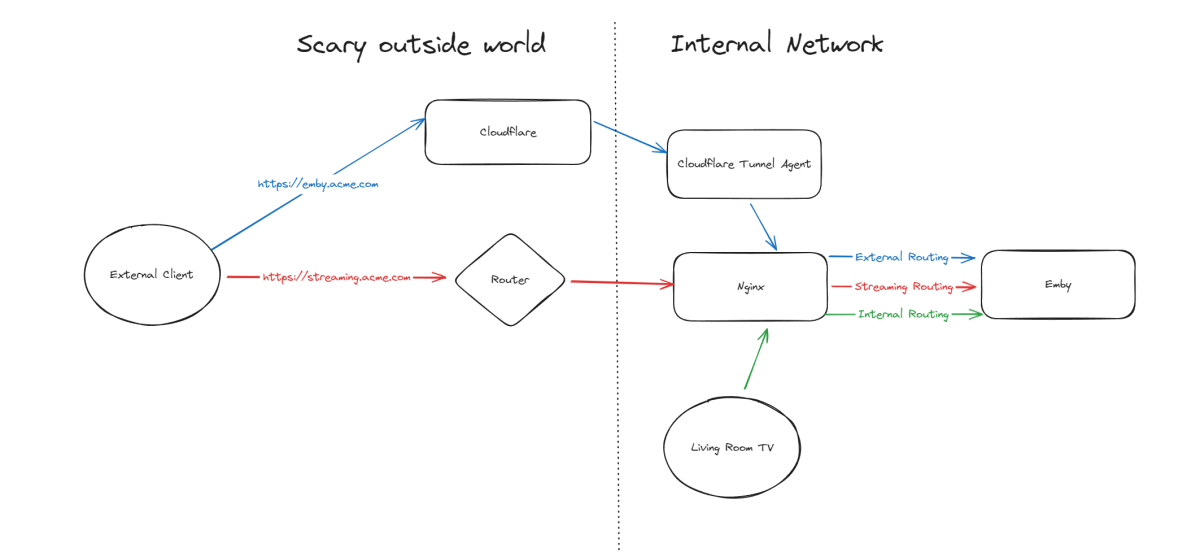
Hello, A few months ago I was in the process of moving away from directly exposing Emby via my home router to using Cloudflare Tunnels, but as it turns out, Cloudflare don't like you paying nothing and yet streaming GB/TB of data through their network. This was frustrating as I really wanted to put Emby away behind something I trust but I also didn't want to get my account banned for streaming media through it. I've read through many posts here about avoiding caching but it seems it's not necessarily the caching that will trigger your account being in trouble, it's the bandwidth usage as well of just piping all that data through their servers. Since I now had some time, I thought I would try to work out a long term stable option using Cloudflare. So what to do? When talking about security with self-hosting anything, I'm not going to go crazy but I like to take away easy wins for bad people. When it comes to running something like Emby, I'll assert that the biggest risk you face is automated attacks at scale. By this I mean that when it comes to hosting Emby at home, I am not really worried about some clever kid that I beat in an online game spending a weekend taking revenge on me or a state-backed hacking groups spending 6 months breaking in - I'm mainly worried about the type of flaws that are easy for people to automatically discover and exploit - e.g. recent examples with Emby and HomeAssistant. Both of these flaws allowed attackers to bypass the authentication layers of the application - no matter how complex your password is or whether you have MFA enabled (in the HA case), it's a trivial exploit once an attacker detects a vulnerable version of your software running. Both of these flaws were exploitable at scale, provided you could find Emby servers online. Given my determination to run things through Cloudflare for several reasons, security included, I wanted to come up with a system that gave me some confidence without being too complicated and without risking my Cloudflare account being banned for streaming through their service. I have not written this for everyone to be able to follow - if you are not familiar with nginx, Cloudflare, HTTP semantics, then this may not be all that helpful. Split Service Where I've landed is a split hosting setup - far from ideal but I think it's better than going all Cloudflare or all direct access. To begin Expose Emby through Cloudflare tunnels as per other guides (I won't go into the details here right now) Expose Emby via reverse proxy for external traffic (and internal too, makes sense to keep things consistent in my view) Setup port forwarding on your router to direct a port from the internet to your nginx service Nginx will have two Emby configurations to start with - one for external and one for internal Once you are able to hit Emby both internally as well as externally, then it's time to split the external. I'm going to imagine that you now have emby.acme.com setup via Cloudflare Tunnels, and you also have streaming.acme.com setup with direct access to your service via your home internet router. What's the difference? emby.acme.com is going to be your main address you use for everything, and that will go via Cloudflare Tunnels. You can use Cloudflare's many, many security options to come up with a setup that is secure but easy for your situation. streaming.acme.com is going to be a DNS only record in Cloudflare, it will point to your home IP and you will port forward this port (can be any random port number) to your nginx server. If we were to leave this setup in place, you would be able to access your Emby service via Cloudflare (with media streaming through Cloudflare), AND you can access Emby via the streaming address, completely outside Cloudflare. So what we can do next is use some clever redirection stuff. Nginx Configuration Now that you have two URLs working with Emby, let's look at Nginx again. In my configuration I have two different `server` blocks in my nginx configuration - one for my internal network and one for external. I don't know if this is strictly necessary but when I started I was an nginx novice and it made sense to be able to apply different rules depending on the origin of the traffic. To complete our nginx configuration, I am actually going to clone my external configuration, giving me a third `server` block. For my third block, I will use the domain streaming.acme.com - this separates it from emby.acme.com which is my tunneled traffic via Cloudflare. Now in my streaming block, I am going to update the rule as follows: This tells nginx to proxy traffic that is destined for streaming.acme.com/something/emby/videos/xxx to your emby server. What it also does (as long as you don't have other `location` sections) is tell nginx to not redirect any other requests that fall outside of this location to your Emby server. Cloudflare Redirect Since we want traffic to go through Cloudflare *except* when it's the actual media stream, we want your main Emby URL to be setup with a DNS address in CF that is proxied through their infrastructure and accesses your local Emby via CF tunnels. To handle the actual stream, we will create a redirect like this Now redirect that traffic to a new location What happens now? Well hopefully it comes together and something like this: if you visit https://streaming.acme.com:port/, then nothing is returned (where previously you could access Emby outside of Cloudflare and directly via your router) - nginx returns a 404 (or if you prefer, set it to return code 444 which drops the connection without explanation). If you visit https://emby.acme.com/ then you will hit the Emby login screen and can log in, and move around the application (this traffic is all via Cloudflare, with caching etc.) If you start to play a video from https://emby.acme.com, Cloudflare will intercept that request and return a redirect to your client, telling it to go and fetch the video chunk/stream from https://streaming.acme.com:port/something/emby/videos/xxx It should hopefully look something like this Why would I go to this trouble? Here is why I think this makes sense 99% of requests will go through Cloudflare, where you can layer on world class security options - you don't need to rely solely on Emby and the development team for security, put a fantastic authentication system & WAF in-front of it. This includes your authentication, requests to delete media and admin operations (These requests benefit from caching) You don't stream the video through Cloudflare - this was our compromise with this design. You are now exposing your nginx service directly to the world, however you may have to do that anyway if you don't want to stream through Cloudflare. Plus you can further protect yourself from autonomous/widespread attacks* You can use all of the Cloudflare security and other features to protect your Emby instance - I am assuming you want to have an easily recognizable URL & use port 443 for ease of use, so now you can do this and then have the Cloudflare firewall and other security features between the client and your service. In my CF redirect, I change the port to a random port number that I then open on my router* In my Nginx service, I drop any request immediately that is not a request to stream an Emby video file (e.g. the login page or any other API/page) If you look in my configuration, I lifted /emby/video off the root location and inserted a `something` - I was exploring injecting a Cloudflare access token as a query string but for now I just added a random base64 encoded string so that streaming.acme.com/emby is not a valid path.* I'm pretty new at Cloudflare, but I'm positive there are a couple of other clever things you cand do, e.g. you could block connections from certain countries, put your friends on an allow-list and block everyone else, or find other creative things to do. * Some people may look at using a random port number or having a random string injected into the path as not that secure, which may be right in some context, however since we don't have complete control over the Emby clients (to setup client certificates or integrate with a real IDP), and since I am focused on being safe from widespread flaws affecting Emby, or the webstack that they build on, or the logging framework they use, or some flaw in some other library, all I need to do for now is make this a pain for anyone to try and exploit. It may not stand up against some state sponsored hackers, but I'd be surprised if you fall victim to a widespread malware dropping activity as part of a critical flaw. Would this have saved me from the two earlier attacks I honestly couldn't answer this right now, it's possible the answer is no, but I am in my infancy with my Cloudflare setup and confident that with a few tweaks (limiting countries, suspicious request blocking) then I will be more confident in the future. Most of all, I would love a way from the Emby client to authenticate securely with a service like Cloudflare - a username and password being sent to the Emby service is nice but as we see flaws that negate this type of authentication, I'd rather try and put Cloudflare or another industry leading provider as my 1st line of defense rather than rely solely on the small teams building the software I enjoy running at home (no offense Emby Team) My goal initially was to move away from hosting Emby directly via my router/home connection, and onto Cloudflare which I believe I have accomplished with a compromise I can live with for now - as I actually get time to spend with Cloudflare I hope to be able to come back and say that I have more confidence that Cloudflare would help avoid attacks in the future.

 1 point
 -
Per user comment here, I am reposting the request that Emby implement volume normalizing across multiple tracks in a music library (full library or a playlist), as seems possible using ffmpeg.1 point
-
While Emby already has recommendations built in based on previously watched items I find they are not all that helpful. They seem to be based on genre only, for example, because you watched a comedy here are other comedies in your library. I do like how the also directed by/appear in recommendations work though. What would be great is if Emby could incorporate Trakt's recommendations as they are much more sophisticated. Trakt's recommendations are not only based off of what you have previously watched but also what your Trakt friends and other Trakt users have watched. It takes user ratings and trending/popular media into account. Ideally Emby would include full Trakt integration allowing users to rate media after watching, view lists and recommendations, and view upcoming media all from within Emby but for now I think recommendations would be a nice addition. Trakt has the potential to give Emby that community feel and allow users to discover new media, find something to watch, and recommend media to other users. http://docs.trakt.apiary.io/#reference/recommendations1 point
-
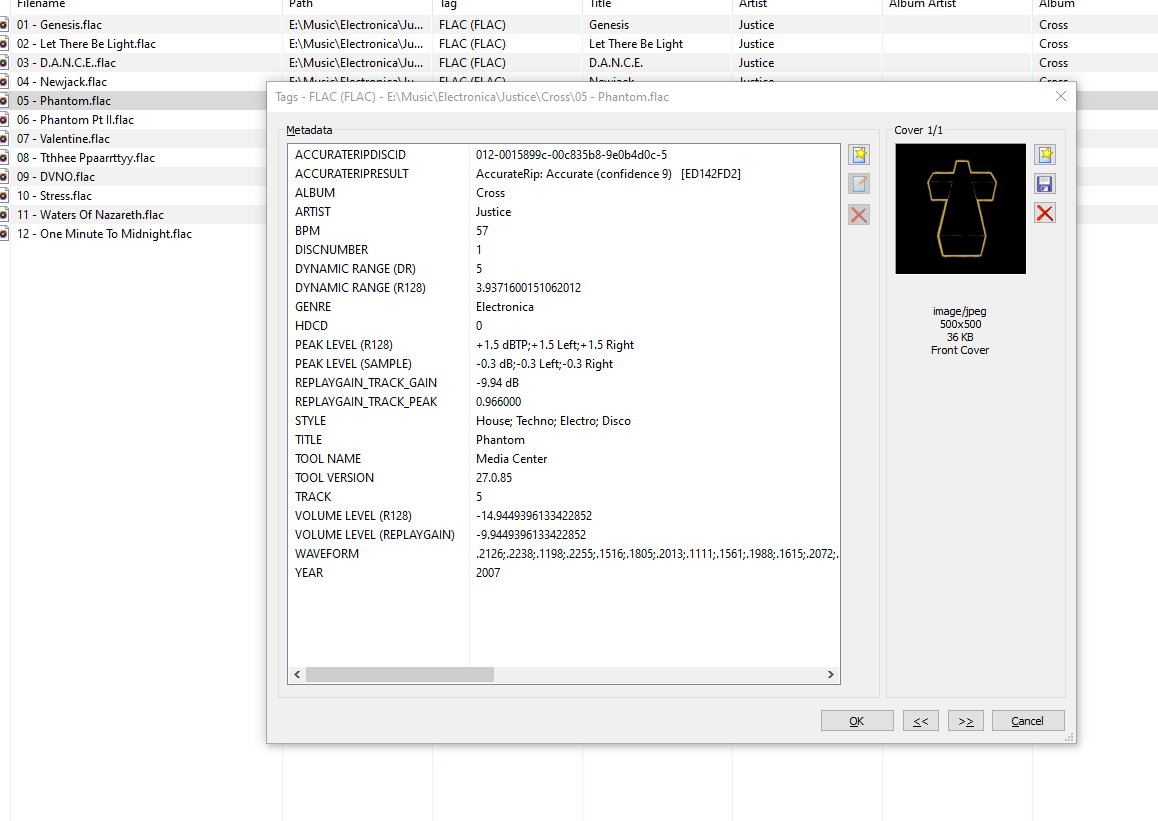
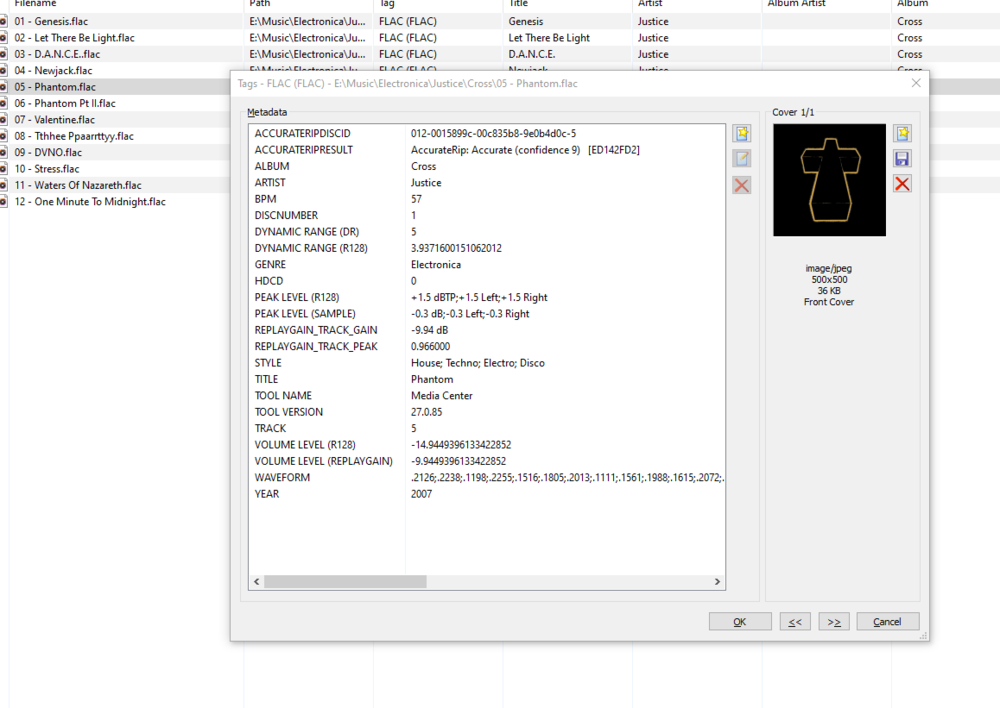
My apologies if this has been asked already. Could the Style tag in embedded music metadata be filterable in the Genre area? For example, I could select 'Electronica' within genres, and then a filter option would allow me to filter House, Disco, Trance... This could prevent genre cluttering for large collections
 1 point
 -
I will disable transcoding for this user and report back my findings. Thank you both for your help.1 point
-
Many thanks for your reply. Thanks for the info etc, it is good to know what to do in the future if i need to select another audio track It seems my receiver is a little bit problematic and thats why im getting sound issues occasionally. I thought it might be the tv but i also got issues using my pc and another hdmi input. The problem goes away eventually so ill put up with it for now, hopefully it wont get any worse. Sam your a star and many thanks for putting your time and effort into this. looking forward to the next release1 point
-
Awesome, thanks for the super fast reply!1 point
-
HI, yes this is planned for future updates. Thanks.1 point
-
NVM its suddenly work?! Not sure whats changed, as its not used much otherwise.1 point
-
OK thanks we’ll take a look.1 point
-
@Multiverse @arrbee99 @kfonda @fridgefins - FYI...1 point
-
@feerlessleadrThank you very much... Vic1 point
-
Okay I see the issue as this is not really a backup as it is just " extra copies of databases to keep". So without "embyserver-backup-full" in the backup location you will not see additional db backups as that is where the backupinfo.json is written. If all you want is those databases the create an empty "embyserver-backup-full" and copy the "backupinfo.json" into it from server1.1 point
-
I just let it run and it looks good. Some of the latest media dates are incorrect but its ok. Thank you1 point
-
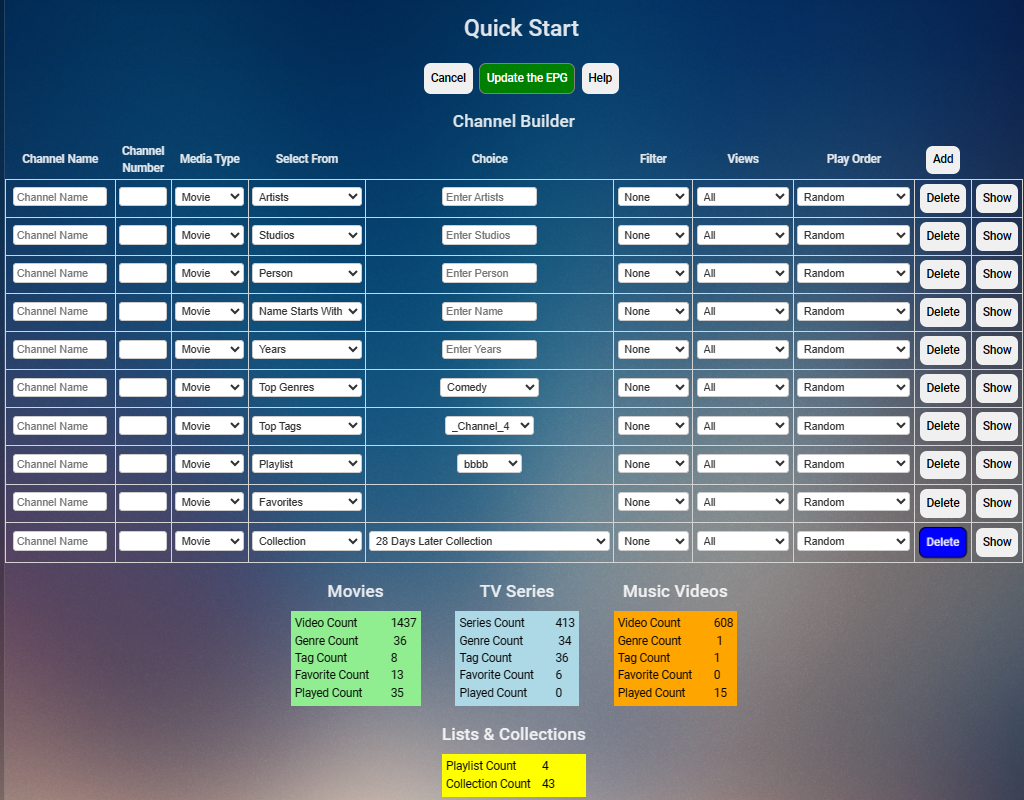
I just added to PseudoTV a way to quickly and easily add channels. It allows you to build channels from Emby Collections, Playlists, Favorites, top genres, top tags, any genre, and tag, artist names, player names, year produced and much more. When you build a channel and Update the EPG, the channel or channels created will appear in the main channel GUI. You cannot edit channels with the Quick Start GUI, just create them. You edit them (if required) in the main GUI. The code was just written and may have bugs, so proceed with caution. Notify me about any bugs encountered. I will fix them ASAP. Also let me know of additions or changes that may be required. Vic PseudoTV.dll
 1 point
 -
If you set up a proxy at the system level that will only be used for outgoing requests (IE requesting for metadata, visiting websites) whereas the video stream is an incoming request, so it would not go through the proxy.1 point
-
Cool... Thanks for the update ;)1 point
-
I would presume that relates to consumers, not users. You don't need an API key to use Opensubtitles plugin with Emby.1 point
-
1 point
-
OK well we have a new windows app set to debut very soon so let's re-evaluate once that is available. Thanks.1 point
-
HI, to download more you'll need OpenSubtitles VIP access. But stay tuned. We have a deal with OpenSubtitles that will benefit our Emby Premiere users, although we haven't rolled this out yet.1 point
-
Hi, yes this is something that we can look into. Thanks.1 point
-
It’s because open subtitles have changed it so you can only download subtitles 5 times over a 24 hour period. If you then try and download over this it’ll throw an error.1 point
-
sorry it took a while to get back to you. I don't know the cause but I made a new account duplicating the settings on ET to replace that one and the duplicate works fine without issue.1 point
-
No TV will pass-through TrueHD from the builtin OS, external sources only. It's always a good idea to have multiple audio tracks for the best compatibility if you want direct play.1 point
-
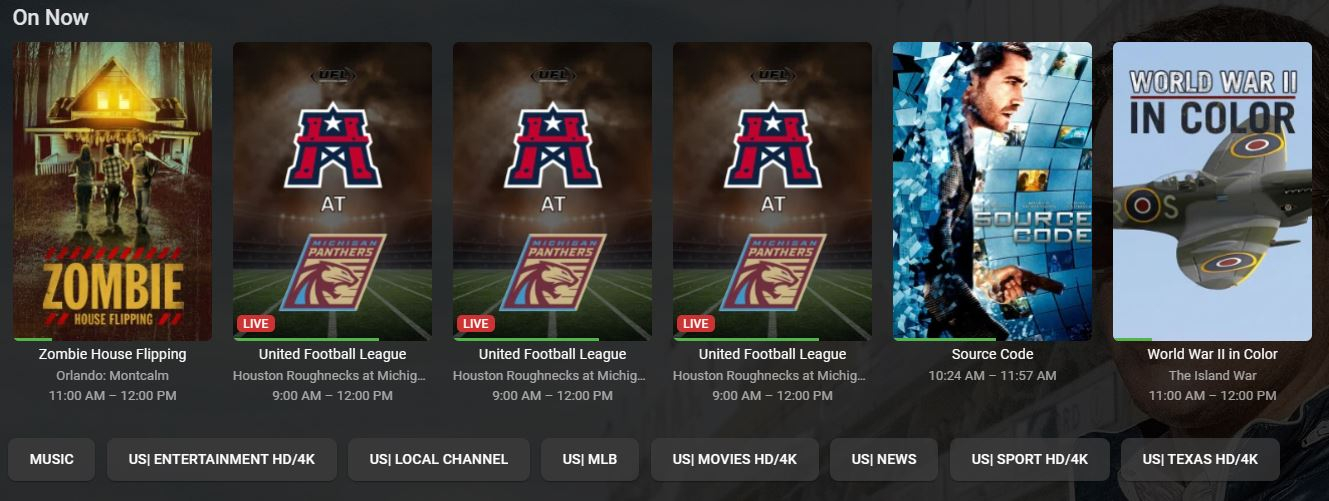
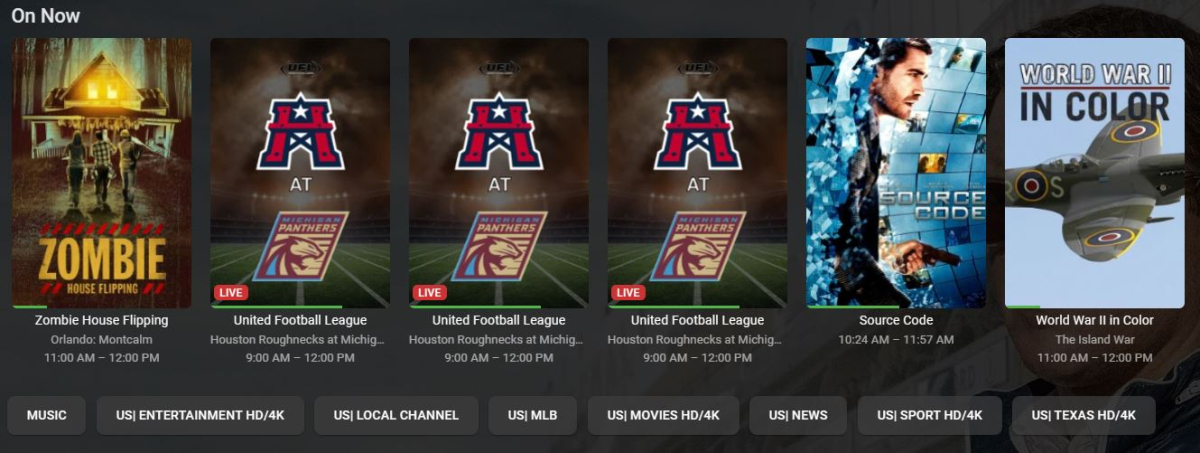
Good Day, It's been a minute since I have been on this forum and the other day I accidentally discovered the following so I thought I would share it. It is a way to group certain channels together so it is easier to find them. For instance you can group by "sports", "movies", etc. Once you include the code shown below, it displays the group buttons as shown in the pic below. This is shown while in Live Tv..Programs. #EXTINF:-1 tvg-id="" tvg-name="####### SPORTS #######" tvg-logo="" group-title="SPORTS HD/4K",####### SPORTS ####### The code above also adds a blank place in the "guide" mode so that you can define specific group sections quickly while scrolling through the EPG. I found this by accident because I was trying to define some background color for the area on the left hand side. The default grey is okay but I would like to add a brighter color across the section where this blank area has been created. This would add additional definition to sections while scrolling. So any help in this would be appreciated. I don't know if this has been discussed or discovered before but if it has I apologize. Cheers!!!
 1 point
 -
i use “clear saved track selection”but it do nothing ,so i uncheck “remember track selection” ,now forced subtitle not show anymore.1 point
-
I kind of feel like an idiot now, but thank you very much for pointing out where that is1 point
-
OK. After deleting the HEICS from Emby, rescanning the library files, and then recopying them back to and again rescanning, the embedded keywords in the HEICs are now recognized in Emby. I swear I did this previously with no luck. All good now. Thanks, Luke.1 point
-
I believe he is talking about the device home screen. @Dualstingeris that correct?1 point
-
Hi, I've run into another issue. I have two versions of the same episode, like 1080p and 2160p. When I delete the 1080p file, in Emby, there is still one version remaining, but in e4k, both are deleted.1 point
-
This should be resolved in the next release1 point
-
As a paying customer, I ask if it's possible (I'm not ordering it to be done) and I have to hear the answer: do it yourself ?? I hope you're not part of the development/customer support team1 point
-
Hi everyone. The latest version of Kodi has a setting that, when enabled, allow you to play Dolby Vision profile 7 as if it were Dolby Vision profile 8.1. Given that Emby correctly reads Dolby Vision 8.1, isn't it conceivable to intercept the type of profile and, if it is the unsupported type (7), behave as if it were a supported type? (8.1). Could the difference be ignored EL?1 point
-
All movies should come with an alternate audio track as it's a Blu-ray requirement. Usually this is AC3, but I use a script which creates a DD+ 7.1 or 5.1 track depending on the source. When Emby transcodes it will create an AC3 384 kbps audio track. You can do much better preselecting another audio track before clicking play without transcoding.1 point
-
It would be nice if this can be added. Plex did it well imo1 point
-
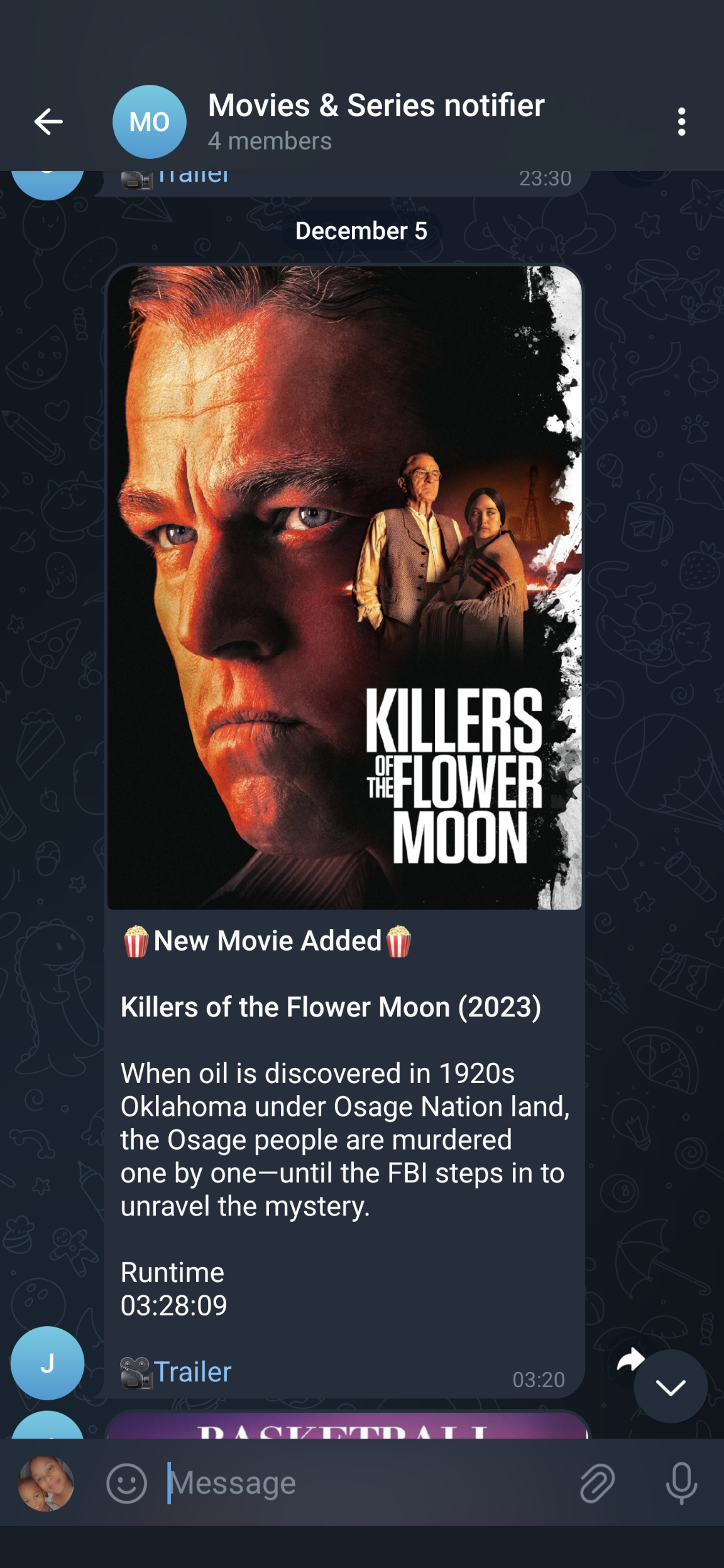
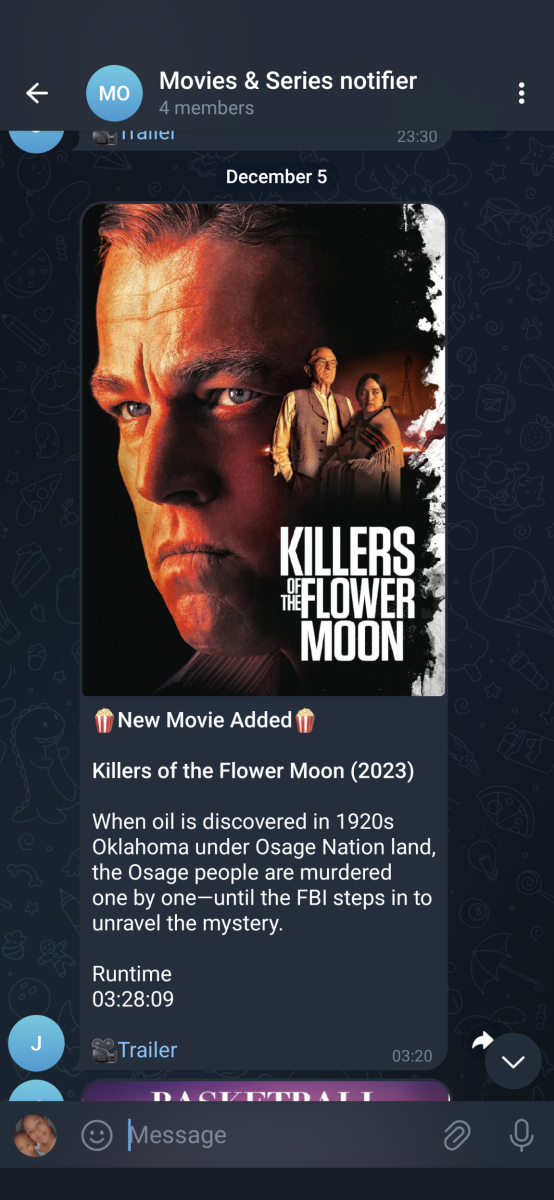
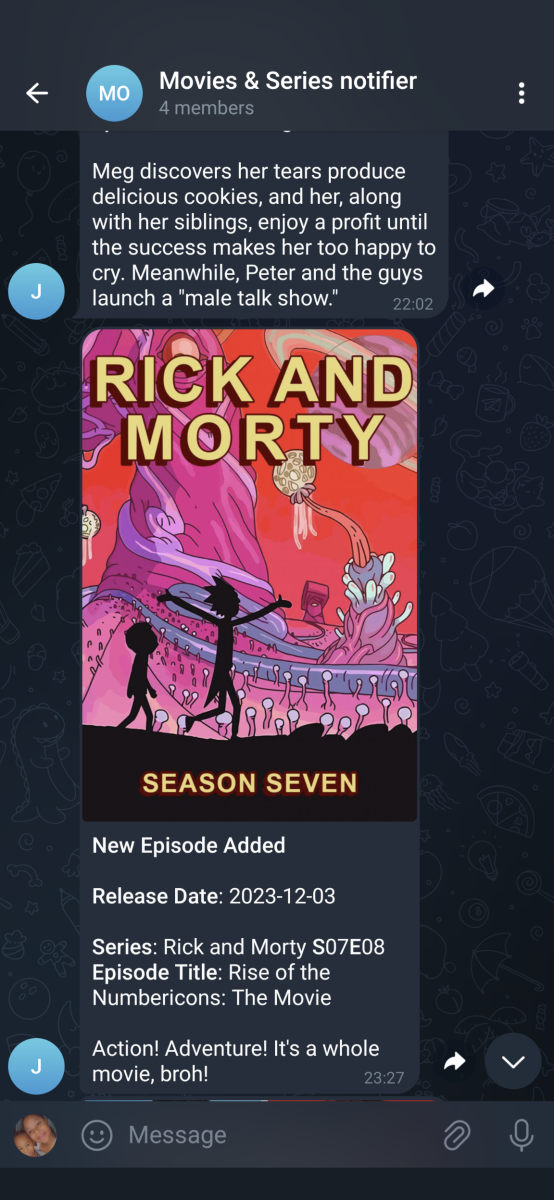
I created a python script that does exactly this. You can find it on github if you're interested. Example of a movie and series below
 1 point