Leaderboard




Popular Content
Showing content with the highest reputation on 04/05/24 in all areas
-
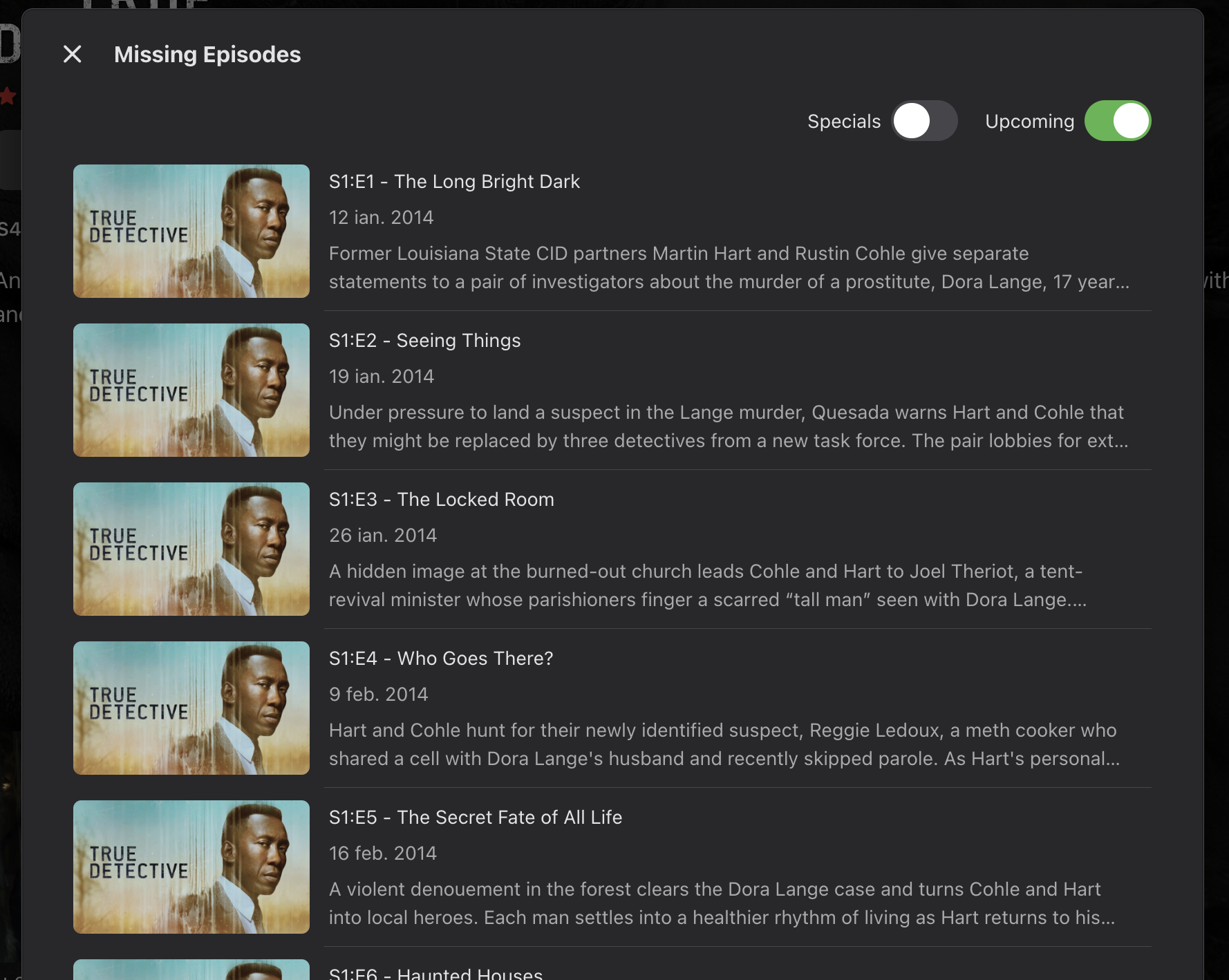
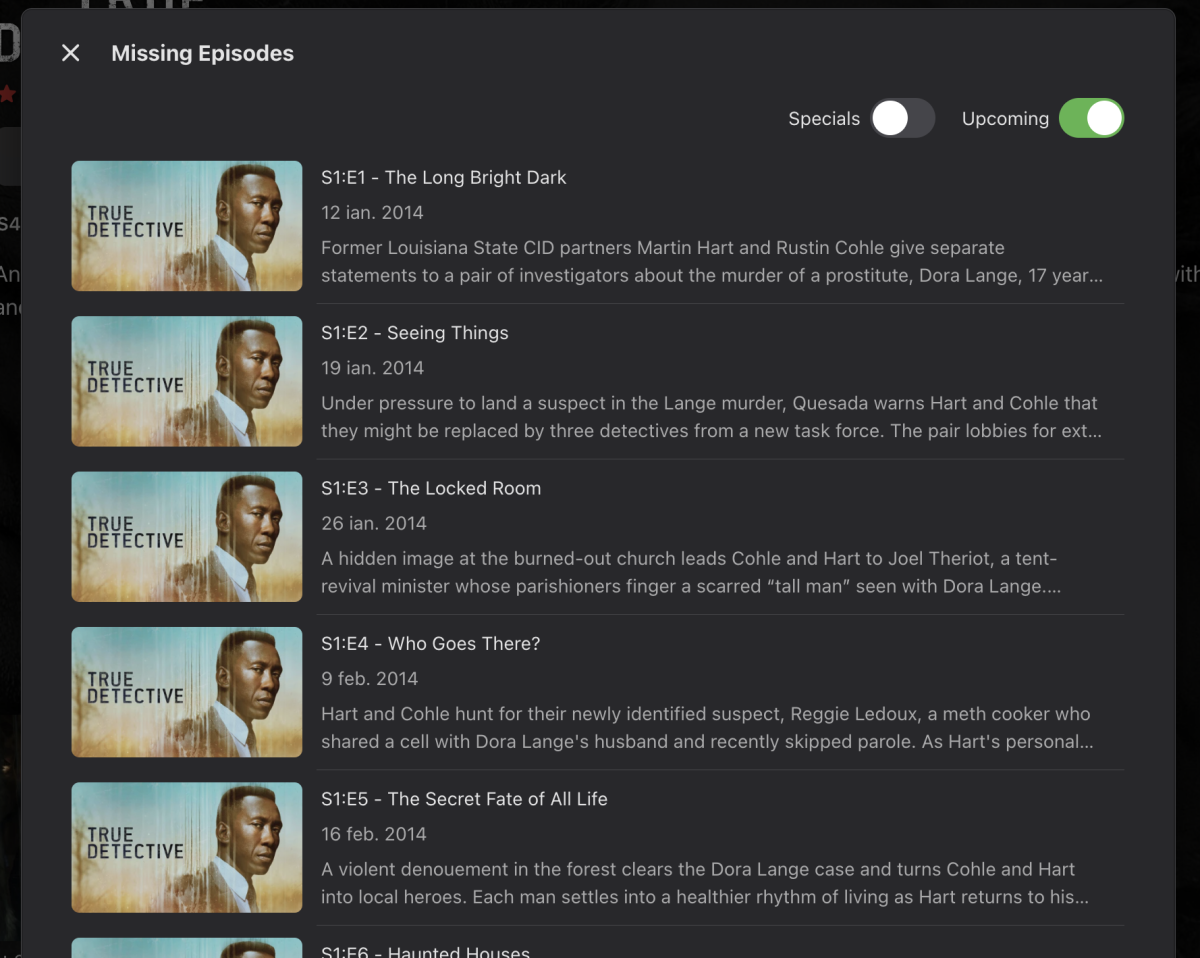
Lets all be honest here - the replacement implementation of 'missing episodes' has been poorly though out. If you don't know that an episode is missing, then why would you select the function to find out ? That is, afterall, it's primary function, to NOTIFY you the episode is missing .. The only useful function this new 'feature' provides, is if you have an suspicion there may be an epsiode missing ('where is the finale ? etc) then you can use the function to confirm. As an option, I don't get why any missing episodes cannot be queried 'live' if required. A little logic on the back end as part of the scheduled scan can eliminate the completed shows, so you would just need to query current shows .. I get there was a technical reason for doing this - but removing a core feature and not replacing it with a suitable alternative has been a backwards step.5 points
-
Everyone, I am changing the GUI again to make it better and simpler to use. I am adding: 1) smart playlists for building channels, 2) pre-built smart playlists for building channels, 3) an editor for adding, and deleting tags (both single edit and bulk edit - like in Bulky), and 4) preview of smart playlists. It's 80% done. I hope to be finished in a few days. Vic4 points
-
This is the Feature Request sub-forum. Support requests need to be posted here for AndroidTV: https://emby.media/community/index.php?/forum/147-android-tv-fire-tv/3 points
-
I use jellyseerr for this. Fallenbagel/jellyseerr: Fork of overseerr for jellyfin support (github.com) Its a fork of Overseerr2 points
-
Buy a Shield Pro. Even though it is from 2019, they're still fully supported, as are the original 2015 an 2017 Shields.2 points
-
OK I've got the saving resolved for the upcoming 4.8.4 release. Thanks.2 points
-
That is great news. I'll keep an eye on the beta releases. It's not really related to this feature request but I hope the new login changes will also merge the host and the port when adding a server in the apps. There's not really a reason to have them separate and since I don't use emby connect my users usually get caught up on changing the port to 443.2 points
-
This is a bad change. Having the missing episodes in the UI made life easy. This "new" change is bad. its so bad I had to google to find this thread to even figure out where in the world to find missing episodes which is a feature that has worked for years. Why make such a horrible change and then hide the feature where nobody would think to look? Watching TV should not involve frustration.2 points
-
I searched but couldn't find a similar request. If one exists with or without all of the options below then please lock this one and point me in that direction. Now that all users are required to login with username and password at least once on each app/device it would be nice to have the option to use a one time password (OTP) for the initial login on any device but mainly TV apps and streaming devices where it's difficult to enter long strings. It doesn't need to be limited to initial login but should at least allow that. 1. Allow any user who is already logged in to an app or browser to generate a one time 4-6 character OTP for themselves to enter on a new app/device in order to login on said app. This would only log them into their account using the single OTP. 2. Allow an admin account to generate an OTP for any specified user to login. This would be useful for Emby admins to help remote users, particularly those who have difficulty with apps and on screen keyboard-remote combinations. Or to help household users while away from home... 3. The generated OTP would be associated with the corresponding user, either self or assigned by admin. No need to enter or select name on the app login screen, the OTP would suffice. 4. The OTP should be created with a short time to live, either fixed or configurable. I don't know enough about Emby Connect to suggest how it should/could work for those users. EDIT: Evidently Jellyfin has a similar feature called Quick Connect but I don't know if it also has the ability for admins to generate codes.1 point
-
It would be nice if when you click on Latest Movies, etc on the Home page (above the horizontal row of latest movies) it went to a page with more latest movies, and not just going to the Suggestions tab.1 point
-
And on a not very related note, I really wish when you click on Latest Movies on the Home page (above the horizontal row of latest movies) it went to a page with more latest movies, and not just going to the Suggestions tab. EDIT - OK, feature request time1 point
-
Assuming it was a virtual scroller and not limited like most scrollers are but personally don't like horizontal scrollers 1000s if items or even 100s.1 point
-
You're both right. Personally I prefer the old Android way where it filled the screen with posters but still scrolled horizontally...1 point
-
With 100's of items? For a small list it's fine, but not for 100's.1 point
-
It should be ok not enabled on libraries.1 point
-
This is good info that I didn't know about and will aim to research it a bit more over the weekend. I'll also reply on some of your other comments, when I get a bit of time... ThankYou!1 point
-
New per user option and context option for the user that created the playlist. PLAYLIST SHARING CONTROL Playlist now belong to the user that created them and that user controls who can see/change them as of 4.8+ .1 point
-
Hi, this can be done in a different way, which will end up being better because everyone will benefit from it without having to enable some obscure feature.1 point
-
HI, that's because LG does not support TrueHD passthrough.1 point
-
Yeah, I can do that. Thanks for the update Luke.1 point
-
That is my understanding but have not tested this yet adding a special that is critical to story.1 point
-
Thanks, but according to your the log they were supplied, and that option just delivers them differently. 02:17:16.941 Stream mapping: 02:17:16.941 Stream #0:0 (hevc) -> scale_vaapi:default (graph 0) 02:17:16.941 scale_vaapi:default (graph 0) -> Stream #0:0 (h264_vaapi) 02:17:16.941 Stream #0:1 -> #0:1 (dts (dca) -> aac (native)) 02:17:16.941 Stream #0:4 -> #1:0 (subrip (srt) -> webvtt (native)) 02:17:16.941 Stream #0:0 -> #1:1 (copy) 02:17:16.941 Stream #0:5 -> #2:0 (subrip (srt) -> webvtt (native)) 02:17:16.941 Stream #0:0 -> #2:1 (copy)1 point
-
It was the simple removal of the https (to Like's point) in the URL and I'm back in business. Apologies for the confusion and wasting of anyone's time but I certainly learned a lot throughout this whole process.1 point
-
Yes but you will then be dealing with all the issues of an HTPC vs a streaming box that is designed for use on a TV and "just works".1 point
-
Hello, I experienced errors due to the SubKiller 1.0.0.9 plugin. However, once I uninstalled the SubKiller plugin, the errors stopped. Therefore, I won't proceed with troubleshooting the plugin any further. Thank you for your assistance.1 point
-
Okay, it seems to work in Chrome,which I don't really use. I was able to find out that "DarkReader" for Firefox was enabled and was causing the highlight color issue. I usually disable this on Emby. The menu looks correct when I open Emby in a new private Firefox tab. I have been slowly disabling each addon and testing but I haven't found the offending extension. I will do more testing later because I have to go to work.1 point
-
Ah, yes. That's perhaps why I'd not looked into running as a service till now. I am surprised at how much more responsive it seems.1 point
-
@Lukelooks like it does what it has to do. I'll update you in case will find any strange behavior. Thanks for the help once again1 point
-
I found a way to extract the data I needed using the API: Manually map one channel in your custom .m3u under LiveTV > Channels using the Emby guide data source you wish to use (I'm using DirecTV (USA)) Using the Emby API, get the ListingsProviderId from /LiveTv/Manage/Channels (for USA-DITV-X this was 9390bbe3a61b49bea1987c897bc077c6) Use the Emby API and the ListingsProviderId to pull the full list of channels and their Gracenote IDs from /LiveTv/ChannelMappingOptions Populate the tvg-id fields in your custom .m3u with the Gracenote IDs (for CNN in the USA-DITV-X linuep the Gracenote ID was 10142) #EXTINF:-1 tvh-chnum="100" tvg-id="10142" group-title="News",CNN http://tvprovider/user/pass/channel11 point
-
Yes it makes since as it can keep those specific story line special inline with playback. It is just getting use to these changes and may force users to manually input this position data if they wish.1 point
-
That's really good to hear, thanks a lot! And sorry for the troubles by raising this question in a possibly wrong section.1 point
-
That was 4.9 but see the same in 4.8.1 point
-
Is it specific media with subtitles? And if you installed the Diagnostic plugin and check disable hls supbtitles does it work?
 1 point
 -
You can watch TV by simply going to a channel - you may know what's on from other sources (newspaper, etc). To make a recording you can right-click on a channel; select "Create Recording"; put in the required information. Paul1 point
-
Hi, yes it's something we can look at improving. Thanks.1 point
-
We digress. Back on-track: In regards to bringing my new server online @ebror @Carlo or any others in the know ... As discussed with others much earlier in this thread. I too will be restoring my backup of my current server on my new server. And I'll be copying all the media files over to the new server before that. However, here's the thing: On the new server the HDD disk letter mapping (and maybe root path naming) won't be the same as on my old server. So there will be some time necessary (many hours) after bringing the server up then changing the disk library path locations, before the libraries are 'ready'. The current [old] server configuration I'll be restoring has dozens of scheduled HDHomeRun tuner recordings. If they are allowed to immediately activate on the new server, they will duplicate the recordings and quickly exceed the 4 tuner count of my HDHomeRun device. So, the question: Is there a way I can restore my Emby-Server backup on the new server, but pause [NOT cancel ] the Live TV series and movie recording schedules I have defined on it? Until I'm ready to switch that over too to the new server. Implied here is I do not want to cancel any of the series and movies scheduled recording that are restored into the new server's runtime configuration. I ask, as I don't see this as a Live TV config option. But maybe I missed it or it can be achieved by modifying a config file directly? If not, all I can think of to do is to simply not bring the new server online until I'm ready for it to perform all my recordings too and switch immediately at that time over to it, and perform all the Library path alterations after that... Which is the very thing I wanted to avoid as scanning media of dozens of libraries containing thousands of media resources makes Emby interaction pretty unresponsive, and why I wanted to do that before I started using the server for real-time Live TV interactions and recordings. Please advise if you have other guidance you can provide that would be better than that route. Thanx!1 point
-
Thanks for taking a look1 point
-
Imho every app on every device, except browsers, should require Premiere! Why should owners of a Sony TV do need Premiere, but not the owners of LG or Samsung?1 point
-
We're discussing the possibility of requiring Premiere for the Android app on a TV device (like the other TV apps do) and not allowing an unlock which then allows people to get around the device limits.1 point
-
You need to use the appropriate naming scheme/structure for server auto grouping. Movie Naming | Emby Documentation or the community plugin1 point
-
What exactly happens when you try to play?1 point
-
Please let us know if you find anything. Thanks.1 point
-
You can use subtitle edit. It will convert between different formats (over 300) with no problem (image based subs like PGS will need you to confirm what letter is what). It can also use AI to create subtitles from the audio.1 point
-
Fwiw, I'm having the same issue running Android 11 on a Samsung Galaxy Tab A. Emby for Android v3.3.77 Emby server 4.8.3.01 point
-
Yea we'll keep an eye on that. Thanks guys.1 point
-
I would encourage you to take a look at the Mega Thread we have going on discussing getting the standard Android app to feature parity with the Android TV app https://emby.media/community/index.php?/topic/89802-et-for-android-and-et-for-windows-ui-match-android-tv-app/ Listed as #56, a highly requested missing feature.1 point
-
So having the old behavior as an option is not even being considered? No one wants to go through countless menus to see something that should be shown in the episodes/seasons list. There is a reason it was done this way before, I assume. I am just not sure who asked for it to be removed...1 point
-
I am also very unhappy with this new solution of showing missing episodes. Missing or unaired episodes should be displayed by default.1 point
-
Quoting issues aside, can we please get confirmation that the much better implementation will be implemented again, as it was before? Thanks1 point
-
Also another bad User Experience call is that you have to go an extra mile and toggle the Upcoming Episodes in order to see them. Wow, I think who planned these, didn't think clearly that this is a bad bad design! So disappointed!
 1 point