Leaderboard




Popular Content
Showing content with the highest reputation on 03/14/24 in all areas
-
Maybe it's a feature request we can put in? I know for me it's far worse for people who are on cable instead of fibre, as the cable ISP locally loves to traffic shape harder than Hulk likes to smash. Even their Netflix watching is massively throttled and it just makes it a blotchy mess. I've tested it with friends who are on the same ISP as me and watching 4k remuxes is not a problem for them.3 points
-
Emby isn't a streaming service. It is software (server and apps) that allows you to manage and consume your own media.3 points
-
Thank you to everyone who took the time to ask the Emby team questions across all of the different platforms including here on the forums. There were a lot of great questions that were thrown our way and we've been excited to get the answers out to you. While some of the questions we were not able to answer, we did our best to give you the most accurate and clear answers possible. Now without further ado, here is the first series of questions and answers for you to look over! Please keep in mind more questions and answers will be coming in additional blog posts in the coming days, so not all questions are being answered today. Who owns Emby? Emby LLC owns the Emby product and is a private entity. The owners are undisclosed but note that the development team has full control over the direction of the product. We are not beholden to or under the influence of any investor or investment group. What is the history of Emby? Emby grew out of an open source project called MediaBrowser. Emby's origin in concept came out of that project but there is actually none of that code base still within it. Emby ended up being completely built from the ground up to be a server-based ecosystem as opposed to just a single app as the old MediaBrowser was. Around 2011 what is now the core development team for Emby were contributors to MediaBrowser. We saw the opportunity to build something more flexible than the WMC environment would allow and embarked on creating what we then called MB 3. The core developers spent over a year furiously writing code before anything was released to the public. It was then probably another two years of dedicated development before anything was truly usable as a system. In 2015 it was decided that we had moved so far away from what MB originally was that we needed a new name. A few of the devs got together and came up with "Emby". There are a few reasons behind that name but one of the main ones was that you needed something that wasn't already trademarked and domained. Emby fit that bill and has the benefit of sounding like "MB" when you say it. With the new name, we needed a new logo and we actually held a contest in the forum taking contributions from users and that finally landed us on the logo you see now. Since 2015 we have expanded the team and worked diligently to try and continue to craft the best truly personal media server system we can. We still have a long way to go but have also come a long way to where we are. What are the most popular Emby clients? We do not have exact data on this, due to sideloading and the such, but through the app store platforms we can gain general ideas. Android is the most popular amongst our userbase (both mobile and TV) with iOS in second place as the most downloaded app. What Emby clients do the development team use most for personal use? Our development team uses a wide variety of apps just as our user base does. We have people on the team using Android on mobile and TV, iOS, Apple TV, Roku and Xbox as well. As you can see our dev team really is as diverse as our user base when it comes to how we use the server. These were just a few of the questions about Emby as a product and who we are. In the next blog post we will be covering a few different things such as some of the future goals of Emby as well as release schedules and more!2 points
-
I would assume you've named Season 1 episodes from 01-364 and Season 2 episodes 01-281? Anyway, although your naming convention is/should be supported: It is possible/likely that parser is not interpreting those correctly, I'd suggest adding Season identifier before episode number according above supported conventions, i.e. S01E211 or 01x211 or any other of your preference, Refresh metadata see how does that compare.2 points
-
IT WORKED!!! @user24the hidden tags were the problem! Thanks so much for your time and help!2 points
-
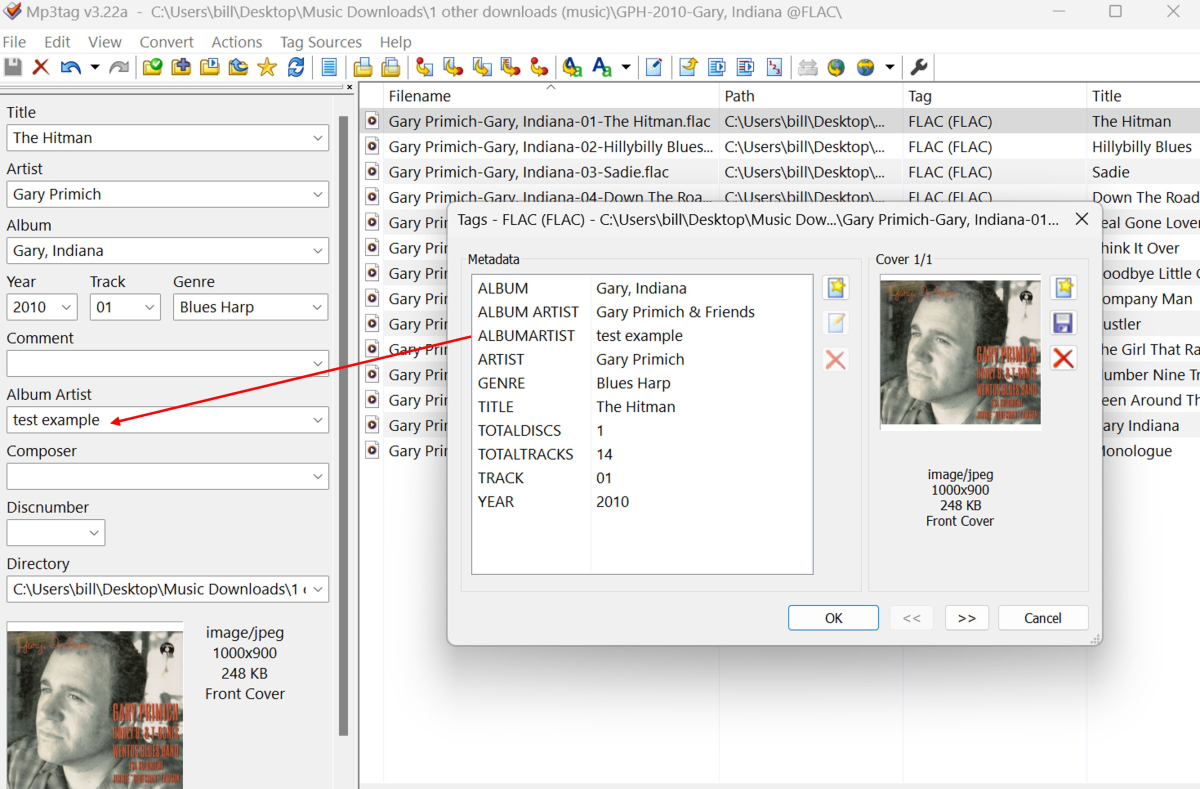
Hi @rawzef Your second picture in only showing the Tag Side Panel from MP3Tag. To show ALL of the tags applied to your music you need to View Extended Tags (from the top menu) to get a popup window, as shown below: My example shows that it is the ALBUMARTIST test example tag is the one that corresponds with what you will see in the Tag Side Panel. The ALBUM ARTIST Gary Primich & Friends tag (which in this case is actually correct) is associated with the individual track selected BUT is HIDDEN from the tag panel. Perhaps try exploring the hidden tags and see what you find? Sometimes you will just see what is in the side panel and other times there will be many more tags that could be causing problems because you don't know that they are there, BUT Emby is still reading them and importing the data. Please let us know if this helps or not!
 2 points
 -
They could add another type of premium subscription, which will only unlock the smartv app, so as not to wait 7 seconds. Like payment for the Android app.1 point
-
The 10105 and 10900k have the same UHD 630 integrated graphics. It's likely better in terms of CPU transcoding, but it shouldn't make any difference for GPU transcoding, which it should be using. Your log indicates the quicksync is available for multiple decoders. Do you have premiere? Do you see transcoding occurring on the dashboard during media playback?1 point
-
Thanks Luke1 point
-
Much better, I understand what you meant now.1 point
-
Many thanks for the quick response! Yes, I have named the first season episodes from 01-364 and the second season episodes from 01-281! I'll try out your suggestion with the complete renaming and get back to you. That will probably be tomorrow. By the way, I have well over 100 series with thousands of episodes, which otherwise have significantly fewer than 99 episodes per season. These are all recognized and displayed correctly.1 point
-
Hi, this has been added to the next update to the Emby Android TV app. Thanks.1 point
-
Hi, please try removing these plugins: 2024-03-14 17:49:44.741 Info App: Loading VirtualTV, Version=1.1.3.2, Culture=neutral, PublicKeyToken=null from /config/plugins/VirtualTV.dll Then restart the server and see how things compare. Thanks.1 point
-
The video backdrops feature is pretty nifty. Sometimes I have multiple video backdrops, and it has occurred to me that it could be nice (on a per-backdrops-folder basis) if there were a way (perhaps through special filenaming?) to designate: that only a configured number of backdrop videos should play; and that whatever that number is, the videos should be randomly selected from the total amount from within the backdrops folder. For example, perhaps with one item (movie, tv season, etc.) I have 3 video backdrops and I only want 1 to be randomly selected and played. But for another item maybe I have 5 video backdrops and so I decide I want 2 to be randomly selected and played. PS - If this is something you might like to see implemented, be sure to "Like" this top/first post (as well as any subsequent posts in this thread that highlight particular aspects of what you are interested in) -- "Liking" the top/first post helps the Devs to know how much interest there is in a given Feature Request.1 point
-
Please go over folder structure and naming scheme. Also what exactly do you see in Emby?1 point
-
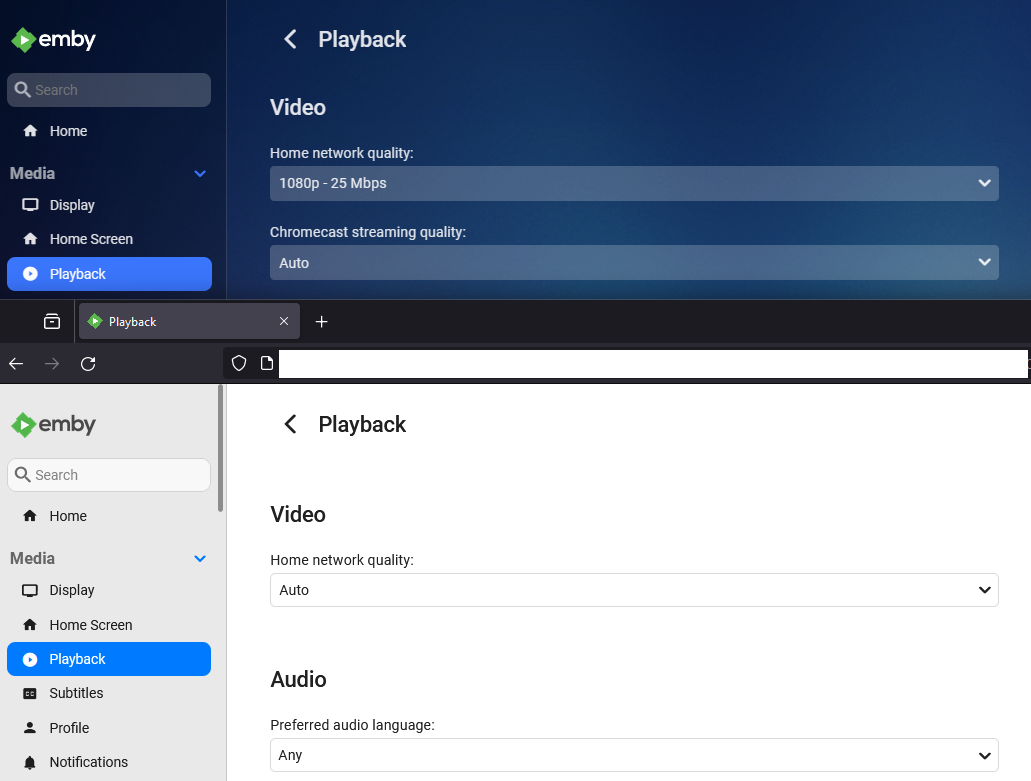
Sorry no as every client/app setting is its own. Example two browsers.
 1 point
 -
Well, @ebrI've been using Emby for 20{ish) years since way back in Mediabrowser 1.x or 2.x days... so it's all evolved over that time. It doesn't seem to be matching up, but seems like since I have nfo's for every file it should be reading id's/info from there. In any case, yes, automatic id both prior and since has been fine. Seems to me the "sure" way to store that data would be in the nfo's for each item. Then it's a simple read operation, not a dependency on 'external' (and possibly evil) providers!1 point
-
Hello, just wanted to say I have noticed this issue as well, but over the last 3 server versions. 4.8.3.0, 4.8.1.0, 4.8.0.80. I never saw it happen in 4.7.14.0. Exactly as the OP has described and it happens in anything I watch. At first I noticed it during playback through chrome web browser in Windows so I dismissed it as a bug in web browser playback, but then I have started to notice it in playback on the Emby app on CCwGTV as well. Its happens intermittently and like the OP says, if you rewind over the same scene, it doesnt happen again. So it seems to be random as well. Edit: just wanted to add that this is always using direct playback, not transcoding. using SRT file1 point
-
Thanks everyone, that worked great!1 point
-
Exactly that - remember, all the info needed on what show, what epsiode etc is already available - so you would simply have to 'pause' have a function on the client to 'Add Intro Start' and then pause again for 'Add Intro End' and that's it - the plugin would then create the fingerprint, upload it with the details (remember it's not the actual 'intro', its a binary pattern - so no copyright issues) and then it's saved for the next person to use in an automated scheduled fashion. One person has marked it - everyone else can see if they have the same fingerprint and then use with your timings or 'find' that pattern as an intro. Plex uses Chromaprint as well - for Intro's they were the first, but the Emby Plugin was the first to do it for Credit detection - that uses a combo of Chroma, black frame detection etc. Plex now have credit detection as well I believe. For duplicate Intro's - It's works well but it's not perfect - If I get 5 minutes, I have the stats for my entire library so can get an overall % of 100% detected episodes per show. Might make for an interesting statistic.1 point
-
It has nothing to do with the location of the Intro - that's why each intro has what is called a 'fingerprint' of the first X minutes of the show. The fingerprint is based on a technology called Chromaprint - which basically converts that Audio passage into patterns/numbers. The process is then to 'compare' one fingerprint to another, for all episodes in a season. If a section is found to be the same pattern - is marked as an intro. (start and end) However - if there is any difference, which may not even be audible to you and I, it will reject it as an intro. There is a tolerance that has been set - set it too low and it will pick up all sorts of background noise as an intro or set it too high (strict) and it won't match anything. Thus, there is always some margin for error. We (the original Introskip devs) did a massive amount of work on getting the detection 'just right' - but ultimately if a show doesn't detect - it's not because of the Algorithm used - it's because it is different across episodes ..1 point
-
The issue is likely that, while the intros all seem the same to you as a human, to the computer, they are actually different.1 point
-
I'm unclear as to how Emby is involved here. Are you using the Panasonic BD player to connect to your Emby Server via DLNA or something?1 point
-
Just an update on this. I rolled out the new emby prod server, which on my part was just : Resyncing watchlists Copyng over playback reporting data Change cloudflare tunnel to new emby ip address On the user end, the ones with appleTV's, ios devices, and of course browsers etc just worked fine. The chromecast with googleTV devices all had to have a new server added - i.e remove the old one and setup a new one. Bit of a pain for the users. I now have prod as daily driver and beta on the backup unraid server. unraid backups have a 7 minute outage instead of 45mins now as the container is so much smaller. Luke says it will grow as stuff is cached though.1 point
-
After complaining that theatre wasn’t as good as WMC for a long time I’ve had to eat my words. Theater in horizontal mode with all user options turned on I.e. backdrops etc looks so much better, is lightning fast and I can’t imagine the unified app could get any better.1 point
-
It is an Ubuntu 22.04 LTS server VM and Emby is running on Docker Compose. I have pulled the latest and rebooted the VM many times since 4.8.x was released. Emby works great, it just will not backup. I will try another reboot JIC but I am pretty sure that this is not going to help. Thanks for the ideas for sure! Cheers,1 point
-
Thanks both of you1 point
-
After the latest upgrade, the server no longer hangs. Thanks for the support!1 point
-
There was an issue at one point with certain characters in passwords tripping up the plugin's login to the .com api, but that was addressed months ago. Maybe there are still some characters causing problems though. Might be worth experimenting with the characters in your password, particularly if there are any 'special' ones involved.1 point
-
For anyone on QuTS Hero, the ZFS file system, the files are located at /share/ZFS530_DATA/.qpkg/EmbyServer1 point
-
Unfortunately not - as I noted above (and copied below). It seems that unwatching a complete season or show in trakt does not sync back to Emby server Ran another scenario. 1. I unwatched a complete season of a show in trakt and then did a sync and it did not sync. 2. Manually set first show to watched of the season and synched and then whole seas correctly synched 3. set first show of season to unwatched and synched but that show did not show as unwatched in emb I've sent full logs for this scenario to you.1 point
-
Adendum: My problem was my vpn that crashed after an update of the nas, which made my Nas no longer b able to reach out to the wild web. After restart of the nas, it could do that again and the problem was solved, but it made my vpn settings no longer available and hidden. This was solves by an other update of the Nas wich made those settings available again. The last stepps where not of influence of the emby problem btw. The restart solved that, but just wanted to made the solution of my Nas issue complete. thanx again.1 point
-
I think I have found the issue. When I change the port to 8095 inside the Docker container config, it doesn't change the port on the custom Docker network, so Emby is still listening in 8096.
 1 point
 -
I have had less problems with Roku's locking down the bitrate than I have with Apple TV's haha. I don't know what Apple does, but in the past every user I had with an Apple TV was locked to 3mbit while the same people with a Roku had no problems. And of course the users are not smart enough to go in and change the settings.1 point
-
You install your Emby server, and add media from your DVD library etc. https://emby.media/support/articles/Quick-Start.html Paul1 point
-
So Truenas creates its own dataset called ix-applications. If I let the emby app default to storing everything there it works until I restore. I tested creating my own dataset with my own permissions and it worked fine after that. I ended up just creating my own dataset called apps for all my apps. I don't know exactly why restoring upset it with permissions after a restore because it doesn't modify that. And the dataset locations it access's weren't any different than before the restore. I'm using emby's built in backup and restore. Truenas also doesn't let you modify the ix-applications permissions so I don't know how to get the old log out for reference.1 point
-
You should always enable throttling. It's a workload management feature that levels out the server load without affecting streaming quality or the user experience. The more streams you have transcoding the better it works. Setting the bitrate on the server side is not enough. If the clients are set to Auto then Emby will attempt to detect the available bandwidth and more often than not gets it wrong. During playback startup the stream bitrate will be set to the lowest value between the server, client or what's detected when Auto. One way or the other the clients should have a non-Auto setting for bitrate. You could do what @Happy2Play suggests and have them all set to max then you can limit on the server side. I know some users are not technical but they're usually in a better position to know what they have and how it's used. A household with multiple school aged kids and low bandwidth probably wouldn't want to give Emby 80% of that when streaming. "Encoding Profile Limit" is more of a compatibility feature.1 point
-
The issue is the client Auto quality setting can go rogue on Remote connections and fallback to say the clients hardcoded low bitrates. Rokus are the worst, but I just tell my remote users to set client quality to max setting then throttle the user bitrate server side per user or globally on Network menu.1 point
-
Now it's time to train your users. Historically the Emby client/server bandwidth detection has been unreliable and very often gets it wrong, very wrong. This can create friction among friends and family . You can set your server-wide internet streaming bitrate limit to a value that you think will work for most or all of your users and fits your upstream bandwidth. It's a per stream value so consider the aggregate. Then you tell (train/show/do it for them) to set their bitrate limit on their client to a value that's reasonable but shy of their internet downstream. Could be 70%, 80% or 90% and it will be different for every household. You can also set a user level limit on your server that overrides the server limit and still respects the client limit. But all remote users should really have a client side bitrate limit defined so that the auto-detected value doesn't cause problems.1 point
-
This is in the 4.9 beta channel by the way.1 point
-
As promised before, here's our final report, detailing the events and measures taken around the security incident and attack on Emby Server installations in May 2023: Emby Malware Incident Report 2023-05.pdf I hope, this will help to address remaining questions. We don't have all answers about origin, background and intentions of the attackers, but we tried to transparently document what we did when and how and why. softworkz1 point
-
Hi, yes, mostly.1 point
-
Thank you to everyone who took the time to ask the Emby team questions across all of the different platforms including here on the forums. There were a lot of great questions that were thrown our way and we've been excited to get the answers out to you. While some of the questions we were not able to answer, we did our best to give you the most accurate and clear answers possible. Now without further ado, here is the first series of questions and answers for you to look over! Please keep in mind more questions and answers will be coming in additional blog posts in the coming days, so not all questions are being answered today. Who owns Emby? Emby LLC owns the Emby product and is a private entity. The owners are undisclosed but note that the development team has full control over the direction of the product. We are not beholden to or under the influence of any investor or investment group. What is the history of Emby? Emby grew out of an open source project called MediaBrowser. Emby's origin in concept came out of that project but there is actually none of that code base still within it. Emby ended up being completely built from the ground up to be a server-based ecosystem as opposed to just a single app as the old MediaBrowser was. Around 2011 what is now the core development team for Emby were contributors to MediaBrowser. We saw the opportunity to build something more flexible than the WMC environment would allow and embarked on creating what we then called MB 3. The core developers spent over a year furiously writing code before anything was released to the public. It was then probably another two years of dedicated development before anything was truly usable as a system. In 2015 it was decided that we had moved so far away from what MB originally was that we needed a new name. A few of the devs got together and came up with "Emby". There are a few reasons behind that name but one of the main ones was that you needed something that wasn't already trademarked and domained. Emby fit that bill and has the benefit of sounding like "MB" when you say it. With the new name, we needed a new logo and we actually held a contest in the forum taking contributions from users and that finally landed us on the logo you see now. Since 2015 we have expanded the team and worked diligently to try and continue to craft the best truly personal media server system we can. We still have a long way to go but have also come a long way to where we are. What are the most popular Emby clients? We do not have exact data on this, due to sideloading and the such, but through the app store platforms we can gain general ideas. Android is the most popular amongst our userbase (both mobile and TV) with iOS in second place as the most downloaded app. What Emby clients do the development team use most for personal use? Our development team uses a wide variety of apps just as our user base does. We have people on the team using Android on mobile and TV, iOS, Apple TV, Roku and Xbox as well. As you can see our dev team really is as diverse as our user base when it comes to how we use the server. These were just a few of the questions about Emby as a product and who we are. In the next blog post we will be covering a few different things such as some of the future goals of Emby as well as release schedules and more! View the full article1 point
-
I am honestly baffled how lackluster the search is in its current state. All I can find is posts from 2020 and beyond claiming improvements but still we have limited return of results, no customization like turning off People search in libraries and my biggest gripe currently, the inability to search "within" a text string Are there any plugins that can provide a search experience that is slightly on par with Windows Explorer at least?1 point
-
Can't the app(s) just request more items as you click to the right? Isn't that what's happening when we click down on the wall of posters on the actual library page? The items get requested and loaded as you click, correct? Couldn't the same thing happen on the main menu, just horizontally?1 point
-
Waaaaaay better. Try it.1 point
-
Does it work better than Emby's subtitle scraper?1 point
-
+1 Everything I through at the Shield Pro (connected to a LG G1) it just works, no matter if HDR, DV, HD Audio (DTS-HD (MA), DTS:X, Dolby Atmos, etc.) or high bitrate (tested up to 50/60 Mbit).1 point
-
Thats right at the end is just a filter the purpose is to refine results, so less results should be expected.1 point
-
Yes, somewhere out here (probably in multiple places) there are discussions of just this issue. The thing stopping us from changing it is just that we've displayed things this way since the beginning and, in the past, when we've tried to change things that have been around that long it is met with a lot of resistance. I do feel we should eventually introduce some options to tailor this a bit better.1 point