Leaderboard




Popular Content
Showing content with the highest reputation on 02/20/24 in all areas
-
Unfortunately not ,. It's been requests many times but there isn't anything to can do about it. Sorry.2 points
-
Are people actually wondering what the purpose of this feature is? How do you play video games with other people when they aren't next to you? How do people work or collaborate remotely? How do you have a conversation with someone if they aren't next to you, like phones don't exist? Don't get me wrong, I probably wouldn't use something like this too often because as I get older and more reclusive I don't really have many friends I'd do that sort of thing with anymore... but I can only imagine how some people who do have friends or family, near or far, might like something like this. If nothing else it'd give people the option, in this digital age of ours. What decade are we living in that we don't understand how or why people might consume entertainment/media or interact together when they aren't in the same room?2 points
-
EMBY SERVER 4.8.1 IS NOW LIVE WITH LOTS OF NEW FEATURES AND IMPROVEMENTS Emby Server 4.8 has been rolling out to various platforms over the past week or so. This upgrade in particular is packed with a lot of new features, improvements and fixes. Over the next few weeks, we will be sharing multiple blog posts to share some of the exciting new functionality that 4.8 brings to Emby and give you a more in-depth look into the features. Today’s blog will focus on two new features: PROFILE PINS With Emby 4.8 you now have the ability to set individual profile PINs. This new PIN replaces the old local network only PIN that existed prior to this release. It is more flexible (works both locally and remotely) and more secure. This new PIN is very useful if you have devices in your home that are shared by multiple users. As an example you may want to put a PIN on your profile so kids in your home can’t just click on your profile and view all of the same media but still allow your kids to freely switch between their profiles on the same device. NOTE: All users (local and remote) must authenticate ONCE per device. Once this initial authentication is done, that user will be remembered on that device and won't require password entry again unless signed out. PLAYLIST SHARING CONTROL Another great feature of 4.8 is the ability to designate exactly what other Emby users you share playlists with. Prior to 4.8, any playlist that was created was available to everyone on your Emby server. Now they’re set up for individual users. When you first create a playlist, that playlist is private to just you. If you wish you can then share it with any user that you would like via the "Modify Collaboration" option. You are able to set it up so that different users have read only access or have view and edit access to the playlist. Please keep in mind that this is only for playlists that were created after the upgrade to 4.8. Playlists created prior to this release will not have this functionality. They would have to be re-created to gain it. NOTE: In order to utilize this feature, you must first grant each user that you want to be able to create shared playlists the ability to share content from the user settings on the dashboard. You can see from the image below that it is simply a checkmark on the settings page. Once that is checked, it is as simple as creating a new playlist and then either right clicking on the playlist or clicking on the “...” menu and clicking on manage collaboration. From there you can easily choose which user you want to share the playlist with and what level of access they have. Stay tuned for a new blog post in the coming days that highlights some of the other awesome and new features of Emby 4.8! For now, we have listed below all the improvements and fixes that were included in 4.8. We as a team are excited to share all of these great new additions with you and hope you’re enjoying the update to Emby just as much as we are! ADDITIONS AND IMPROVEMENTS Add new profile pin feature. Useful for devices shared by multiple users. Add new table view option Add more fields for selection in poster views Add new theme options Various database performance improvements Merge webhooks into notifications Support keyword-based recordings Display all episodes directly under series without using season layer (with user display option to control behavior) Update Intel Media Driver Minor database performance improvements Support extras for seasons and episodes Revamp backup plugin to be a more complete backup Support saving images locally for extras Add FR-TP content rating Import hearing impaired attribute for both internal and external subtitles Add hidden config switch to disable ssl renegotiation Add library option to cache images in server data folder to reduce disk access to original media folder Remember audio and subtitles across a tv series Improve support for audio-only live streams Add View Missing Episodes context menu option for series and seasons Add option when creating a user to copy data from an existing user Support random sorting on list screens Improve country and language list sorting Improve program dialog in live tv guide to show complete information Add subtitle position settings Improve user interface of Play On menu Add sample file ignore size to library options Added New Episodes section under Live TV suggestions Add new indicator on Live TV program posters Add options to hide played media from More Like This and Suggestions Add user locked out notification to Notifications and Webhooks Support more conventions with provider id values in folder names (moviedb, imdb, etc) Improve series name detection by getting the series name from episode file names, in some cases Support multiple languages with user audio and subtitle preferences Improve performance of server activity viewer Improve support for folders being used in multiple libraries of same content types Clear external ids for episodes when using Identify feature on Series Improve search for single title movies Add camera upload user permission Add new configurable home screen sections - Playlists, Collections, and Recently Released Movies Add more fields for display in User and Device management Add HDR filters to video list screens Add sorting controls to user and device management screens Add additional subtitle color options Support swipe down to close all dialogs that slide up Add Remove Identification feature to reset metadata Improve searching titles containing quotes and periods (e.g. Agents of S.h.i.e.l.d or Shield) Anonymize manifest.json Add warning for duplicates when adding items to playlists Support both nb and no Norwegian language options Add automatic metadata refresh option for episodes with placeholder titles such as TBA Rework Trakt plugin to be an option that each user can configure, rather than server settings Rework Notifications to be an option that each user can configure, rather than server settings Add guide display options to control visibility of channel names, images and numbers Improve automatic reconnection for live streams Display preview of matched items when setting up a keyword recording Reduce database queries in audio fingerprint process Add HK ratings Add user option to hide media info from detail screens Improve support for "subs" and "subtitles" folders Don't allow local network addresses to be specified in x-forwarded-for and x-real-ip Add media deleted notification and webhook event Support multi-select drag and drop add to playlist Support multi-select operations on downloads and conversions lists Update default subtitle font Add option to limit the number of genres displayed at the top of detail screens Rework playlists to be saved as m3u and deprecate the previous xml format Support extras in Collections Improve episode number parsing when episode file name is gibberish and parent folder name is readable Support sorting for playlists and collections Revamp webhooks plugin, supporting new events and configuration options Include activity log database file when vacuuming databases Rework scanning of extras, allowing more flexible usage of video extras Improve the use of internet metadata with recordings Support shift to multi-select Use tone mapping for image extraction Allow separate images for audio book tracks Stop scanning at the top of a library when it's unreachable Add image size display option Add lock screen function to video player on mobile devices Add three way toggle nav menu to web app Add option to control display of rating information at the start of video playback Change wording of transcoding reasons to be more user friendly Improve filter menu indicator Add Select None to multi-select lists Initial RTL support in web interface Make tagline field lockable Make overview field lockable Rework Live TV recording options to be based on selected folders, rather than raw paths Support .actors folder for people images Nfo plugin: Stop saving nfo files for additional parts Improve photo loading performance Remember subtitle selections even when user option is set to None Improve support for musicbrainz illegal character replacement Improve drag and drop scrolling Sanitize new playlist and collection names Add intro detection library options Improve automatic channel mapping with xml tv Support sort by composer FIXES Fix songs not being grouped into album when the album title contains an emoji Fix empty genre filters on playlists Fix anamorphic image extraction Various fixes for iOS 17 Various image processing fixes Fix transcode temp path in startup logging Fix 172.X addresses always being considered private Fix swagger docs with reverse proxies Fix restricting by tag hiding the tag itself Fix multi-episode file titles not using series display order Fix hide from Continue Listening only hiding a single track and not the entire album Fix live tv recordings being stopped in rare cases when the limit to keep is set to 1 Resolve issue of multi-part and multi-version not being able to be used together Fix green bottom line with QSV+OpenCL tone mapping Fix single image extraction with MPEGTS Fix support for simultaneous music and photo playback Fix sort by sort title being case sensitive in some views Fixes for multi-part and multi-version videos being used together Fixes for movies having file names starting with years Fix Intro Detection scheduled task not being visible Fix a/v sync regressions with live tv and recordings Resolve long-standing metadata quirks when removing data from nfo files and having it not get cleared in Emby Fix changes to url-only nfo files not being recognized Fixes for downloads automatically redownloading Fix graphic subtitle position when burning in subtitles with transcoding Fix unnecessary ffmpeg dependency on Windows Media Foundation Fix sporadic cases of errors when reordering live tv channels View the full article2 points
-
Great news. Emby for Samsung is now available in the Samsung app store for more countries. If you're in any of the following countries, you can now install the Emby app using the Samsung app store: Angola Argentina Australia Austria Bahamas Belarus Belgium Bermuda Bulgaria Canada Chile Colombia Costa Rica Croatia Czech Republic Denmark Dominica Dominican Republic Ecuador Egypt Fiji Finland France France-Dom Georgia Germany Greece Greenland Hungary Iceland India Ireland Israel Italy Jamaica Lithuania Luxembourg Mexico Netherlands New Zealand Norway Panama Peru Philippines Poland Portugal Romania Russian Federation Saudi Arabia Serbia Slovakia (Slovak Republic) Slovenia Spain Swaziland Sweden Switzerland Türkiye Turks and Caicos Islands Ukraine United Kingdom of Great Britain and Northern Ireland United States of America Venezuela Virgin Islands, British Virgin Islands, U.S. We are working on adding more countries so stay tuned!1 point
-
It would be great to be able to pinch to zoom the video so it fills the screen on Android. I have a lot of older 3:2 ratio TV shows and watching them with such large black borders is quite annoying.1 point
-
Greetings. I found the answer to this, but figured I'd share just in case someone else runs into this... PROBLEM: I tried 4.8.0 and had this issue a couple weeks ago but didn't report it and just reverted to 4.7. But today I upgraded to 4.8.1 and it is the same as I experienced with 4.8.0. (same with 4.9 betas as well). Once the upgrade is complete and I start the server up, it just dies. I don't touch the server for 10 minutes and when I check, the emby app has died. Restarting app or server has no change to the issue. Log attached for the first boot after upgrade. I tried again after removing the EmbyScripterX plugin (only thing I noticed as an error in the log) and the same result. Server starts and just stops. So I tried a few more times but noticed something on my last attempt that I missed during the unpacking and upgrade of Emby previously: emby-server depends on libc6 (>= 2.27); however: Version of libc6:amd64 on system is 2.23-0ubuntu11.3 This warning/error did not prevent Emby from upgrading. It would install and then allow me to start Emby server and then would die as I stated - the log attached shows no issues I could see really. FIX: I was on Ubuntu 16 server (yes, I know, old), so I couldn't easily upgrade libc so I decided to do a full distro upgrade to 18 server and then Emby installed and worked normally. Just figured I would share. cheers! j embyserver.zip1 point
-
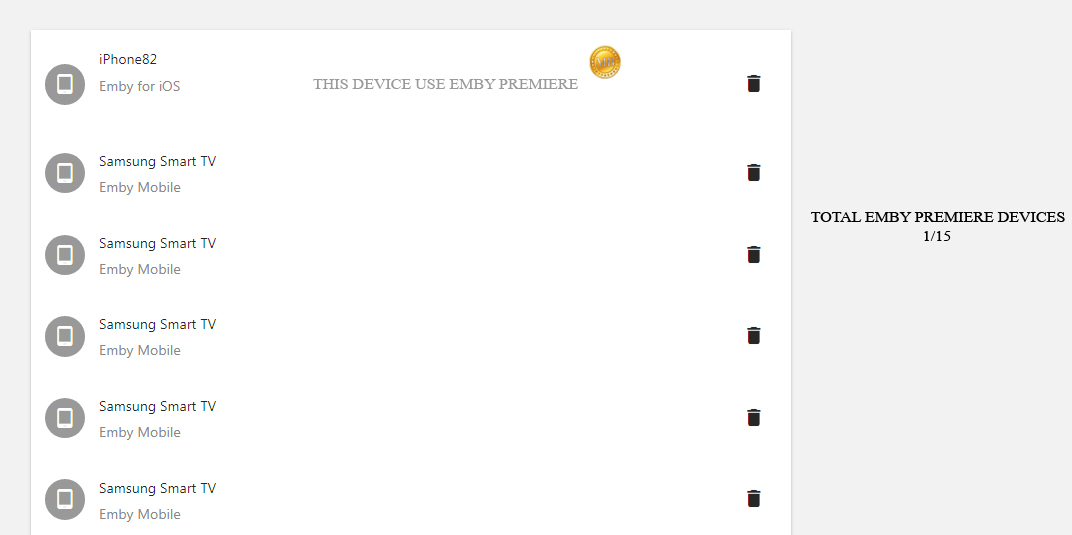
I have seen many people asking for the 15 devices limitation. Could it be possible to add a counter for understand wich device uses Emby Premiere? Something like this : Understand which device uses emby premiere and which no?
 1 point
 -
Hey there guys, in my opinion Emby is the best option to host a personal media server and I think many might agree, that one of it's outstanding features is the performance in terms of streaming. Also, Emby doesn't have as much bloatware, which i.e. Plex does. It's not as fancy or probably not visually as appealing as Plex, but it has most of the features that really matter, rather than features that nobody needs or uses. However, I think one big flaw is the current (Not so current, eh?) state of the music library, its performance and its features. Please read the following with knowing that it's a subjective point of view, but there might be others agreeing. While Plex music libraries probably evolved into the probably best music experience for audiophiles, Emby's music experience is several quantum leaps behind. Things that would drastically improve the music experience on Emby - still very subjective - would be: - Improve metadata matching. Large music libraries (50.000 songs and above) feel the real pain of 20-35% of artists not being matched correctly or rather not at all - Music player overhaul. The player looks clunky, outdated, is featureless and even worse: Even lacks essential rudimental features almost every music player has since 2015. Sidenote and not to trigger anybody, but to be honest it reminds me of a visually less appealing version of Winamp from 2002. Features like "smart shuffle", "accoustical analysis", "smart(er) playlists" or at least "smart suggestions" is just a quick idea of features it could have. While Plex has introduced AI into their standard repertoire, Emby doesn't have a "repeat 1 song" feature in their music player web app... - Media presentation rework. Rather than throwing everything into one clotted spot (like albums at once in 1 overview, songs at once in 1 overview), differentiate between Albums, Compilations, Live Albums, Singles, etc. as I proposed here Please consider this as one of the bigger feature requests, but over all I'm still very happy with Emby. It's outperforming others in most areas, but the state of music libraries - and I'm talking about libs with more than 100 albums - is my biggest arch enemy and which is the only reason I keep my music on Plex exclusively without creating a music library on Emby. I'm quite sure there's a bunch of Embynauts that potentially would agree with me. And if not, it's just me Thank you for all the hard work over the past decades, which always dragged me back to Emby, coming to find that it might lack one or two things, but is still the best option compared to the competition.1 point
-
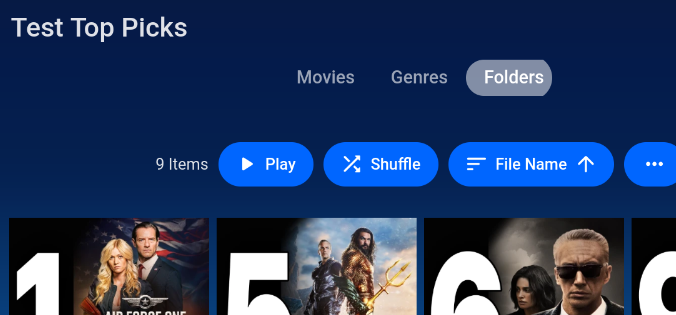
@chefI got it working. So i did something similar to what I just did a minute ago. I just deleted the library Top Picks, Recreated a library titled Top Picks, ran the "update top picks" and a library scan and its working. I'm thinking maybe the library was just left over still from the previous install of the plugin & for some reason didn't get fully in-sync somewhere with the updates. But it is working now.1 point
-
yes. It does actually. I just experimented myself with creating my own library manually and using the top-picks filepath. I am able to see all of the top picks movies in there but not the library created by the plugin (if that makes sense).
 1 point
 -
I am also asking for the option to filter by country of origin1 point
-
I am also asking for the option to filter by country of origin1 point
-
You need to create an application in pushover and that has an API Token/Key. You use that for Pushover auth token:1 point
-
What has been added to the metadata editor for the upcoming 4.8.2 server release is equivalent to what you had to the Missing Episodes view in the reports plugin.1 point
-
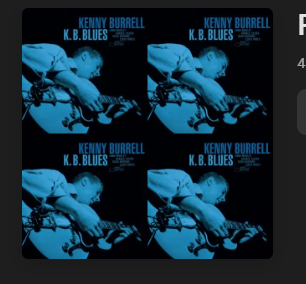
Hi I have seen similar behavior, the below playlist was created yesterday. The image from the first item in the list, is always just duplicated 4 times rather than any randomness. Pretty sure it's a regression that slipped by as it worked in 4.7 Thanks, -vicpa
 1 point
 -
Hi, we’ll take a look at it.thanks for reporting.1 point
-
Correct new installs will not have a Collection library. But if you really want it you can readd it via the api1 point
-
if i could find some info on how to make plugins for emby i would look into it..1 point
-
May be fixed. Looks like an issue with the DAS. Will update later.1 point
-
This is unfortunately not true at all.1 point
-
What are the chances we could add the Monitor app to Emby’s plug-in catalogue? It’s working well and solves the issue of failed recordings being marked as completed. Integration could possibly solve the issue of failed recordings for everyone. Thoughts….1 point
-
Oh, I looked at that video. I have used revo uninstaller and its a tool in my portable apps group. It works well. I hate installing stuff like that so I just use the this companys stuff. I have been using it since disk space was very expensive... https://portableapps.com1 point
-
Is there a way to prevent the top pick item from displaying twice in 'continue watching' or still no workarounds?1 point
-
Hi. Surprisingly, it is. You would think...1 point
-
I would stay away from any program advertised like that, myself. Paul1 point
-
Oui les applis natives quelque soit la plateforme lisent 99% des médias sans transcodage serveur (tout est géré dans le client de lecture) c'est surtout les browsers comme tu l'as constaté qui posent soucis parce que la plupart lisent très peu de formats vidéo !1 point
-
You could also try this program. Never tried it though.1 point
-
Thank you. It works with emby connect!1 point
-
Yes because you will have idiots who want to play a DV or HDR movie and not have a setup that is capable of doing it, and then they will be morons and complain that the movie looks like garbage while your server is doing unnecessary work. You have to remember that most of your users are complete idiots when it comes to playback compatibility. it also makes it far easier to control updates for extras and IMAX variants.1 point
-
Okay, then that would explain why you think it tunes slower, correct?1 point
-
those are singele add, I meant multi-add. the only way to enable multi-add is via the top left of the thumbnail, its not on any text menus anywhere and really should be (good UI design and all that)1 point
-
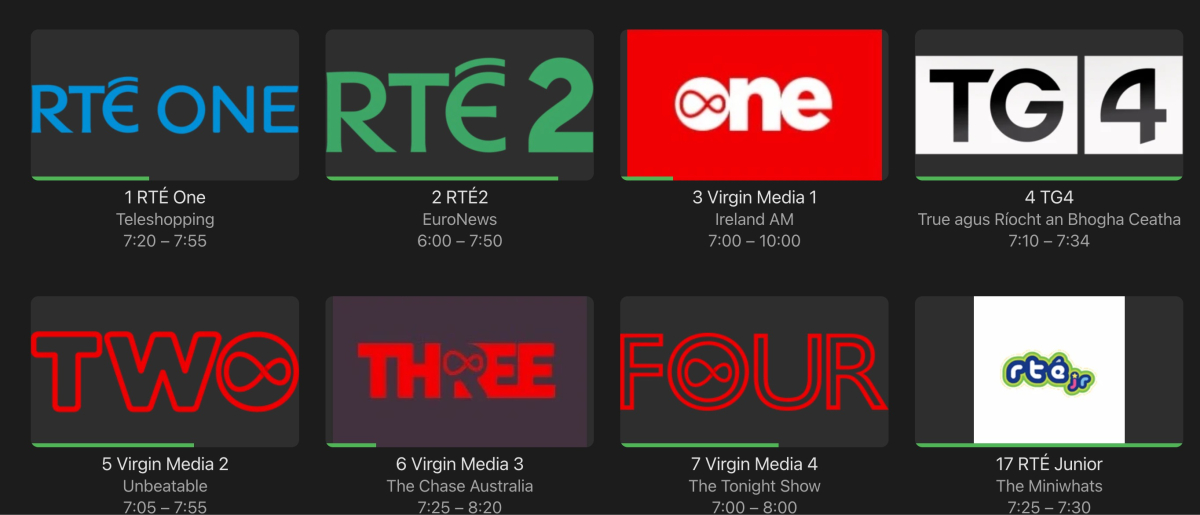
Confirmed - I switched web browser to TV display mode and icons are arranged in 4 columns. However, at some point prior in the last few months the ATV app changed live TV icon arrangement from 5 columns to 4. I prefer more columns - an arrangement of 4 columns seems way too big on a 65" OLED TV
 1 point
 -
I was able to get Emby up and running following those instructions. I modified the docker-compose.yml file the best I could, but I don't really understand all the lines. I don't believe my "volumes" section is correct. However, Emby itself seems to be running fine, and I'm able to open the web-page and navigate just like I used to in MS Windows. My current issue is getting a Library correctly set up. I"m able to add a new (music) Library -- the path is accepted by Emby setup, and the Library is created, but it has zero contents. It's the exact same folder I used for Emby Server in Windows. Maybe it's my "path" syntax, although I'm copying the path directly from the file explorer, and Emby is accepting it. I also chose "Other or Unstructured" for Music Folder Structure, just to be safe. Re-scanning media files yields nothing. Note that, I'm really happy just to have gotten Emby Server up and running, and again, everything on my server web page looks and acts like I'm used to on Windows. Just missing contents from newly added Library. I'm sure it has to do with my lack of understanding of Linux filesystem and path syntax, etc. Possibly something wrong in my docker-compose.yml as well. BTW, I'm using MX Linux. Thanks.1 point
-
Hi, please try lowering the in-app quality setting even more. That will usually resolve issues such as this. I would also try Chrome for comparison purposes. Please let us know if this helps. Also have you compared you nginx settings to this: Thanks.1 point
-
Think i solved it by deleting the playlist library and let system recreate it. At least for now new playlist dont get deleted. I still have lost all my playlist in the 4.7 to 4.8 upgrade1 point
-
Yes it's fine now1 point
-
Yes, after turning off hardware transcoding, they seem to be much better.
 1 point
 -
Bumping, Jellyfin now supports this so I would like to see it here as well1 point
-
Yeah, the issue was they weren't actually combined, it just looked like they were, thus there was no split versions apart option. I had imported a bunch of videos from several artists but it only showed one song even though I imported 8 of them. Only one was new, the other seven were just higher quality overwrites so they didn't show when sorted by date added. Because I only saw the one song, I assumed they were combined as well, and it really threw me for a loop until I figured it out. Thanks for the follow up.1 point
-
Hi Luke Thank you for looking into the matter. Actually, the issue started happening during the last few months with the previous version but less frequently. I'll be happy to provide the log(s) you need once the update has been released.1 point
-
I rebuilt my server about a year ago when my 9800x board went kaput. I had a 2011-3 board and got an old xeon for it considering that was cheaper than a new 2066 board. I also replaced my 8tb drives with 18tb drives. Then, I went pit on a limb and went with truenas instead of back with windows. It has certainly been a learning curve. But then again properly setting up windows storage spaces with parity wasn't a cakewalk either. Now on truenas, managing through the webgui is nice. And it is probably more secure than windows. I have also upgraded the house to 10gbe cards and done 2tb iSCSI drives for everyone for files. Then for transcoding I used to have a 1050ti but upgraded to my old 1080ti. They should be the same by the book, but the 1080ti is better. I figure the 11gb of vram keeps things pretty smooth. I dunno. I have a 3070 I could use now, but the 1080ti is my (emotionally) favorite.1 point
-
Thanks all. Very great information which prompted me to do further research - in the end, I decided to upgrade the internal M.2 256GB drive in my NUC to a 2TB Gen 4 M.2 NVME after discovering that the M.2 in my NUC supported Gen 4 NVME drives. Hopefully it's not a placebo effect but honestly feel that Windows 11 is much more snappier and that my media in Emby loads much quicker.1 point
-
Solved my own problem. My plex server was running and was pointed to my mounted drive. This somehow locked the drive so that Emby couldn't see it. Stopping the Plex service freed the mounted drive and it became visible to Emby.1 point
-
Comme j'avais toujours accès, depuis un autre appareil, à la configuration de Emby, j'ai tout simplement changé le nom d'utilisateur et ça a fonctionné.1 point
-
I think you guys are over emphasising (suggesting) the PIN feature. Some people just want a passwordless log in experience on their local networks. All you need to tell people is that all clients should now remember your password so you don't have to enter it every time, just the first time. The PIN is an optional feature you can add to your login to add a barrier to other users of your household from accessing your account, add a PIN like 1234 to stop kids using your parent account etc.1 point
-
Try adding UserDataPlayCount and UserDataLastPlayedDate to your requested fields. Copied from: Per @Luke, this should have been fixed already:1 point
-
So are you saying Emby will only skip a recording if the existing episode remains in the RECORDINGS folder???? Previously it worked if it was in ANY TV library. This is a huge backward step......1 point
-
Ok, the first test build is up and available here for anyone running 4.8 beta that wants to try it out.1 point
-
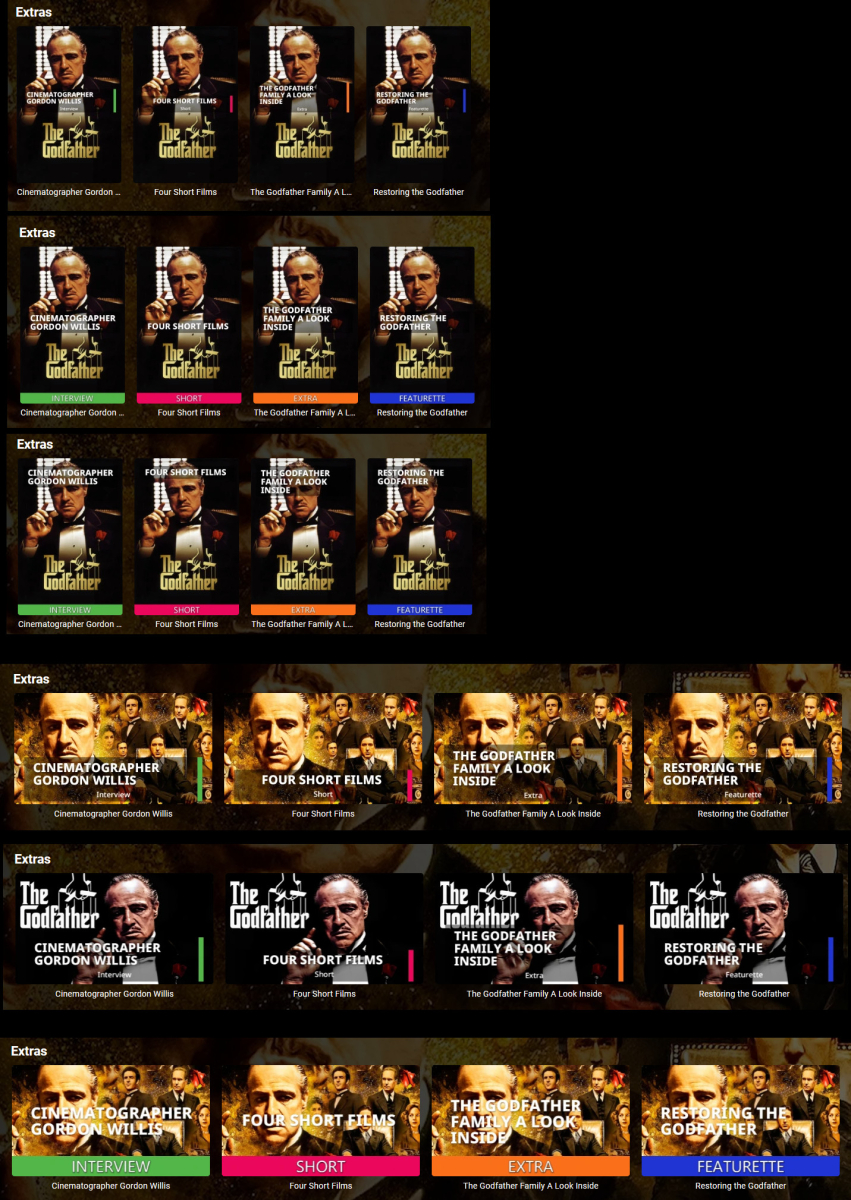
Just a progress update. Lots more image design options, cleaner font, and a functional Configuration UI. I still have UI stuff to do and need to re-implement all the image processing in the other image library some Emby builds use. But it's getting closer. Here are some images generated by the plugin using configuration options:
 1 point
 -
+1 would like to zoom on my tablet which is 16:10 while watching 16:9 content quick. additionally: save the setting. every time i stop playback emby app "forgets" that i want the image to be scalen / zommed / cropped1 point





.thumb.png.1ddf135ad99a72646a26d671a28ffe35.png)