Leaderboard




Popular Content
Showing content with the highest reputation on 02/18/24 in all areas
-
EMBY SERVER 4.8.1 IS NOW LIVE WITH LOTS OF NEW FEATURES AND IMPROVEMENTS Emby Server 4.8 has been rolling out to various platforms over the past week or so. This upgrade in particular is packed with a lot of new features, improvements and fixes. Over the next few weeks, we will be sharing multiple blog posts to share some of the exciting new functionality that 4.8 brings to Emby and give you a more in-depth look into the features. Today’s blog will focus on two new features: PROFILE PINS With Emby 4.8 you now have the ability to set individual profile PINs. This new PIN replaces the old local network only PIN that existed prior to this release. It is more flexible (works both locally and remotely) and more secure. This new PIN is very useful if you have devices in your home that are shared by multiple users. As an example you may want to put a PIN on your profile so kids in your home can’t just click on your profile and view all of the same media but still allow your kids to freely switch between their profiles on the same device. NOTE: All users (local and remote) must authenticate ONCE per device. Once this initial authentication is done, that user will be remembered on that device and won't require password entry again unless signed out. PLAYLIST SHARING CONTROL Another great feature of 4.8 is the ability to designate exactly what other Emby users you share playlists with. Prior to 4.8, any playlist that was created was available to everyone on your Emby server. Now they’re set up for individual users. When you first create a playlist, that playlist is private to just you. If you wish you can then share it with any user that you would like via the "Modify Collaboration" option. You are able to set it up so that different users have read only access or have view and edit access to the playlist. Please keep in mind that this is only for playlists that were created after the upgrade to 4.8. Playlists created prior to this release will not have this functionality. They would have to be re-created to gain it. NOTE: In order to utilize this feature, you must first grant each user that you want to be able to create shared playlists the ability to share content from the user settings on the dashboard. You can see from the image below that it is simply a checkmark on the settings page. Once that is checked, it is as simple as creating a new playlist and then either right clicking on the playlist or clicking on the “...” menu and clicking on manage collaboration. From there you can easily choose which user you want to share the playlist with and what level of access they have. Stay tuned for a new blog post in the coming days that highlights some of the other awesome and new features of Emby 4.8! For now, we have listed below all the improvements and fixes that were included in 4.8. We as a team are excited to share all of these great new additions with you and hope you’re enjoying the update to Emby just as much as we are! ADDITIONS AND IMPROVEMENTS Add new profile pin feature. Useful for devices shared by multiple users. Add new table view option Add more fields for selection in poster views Add new theme options Various database performance improvements Merge webhooks into notifications Support keyword-based recordings Display all episodes directly under series without using season layer (with user display option to control behavior) Update Intel Media Driver Minor database performance improvements Support extras for seasons and episodes Revamp backup plugin to be a more complete backup Support saving images locally for extras Add FR-TP content rating Import hearing impaired attribute for both internal and external subtitles Add hidden config switch to disable ssl renegotiation Add library option to cache images in server data folder to reduce disk access to original media folder Remember audio and subtitles across a tv series Improve support for audio-only live streams Add View Missing Episodes context menu option for series and seasons Add option when creating a user to copy data from an existing user Support random sorting on list screens Improve country and language list sorting Improve program dialog in live tv guide to show complete information Add subtitle position settings Improve user interface of Play On menu Add sample file ignore size to library options Added New Episodes section under Live TV suggestions Add new indicator on Live TV program posters Add options to hide played media from More Like This and Suggestions Add user locked out notification to Notifications and Webhooks Support more conventions with provider id values in folder names (moviedb, imdb, etc) Improve series name detection by getting the series name from episode file names, in some cases Support multiple languages with user audio and subtitle preferences Improve performance of server activity viewer Improve support for folders being used in multiple libraries of same content types Clear external ids for episodes when using Identify feature on Series Improve search for single title movies Add camera upload user permission Add new configurable home screen sections - Playlists, Collections, and Recently Released Movies Add more fields for display in User and Device management Add HDR filters to video list screens Add sorting controls to user and device management screens Add additional subtitle color options Support swipe down to close all dialogs that slide up Add Remove Identification feature to reset metadata Improve searching titles containing quotes and periods (e.g. Agents of S.h.i.e.l.d or Shield) Anonymize manifest.json Add warning for duplicates when adding items to playlists Support both nb and no Norwegian language options Add automatic metadata refresh option for episodes with placeholder titles such as TBA Rework Trakt plugin to be an option that each user can configure, rather than server settings Rework Notifications to be an option that each user can configure, rather than server settings Add guide display options to control visibility of channel names, images and numbers Improve automatic reconnection for live streams Display preview of matched items when setting up a keyword recording Reduce database queries in audio fingerprint process Add HK ratings Add user option to hide media info from detail screens Improve support for "subs" and "subtitles" folders Don't allow local network addresses to be specified in x-forwarded-for and x-real-ip Add media deleted notification and webhook event Support multi-select drag and drop add to playlist Support multi-select operations on downloads and conversions lists Update default subtitle font Add option to limit the number of genres displayed at the top of detail screens Rework playlists to be saved as m3u and deprecate the previous xml format Support extras in Collections Improve episode number parsing when episode file name is gibberish and parent folder name is readable Support sorting for playlists and collections Revamp webhooks plugin, supporting new events and configuration options Include activity log database file when vacuuming databases Rework scanning of extras, allowing more flexible usage of video extras Improve the use of internet metadata with recordings Support shift to multi-select Use tone mapping for image extraction Allow separate images for audio book tracks Stop scanning at the top of a library when it's unreachable Add image size display option Add lock screen function to video player on mobile devices Add three way toggle nav menu to web app Add option to control display of rating information at the start of video playback Change wording of transcoding reasons to be more user friendly Improve filter menu indicator Add Select None to multi-select lists Initial RTL support in web interface Make tagline field lockable Make overview field lockable Rework Live TV recording options to be based on selected folders, rather than raw paths Support .actors folder for people images Nfo plugin: Stop saving nfo files for additional parts Improve photo loading performance Remember subtitle selections even when user option is set to None Improve support for musicbrainz illegal character replacement Improve drag and drop scrolling Sanitize new playlist and collection names Add intro detection library options Improve automatic channel mapping with xml tv Support sort by composer FIXES Fix songs not being grouped into album when the album title contains an emoji Fix empty genre filters on playlists Fix anamorphic image extraction Various fixes for iOS 17 Various image processing fixes Fix transcode temp path in startup logging Fix 172.X addresses always being considered private Fix swagger docs with reverse proxies Fix restricting by tag hiding the tag itself Fix multi-episode file titles not using series display order Fix hide from Continue Listening only hiding a single track and not the entire album Fix live tv recordings being stopped in rare cases when the limit to keep is set to 1 Resolve issue of multi-part and multi-version not being able to be used together Fix green bottom line with QSV+OpenCL tone mapping Fix single image extraction with MPEGTS Fix support for simultaneous music and photo playback Fix sort by sort title being case sensitive in some views Fixes for multi-part and multi-version videos being used together Fixes for movies having file names starting with years Fix Intro Detection scheduled task not being visible Fix a/v sync regressions with live tv and recordings Resolve long-standing metadata quirks when removing data from nfo files and having it not get cleared in Emby Fix changes to url-only nfo files not being recognized Fixes for downloads automatically redownloading Fix graphic subtitle position when burning in subtitles with transcoding Fix unnecessary ffmpeg dependency on Windows Media Foundation Fix sporadic cases of errors when reordering live tv channels3 points
-
TheTVDB now supports more alternative orders than just Aired/Absolute/DVD. Can Emby query these additional orders and add them as options? Two examples of shows I've seen this used are Re:Zero which has a "Director's Cut" display order and Money Heist which has a "Netflix" order. https://thetvdb.com/series/re-zero-starting-life-in-another-world https://thetvdb.com/series/la-casa-de-papel2 points
-
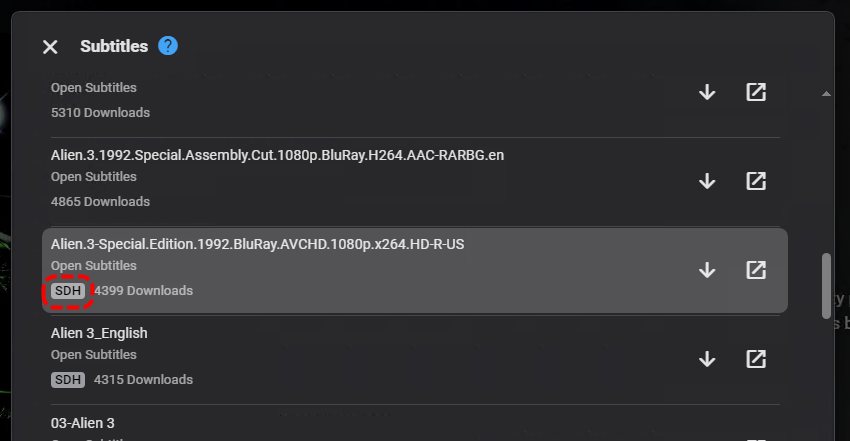
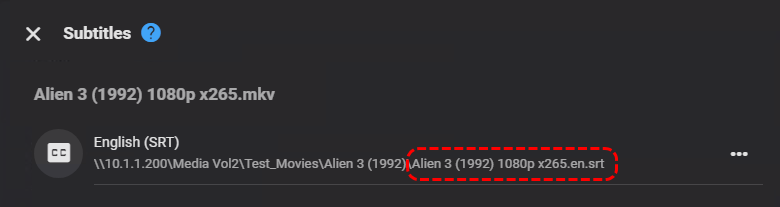
@LukeFound in Beta, and reproduced in Stable 4.8.1.0 Now that OpenSubtitles have SDH indicators in search results: the expectation was that when downloaded they would be named accordingly so that "Hearing Impaired" info was retained. However, files are downloaded and are missing the appropriate ".en.sdh.srt" Was able to reproduce with different media, same result. Log attached is for the above example. embyserver.txt
 2 points
 -
So renaming Shorts at the Season level to "Xtras" and this worked. I now have to go through all my cover art for the old Shorts folder and change "Shorts" on them to "Xtras" - this is definitely a user impacting change and because existing folders were scanned on my test server, the beta releases did not reveal this. Can the WIKI please be updated with the new handling in 4.8 - It's supposed to reduce support tickets and be authoritative but its not detailed. Also the release notes of 4.8.x do not have indication of this change.2 points
-
This might sound a little crazy, but I have two home networks. I didn't realize that my TV and my laptop were using two different ones, nor that it was necessary for them to be using the same one to connect. Once I changed the one my laptop was using, everything is working perfectly. Thanks, Luke, for making that idea pop in my head!2 points
-
On desktop when you mouse over an item there's a circle in the top left which you can click to start multi select. Shift+click to select a range also works once in this mode.2 points
-
EMBY SERVER 4.8.1 IS NOW LIVE WITH LOTS OF NEW FEATURES AND IMPROVEMENTS Emby Server 4.8 has been rolling out to various platforms over the past week or so. This upgrade in particular is packed with a lot of new features, improvements and fixes. Over the next few weeks, we will be sharing multiple blog posts to share some of the exciting new functionality that 4.8 brings to Emby and give you a more in-depth look into the features. Today’s blog will focus on two new features: PROFILE PINS With Emby 4.8 you now have the ability to set individual profile PINs. This new PIN replaces the old local network only PIN that existed prior to this release. It is more flexible (works both locally and remotely) and more secure. This new PIN is very useful if you have devices in your home that are shared by multiple users. As an example you may want to put a PIN on your profile so kids in your home can’t just click on your profile and view all of the same media but still allow your kids to freely switch between their profiles on the same device. NOTE: All users (local and remote) must authenticate ONCE per device. Once this initial authentication is done, that user will be remembered on that device and won't require password entry again unless signed out. PLAYLIST SHARING CONTROL Another great feature of 4.8 is the ability to designate exactly what other Emby users you share playlists with. Prior to 4.8, any playlist that was created was available to everyone on your Emby server. Now they’re set up for individual users. When you first create a playlist, that playlist is private to just you. If you wish you can then share it with any user that you would like via the "Modify Collaboration" option. You are able to set it up so that different users have read only access or have view and edit access to the playlist. Please keep in mind that this is only for playlists that were created after the upgrade to 4.8. Playlists created prior to this release will not have this functionality. They would have to be re-created to gain it. NOTE: In order to utilize this feature, you must first grant each user that you want to be able to create shared playlists the ability to share content from the user settings on the dashboard. You can see from the image below that it is simply a checkmark on the settings page. Once that is checked, it is as simple as creating a new playlist and then either right clicking on the playlist or clicking on the “...” menu and clicking on manage collaboration. From there you can easily choose which user you want to share the playlist with and what level of access they have. Stay tuned for a new blog post in the coming days that highlights some of the other awesome and new features of Emby 4.8! For now, we have listed below all the improvements and fixes that were included in 4.8. We as a team are excited to share all of these great new additions with you and hope you’re enjoying the update to Emby just as much as we are! ADDITIONS AND IMPROVEMENTS Add new profile pin feature. Useful for devices shared by multiple users. Add new table view option Add more fields for selection in poster views Add new theme options Various database performance improvements Merge webhooks into notifications Support keyword-based recordings Display all episodes directly under series without using season layer (with user display option to control behavior) Update Intel Media Driver Minor database performance improvements Support extras for seasons and episodes Revamp backup plugin to be a more complete backup Support saving images locally for extras Add FR-TP content rating Import hearing impaired attribute for both internal and external subtitles Add hidden config switch to disable ssl renegotiation Add library option to cache images in server data folder to reduce disk access to original media folder Remember audio and subtitles across a tv series Improve support for audio-only live streams Add View Missing Episodes context menu option for series and seasons Add option when creating a user to copy data from an existing user Support random sorting on list screens Improve country and language list sorting Improve program dialog in live tv guide to show complete information Add subtitle position settings Improve user interface of Play On menu Add sample file ignore size to library options Added New Episodes section under Live TV suggestions Add new indicator on Live TV program posters Add options to hide played media from More Like This and Suggestions Add user locked out notification to Notifications and Webhooks Support more conventions with provider id values in folder names (moviedb, imdb, etc) Improve series name detection by getting the series name from episode file names, in some cases Support multiple languages with user audio and subtitle preferences Improve performance of server activity viewer Improve support for folders being used in multiple libraries of same content types Clear external ids for episodes when using Identify feature on Series Improve search for single title movies Add camera upload user permission Add new configurable home screen sections - Playlists, Collections, and Recently Released Movies Add more fields for display in User and Device management Add HDR filters to video list screens Add sorting controls to user and device management screens Add additional subtitle color options Support swipe down to close all dialogs that slide up Add Remove Identification feature to reset metadata Improve searching titles containing quotes and periods (e.g. Agents of S.h.i.e.l.d or Shield) Anonymize manifest.json Add warning for duplicates when adding items to playlists Support both nb and no Norwegian language options Add automatic metadata refresh option for episodes with placeholder titles such as TBA Rework Trakt plugin to be an option that each user can configure, rather than server settings Rework Notifications to be an option that each user can configure, rather than server settings Add guide display options to control visibility of channel names, images and numbers Improve automatic reconnection for live streams Display preview of matched items when setting up a keyword recording Reduce database queries in audio fingerprint process Add HK ratings Add user option to hide media info from detail screens Improve support for "subs" and "subtitles" folders Don't allow local network addresses to be specified in x-forwarded-for and x-real-ip Add media deleted notification and webhook event Support multi-select drag and drop add to playlist Support multi-select operations on downloads and conversions lists Update default subtitle font Add option to limit the number of genres displayed at the top of detail screens Rework playlists to be saved as m3u and deprecate the previous xml format Support extras in Collections Improve episode number parsing when episode file name is gibberish and parent folder name is readable Support sorting for playlists and collections Revamp webhooks plugin, supporting new events and configuration options Include activity log database file when vacuuming databases Rework scanning of extras, allowing more flexible usage of video extras Improve the use of internet metadata with recordings Support shift to multi-select Use tone mapping for image extraction Allow separate images for audio book tracks Stop scanning at the top of a library when it's unreachable Add image size display option Add lock screen function to video player on mobile devices Add three way toggle nav menu to web app Add option to control display of rating information at the start of video playback Change wording of transcoding reasons to be more user friendly Improve filter menu indicator Add Select None to multi-select lists Initial RTL support in web interface Make tagline field lockable Make overview field lockable Rework Live TV recording options to be based on selected folders, rather than raw paths Support .actors folder for people images Nfo plugin: Stop saving nfo files for additional parts Improve photo loading performance Remember subtitle selections even when user option is set to None Improve support for musicbrainz illegal character replacement Improve drag and drop scrolling Sanitize new playlist and collection names Add intro detection library options Improve automatic channel mapping with xml tv Support sort by composer FIXES Fix songs not being grouped into album when the album title contains an emoji Fix empty genre filters on playlists Fix anamorphic image extraction Various fixes for iOS 17 Various image processing fixes Fix transcode temp path in startup logging Fix 172.X addresses always being considered private Fix swagger docs with reverse proxies Fix restricting by tag hiding the tag itself Fix multi-episode file titles not using series display order Fix hide from Continue Listening only hiding a single track and not the entire album Fix live tv recordings being stopped in rare cases when the limit to keep is set to 1 Resolve issue of multi-part and multi-version not being able to be used together Fix green bottom line with QSV+OpenCL tone mapping Fix single image extraction with MPEGTS Fix support for simultaneous music and photo playback Fix sort by sort title being case sensitive in some views Fixes for multi-part and multi-version videos being used together Fixes for movies having file names starting with years Fix Intro Detection scheduled task not being visible Fix a/v sync regressions with live tv and recordings Resolve long-standing metadata quirks when removing data from nfo files and having it not get cleared in Emby Fix changes to url-only nfo files not being recognized Fixes for downloads automatically redownloading Fix graphic subtitle position when burning in subtitles with transcoding Fix unnecessary ffmpeg dependency on Windows Media Foundation Fix sporadic cases of errors when reordering live tv channels View the full article2 points
-
I'm a plex life time member, but I have been using Emby for over six years continuously, but there is a feature which I have always thought is missing in Emby which I would like and encourage the developer to consider including especially in this dispensation where families can social or commingle due to COVID 19. Today, I received a notification from Plex about it new feature titled Watch together you can read about it here https://support.plex.tv/articles/watch-together/ The feature allows friends and families at distance to watch same movies together instantly, you simply invite all your buddy, once they signed to the system which can be seeing in the server then play and pause as needed, this I think is cool feature should be added to emby. Let's here your though if Emby developer should consider adding this feature to our beloved Emby Media https://www.bing.com/news/search?q=Plex+Watch+Together&qpvt=plex+watch+together&FORM=EWRE1 point
-
Hey Everyone, My journey from Plex to Emby has been pretty smooth with the exception of setting up SSL encryption. There are lots of great posts on this forum and elsewhere on how to do this, and I consider myself pretty computer literate. But I'll be honest, this was a bit overwhelming for me as I have no experience at all in hosting web servers, DNS, or encryption certificates. After many hours, I've got it all working, so I thought I'd share what I've learned. I'm going to try to write this for the newbie, so don't be offended if it seems like I'm explaining lots of simple stuff. That's really what I needed a week ago, so maybe it'll help someone else in my shoes. Also, this is for Windows, although most of it applies to any OS. There's lots of text, but it's really very easy. Let me also say, I understand that a reverse proxy gives you lots of benefits and flexibility for securing your server. But that was a step too far for me. If you want a reverse proxy this post is not for you, but there are many posts in this forum to help you. If you want to access your Emby server from outside your home network you will want to require secure connection mode for all remote connections (see "Network" tab in Emby server configuration). To do this you need an SSL certificate. To get an SSL certificate you must have your own registered domain name. Here's a step-by-step. Domain Name Registration A domain name is the readable text part of a web address. So emby.media, or google.com, or media.yourdomain.net. Most home users don't have one, but you need one to get an encryption certificate. While (Edit:)There are many options for purchasing a domain (godaddy.com being very popular), I chose to buy my domain from domains.google. It cost me $12/year, and this is the only cost to getting your Emby server working with encryption. Go to https://domains.google, pick a domain, pay your money, and you're ready to go. For the rest of this discussion let's say you registered the domain name yourdomain.net. Now you need to associate your new domain with your home IP address. Most home users get their IP address assigned to them by their internet provider and it is "dynamic," meaning it can change. So you need to be able to tell your domain provider what your address is and update it when it changes. This can be done automatically, and is called dynamic DNS (DDNS). (Edit:) Before obtaining a domain, ensure the provider supports Dynamic DNS. Google domains supports this easily, here is the help page explaining how to set it up. Fortunately, my ASUS router has this capability built in so it was easy, but it's easy even if your router doesn't (follow google's directions). (Edit:) In case you have a static IP (obtained from your ISP), DDNS support is not mandatory. That's it for domain name registration. Now yourdomain.net points to your home network IP address. SSL Certificate Now you need to get an SSL certificate. This has the encryption keys you need, and must be issued by a recognized certificate authority or it gets blocked by your browser. Lets Encrypt will give you a free SSL certificate but it has to be renewed every 90 days. This was the part I was most confused by, but it's actually really easy. The part to understand is that Lets Encrypt must have some way of proving you own your domain name before they can issue you a certificate. There are two options, 1) they give you a little text file to place on your web server in a certain location. I don't have a web server so this is a no-go. 2) They give you a text string to add to your DNS registration in what is called a "TXT Record." You do this with google domains, it's very easy. To get a certificate you need an ACME client program that knows how to talk to the lets encrypt server. They recommend certbot, but it doesn't work in windows. Dig enough and you'll find ZeroSSL, they have a nice downloadable program that does it all and is really easy. Download here. Make a directory on your computer (I used c:\ZeroSSL). Put the le64 (or 32) exe in this directory. A single command will create your certificate. I think the easiest way to do this is create a text file in the same folder as the program, call it "get_cert.bat" and put the following three lines of text in the file. Edit the second line to have your actual domain name (instead of "yourdomain.net"), and to have your actual password for your PFX file (whatever you want it to be, just replace "yourpasswordhere" in the code below. @[member="Echo"] off le64 --key account.key --csr domain.csr --csr-key domain.key --crt certificate.csr --domains "yourdomain.net" --generate-missing --handle-as dns --export-pfx “yourpasswordhere” --live pause Save the text file as get_cert.BAT and then double click it to run. This runs the le64 program, creates the public/private key pair, asks lets encrypt to generate a certificate, saves that certificate, and converts it to a PFX file format that Emby requires. All in one command! When you run this, a command window will appear and you can see what it's doing. After a few seconds it'll pause and ask you to place the TXT record in your domain. It gives you a name and value, the name will be something like _acme-challenge.yourdomain.net, and the value will be a bunch of random letters and numbers. The program pauses here for you to put this into your domain. So now you just log in to your google domain again, go to "DNS" on the left menu, scroll all the way down and enter a "Custom Resource Record." The type is TXT, the name and value are what le64 gave you. Put them in, wait a few minutes for the change to take effect (took just a couple of minutes for me). Then go back to the command window where le64 is running and press enter to continue. It'll then verify your TXT record is there and issue your certificate. You'll find a file certificate.pfx in the le64 directory, that's it! Emby Setup Now log in to your Emby server setup. Go to "Network," in the field "External Domain" you put your domain name, so yourdomain.net or whatever you chose. For "Custom SSL certificate path," browse to the .pfx file that was created by the le64 program. In the "Certificate Password" field put whatever password you used in the .BAT file above when you created your certificate. Then for "Secure Connection Mode" I recommend you choose "Required for all remote connections." You also have to log in to your home router and forward port 8920 to the computer running your Emby server. I'm not going to give directions on how to do this, it depends on your router, but it's super easy. That's it. You need to restart your Emby Server, and then you're done! You can now access your server remotely and securely at https://yourdomain.net:8920. Certificate Renewal Now, I mentioned before that the Lets Encrypt certificates are only good for 90 days. So every 90 days you have to renew the certificate. Take that "get_cert.bat" file you made earlier and make a copy of it called renew_cert.bat. At the end of the second line, just add the text "--renew 20" (without the double quotes). When you are within 20 days of your expiration date run this file, it'll renew your certificate. I believe it'll ask you to place a new TXT record in your domain, so certificate renewal cannot be made fully automatic. You'll have to run it manually and add this TXT record into your google domain just like when you created the certificate in the first place. But it takes just a few minutes and then your certificate is renewed. You'll have to restart your Emby server for it to take. The file locations all stay the same, so you don't have to update anything in the Emby setup, just restart Emby. That's it! Well, I hope this helps someone. Sorry for the long post. I would have benefited from this level of detail a week ago, so maybe it'll be good for someone. If anyone sees something wrong here, feel free to correct me.1 point
-
I have a couple of media folders holding football and basketball games I've recorded. I recently came accross a metadata website for sports called http://thesportsdb.com. Would it be possible to add a field like the other metadata fields to pull information from that site to fill in fanart, description, dates, etc.? Ii'm not sure if it would require a new media "type" folder called sports, similar to tv and movies. I've linked a couple pages, the first is the API for returning information from the db. http://www.thesportsdb.com/forum/viewtopic.php?f=6&t=5 The second is example json (I believe) data http://www.thesportsdb.com/api/v1/json/1/searchteams.php?t=Cleveland%20Indians1 point
-
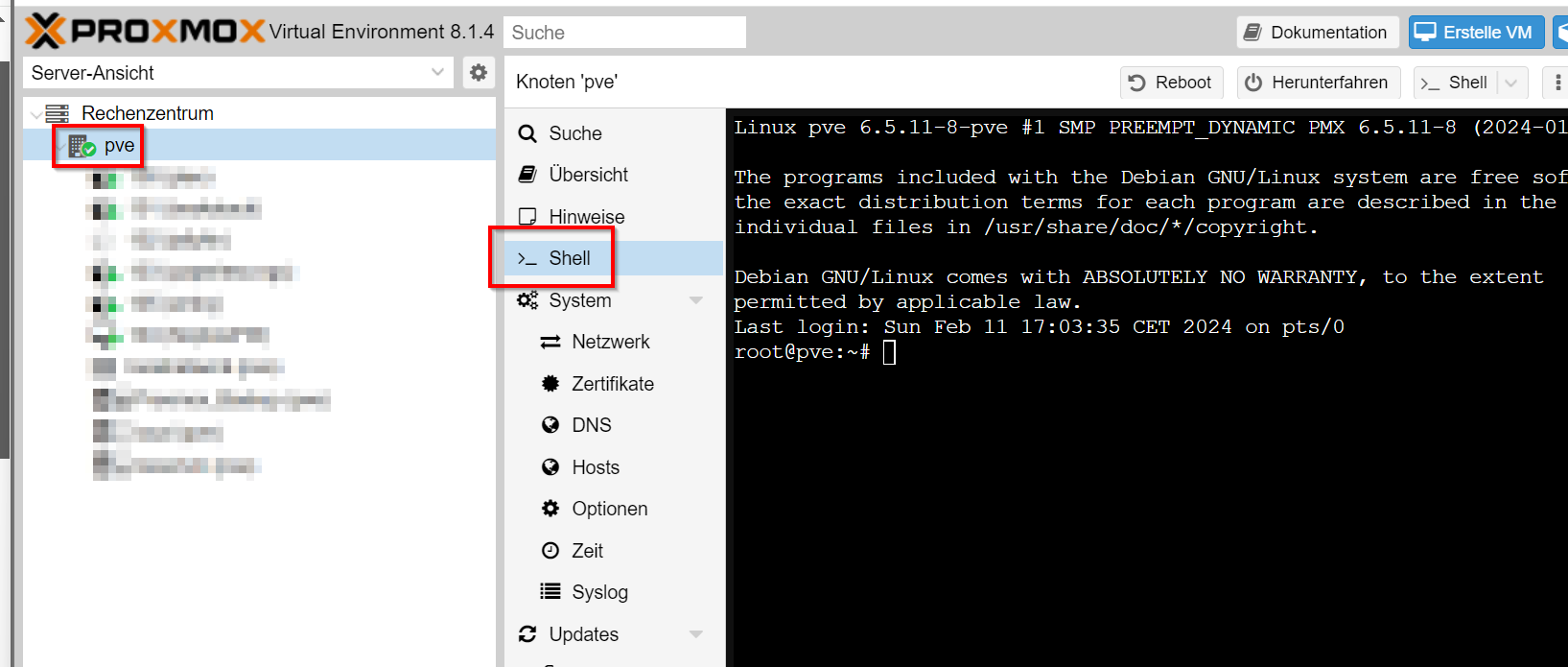
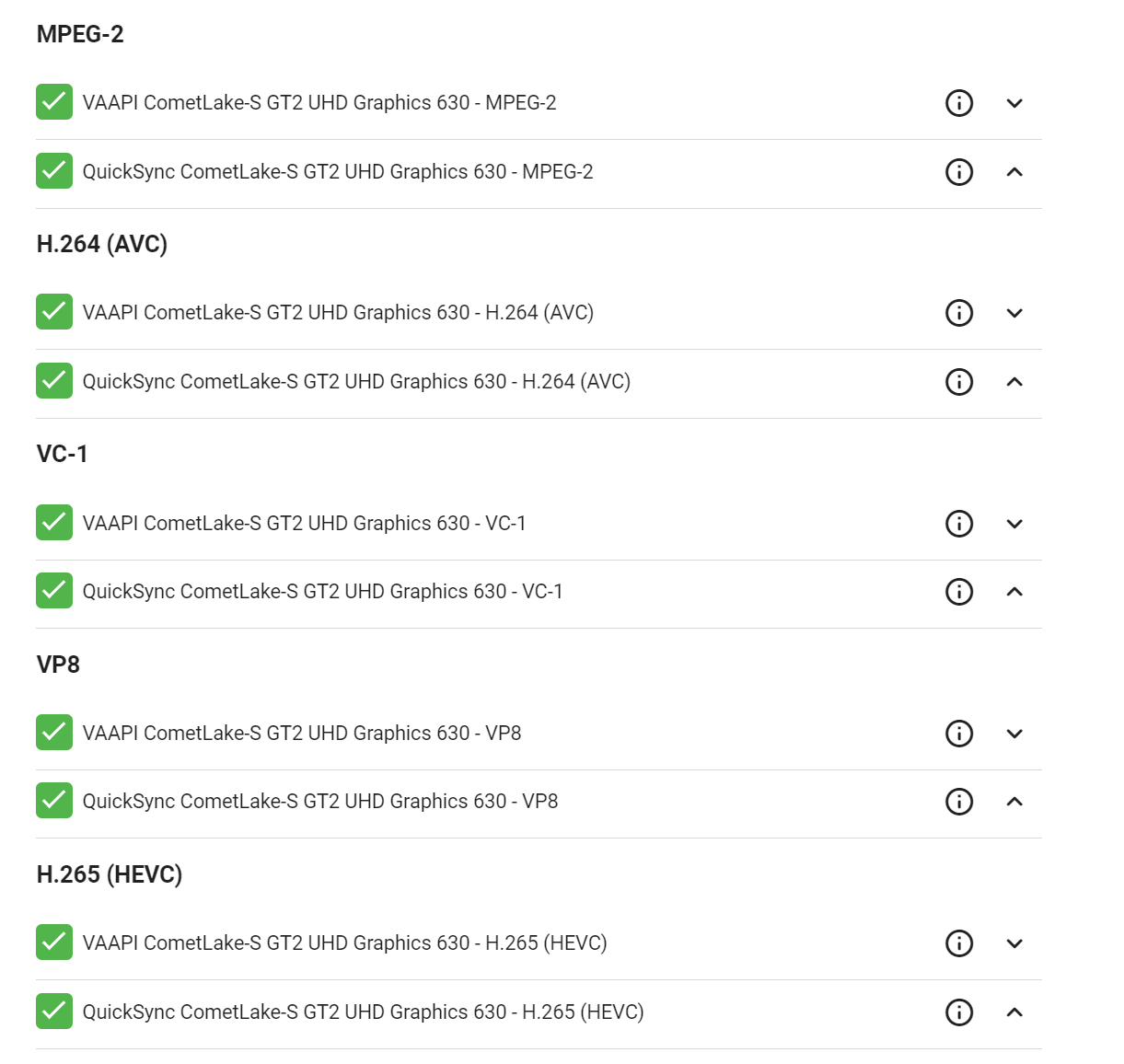
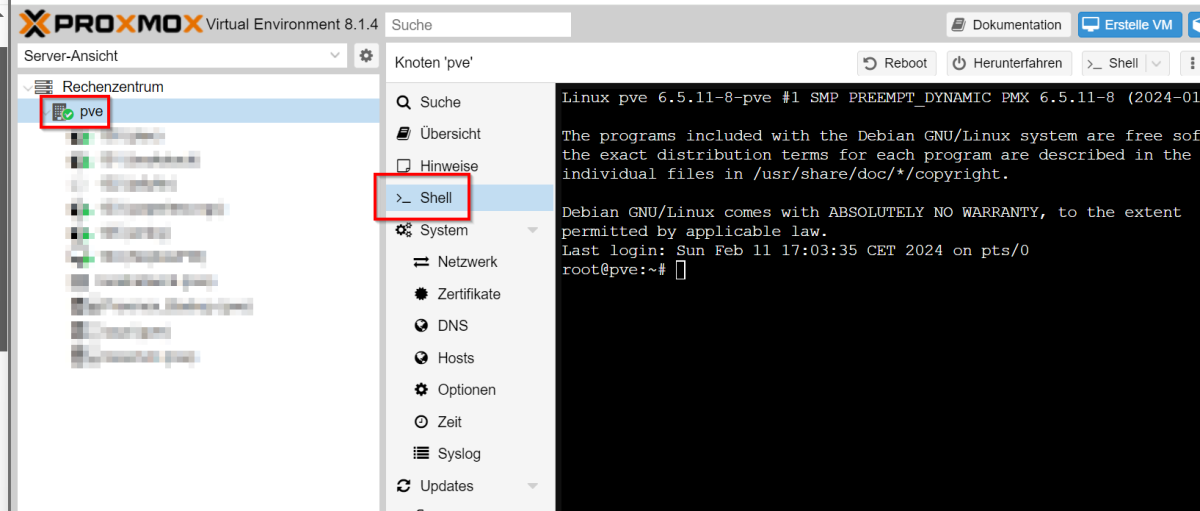
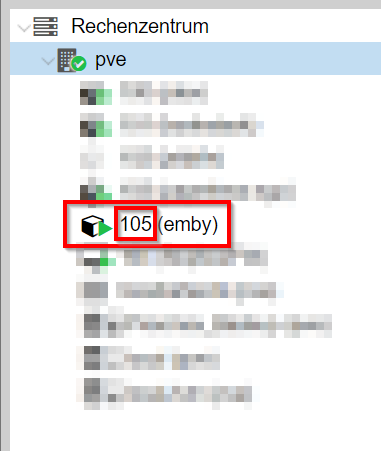
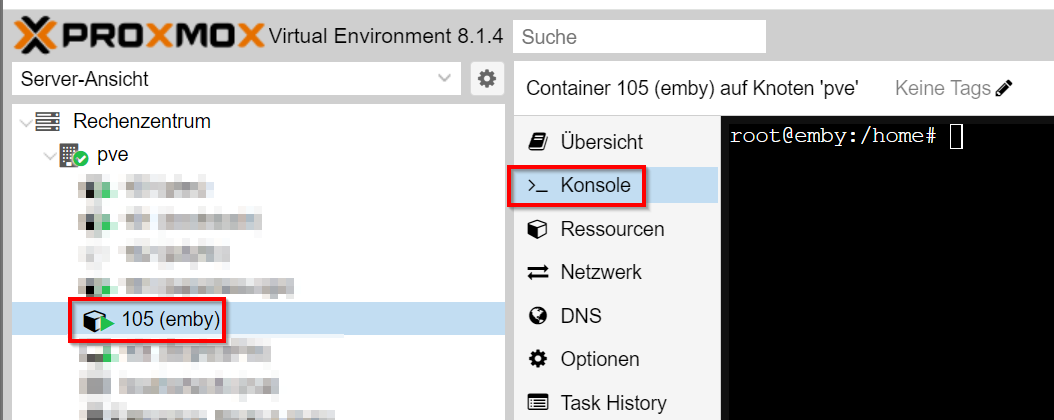
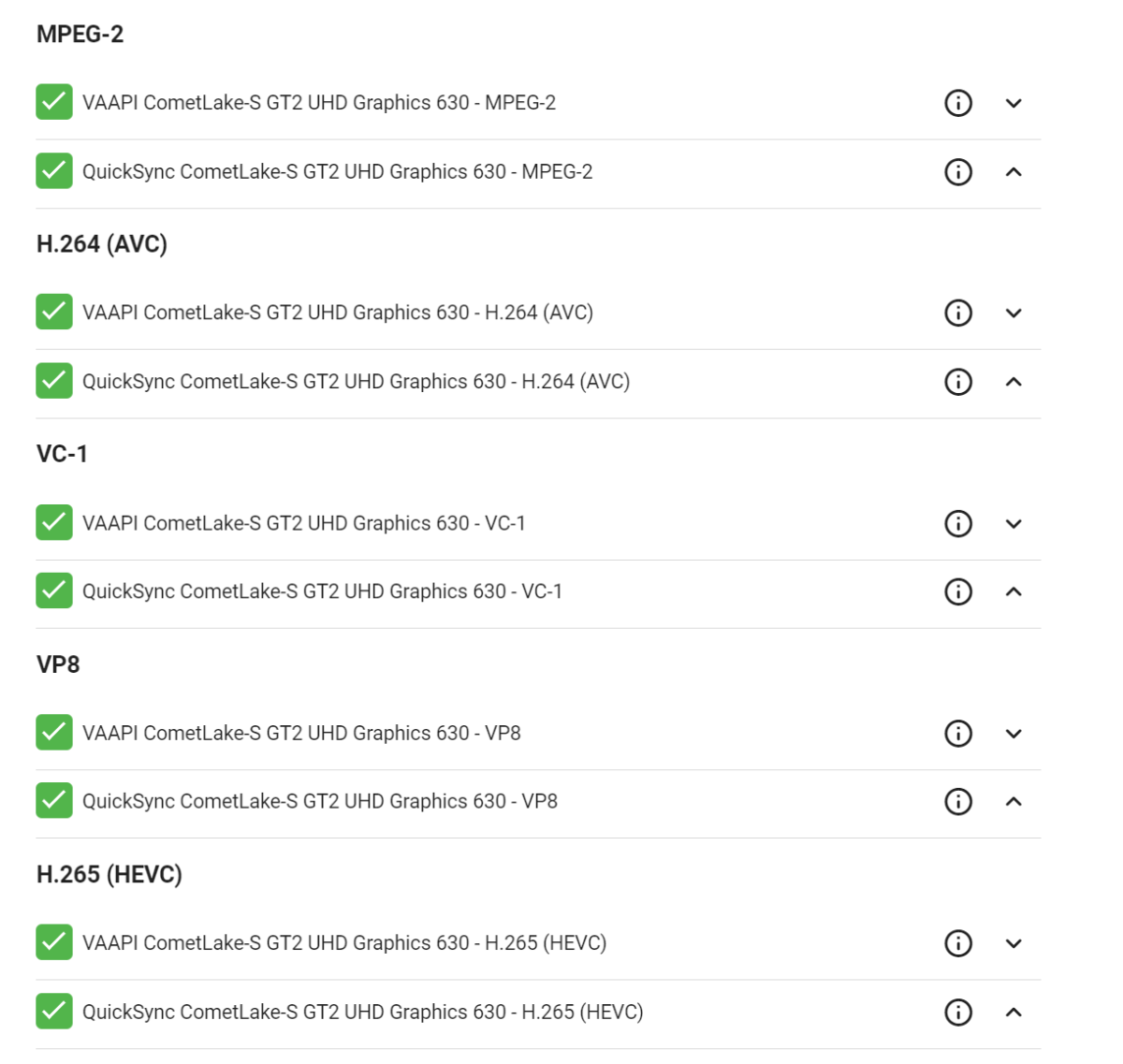
Hi Volks, I don't know if there is already an article on this, at least I haven't found one. I have a Proxmox server with an inbuilt Intel 630 GPU. I will show you here how you can activate the hardware acceleration for it. !! This is how it works for me. There are probably better ways, but this is the way it works for me I installed Emby with the LXC script from tteck (https://github.com/tteck) thanks for your work! https://tteck.github.io/Proxmox/ If you install Emby via the script and are on the emby interface, you still have to make a few settings on Proxmox and the LXC container itself. 1. switch to your Proxmox instance and execute the following command: nano /etc/modprobe.d/i915.conf enter the following there: options i915 enable_guc=3 and save the file. 2. reboot Proxmox 3. Still in the Proxmox instance, execute this command nano /etc/pve/lxc/105.conf (You must adapt 105 to your LXC container!!) Copy the following lines into the last position lxc.cgroup2.devices.allow: c 226:0 rwm lxc.cgroup2.devices.allow: c 226:128 rwm lxc.mount.entry: /dev/denderD128 dev/dri/renderD128 none bind,optional,create=file save the file. 4. Still in the Proxmox shell, execute this command: chmod -R 777 /dev/dri/* 5. Now switch to the shell of the Emby LXC container add the Emby user to the groups: usermod -aG video emby usermod -aG input emby usermod -aG render emby 6. Restart your emby server And here you go!
 1 point
 -
When you're not sure which drive to choose when auto organizing your rips, you can quickly choose 'Disk Space' From the dashboard menu and visualize the space left on your drives. Good for Remote access to see which drives to choose when Organizing media titles. DOWNLOAD: we're in the catalogue!! Notes: 1. Added color picker to the plugin. 1.0.0.2 1. Scheduled Task Added to monitor Disk Space (will run every hour) - this task is hidden by default 2. Notifications Added when a drive has surpassed 90% of it's space Note: Windows decides 90% is the threshold to alert the user of an almost full hard drive. 3. Removed chartJS drive donuts tool-tips. TODO: Add custom tool-tips - https://www.chartjs.org/docs/latest/configuration/tooltip.html#external-custom-tooltips I'd be great to get some feedback on the notifications.1 point
-
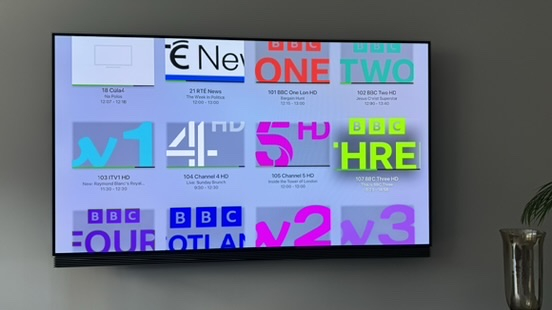
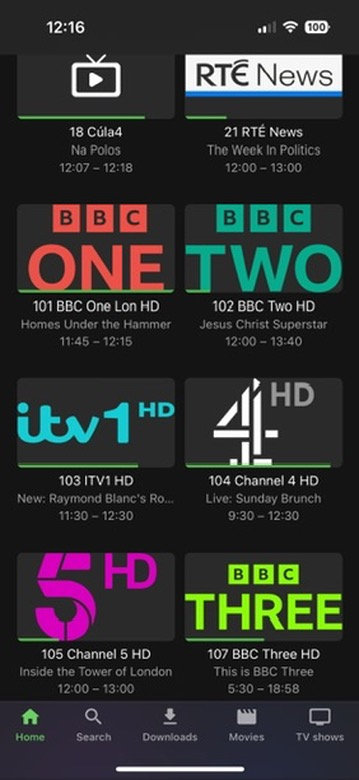
Hi - since upgrading to the latest Emby Server version, the LiveTV channel logos icons from TVHeadEnd no longer fit the space available for the logos in the Apple TV Emby app. Instead they appear zoomed in. Channel Icons are displayed correctly on iOS app and Web Browser. System Setup: Emby Server version 4.8.1.0 (running as docker on Synology DS918+), TVHeadEnd plugin V1.5.3.0, Apple TV App version 1.8.3
 1 point
 -
GN told me they added the channel but that doesn't necessarily mean that the ultimate source (Sky) is providing them with guide information yet so maybe its just a lag there.1 point
-
1 point
-
The next update should resolve all the image sizing issues1 point
-
UNC works fine in both fields - I've been using it this way for years. The simple way to test is by using the same account as Emby - just put the UNC path in the search box - if it shows the folders, then emby should do the same. Also test by substituting the NetBios name by IP - ie \\192.168.1.100\sharename If that works - then you have a NetBios issue (shortname lookup), if you want to use name - then maybe add the name is the local hosts file and use the dns name instead.1 point
-
I've been following this topic on Reddit as well and someone suggested resetting the device profile for the tv (emby/devices), i deleted the profile and then logged on again and the issue seems to be resolved as i have tried a few times since and emby has loaded every time.1 point
-
Perso je te conseille de ne pas t'embêter avec les apps et acheter la licence Emby Premiere pour le serveur qui te donne 25 appareils avec toutes les fonctions ce qui est nomalement suffisant pour la grande majorité des cas Si tu veux pas prendre de risque tu prends la mensuelle que tu peux transformer en annuelle ou perpétuelle une fois que tu es convaincu1 point
-
This is only possible if you have set up a separate library for your anime on the server. The skin is very simple but still very extensive. You have to click through it yourself. Giving instructions here would simply go beyond the scope. A little tip anyway - also use the "Custom widgets" area. Simply set it up on the PC - and if everything fits, copy the "Addons & Userdata" folder to the desired client in the corresponding directory. Then, of course, re-adjust the settings for picture and sound on the client and check the path to the server. However, it may well be that all this no longer works with the new server 4.8.xx.xx. New episodes and films were then displayed 6x in Kodi. This is probably due to the fact that all the plugins were probably not tested with the server update. I have now combined my skin with Plex because I am tired of being abused as a beta user even with the official releases. Works very well with PexKodiConnect. Even if that's not the answer you were probably hoping for - you'll have to click and work your way through it yourself.1 point
-
I watch an episode in Kodi. And I have it set to prompt me if I want to delete the episode after I watch it. When I do, the rest of the season is removed from my Kodi. But it's still in my Emby library. It also seems to happen if I use the context menu in Kodi, delete a watched episode using "EMBY: Delete" in the context menu.1 point
-
You probably uninstalled the xmltv plugin.1 point
-
@Spaceboymay have some tips on automating that.1 point
-
@LukeI sent you a link with an example video file that's producing the grey bars for me1 point
-
Wellllllll....I was going to take a screenshot of the error. Which I did. But as I did I noticed it talked about the firewall. So I decided to make sure NGINX could pass through the firewall. Once I had that setup...everyhting is working. Huzzah! And even though I didn't end up needing any specific advice from this thread....it did trigger in me the ability to figure it out. So I thank you all the same.1 point
-
So far so good! Looks like it was my browser holding onto the Emby-Server folder! Even after shutting down the server & closing the tab! That's probably why the server wouldn't fully shutdown & restart when asked to. Not sure if it is a problem with FireFox or possibly a Windows update? I used PowerToys & right clicked the folder. Chose Unlock with File Locksmith & it showed me that FireFox was still using something in that folder! Thank you,1 point
-
The new one seems pretty fast, and it has some very nice features like being able to use playlists for 'broadcast' order. I will need to play with it more, create a dozen or so channels with some complex rules to simulate what I had before, but to be fair with being able to use collections much of the rule stuff can by worked around. I suspect that the and or not statements likely slowed things down.1 point
-
OK, we can increase the options that are available there. Thanks.1 point
-
No it looks good. Just didn't remember working previously and required manual db path updates.1 point
-
Yea we'll have the macOS beta up Monday night. Thanks.1 point
-
Thanks very much. The Aeon MQ9 skin works a bit differently but underlying basics are the same. So that makes me feel much better as it confirms I've actually got it set up correctly already. So I just need to do a little bit more tweaking to get it perfect. Thanks again. Nice choice with the F1 by the way.1 point
-
thanks I can't wait so I save a lot of time thanks1 point
-
Since you have already enabled multi-select on first card, click the three dot menu at the top right of screen.
 1 point
 -
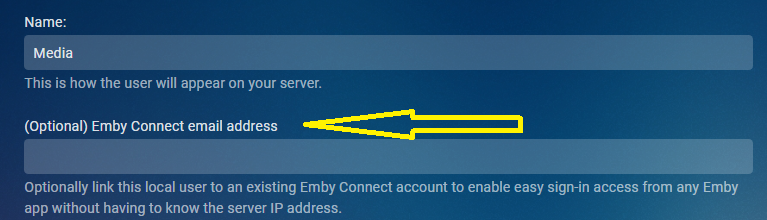
But you do as it is ip address and port. if you have access to the host computer, how do you access Emby in a browser? localhost:8096 LANIP:8096 WANIP:8096 DDNSaddress:8096 But sounds like you are using Connect and need to link/relink your user account by removing and readding email address.
 1 point
 -
Hi, they are stored in a place that is not included in this, but that will change in future updates. Thanks.1 point
-
1 point
-
Hello Luke. I downgraded from openssl-3.0.13,1 to 1.1.1 and everything came back online. I promisse I searched. In any case you made my day thank you.1 point
-
@Hoptional Looks like the variable in my case is nested folder structure. library point to C:\Users\Media\Desktop\Videos\Movies - nfo items in C:\Users\Media\Desktop\Videos\Movies - nfo\Test 1\Star Wars Collection folder Removing Testing 1 did not work, had to remove both folder structures. Moving items to C:\Users\Media\Desktop\Videos\Movies - nfo resolves the issues. Everything grouped as expected in this specific example.1 point
-
I did find another library that had a ZFS2_DATA folder path. I have reset it to the "regular" file path and waiting on the library scan to complete.1 point
-
That's a way to work around this bug to an extent, but users can stream any media at any time. Emby should recognize it's using a file it wants to delete and wait until it's own processes are finished with it.1 point
-
doh! what a dummy. yea, that's it. thanks Luke.1 point
-
I went to the api "/Library/VirtualFolders/Query" on server with the library and pulled the library info. Then post "/Library/VirtualFolders" the info to create the virtual library on new server. These options just happened to be the options I have the Collections library configured with. See post below if you get an error on API pages as CORS requires localhost/https connections.1 point
-
Hi Luke. Circling back on this as I wonder if you have a method to poll on this feature request to determine the need and I also wonder if we might be able to sponsor this feature request. I for one, would be willing to prepay for the feature as there may be licensing costs involved.1 point
-
Ooh, that's great. I had set no password so local users didn't need to enter one but obviously that left my server wide open remotely. Will look at this, cheers1 point
-
Can confirm I had this exact issue and disabling split tunneling oddly fixed it. Very unusual. Would be nice to have a solution to this since I require split tunneling for Emby.1 point
-
Hi All, So I haven't changed anything and today it all works perfectly. The server rebooted at the Hardware level, but it did that twice before hand too. I checked the let's Encrypt certificate, and that's not renewed overnight. So I'm happy, but what about the next person who has this? I know there's an IP6 problem, but I can't offer any suggestions on why it now works. So if anyone reading this has it again, the only thing that happened was 3 power off reboots. Thanks for all the help juju1 point
-
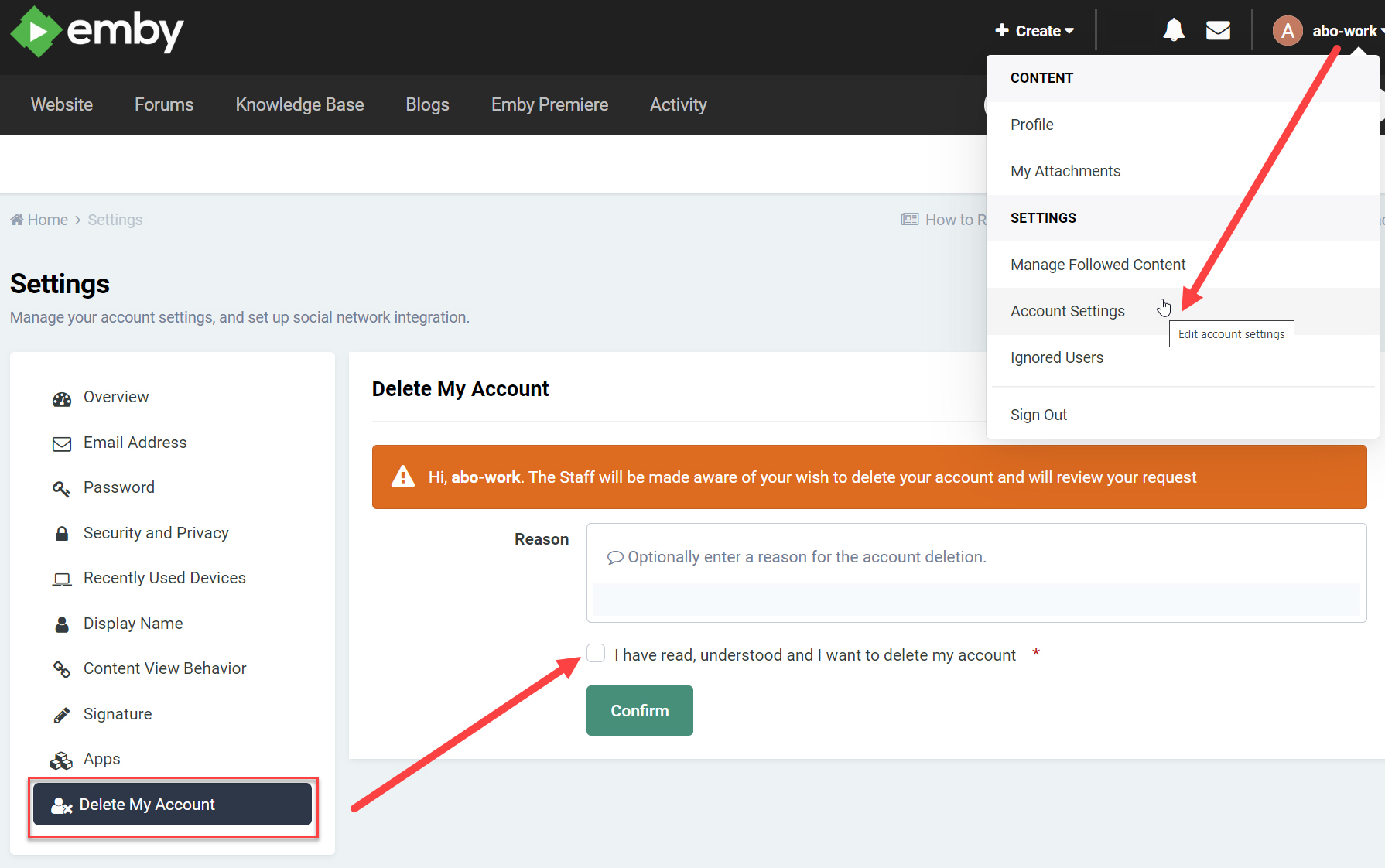
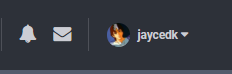
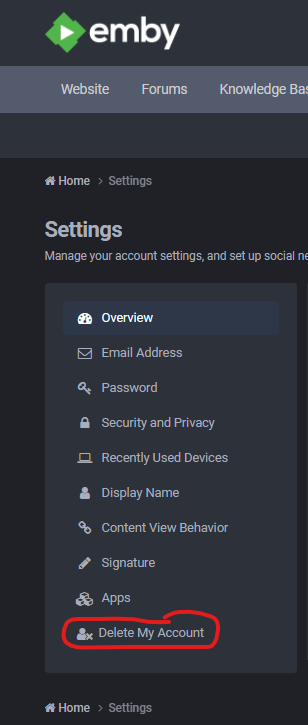
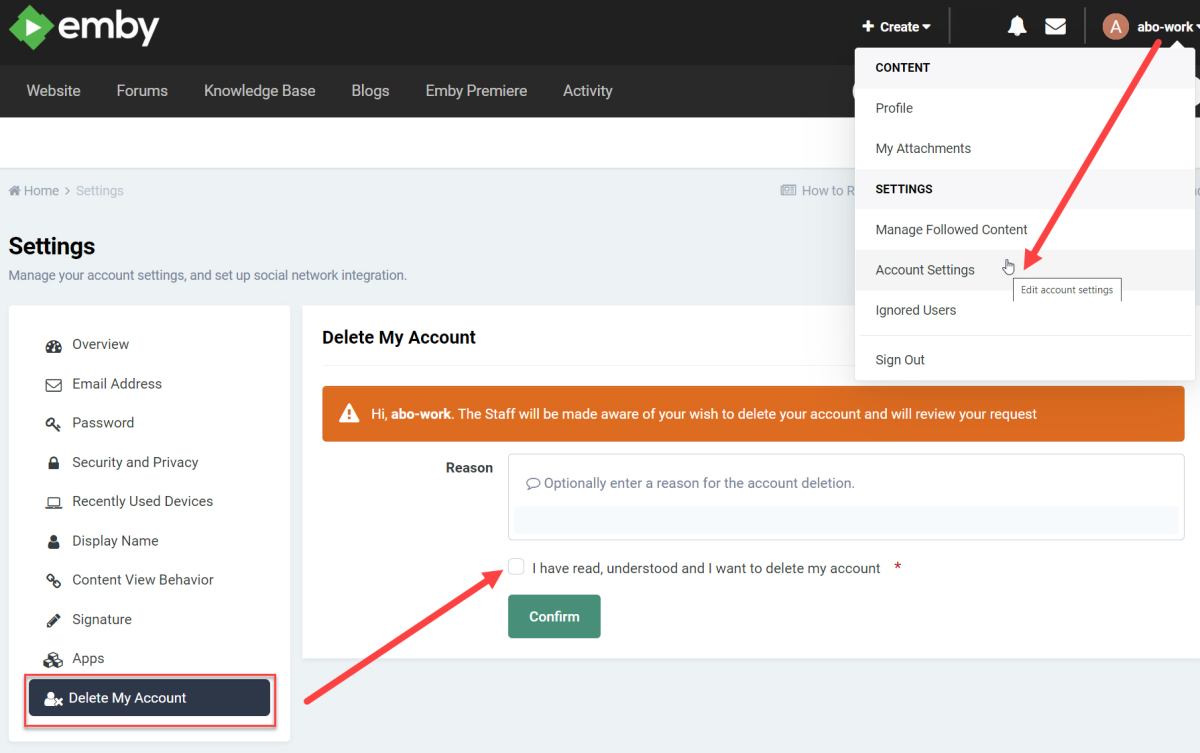
Click your name Click Account settings, in the drop down.
 1 point
 -
I had the same issue. But goto settings and toggle mntsamba on and then off. Do the same with the others, thats how I fixed it.1 point
-
Please as the image from your account settings - delete my account.
 1 point